
AD4Q - Receiver SHURE - Free user manual and instructions
Find the device manual for free AD4Q SHURE in PDF.


| Product Type | Quad Channel Wireless Receiver |
| Brand | Shure |
| Model | AD4Q |
| RF Tuning Range | Up to 210 MHz (varies by band: AD4Q=A: 470–636 MHz, AD4Q=B: 606–810 MHz, AD4Q=C: 750–960 MHz) |
| Frequency Bands | A (470-636 MHz), B (606-810 MHz), C (750-960 MHz) |
| Audio Outputs | 4 transformer-balanced XLR (outputs 3&4 switchable to AES3 digital), 4 transformer-balanced 1/4" |
| Digital Audio Output | AES3, AES67, Dante |
| Network Control | Wireless Workbench, ShurePlus Channels, Dante Controller, AMX/Crestron |
| Encryption | AES 256 |
| Quadversity Mode | Supports four antennas for enhanced RF coverage |
| High Density Mode | Up to 47 channels in 6 MHz (63 in 8 MHz) TV bandwidth |
| Latency | Low latency (typical 2.5 ms) |
| Antenna Inputs | 2 coaxial (A & B) plus RF cascade connectors for additional receiver or Quadversity |
| Power Supply | 100-240 V AC, 50/60 Hz, locking IEC connector |
| Power Cascade | AC power cascade output for daisy-chaining multiple units |
| Dimensions (H x W x D) | 1.7 x 19 x 14.2 inches (44 x 483 x 361 mm) |
| Weight | 8.3 lb (3.8 kg) |
| Mounting | Standard 19" rack mount, 1U |
| Compatible Transmitters | All Axient Digital transmitters |
| Gain Adjustment | 60 dB range |
| Headphone Output | Front panel 1/8" with adjustable volume, Dante Browse for monitoring |
| Word Clock | Input and Thru ports, with termination switch |
| Network Modes | Switched or Split/Redundant |
| Spare Parts & Reparability | Contact Shure service centers; user-replaceable AC fuse |
| Maintenance | Keep vents clear; clean with dry cloth; no internal user-serviceable parts except fuse |
| Safety | Complies with relevant safety standards; use only supplied power cord; ground lift switch available |
Frequently Asked Questions - AD4Q SHURE
User questions about AD4Q SHURE
0 question about this device. Answer the ones you know or ask your own.
Ask a new question about this device
Download the instructions for your Receiver in PDF format for free! Find your manual AD4Q - SHURE and take your electronic device back in hand. On this page are published all the documents necessary for the use of your device. AD4Q by SHURE.
USER MANUAL AD4Q SHURE
User guide for the Shure AD4Q Axient Digital quad channel receiver
Version: 10.5 (2023-C)
Table of Contents
AD4Q Axient Digital Four-Channel Wireless Receiver 4
Features 4
Receiver Back Panel 8
Networking Receivers 28
Netzwerk-Browser 31
AD4Q Axient Digital Four-Channel Wireless Receiver
The AD4Q Axient Digital four-channel wireless receiver sets a new standard in transparent digital audio and maximum spectral efficiency. Groundbreaking performance features include wide tuning, low latency, high density (HD) mode, and Quadversity ^™ , ensuring solid performance in the most challenging RF environments. Networked control, AES3, AES67, and Dante output, and signal routing options bring a new level of management and flexibility to your entire workflow. Compatible with all Axient Digital transmitters.
Features
Audio
- 60 dB of gain adjustment offers compatibility with a wide range of input sources
- Dante™ networking for quick and easy channel management
- Dante Browse feature for headphone monitoring of all Dante channels, including third party components
• AES 256 encryption to protect audio channels - Automatic limiter function protects against signal clipping, allowing for higher gain settings and preventing unexpected signal peaks
- Front panel connection for headphones with adjustable volume
1/0
- Four transformer-balanced XLR outputs (outputs 3 and 4 switchable AES3 digital)
• Four transformer-balanced 1/4" outputs - Two Dante-enabled Ethernet ports, Two network control Ethernet ports with PoE
• Split-Redundant mode: two ports of Ethernet, two ports of Dante - Switched mode: four ports of Ethernet, Four ports of Dante
Note: The receiver can only power 1 PoE device at a time.
- Locking AC power connection
• AC power cascade to additional components - Optional DC module available to support redundant power
RF
• True digital diversity reception per channel
• Quadversity mode for enhanced coverage
• Up to 210 MHz of tuning range
• Channel Quality meter displays signal-to-noise ratio of RF signal
• Frequency diversity with selection or combining modes for transmitters
• Antenna cascade for one additional receiver
- Preprogrammed group and channel maps with options to create custom groups
- Search for open frequencies via receiver using group and channel scan
- Perform full bandwidth scan for frequency coordination via Wireless Workbench
- Register up to eight transmitters to one receiver channel
- High Density transmission mode enables up to 47 active transmitters in one 6 MHz TV channel (up to 63 in one 8 MHz TV channel)
Network Control
- Wireless Workbench® control software
- ShurePlus™ Channels mobile device control
- Console integration
• Control systems support
natural_image
Technical line drawing of a mechanical assembly with mounting brackets and a central panel (no text or symbols)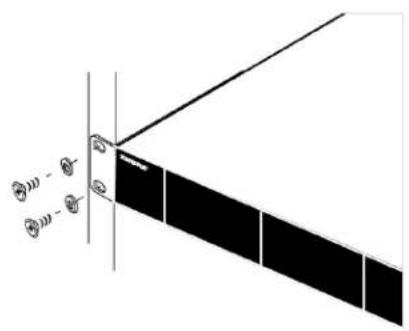
natural_image
Diagram of a solar panel array with directional arrows and sensor icons (no text or labels)Hardware
IEC locking connector, 100 - 240 V AC.
② AC Power Protection Fuse
Protects the AC power cascade from overloads.
③ AC Power Cascade (locking)
Use IEC extension cables to loop power through multiple devices.
④ Ethernet Ports
Four Ethernet ports carry the following signals:
• ctrl 1: Network control
• ctrl 2: Network control
• Dante Primary: Dante digital audio
• Dante Secondary: Dante digital audio
Network Status (green) LEDs:
- Off: no network link
- On: network link active
- Flashing: network link active, rate corresponds to traffic volume
Network Speed (amber) LEDs:
Off = 10/100 Mbps
On = 1 Gbps
⑤ Word Clock Input and Thru Ports
- Input: Connect to an external word clock to resolve the AES3 digital output
- Thru: Passes word clock signal to additional components
⑥ AES3 Switch
Enables AES3 output on Output 3 and Output 4. This disables analog output on XLR Output 1 and XLR Output 2.
⑦ Word Clock Termination Switch
- Set to Thru when passing signal to additional components
- Set to Term 75Ω when Thru connection is not used
⑧ Balanced XLR Audio Output (one per channel)
• Transformer Balanced
- Connect to a mic or line level input. Output 3 and Output 4 carry AES3 signals when enabled. XLR Outputs 1 and 2 are disabled when AES3 is enabled.
⑨ Mic/Line Switch and Ground Lift Switch (one per channel)
- Mic/Line: Applies a 30 dB pad in mic position.
Ground Lift: Lifts the ground from pin 1 of the XLR connector and the sleeve of the 14 " Audio Output
⑩ 14 " Audio Output (one per channel)
Transformer Balanced
⑪ Coaxial inputs from Antenna A and Antenna B
RF Connection for Antenna A and Antenna B.
⑫ RF Cascade Connectors C and D
Passes the RF signal from Antenna A and Antenna B to one additional receiver. In Quadversity mode, use these connectors for additional antenna inputs.
⑬ Antenna Bias Indicator LED
• Green: Antenna bias enabled
• Red: Antenna fault
• Off: Antenna bias disabled
⑭ Quadversity Indicator LED
Illuminates when the receiver is configured for Quadversity mode.
Kanalmenü
Hinweis:
Gruppen-Scan
Störungsverwaltung
Quadversity
HF-Kaskadenanschlüsse
Pegelton-Generator
Vernetzung
Networking Receivers
The receiver features a 4-port network interface. Dante technology provides an integrated solution to distribute digital audio. Dante uses standard IP over Ethernet and safely coexists on the same network as IT and control data. Selectable networking modes route port signals for flexible network set up.
Network Control Software
Receivers can be controlled by Shure Control (Wireless Workbench) for remote management and monitoring. The Dante Controller manages digital audio routing. Signals for AMX and Crestron controllers are carried on the same network as Shure Control.
Shure Control
Wireless Workbench (WWB) software provides comprehensive control for wireless audio systems. Wireless Workbench enables remote adjustments to networked receivers for real-time changes to gain, frequency, RF power, and control locks. A familiar channel strip interface displays audio meters, transmitter parameters, frequency settings, and network status.
Dante
The Dante Controller is a free software program created by Audinate ^™ to configure and manage networks of Dante-enabled devices. Use the Controller to create audio routes between networked components and to monitor the status of online devices.
Dante Controller and Lock Settings
Version 1.2.X introduces support for Dante Device Lock for AD4D and AD4Q. Dante Device Lock is a feature of Dante Controller that allows you to lock and unlock supported Dante devices using a 4-digit PIN (Personal Identification Number). When a device has a Dante lock turned on, Dante audio will continue to flow according to existing subscriptions, but its subscriptions and settings can't be controlled or configured.
If you forget your Dante Device Lock PIN, see the Device Lock section of the Dante Controller User Guide for instructions on how to proceed.
Dante Domain Manager
Version 1.2.X introduces support for Dante Domain Manager (DDM) for AD4D and AD4Q. DDM is network management software that enables user authentication, role based security, and audit capabilities for Dante networks and Dante-enabled products.
Considerations for Shure devices controlled by DDM:
- When you add Shure devices to a Dante domain, leave the local controller access setting in Read Write. Otherwise, access to Dante settings, device factory reset, and device firmware updates will be disabled.
- When a device is managed by a Dante Domain and the Dante Domain is disconnected, access to Dante settings, device factory reset and device firmware updates will be disabled. When a device reconnects to the Dante Domain, it follows the policy set for it in the Dante Domain.
See the Dante Domain Manager User Guide for more information.
Networking Modes and Switch Configuration
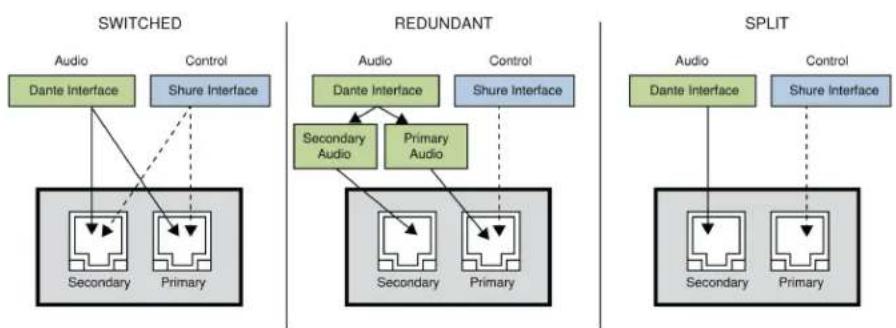
The receiver offers two selectable networking modes:
- Split/Redundant: This mode places Dante audio and Shure control on separate networks, while allowing you to take advantage of Dante redundancy.
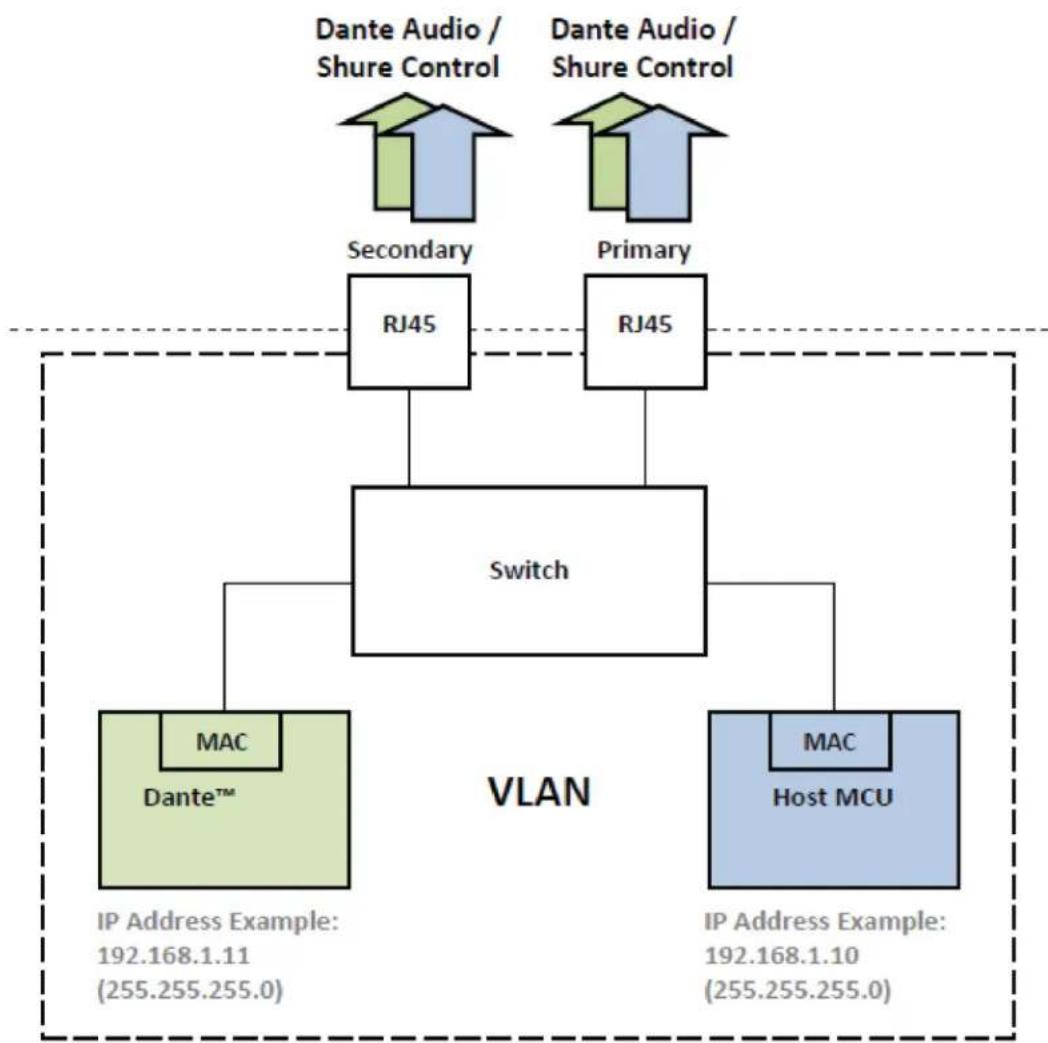
- Switched: In Switched mode, the receiver acts as a 4-port network switch. Shure control and Dante audio are present on all network ports.
flowchart
graph TD
    subgraph SWITCHED
        A1["Audio"] --> B1["Dante Interface"]
        A2["Control"] --> B1
        B1 --> C1["Secondary"]
        B1 --> C2["Primary"]
    end
    subgraph REDUNDANT
        D1["Audio"] --> E1["Dante Interface"]
        D2["Control"] --> E1
        E1 --> F1["Secondary Audio"]
        E1 --> G1["Primary Audio"]
        F1 --> H1["Secondary"]
        F1 --> I1["Primary"]
    end
    subgraph SPLIT
        J1["Audio"] --> K1["Dante Interface"]
        J2["Control"] --> K1
        K1 --> L1["Secondary"]
        K1 --> M1["Primary"]
    end
| Network Mode | Port Function and Signals | Application | |||
| Port 1 | Port 2 | Port 3 (Primary) | Port 4 (Secondary) | ||
| SWITCHED | Shure control, Dante primary | Shure control, Dante primary | Shure control, Dante primary | Shure control, Dante primary | For single network installations of star or daisy-chained networks. |
| SPLIT/RED-UNDANT (Factory setting) | Shure control | Shure control | Dante primary | Dante secondary | Primary and secondary ports are configured are separate networks to provide isolation between control signals and audio signals. |
To configure the switch mode:
- Device Configuration > Network Configuration.
- Select Setup to enter the Switch Configuration menu.
- Use the control wheel to change the mode.
- Press ENTER to reboot the receiver and change the mode.
Diagram of switched mode:
flowchart
graph TD
    A["Dante Audio / Shure Control"] --> B["Secondary RJ45"]
    C["Dante Audio / Shure Control"] --> D["Primary RJ45"]
    B --> E["Switch"]
    D --> E
    E --> F["MAC Dante™"]
    E --> G["MAC Host MCU"]
    H["IP Address Example: 192.168.1.11 (255.255.255.0)"]
    I["IP Address Example: 192.168.1.10 (255.255.255.0)"]
IP Address Configuration
An IP address must be assigned to each device in the network to ensure communication and control between components. Valid IP addresses can be assigned automatically using a DHCP server or manually from a list of valid IP addresses. If using Dante audio, a separate Dante IP address must also be assigned to the receiver.
Automatic IP Addressing Mode
- If using a DHCP capable Ethernet switch, set the DHCP switch to ON.
- From the Device Configuration menu: Network Configuration > Next
- Press the control wheel to enable editing of the Mode, and then set the mode to Automatic.
Manual IP addressing Mode
- From the Device Configuration menu: Network Configuration > Next
- Press the control wheel to enable editing of the Mode, and then set the mode to Manual
- Set valid IP addresses and subnet values, and then press ENTER to save.
Netzwerk-Browser
| AD4Q=A | 470–636 MHz |
| AD4Q=B | 606–810 MHz |
| AD4Q=C | 750–960 MHz |

- Table of Contents
- AD4Q Axient Digital Four-Channel Wireless Receiver 4
- AD4Q Axient Digital Four-Channel Wireless Receiver
- Features
- Audio
- 1/0
- RF
- Network Control
- Hardware
- ② AC Power Protection Fuse
- ③ AC Power Cascade (locking)
- ④ Ethernet Ports
- ⑤ Word Clock Input and Thru Ports
- ⑥ AES3 Switch
- ⑦ Word Clock Termination Switch
- ⑧ Balanced XLR Audio Output (one per channel)
- ⑨ Mic/Line Switch and Ground Lift Switch (one per channel)
- ⑩ 14 " Audio Output (one per channel)
- ⑪ Coaxial inputs from Antenna A and Antenna B
- ⑫ RF Cascade Connectors C and D
- ⑬ Antenna Bias Indicator LED
- ⑭ Quadversity Indicator LED
- Kanalmenü
- Gruppen-Scan
- OPEN CH: 52 # RX CH: 6
- Störungsverwaltung
- Quadversity
- HF-Kaskadenanschlüsse
- Pegelton-Generator
- Vernetzung
- Networking Receivers
- Network Control Software
- Shure Control
- Dante
- Dante Controller and Lock Settings
- Dante Domain Manager
- Networking Modes and Switch Configuration
- IP Address Configuration
- Automatic IP Addressing Mode
- Manual IP addressing Mode
- Netzwerk-Browser
Brand : SHURE
Model : AD4Q
Category : Receiver