
7 Series 708P - Monitor JBL - Free user manual and instructions
Find the device manual for free 7 Series 708P JBL in PDF.


| Product Type | Powered Studio Monitor |
| Model | JBL 708P |
| Brand | JBL Professional |
| Woofer Size | 8 inches (203 mm) |
| Tweeter Size | 1 inch (25 mm) Compression Driver |
| Amplifier Power | 250W LF + 250W HF (Class D) |
| Frequency Response | 41 Hz – 25 kHz (±3 dB) |
| Maximum SPL | 108 dB continuous, 114 dB peak |
| Audio Inputs | 1 x XLR Analog (balanced), 1 x XLR AES3 Digital |
| Digital Pass-Through | 1 x XLR Male |
| Sample Rates | Up to 192 kHz |
| Equalization | 8 Room EQ + 6 User EQ (parametric and shelving) |
| Delay | Speaker Delay up to 18 ms, Frame Delay up to 150 ms |
| Network Interface | HiQnet (RJ45) |
| Power Requirement | 100-240 VAC, 50/60 Hz |
| Power Consumption | 500 W max |
| Enclosure Material | 12 mm Birch Plywood |
| Dimensions (H x W x D) | 441 x 250 x 312 mm (17.35 x 9.85 x 12.3 in) |
| Weight | 11.5 kg (25.2 lbs) |
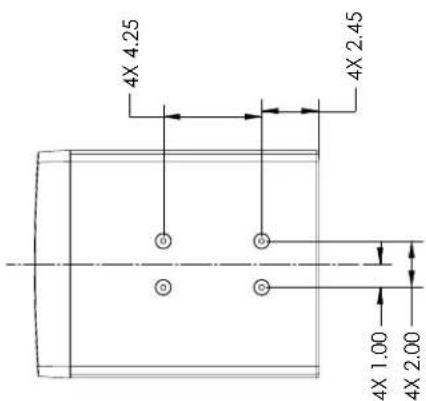
| Mounting Features | 8 x M8 threaded inserts (top and bottom) |
| Handles | Integrated side handles |
| Cleaning Instructions | Clean with dry cloth only |
| Safety Notices | Do not expose to rain/moisture; use grounded outlet |
| Warranty | 5 years for drivers, 3 years for amplifiers (US) |
Frequently Asked Questions - 7 Series 708P JBL
User questions about 7 Series 708P JBL
0 question about this device. Answer the ones you know or ask your own.
Ask a new question about this device
Download the instructions for your Monitor in PDF format for free! Find your manual 7 Series 708P - JBL and take your electronic device back in hand. On this page are published all the documents necessary for the use of your device. 7 Series 708P by JBL.
USER MANUAL 7 Series 708P JBL
natural_image
Illustration of a JBL speaker with antenna and sound waves (no text or symbols)JBL 705P
5" Powered
Master Reference Monitor
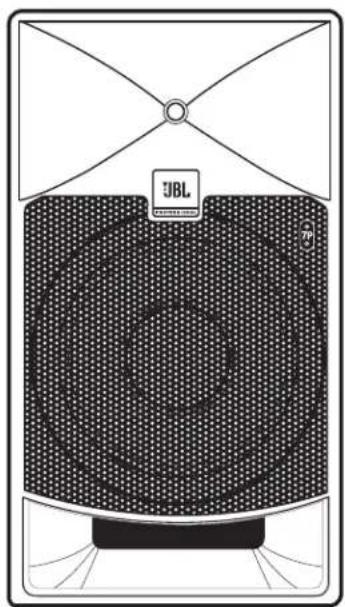
natural_image
Diagram of a JBL brand air conditioner unit with mesh pattern and top panel (no text or symbols)JBL 708P
8" Powered
Master Reference Monitor
Thank you for your purchase of JBL 7 Series Powered Master Reference Monitors
To receive important information as it becomes available please take a moment to register your 7 Series speakers now.
Click link or go to www.jblpro.com/7series
- Read these instructions.
- Keep these instructions.
- Heed all warnings.
- Follow all instructions.
- Do not use this apparatus near water.
- Clean only with dry cloth.
- Do not block any ventilation openings. Install in accordance with manufacturer's instructions.
- Do not install near any heat sources such as radiators, heat registers, stoves or other apparatus that produce heat.
- Do not defeat the safety purpose of the grounding type plug. A polarized plug has two blades with one wider than the other. A grounding type plug has two blades and a third grounding prong. The wide blade or the third prong is provided for your safety. If the provided plug does not fit into your outlet, consult an electrician for replacement of the obsolete outlet.
- Protect the power cord from being walked on or pinched particularly at plugs, convenience receptacle and the point where the power cord connects to the apparatus.
- Only use attachments/accessories specified by the manufacturer.
- Unplug this apparatus during lightning storms or when unused for long periods of time.
- Refer all servicing to qualified service personnel. Servicing is required when the apparatus has been damaged in any way, including: power-supply cord or plug is damaged, liquid has been spilled or objects have fallen into the apparatus, the apparatus has been exposed to rain or moisture, does not operate normally, or has been dropped.
- The appliance coupler of the power supply cord is used as the ultimate disconnect device from the mains. The appliance coupler shall remain readily operable.
- The apparatus shall be connected to mains socket outlet with a protective earthing connection.
WARNING:
- To reduce the risk of fire or electrical shock, do not expose the apparatus to rain or moisture.
- The apparatus shall not be exposed to dripping or splashing and no objects filled with liquids, such as vases, shall be placed on the apparatus. As with any electronic product, use care not to spill liquids into any part of the system. Liquids can cause a failure and/or a fire hazard.
Explanation of Graphic Symbols

The exclamation point within an equilateral triangle is intended to alert the users to the presence of important operating and maintenance (servicing) instructions in the literature accompanying the product.

The lightning flash with the arrowhead symbol, within an equilateral triangle, is to alert the user to the presence of insulated “dangerous voltage” within the products enclosure that may be of sufficient magnitude to constitute a risk of electric shock to humans.
DO NOT EXPOSE TO RAIN OR MOISTURE!
CAUTION: TO REDUCE THE RISK OF ELECTRONIC SHOCK - DO NOT REMOVE COVER. NO USER SERVICEABLE PARTS INSIDE. REFER SERVICING TO QUALIFIED PERSONNEL. DO NOT EXPOSE THIS APPARATUS TO RAIN OR MOISTURE.
Any changes or modifications not expressly approved by the party responsible for compliance could void the user's authority to operate the equipment.
This equipment has been tested and found to comply with the limits for a class B digital device, pursuant to part 15 of the FCC Rules. These limits are designed to provide reasonable protection against harmful interference in a residential installation. This equipment generates, uses and can radiate radio frequency energy and, if not installed and used in accordance with the instructions, may cause harmful interference to radio communications. However, there is no guarantee that interference will not occur in a particular installation. If this equipment does cause harmful interference to radio or television reception, which can be determined by turning the equipment off and on, the user is encouraged to try to correct the interference by one or more of the following measures:
- Reorient or relocate the receiving antenna.
- Increase the separation between the equipment and receiver.
- Connect the equipment into an outlet on a circuit different from that to which the receiver is connected.
- Consult the dealer or an experienced radio/ TV technician for help.
Contents
Important Safety Instructions .... 3
Introduction 5
Setting Up Your System 6
What's Included? 6
Unpacking 6
Placement 6
System Connections 7
Audio Connections 7
Power Connections 7
Making Sound 7
705P and 708P Features
Front 8
Rear 9
Menu of Software-Controlled Features 11
Troubleshooting 15
Specifications 16
Dimensional Drawings and Mounting Features 17
JBL Service Contact Information 19
Product Warranty Information 20
Congratulations on your purchase of JBL Professional 7 Series Master Reference Studio Monitors. These studio monitors meet JBL's high standards for accuracy and long-term reliability in demanding professional applications. All 7 Series models incorporate JBL Professional transducer and network technologies to provide accurate frequency response, exceptional low frequency extension and SPL capability. 7 Series speakers incorporate JBL's patented Image Control Waveguide to deliver greater accuracy and an exceptional listening experience. Additionally, each powered 7 Series monitor is equipped to interface with a range of Analog and Digital signal sources used in professional production systems. The 705P and 708P leverage JBL Professional acoustic technologies to deliver unprecedented next-generation studio monitor performance. The JBL 705P and 708P Master Reference Monitors include:
JBL Custom Drivers - JBL 705P and 708P models incorporate custom JBL transducers for greater dynamic range and extended frequency response. The JBL 2409H high-frequency compression driver incorporates an innovative low-mass annular diaphragm to deliver smooth response beyond 30kHz. The JBL725G and 728G low-frequency transducers produce exceptional low-frequency output into the 30Hz range. JBL's low frequency port design works in concert with the low frequency transducer to produce accurate bass response at all playback levels. JBL's patented "Slip Stream" port design minimizes the turbulence and front-port design allows soffit and shelf mounting.
Image Control Waveguide - JBL's revolutionary patented Image Control Waveguide allows the 705P and 708P to provide remarkable imaging, a detailed sound-stage, and a virtually seamless crossover transition. Subtle detail can be heard, even in a dense mix. 7-Series models provide a broad “sweet-spot” in your workspace. And as an added benefit, neutral sound can be heard at almost any listening position in the room.
Integrated Dual Amplification System - The 705P and 708P models feature a built-in dual amplification system optimized for JBL's high-output drivers. A 250W amp powers the 2409H high-frequency transducer, and a separate 250W amp is dedicated to the 725G low-frequency transducer, providing exceptional output, dynamic range and ample sound pressure level (SPL) at greater listening distances. Analog inputs with adjustable sensitivity allow connection of a broad range of professional and consumer sources. Digital AES3 format inputs with switchable sample rate converter allows interface to professional digital systems with sample rates of up to 192 kHz.
Comprehensive EQ and Delay - Although 7 Series monitors are designed to yield exceptional neutrality in any room, the 705P and 708P models also feature onboard room equalization that can be adjusted to compensate for adverse effects of room acoustics and optimize the accuracy of sound reproduction in any listening environment. In addition to eight Room EQ filters, six User EQ filters allow implementation of customized response curves such as the X-Curve or compensation for transmission-loss" when the speaker is placed behind a perforated cinema screen. User-enabled digital delay allows virtual alignment of speakers relative to the listening position, while additional "AV Synchronization" delay is available to compensate for latency in video displays. Factory and User Presets are provided for storage and recall of user-specific EQ and delay settings.
Installation-Friendly enclosures - Birch plywood enclosures are braced and reinforced to allow safe mounting. Top and bottom mounting features allow wall and ceiling mounting using readily available brackets. Integrated handles on the 708P are provided for ease in speaker positioning.
JBL Professional Reliability - Prior to becoming a production-ready design, each 7 Series studio monitor undergoes JBL's tough power test, in which the speaker is required to play continually without failure at full output for 100 hours. This demanding test ensures your 7 Series speakers will deliver years of reliable performance. To get the most out of your JBL 7 Series, please review this owner's manual and keep it available for future reference. Also, please register your new speakers at www.jblpro.com/registration.
Each 7 Series box includes the following items:
• One 7 Series Master Reference Monitor
- One Power Cord
- Quick Set Up Guide
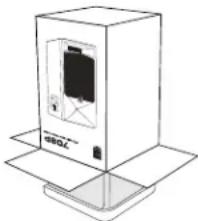
UNPACKING
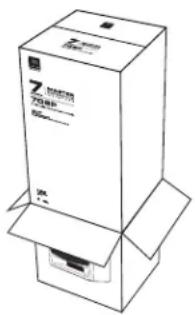
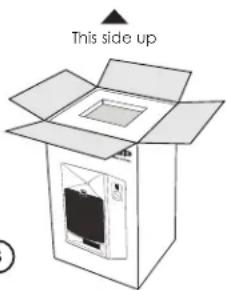
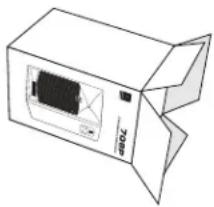
When removing a speaker from its packaging, we recommend the following procedure, which will prevent damage of the high frequency transducer located near the top of the cabinet on the front of the speaker:
- Place the inner carton on the floor with the top facing upwards.
- Open the top of the box.
- Remove the power cord from the tray. Gently rotate the carton so the open end rests on the floor and the bottom of the carton is facing you.
- Gently lift the carton allowing the speaker and the end-cap tray to slide out of the carton and remain on the floor.
- Remove the speaker from the protective sleeve.
①
② ③

④
natural_image
Line drawing of a cardboard box with an open lid and internal panel (no text or symbols)
5
natural_image
Line drawing of a box with a display panel and '700' label, placed on an open base (no text or symbols beyond label)PLACEMENT
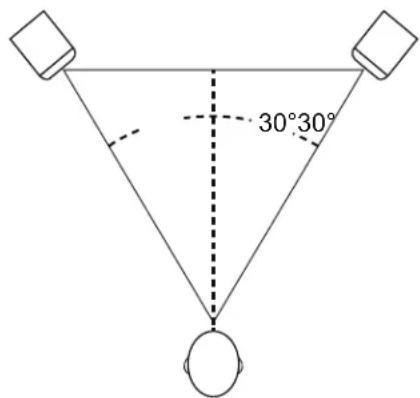
7 Series speakers are designed to deliver exceptional imaging in any room. To get the most out of your speakers, follow these recommendations:
- Position each 705P and 708P speaker in a vertical orientation with the high frequency transducer on the top.
- Ideally the speakers should be placed on suitable speaker stands, rather than on the work surface. This will reduce resonance caused by mechanical interaction of the speaker with the work surface.
- For optimum imaging, the left speaker and the right speaker should be placed symmetrically in the room, so each speaker is located the same distance from adjacent walls and reflective surfaces.
- The speakers should be placed so the position of the listener and the two speakers form an equilateral triangle. Adjusting the distance between the speakers will affect the quality of bass heard at the listening position. You can experiment with speaker positioning to find the placement that produces the preferred bass response, imaging, and when listening to stereo material, produces a strong “phantom” center in which vocals and some instruments seem to originate from a point between speakers.
- The listening distance can be determined according to your preference, the acoustics of your room and the SPL (Sound Pressure Level) you desire at the listening position. You can find the speaker's maximum SPL at 1 Meter in the Specifications Section at the end of this manual. Each doubling of listening distance will reduce the SPL at the listening position as much as 6 dB in an acoustically absorptive room, but only 3 or 4 dB in an acoustically reflective room.
ANALOG AUDIO SIGNAL CONNECTIONS
The 7 Series powered models are equipped with a balanced XLR female input allowing connection to professional audio production equipment with balanced outputs such as computer audio interfaces, mixing consoles and also products with unbalanced outputs including personal music players, consumer audio receivers and audio visual equipment. Connect equipment with balanced outputs to the XLR input of the speaker using balanced signal cables. Alternately connect equipment with unbalanced outputs to the XLR female connector using unbalanced cables. The speaker includes software-selectable +4 dBU Input sensitivity for connection of high-output professional equipment and -10 dBV input sensitivity that provides additional gain for products with consumer-level signal output. The desired setting is selected using the rear panel controls. See Section 5 for details.
DIGITAL AUDIO SIGNAL CONNECTIONS
705P and 708P speakers include an XLR female connector that accepts digital signals in two-channel AES3 format. Adjacent to this connector, an XLR male digital "Pass-Through" connector is provided allowing the identical digital signal to be connected to other speakers in the system. Use of 110 ohm cable is recommended. A maximum of four JBL 7 Series speakers can be serially connected using the digital Pass-Through connectors.
Selective monitoring of the sources, Analog, AES channel A or AES channel B is achieved using the rear panel controls. See Section 5 for details.
POWER CONNECTIONS
The 7 Series powered models incorporate a universal power supply allowing these to be used domestically and internationally. The ground terminal of the IEC plug is required by wiring codes and regulations and must always be connected to the electrical installation safety ground. Power Cords are provided with Edison and Shuko type grounded plugs.
MAKING SOUND
After the speakers are connected to the audio system, reduce the output level of the audio source (for instance, a mixing console, computer recording system, or preamp) to a minimum setting. Set the 7 Series POWER SWITCH to the "ON position." After a short delay the POWER INDICATOR on the front of each speaker will illuminate and the speakers will be ready to reproduce audio signals. Adjust the level of the playback system to produce a suitable level at the listening position. Individual speaker levels can be adjusted in 1/10th dB increments using the rotary control on the back of each speaker.
NOTE: 7 Series powered models include software enabled features that can be set by the user according to the application and user-preference. To restore the factory default settings 1.set the POWER SWITCH to the OFF position. 2. Press and Hold the MENU and BACK keys simultaneously while setting the POWER SWITCH to the ON position. Text in the display will confirm the speaker has been reset.
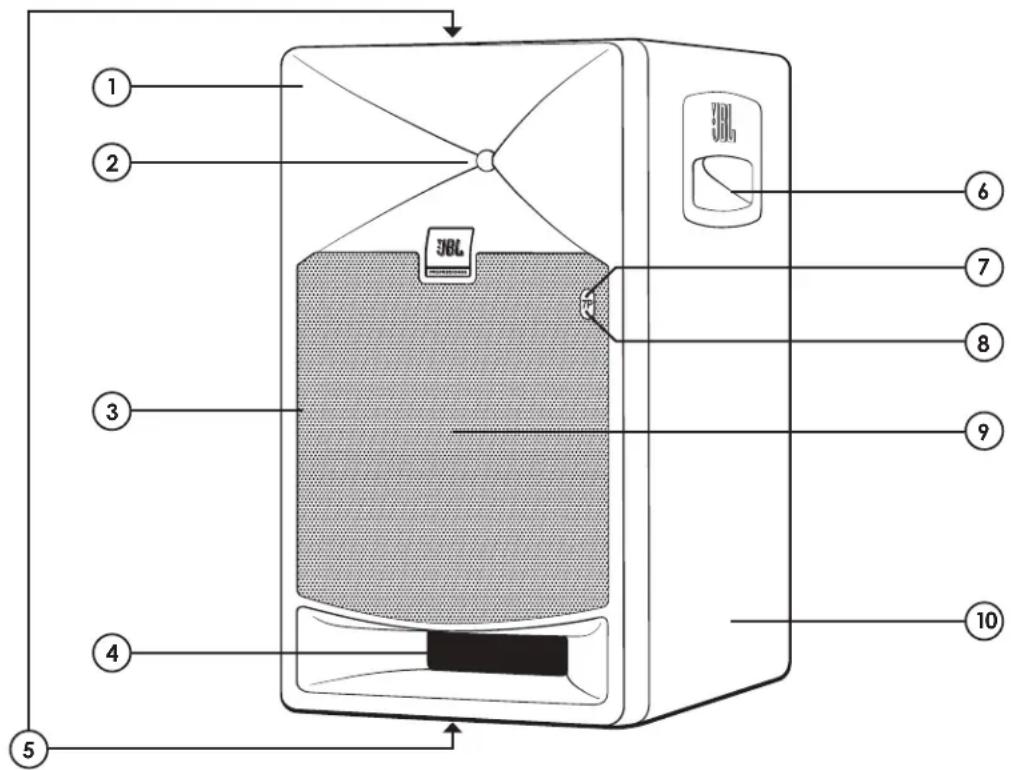
FRONT VIEW
FEATURES
- WAVEGUIDE – The specially designed Image Control Waveguide enhances imaging and optimizes the blend of direct and reflected sound in the room, ensuring neutral sound at the listening position.
- HIGH FREQUENCY TRANSDUCER (Tweeter) – Reproduces high frequency signals.
- SPEAKER GRILLE – Provides protection for the low frequency transducer.
- LOW FREQUENCY PORT – The patented JBL Slip Stream™ Port works in conjunction with the low frequency transducer to provide accurate low frequency performance at all listening levels.
- MOUNTING FEATURES – Threaded inserts on the top and bottom panels allow attachment of mounting brackets (not included).
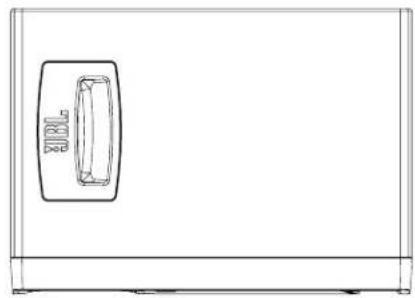
- HANDLES (708P only) – Handles on both sides of the speaker allow transportation and easy positioning of speaker.
- WHITE LED – The White LED Illuminates when power is connected and the POWER SWITCH is set to ON. Note After setting the POWER SWITCH to ON, there is a short delay prior to illumination of the LED.
- RED/GREEN LED – When illuminated, GREEN Color indicates one of more of the following user-settings are enabled: BASS MANAGEMENT; ROOM EQ; USER EQ, A/V Delay; Flashing RED color indicates activation of a protective limiter. Persistent RED color indicates a system fault or, when using digital inputs, interruption or loss of valid digital word clock.
- LOW FREQUENCY TRANSDUCER (Woofer) – Reproduces low frequency content of the input signal.
- ENCLOSURE – The top, bottom and side panels of the speaker.
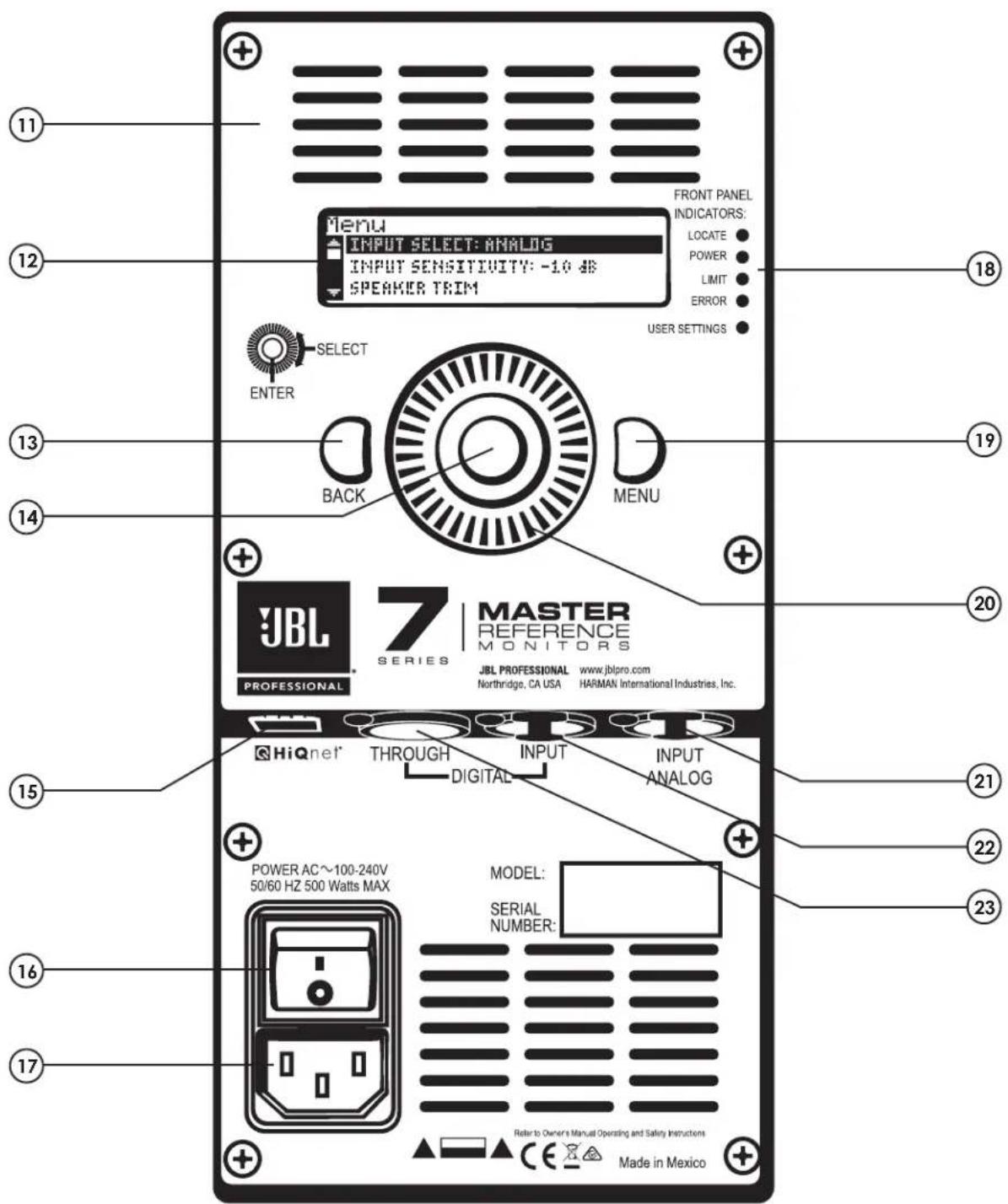
REAR VIEW
REAR PANEL
- VENTILATION SLOTS - These slots provide air flow to reduce heat inside the enclosure, this ensure that airflow is not impeded.
- LCD DISPLAY – Text in the display indicates status of software-controlled settings.
- BACK KEY – Press this key to return to prior display screen.
- ENTER KEY – Press this button to select and enable the value displayed on the screen.
- HiQnet™ PORT – This port allows feature updates as they become available
- POWER SWITCH – Press "I" to apply power and "O" to disable power.
- IEC POWER CONNECTOR – This connector supplies power to the speaker's electronics. Connect the supplied IEC Grounded Power Cord to this connector.
- FRONT PANEL INDICATORS – This chart illustrates status of functions as indicated by the Front Panel LEDs.
Locate – Flashing WHITE LED is used to selectively identify the speaker when connected to a HiQnet™ network.
Power – A persistent WHITE LED indicates the unit is powered on.
Limit – A flashing RED LED indicates protective limiting is engaged.
Error – Persistent RED LED – indicates a system fault or when using digital input, interruption of loss of valid digital word clock.
- User Settings – Persistent GREEN LED indicates EQ, Delay and other processing are enabled.
- MENU KEY – Press this key to access a directory of software-enabled features.
- ROTARY CONTROL – Rotate this dial to review menu options.
- ANALOG INPUT – An XLR Female connector is used to connect balanced and unbalanced analog equipment.
- DIGITAL INPUT – An XLR Female connector is used to connect AES3 format digital signals.
- DIGITAL THROUGH – Use this output connector to route the incoming AES3 signal to another speaker.
705P and 708P speakers include software-enabled features that can be accessed and adjusted using the MENU key, the ROTARY CONTROL, along with the ENTER and BACK Keys.
To select and set the values of a particular feature:
- Press the MENU key. Rotate the ROTARY CONTROL to view the desired feature in the display.
- Press the ENTER key to select the feature.
- Use the ROTARY CONTROL and ENTER key to select the desired parameter and set its value.
- Use the BACK key to return to the previous menu item.
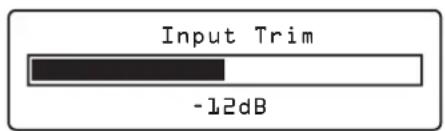
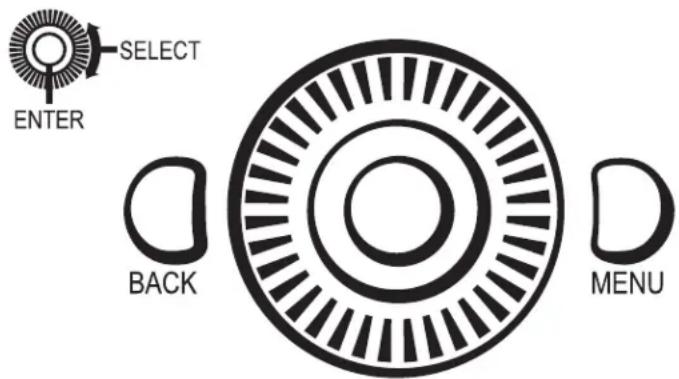
Example: Turn the ROTARY CONTROL clockwise to reduce the amount of speaker trim and thereby increase the speaker volume. Turn the ROTARY CONTROL counter-clockwise to increase the amount of INPUT TRIM, thereby attenuating the speaker volume. While viewing this screen, pressing the MENU key displays the complete list of software controlled features
- Pressing the MENU Key consecutive times toggles the display from the currently selected function to the INPUT TRIM screen and vice versa. When the controls have not been used for a period of time, the “toggle function” will time-out and successive presses of the MENU key will no longer return the display to the previously used feature. The length of time can be specified in the UTILITY/ MENU TIME screen.
Following is a list of features and the parameters that can be selected using this interface.

- This symbol indicates a feature
- This symbol indicates a parameter of the feature that can be adjusted
[BOLD text] in brackets indicates the factory default setting.
The text immediately following the [BOLD text] indicates the available values.
SOFTWARE-ENABLED FEATURES:
- INPUT TRIM – Adjusts the level of the signal sent to the amplifier. Counter clockwise adjustment of the ROTARY CONTROL reduces the speaker volume. Clockwise rotation increases speaker volume.
▶ [0dB]; -24dB – 0dB; 0.1dB adjustment resolution
○ INPUT SELECT - Allows monitoring of the following input sources:
{[Analog]; AES Ch1; AES Ch2; AES Ch1+Ch2}
AESLEVEL TRIM – Allows increase in gain or attenuation of digital signals.
▶ [0dB]; -24dB – +24dB; 0.1dB adjustment resolution
- INPUT SENSITIVITY – Select +4 dBu when connecting high-output professional equipment or =10dBV when connecting consumer level equipment.
{[+4dBu], -10dBV}
USER EQ – USER EQ allows application of customized equalization based on preference, program material, the requirement to monitor using an industry standard curve such as the X Curve, or to compensate for transmission loss when the speaker is positioned behind a perforated cinema screen. The following controls Enable/Disable the six bands of user EQ and provide access to the frequency, gain, and Q parameters of each band.
▶ Enable {Engaged, [Disengaged]}
▶ High Shelf Frequency ◦ [2kHz]; 1/24th octave adjustment resolution Gain ◦ [0dB]; -12dB – +12dB; 0.1dB adjustment resolution
▶ Low Shelf Frequency ◦ [90 Hz]; 1/24th octave adjustment resolution Gain ◦ [0dB]; -12dB – +12dB; 0.1dB adjustment resolution
▶ Parametric EQ Filter 1 Frequency [1kHz]; 20Hz - 20kHz; 1/24th octave adjustment resolution Q [1.0]; 0.1 - 12; 0.1 adjustment resolution Gain [0dB]; -12dB - +12dB; 0.1dB adjustment resolution
▶ Parametric EQ Filters 2 - 4 ◦ Settings and default values same as PEQ Filter 1
- ROOM EQ – Eight filters of parametric ROOM EQ can be applied to compensate for the adverse effects of room acoustics and the speakers proximity to boundaries and restore neutral frequency response.
▶ Enable
{Engaged,
[Disengaged]}
▶ Parametric EQ Filter 1
{Engaged,
[Disengaged]}
Frequency
- [1kHz]; 20Hz - 20kHz; 1/24th octave adjustment resolution
Q
- [1.0]; 0.1 - 12; 0.1 adjustment resolution
Gain
- [0dB]; -12dB – +12dB; 0.1dB adjustment resolution
▶ Parametric EQ Filters 2 - 8
- Settings and default values same as PEQ Filter 1
FRAME DELAY – FRAME DELAY sometimes referred to as "A/V Delay" or "Lip Sync Delay" can be selectively applied to the incoming signal to compensate for processing latency in video displays allowing synchronization of audio with picture.
▶ Bypass
{Engaged;
[Disengaged]}
▶ Delay
[0ms]; 0ms - 150ms; 1.0ms adjustment resolution
☐ SPEAKER DELAY – This delay can be selectively applied to each speaker in the system, to precisely match the arrival time of audio from each speakers to that of the most distant speaker.
▶ Bypass
{Engaged;
[Disengaged]}
▶ Delay
[0ms]; 0ms - 18ms; 1.0ms adjustment resolution
- BASO MANAGEMENT – When engaged applies a high-pass filter at the selected frequency. This is useful when the system is “bass managed,” and a subwoofer is used to reproduce the low frequency portion of the audio signal.
▶ Bypass
{Engaged;
[Disengaged]}
▶ High-Pass Frequency
{60Hz; 70 Hz; [80 Hz]; 100 Hz; 120 Hz}
- PRESETS – Provides access to six factory presets and six registers that can be used to save user-created settings of EQ and Delay parameters.
Load
Load Factory Preset
• [1] EQ Flat
- 2: LF Boost
• 3: LF Cut
• 4: HF Boost
- 5: HF Cut
- 6: HPF
▶ Save
Save User Preset
{[Preset_1] (Preset_2; ... ; Preset_6}
▶ Default name is "PRESET_1 (2, 3, 4, 5, 6) Preset naming is possible using ROTARY CONTROL and ENTER key. Pressing ENTER Key consecutively toggles ROTARY CONTROL function, allowing you to either MOVE CURSOR or MODIFY CHARACTER
☐ SPEAKER SELECT – For identification, you can assign a standard channel name to the speaker selected from this list.
{[Left]; Center; Right; Left Side Surround; Right Side Surround; Left Rear Surround; Right Rear Surround; Left Front OH Surround; Right Front OH Surround; Left Rear OH Surround; Right Rear OH Surround}
FRONT PANEL LED – Select “DISABLED” to defeat the illumination of the front panel LED indicators.
{[Enabled]; Disabled}
▶ Settings – When selected, displays current
- IP Address
- MAC Address
- Subnet Mask
- Gateway
▶ EDIT – When selected allows editing of Network Settings
▶ EDIT DHCP Setting
{[DHCP]; Manual IP} Selecting MANUAL allows editing of
- IP Address
- MAC Address
- Subnet Mask
- Gateway

UTILITY
▶ MENU TIMEOUT – Determines the interval that the MENU key retains and when pressed, returns the display to the last edited feature screen.
- Immediate
- 5 Seconds
- 15 Seconds
- 30 Seconds
- 45 Seconds
- 1 minute
- Disabled
Section 6: Troubleshooting
TROUBLESHOOTING
If there is no sound from your speakers, check these settings:
- Make sure a signal source is connected and producing sound.
- Make sure the POWER INDICATOR is illuminated on the front of the speaker.
- Make sure the VOLUME CONTROL is not set to the full counter-clockwise minimum position.
- Confirm the power cable is connected and the POWER SWITCH is set to the ON position.
• Perform a FACTORY RESET procedure.
If the above measures do not correct the problem, please contact JBL Professional Customer Service.
See contact information in section 9 of this manual.
System Specifications
| Model Name 705P 708P | ||
| LF Driver Size 127mm (5") 203mm (8") | ||
| HF Driver Size 25mm (1") 25mm (1") | ||
| HF Driver Type JBL 2409H Compression Driver | ||
| Crossover 1750 Hz 1700 Hz | ||
| Power Configuration Bi-Amplified Bi-Amplified | ||
| HF Driver Power Amp 250W Class D | ||
| LF Driver Power Amp 250W Class D | ||
| Frequency Response +/- 3 dB 45Hz-25kHz | 41Hz-25kHz | |
| LF Frequency Extension (-10dB) | 39Hz | 35Hz |
| High Frequency Range (-10dB) | 32 kHz | 31kHz |
| Maximum Continuous SPL* | 101 dB | 108 dB |
| Maximum Peak SPL* | 107 dB | 114 dB |
| Maximum Peak Input Level: -10 dBV / +4 dBu | +9 dBV / +23.3 dBu | |
| Electrical Distortion Criteria | 0.1%THD @ 1kHz/2.83VRMS output;<0.5% THD @ 1kHz, Full rated output | |
| Signal To Noise Ratio, HF | 92dBA (A-Weighted), 83dBr (unweighted), relative to 2.83VRMS output on HF | |
| Signal To Noise Ratio, LF | 85dBA (A-Weighted), 80dBr (unweighted), relative to 2.83VRMS output on LF | |
| Analog Input Type | 1 x XLR, Female Balanced | |
| Digital Input Type | 1 x XLR, Female Balanced | |
| Digital Input Format | AES3 | |
| Digital Pass Through | 1 x XLR, Male | |
| Acceptable digital audio sample rates +/- 1% | 44.1 kHz, 48 kHz, 88.2 kHz, 96 kHz, 176.4 kHz, 192 kHz | |
| Room Equalization | 8 parametric filters | |
| User Equalization | 4 parametric filters, HF Shelf, LF Shelf | |
| Room Delay | 18ms | |
| Frame (A/V) Delay | 150ms | |
| A/D, D/A Converter 24 bit / 192 kHz A/D, 32 bit / 192 kHz D/A | ||
| Internal Processing | 32 bit Floating Point. 192 kHz Sample Rate | |
| Network Interface | Harman HiQnetTM RJ45 Connector | |
| AC Input Voltage | 100-240VAC 50/60Hz +/-10% | |
| Enclosure Type Ported with patented JBL SlipStreamTM port tube | ||
| Construction | 9 mm Birch Plywood | 12 mm Birch Plywood |
| H x W x D mm(inches) | 268 x 151 x 274(10.56 x 5.94 x 10.80) | 441 x 250 x 312(17.35 x 9.85 x 12.3) |
| Weight | 5.68 kg (12.5 lbs.) | 11.5 kg (25.2 lbs) |
| Shipping Carton(H x W x D) | 394 x 254 x 375 mm(15.5 x 10 x 14.25 in.) | 565 x 359 x 419 mm(22.25 x 14.12 x 16.5 in.) |
| Shipping Weight | 8.01 kg (17.67 lbs.) | 18.1 kg (39.92 lbs.) |
* Measured using Full Bandwidth Pink Noise, C Weighted, 4-pi equivalent environment
| PART NUMBER | DESCRIPTION |
| LSR705P SALES MODEL, LSR705P | |
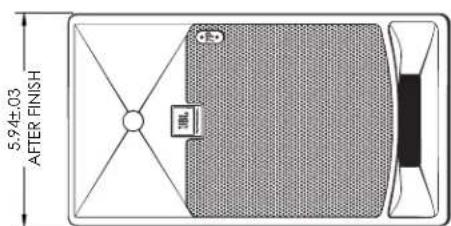
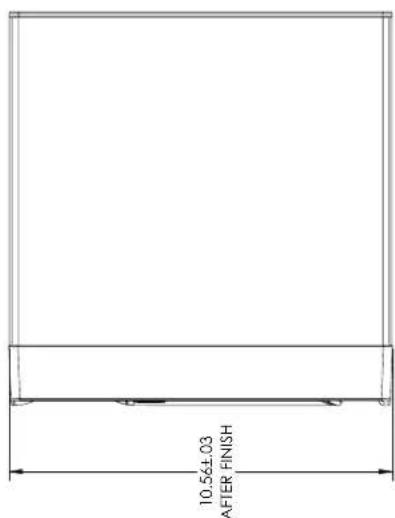
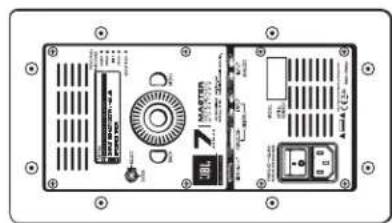
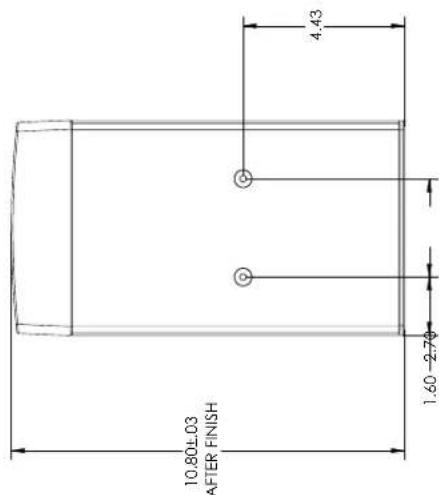
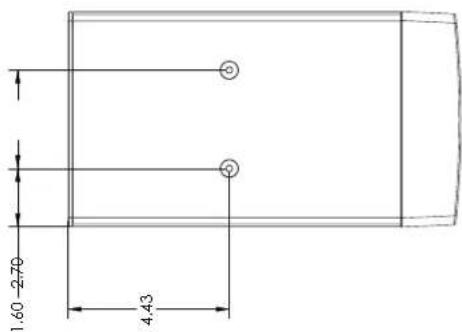
NOTES:
MOUNTING POINTS: 4XM6 - MAXIMUM CLEARANCE IN ENCLOSURE IS 3/4 IN (19MM).
LESS THAN OR EQUAL TO 3/4 IN [19MM] IN LENGTH PLUS THICKNESS OF M
| HARMAN TITLE S/M. LSR705P | ||
| DRAWN BY: M. BEC DAS: 12340000000000000000000000000000000000000000000000000000000000000000000000000000000000000000000000000000 | DATE: 2022-12-29 | ISSUED BY: 00224793 |
| PART NUMBER | DESCRIPTION |
| LSR708P SALES MODEL, LSR708P | |
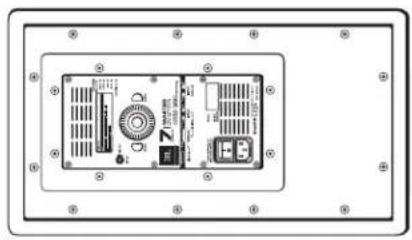
natural_image
Front view of a device rear panel with labeled ports and indicators (no readable text or symbols)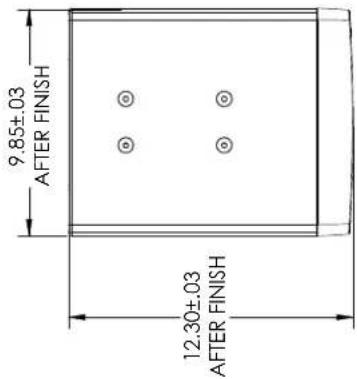
NOTES:
MOUNTING POINTS: 8XMB - MAXIMUM CLEARANCE IN ENCLOSURE IS 3/4 IN (19MM).
USE DNL Y LOAD-RATED FASTENERS. RECOMMENDED FASTENER LENGTH: LESS THAN OR EQUAL TO 3/4 IN (19MM) IN LENGTH PLUS THICKNESS OF MOUNTING PLATE
Register your product online at www.jblpro.com/registration
On The World Wide Web:
www.jblpro.com
PROFESSIONAL CONTACTS, OUTSIDE THE USA:
Contact the JBL Professional Distributor in your area. A complete list of JBL Professional international distributors is provided at our U.S.A. website: www.jblpro.com
EN DEHORS DES ETATS-UNIS:
The JBL Limited Warranty on professional loudspeaker products (except for enclosures) remains in effect for five years from the date of the first consumer purchase. JBL amplifiers are warranted for three years from the date of original purchase. Enclosures and all other JBL products are warranted for two years from the date of original purchase.
WHO IS PROTECTED BY THIS WARRANTY?
Your JBL Warranty protects the original owner and all subsequent owners so long as: A.) Your JBL product has been purchased in the Continental United States, Hawaii or Alaska. (This Warranty does not apply to JBL products purchased elsewhere except for purchases by military outlets. Other purchasers should contact the local JBL distributor for warranty information.); and B.) The original dated bill of sale is presented whenever warranty service is required.
WHAT DOES THE JBL WARRANTY COVER?
Except as specified below, your JBL Warranty covers all defects in material and workmanship. The following are not covered: Damage caused by accident, misuse, abuse, product modification or neglect; damage occurring during shipment; damage resulting from failure to follow instructions contained in your Instruction Manual; damage resulting from the performance of repairs by someone not authorized by JBL; claims based upon any misrepresentations by the seller; any JBL product on which the serial number has been defaced, modified or removed.
WHO PAYS FOR WHAT?
JBL will pay all labor and material expenses for all repairs covered by this warranty. Please be sure to save the original shipping cartons because a charge will be made if replacement cartons are requested. Payment of shipping charges is discussed in the next section of this warranty.
HOW TO OBTAIN WARRANTY PERFORMANCE
If your JBL product ever needs service, write or telephone us at JBL Incorporated (Attn: Customer Service Department), 8500 Balboa Boulevard, PO. Box 2200, Northridge, California 91329 (818/893-8411). We may direct you to an authorized JBL Service Agency or ask you to send your unit to the factory for repair. Either way, you'll need to present the original bill of sale to establish the date of purchase. Please do not ship your JBL product to the factory without prior authorization. If transportation of your JBL product presents any unusual difficulties, please advise us and we may make special arrangements with you. Otherwise, you are responsible for transporting your product for repair or arranging for its transportation and for payment of any initial shipping charges. However, we will pay the return shipping charges if repairs are covered by the warranty.
LIMITATION OF IMPLIED WARRANTIES
ALL IMPLIED WARRANTIES, INCLUDING WARRANTIES OF MERCHANTABILITY AND FITNESS FOR PARTICULAR PURPOSE, ARE LIMITED IN DURATION TO THE LENGTH OF THIS WARRANTY.
EXCLUSION OF CERTAIN DAMAGES
JBL'S LIABILITY IS LIMITED TO THE REPAIR OR REPLACEMENT, AT OUR OPTION, OF ANY DEFECTIVE PRODUCT AND SHALL NOT INCLUDE INCIDENTAL OR CONSEQUENTIAL DAMAGES OF ANY KIND. SOME STATES DO NOT ALLOW LIMITATIONS ON HOW LONG AN IMPLIED WARRANTY LASTS AND/OR DO NOT ALLOW THE EXCLUSION OF INCIDENTAL OR CONSEQUENTIAL DAMAGES, SO THE ABOVE LIMITATIONS AND EXCLUSIONS MAY NOT APPLY TO YOU. THIS WARRANTY GIVES YOU SPECIFIC LEGAL RIGHTS, AND YOU MAY ALSO HAVE OTHER RIGHTS, WHICH VARY, FROM STATE TO STATE.
JBL Professional
8500 Balboa Boulevard
Northridge, CA 91329 USA
Visit us online at www.jblpro.com
Hear the truth.

PROFESSIONAL
by HARMAN


- Thank you for your purchase of JBL 7 Series Powered Master Reference Monitors
- WARNING:
- Explanation of Graphic Symbols
- Contents
- 705P and 708P Features
- Each 7 Series box includes the following items:
- UNPACKING
- PLACEMENT
- ANALOG AUDIO SIGNAL CONNECTIONS
- DIGITAL AUDIO SIGNAL CONNECTIONS
- POWER CONNECTIONS
- MAKING SOUND
- FRONT VIEW
- FEATURES
- REAR PANEL
- SOFTWARE-ENABLED FEATURES:
- UTILITY
- Section 6: Troubleshooting
- TROUBLESHOOTING
- NOTES:
- On The World Wide Web:
- PROFESSIONAL CONTACTS, OUTSIDE THE USA:
- EN DEHORS DES ETATS-UNIS:
- WHO IS PROTECTED BY THIS WARRANTY?
- WHAT DOES THE JBL WARRANTY COVER?
- WHO PAYS FOR WHAT?
- HOW TO OBTAIN WARRANTY PERFORMANCE
- LIMITATION OF IMPLIED WARRANTIES
- EXCLUSION OF CERTAIN DAMAGES
- JBL Professional
Brand : JBL
Model : 7 Series 708P
Category : Monitor