
HS-2R - Wireless Earbuds NOKIA - Free user manual and instructions
Find the device manual for free HS-2R NOKIA in PDF.


| Product type | Wired FM radio headset (Pop-Port connection) |
| Brand | Nokia |
| Model | HS-2R |
| Power source | Via connected phone (Pop-Port connector) |
| Main functions | Stereo FM radio, hands-free calls, voice dialing, volume control, radio frequency display |
| Compatibility | Nokia phones with Pop-Port connector (e.g., Nokia 6100, 3100) |
| Care and cleaning | Keep dry, avoid dust and extreme temperatures, do not use chemicals, do not paint |
| Safety | Keep out of reach of children, do not open, do not use if damaged, follow phone usage instructions |
| Spare parts and repairability | Contact a Nokia authorized service center for repairs |
| General information | Compliant with directive 1999/5/EC. Manufactured in 2003. Registered trademark Nokia. |
| Connection type | Wired with Pop-Port connector |
| Buttons | Send/End button, radio power button, frequency search buttons (previous/next), volume wheel |
| Display | Single-line screen to indicate radio channel |
Frequently Asked Questions - HS-2R NOKIA
User questions about HS-2R NOKIA
0 question about this device. Answer the ones you know or ask your own.
Ask a new question about this device
Download the instructions for your Wireless Earbuds in PDF format for free! Find your manual HS-2R - NOKIA and take your electronic device back in hand. On this page are published all the documents necessary for the use of your device. HS-2R by NOKIA.
USER MANUAL HS-2R NOKIA
Nokia Radio Headset HS-2R User's Guide
9355494
Issue 2
DECLARATION OF CONFORMITY
We, NOKIA CORPORATION, declare under our sole responsibility that the product
HS-2R is in conformity with the provisions of the following Council Directive: 1999/5/EC.
A copy of the Declaration of Conformity can be found at
http://www.nokia.com/phones/declaration_of_conformity/.

Copyright © 2003 Nokia. All rights reserved.
Reproduction, transfer, distribution or storage of part or all of the contents in this document in any form without the prior written permission of Nokia is prohibited.
Nokia, Nokia Connecting People and Pop-Port are trademarks or registered trademarks of Nokia Corporation. Other product and company names mentioned herein may be trademarks or tradenames of their respective owners.
Nokia operates a policy of continuous development. Nokia reserves the right to make changes and improvements to any of the products described in this document without prior notice.
Under no circumstances shall Nokia be responsible for any loss of data or income or any special, incidental, consequential or indirect damages howsoever caused.
The contents of this document are provided "as is". Except as required by applicable law, no warranties of any kind, either express or implied, including, but not limited to, the implied warranties of merchantability and fitness for a particular purpose, are made in relation to the accuracy, reliability or contents of this document. Nokia reserves the right to revise this document or withdraw it at any time without prior notice
The availability of particular accessories may vary by region. Please check with the Nokia dealer nearest to you.
Contents
Introduction......4
Overview of the headset....5
1. Using the headset....6
Making a call 6
Answering and rejecting a call 6
Automatic answer....6
Voice dialling 7
Adjusting the earpiece volume....7
2. Using the FM radio 8
Listening to the radio 8
Call functions when using the radio....9
Care and maintenance 10
Introduction
The Nokia Radio Headset HS-2R combines a stereo FM radio unit and a headset. The Nokia Radio Headset HS-2R can be connected to compatible Nokia phones with a Pop-Port™ connector, for example Nokia 6100 ^1 and 3100. For compatibility of your Nokia phone contact your dealer or Customer Care. Using the headset, you can make and receive calls and listen to the radio while on the move or in the office. The Nokia Radio Headset HS-2R offers a possibility to listen to the radio with those mobile phones not equipped with an FM radio.
Read this user's guide carefully before using the headset. More detailed information is provided in your phone's user's guide. Do not use the present user's guide in place of your phone's user's guide, which provides important safety and maintenance information.
The present user's guide explains how to use of the headset in connection with the basic call functions and how to use the radio's FM headset.
■ Overview of the headset
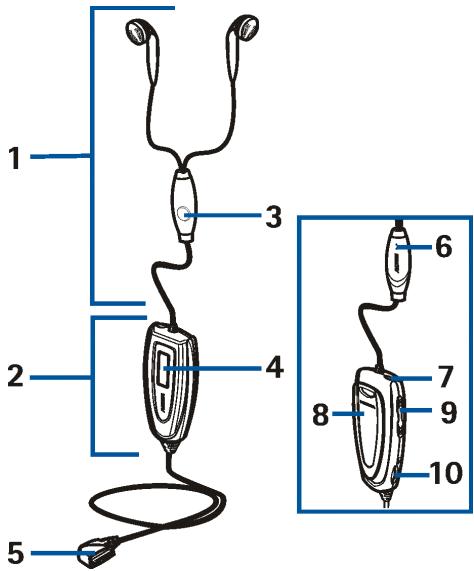
The Nokia Radio Headset HS-2R consists of the following parts:
- Headset with earplugs
- Stereo FM radio unit
- Send/end button to answer, reject or end the call. One long keypress of the send/end button activates voice dialling.
- One line display to indicate the selected radio channel.
- Pop Port connector to connect the headset to the phone.
- Microphone
-
Power key to switch the radio on or off.
-
Carrying clip with a hook for attaching the strap
-
◀ and ➕ buttons for searching radio channels.
-
Volume roller to adjust volume.
1. Using the headset
■ Making a call
When the headset is connected to your phone, press the send/end button to make a call.
To end the currently active call, press the send/end button.
You can also make and end a call by using your phone.
■ Answering and rejecting a call
Press the send/end button to answer an in-coming call. If you do not want to answer the call, press the send/end button twice briefly.
You can also answer or reject the call by using your phone.
When you receive a call, you hear a selected ringing tone on your phone.
Automatic answer
If the Automatic answer function in your phone is set to On, the phone automatically answers the incoming call after one ring.
■ Voice dialling
When no call is in progress, press and hold the send/end button until you hear a tone, indicating that you can say the name you want as a voice tag. Say the voice tag. The phone plays the voice tag and dials the corresponding phone number.
You can also activate voice dialling with your phone. For details on using voice dialling, see your phone's user's guide.
■ Adjusting the earpiece volume
During a call, turn headst's volume roller to increase or decrease the volume, or, alternatively, use the volume key on your phone.
2. Using the FM radio
The Pop-Port connection on your phone functions as the power source for your Nokia Radio Headset HS-2R. Connect the headset to your phone when you want to listen to the radio.

Note: The phone must be switched on to use this function. Do not switch on the phone when the use of a wireless phone is prohibited or when it may cause interference or danger.
■ Listening to the radio
To provide the best radio audibility, make sure that all cords of the headset are straightened out as much as possible.
- To switch the radio on, press the power key. The headset automatically selects the radio channel you have last listened to. The channel number is shown on the headset display.
- To search for a channel automatically, press either the ⌘ or ➕ button for more than one second. To search for a channel manually, press the ⌘ or ➕ button quickly.
- Press >> to search for higher frequencies, and << to search for the lower frequencies.
■ Call functions when using the radio
- When you make or receive a call, the radio is muted automatically, and you can make a call and answer the call by pressing the send/end button. When you end the call, the radio is automatically switched back on.
- To reject a call, press the right selection key on your phone. The radio is automatically switched back on.
Care and maintenance
Your headset is a product of superior design and craftsmanship and should be treated with care. The suggestions below will help you to fulfil any warranty obligations and to enjoy this product for many years.
- Keep all accessories out of the reach of small children.
- Keep the headset dry. Precipitation, humidity and all types of liquids or moisture can contain minerals that will corrode electronic circuits.
- Do not use or store the headset in dusty, dirty areas. Its moving parts can be damaged.
- Do not store the headset in hot areas. High temperatures can shorten the life of electronic devices, damage batteries, and warp or melt certain plastics.
- Do not store the headset in cold areas. When it warms up (to its normal temperature), moisture can form inside, which may damage electronic circuit boards.
- Do not attempt to open the headset. Non-expert handling may damage it.
- Do not drop, knock or shake the headset. Rough handling can break internal circuit boards.
- Do not use harsh chemicals, cleaning solvents, or strong detergents to clean the headset.
- Do not paint the headset. Paint can clog the moving parts and prevent proper operation.
If the headset is not working properly, take it to your nearest qualified service facility. The personnel there will assist you and, if necessary, arrange for service.
- Nokia Radio Headset HS-2R User's Guide
- DECLARATION OF CONFORMITY
- Contents
- Introduction......4
- Using the headset....6
- Using the FM radio 8
- Care and maintenance 10
- Introduction
- ■ Overview of the headset
- Using the headset
- ■ Making a call
- ■ Answering and rejecting a call
- Automatic answer
- ■ Voice dialling
- ■ Adjusting the earpiece volume
- Using the FM radio
- ■ Listening to the radio
- ■ Call functions when using the radio
- Care and maintenance
Brand : NOKIA
Model : HS-2R
Category : Wireless Earbuds