
KX-HDV800 - Speakers PANASONIC - Free user manual and instructions
Find the device manual for free KX-HDV800 PANASONIC in PDF.
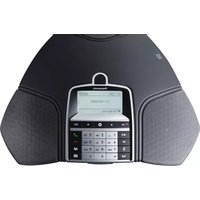


| Product Type | Conference Speakerphone |
| Brand | Panasonic |
| Model | KX-HDV800 |
| Dimensions (W x D x H) | 275 x 240 x 77 mm |
| Weight | 1 kg |
| Color | Liquorice Black |
| Display | Illuminated Graphics LCD, 128 x 64 px |
| Keypad | Alphanumerical (0-9, *, on, off, mute, hold, volume up/down, 5 menu navigation keys, line mode, conference guide) |
| Memory Card Support | SD/SDHC up to 32 GB (35 hours recording per GB) |
| Network Connectivity | Ethernet 10/100 Base T (RJ45), PoE IEEE 802.3af Class III |
| Bluetooth | Bluetooth v4.0, Class 1, BLE support |
| NFC | NFC Forum Type 4, ISO/IEC 14443 Type A for simplified pairing |
| Microphone | 360° Omnidirectional, reception area up to 30 m² (>10 people) |
| Speaker Frequency Range | 200 – 7000 Hz |
| Speaker Volume | 90 dB SPL at 0.5 m |
| Audio Codecs | G722, G711 A-law, G711 μ-law, G729ab |
| Compatibility | Panasonic KX-NS Version 8.0 or later, KX-NSX1000/2000 Version 4.11 or later |
| Expansion Microphone Ports | 2 x RJ11 (4P4C) for optional KX-HDV801 |
| Aux Port | RJ11 (4P4C) for wireless headset |
| USB Port | USB 2.0 Mini B |
| Security Slot | Kensington lock compatible |
| Power Supply | PoE (IEEE 802.3af) or optional AC adapter (KX-A424) |
| Power Consumption | 3.2 W (standby), 5.5 W (talking) |
| Configuration | Via integrated web server (HTTP/HTTPS) with separate user and admin login |
| Directory | Internal phonebook: 1,000 entries per profile (4 profiles), LDAP support |
| Cleaning and Maintenance | Wipe with a soft dry cloth; avoid liquid cleaners |
| Safety Precautions | Read Important Information Leaflet/User Guide before use |
| Spare Parts / Repairability | Expansion microphones (KX-HDV801) and AC adapter (KX-A424) available as options |
Frequently Asked Questions - KX-HDV800 PANASONIC
User questions about KX-HDV800 PANASONIC
0 question about this device. Answer the ones you know or ask your own.
Ask a new question about this device
Download the instructions for your Speakers in PDF format for free! Find your manual KX-HDV800 - PANASONIC and take your electronic device back in hand. On this page are published all the documents necessary for the use of your device. KX-HDV800 by PANASONIC.
USER MANUAL KX-HDV800 PANASONIC
The clear choice for better collaboration

Simple, effortless, and quick start conference calls
Dive straight into clear audio
In today's busy business world, you don't want to waste time trying to figure out what to do or who to call in order to start conference calls. Joining a meeting with the KX-HDV800 couldn't be simpler: Just one click!
In most conference rooms there are sound-absorbing elements. In the KX-HDV800 conference phone, we have embedded the best of current technology to reduce noise and deliver a crystal-clear HD audio experience. All this made possible using an advanced 360° omnidirectional microphone.
Intuitive operation in the palm of your hand
The Panasonic Conference App is your capable meeting assistant. Managing meetings is much more personal and direct when you're holding the user interface in your hand. Intuitively call contacts straight from your local address book, create conference groups, adjust the volume and more during meetings by using your mobile or tablet. You no longer need to get up and operate the keypad of the conference phone that is far away at the centre of the table.
The KX-HDV800 and Panasonic Conference App work together to bring One Touch Conferencing into the conference room. A single touch is all it takes to start or join a phone meeting that is scheduled in your calendar.
Experience a new world of versatility
■ Use with an SD card
Conference calls can be very chaotic, and not everyone is necessarily taking notes on what's being said and agreed upon. By using the KX-HDV800's built-in SD memory card port, you can record any conference call on an SD/SDHC card (32 GB max., sold separately) for later referencing. Internal meetings can also be recorded by using the KX-HDV800 as a reliable Dictaphone. Capacity-wise, it's as easy as it gets with 35 hours of recording per GB.
■ Use with external equipment
A single KX-HDV800 is capable of handling small-sized conference rooms up to 30 m². Moreover, a wide array of ports allows KX-HDV800 to connect to extra microphones and wireless headsets, making it the ideal IP conference phone for rooms of all sizes up to large auditoriums.
■ Use with a computer
The KX-HDV800 transforms your computer into a piece of high-quality conferencing equipment. Unlike normal computer speakers and microphones, the KX-HDV800 provides full-duplex (two-way audio) and efficient echo cancellation and static noise reduction.
By connecting the KX-HDV800 to a computer that has a UC application installed (such as Panasonic IP Softphone or UC Pro), the computer allows the KX-HDV800 to process the audio, improving the sound quality when using such an application.
Locations

Specifications
| General | |
| Compatible PBX KX-NS Version 8.0 or laterKX-NSX1000/2000 Version 4.11 or later | |
| Dimensions(Width × Depth × Height) | 275 × 240 × 77 mm |
| Weight 1 kg | |
| Colour Liquorice black | |
| Display screen Illuminated graphics (LCD), 128 × 64 px | |
| Keypad Alphanumerical 0-9, *, on, off, mute, hold, volume up, volume down, 5 buttons for menu navigation, line mode, conference guide | |
| Anti-theft protection Kensington security slot | |
| Memory Support for SD and SDHC memory cards(Recording capacity 35 h/GB) | |
| PoE/AC adapter 3.2 W (Standby) 5.5 W (Talking) | |
| Bluetooth® specifications | |
| Frequency band 2.402 - 2.480 GHz | |
| Maximum power output 0.01 W | |
| Connectivity | |
| Network connection Modular 8P8C (RJ45), Ethernet 10/100 Base T | |
| USB connection USB 2.0 Mini B. | |
| Bluetooth Bluetooth v4. Support for Bluetooth Low Energy Profiles, GAP and GATT, Class 1. | |
| NFC Support for simplified Bluetooth pairing and connection using NFC (near-field communications). NFC Forum Type 4 and ISO/IEC 14443 Type A support. | |
| Power supply | IEEE 802.3af Power over Ethernet, Class III.Optional: AC adapter 100 - 240 V AC/12 V DC |
| Extra microphones | 2 modular 4P4C (RJ11) |
| Auxiliary | Modular 4P4C (RJ11) for wireless headset |
| Network and communication | |
| IP stack | IPv4 |
| Network addressing | DHCP and static IP |
| NAT traversal | STUN, ICE and TURN |
| Connection protocol SIP 2.0 (RFC 3261 and companion RFCs) | |
| Transport UDP, TCP, TLS and SIPS | |
| Security | TLS v1.0, TLS v1.1, TLS v1.2 |
| Quality of service | DiffServ, VLAN |
| Audio support | Codecs: G722, G711 A-law, G711 μ-law, G729ab |
| DTMF tone generation | RFC2833, SIP INFO, In-band |
| Time servers | NTP and SNTP |
| Daylight saving | Configurable for automatic adjustments. |
| Configuration | Via integrated web server |
Important
- Safety Precaution: Carefully read the Important Information Leaflet/User Guide before using this product.
| Configuration and provisioning | |
| Configuration | Via integrated web server, HTTP or HTTPS Separate user and administrator login for secure configuration. |
| Device management | Support for device management for easy configuration and updating of multiple conference phones. |
| Directory | |
| Internal phone book | 1,000 entries per profile (4 password protected profiles) Export/import of directory Call list |
| External directory | Support for LDAP |
| Sound | |
| Microphone | Omnidirectional, 360° |
| Reception area | Up to 30 m2, >10 people |
| Speaker Frequency band 200 – 7000 Hz | |
| Volume 90 dB SPL 0.5 m | |
| Equalizer | Three pitches: soft, neutral, bright |
| Environment | |
| Temperature: | 0 – 40 °C |
| Relative humidity: | 20 – 80 % condensation free |
| Recommended acoustic conditions: | Reverberation period: 0.5 S Rt 60Background noise: 45 dBA |
*The Bluetooth® word mark is a registered trademark owned by Bluetooth SIG, Inc. and any use of such marks by Panasonic is under license.
Optional equipment
- AC adaptor (KX-A424)
- Expansion microphone ×2 pcs (KX-HDV801)

KX-HDV801
- The images shown of the base unit display and lamps are composite images.
- The actual product may vary slightly from the photograph.
- Weights and dimensions are approximate.
- Design and specifications are subject to change without notice.
- This product may be subject to export control regulations.
- Please contact your nearest Panasonic sales company to confirm the product availability.

Brand : PANASONIC
Model : KX-HDV800
Category : Speakers