
WR-040 - Microphone Steren - Free user manual and instructions
Find the device manual for free WR-040 Steren in PDF.


| Product Type | Wired Dynamic Microphone |
| Brand | Steren |
| Model | WR-040 |
| Dimensions (approx.) | 25 cm (length) x 5 cm (diameter) |
| Weight (approx.) | 300 g |
| Frequency Response | 50 Hz - 15 kHz |
| Impedance | 600 Ω |
| Connector Type | XLR (3-pin) |
| Cable Length (approx.) | 3 m (10 ft) |
| Polar Pattern | Cardioid |
| Power Source | No external power required (dynamic) |
| On/Off Switch | Yes, built-in |
| Compatible Devices | PA systems, amplifiers, audio interfaces with XLR input |
| Maintenance & Cleaning | Wipe with a dry, soft cloth; avoid moisture and solvents |
| Safety Precautions | Do not expose to liquids or extreme temperatures; keep away from magnetic fields |
| Repair & Spare Parts | No user-serviceable parts; contact Steren service center |
| Warranty | 1 year limited warranty against manufacturing defects |
Frequently Asked Questions - WR-040 Steren
User questions about WR-040 Steren
0 question about this device. Answer the ones you know or ask your own.
Ask a new question about this device
Download the instructions for your Microphone in PDF format for free! Find your manual WR-040 - Steren and take your electronic device back in hand. On this page are published all the documents necessary for the use of your device. WR-040 by Steren.
USER MANUAL WR-040 Steren
natural_image
Illustration of a black handheld device with a circular top and control buttons, set against a blue background (no text or symbols visible)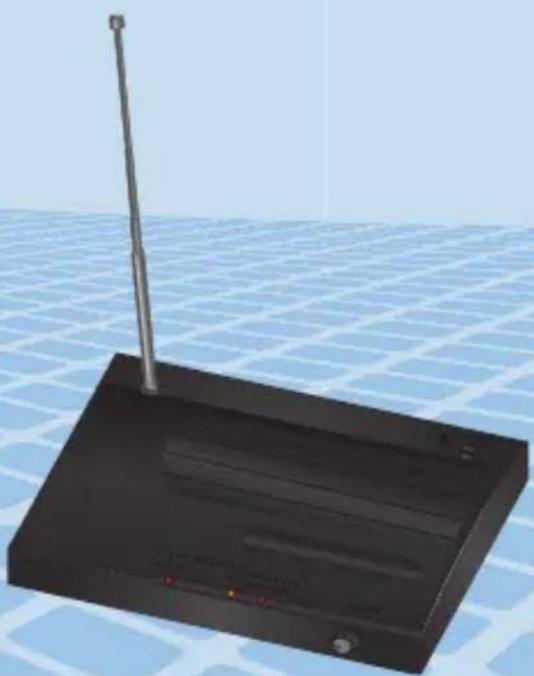
natural_image
3D rendering of a black electronic device with a vertical antenna and red indicator lights, set against a grid background (no text or symbols visible)natural_image
Diagram of a cylindrical device with red arrows indicating rotation, no text or symbols present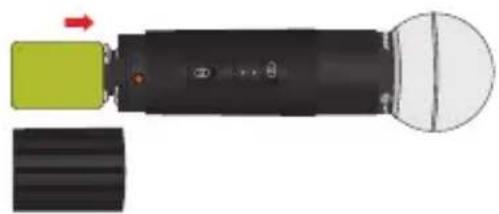
natural_image
Diagram of a device with a green component and a black body, showing a red arrow indicating direction (no text or symbols)STEREN PRODUCTO EMPACADO S.A. DE C.V.
Autopista México-Querétaro. Km 26.5 Sin número, Nave Industrial 3-A, Col. Lomas de Boulevares, Tlalnepantla de Baz, Estado de México, C.P. 54020, RFC: SPE-941215-H43

STEREN
WR-040
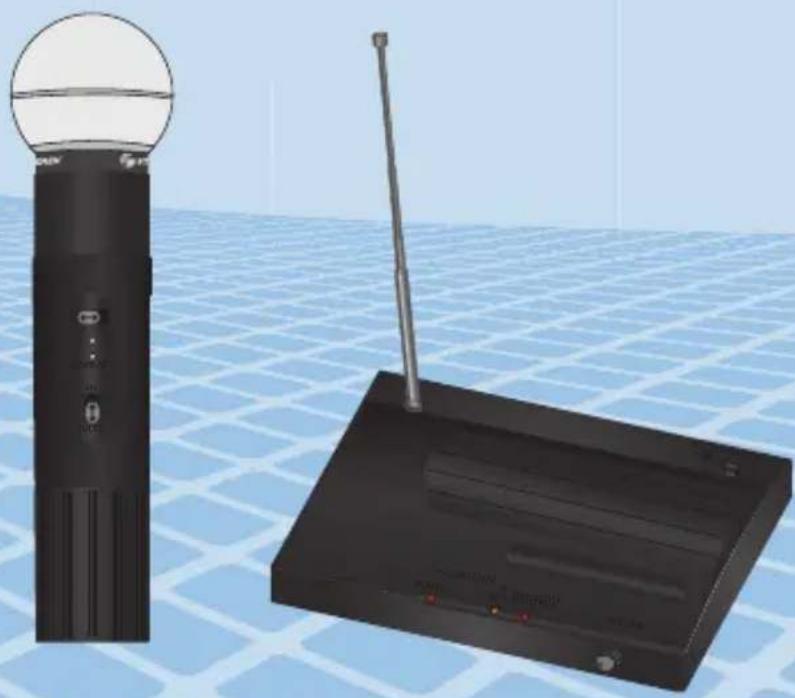
VHF wireless microphone system
natural_image
Illustration of a black remote control tower and a black wireless router on a grid-patterned surface (no text or symbols)Instruction manual
0819N
V0.1
VHF WIRELESS MICROPHONE SYSTEM
WR-040
Thank You on purchasing your new Steren product.
This manual includes all the feature operations and troubleshooting necessary to install and operate your new Steren's Professional VHF wireless microphone system.
Please review this manual thoroughly to ensure proper installation and operation of this product. For support, shopping, and everything new at Steren, visit our website:
www.steren.com

The instructions of this manual are for reference about the product. There may be differences due to updates.
Please check our website (www.steren.com) to obtain the latest version of the instruction manual.
IMPORTANT
- Do not use or store the equipment near wet places.
- Do not bump or drop the microphone.
- Clean only with a soft, dry cloth.
- Do not use the microphone if it is exposed to dust or moisture, extreme temperatures or mechanical vibrations.
1. HIGHLIGHTS
- Wide response range
• Power on, reception and transmission indicators.
• 4-section antenna
• Volume control. - Up to 50 metres.
• The microphone works in VHF band, in a range between 229 and 279 MHz.
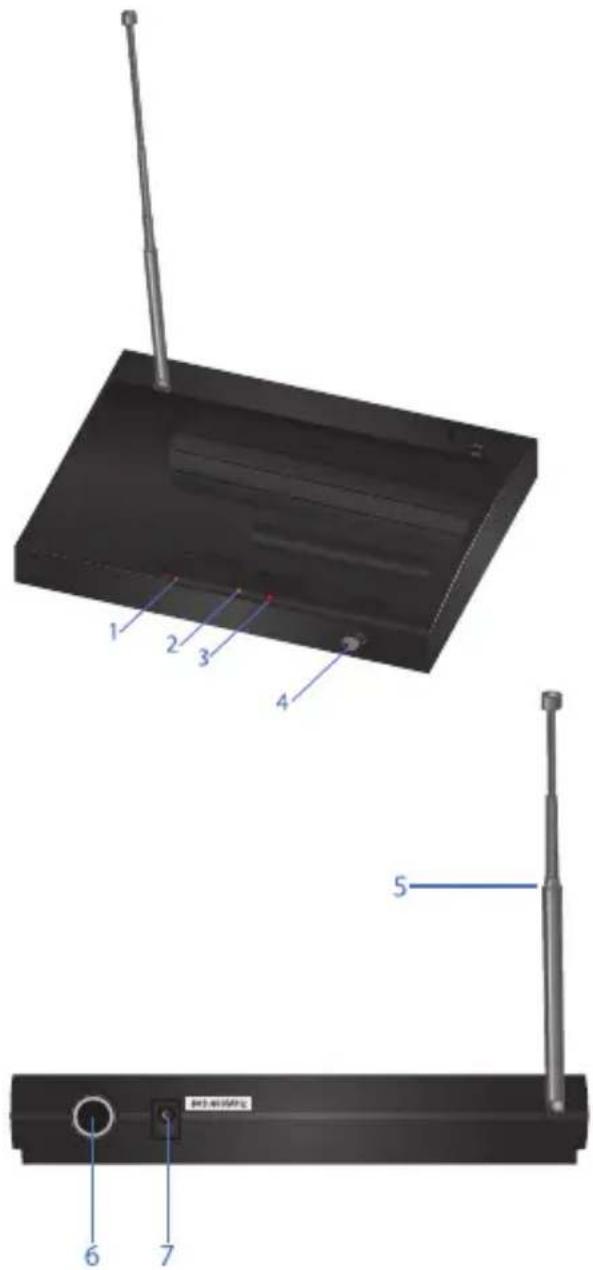
2. CONTROLS
Receiver
Front panel
- Power LED indicator.
- Microphone on LED indicator
- LED indicator audio signal.
- Volume control.
Rear panel
- Receiver antenna.
- Output audio
- AC IN
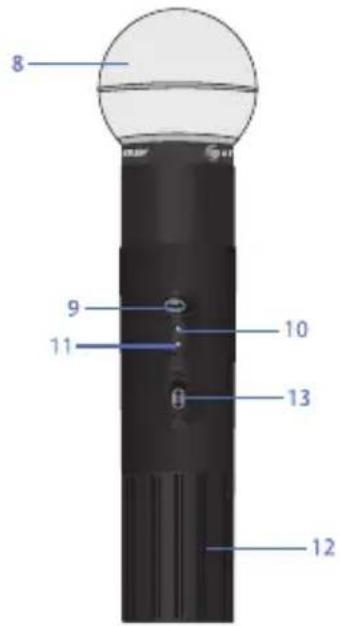
Microphone
-
Grill: Protects the microphone cartridge and helps reduce "breathy" and wind noise pick-up.
-
Power switch.
-
Microphone on LED indicator.
-
Low battery LED indicator.
-
Battery compartment
-
Power switch / mute: Turn on the microphone or put on silent mode.
3. BATTERY INSTALLATION
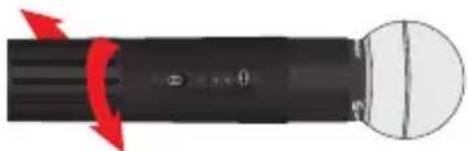
- Open the compartment lid.
natural_image
Diagram of a black cylindrical device with red arrows indicating rotation or force direction, and a white circular component on the right (no text or symbols)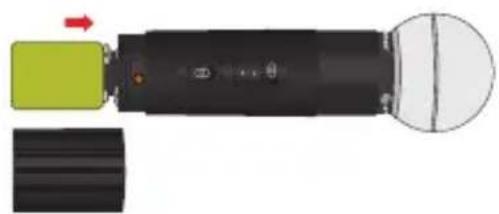
natural_image
Diagram of a mechanical device with a green component and black shaft, showing internal components and a white circular housing (no text or symbols)-
Place a 9 V type battery. Pay attention to polarity.
-
Place the cover again.
4. INSTRUCTIONS
Before turning on the device, make sure the microphone volume is at the minimum level. Loud sounds can cause damages in the microphones or ears.
- Place the receiver on a flat surface.
- Connect the AC power adapter to the receiver's DC IN connector and to an AC electrical outlet.
- Connect the receiver to a sound system, mixer or amplifier's using a 6.3 mm connector cable.
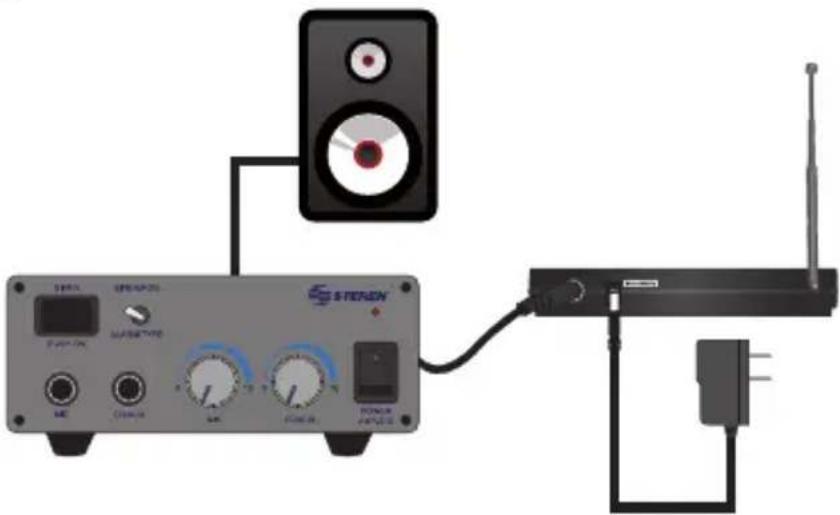
- Place the receiver's antenna in perpendicular and extend it.
- Press the power button. The LED indicator will light up.
- Turn the microphone on and adjust the volume level.
- Take out the battery when you do not use the microphone.
5. SPECIFICATIONS
Microphone
Input: 9 V == (rounder rectangular prism)
Frequency response: 40 Hz to 16 kHz
Total harmonic distortion (THD): <0.5 %
Power converter
Input: 100-240 V\~ 60 Hz 8 W
Output: 12 V = 400 mA
Receiver
Input: 12 - 15 ~V = 400 ~mA

Product design and specifications are subject to change, without notice.
Product: VHF wireless microphone system
Part number: WR-040
Brand: Steren
WARRANTY
This Steren product is warranted under normal usage against defects in workmanship and materials to the original purchaser for one year on the other parts from the date of purchase
CONDITIONS
- This warranty card with all the required information, invoice or purchase ticket, product box or package, and product, must be presented when warranty service is required.
- If the product is in the warranty time, the company will repair it free of charge. The supplier will pay for transportation charges.
- The repairing time will not exceed 30 natural days, from the day the claim was received.
- Steren sell parts, components, consumables and accessories to customer, as well as warranty service, at any of the addresses mentioned later.
THIS WARRANTY IS VOID IN THE NEXT CASES:
If the product has been damaged by an accident, acts of God, mishandling, leaky batteries, failure to follow enclosed instructions, improper repair by unauthorized personnel, improper safe keeping, among others.
a) The consumer can also claim the warranty service in the purchase establishment.
b) If you lose the warranty card, we can reissue it, if you show the invoice or purchase ticket.
In case your product fails or have questions, please contact your nearest dealer.
If you are in Mexico, please call to our Call Center.
01 800 500 9000
ELECTRÓNICA STEREN S.A. DE C.V.
Biólogo Maximino Martínez No. 3408, San Salvador Xochimanca, Azcapotzalco Ciudad de México 02870, RFC: EST850628-K51
STEREN PRODUCTO EMPACADO S.A. DE C.V.
Autopista México-Querétaro. Km 26.5 Sin número, Nave Industrial 3-A, Col. Lomas de Boulevares, Tlalnepantla de Baz, Estado de México, C.P. 54020, RFC: SPE-941215-H43

STEREN
Help us to improve this instruction manual, call us:

01800 500 9000
Customer Service Center
www.steren.com
- VHF wireless microphone system
- IMPORTANT
- HIGHLIGHTS
- CONTROLS
- Receiver
- Front panel
- Rear panel
- Microphone
- BATTERY INSTALLATION
- INSTRUCTIONS
- SPECIFICATIONS
- Power converter
- Product design and specifications are subject to change, without notice.
- WARRANTY
- CONDITIONS
- THIS WARRANTY IS VOID IN THE NEXT CASES:
- STEREN
Brand : Steren
Model : WR-040
Category : Microphone