GT200 - Flash Geekoto - Free user manual and instructions
Find the device manual for free GT200 Geekoto in PDF.


User questions about GT200 Geekoto
0 question about this device. Answer the ones you know or ask your own.
Ask a new question about this device
Download the instructions for your Flash in PDF format for free! Find your manual GT200 - Geekoto and take your electronic device back in hand. On this page are published all the documents necessary for the use of your device. GT200 by Geekoto.
USER MANUAL GT200 Geekoto
text_image
GEEKOTO GT-200 INSTRUCTION MANUAL FCE CE RoHS Made in China support@geekoto.comContents
- 01 - Foreword
- 02 - Warning
- 03 - Part Name
- 09 - Battery
- 10 - Power management
- 10 - Modeling lamp
- 10 - Wireless mode selection
- 11 - TTL Flash mode
- 12 - M Manual
- 13 - S1/S2 Flash mode
- 14 - Multi-frequency flash mode
- 16 - Group setting / channel setting
- 17 - Wireless flash shooting
- 19 - C.Fn: Set custom features
- 20 - Specifications
Foreword
Before using this product
Please read this manual carefully to ensure that you can use it safely. Please save this manual for future reference.
Gt200 flash is a wireless TTL flash with built-in 2.4G wireless 阵 system, with this C series trigger can remotely control the function of TTL/M/Multi mode of GT200 flash; at the same time, it can also be used in combination with the TTL master-slave function flash, TTL Outdoor flash speedspeedlite and the TTL studio light. With the GT200 flash, you'll get a simpler shooting experience with complex lighting changes. Accurate flash exposure is automatically obtained for comfortable shooting.
The GT200 is a portable flash solution consisting of a flash, wireless remote trigger, and various light effects accessories. Program. GT200 flash, compact and portable, powerful, built-in battery capacity, support full speed, for Outdoor shooting and live shooting provide good light quality. Portable and efficient light quality, it is free business An ideal source for photographers, journalists, enthusiasts, photographers, and wedding documentary photographers.
Product highlights :
Wireless TTL system is fully compatible: With built-in GEEKOTO 2.4G wireless system. It can support Canon E-TTL, Nikon i-TTL and other TTL automatic flash system; can be used as a slave unit of a wireless multi-lamp flash system, shooting is fast and straightforward.
Sturdy, compact and portable: The flash power is up to 200W, making it easy to carry.
Replaceable lamp holder, a variety of light-emitting methods: Easy to carry, with multiple sets of optical lenses, uniform light, LED modeling lights.
High-quality AV display: intuitive display and smooth operation.
Built-in 2.4G wireless transmission: 50 meters ultra-long distance.
Studio light quality: power up to 200Ws.
Creative unlimited professional power supply: use well-known Korean brand battery, large capacity power box (14.4V/2900mAh), 0.01-2.1s callback, full light 500 flashes or more.
Warning
Wireless control: Built-in GEEKOTO 2.4G wireless system, can realize TTL control, external can use GEEKOTO C-1 (Commander) remote control, wireless control flash power size and trigger flashing simultaneously; while leaving 3.5mm sync jack, can be realized A variety of synchronous triggering methods.
Dimming accuracy: The power adjustment range is broad (1/1-1/128), and the 22-level precision is fine-tuned.
The color temperature is constant: the color temperature is maintained in the range of 5600 ± 200K .
Advanced features: support 1/8000 second high-speed synchronization, high-speed strobe, high-speed remote control synchronization trigger.
▲ Please keep it dry.
Do not disassemble the product. If the product fails, it must be inspected and repaired by our company or authorized maintenance personnel.
Do not allow children to come into contact with this product
Do not disassemble, impact, crush or put into fire. If there is severe swelling, do not continue to use it. Do not place in a high-temperature environment exceeding 50 degrees.
Do not flash the flash head directly against the human eye (especially the baby's eyes), as it may cause visual impairment in a short period of time.
Do not use the flash near chemicals, flammable gases, or other special substances that may be sensitive to the flash of the flash speedlite under special conditions and may cause the fire or electromagnetic interference. In these cases, please pay attention to the relevant warning signs.
This product is not waterproof. Please pay attention to waterproof in rainy and humid environments.
If any malfunction occurs, turn off the flash immediately.
Name of Parts
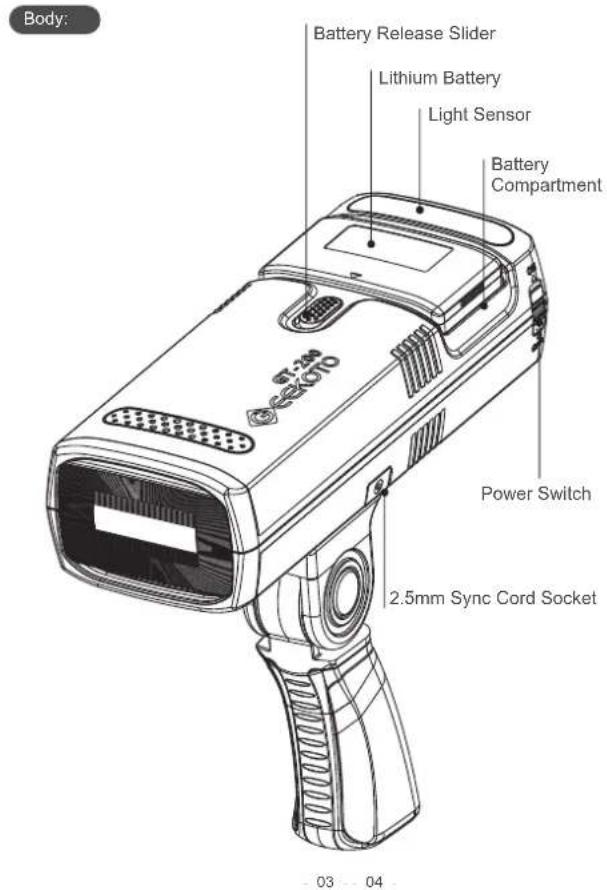
text_image
Body: Battery Release Slider Lithium Battery Light Sensor Battery Compartment Power Switch 2.5mm Sync Cord Socket 03 04Name of Parts
Body:
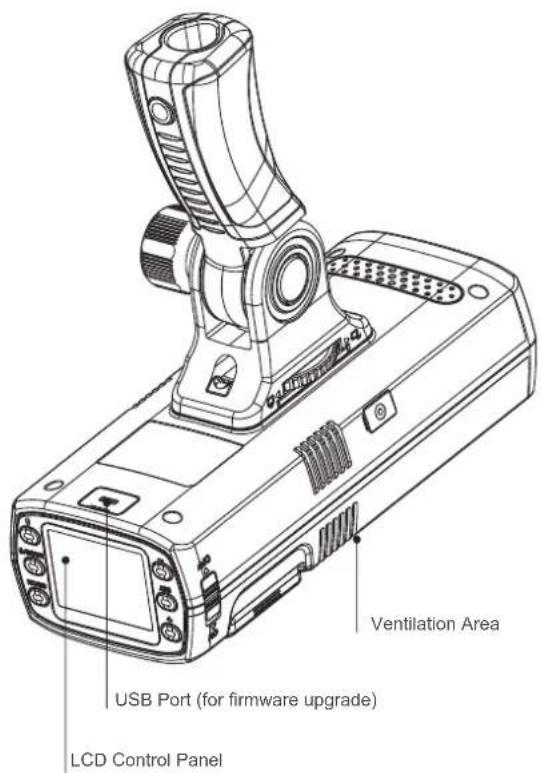
text_image
Ventilation Area USB Port (for firmware upgrade) LCD Control PanelName of Parts
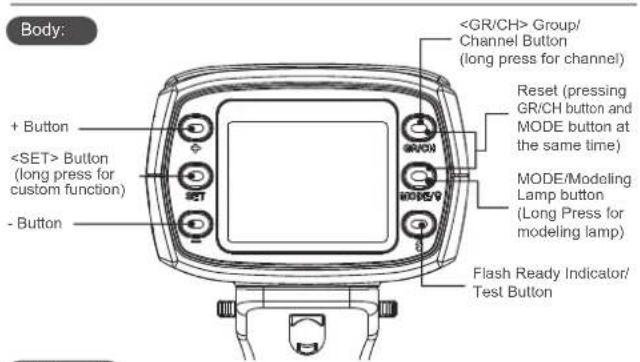
text_image
Body: + ButtonAV Panel
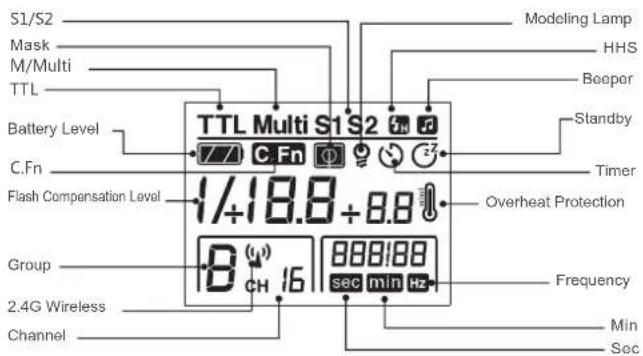
text_image
S1/S2 Mask M/Multi TTL Battery Level C.Fn Flash Compensation Level Group 2.4G Wireless Channel TTL Multi S1 S2 7/7 C Fn 1/18.8 + 8.8 Overheat Protection Frequency sec min Hz Modeling Lamp HHS Beeper Standby Timer Min Sec
•The display will only show the settings currently applied.
- When button is pressed, the AV panel will illuminate automatically.
Name of Parts
(1)TTL Auto-flash
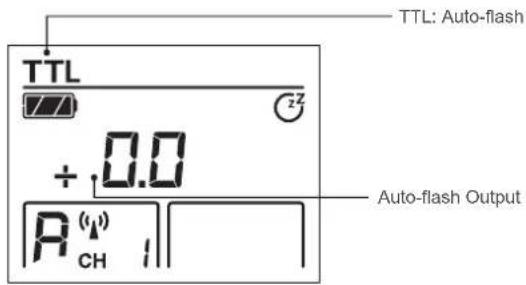
text_image
TTL: Auto-flash + 0.0 Auto-flash Output A CH(2)M Manual Flash
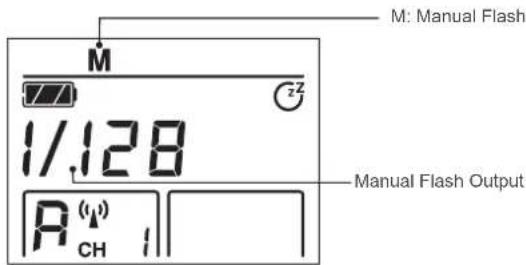
text_image
M: Manual Flash 1/128 R CH Manual Flash OutputName of Parts Name of Parts
(3)Multi Strobe Flash
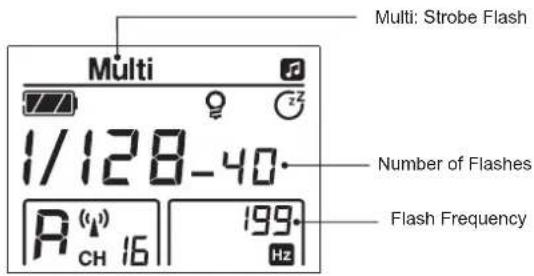
text_image
Multi: Strobe Flash 1/128-40 Number of Flashes R (q) CH 16 199 Hz Flash Frequency(4) S2 Slave Mode
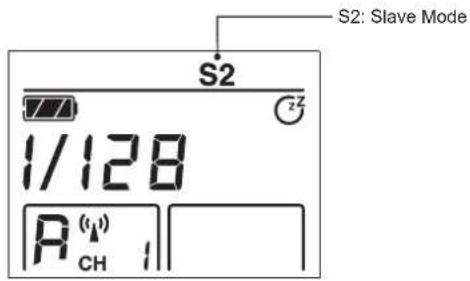
text_image
S2: Slave Mode 1/128 R(1) CH 1(4)S1 Slave Mode
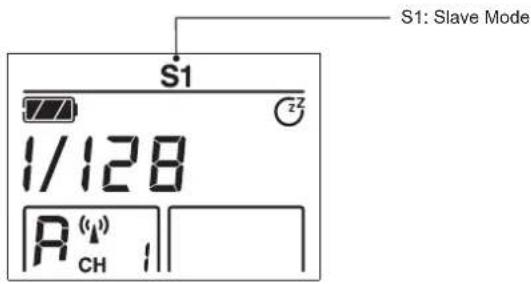
text_image
S1: Slave Mode S1 1/128 R(ω) CH 1(5)Custom Mode
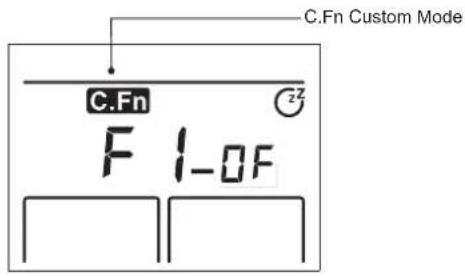
text_image
C.Fn Custom Mode F 1-0FLithium Battery Power Management
Features
- This flash unit uses Li-ion polymer battery which has a long service life. When the battery is fully charged, it will offer 500 times of charge and discharge cycles.
- Battery is safe and reliable. The inner circuit of the battery is designed against over-charge, over-discharge, over-current and short circuit.
- This battery takes only four hours to be fully charged.
Cautions
- Do not short circuit.
- Do not expose to moisture or submerge into water. This battery is not waterproof.
- Keep out of reach of children.
4.Do not charge the battery continuously over 24 hours. - Store in dry, cool, ventilated places.
6.Do not dispose in fire. - Scrapped batteries should be disposed of according to local regulations.
- Please charge the battery to 60% for long-term storage.
- If the battery has been stored for over 3 months, please recharge the battery.
Battery Level Indication
Make sure the battery pack is securely loaded in the flash. Check the battery level indication on the AV panel to see the remaining battery level.
| Battery Level Indication on the AV Panel | Meaning |
| 3 Bars | Full battery |
| 2 Bars | Medium battery |
| 1 Bar | Low battery |
| Blank | Lower battery, please recharge. |
| Blinking | Battery exhausted, the flash will auto power off in 1 minute.Note: when in this state, Please recharge the battery as soon as possible (within 10 days).Then the battery can be used or be placed for long periods. |
ON/OFF Power Switch controls the on/off of the flash unit, please turn off the power when not in use. This product is designed with automatic standby feature, it will go to standby mode when not operated, (approx. 30/60 minutes).
Modeling Lamp
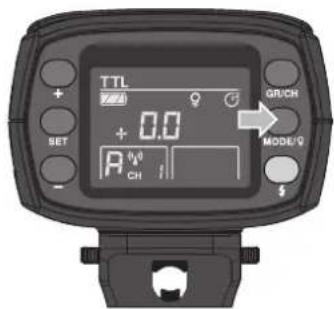
text_image
TTL + 0.0 SET A CH GR/CH MODE/QLong press
Wireless Flash Mode
GT-200 can only be set as a slave unit (receiver en d). Long press the wireless selection button for 2 seconds to switch the radio transmission function.
| Wireless Mode | Flash Mode |
| OFF | M / Multi |
| Radio Transmission | TTL / M / Multi |
TTL Autoflash
This flash has three flash modes: TTL, Manual (M), and Multi (Strobe). In TTL mode, the camera and the flash will work together to calculate the correct exposure for the subject and the background.
Press < Mode/ ♀> button to cycle through all three flash modes.
TTL Mode
Press
Flash Compensation
With flash compensation function, this flash can adjust from -3 to +3 in 1/3rd sto ps. It is useful in situations where minor adjusting of the TTL system is needed based on the environment.
Setting Flash Compensation:
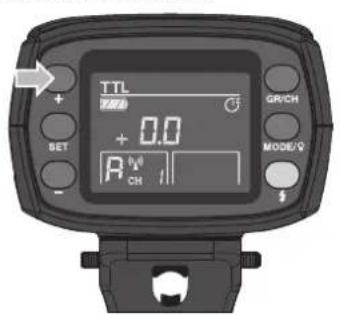
text_image
TTL SET + 0.0 R CH GR/CH MODE/9 +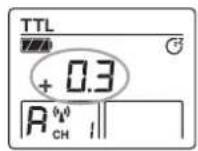
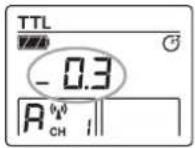
- Press <+>, "+0.3" means 1/3 step, "+0.7" means 2/3 step.
- Press <->, "-0.3" means 1/3 step, "+0.7" means 2/3 step.
- To cancel flash compensation, set the amount to "+0".
High-Speed Sync
High-Speed Sync (FP flash) enables the flash to synchronize with all camera shutter speeds. This is convenient when you want to use aperture priority for fill-flash portraits.

- With high-speed sync, the faster the shutter speed, the shorter the effective flash range.
- Multi-strobe mode cannot be set in high-speed sync mode.
Manual Flash
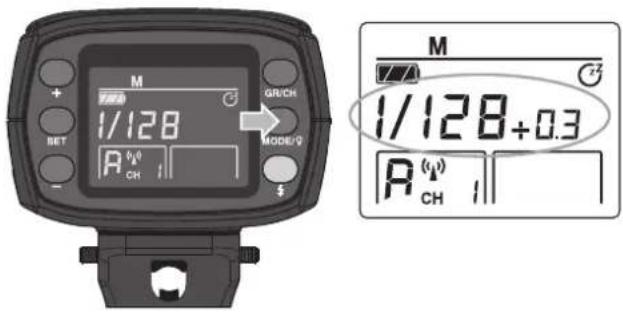
In manual mode, you can cycle through all the power output 1/128 to 1/1 in 1/3-stop increments.
For a proper exposure, please use an external flash meter or the meter within the camera.
text_image
M + BET 1/128 R CH MODE/Q $GRI/CH M 1/128+0.3 R CH 1- Press
button, until the AV panel display . - Press <+> <-> button to set desired flash output.
Flash Output Range
The following table makes it easier to see how the f/stop changes when you increase or decrease the flash output. For example, when you decrease the flash output to 1/2, 1/2-0.3, or 1/2-0.7, and then increase the flash output to more than 1/2, 1/2+0.3, 1/2+0.7, and 1/1 will be displayed.
Figures displayed when reducing the flash output level→
| 1/1-0.3 | 1/1-0.7 | 1/2-0.3 | 1/2-0.7 | 1/41 | ...... | ||
| 1/2+0.7 | 1/2+0.3 | 1/4+0.7 | 1/4+0.3 | ...... |
←Figures displayed when increasing the flash output level
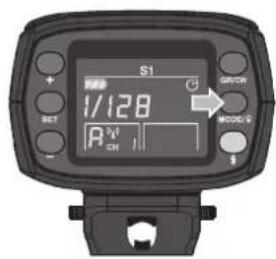
S1/S2 Flash Mode
text_image
S1 1/128 R OFF MODE V SETOptic S1 Secondary Unit Setting
Press

text_image
S2 OFF 1/128 AHz ON/OFFOptic S2 Secondary Unit Setting
Press
Multi Strobe Flash
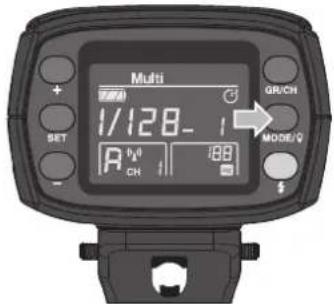
With strobe flash, a rapid series of flashes is fired. It can be used to capture multiple images of a moving subject in a single photograph. You can set the firing frequency (number of flashes per sec. expressed as Hz), the number of flashes, and the flash output.
text_image
Multi 1/128-1 A CH MODE/Q + SET GR/CH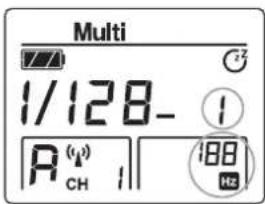
text_image
Multi 1/128- A(μ) CH 1 188 HzPress
Setting the Number of Flashes and Flash Frequency
Press
Calculating the Shutter Speed
During the strobe flash, the shutter remains open until the firing stops. Use the formula below to calculate the shutter speed and set it with the camera.
Number of Flashes / Flash Frequency = Shutter Speed
For example, if the number of flashes is 10 and the firing frequency is 5 Hz, the shutter speed should be at least 2 seconds.

To avoid overheating and deteriorating the flash head, do not use stroboscopic flash more than 10 times in succession. After 10 times, allow the camera flash to rest for at least 15 minutes. If you try to use the stroboscopic flash more than 10 times in succession, the firing might stop automatically to protect the flash head. If this happens, allow at least 15 minutes' rest for the camera flash.

- Stroboscopic flash is most effective with a highly reflective subject against a dark background.
• Using a tripod and a remote control is recommended.
- A flash output of 1/1 and 1/2 cannot be set for stroboscopic flash.
- Stroboscopic flash can be used with "buLb".
- If the number of flashes is displayed as “--”, the firing will continue until the shutter closes or the battery is exhausted. The number of flashes will be limited as shown by the following table.
Maximum Stroboscopic Flashes
| Flash output\Hz | 1 | 2 | 3 | 4 | 5 | 6-7 | 8-9 | 10 | 11 | 12-14 | 15-19 | 20-50 | 60-99 |
| 1/4 | 7 | 6 | 5 | 4 | 4 | 3 | 3 | 2 | 2 | 2 | 2 | 2 | 2 |
| 1/8 | 14 | 14 | 12 | 10 | 8 | 6 | 5 | 4 | 4 | 4 | 4 | 4 | 4 |
| 1/16 | 30 | 30 | 30 | 20 | 20 | 20 | 10 | 8 | 8 | 8 | 8 | 8 | 8 |
| 1/32 | 60 | 60 | 60 | 50 | 50 | 40 | 30 | 20 | 20 | 20 | 18 | 16 | 12 |
| 1/64 | 90 | 90 | 90 | 80 | 80 | 70 | 60 | 50 | 40 | 40 | 35 | 30 | 20 |
| 1/128 | 90 | 90 | 90 | 90 | 90 | 90 | 80 | 70 | 70 | 60 | 50 | 40 | 40 |
Group Setting / Channel Setting
GT-200 adopts GEEKOTO 2.4G wireless system, which has good compatibility with other products of our lineup.
As a slave unit, GT-200 is automatically compatible with Canon / Nikon / Sony / Fujifilm TTL system according to the master unit.
By using GEEKOTO C1(Commander) trigger you can use one or more GT-200-TTL flashes simultaneously.
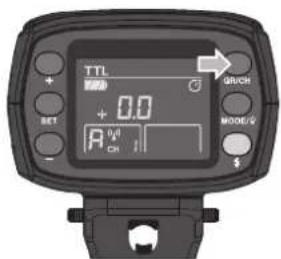
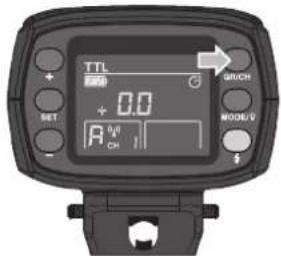
1. Setting Communication Group
Short press
text_image
TTL + RET 0.0 A - MODE/2 $GUCH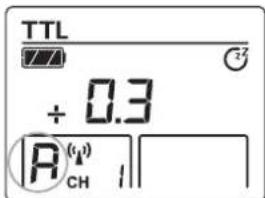
text_image
TTL + 0.3 |A_(CH)|2. Setting Communication Channel
Long press
text_image
TTL SET + 0.0 A CH MOOE/V → OUTCH
text_image
TTL + 0.3 R(CH)Wireless Flash Shooting
Positioning and operation Range (Example of wireless flash shooting)
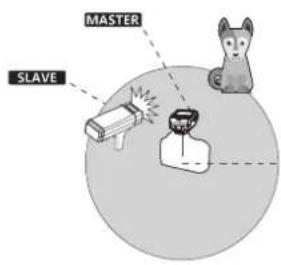
•Auto-flash shooting with one slave unit
text_image
MASTER SLAVETransmission distance is about 50 meters.

- Use the supplied stand to position the slave unit.
- Before shooting, perform a test flash and test shot.
- The transmission distance might be shorter depending on the conditions such as the positioning of slave units, the surrounding environment and weather conditions
- With a lot of wireless signal interference, if there's a miss flash please change the wireless communication channel.
Wireless Flash Shooting
Wireless Multiple Shooting
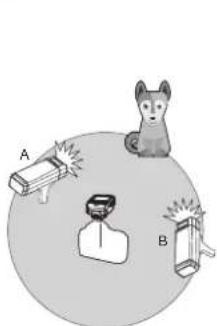
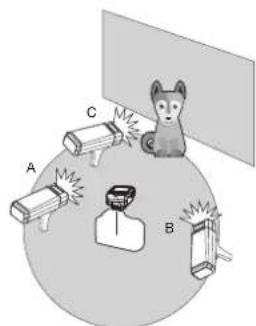
You can divide the slave units into two or three groups and perform TTL autoflash while changing the flash ratio (factor). In addition, you can set and shoot with a different flash mode for each firing group, for up to 4 groups.
natural_image
Illustration of a cat observing three labeled objects (A, B) with no visible text or symbols• Auto Shooting with Two Slave Groups
text_image
Diagram showing a cat interacting with three labeled objects (A, B, C) around a central device, possibly illustrating a safety or monitoring system.•Auto Shooting with Three Slave Groups

When using the GT-200 and GEEKOTO C1(Commender) series trigger together, the C1 can control the flash function such as:
- Flash Mode: TTL/M/Multi
- Sync Mode: First-curtain sync, second-curtain sync, and High-speed sync
- Control the power level
- Modeling Lamp ON/OFF
- Beeper ON/OFF
C.Fn :Setting custom Functions
The following table lists the available and unavailable custom functions of this flash.
| Custom Function Signs | Functions | Setting Signs | Setting & Descriptions |
| F1 | Standby Modes | OF | OFF |
| 30 min | No Operation Auto Standby | ||
| 60 min | |||
| F2 | Beeper | ON | ON |
| OFF | OFF | ||
| F3 | Mask | OF | OFF |
| 01 | ON: Trigger 2 times for 1 cycles, 1st flash of the trigger. | ||
| 02 | ON: Trigger 2 times for 1 cycles, 2nd flash of the trigger. | ||
| F4 | Delay Flash | OF, 0.01~30s | Can be triggered as the second curtain |
| F9 | Version Information |
-
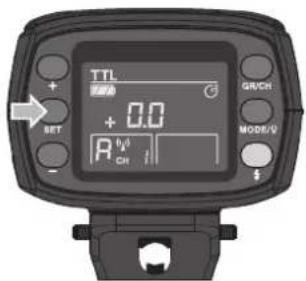
Long press
button for 2 seconds to enter the C.Fn menu. -
Choose custom function signs. Press <+> <-> to set custom function signs.
-
Change the setting. Press
button to choose between customize functions
4.Exit C.Fn menu.
Long press
text_image
TTL + 0.0 RET R CH GR/CH MODE/VTechnical Data
| Model | GT-200 | |
| Wireless Slave Unit Mode | Radio transmission mode (compatible with Canon & Nikon & Sony & Fujifilm) | |
| Flash Mode | Slave radio transmission | TTL/ M/Multi |
| Guide No. (1/1 Output) | 53(m ISO 100, @35mm) | |
| POWER | 200W | |
| Power Output | 8 steps: 1/128~1/1 | |
| Stroboscopic Flash | Provides (up to 90 times, 99Hz) | |
| Flash Compensation | ±3 stops in 1/3 stop increments | |
| Sync mode | High-speed sync (up to 1/8000 seconds), first-curtain sync, and second-curtain sync | |
| Delay Flash | 0.01~30s | |
| Mask | √ | |
| Beeper | √ | |
| Modeling Lamp (LED) | √ | |
| Optic Slave Flash | S1/S2 | |
| Flash Duration Indication | √ | |
| •Wireless Flash (2.4G transmission) | ||
| Wireless Flash Function | Slave unit, OFF | |
| Controllable Slave Groups | 4 groups: A, B, C, D | |
| Transmission Range (Approx.) | 50m | |
| Channel | 1~16 | |
| •Power Supply | ||
| Power Supply | Lithium battery pack (14.4V/2900mAh) | |
| Full Power Flashes | 500 | |
| Recycle Time | Approx. 0.01-2.1s | |
| Battery Indicator | √ | |
| Power Indication | Power standby automatically after approx. 30 minutes without operation. | |
| •Sync Triggering Mode | 2.5mm syncline, a wireless control port | |
| •Color Temperature | 5600±200k | |
| •Dimensions | ||
| Volume | ||
| Net Weight | ||