
D1 - Headphones AUDIOENGINE - Free user manual and instructions
Find the device manual for free D1 AUDIOENGINE in PDF.


User questions about D1 AUDIOENGINE
0 question about this device. Answer the ones you know or ask your own.
Ask a new question about this device
Download the instructions for your Headphones in PDF format for free! Find your manual D1 - AUDIOENGINE and take your electronic device back in hand. On this page are published all the documents necessary for the use of your device. D1 by AUDIOENGINE.
USER MANUAL D1 AUDIOENGINE
text_image
Audioengine D1 Power Hearphone
audioengine
D1
www.audioengineusa.com
Premium 24-bit DAC
Contents
Introduction Page 3
Package Contents Page 3
Cleaning Page 3
Features Page 4
Overview Page 4
Quick Setup Page 6
Troubleshooting Page 8
Specifications Page 9
Contact Us Page 10
About Audioengine Page 10
Basic Safety Instructions
- Read these instructions for all components before using this product.
- Keep these instructions for future reference.
- Heed all warnings on the product and in the owner's guide Follow all instructions.
- Do not use this apparatus near water or moisture. Do not use this product near a bathtub, washbowl, kitchen sink, laundry tub, in a wet basement, near a swimming pool, or anywhere else that water or moisture are present.
- Clean only with a dry cloth and as directed by the manufacturer. Unplug this product from the wall outlet before cleaning.
- Do not block any ventilation openings. Install in accordance with the manufacturer's instructions. To ensure reliable operation of the product and to protect it from overheating, put the product in a position and location that will not interfere with its proper ventilation. For example, do not place the product on a bed, sofa, or similar surface that may block the ventilation openings. Do not put it in a built-in system, such as a bookcase or a cabinet that may keep air from flowing through it's ventilation openings.
- Do not install near any heat sources, such as radiators, heat registers, stoves or other apparatus that produce heat.
- Do not defeat the safety purpose of the polarized or grounding-type plug. A polarized plug has two blades with one wider than the other. A grounding-type plug has two blades and a third grounding prong. The wider blade or third prong are provided for your safety. If the provided plug does not fit in your outlet, consult and electrician for replacement of the obsolete outlet.
- Protect the power cord from being walked on or pinched, particularly at plugs, convenience receptacles, and the point where they exit from the apparatus.
- Only use attachments or accessories specified by the manufacturer.
- Use only with the cart, stand, tripod, bracket or table When a cart is used, use caution when moving the cart/ apparatus
combination to avoid injury from tip-over.
- Unplug this apparatus during lightning storms or when unused for long periods of time to prevent damage to this product.
• Refer all servicing to qualified service personnel.
- Servicing is required when the apparatus has been damaged in any way such as power supply cord or plug is damaged, liquid has been spilled or objects have fallen into the apparatus, the apparatus has been exposed to rain or moisture, does not operate normally, or has been dropped.
- Do not attempt to service this product yourself. Opening or removing covers may expose you to dangerous voltages or other hazards. Please contact the manufacturer to be referred to an authorized service center near you.
- To prevent risk of fire or electric shock, avoid over loading wall outlets, extension cords, or integral convenience receptacles.
- Do not let objects or liquids enter the product as they may touch dangerous voltage points or short out parts that could result in a fire or electrical shock.
• See product enclosure bottom for safety related markings.
- Use Proper Power Sources. Plug the product into a proper power source, as described in the operating instructions or as marked on the product.
- Avoid power lines—Use extreme care when installing an outside antenna system to keep from touching power lines or circuits, as contact with them may be fatal. Do not install external antennas near overhead power lines or other electric light or power circuits, nor where an antenna can fall into such circuits or power lines.
This device complies with part 15 of the FCC Rules. Operation is subject to the following two conditions: This device may not cause harmful interference and this device must accept any interference received, including interference that may cause undesired operation.
Introduction
Welcome to the Audioengine family and congratulations on your purchase of the Audioengine D1 Premium 24-bit DAC!
The Audioengine team is dedicated to bringing you the highest quality listening experience possible. The Audioengine D1 is designed with the same attention to detail and operational simplicity as all Audioengine products. Our goal is to get you to your music as simply as possible, without all the "gadget tinkering" that other products require.
As with our other past efforts, we thank all our customers and resellers for helping us create another great Audioengine product!
Package Contents
• Audioengine D1 DAC
- USB cable
- Setup Guide
Cleaning
Your D1 components are not water-resistant, so it's important that they should be kept free of moisture. You should clean only with a dry cloth or tissue and no liquid cleaners or solvents should be used.
Features
- Desktop or portable digital-to-analog converter
• Mac or PC plug-and-play, no drivers to install
• High-performance headphone amp included
• USB and optical inputs - USB-powered
• Stream bit-perfect 24/96 HD audio with low jitter - Based on high-performance AK4396 DAC
Overview
The D1 24-bit DAC is a simple yet powerful digital-to-analog converter, with performance and features usually found only in much more expensive DACs. It can accept USB or PCM-stream optical inputs, and will automatically configure to match the inputs you deliver, with the optical input being dominant.
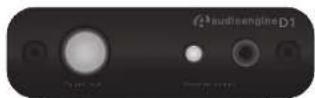

The D1 can process digital audio at any bit depth up to 24 bits, and any sample rate up to 192KHz. The D1 USB input can accept a USB audio stream from your computer or other USB source device. The D1 optical input can accept optical (PCM stereo) streams from any optical (TOSLINK) source, such as TVs, Apple TV ^® , DVD/BluRay players, CD players, etc.
Note: optical sources must be set to PCM Stereo.
The D1 output can be connected to any gear with an analog audio input, such as powered speakers, a boombox, stereo system, etc.
Power for the D1 is provided via the USB bus.
Note: when using the D1 with the optical output of your computer, the USB port on the computer can provide power. The D1 will sense that an optical input is present, and give that input priority.
USB power is "double regulated" to ensure that no USB bus power variations affect your output.
The D1 also contains a high-performance headphone amplifier.
Note: When headphones are plugged in, the analog output will be muted.
Quick Setup
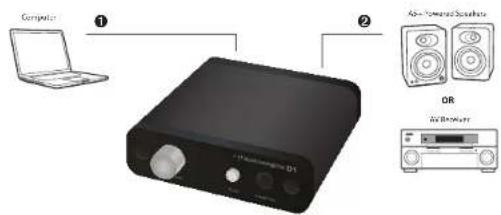
The following diagrams show the most common configurations for D1 Setup.
text_image
Computer ① ② AI-Powered Audio DR AVI-Blower
USB Audio Input
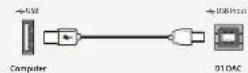

Analog Audio Output
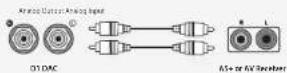
Audioengine D1 - Config A
USB from your computer
Step 1 – connect the D1 to your computer USB port.
For PC, the D1 should be recognized automatically.
For Mac, under System Preferences/Sound, select "Audioengine D1"
Step 2 -- connect the analog output of your D1 to any audio input of your active speakers, stereo, etc.
For advanced setup tips visit: audioengineusa.com
Headphones
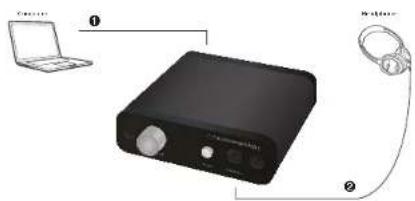
text_image
Controller ① Controller ②
USB Audio Input
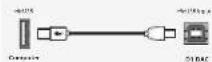

Headphone Output
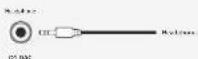
Audicengine D1 - Config B
Optical Source
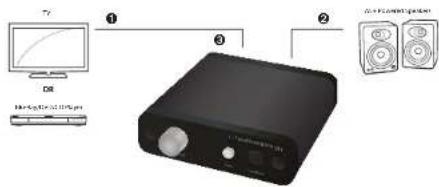
text_image
T2 DR 1 3 2 0.4x 100000000000000000000000000000000000000000000000000000000000000000000000000000000000000000000000000
Optical Audio Input
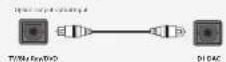

Analog Audio Output
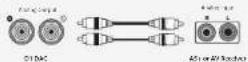

External AC Power
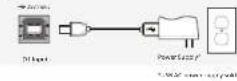
Audioengine D1 - Config C
Troubleshooting
- I have connected my D1 as shown in the manual, but there is no music output.
- Check to see that the power light is lit. If not, try another USB output on your computer.
- Ensure that D1 is selected as your output device under Control Panel (PC) or System Preferences/Audio (Mac).
- Try another USB cable.
- I have connected my D1 to my TV/DVD/BluRay, but there is no sound output.
- Be sure that D1 is also connected to a USB power adapter, and that the power light is lit.
- Be sure that your TV/DVD/BluRay digital audio is set to "PCM Stereo".
- Only one channel plays through my D1.
- Check the RCA cables between your D1 and your sound system.
- Check your audio player to ensure that the balance is centered.
Break-In Period
Your DAC will sound great out of the box and will get better over time. However, give it 40 to 50 hours break-in time before doing any critical listening.
Specifications
Electrical
Full Scale output 2.0V RMS
Frequency Response 10 Hz - 25 kHz, +/- 0.5db
S/N Ratio (DC to 20 kHz) >110 dB
THD+N (1 kHz FS 96 kS/s) <0.0025%
Interface
Input Data Rate up to 192KS/s
Input Bit Depth up to 24 bits
USB type 1.1 or above
Power Requirements 130 mA
For additional specifications go to: audioengineusa.com
Contact Us
If you have any questions or feel you may need service, contact the reseller where you purchased your product or feel free to email us directly at: support@audioengineusa.com or call toll-free in the United States: (877) 853-4447
About Audioengine
Audioengine designs and builds innovative audio products with all your music in mind. Great sound, simple but elegant designs, high-quality materials, and truly useful features are what Audioengine is about. We sincerely hope you get as much enjoyment from our products as we've had creating them! For information about our other products go to:
www.audioengineusa.com
Information for Users on Disposal of Old Equipment [European Union]
![AUDIOENGINE D1 - Information for Users on Disposal of Old Equipment [European Union] - 1](/content/2026/05/811231/images/67297c2409790ce3d29fdc3b7dd5f1f36dbf685940fd0d36aae7c13f36fee4b9.jpg)
Attention: This symbol is only valid in the European Union.
This symbol indicates that the electrical and electronic equipment should not be disposed as general household waste at its end-of-life. Instead, the product should be handed over to the applicable collection point for the recycling in accordance with your national legislation. By disposing of this product correctly, you will help to conserve the environment and human health that
could otherwise be caused by inappropriate waste handling of this product. For more information about collection point and recycling of this product, please contact your household waste disposal service or the shop where you purchased the product. Penalties may be applicable for incorrect disposal of this waste, in accordance with national legislation.
[Other Countries outside the European Union]
If you wish to dispose of this product, please do so in accordance with applicable national legislation or other rules in your country for the treatment of old electrical and electronic equipment.
![AUDIOENGINE D1 - [Other Countries outside the European Union] - 1](/content/2026/05/811231/images/741cb8c73c522e3b3e153f1c94a3fda5deefdeb376b140944e53fefb1195b731.jpg)
audioengine
Audioengine, Ltd.
support@audioengineusa.com
www.audioengineusa.com