
DAC3 - Receiver AUDIOENGINE - Free user manual and instructions
Find the device manual for free DAC3 AUDIOENGINE in PDF.


| Product Name | DAC3 |
| Brand | Audioengine |
| Category | Headphone Amplifier / DAC |
| Type | Portable USB DAC and Headphone Amp |
| DAC Chip | ESS Sabre ES9281A PRO |
| Amplifier | LME49726 high-performance audio amplifier |
| Supported Audio Formats | PCM up to 32-bit/384kHz, DSD up to DSD128, MQA Renderer |
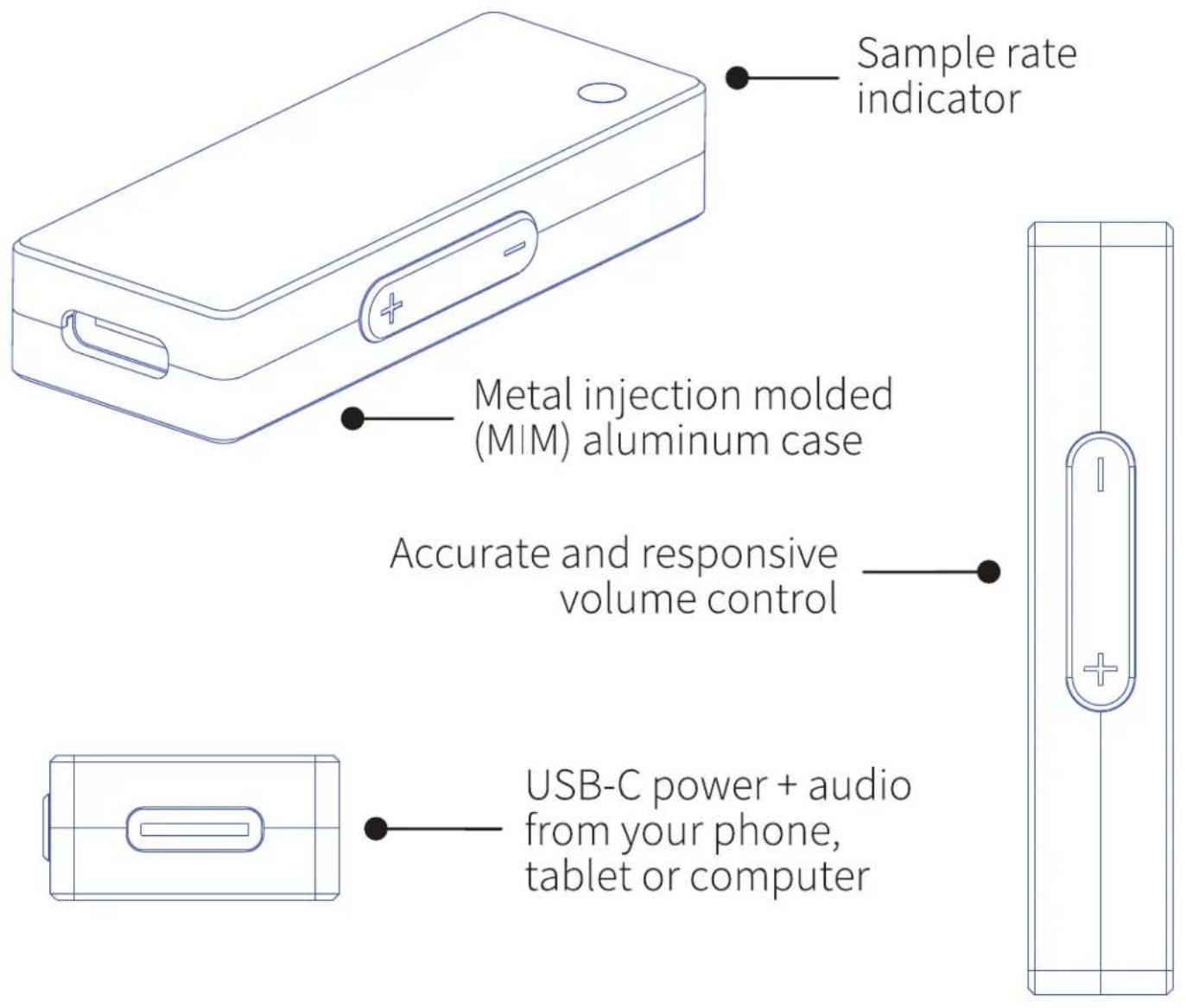
| Input | USB-C (data + power) |
| Output | 3.5mm stereo mini-jack (headphones or line out) |
| Headphone Impedance | 12 ohms or higher |
| Indicator Light Colors | White (32-48kHz PCM), Green (88.2-192kHz PCM, DSD64), Blue (352.8-384kHz PCM, DSD128), Purple (MQA) |
| Power Source | USB bus-powered (connected to computer, phone, or tablet) |
| Chassis Material | Metal injection molded (MIM) aluminum |
| Compatibility | iOS (with USB-C to Lightning cable), macOS, Android, Windows |
| Volume Control | Accurate and responsive knob |
| Included Accessories | USB-C to USB-C cable (for MacOS, Android, Windows) |
| Break-in Period | 40-50 hours recommended for optimal sound |
| Warranty | 3-year Limited Warranty on parts and labor |
| Dimensions | Approximately 110 x 30 x 20 mm (estimated from typical portable DAC) |
| Weight | Approximately 50 g (estimated) |
| Cleaning & Care | Wipe with a soft dry cloth; avoid liquids |
| Safety | FCC Part 15 compliant; do not use in wet environments |
| Repairability | No user-serviceable parts inside; refer to warranty service |
Frequently Asked Questions - DAC3 AUDIOENGINE
User questions about DAC3 AUDIOENGINE
0 question about this device. Answer the ones you know or ask your own.
Ask a new question about this device
Download the instructions for your Receiver in PDF format for free! Find your manual DAC3 - AUDIOENGINE and take your electronic device back in hand. On this page are published all the documents necessary for the use of your device. DAC3 by AUDIOENGINE.
USER MANUAL DAC3 AUDIOENGINE
DAC3 Portable Headphone Amp & DAC
Quickstart Guide
Welcome to the Audioengine family and congratulations on your purchase of the DAC3 Premium Headphone Amp and Digital-to-Analog Converter (DAC).
Audioengine is dedicated to bringing you the highest-quality listening experience possible and the DAC3 was designed with the same attention to detail and operational simplicity as all our products.
We wish to sincerely thank our customers and the entire Audioengine team for the inspiration to create yet another great product.
Overview
DAC3 is a powerful yet portable 32-bit headphone amplifier and DAC with performance and features found in more expensive digital interfaces. It doesn’t require much power but is capable of driving premium low-impedance headphones and can also be used to bypass your computer’s internal DAC or soundcard and connect directly to powered desktop speakers.
DAC3 uses an LME49726 high-performance audio amplifier that drives headphones with impedances of 12 ohms or higher. The output can also be connected to any system with an analog audio input, such as Audioengine powered speakers or an A/V receiver.
DAC3 features the acclaimed ESS Sabre ES9281A PRO DAC, using the critically acclaimed ESS HyperStream® II QUAD DAC architecture and Time Domain Jitter Eliminator.
MQA Renderer technology is also included, which can connect to an MQA Core signal and complete the final unfold of an MQA file.
DAC3 will process PCM digital audio up to 32 bits with a maximum sample rate of 384kHz and supports DSD playback up to DSD128 sources.
Audio formats and bitrates are shown by the color of the indicator light on the DAC3 case:
White PCM 32-48kHz Green PCM 88.2-192kHz, DSD64 Blue PCM 352.8-384kHz, DSD128 Purple MQA Rendering
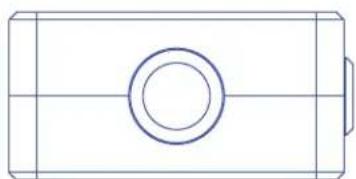
3.5mm mini-jack audio output — for headphones, powered speakers, or any music system with an aux input
natural_image
Simple line drawing of a rectangular object with a circular hole and horizontal centerline (no text or symbols)Quick Setup
Here's how to connect DAC3 to headphones or any music system:
1 Connect your iOS device to DAC3 using a USB-C to Lightning cable (use the included USB-C cable for MacOS, Android, or Windows)
2 Plug your headphones or powered speakers into the DAC3 mini-jack output. The sample rate indicator will flash and turn white.
3 Adjust the volume levels on your device and DAC3 to a medium level and start playing music.
For PC, DAC3 will be recognized automatically.
For Mac, under System Preferences/Sound, select "Audioengine DAC3" as the sound output.
DAC3 will sound great out of the box and will get better over time. However, give it 40 to 50 hours break-in time before doing any critical listening.
Extra tips, troubleshooting, FAQs and updates to this guide can be found on our website:
audioengine.com/support-inquiry
And if you have questions or need help, please contact our customer support team:
audioengine.com/support-inquiry
Product returns and refunds
We sincerely hope you get as much enjoyment from our products as we've had creating them. However, should you have an issue or are not satisfied with any
Audioengine product for any reason contact the reseller where you purchased or contact us directly:
support@audioengine.com
Warranty information
All Audioengine products have a 3-year Limited Warranty on parts and labor from the date of purchase. The Limited Warranty applies only to Audioengine products sold in the United States. Your warranty is automatic, so there is no need to register. For Limited Warranty coverage elsewhere, please contact the Audioengine dealer, reseller, or distributor in your country or region.
What is covered
All defective parts or faulty workmanship.
What is not covered
The Audioengine Limited Warranty does not cover damage caused by accident, misuse, abuse, neglect, excessive moisture, lightning, power surges, other acts of nature, unauthorized product modification or repairs, or failure to follow the instructions outlined in this guide.
What we will do
We will repair or replace any defective parts, at our option, within a reasonable amount of time and free of charge any time during the warranty period. After service, we will be responsible for shipping the product back to you at our expense.
What we ask from you
You will be responsible for shipping charges to Audioengine or to an authorized dealer. We recommend you keep the original shipping materials to prevent shipping damage if service is needed. Audioengine cannot be responsible for any damages incurred during shipping due to poor packing, so please pack well and make sure to insure your shipment.
How to obtain Audioengine warranty service
If you have any questions or feel you may need service, contact the reseller where you purchased your product. You can also visit our support portal at
support.audioengineusa.com where you will find a searchable Knowledge Base. And if you don't find an answer to your question you can easily contact us by opening a support ticket.
Exclusive remedy
This Limited Warranty is fully transferable provided the current owner furnishes the proof of purchase and that the serial number on the product is intact. THE MAXIMUM LIABILITY OF AUDIOENGINE SHALL NOT EXCEED THE ACTUAL PURCHASE PRICE PAID BY YOU FOR THE PRODUCT. IN NO EVENT SHALL AUDIOENGINE BE LIABLE FOR SPECIAL, INCIDENTAL, CONSEQUENTIAL OR INDIRECT DAMAGES.
FCC Part 15 Notice
This device complies with Part 15 of the FCC Rules. Operation is subject to the following two conditions:
1) This device may not cause harmful interference.
2) This device must accept any interference received, including interference that may cause undesired operation.
Changes or modifications not expressly approved by the party responsible for compliance could void the user's authority to operate the equipment.
This equipment has been tested and found to comply with the limits for a Class B digital device, pursuant to Part 15 of the FCC Rules. These limits are designed to provide reasonable protection against harmful interference in a residential installation.
This equipment generates, uses, and can radiate radio frequency energy and, if not installed and used in accordance with the instructions, may cause harmful interference to radio communications. However, there is no guarantee that interference will not occur in a particular installation. If this equipment does cause harmful interference to radio or television reception, which can be determined by turning the equipment off and on, the user is encouraged to try to correct the interference by one or more of the following measures:
Reorient or relocate the receiving antenna.
Increase the separation between the equipment and receiver.
Connect the equipment into an outlet on a circuit different from that to which the receiver is connected.
Consult the dealer or an experienced technician for help.
FCC Radiation Exposure Statement
This equipment complies with FCC radiation exposure limits set forth for an uncontrolled environment. This equipment should be installed and operated with minimum distance 20cm between the radiator & your body.
Information for Users on Disposal of Old Equipment
[European Union]
This symbol indicates that the electrical and electronic equipment should not be disposed as general household waste at its end-of-life. Instead, the product should be handed over to the applicable collection point for the recycling in accordance with your national legislation.
![AUDIOENGINE DAC3 - [European Union] - 1](/content/2026/05/954673/images/e1e135396d07e47087e2927ba464700994646818aa8e72f8b93533bf2a5bab40.jpg)
By disposing of this product correctly, you will help to conserve the environment and human health that could otherwise be caused by inappropriate waste handling of this product. For more information about collection point and recycling of this product, please contact your household waste disposal service or the shop where you purchased the product. Penalties may be applicable for incorrect disposal of this waste, in accordance with national legislation.
[Other Countries outside the European Union]
If you wish to dispose of this product, please do so in accordance with applicable national legislation or other rules in your country for the treatment of old electrical and electronic equipment.
© 2022 Audioengine, LLC. All Rights Reserved.
Audioengine and Audioengine DAC3 are trademarks of Audioengine.
MQA and the Sound Wave Device are registered trade marks of MQA Limited © 2016
All other product names, company names and logos mentioned may be the trademarks of their respective owners and are acknowledged by Audioengine.
About Audioengine
Audioengine designs and builds innovative audio products with all your music in mind. Great sound, simple but elegant designs, high-quality materials and truly useful features are what Audioengine is about.

- Overview
- Quick Setup
- Product returns and refunds
- Warranty information
- What is covered
- What is not covered
- What we will do
- What we ask from you
- How to obtain Audioengine warranty service
- Exclusive remedy
- FCC Part 15 Notice
- FCC Radiation Exposure Statement
- Information for Users on Disposal of Old Equipment
- [European Union]
- [Other Countries outside the European Union]
- About Audioengine
Brand : AUDIOENGINE
Model : DAC3
Category : Receiver