
8331A - Monitor GENELEC - Free user manual and instructions
Find the device manual for free 8331A GENELEC in PDF.


| Product Type | Active Studio Monitor |
| Driver Configuration | Coaxial (3-way: 2 x 5.14 in woofers, 1 in tweeter) |
| Amplifier Power | 2 x 90 W (LF/MF), 1 x 90 W (HF) |
| Frequency Response | 58 Hz – 21 kHz (-6 dB) |
| Maximum SPL | 110 dB peak |
| Crossover Frequency | 3.2 kHz |
| Dimensions (with Iso-Pod) | 299 x 189 x 212 mm (11 3/4 x 7 7/16 x 8 3/8 in) |
| Weight | 6.7 kg (14.8 lb) |
| Power Consumption | Idle: 10 W, Max: 90 W |
| Input Connectors | XLR analog (balanced), XLR AES/EBU digital |
| Calibration | GLM network (Genelec Loudspeaker Manager) |
| Mounting Options | Iso-Pod stand, wall mount, ceiling mount (optional accessories) |
| Protection Circuitry | Driver overload protection, thermal protection |
| Enclosure Material | Die-cast aluminum |
| Grille | Metal grille, detachable |
| Cleanliness | Wipe with a dry, soft cloth; avoid solvents |
| Safety Precautions | Keep away from moisture; ensure ventilation; do not block cooling vents |
| Spare Parts | Available via Genelec authorized service centers |
| Repairability | Module replacement; recommended to contact service |
| Suitable Applications | Nearfield monitoring, mixing, mastering, broadcasting |
Frequently Asked Questions - 8331A GENELEC
User questions about 8331A GENELEC
0 question about this device. Answer the ones you know or ask your own.
Ask a new question about this device
Download the instructions for your Monitor in PDF format for free! Find your manual 8331A - GENELEC and take your electronic device back in hand. On this page are published all the documents necessary for the use of your device. 8331A by GENELEC.
USER MANUAL 8331A GENELEC
natural_image
Black GELEEC camera with visible lens and green indicator light (no text or symbols on body)Introduction
Thank you for choosing a Genelec product! Fulfilling dreams by offering people the most truthful sound reproduction possible has been the source of our enthusiasm since 1978. There's already over one million Genelec monitors around the world - welcome to our story!
All Genelec monitors are designed, hand assembled and tested at our factory in lisalmi, Finland. Our monitors are designed to last for decades and we take care that our customers receive excellent support and technical services throughout the life-time of the products.
Please register your monitor at http://www.community.genelec.com/. You will receive an extended 5 year warranty for spare parts. For more information about our service and technical support see
http://www.genelec.com/customer-service.
System Characteristics
Each 8331A is supplied with one mains power cable, one 5-meter GLM network cable and this operating manual.
The Genelec 8331A is suitable for professional monitoring applications calling for very high precision and reliability. It combines many remarkable Genelec technologies to provide point source benefits with directivity control over an extraordinarily wide audio bandwidth.
Genelec Loudspeaker Manager™ (GLM™) Software And GLM User Kit
The GLM software gets the most out of 8341 and tailor-fits it to your room. GLM is available for download free of charge at www.genelec.com/glm. Check in from time to time to take advantage of new features, or consider using the cloud-based version. A GLM User Kit comprising the necessary hardware, including the GLM Adapter and measuring microphone is needed for building and operating the GLM network. This kit can be purchased at all certified Genelec dealers.
Minimum Diffraction Coaxial (MDC™)
The minimum diffraction coaxial driver is comprised of a powerful midrange driver combined with a tweeter driver extending to ultrasonic frequencies. This unique arrangement eliminates or minimizes acoustic diffraction sources that typically exist in coaxial drivers and produces a flat frequency response both on the acoustical axis and at all off-axis directions.
The 8331 may be oriented either horizontally or vertically and is intended for near-field listening where the influences of the room can be mostly minimized. Typical distances can vary from 1 meter or less to 3 meters depending on room size and SPL requirements.
Directivity Control Waveguide (DCW™)
The 8331A has an unusually large directivity control waveguide extending over the whole front face of the enclosure. The midrange driver cone also forms a part of the directivity control waveguide for the tweeter. From behind the waveguide, two woofers radiate audio through two openings in the enclosure front. This unique design enables directivity control of all audio frequencies down to low bass.
Acoustically Concealed Woofers (ACW™)
A pair of nearly invisible woofers in the 8331A are placed acoustically coaxially with the midrange/tweeter drivers to create a three-way system with all drivers having their acoustical axes in the same position. This creates an ideally working point source radiator.
Smart Active Monitor (SAM™)
Genelec SAM technology can improve the reliability and accuracy of monitoring. Smart Active Monitors have several parametric notch and shelving filters that can be tuned automatically using the Genelec Loudspeaker Manager (GLM) software to exactly compensate for colorations generated by room acoustics. This enables SAM monitors to sound neutral and achieve accurate stereo imaging in all acoustical environments.
Audio Inputs
The 8331A's audio inputs are designed to integrate easily into all professional environments, supporting balanced line analog and AES/EBU format digital signal. The maximum analog input level is +25 dBu (13.7 Vrms or 19.5 V peak). Set to the maximum sensitivity, an analog input signal of -6 dBu produces 100 dB SPL sound level at 1 meter in free space. A -30 dBFS digital audio input level produces 100 dB SPL level at 1 meter in free space. Note that 0 dBFS refers to the largest possible digital input value.
The XLR audio input accepts both AES/EBU format digital signal and analog line level analog audio signal. With an extremely low level AES/EBU signal, the automatic selection may not work properly. In such case, the signal selection can be made in the GLM software or, if GLM is not available, by setting the "Stored" DIP switch to "OFF" and selecting the appropriate AES/EBU channel with the "Digital" switches.
When using a digital audio source with adjustable level, it may instead be advantageous to lower the output level of the 8331A using the monitors on-board rear panel controls. This enables the use of a higher source output level with more digital resolution, while taking full advantage of 8331's impressively low self generated noise.
The AES/EBU format supports two channels of audio in a single cable. The DIGITAL OUT male XLR connector carries an unaltered copy of the digital input signal. This enables daisy-chaining of up to four monitors. The proper digital channel can be selected using DIP switches or GLM.
Power Management
The 8331A mains power input supports any mains voltage globally (100-240 VAC, 50-60 Hz). It can be plugged in anywhere in the world and will always deliver the maximum output power to the drivers even when the mains voltage fluctuates. If mains power is provided with a generator, inverter or lower-quality UPS device, we recommend filtering out harmonics from the mains power voltage.
The energy saving function Intelligent Signal Sensing (ISS ^™ ) puts the monitor automatically into a deep sleep state when no input signal is present. The device then consumes less than one watt of power. Upon sensing an input signal, the monitor automatically awakens. The wait time until entering the power saving state can be configured using the GLM software. When ISS is active, you can leave your monitors on at all times and
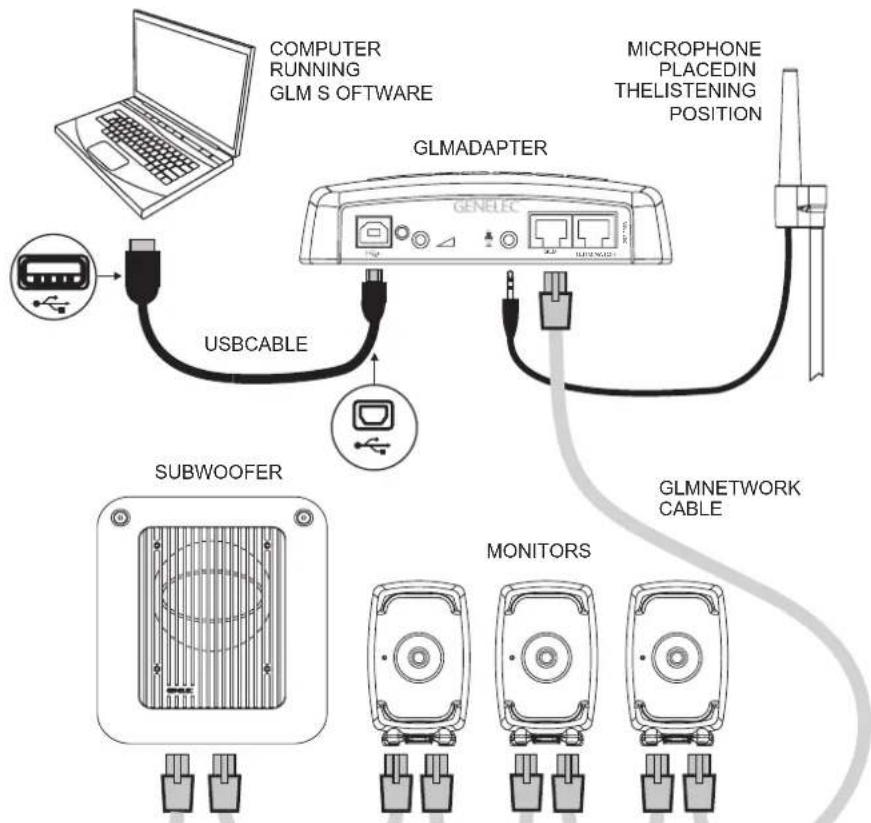
flowchart
graph TD
    A["Computer"] --> B["GLM ADAPTER"]
    C["USB Cable"] --> B
    D["Microphone"] --> B
    B --> E["GLM NETWORK CABLE"]
    B --> F["MONITORS"]
    B --> G["SUBWOOFER"]
Figure 1. GLM control network cabling
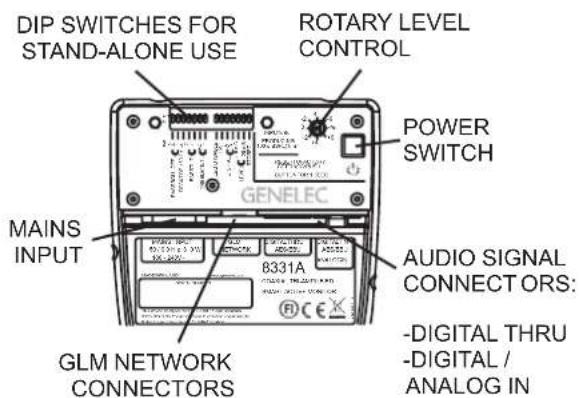
Figure 2. Connectors and controls on the back panel of a 8331A.
have the monitoring system immediately ready for action. The default wait time when ISS is enabled using the ISS DIP switch is 60 minutes.
Setup Using The GLM™ Control Network
Although the 8331A can be used without the GLM software and control network, it can only reach its full potential when set up and calibrated using GLM software, running on a Mac or PC.
Genelec therefore recommends setting up the 8331A
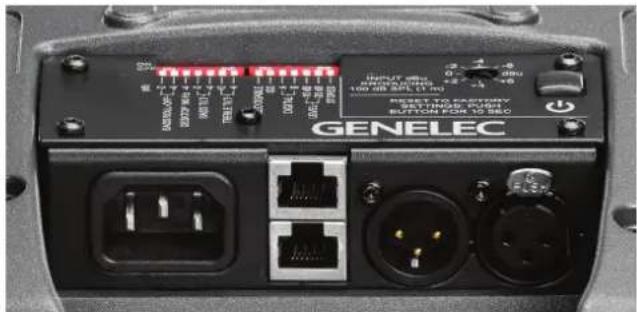
Figure 3. Connector panel detail.
and other SAM monitors using GLM. You can find a detailed description of the setup and the use in the GLM System Operating Manual.
The GLM software and the proprietary Genelec monitor control network offer automated acoustic equalization and alignment for any reproduction system from mono over stereo to complex 3D immersive audio setups, including also one or more subwoofers. GLM includes AutoCal, an expert algorithm built on data from thousands of professional listening rooms.
Setup with the GLM User Kit consists of the following steps:
- Connect a CAT5 (RJ45) cable between each monitor (and subwoofer) and finally to the control network input of the GLM Adapter device (see Figure 1).
- Connect the GLM Adapter to computer USB connector.
- Using a microphone stand, place the Genelec measurement microphone at the listening location with the microphone pointing upwards and the microphone top at the height of
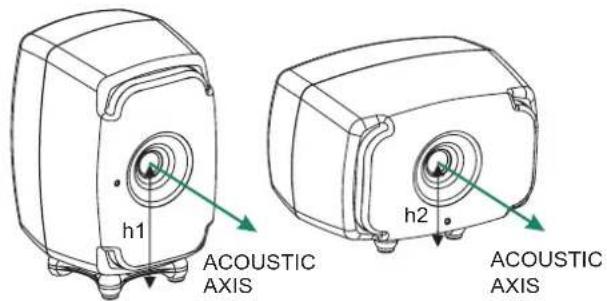
h1 = 163 mm (6 3/8 in)
h2 = 116 mm (4 9/16 in)
Figure 4. The location of the acoustic axis.
the engineer's ear. The microphone is a part of the GLM User Kit.
- Connect the microphone cable to the microphone input in the GLM Adapter device.
- Download the GLM software at the Genelec web site (www.genelec.com). Install the GLM software and follow the instructions in the software to measure and set up your monitors.
- If you plan to not use a computer for controlling the monitors, use the GLM software to write the settings into the monitors (use menu item "Store | Store the Current Group Settings...").
The GLM network may also be used for monitor control - switching between sets of loudspeakers, solo, mute, invoking calibrated levels etc. - or settings can be permanently stored in all monitors for a static and predictable setup. If so, a computer is only needed for the setup.
If the network is disconnected, settings stored using the GLM software can be enabled by setting the DIP switch "Stored" to ON.
The CONTROL NETWORK RJ-45 connectors are used for the GLM network. These connectors are not Ethernet LAN compatible. Do not connect to an Ethernet LAN.
Setup Without Using The GLM
When GLM is not available, you can still adjust the 8331A for placement in a room by using the DIP switches on the back of the monitor. Settings are more limited but nevertheless provide the fundamental equalizers to compensate for the acoustical effects of the listening room, input selections and input sensitivity. To use this method, ensure that the GLM management network is not connected and set the DIP switch "Stored" to its OFF position.
Stand-Alone Control Functions
Bass Roll-Off Control
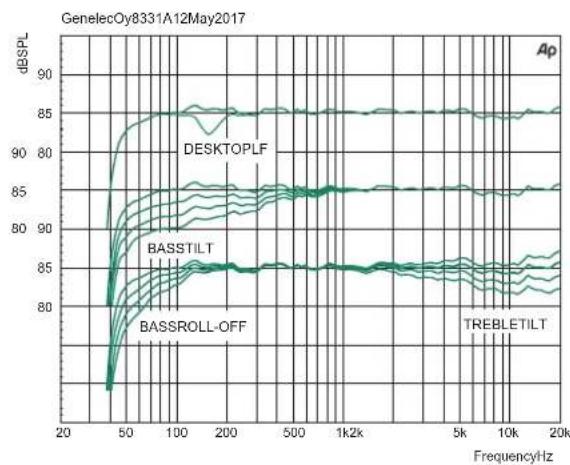
The Bass Roll-Off control attenuates the monitor's output near the cut-off frequency. Attenuation levels of -2 dB, -4 dB or -6 dB (both switches ON) can be selected by combining settings on one or more switches. This setting may be needed to control the bass level in spaces with strong low frequency reverberance.
flowchart
graph TD
    A["Central Hub"] --> B["Device 1"]
    A --> C["Device 2"]
    A --> D["Device 3"]
    A --> E["Device 4"]
    A --> F["Device 5"]
    A --> G["Device 6"]
    A --> H["Device 7"]
    A --> I["Device 8"]
    A --> J["Device 9"]
    A --> K["Device 10"]
    A --> L["Device 11"]
    A --> M["Device 12"]
    A --> N["Device 13"]
    A --> O["Device 14"]
    A --> P["Device 15"]
    A --> Q["Device 16"]
    A --> R["Device 17"]
    A --> S["Device 18"]
    A --> T["Device 19"]
    A --> U["Device 20"]
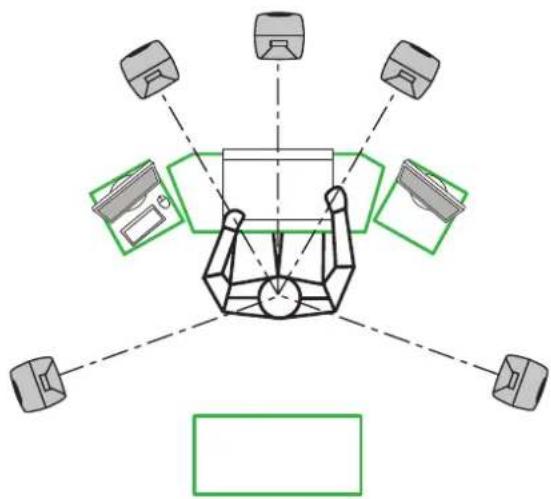
Figure 5. Symmetrical layout and keeping the acoustic axis clear from obstructions minimizes reflection surfaces and maintains accurate localisation because reflections are symmetrical.
| Monitor Mounting Position | Treble Tilt | Bass Tilt | Bass Roll-Off | Desktop |
| Flat anechoic response | None None | None None | ||
| Free standing in a damped room | None -2 | dB None None | ||
| Free standing in a reverberant room | None -4 | dB None None | ||
| Near field on a reflective surface | None -2 | dB None -4 dB | ||
| In a corner None -4 dB | -4 dB None |
Table 1. Suggested Tone Control settings for some typical monitor placement positions.
Desktop Reflection Compensation
The desktop low frequency control attenuates the bass frequencies around 160 Hz by 4 dB. This feature is designed to compensate for the boost occurring often when the monitor is placed upon a meter bridge, table or similar reflective surface.
Bass Tilt Control
The Bass Tilt control switches offer three attenuation levels for the bass response below 800 Hz. The attenuation levels are -2 dB, -4 dB and -6 dB (both switches ON). This control is usually necessary when the monitors are placed near room boundaries such as at the wall or close to a room corner.
Treble Tilt Control
The Treble Tilt control allows adjusting the high frequency response above 5 kHz by +2 dB, -2 dB or -4 dB, which can be used for correcting an excessively bright or dull sounding system or to compensate for the high frequency level loss when the monitor is placed behind a screen.
LED Disable
This switch shuts off the front panel LED light.
| Colour Indication | |
| Solid greed Normal state, normal operation | |
| Blinking green GLM is adjusting the monitor | |
| Green blink every 10 sec. Monitor is in an ISS power saving sleep state | |
| Red blink Power amplifier overload protection is active (audio is modified because of protection) | |
| Solid red Monitor is muted | |
| Yellow Monitor is not in the active (playing) group | |
| Yellow blinking Overheat protection is active (audio is modified because of protection) | |
Table 2. Monitor front panel light indications summary
ISS
This switch activates or deactivates the ISS automatic power saving function. The default time for ISS activation is 60 minutes, but the time can be adjusted in the GLM software.
Digital
The Digital switch selects the digital audio channels on the AES/EBU. Turning both switches on reproduces the sum of the A and B channels. When both channels are selected 6 dB of attenuation is applied to avoid overloading the monitor.
Level
The Level switches reduce the monitor output in 10 dB steps (-10 dB, -20 dB and with both switches set to ON, -30 dB). The effects of these switches combine with the effect of the rotary level adjustment control. The total setting range is 42 dB.
Stored
The Stored switch selects between the application of the above listed controls on the monitor's back panel and applying the settings stored inside the monitor memory using the GLM calibration software. Setting the Stored switch to the OFF position selects the settings defined by the monitor's controls. Setting the Stored switch to ON position selects the use of internally stored GLM settings. When the Stored switch is set to the ON position the adjustments on the monitor have no effect.
Operating Environment
This product is designed for indoor use only. The permissible ambient temperature is 15-35 degrees Celsius (50-95°F) and relative humidity 20% to 80% (non-condensing). To prevent condensation of humidity, after the product has been stored or transported in a cool environment and is then taken into a warm room, wait 0.5-1 hours before opening the packaging and connecting to the mains power.
Sufficient cooling around the 8331A must be ensured. The minimum clearance behind, above and on both sides of the monitor is 50 mm (2 in). If the product is installed in a recess, the space must be ventilated sufficiently to dissipate the heat.
Mounting And Placing Monitors
Mounting Options
The vibration insulating Isolation Positioner/Decoupler™ (Iso-Pod™) table stand allows tilting of the monitor. The stand spring can be attached to three mounting points on the 8331A enclosure, allowing the Iso-Pod to be used in vertical or horizontal positions.
Aim the monitor so that its acoustic axis points towards the listening position (see Figure 4). Place the monitors symmetrically at equal distances from the listening position. If possible, place the listening position on the left-right centerline of the room (see Figure 5). When a monitor is placed far away (1.0-2.2 m, 3-7 ft) from the acoustically hard wall behind the monitor, an acoustic reflection from the wall may cause cancellation of low frequencies and reduce the bass output.
Minimize reflections by placing the monitors away from acoustically reflective surfaces. Acoustic reflections from objects like desks, cabinets and computer monitors can cause unwanted coloration and blurring of the sound image. Putting the monitors on stands behind and above a mixing console usually improves the response over placing monitors on a meter bridge. Symmetrical positioning of the sound reflecting objects maintains a balanced soundstage (see Figure 5).
A wide variety of ceiling and wall mounts are available through your Genelec dealer. Genelec 8331A can be fitted with König & Meyer monitor mounts using two M6 x 10 mm threaded holes on the enclosure back. There is also a 3/8 in UNC threaded hole in the base of the monitor. Consult the Genelec Accessories Catalogue at www.genelec.com or your local distributor/dealer for information.
Front Panel Light
Normally, the light on the front panel is green, indicating normal operational mode. Red and yellow colours are used to indicate special situations. See Table 2.
Use With Subwoofers
In situations requiring deeper fundamental response or multichannel bass management, Genelec recommends using the 7300 series subwoofers. For more detailed system configuration and matching products, please consult the on-line Genelec Product Selection Tool at www.genelec.com.
Maintenance
There are no user serviceable parts inside the monitor. Maintenance or repair must only be done by Genelec certified service personnel. The monitor enclosure must not be opened. Opening the monitor may lead to loss of the individual monitor factory calibration and damage to components.
Safety Considerations
Although the 8331A has been designed in accordance with international safety standards, to ensure safe operation and to maintain the monitor under safe operating conditions, the following warnings and precautions must be observed:
- Servicing and adjustment must only be performed by certified Genelec service personnel. The monitor enclosure must not be opened.
- Do not use this product with an unearthed mains cable
or a mains connection without the protective earth contact as this may lead to personal injury.
- To prevent fire or electric shock, do not expose the unit to water or moisture.
- Do not place any objects filled with liquid, such as vases on the monitor or near it.
- Note that the amplifier is not completely disconnected from the AC mains service unless the mains power cord is removed from the monitor loudspeaker or the mains outlet.
- Free flow of air behind and around the monitor is necessary to maintain sufficient cooling. Do not obstruct airflow around the monitor.
WARNING!
The 8331A is capable of producing sound pressure levels in excess of 85 dB, which may cause hearing damage. Sound exposure level integrated over an 8 hour working day should be limited to 80 dB(A) to reduce the risk of permanent hearing damage. For each 3 dB increase in sound exposure, half the exposure time should be observed (equal energy).
Guarantee
The Genelec 8331A is guaranteed for two years against manufacturing faults or defects altering performance. Refer to the reseller for full sales and guarantee terms.
line
| FrequencyHz | DESKTOPLF | BASSTILT | BASSROLL-OFF | TREBLETILT | | ----------- | --------- | -------- | ------------ | ---------- | | 20 | ~85 | ~85 | ~85 | ~85 | | 50 | ~85 | ~85 | ~85 | ~85 | | 100 | ~85 | ~85 | ~85 | ~85 | | 200 | ~85 | ~85 | ~85 | ~85 | | 500 | ~85 | ~85 | ~85 | ~85 | | 1k | ~85 | ~85 | ~85 | ~85 | | 5k | ~85 | ~85 | ~85 | ~85 | | 10k | ~85 | ~85 | ~85 | ~85 | | 20k | ~85 | ~85 | ~85 | ~85 |Figure 6. The curves above show the effect of the "Bass Tilt", "Treble Tilt", "Desktop Low Frequency" and "Bass Roll-Off" controls on the free field response of the 8331A.
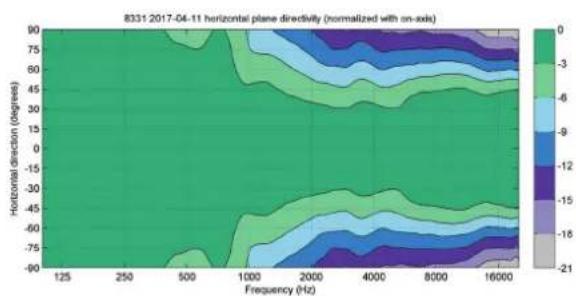
Figure 8. The curves above show the horizontal directivity characteristics of the 8331A.
Compliance To FCC Rules
Note: This equipment has been tested and found to comply with the limits for a Class B digital device, pursuant to part 15 of the FCC Rules. These limits are designed to provide reasonable protection against harmful interference in a residential installation. This equipment generates, uses and can radiate radio frequency energy and, if not installed and used in accordance with the instructions, may cause harmful interference to radio communications. However, there is no guarantee that interference will not occur in a particular installation. If this equipment does cause harmful interference to radio or television reception, which can be determined by turning the equipment off and on, the user is encouraged to try to correct the interference by one or more of the following measures:
• Reorient or relocate the receiving antenna.
- Increase the separation between the equipment and receiver.
- Connect the equipment into an outlet on a circuit different from that to which the receiver is connected.
- Consult the dealer or an experienced radio/TV technician for help.
Modifications not expressly approved by the manufacturer could void the user's authority to operate the equipment under FCC rules.
line
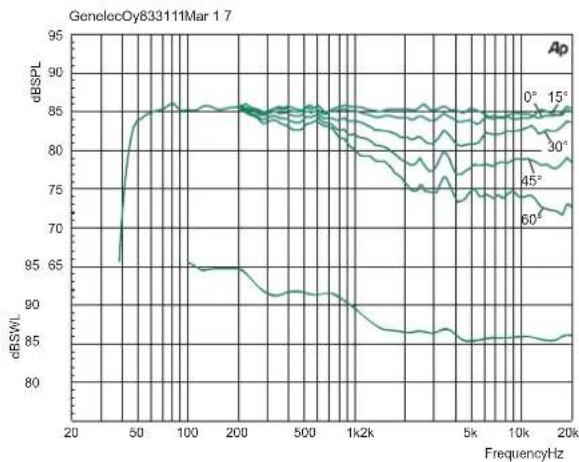
| Frequency/Hz | 0° | 15° | 30° | 45° | 60° | | ------------ | ----- | ----- | ----- | ----- | ----- | | 20 | 95.0 | 95.0 | 95.0 | 95.0 | 95.0 | | 50 | 85.0 | 85.0 | 85.0 | 85.0 | 85.0 | | 100 | 85.0 | 85.0 | 85.0 | 85.0 | 85.0 | | 200 | 85.0 | 85.0 | 85.0 | 85.0 | 85.0 | | 500 | 85.0 | 85.0 | 85.0 | 85.0 | 85.0 | | 1k2k | 85.0 | 85.0 | 85.0 | 85.0 | 85.0 | | 5k | 85.0 | 85.0 | 85.0 | 85.0 | 85.0 | | 10k | 85.0 | 85.0 | 85.0 | 85.0 | 85.0 | | 20k | 85.0 | 85.0 | 85.0 | 85.0 | 85.0 |Figure 7. Frequency responses at 0, 15, 30, 45 and 60 degree angles and power response in full space. Input level -20 dBu.
heatmap
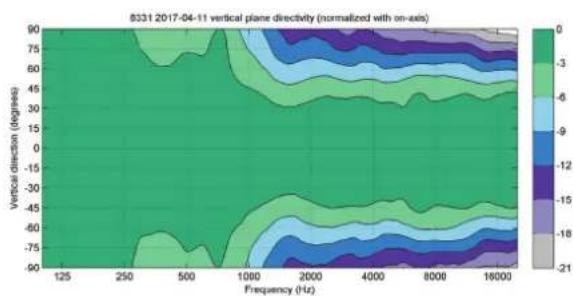
8331 2017-04-11 vertical plane directivity (normalized with on-axis) | Frequency (Hz) | 125 | 250 | 500 | 1000 | 2000 | 4000 | 8000 | 16000 | |---|---|---|---|---|---|---|---|---| | 90 | -3.5 | -3.5 | -3.5 | -3.5 | -3.5 | -3.5 | -3.5 | -3.5 | | 75 | -3.5 | -3.5 | -3.5 | -3.5 | -3.5 | -3.5 | -3.5 | -3.5 | | 60 | -3.5 | -3.5 | -3.5 | -3.5 | -3.5 | -3.5 | -3.5 | -3.5 | | 45 | -3.5 | -3.5 | -3.5 | -3.5 | -3.5 | -3.5 | -3.5 | -3.5 | | 30 | -3.5 | -3.5 | -3.5 | -3.5 | -3.5 | -3.5 | -3.5 | -3.5 | | 15 | -3.5 | -3.5 | -3.5 | -3.5 | -3.5 | -3.5 | -3.5 | -3.5 | | 0 | -3.5 | -3.5 | -3.5 | -3.5 | -3.5 | -3.5 | -3.5 | -3.5 | | -15 | -3.5 | -3.5 | -3.5 | -3.5 | -3.5 | -3.5 | -3.5 | -3.5 | | -30 | -3.5 | -3.5 | -3.5 | -3.5 | -3.5 | -3.5 | -3.5 | -3.5 | | -45 | -3.5 | -3.5 | -3.5 | -3.5 | -3.5 | -3.5 | -3.5 | -3.5 | | -60 | -3.5 | -3.5 | -3.5 | -3.5 | -3.5 | -3.5 | -3.5 | -3.5 | | -75 | -3.5 | -3.5 | -3.5 | -3.5 | -3.5 | -3.5 | -3.5 | -3.5 | | 0 | 0 | 0 | 0 | 0 | 0 | 0 | 0 | 0 | | 125 | 0 | 0 | 0 | 0 | 0 | 0 | 0 | 0 | The chart displays a contour plot of vertical plane directivity normalized with an on-axis color scale ranging from approximately 18 to 21, where darker shades indicate higher values and lighter shades indicate lower values.Figure 9. The curves above show the vertical directivity characteristics of the 8331A.
line
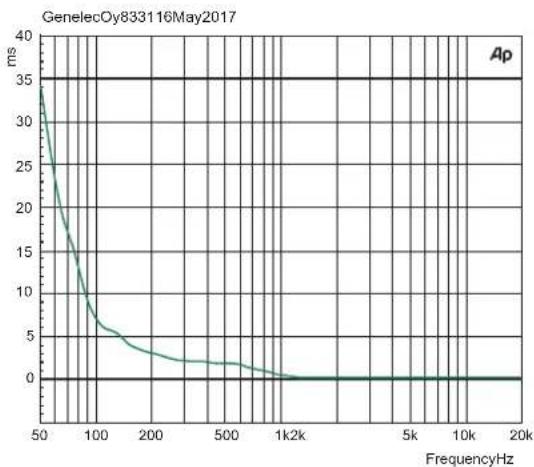
| FrequencyHz | ms | | ----------- | --- | | 50 | 35 | | 100 | 10 | | 200 | 5 | | 500 | 2 | | 1k | 1 | | 5k | 0.5 | | 10k | 0.2 | | 20k | 0.1 |Figure 10. The curve above shows the delay variation of the 8331A as a function of frequency.
SYSTEM SPECIFICATIONS
| Lower cut-off frequency, -6 dB < 45 Hz | |
| Upper cut-off frequency, -6 dB >37 kHz | |
| Accuracy of frequency response, ± 1.5 dB 58 Hz – 20 kHz | |
| Maximum short term sine wave acoustic output on axis in half space, averaged from 100 Hz to 3 kHz at 1 m | ≥ 104 dB SPL |
| Maximum long term RMS acoustic output in the same conditions with IEC weighted noise (limited by driver protection circuit) at 1 m | 99 dB SPL |
| Maximum peak acoustic output per pair in a listening room with music material at 1 m 110 dB | |
| Self generated noise level in free space at 1 m on axis (A-weighted) ≤ 0 dB | |
| Harmonic distortion at 85 dB SPL at 1 m on axisFreq: 50...100 Hz>100 Hz | < 2 %< 0.5 % |
| DriversBassMidrangeTreble | Dual 130 x 65 mm ( 5^1/_a x 2^1/_a in) oval cones90 mm ( 3^1/_2 in) cone (coaxial)19 mm ( ^3/_4 in) metal dome (coaxial) |
| Weight 6.7 kg (15 lb) | |
| DimensionsHeight including IsoPod standHeight without IsoPodWidthDepth | 305 mm (12 in)285 mm ( 11^1/_4 in)189 mm ( 7^1/_2 in)212 mm ( 8^3/_8 in) |
AMPLIFIER SECTION
| Bass amplifier short term output power | 72 W |
| Midrange amplifier short term output power | 36 W |
| Treble amplifier short term output power | 36 W |
| (Long term output power is limited by driver protection circuitry) | |
| Amplifier system THD at nominal output <0.05% | |
| Mains voltage 100-240 VAC 50/60 Hz | |
| Power consumption | |
| ISS active | < 0.5 W |
| Idle | 4 W |
| Full output (short term) | 60 W |
SIGNAL PROCESSING
| 8331A | |
| Analog signal input connector XLR female, balanced 10 kOhm | pin 1 gndpin 2 non-invertingpin 3 inverting |
| Maximum analog input signal | +24.0 dBu |
| Analog input sensitivity (100 dB SPL at 1 m) | -6 dBu |
| Analog input sensitivity control | Adjustable from +36 to -6 dBu |
| Digital signal input connector XLR female 110 Ohm | AES/EBU Single Wire |
| Digital signal output / Thru connector XLR male 110 Ohm | AES/EBU Single Wire |
| Digital audio input | |
| Word length | 16 - 24 bits |
| Sample rate | 32 - 192 kHz |
| Digital input sensitivity (100 dB SPL at 1 m) | -30 dBFS |
| Digital input maximum attenuation | 42 dB |
| Control network | |
| Type | Proprietary GLMTM network |
| Connection | 2 RJ45, CAT5 cables |
| Crossover frequencies | |
| Bass/Mid | 500 Hz |
| Mid/Treble | 3 kHz |
| GLMTMsoftware frequency response adjustment* | |
| Parametric notch filters | 16 |
| Shelving filters | 2 LF and 2 HF |
| System room response calibration Genelec GLM AutoCalTM, GLM | TM manual, Stand-alone* |
* The notch and shelving filters adjustments, AutoCal™ and GLM™ manual system calibration features are part of the Genelec Loudspeaker Manager (GLM™) software
介绍
h1 = 163 mm (6 3/8 in)
h2 = 116 mm (4 9/16 in)
图4 声轴的位置
line
| FrequencyHz | ms | | ----------- | --- | | 50 | 35 | | 100 | 10 | | 200 | 5 | | 500 | 2 | | 1k2k | 1 | | 5k | 0.5 | | 10k | 0.2 | | 20k | 0.1 |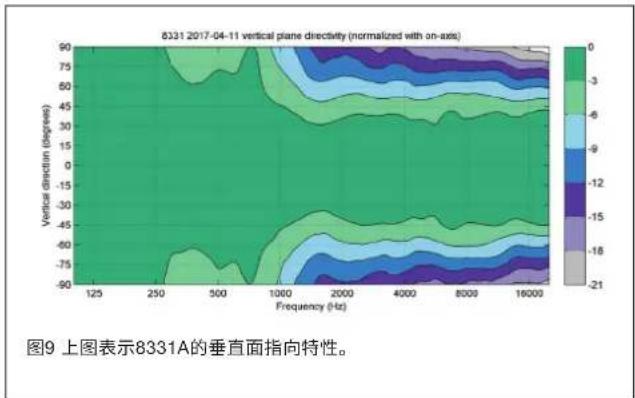
系统参数
Genelec Document D0131R001 Copyright Genelec Oy 4.2017. All data subject to change without prior notice.
www.genelec.com
GENELEC®
International enquiries:
Genelec, Olivile 5
FIN-74100, lisalmi, Finland
Phone -358 17 83881
Fax +358 17 812 267
Email genelec@genelec.com
In the U.S. please contact:
Genelec, Inc., 7 Tech Circle
Natick, MA 01760, USA
In Sweden please contact:
Genelec Sverige
Ellipsvågen 108
P.O. Box 5521, S-141 05 Huddinge
Phone +45 8 449 5220
Fax +46 8 708 7071
Email info@genelec.com
真力中国
北京市朝阳区酒仙桥路10号
恒通商务园 B33-101
电话 400 700 1978
微信真力GENELEC
微博@真力GENELEC
Email genelec.china@genelec.com

- Introduction
- System Characteristics
- Genelec Loudspeaker Manager™ (GLM™) Software And GLM User Kit
- Minimum Diffraction Coaxial (MDC™)
- Directivity Control Waveguide (DCW™)
- Acoustically Concealed Woofers (ACW™)
- Smart Active Monitor (SAM™)
- Audio Inputs
- Power Management
- Setup Using The GLM™ Control Network
- Setup Without Using The GLM
- Stand-Alone Control Functions
- Bass Roll-Off Control
- Desktop Reflection Compensation
- Bass Tilt Control
- Treble Tilt Control
- LED Disable
- ISS
- Digital
- Level
- Stored
- Operating Environment
- Mounting And Placing Monitors
- Mounting Options
- Front Panel Light
- Use With Subwoofers
- Maintenance
- Safety Considerations
- WARNING!
- Guarantee
- Compliance To FCC Rules
- 介绍
Brand : GENELEC
Model : 8331A
Category : Monitor