
AirGenius HFD310 - Air purifier HONEYWELL - Free user manual and instructions
Find the device manual for free AirGenius HFD310 HONEYWELL in PDF.


| Product Type | Air Purifier |
| Brand | Honeywell |
| Model | AirGenius HFD310 |
| Dimensions (L x W x H) | 40 x 20 x 50 cm |
| Weight | 5 kg |
| Power Supply | 220-240 V, 50/60 Hz |
| Power Consumption | 55 W |
| Recommended Room Size | Up to 50 m² |
| Filtration Type | Pre-filter, HEPA filter, activated carbon filter |
| Number of Speeds | 4 speeds + Turbo mode |
| Noise Level | 30 to 55 dB |
| Functions | Timer (1-8 h), Night Mode, Air Quality Indicator |
| Maintenance | Clean pre-filter every month |
| Filter Replacement | Every 12 months based on usage |
| Safety | Automatic shut-off if tipped over |
| Spare Parts | HEPA filter HRF-G1, carbon filter HRF-AP1 |
| Warranty | 2 years |
Frequently Asked Questions - AirGenius HFD310 HONEYWELL
User questions about AirGenius HFD310 HONEYWELL
0 question about this device. Answer the ones you know or ask your own.
Ask a new question about this device
Download the instructions for your Air purifier in PDF format for free! Find your manual AirGenius HFD310 - HONEYWELL and take your electronic device back in hand. On this page are published all the documents necessary for the use of your device. AirGenius HFD310 by HONEYWELL.
USER MANUAL AirGenius HFD310 HONEYWELL
AIR GENIUS Air Purifier/Odor Reducer
Owner's Manual
natural_image
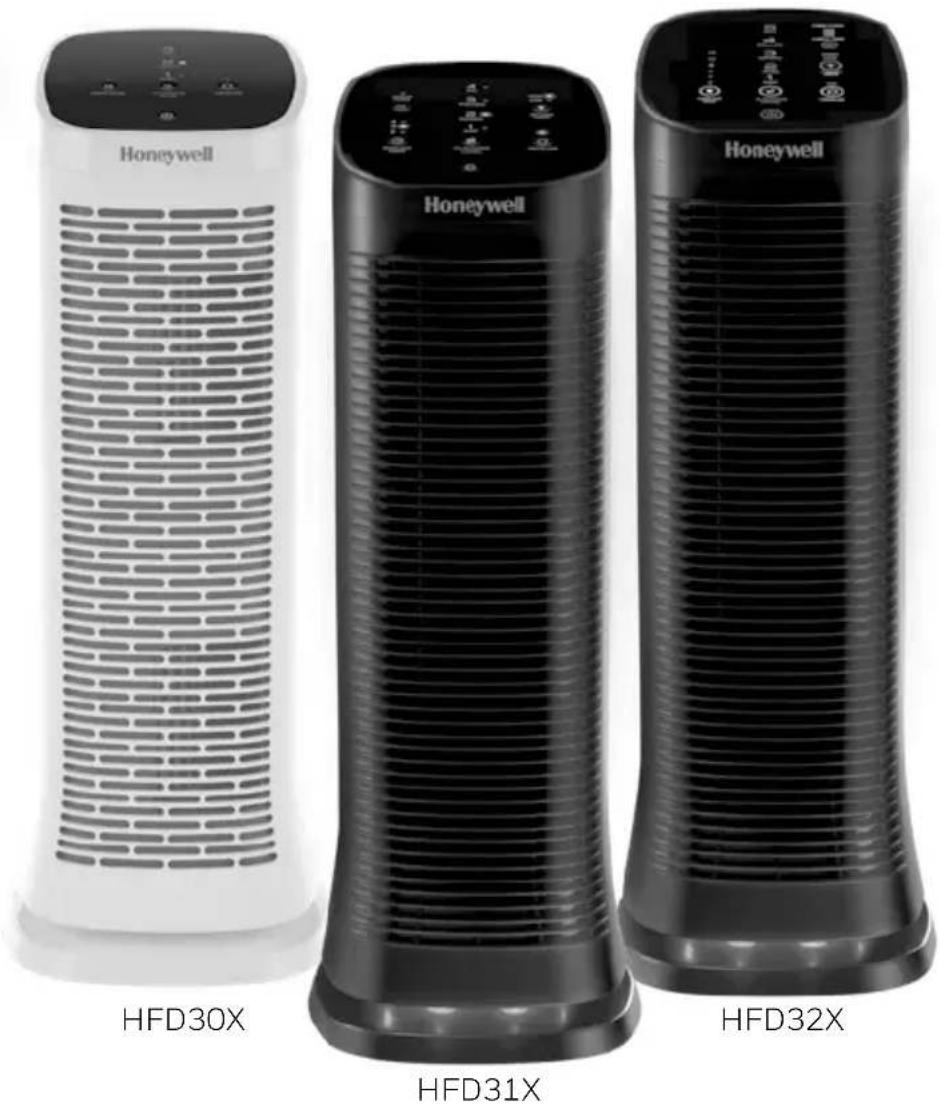
Three Honeywell air purifiers labeled HFD30X, HFD31X, and HFD32X, shown from different angles (no text or symbols on the devices themselves)HFD30X SERIES HFD31X SERIES HFD32X SERIES
If you have any questions about the operation of this product, please call us toll-free at 1-800-477-0457, or visit our website at: www.HoneywellPluggedIn.com/contact-us.
⚠️ IMPORTANT SAFETY INSTRUCTIONS
READ AND SAVE THESE SAFETY INSTRUCTIONS BEFORE USING THIS AIR PURIFIER
When using electrical appliances, basic precautions should always be followed to reduce the risk of fire, electric shock, and injury to persons, including the following:
- Read all instructions before operating the air cleaner.
- Place air purifier where it is not easily overturned by persons in the household.
- ALWAYS turn the air purifier controls to the OFF position and unplug from the wall outlet when not in use.
- To disconnect the air purifier, press the Power button to turn the unit OFF, grip the plug and pull it from the wall outlet. NEVER pull by the cord.
- DO NOT use any product with a damaged cord or plug or if product malfunctions, or any product that has been dropped or damaged in any manner. Keep the cord away from heated surfaces.
- DO NOT use air purifier outdoors.
- NEVER use air purifier unless it is fully assembled.
- DO NOT run power cord under carpets, and DO NOT cover with throw rugs. Arrange cord such that it will not be a tripping hazard.
- DO NOT use air purifier where combustible gases or vapors are present.
- DO NOT expose the air purifier to rain, or use near water, in a bathroom, laundry area, or other damp location.
-
The air purifier MUST be used in its upright position.
-
DO NOT allow foreign objects to enter ventilation or exhaust opening as this may cause electric shock or damage to the air purifier. DO NOT block air outlets or intakes.
- Locate air purifier near the outlet and avoid using an extension cord or power-strip.
- This appliance has a polarized plug (one blade is wider than the other). To reduce the risk of shock, this plug is intended to fit only one way in a polarized outlet. If the plug does not fit fully in the outlet, reverse the plug. If it still does not fit, contact a qualified electrician. DO NOT attempt to defeat this safety feature.
- A loose fit between the AC outlet (receptacle) and plug may cause overheating and a distortion of the plug. Contact a qualified electrician to replace loose or worn outlet.
- DO NOT sit, stand or place heavy objects on the air purifier.
- ALWAYS disconnect power supply before servicing.
- Keep out of reach of children and pets.
- Filters may be harmful if ingested. Avoid breathing dust when changing filters.
- SAVE THESE INSTRUCTIONS.
NOTE: For FCC compliance and RSS information, please see last page of this manual.
⚠ WARNING: To Reduce The Risk of Fire or Electric Shock, DO NOT Use This Air Purifier With Any Solid-State Speed Control Device.
GETTING TO KNOW YOUR AIR PURIFIER
ODOR REDUCTION
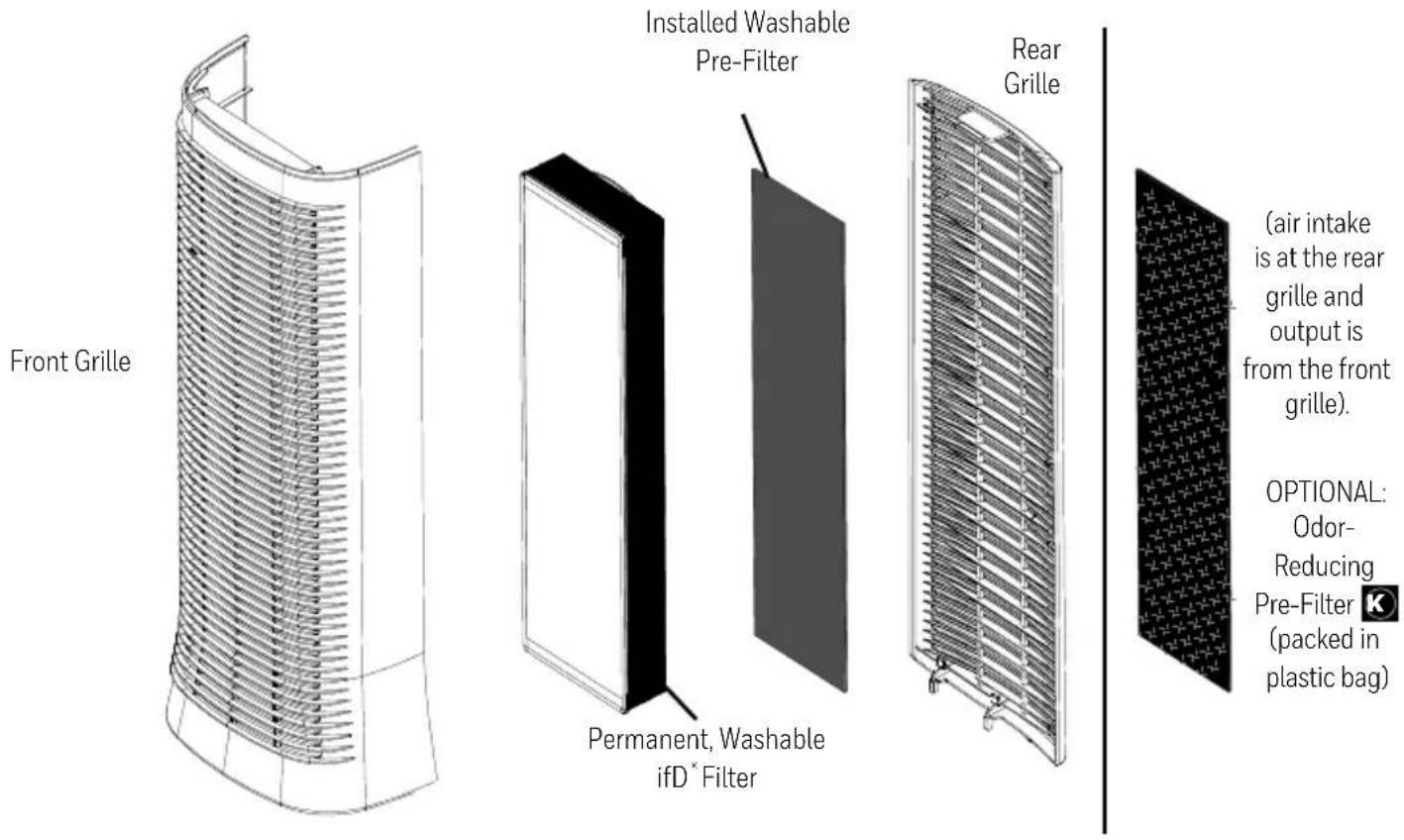
The Washable Pre-Filter came installed in your air purifier and removes larger particles from the air that passes through the filter. You may use this washable pre-filter, or you have the choice to use the optional Odor & VOC Reducing K Pre-Filter that is packed in a bag that came with the air purifier. In addition to capturing larger particles, the K Pre-Filter will also trap common household odors and gases. If you choose to use the K Pre-Filter, you must remove the installed washable pre-filter then insert the ☑ Pre-Filter.
Note: The K Pre-Filter cannot be washed and should be replaced every 3 months for optimum performance.
NOTE: Please only use one pre-filter in your air purifier at a time. You will need to choose whether you want to use the Permanent, Washable Pre-Filter or the replaceable Odor & VOC Reducing 📁 Pre-Filter. Both are included with your air purifier at the time of purchase.
HOW YOUR AIR PURIFIER WORKS
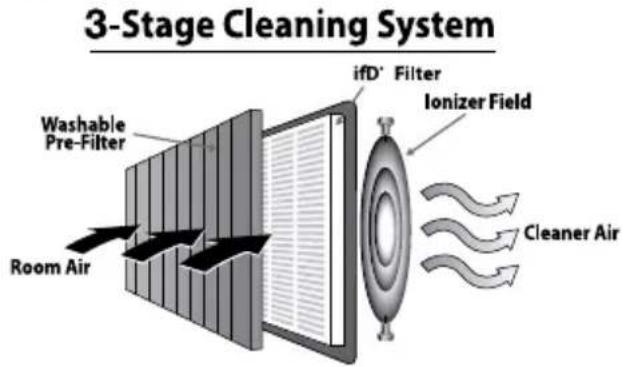
This model air purifier incorporates a 3-stage cleaning system to help clean the air that passes through the filter in the unit (Fig. 1).
Stage 1: Washable or Odor & VOC Reducing Pre-Filter (your choice) attaches to the rear grille. Captures larger airborne particles and traps odors and VOCs (when used with Optional K Pre-Filter).
Stage 2: Permanent Washable iFD ^ Filter. Captures the following microscopic airborne particles: dust, pollen, pet dander, dust mite debris and smoke.
Stage 3: Electronic Ionizer boosts the cleaning power.
Fig. 1
GETTING STARTED
- Select a firm, level and flat location. Ensure the front of the unit faces away from the closest wall or furniture and that no grilles are blocked.
- When operating, large volumes of air are drawn toward the air purifier. Surrounding areas should be cleaned and/or vacuumed frequently to prevent build-up of dust and other contaminants. This may also help prolong the life of the filter. If the unit is placed on a light colored carpet, a small mat or rug should be used underneath to prevent staining. This is especially important in homes with contamination from smoking or fireplaces.
ENERGY STAR
ENERGY STAR
This product earned the ENERGY STAR label by meeting strict energy efficiency guidelines set by the U.S. EPA. Room air cleaners have demonstrated the potential for improving air quality and providing health benefits. EPA does not endorse manufacturer claims regarding the degree to which a specific product will produce healthier indoor air.
The energy efficiency of this ENERGY STAR certified model is measured based on a ratio between the model's CADR for Smoke and the electrical energy it consumes, or CADR/Watt.
OPERATION
- Ensure the air purifier is plugged into a working electrical outlet.
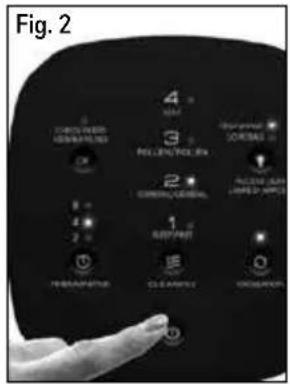
- Press the power button (⏻) once. The unit will start at the General Cleaning level and remain on this setting until another cleaning level is chosen (Fig. 2).
- Press the ( ) button to select a different cleaning level.
Portable air purifiers are more effective in rooms where all doors and windows are closed. It is recommended that you run your air purifier while you are at home to help clean the air. If desired or conditions warrant, you may run your air purifier 24 hours a day.
Tips for Using your new Air Purifier
HFD300 Series
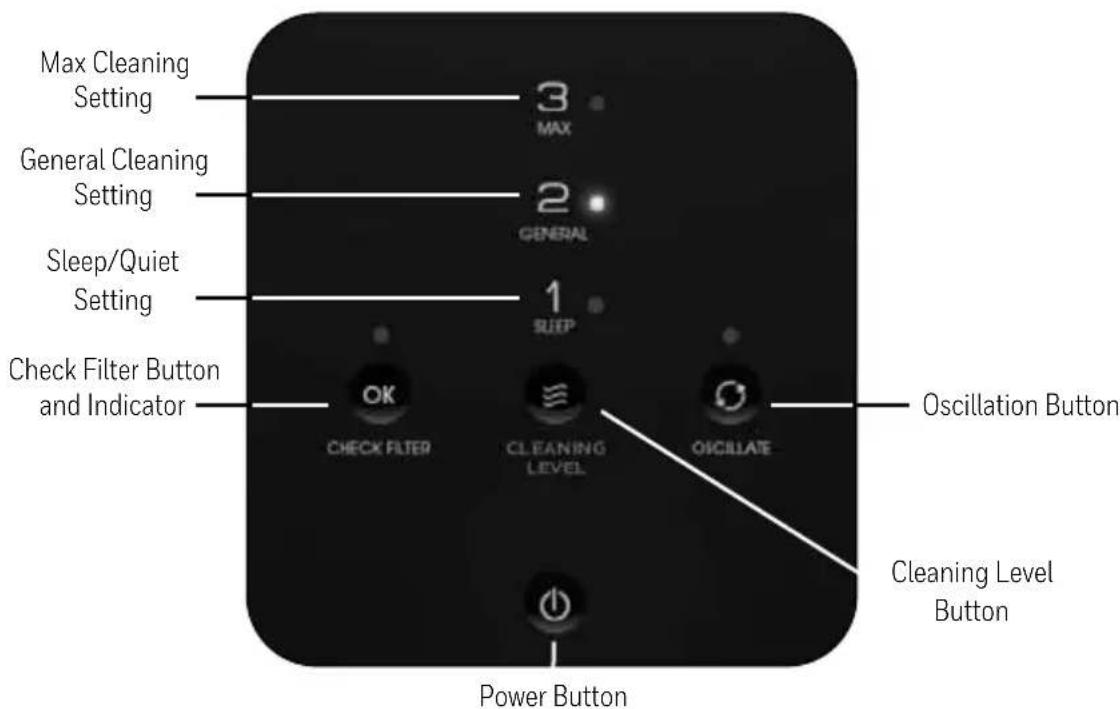
Cleaning Level Button – Once you have pressed the Power Button, use the Cleaning Level Button
( ≡ ) to select the desired air cleaning level. Your air purifier will start on the General Cleaning setting each time you turn the air purifier on. Continue to press the ( ➡ button to cycle through cleaning levels to reach the desired setting. The following is a reference to help get the most out of your air purifier's performance:
LEVEL 3 - MAX
Best for power cleaning the air when unpleasant odors are noticeable, your room is particularly dusty, or you can sense that airborne particles are present. This setting provides the fastest air cleaning of all the settings and circulates the air frequently in the room.
LEVEL 2 - GENERAL
Best for General Cleaning. Use this setting to help reduce airborne dust and smoke particles, like those from cooking or tobacco smoke.
LEVEL 1 - SLEEP
Best for ultra quiet operation, perfect for nighttime use when sleeping.
Oscillate Button – To help circulate fresher, cleaner air through the room, this unit has an oscillation feature.
To turn Oscillation on, simply press the Oscillation button ( ) once. The LED indicator will illuminate when in Oscillation mode. To turn Oscillation off, press the button again.
Check Filters Button – When it is time to check and clean the filters, the indicator light will illuminate. When this light comes on, you will need to clean the Permanent, Washable ifD® Filter and clean or replace the Pre-Filter.
(See Filter Cleaning instructions on pages 9-10). It is recommended that you periodically check the filters.
Depending on operating conditions, the filters should be cleaned every 3 months. If you have chosen to use the Odor & VOC Reducing Pre-Filter, it is NOT washable and should be replaced after 3 months.
After you have cleaned or replaced the filters, you will need to RESET the Electronic Filter Check.
CONTROLS (CONTINUED)
To RESET the Electronic Filter Check: After the Permanent, Washable ifD® Filter and Pre-Filter have been cleaned/replaced and returned to the unit, plug the unit into the power outlet with the unit still in POWER OFF mode, then press and hold the CHECK FILTER "OK" button for 3 seconds. The CHECK FILTER LED will flash twice and shut off indicating the filter check has been reset. The LED will no longer be illuminated. The cleaning intervals are intended as guidelines only. Performance of any filter media is dependent upon the concentration of particles going through the system. High concentrations of particles such as dust, pet dander and smoke particles will reduce the useful performance of the filter and they may need to be cleaned more frequently.
HFD310 Series
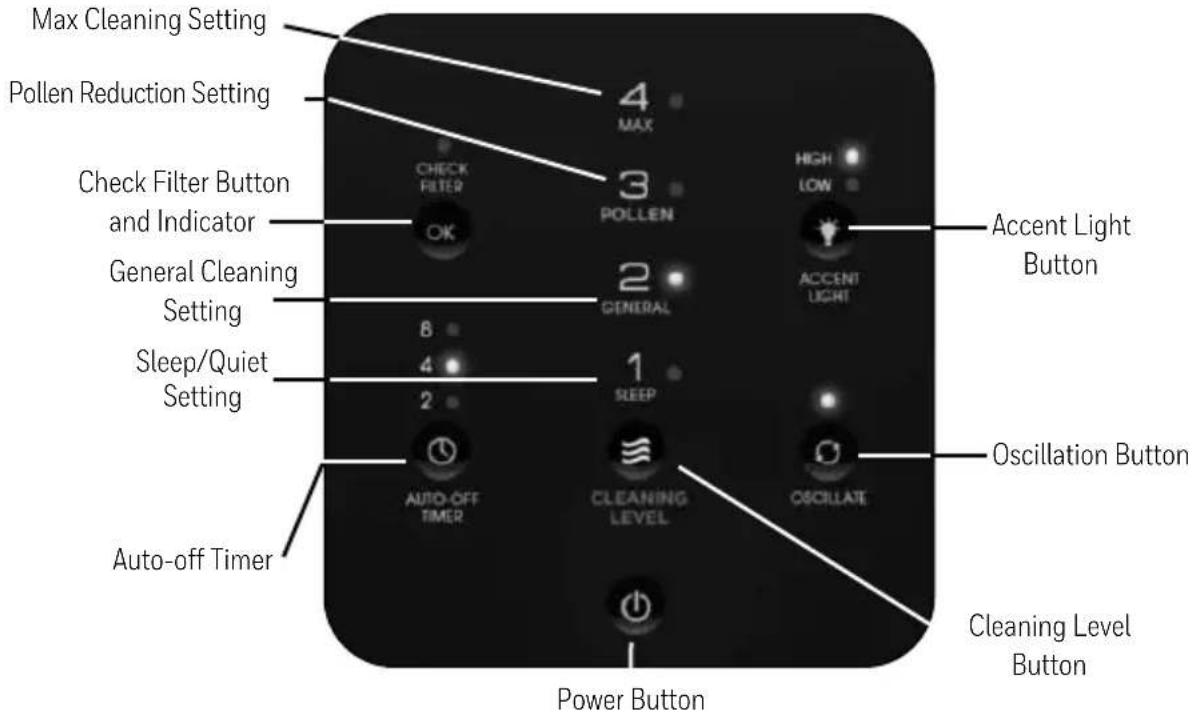
Cleaning Level Button – Once you have pressed the Power Button, use the Cleaning Level Button ( ≡ ) to select the desired air cleaning level. Your air purifier will start on the General Cleaning setting each time you turn the air purifier on. Continue to press the ( ≡ ) button to cycle through cleaning levels to reach the desired setting. The following is a reference to help get the most out of your air purifier's performance:
LEVEL 4 - MAX
This setting is best for power cleaning the air when unpleasant odors are noticeable, your room is particularly dusty, or you can sense that airborne particles are present. This setting provides the fastest cleaning of all the settings and circulates the air frequently in the room.
LEVEL 3 - POLLEN
This setting is best for fighting airborne pollen during high allergen season, particularly in the spring and fall to help reduce airborne pollen. It is also great for year-round reduction of pet dander allergens.
LEVEL 2 - GENERAL
This setting is best for General Cleaning. Use this setting to help reduce airborne dust and smoke particles, like those from cooking or tobacco smoke.
LEVEL 1 - SLEEP
This setting is best for ultra quiet operation, perfect for nighttime use when sleeping.
CONTROLS (CONTINUED)
Oscillate Button – To help circulate fresher, cleaner air through the room, this unit has an oscillation feature. To turn Oscillation on, simply press the Oscillation button ( ) once. The LED indicator will illuminate when in Oscillation mode. To turn Oscillation off, press the button again.
Auto-off Timer Button – Push the ( Ⓤ ) button if you would like your air purifier to run and then automatically shut-off after a certain amount of time (choose from between 2, 4 and 8 hours). This is convenient if you would like your air purifier to run during the night but then shut-off automatically in the morning (choose the 8 hour setting).
Accent Light Button – Your air purifier features a soft accent light at the bottom of the unit that provides a nice glow around the base. You can choose to operate your unit with or without this accent light turned on. If you want to use the light feature, you can choose between a low or high light level.
Check Filter Button – When it is time to check and clean the filters, the indicator light will illuminate. When this light comes on, you will need to clean the Permanent, Washable ifD® Filter and clean or replace the Pre-Filter. (See Filter Cleaning instructions on pages 9-10). It is recommended that you periodically check the filters.
Depending on operating conditions, the filters should be cleaned every 3 months. If you have chosen to use the Odor & VOC Reducing Pre-Filter, it is NOT washable and should be replaced after 3 months. After you have cleaned or replaced the filters, you will need to RESET the Electronic Filter Check.
To RESET the Electronic Filter Check: After the Permanent, Washable ifD ^® Filter and Pre-Filter have been cleaned/replaced and returned to the unit, plug the unit into the power outlet with the unit still in POWER OFF mode, then press and hold the CHECK FILTER “OK” button for 3 seconds. The CHECK FILTER LED will flash twice and shut off indicating the filter check has been reset. The LED will no longer be illuminated. The cleaning intervals are intended as guidelines only. Performance of any filter media is dependent upon the concentration of contaminants going through the system. High concentrations of contaminants such as dust, pet dander and smoke particles will reduce the useful performance of the filter and they may need to be cleaned more frequently.
HFD320 Series
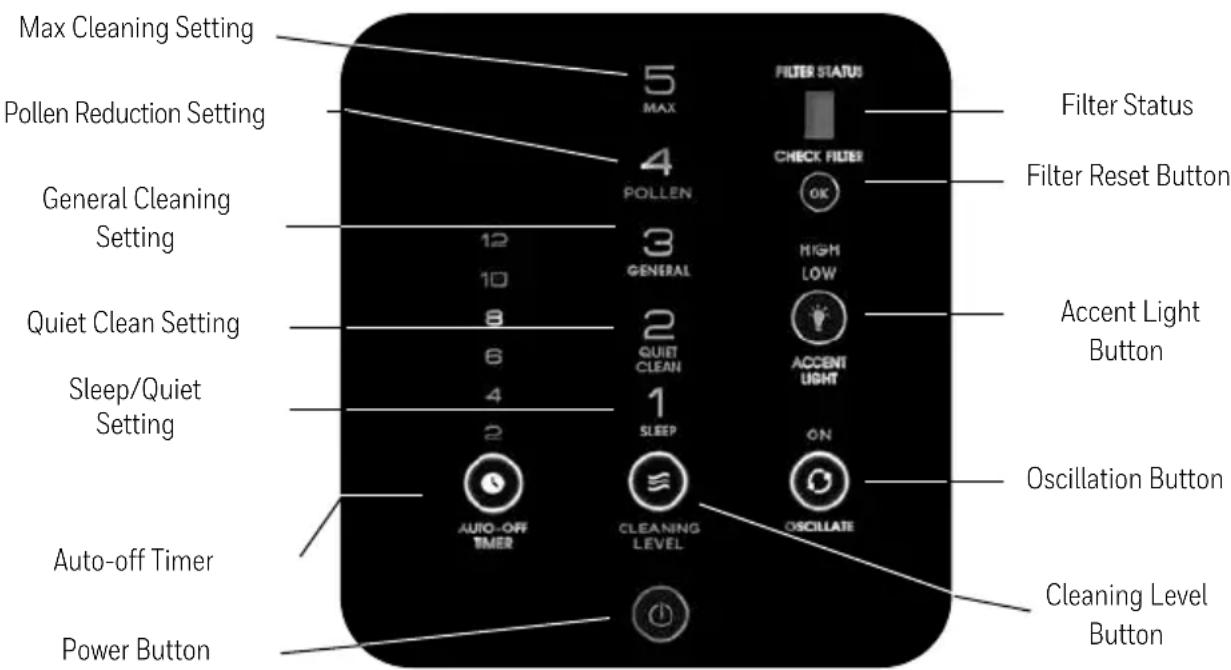
Cleaning Level Button – Once you have pressed the Power Button, use the Cleaning Level Button ( ≡ ) to select the desired air cleaning level. Your air purifier will start on the General Cleaning setting each time you turn the air purifier on. Continue to press the ( ≡ ) button to cycle through cleaning levels to reach the desired setting. The following is a reference to help get the most out of your air purifier's performance:
CONTROLS (CONTINUED)
LEVEL 5 - MAX
Best for power cleaning the air when unpleasant odors are noticeable, your room is particularly dusty, or you can sense that airborne particles are present. This setting provides the fastest air cleaning of all the settings and circulates the air frequently in the room.
LEVEL 4 - POLLEN
Best for fighting airborne pollen during high pollen season, particularly in the spring and fall to help reduce airborne pollen. It is also great for year-round reduction of pet dander allergens.
LEVEL 3 - GENERAL
Best for General Cleaning. Use this setting to help reduce airborne dust and smoke particles, like those from cooking or tobacco smoke.
LEVEL 2 - QUIET CLEAN
Quietest setting and optimized to capture small particles.
LEVEL 1 - SLEEP
Best for ultra quiet operation, perfect for nighttime use when sleeping.
Oscillate Button – To help circulate fresher, cleaner air through the room, this unit has an oscillation feature.
To turn Oscillation on, simply press the Oscillation button ( ) once. To turn Oscillation off, press the button again.
Auto-off Timer Button – Push the ( Ⓤ ) button if you would like your air cleaner to run and then automatically shut-off after a certain amount of time (choose from between 2, 4, 6, 8, 10 and 12 hours). This is convenient if you would like your air purifier to run during the night and then shut-off automatically in the morning (choose the 8 or 10 hour setting).
Accent Light Indicator – Your air purifier features a soft accent light at the bottom of the unit that provides a nice glow around the base. You can choose to operate your unit with or without this accent light turned on. If you want to use the light feature, you can choose between a low or high light level.
Filter Status and Check Filters Button –The Filter Status “LED light bar” will gradually illuminate to show you when it is time to check and clean the filters. When all the bars are illuminated and the Check Filter “OK” button is illuminated, you will need to clean the Permanent, Washable ifD® Filter and clean or replace the pre-filter. (See Filter Cleaning instructions on pages 9-10). It is recommended that you periodically check the filters.
Depending on operating conditions, the filters should be cleaned every 3 months. If you have chosen to use the Odor & VOC Reducing Pre-Filter, it is NOT washable and should be replaced after 3 months. After you have cleaned or replaced the filters, you will need to RESET the Electronic Filter Check.
To RESET the Electronic Filter Check: After the Permanent, Washable ifD® Filter and Pre-Filter have been cleaned/ replaced and returned to the unit, plug the unit into the power outlet with the unit still in POWER OFF mode, then press and hold the CHECK FILTER "OK" button for 3 seconds. The Filter Status "LED light bar" will flash twice and shut off indicating the filter check has been reset. The "OK" button will no longer be illuminated. The cleaning intervals are intended as guidelines only. Performance of any filter media is dependent upon the concentration of contaminants going through the system. High concentrations of contaminants such as dust, pet dander and smoke particles will reduce the useful performance of the filter and they may need to be cleaned more frequently.
REMOVING THE FILTERS (ALL MODELS)
CAUTION: Turn off the air purifier and wait 60 seconds before removing the grille to clean filters.
WARNING: Filters may be harmful if ingested. Avoid breathing dust when cleaning or changing filters.
The ifD ^® Filter comes installed in the air purifier.
- Turn-off the air purifier. Wait 60 seconds and unplug the unit before removing the grille.
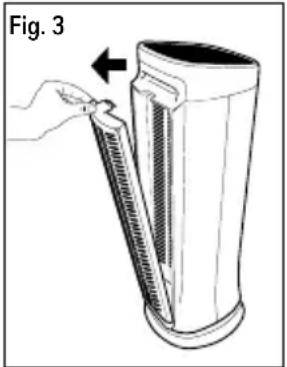
- Press down on the tab on the rear grille and pull the grille down and toward you (Fig. 3). Remove the grille.
- With one hand, hold the air purifier steady and use other hand to grasp ifD® Filter and pull out (Fig. 4).
- To place the ifD® Filter back into the air purifier housing, insert at bottom and ensure it is pushed in as far as it can go, then push in from the top. You will hear an audible “click”.
- Return the grille to the air purifier housing. You will hear an audible "click" when the grille is installed correctly.
- The air purifier will not turn on if the ifD® Filter or the rear grille is not seated properly.
natural_image
Illustration of a hand holding a tool interacting with a cylindrical device (no text or symbols visible)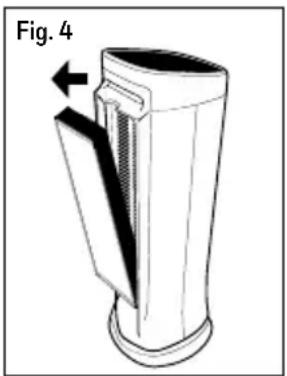
natural_image
Diagram of a cylindrical device with a pointed tip and arrow indicating direction, labeled 'Fig. 4' (no text or symbols on the device itself)CLEANING THE PERMANENT, WASHABLE IFD FILTER (ALL MODELS)
The Permanent, Washable ifD® Filter should be cleaned every 3 months.
WARNING: Filters may be harmful if ingested. Avoid breathing dust when cleaning or changing filters.
Turn the power off and wait 60 seconds, then unplug the air purifier. After removing the ifD® Filter from the air purifier, follow the steps below to clean the ifD® Filter.
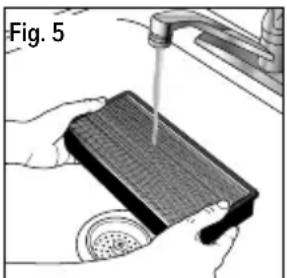
- Rinse the filter with clean tap water (Fig. 5).
- If the filter still appears dirty, proceed to "Washing," otherwise proceed to "Drying."
natural_image
Illustration of hands using a drain to clean or wash the surface of a textured material (no text or symbols visible)Washing:
- Remove the ifD® Filter from the unit.
- Fill a sink with lukewarm water and add a few drops of mild dish soap.
- Gently swish the filter in the soap solution to clean.
- Soak the filter for 2-3 minutes. Do not leave the filter in the water for an extended period of time.
- Rinse the filter with clean tap water (Fig. 5). Proceed to "Drying".
Note that the filter may still be discolored even after washing. This is acceptable and will not affect performance.
Drying:
- Shake the filter to remove any excess water.
- Place the filter with the honeycomb side down on a plush towel.
- Allow the ifD® Filter to dry for a few hours or overnight.
- When the ifD® Filter is completely dry, place back into the air cleaner.
CAUTION:
- Never place a wet ifD® Filter in your air cleaner.
- The ifD® Filter is NOT dishwasher safe. DO NOT place the ifD® Filter in a dishwasher or subject it to other extreme hot water conditions.
- DO NOT use any solvents, strong cleaning agents or flammable liquids to clean the ifD® Filter.
MAINTAINING YOUR WASHABLE PRE-FILTER (ALL MODELS)
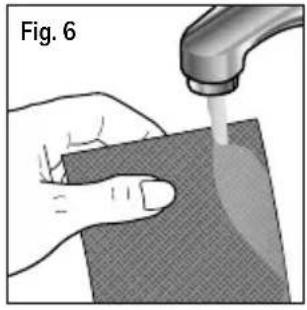
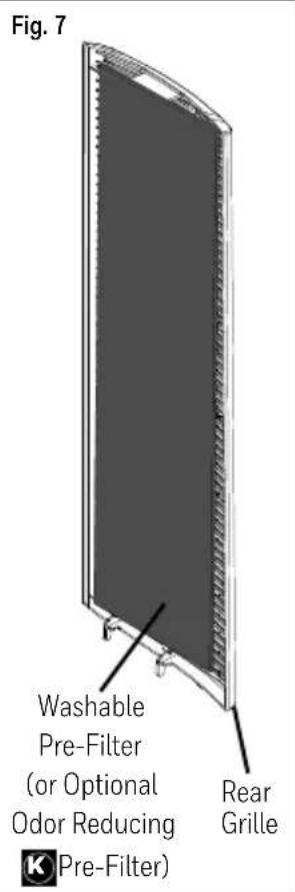
The Washable Pre-Filter helps trap large airborne particles that enter the rear grille. This Pre-Filter can be periodically removed and shaken to clean it. Alternatively, it can be rinsed by hand under warm water (Fig. 6).
Let the Pre-Filter air dry completely before inserting back into the grille (Fig. 7).
If you need to replace this item, please call Consumer Relations at 1-800-477-0457.
natural_image
Illustration of a hand using a tool to apply liquid onto a textured surface, labeled 'Fig. 6' (no text or symbols on the diagram itself)OPTIONAL: Changing the Odor Reducing Pre-Filter
If you have chosen to use the Odor Reducing 📀 Pre-Filter that came with your air cleaner, it will lose its effectiveness for odor reduction over time and will need to be replaced.
To purchase additional 📀 Pre-Filters, see Accessories and Replacement Filters section below.
If using the Odor Reducing Pre-Filter, it is recommended that you store the original Washable Pre-Filter in the event that you decide to use it in the future.
To insert it into the unit, simply place securely into the rear grille in lieu of standard Pre-Filter as shown in Fig. 7.
NOTE: The Odor Reducing Pre-Filter is not washable.
WARNING: Filters may be harmful if ingested. Avoid breathing dust when cleaning or changing filters.
CLEANING AND STORAGE (ALL MODELS)
We recommend that you clean the air purifier at least once every 3 months and before extended storage. Unplug unit from outlet before cleaning. Use only a dry cloth to wipe the external surfaces of the air cleaner. DO NOT USE WATER, WAX, POLISH, OR ANY CHEMICAL SOLUTION.
ACCESSORIES AND REPLACEMENT FILTERS (ALL MODELS)
There is an optional Pre-Filter that can be purchased and used with this air purifier that will help reduce common household odors and VOCs. This K Pre-Filter (HRF-K2) can be used in lieu of the Permanent, Washable Pre-Filter that is supplied with the air purifier. The optional K Pre-Filter should be replaced every 3 months for optimum odor and VOC reduction performance.
Use only Genuine Honeywell Replacement Filters.
You may purchase Honeywell replacement Odor & VOC Reducing Pre-Filter at the store where you purchased your air purifier or they can be ordered directly from www.HoneywellPluggedIn.com.
Odor and VOC Reducing 📀 Pre-Filter: Model HRF-K2 (2 pack).
If you have any questions about your ifD® Filter or the Washable Pre-Filter, call Consumer Relations at 1-800-477-0457.
My Filter Status Bar (Model HFD320 series only) / Check Filters light has not come on but when I checked my filter, it was really dirty.
In conditions where smoke, pets or air with a lot of particles are present it is possible that the filter could be dirty sooner than indicated on the indicator. The filter life indicator on your unit runs on a timer and if there are more particles in your air than in an average home, your filter could need cleaning sooner than indicated on the display. The indicator is intended to be used as a guideline and individual environmental conditions will vary.
My unit will not turn on.
The air purifier has safety features to ensure that the unit is ready for operation. Check to make sure that the Permanent, Washable ifD® Filter and rear grille are installed correctly. When properly installed, you will hear an audible “click” when you re-install both the ifD® Filter and the rear grille. If your air purifier still won’t turn on, contact Consumer Relations at 1-800-477-0457.
My Air Purifier is starting to make noise and the air output is less. What's wrong?
The filters may be dirty. High amounts of particles can block the pores in the filter and stop the air from moving through it. The filter and pre-filter should be cleaned.
How long should I run my Air Purifier?
It is recommended that you run your air purifier when you are at home for air cleaning. The unit will be more effective when doors and windows are closed. If desired or conditions warrant, you may run your air purifier 24 hours a day.
Can I wash my Odor & VOC Reducing K Pre-Filter?
No. Washing the Odor Reducing K Pre-Filter will destroy it. You can, however, wash the Permanent Pre-Filter.
How do I use the additional pre-filter that is packed in the plastic bag?
Your air purifier came with an installed washable porous foam pre-filter that helps capture the larger airborne particles before they reach the ifD® Filter. If you would like the additional benefit of Odor & VOC Reduction, you may replace the washable porous foam pre-filter with the Odor & VOC Reducing Pre-Filter that was packed in a plastic bag with the cleaner. You must first remove the washable porous foam pre-filter that came in your air purifier and replace it with the Pre-Filter. This pre-filter is not washable and should be replaced every 3 months for optimum performance.
How does the electronic filter check work?
The Check Filter light will illuminate when it is time to check and clean the filters after 3 months of continuous operation. After the filters have been cleaned/changed, you should reset the electronic filter check (Check Filter light). See instructions on pages 6, 7, 8 depending on which model you own.
IMPORTANT NOTE
The ionizing process used by the air purifier produces small amount of ozone as a byproduct. The air purifier complies with the U.S. Government limits for acceptable levels of ozone (less than 50 parts per billion by volume of air circulating through the product.) Studies have demonstrated that you will get more ozone in a room from simply opening a window than you will get from operating an air purifier with ifD® Filters.
This air purifier complies with federal ozone emissions limit. ARB certified.
This product complies with the maximum allowable concentration of ozone of 0.050 parts per million by volume (ppmv) in a 24-hour period. The Health Canada Guideline 2010 recommends that the maximum exposure limit, based on an averaging time of 8 hours, is 0.020 ppmv or less when tested in a sealed, controlled room approximately 30 m ^3 .
5 YEAR LIMITED WARRANTY
You should first read all instructions before attempting to use this product.
A. This 5 year limited warranty applies to repair or replacement of product found to be defective in material or workmanship. This warranty does not apply to damage resulting from commercial, abusive, unreasonable use or supplemental damage. Defects that are the result of normal wear and tear will not be considered manufacturing defects under this warranty. KAZ IS NOT LIABLE FOR INCIDENTAL OR CONSEQUENTIAL DAMAGES OF ANY NATURE, ANY IMPLIED WARRANTY OF MERCHANTABILITY OR FITNESS FOR A PARTICULAR PURPOSE ON THIS PRODUCT IS LIMITED IN DURATION TO THE DURATION OF THIS WARRANTY. Some jurisdictions do not allow the exclusion or limitation of incidental or consequential damages or limitations on how long an implied warranty lasts, so the above limitations or exclusions may not apply to you.
This warranty gives you specific legal rights, and you also may have other rights which vary from jurisdiction to jurisdiction. This warranty applies only to the original purchaser of this product from the original date of purchase.
B. At its option, Kaz will repair or replace this product if it is found to be defective in material or workmanship.
C. This warranty does not cover damage resulting from any unauthorized attempts to repair or from any use not in accordance with the instruction manual.
D. This warranty does not cover the ifD® Filter or the Pre-Filters, except for material or workmanship defects.
Please go to www.HoneywellPluggedIn.com/warranty-registration to register your product and receive product information updates and new promotional offers.
CONSUMER RELATIONS
We are here to help answer any questions you may have about this product.
Call us toll-free at: 1-800-477-0457, e-mail: ConsumerRelations@HelenofTroy.com, or visit our website at: www.HoneywellPluggedIn.com, in Canada: www.HoneywellPluggedIn.ca.
Please be sure to specify the model number of the unit you are contacting us about. The model number is located on the bottom of the unit.
NOTE: IF YOU EXPERIENCE A PROBLEM, PLEASE CONTACT CONSUMER RELATIONS FIRST OR SEE YOUR WARRANTY. DO NOT RETURN TO THE ORIGINAL PLACE OF PURCHASE. DO NOT ATTEMPT TO OPEN THE MOTOR HOUSING YOURSELF, DOING SO MAY VOID YOUR WARRANTY AND CAUSE DAMAGE TO THE AIR PURIFIER OR PERSONAL INJURY.
Honeywell
AIR GENIUS
natural_image
Three Honeywell air purifiers labeled HFD30X, HFD31X, and HFD32X, shown from different angles (no text or symbols on the devices themselves)MODÈLE HFD30X
MODÈLE HFD31X
MODÈLE HFD32X
natural_image
Illustration of a hand holding a tool interacting with a cylindrical device labeled Fig. 3 (no text or symbols on the device itself)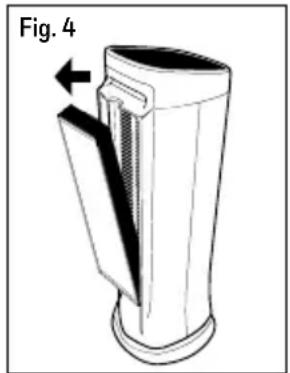
natural_image
Diagram of a cylindrical device with a pointed tip and arrow indicating direction, labeled 'Fig. 4' (no text or symbols on the device itself)NETTOYAGE DU FILTRE IFD ^MD PERMANENT LAVABLE (TOUS LES MODELES)
natural_image
Illustration of a hand using a pipette to clean or wash a textured object (no text or symbols visible)Lavage
natural_image
Close-up of a hand using a tool to apply liquid onto a textured surface, labeled 'Fig. 6' (no other text or symbols)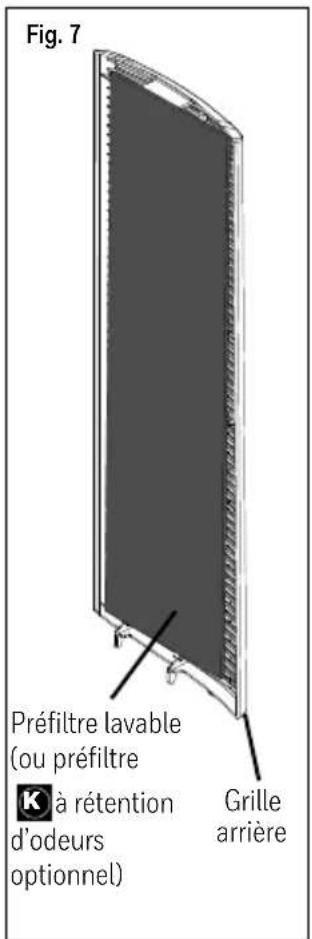
natural_image
Three Honeywell heat exchangers with grid-patterned designs, displayed side by side (no visible text or symbols on the devices themselves)SERIES HFD30X
SERIES HFD31X
SERIES HFD32X
natural_image
Illustration of a hand inserting a spring into a cylindrical device (no text or symbols)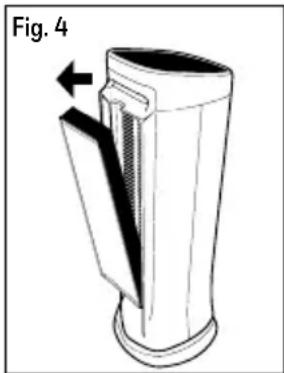
natural_image
Diagram of a cylindrical device with a side panel and an arrow indicating direction, labeled 'Fig. 4' (no text or symbols on the device itself)LIMPIEZA DE FILTRO IFD® PERMANENTE, LAVABLE (TODOS LOS MODELOS)
El Filtro ifD® Permanente, Lavable se debe limpiar cada 3 meses.
natural_image
Illustration of a hand using a tool to clean or store items on a sink (no text or symbols visible)Lavar:
natural_image
Illustration of a hand using a pipette to apply material on a textured surface (no text or symbols)NOTE: This equipment has been tested and found to comply with the limits for a Class B digital device, pursuant to Part 15 of the FCC Rules. These limits are designed to provide reasonable protection against harmful interference in a residential installation. This equipment generates, uses, and can radiate radio frequency energy and, if not installed and used in accordance with the instructions, may cause harmful interference to radio communications. However, there is no guarantee that interference will not occur in a particular installation. If this equipment does cause harmful interference to radio or television reception, which can be determined by turning the equipment off and on, the user is encouraged to try to correct the interference by one or more of the following measures:
- Reorient or relocate the receiving antenna.
- Increase the separation between the equipment and receiver.
- Connect the equipment into an outlet on a circuit different from that to which the receiver is connected.
- Consult the dealer or an experienced radio TV technician for help.
Warning: Changes or modifications to this unit not expressly approved by the party responsible for compliance could void the user's authority to operate the equipment.
THIS DEVICE COMPLIES WITH INDUSTRY CANADA LICENSE-exempt RSS-210
Operation is subject to the following conditions: (1) this device may not cause interference, and (2) this device must accept interference, including interference that may cause undesired operation of the device..
© 2021 All rights reserved.
Kaz USA, Inc., a Helen of Troy Company
400 Donald Lynch Blvd., Suite 300, Marlborough, MA 01752
Honeywell is a trademark of Honeywell International Inc., used under license by Helen of Troy Limited.
The ifD ^® trademark is used under license from Darwin Technology International LTD.
Distributed in Canada by: Kaz Canada, Inc., a Helen of Troy Company
6700 Century Avenue, Suite 210, Mississauga, Ontario L5N 6A46
Contact us at 1-800-477-0457 or www.HoneywellPluggedIn.com or in Canada, www.HoneywellPluggedIn.ca
The ENERGY STAR ^® name and mark are registered trademarks owned by the U.S. EPA.
Made in China
For Responsible recycling, please visit:

www.RecycleNation.com
www.RecycleNation.com
Helen of Troy
Creative Department Artwork Specifications
Brand: Honeywell
Category: Air Purifiers
Model: HFD300 Series HFD310 Series HFD320 Series
Artwork Part #: A007023R0
Subject: OWNERS MANUAL
Region: US, Canada
Flat Size:IN:W11.0 x H8.0
Folded Size:IN:W5.5 x H8.0
Scale: 1/1
Material: 70# Gloss or Matte Text Bindary is saddle stitch
Page Count: NA
Revision: 5
Date: 26AUG21
Release Date: 30AUG21
Re-release Date:
Colors:
Dielines (Do not print) Spot Colors
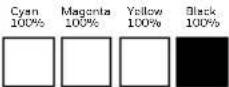
Special Instructions:
Quality Requirement of Artwork and Quality Clarification Process of Artwork Printing: Meet Eng-QS-06&02
Helen of Troy CreativeServices Marlborough, MA 01752 USA +1 508 490 7000

- AIR GENIUS Air Purifier/Odor Reducer
- ⚠️ IMPORTANT SAFETY INSTRUCTIONS
- READ AND SAVE THESE SAFETY INSTRUCTIONS BEFORE USING THIS AIR PURIFIER
- GETTING TO KNOW YOUR AIR PURIFIER
- ODOR REDUCTION
- HOW YOUR AIR PURIFIER WORKS
- GETTING STARTED
- ENERGY STAR
- OPERATION
- CONTROLS (CONTINUED)
- LEVEL 4 - MAX
- LEVEL 3 - POLLEN
- LEVEL 2 - GENERAL
- LEVEL 1 - SLEEP
- LEVEL 5 - MAX
- LEVEL 4 - POLLEN
- LEVEL 3 - GENERAL
- LEVEL 2 - QUIET CLEAN
- REMOVING THE FILTERS (ALL MODELS)
- CLEANING THE PERMANENT, WASHABLE IFD FILTER (ALL MODELS)
- Washing:
- Drying:
- CAUTION:
- MAINTAINING YOUR WASHABLE PRE-FILTER (ALL MODELS)
- OPTIONAL: Changing the Odor Reducing Pre-Filter
- CLEANING AND STORAGE (ALL MODELS)
- ACCESSORIES AND REPLACEMENT FILTERS (ALL MODELS)
- Use only Genuine Honeywell Replacement Filters.
- IMPORTANT NOTE
- YEAR LIMITED WARRANTY
- CONSUMER RELATIONS
- Honeywell
- AIR GENIUS
- NETTOYAGE DU FILTRE IFD MD PERMANENT LAVABLE (TOUS LES MODELES)
- Lavage
- LIMPIEZA DE FILTRO IFD® PERMANENTE, LAVABLE (TODOS LOS MODELOS)
- Lavar:
- THIS DEVICE COMPLIES WITH INDUSTRY CANADA LICENSE-exempt RSS-210
- Helen of Troy
- Creative Department Artwork Specifications
- Model: HFD300 Series HFD310 Series HFD320 Series
- Date: 26AUG21
Brand : HONEYWELL
Model : AirGenius HFD310
Category : Air purifier