
PerfecTemp DCC-3200 - Coffee maker CUISINART - Free user manual and instructions
Find the device manual for free PerfecTemp DCC-3200 CUISINART in PDF.


| Brand | Cuisinart |
| Model | PerfecTemp DCC-3200 |
| Product Type | Programmable Coffeemaker |
| Capacity | 14 cups |
| Power Supply | 120V, 60Hz |
| Carafe Material | Glass |
| Carafe Capacity | 14 cups |
| Filter Type | #4 paper filter or Cuisinart Gold-Tone permanent filter |
| Water Filter | Charcoal water filter (replaceable every 60 days) |
| BPA Free | Yes (all parts that contact coffee or liquids) |
| Programmable | Yes, up to 24 hours in advance |
| Auto Shut-off | Adjustable 0 to 4 hours after brew |
| Brew Pause Feature | Yes (allows pouring mid-brew, max 20 seconds) |
| Bold Flavor Setting | Yes |
| 1-4 Cup Setting | Yes |
| Carafe Temperature Control | Low, Medium, High |
| Ready Tone | Audible alert (can be turned off) |
| Decalcification Indicator | Yes (Clean LED) |
| Dishwasher Safe Parts | Carafe, carafe lid, filter basket (upper rack only) |
| Warranty | 3-year limited (U.S. consumers) |
Frequently Asked Questions - PerfecTemp DCC-3200 CUISINART
User questions about PerfecTemp DCC-3200 CUISINART
0 question about this device. Answer the ones you know or ask your own.
Ask a new question about this device
Download the instructions for your Coffee maker in PDF format for free! Find your manual PerfecTemp DCC-3200 - CUISINART and take your electronic device back in hand. On this page are published all the documents necessary for the use of your device. PerfecTemp DCC-3200 by CUISINART.
USER MANUAL PerfecTemp DCC-3200 CUISINART
natural_image
Exterior view of a modern cooking air fryer with digital display and control knobs (no visible text or symbols on the device itself)PerfecTemp® 14-Cup Programmable Coffeemaker
DCC-3200
IMPORTANT SAFEGUARDS
When using electrical appliances, basic safety precautions should always be followed to reduce the risk of fire, electric shock and/or injury to persons, including the following:
- READ ALL INSTRUCTIONS.
- Always unplug from outlet when not in use and before cleaning. Allow to cool before putting on or taking off parts and before cleaning the appliance.
- Do not touch hot surfaces. Use handles and knobs.
- To protect against electric shock, do not place cord, plug, or base unit in water or other liquids.
- This appliance should not be used by or near children or individuals with certain disabilities.
- Do not operate any appliance with a damaged cord or plug, or after the appliance malfunctions or has been dropped or damaged in any manner. Return appliance to the nearest Cuisinart Repair Center for examination, repair, and electrical or mechanical adjustment.
- The use of accessory attachments not recommended by Cuisinart may cause injuries.
- Do not use outdoors.
- Do not let cord hang over edge of table or counter, or touch hot surfaces.
- Do not place on or near a hot gas or electric burner, or in a heated oven.
- Always fill water reservoir first, then plug cord into the wall outlet. To disconnect, push the Brew/Off button, then remove plug from wall outlet.
- Do not use appliance for other than intended use.
- Snap lid securely onto carafe before serving any beverages.
-
Scalding may occur if the lid is removed during the brewing cycle.
-
The glass carafe is designed for use with this coffeemaker only. It must never be used on the range top.
-
Do not set a hot carafe on a wet or cold surface.
-
Do not use a cracked carafe or a carafe having a loose or weakened handle.
-
Do not clean carafe or heating plate with cleansers, steel wool pads, or other abrasive materials.
-
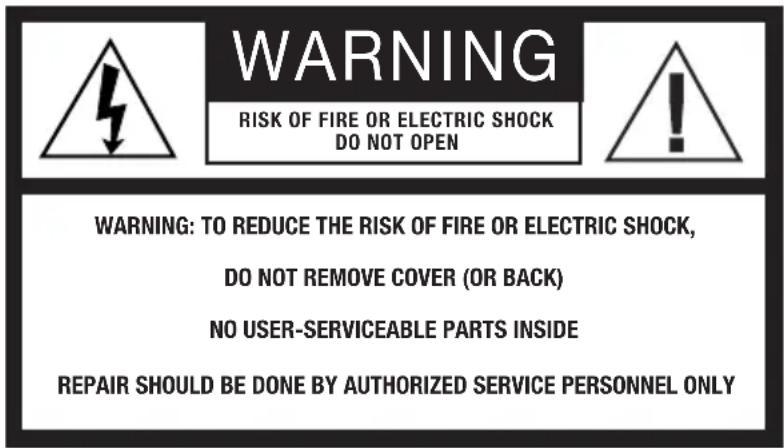
WARNING: TO REDUCE THE RISK OF FIRE OR ELECTRIC SHOCK, DO NOT REMOVE THE BASE PANEL. NO USER-SERVICEABLE PARTS ARE INSIDE. REPAIRS SHOULD BE DONE ONLY BY AUTHORIZED PERSONNEL.
-
Do not place cloth beneath coffeemaker or otherwise restrict airflow.
-
Use only the Cuisinart® Gold-Tone Commercial Style Filter or standard basket-style paper filter with this unit. OTHER GOLD-TONE PERMANENT FILTERS MAY CAUSE THE COFFEEMAKER TO OVERFLOW.
-
Do not operate your appliance in an appliance garage or under a wall cabinet. When storing in an appliance garage, always unplug the unit from the electrical outlet. Not doing so could create a risk of fire, especially if the appliance touches the walls of the garage or the door touches the unit as it closes.
SAVE THESE INSTRUCTIONS
The lightning flash with arrowhead symbol within an equilateral triangle is intended to alert the user to the presence of uninsulated, dangerous voltage within the product's enclosure that may be of sufficient magnitude to constitute a risk of fire or electric shock to persons.

The exclamation point within an equilateral triangle is intended to alert the user to the presence of important operating and maintenance (servicing) instructions in the literature accompanying the appliance.
SPECIAL CORD SET INSTRUCTIONS
A short power-supply cord is provided to reduce the risks resulting from becoming entangled in or tripping over a longer cord.
Extension cords may be used if care is exercised in their use.
If an extension cord is used, the marked electrical rating of the extension cord must be at least as great as the electrical rating of the appliance, and the longer cord should be arranged so that it will not drape over the countertop or tabletop where it can be pulled on by children or tripped over.
NOTICE
This appliance has a polarized plug (one blade is wider than the other). To reduce the risk of electric shock, this plug will fit into a polarized outlet only one way. If the plug does not fit fully into the outlet, reverse the plug. If it still does not fit, contact a qualified electrician. Do not modify the plug in any way.
OPERATING NOTICE
Clogging and backing up of water and/or coffee in the filter basket can occur under any or a combination of any of the following conditions: The use of too finely ground coffee, using two or more paper filters, using the gold-tone filter in conjunction with a paper filter or not properly cleaning coffee grounds from the gold-tone filter, or allowing coffee grounds to spill over the filter.
Caution: Never open the filter basket during the brewing cycle, even if no water is draining from the filter basket, because extremely hot water/coffee can spill out from the filter basket and cause injury. If water/coffee is not draining from the filter basket during the brewing cycle, unplug the unit and wait 10 minutes before opening and checking the filter basket.
CONTENTS
Important Safeguards....2-3
Important Unpacking Instructions ..... 4
The Quest for the Perfect Cup of Coffee....4
Features and Benefits .... 5
Control Panel 6
Before Brewing Your First Pot ..... 7
Programming Your Coffeemaker ..... 7
Making Coffee 8
Brew Pause™ Feature....8
Cleaning and Maintenance 9
Decalcification 9
Warranty 10
IMPORTANT UNPACKING INSTRUCTIONS
- Place the box on a large, sturdy, flat surface.
- Remove literature.
- Turn the box so that the back side of the coffeemaker is down and slide the coffeemaker from the box.
- After the coffeemaker has been removed, place the box out of the way and lift off the left and right inserts.
- Grasp the carafe by its handle, remove it from the heating plate, and remove the polybag.
- Remove the polybag covering the coffeemaker.
Save all packing materials in case you have to ship the machine in the future.
KEEP ALL PLASTIC BAGS AWAY FROM CHILDREN.
THE QUEST FOR THE PERFECT CUP OF COFFEE
Element 1: Water
Coffee is 98% water. The quality of that water is as important as the quality of your coffee. If water doesn't taste good from the tap, it won't taste good in your coffee. Cuisinart includes a charcoal water filter to remove chlorine, bad tastes and odors for the purest coffee flavor, every time you brew.
Element 2: Coffee
While coffee is 98% water, all of the flavor comes from the beans. To achieve the same great taste you enjoy at a coffee bar, you need to use the same quality of coffee. If you choose to grind your own beans, buy them fresh and whole. Buy only about a two-week supply at a time, because once the bean is broken, its flavor degrades quickly.
Element 3: Grind
The grind is critical for proper flavor extraction. If the grind is too fine, over-extraction and bitterness will result. Too fine a grind may also clog the filter. If grind is too coarse, the water will pass through too quickly and the maximum flavor will not be extracted. When grinding your own beans, we recommend a medium-fine grind.
Element 4: Proportion
Coffee that is too strong or too weak is always a disappointment. Follow the recommended portions of ground coffee in the instructions under MAKING COFFEE, and later adjust the amount to suit your taste.
FEATURES AND BENEFITS
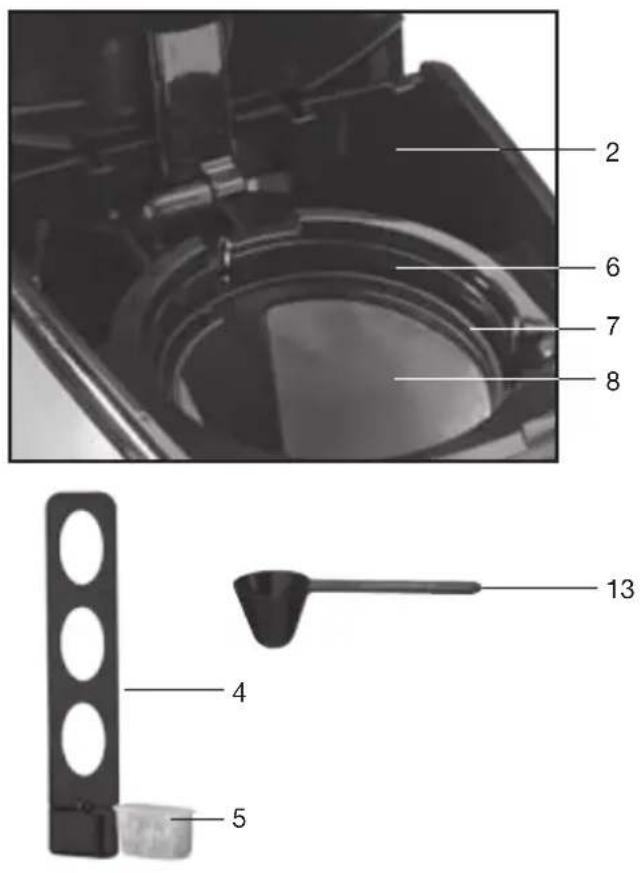
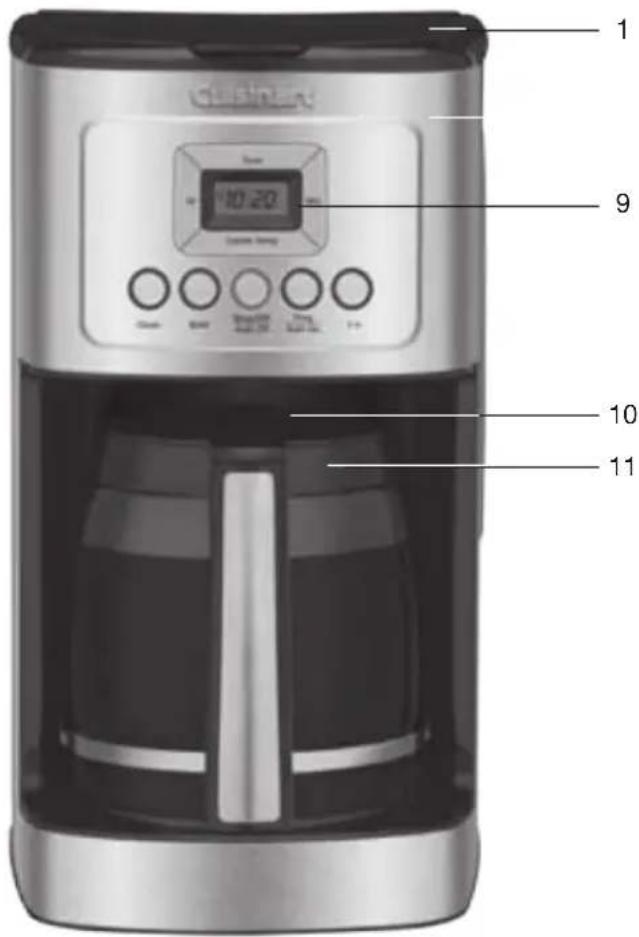
1. CoffeemakerLid
Opens to access filter basket, water filter and water reservoir.
2. Water Reservoir with Water Level Indicator Window
3. Showerhead (not shown)
Distributes water evenly over coffee, reducing temperature loss as water passes through grounds.
4. Charcoal Water Filter Holder
Holds water filter firmly in place.
5. Charcoal Water Filter
Eliminates chlorine, bad tastes and odors from tap water.
6. Filter Basket
Holds a #4 paper filter OR a gold-tone filter.
7. Filter Basket Holder
8. Cuisinart® Permanent Gold-Tone Commercial-Style Filter
Eliminates the need for paper filters.
NOTE: Some fine grounds may flow through the filter and appear as sediment in the carafe.
9. Control Panel
See detailed illustration, page 6.
10. Brew Pause™
Stops flow of coffee from basket when carafe is removed (20 seconds max) from the heater plate, so a cup can be poured mid-brew.
11. 14-Cup Glass Carafe
The easy-pour carafe has an ergonomic handle and brewed coffee markings for 4 to 14 cups.
12. 60-Second Reset (not shown)
One-minute protection in case a breaker trips, the unit is unplugged, or the power fails. It holds all programmed information, including time of day, Auto On time and Auto Off time.
13. Measuring Scoop
14. BPA Free (not shown)
All parts that come in contact with coffee or liquids are BPA free.
GETTING TO KNOW YOUR CONTROL PANEL
Detailed programming and use instructions are on pages 7 and 8.
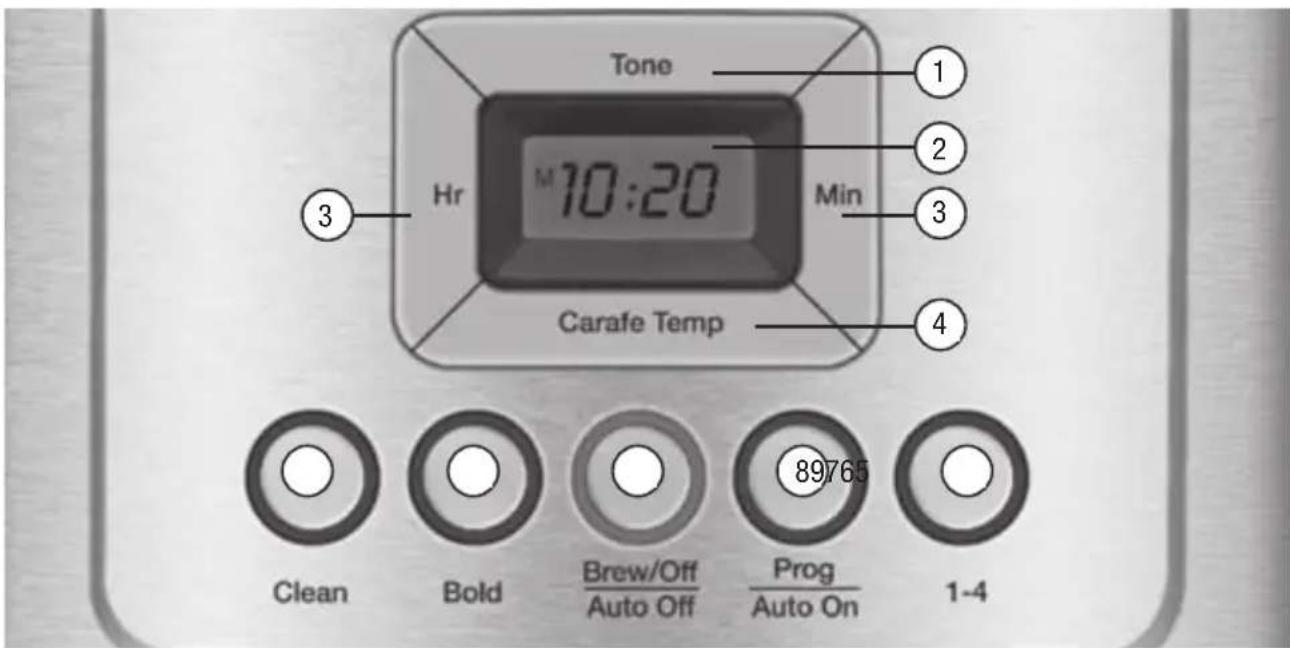
1. Ready Tone Button
Lets you turn an audible "Brew Cycle Finished" alert on or off.
2. Blue Backlit Display
Displays time of day, Auto On and Auto Off times.
A. Low, Medium and High (L,M,H) warming plate indicators.
B. Ready Tone off icon appears when Ready Tone is off.
3. Hour and Minute Buttons
Use to set hours and minutes for time of day, Auto On and Auto Off times.
4. Carafe Temperature Button
Adjusts warming plate temperature to Low, Medium or High to keep freshly brewed coffee at the temperature you prefer.
5. Clean Button
Red indicator appears when it is time to decalcify your coffeemaker.
6. Bold Flavor Strength Button
Lets you choose bold or regular coffee flavor; blue indicator appears when bold is selected.
7. Brew/Off & Auto Off Button
Turns coffeemaker on and off. Use the Auto Off feature to program the time you want the coffeemaker to shut off – from 0 to 4 hours after brew cycle is finished.
8. Prog/Auto On Button
Lets you program coffeemaker to automatically begin brewing up to 24 hours in advance.
9. 1-4 Cup Button
Adjusts brew process to maximize coffee flavor when brewing fewer than 5 cups. Blue indicator appears when function is selected.
BEFORE BREWING YOUR FIRST POT OF COFFEE
Rinsing your coffeemaker: During the manufacturing process, dust can get trapped in the unit. We recommend flushing out the system before brewing your first pot of coffee. Simply fill the reservoir, power on the unit, and follow steps 1, 3 and 5 on page 8 under MAKING COFFEE. Do not add coffee!
Charcoal Water Filter
Your coffeemaker comes with a charcoal water filter that eliminates chlorine, bad tastes and odors from tap water.
Inserting the Water Filter
- Remove the filter from polybag and soak it, fully immersed, in cold tap water for 15 minutes.
- Lift the water filter holder out of the water reservoir.
- Press down on the filter compartment and pull toward you to open.
- Place filter into the holder and snap it closed. Be careful – improper placement can tear the filter skin.
- Flush filter by running cold tap water through holes in bottom of compartment for 10 seconds.
- Allow the filter to drain completely.
- Slide the water filter holder back into the channel in the water reservoir, pushing it down to the base of the unit.
NOTE: We recommend changing the water filter every 60 days or after 60 uses, and more often if you have hard water.
Replacement filters can be purchased in stores, by calling Cuisinart Customer
Service, or at www.cuisinart.com

natural_image
Black vertical object with three white oval cutouts, no visible text or symbols
PROGRAMMING YOUR COFFEEMAKER
SETTING THE CLOCK
When the coffeemaker is plugged in, 12:00 will flash in the display for 10 seconds, indicating the unit is in Clock Set mode. If 12:00 stops flashing, simply press and hold Hour or Minute button to return to flashing Clock Set mode.
Setting Hours and Minutes
Press either button to select the desired time. Hold buttons down to scroll through the digits quickly, or press and release to advance one digit at a time. Be sure the PM indicator is on if setting a PM time.
SETTING THE AUTO ON TIME
1. Press and hold the Prog/Auto On button for 2 seconds.
The digital display will flash the default (12:00) or previously selected time. Follow directions under SETTING THE CLOCK (above) to program your start-brew time. Five seconds after finishing, the unit will automatically exit Auto On Setup mode and the indicator light will illuminate, letting you know Auto On is activated.
NOTE: To exit Auto On Setup mode, you can also just press Auto On button again.
2. To activate Auto On using previously selected time:
Press the Prog/Auto On button. Previously set time will appear and indicator will light up. Display will return to clock setting.
3. To deactivate Auto On:
Press illuminated Auto On button; light will go off, indicating mode is turned off.
SETTING THE AUTO OFF TIME
1. Press and hold the Auto Off button for 2 seconds.
The digital display will flash the programmed Auto Off default (2:00) or previously selected time. Follow directions under SETTING THE CLOCK to program coffeemaker to shut off from 0 to 4 hours after brew cycle is finished.
2. To exit/confirm Auto Off time setting:
Do not touch any buttons. Auto Off Setup mode will be exited automatically after 5 seconds.
Your coffeemaker features a Ready Tone that beeps 5 times when coffee is finished brewing. To turn this alert off, press Tone button; an icon will appear in display to indicate tone is off. To turn tone back on, press Tone button again; icon will disappear.
MAKING COFFEE
Follow instructions in BEFORE BREWING YOUR FIRST POT OF COFFEE (page 7).
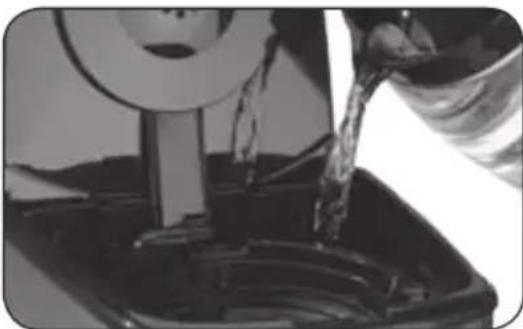
1. Fill the water reservoir
Lift the coffeemaker lid to open. Pour the desired amount of water into the water reservoir using the water level indicator located at the side of the coffeemaker.
natural_image
Close-up of a hand pouring liquid into a container with a spool, no visible text or symbols2. Add the ground coffee
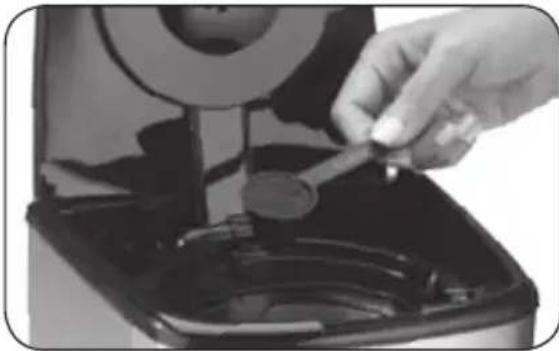
Insert a #4 paper filter OR the gold-tone filter. Be sure that the paper filter is completely open and fully inserted in the basket. It may help to fold and flatten the seams of a paper filter beforehand. Add 1 level scoop of ground coffee per cup. Adjust the amount according to taste.
natural_image
Close-up of a hand inserting a coin into a black appliance (no text or symbols visible)NOTE: The maximum capacity for ground coffee is 15 tablespoons for this coffeemaker. Exceeding this amount may cause overflow if the coffee is too finely ground.
3. Position carafe and plug in unit
Place carafe on heating plate and be sure coffeemaker lid is closed. Plug coffeemaker into an electrical outlet.
4. Set preferences
a. Press the 1–4 cup button if you are brewing fewer than 5 cups. The indicator light will illuminate.
b. Press the Bold button to select stronger coffee flavor, if desired. The button's indicator light will illuminate. Press again to turn off light and brew at regular strength.
c. Choose Low (L), Medium (M) or High (H) carafe temperature by pressing Carafe Temp button. Selection will appear in display.
5. Start Brewing
Press the Brew/Off button to begin brewing.
6. After brewing
When the brewing cycle has been completed, five beeps will sound. Coffee will continue to stream from the filter for several seconds.
Note: Reservoir cover may be hot during and directly after brewing. Wait at least 10 minutes before opening.
Brew Pause™ Feature
This feature interrupts the flow of coffee from the basket to let you pour that first cup mid-brew. Because the flavor profile of coffee brewed at the start of a cycle differs from that brewed toward the end, be aware that using this feature will weaken the flavor strength of the finished pot.
NOTE: Removing carafe for more than 20 seconds during brew cycle may cause filter basket to overflow.
CLEANING AND MAINTENANCE
Always turn coffeemaker off and remove the plug from the electrical outlet before cleaning.
Lift up the coffeemaker lid. Remove and discard the paper filter and ground coffee. The filter basket can be washed in warm, soapy water and rinsed thoroughly, or cleaned in the upper rack of the dishwasher. Dry all parts after use.
Do not put any water in the unit once the filter basket has been removed. Wipe the area under the filter basket with a damp cloth.
Remove the carafe from the heating plate. Discard any remaining coffee. The carafe and lid can be washed in warm, soapy water and rinsed thoroughly, or placed in a dishwasher. The carafe and carafe lid should be placed on the upper rack only.
Do not use any scouring agents or harsh cleansers on any part of the coffeemaker.
Never immerse base unit in water or other liquids. To clean base, simply wipe with a clean, damp cloth and dry before storing. Fingerprints and other blemishes on the housing can be washed off with soap and water or a nonabrasive cleaning solution. Wipe heating plate with a clean, damp cloth. Never use rough, abrasive materials or cleansers to clean the heating plate. Do not dry the inside of the water reservoir with a cloth, as lint may remain.
Maintenance
Any other servicing should be performed by an authorized service representative.
DECALCIFICATION
Decalcification refers to the removal of calcium deposits that form over time on the metal parts of your coffeemaker. The mineral content of the tap water in your area and the frequency of use affects the rate of the calcium buildup, which can affect the functioning of your coffeemaker and the flavor of your coffee.
For best performance from your PerfecTemp® coffeemaker, we recommend cleaning it whenever the CLEAN LED indicator lights up.
NOTE: Before decalcifying your unit, remove the charcoal water filter from the water reservoir.
To clean:
- Fill the water reservoir to capacity with a mixture of 13 white vinegar and 23 water.
- Press and hold the CLEAN button. When the CLEAN LED indicator flashes, the coffeemaker is in Clean mode. Release the button.
- When the cycle is completed, 5 beeps will sound and the coffeemaker will shut off.
- If the CLEAN indicator illuminates once more, repeat the cleaning procedure with a fresh solution of vinegar and water.
NOTE: One cleaning cycle is usually sufficient. - When the CLEAN indicator remains off, run one cycle with a full reservoir of fresh, cold water to rinse the unit.
- Return the charcoal water filter to the holder inside the water reservoir and your coffeemaker is ready to brew!
WARRANTY
Limited Three-Year Warranty
This warranty is available to U.S. consumers only. You are a consumer if you own a Cuisinart® PerfecTemp® 14-Cup Programmable Coffeemaker that was purchased at retail for personal, family or household use. Except as otherwise required under applicable law, this warranty is not available to retailers or other commercial purchasers or owners. We warrant that your Cuisinart® PerfecTemp® 14-Cup Programmable Coffeemaker will be free of defects in materials and workmanship under normal home use for 3 years from the date of original purchase.
We recommend that you visit our website, www.cuisinart.com for a fast, efficient way to complete your product registration. However, product registration does not eliminate the need for the consumer to maintain the original proof of purchase in order to obtain the warranty benefits. In the event that you do not have proof of purchase date, the purchase date for purposes of this warranty will be the date of manufacture.
CALIFORNIA RESIDENTS ONLY
California law provides that for In-Warranty Service, California residents have the option of returning a nonconforming product (A) to the store where it was purchased or (B) to another retail store that sells Cuisinart products of the same type. The retail store shall then, according to its preference, either repair the product, refer the consumer to an independent repair facility, replace the product, or refund the purchase price less the amount directly attributable to the consumer's prior usage of the product. If neither of the above two options results in the appropriate relief to the consumer, the consumer may then take the product to an independent repair facility, if service or repair can be economically accomplished. Cuisinart and not the consumer will be responsible for the reasonable cost of such service, repair, replacement, or refund for nonconforming products under warranty. California residents may also, according to their preference, return nonconforming products directly to Cuisinart for repair or, if necessary, replacement by calling our Consumer Service Center toll-free at 800-726-0190. Cuisinart will be responsible for the cost of the repair, replacement, and shipping and handling for such nonconforming products under warranty.
BEFORE RETURNING YOUR CUISINART PRODUCT
If your Cuisinart® PerfecTemp® 14-Cup Programmable Coffeemaker should prove to be defective within the warranty period, we will repair or, if we think necessary, replace it. To obtain warranty service, please call our Consumer Service Center toll-free at 1-800-726-0190 or write to: Cuisinart, 7475 North Glen Harbor Blvd., Glendale, AZ 85307. To facilitate the speed and accuracy of your return, please enclose \$10.00 for shipping and handling of the product, along with proof of purchase. (California residents need only supply proof of purchase and should call 1-800-726-0190 for shipping instructions.) Be sure to include your return address, phone numbers, description of the product's defect, product serial number, and any other information pertinent to the return. Please pay by check or money order. NOTE: For added protection and secure handling of any Cuisinart product that is being returned, we recommend you use a traceable, insured delivery service. Cuisinart cannot be held responsible for in-transit damage or for packages that are not delivered to us. Lost and/or damaged products are not covered under warranty.
Your Cuisinart® PerfecTemp® 14-Cup Programmable Coffeemaker has been manufactured to the strictest specifications and has been designed for use only in 120-volt outlets and only with authorized accessories and replacement parts. This warranty expressly excludes any defects or damages caused by attempted use of this unit with a converter, as well as use with accessories, replacement parts or repair service other than those authorized by Cuisinart. This warranty does not cover any damage caused by accident, misuse, shipment or other than ordinary household use. This warranty excludes all incidental or consequential damages. Some states do not allow the exclusion or limitation of these damages, so these exclusions may not apply to you. You may also have other rights, which vary from state to state.
Important: If the nonconforming product is to be serviced by someone other than Cuisinart's Authorized Service Center, please remind the servicer to call our Consumer Service Center at 1-800-726-0190 to ensure that the problem is properly diagnosed, the product is serviced with the correct parts, and to ensure that the product is still under warranty.
NOTES:
©2014 Cuisinart
150 Milford Road
East Windsor, NJ 08520
Printed in China
14CE002770
F1B-12654-ESP
East Windsor, NJ 08520
150 Million Road
©2014 Cuisineant
natural_image
Close-up of a hand using a tool to adjust or install a mechanical component (no visible text or symbols)natural_image
Close-up of a car's wheel and suspension system, showing mechanical components and fluid flow (no text or symbols visible)natural_image
Exterior view of a modern kitchen air fryer with digital display and control buttons (no text or symbols on main body)- IMPORTANT SAFEGUARDS
- SAVE THESE INSTRUCTIONS
- SPECIAL CORD SET INSTRUCTIONS
- NOTICE
- OPERATING NOTICE
- CONTENTS
- IMPORTANT UNPACKING INSTRUCTIONS
- THE QUEST FOR THE PERFECT CUP OF COFFEE
- Element 1: Water
- Element 2: Coffee
- Element 3: Grind
- Element 4: Proportion
- FEATURES AND BENEFITS
- CoffeemakerLid
- Water Reservoir with Water Level Indicator Window
- Showerhead (not shown)
- Charcoal Water Filter Holder
- Charcoal Water Filter
- Filter Basket
- Filter Basket Holder
- Cuisinart® Permanent Gold-Tone Commercial-Style Filter
- Control Panel
- Brew Pause™
- 14-Cup Glass Carafe
- 60-Second Reset (not shown)
- Measuring Scoop
- BPA Free (not shown)
- GETTING TO KNOW YOUR CONTROL PANEL
- Ready Tone Button
- Blue Backlit Display
- Hour and Minute Buttons
- Carafe Temperature Button
- Clean Button
- Bold Flavor Strength Button
- Brew/Off & Auto Off Button
- Prog/Auto On Button
- 1-4 Cup Button
- BEFORE BREWING YOUR FIRST POT OF COFFEE
- Charcoal Water Filter
- Inserting the Water Filter
- PROGRAMMING YOUR COFFEEMAKER
- SETTING THE CLOCK
- Setting Hours and Minutes
- SETTING THE AUTO ON TIME
- Press and hold the Prog/Auto On button for 2 seconds.
- To activate Auto On using previously selected time:
- To deactivate Auto On:
- SETTING THE AUTO OFF TIME
- Press and hold the Auto Off button for 2 seconds.
- To exit/confirm Auto Off time setting:
- MAKING COFFEE
- Follow instructions in BEFORE BREWING YOUR FIRST POT OF COFFEE (page 7).
- Fill the water reservoir
- Add the ground coffee
- Position carafe and plug in unit
- Set preferences
- Start Brewing
- After brewing
- Brew Pause™ Feature
- CLEANING AND MAINTENANCE
- Do not put any water in the unit once the filter basket has been removed. Wipe the area under the filter basket with a damp cloth.
- Maintenance
- DECALCIFICATION
- To clean:
- WARRANTY
- Limited Three-Year Warranty
- CALIFORNIA RESIDENTS ONLY
- BEFORE RETURNING YOUR CUISINART PRODUCT
- NOTES:
Brand : CUISINART
Model : PerfecTemp DCC-3200
Category : Coffee maker