SWA6 - Subwoofer Aquatic AV - Free user manual and instructions
Find the device manual for free SWA6 Aquatic AV in PDF.


| Product Type | Combined Bluetooth Stereo Subwoofer with full-range speaker outputs |
| Dimensions (W x H x D) | 368.3 x 279.4 x 144.2 mm |
| Power Output (Max) | 288W total (144W subwoofer + 2 x 72W full-range speakers at 2 ohms) |
| Subwoofer Cone Size | 8" Dual Voice Coil (DVC) |
| Frequency Response | Subwoofer: 26 Hz - 125 Hz; Speaker outputs: 125 Hz - 20 kHz |
| Sensitivity | 86 dB |
| Impedance Stability | 2 Ohm and 4 Ohm stable |
| Inputs | Bluetooth (with Halo Aerial Technology), 2x RCA with variable voltage (400 mV, 2 V, 4 V) |
| Outputs | 2x full-range speaker outputs (wiring harness required) |
| Waterproof Rating | IPX4 (splash resistant) with conformal coated PCB |
| Bluetooth Range Enhancement | Halo Aerial Technology antenna (included) for extended range and signal strength |
| USB Charging | Yes (5V output, charging only, no audio playback) |
| Automatic Standby | Engages when no input from RCA or Bluetooth for energy saving |
| Remote Control | Optional RF6 Wireless Handheld Remote (sold separately) |
| Enclosure Material | Black plastic, IPX4 rated for marine/outdoor use |
| Warranty | 2 years limited (requires registration for extended warranty) |
| Box Contents | SWA6 subwoofer, User/Installation manual, Bluetooth Halo Aerial Technology antenna |
| Safety Features | Polarized plug, protection against moisture and heat, no user-serviceable parts inside |
| Maintenance | Unplug before cleaning with a damp cloth; do not block vents |
Frequently Asked Questions - SWA6 Aquatic AV
User questions about SWA6 Aquatic AV
0 question about this device. Answer the ones you know or ask your own.
Ask a new question about this device
Download the instructions for your Subwoofer in PDF format for free! Find your manual SWA6 - Aquatic AV and take your electronic device back in hand. On this page are published all the documents necessary for the use of your device. SWA6 by Aquatic AV.
USER MANUAL SWA6 Aquatic AV
products with a watertight reputation
SWA6
COMBINED BLUETOOTH STEREO SUBWOOFER
with Bluetooth, USB Charging and Full Range Speaker Outputs
USER / INSTALLATION MANUAL
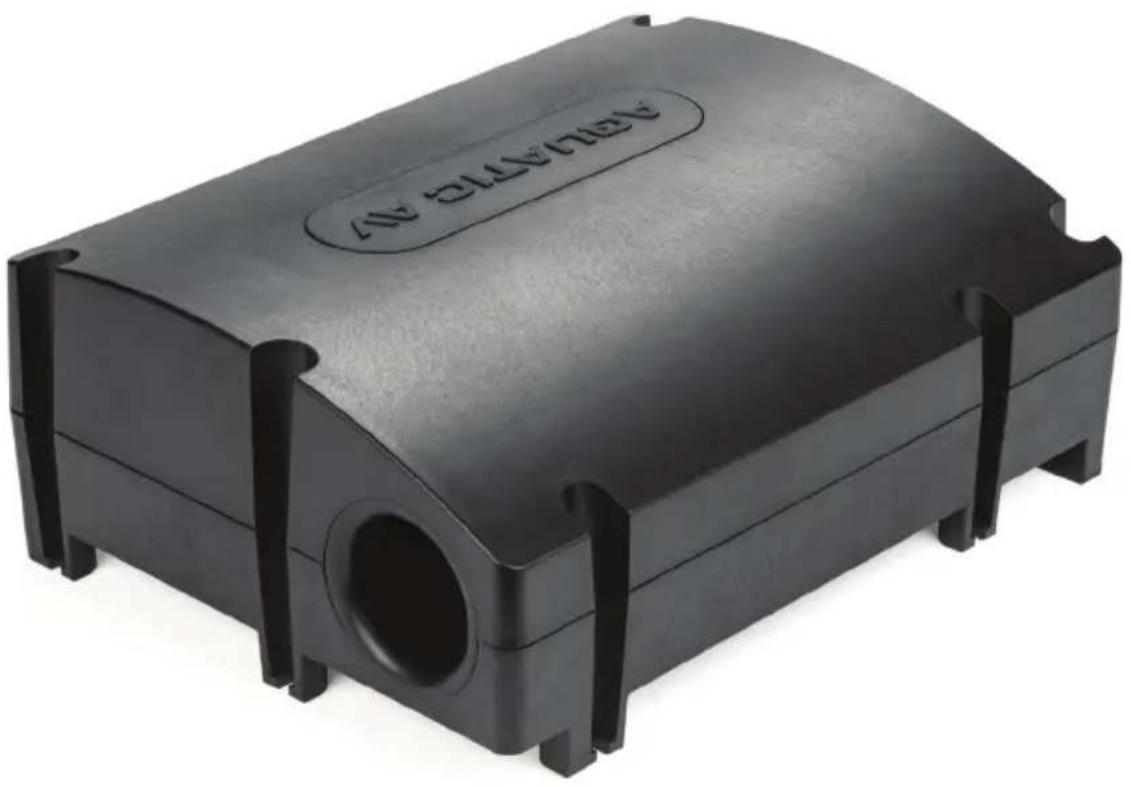
natural_image
Black plastic enclosure with a circular opening and 'NEUTRAL NO' label on the top (no other text or symbols visible)1 Introduction......3
1.1 Safety Instructions....3
2 Getting Started....4
2.1 Contents....4
2.2 Features....4
3 Installation & Wiring....5
3.1 Connecting the Combined Stereo Subwoofer....5
3.2 Wiring Harness.... 5
3.3 Bluetooth Halo Aerial Technology Antenna....6
3.3.1 Bluetooth Halo Aerial Technology Precautions....6
3.3.2 Bluetooth Halo Aerial Technology Installation....6
4 Remote Control (optional)....7
5 Listening to Devices....8
5.1 Listening via Bluetooth....8
5.1.1 Pair with Bluetooth Device....8
5.1.2 Play Bluetooth Device....8
5.1.3 Bluetooth Multi-Link....8
5.2 Listening via Auxiliary Input....8
5.3 Automatic Standby Mode....8
5.4 USB Device Charging....8
6 Specifications & Dimensions....9
6.1 Specifications....9
6.2 Dimensions....9
7 Warranty Information.... 10
1.1 Safety Instructions

CAUTION: TO PREVENT THE RISK OF ELECTRIC SHOCK, DO NOT REMOVE COVER (OR BACK). NO USER-SERVICEABLE PARTS INSIDE. REFER SERVICING TO QUALIFIED AQUATIC AV SERVICE PERSONNEL ONLY.

Please read all the instructions herein. Please retain this manual safely for future reference.
Please heed all safety warnings. Please install in accordance with the Manufacturer's instructions.
Please adjust the volume control to a comfortable level to avoid damaging your hearing and the system.

WARNING: TO REDUCE THE RISK OF ELECTRIC SHOCK

Do not expose this apparatus to rain or moisture.
Place the combined stereo subwoofer away from all heat sources, such as heat registers, stoves, and direct sunlight.
Do not defeat the safety purpose of the polarized plug. A polarized plug has two blades with one wider than the other. The wider blade is provided for your safety. If the provided plug does not fit into your outlet, consult an electrician for replacement of the obsolete outlet. Protect the power cord from being walked on or pinched particularly at plugs, convenience receptacles, and the point where they exit from the apparatus.
For added protection during lightning storms, unplug the combined stereo subwoofer from the electrical outlet.
Unplug the combined stereo subwoofer when unused for long periods of time.
Do not block the openings in the combined stereo subwoofer cabinet, never push objects into combined stereo subwoofer vents or slots because of fire or electric shock hazards, and provide sufficient space around the combined stereo subwoofer for proper ventilation.
Place the combined stereo subwoofer in a stable location so that it will not fall causing damage to the combined stereo subwoofer or bodily harm.
Unplug the combined stereo subwoofer from the electrical outlet before cleaning with a damp cloth.
Servicing is required when the apparatus has been damaged in any way, such as the power-supply cord or plug is damaged, liquid has been spilled or objects have fallen into the apparatus, the apparatus has been exposed to rain or moisture, does not operate normally, or has been dropped
Refer all servicing to qualified service personnel only.
Congratulations on the purchase of the SWA6 Combined Stereo Subwoofer with Bluetooth connectivity and two full range speaker outputs. With the right care and attention it will give you many years of trouble free operation.
Before operating the system, please read this manual fully to obtain the best results from your new product, and retain it for future reference.
2.1 Contents
• SWA6 Combined Stereo Subwoofer
- User/Installation Manual
- Bluetooth Halo Aerial Technology Antenna (AQ-BTANT-1)
2.2 Features
The SWA6 Combined Bluetooth Stereo Subwoofer System is a high quality, robust and durable combined subwoofer and stereo, with built-in amplifier and outputs for connection of standard full range speakers.
Built-in electronic cross-over automatically balances the full range speaker outputs with the tuned subwoofer for optimum performance
Halo Aerial Technology provides unrivalled Bluetooth range and signal strength.
Connect your Smartphone or MP3 device wirelessly over Bluetooth or with wired RCA inputs. Variable stereo RCA inputs allow optimum performance from all devices. There are 3 selected ranges from 400mV, 2V and 4V inputs.
Automatic Standby mode will engage when the Combined Stereo Subwoofer does not see any input from either the RCA's or Bluetooth.
USB Device charging connection provides charging of smartphones and USB devices when connected.
Rated at 288W max power output: 144W for the sub and 72W x 2 to the full range speakers (at 2 Ohms) with a frequency response of 26Hz-125Hz for the sub frequencies and 125-20Hz for the full range frequencies.
The amplifier is both 2 Ohm and 4 Ohm stable, so a maximum of four 4 Ohm speakers can be connected.
The SWA6 active subwoofer features a Tuned Port for enhanced bass response and 8" DVC (Dual Voice Coil) speaker to deliver powerful, warm bass to your existing speaker setup, adding musicality and depth to your favourite audio content.
Designed and built to withstand the harsh IPX4 conditions associated with use in marine, boat, pool or spa applications the cabinet has been treated to an IPX4 rating and the PCB is conformal coated.
3.1 Connecting the Combined Stereo Subwoofer
The SWA6 requires a wiring harness in order to connect to power and speakers.
All open wire connections should be soldered and protected against water and dust for best long term performance.
- You will need an Aquatic AV AQ-UNH-2 wiring harness or the factory harness on your stereo system to complete the install.
- Follow the Wiring Harness diagram below. Use a minimum of 18 gauge wire for power and ground.
- When the unit is powered on you will see the LED light up green on the control panel.
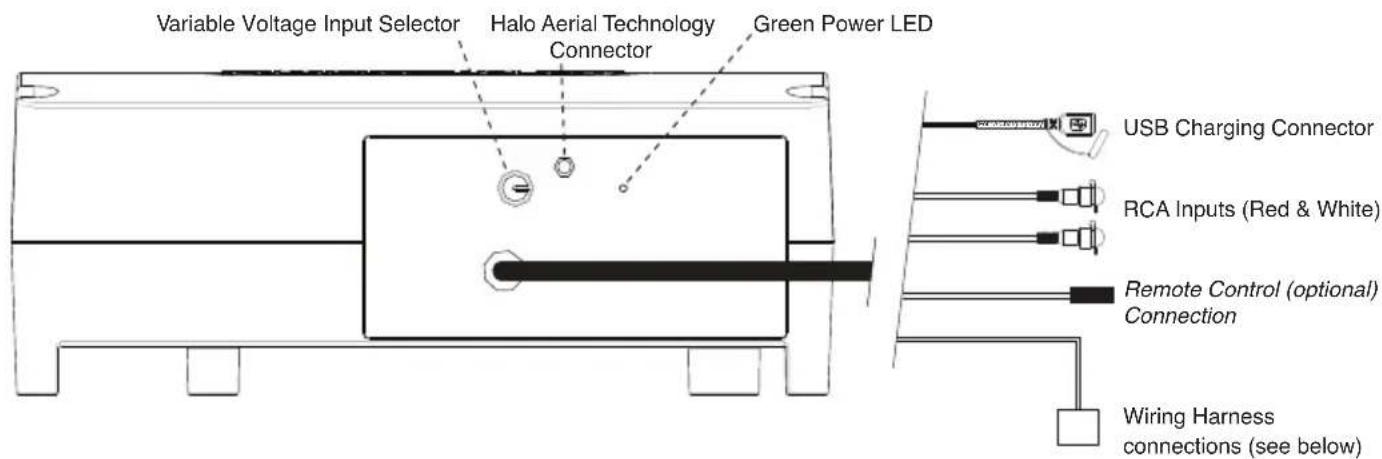
text_image
Variable Voltage Input Selector Halo Aerial Technology Connector Green Power LED USB Charging Connector RCA Inputs (Red & White) Remote Control (optional) Connection Wiring Harness connections (see below)3.2 Wiring Harness
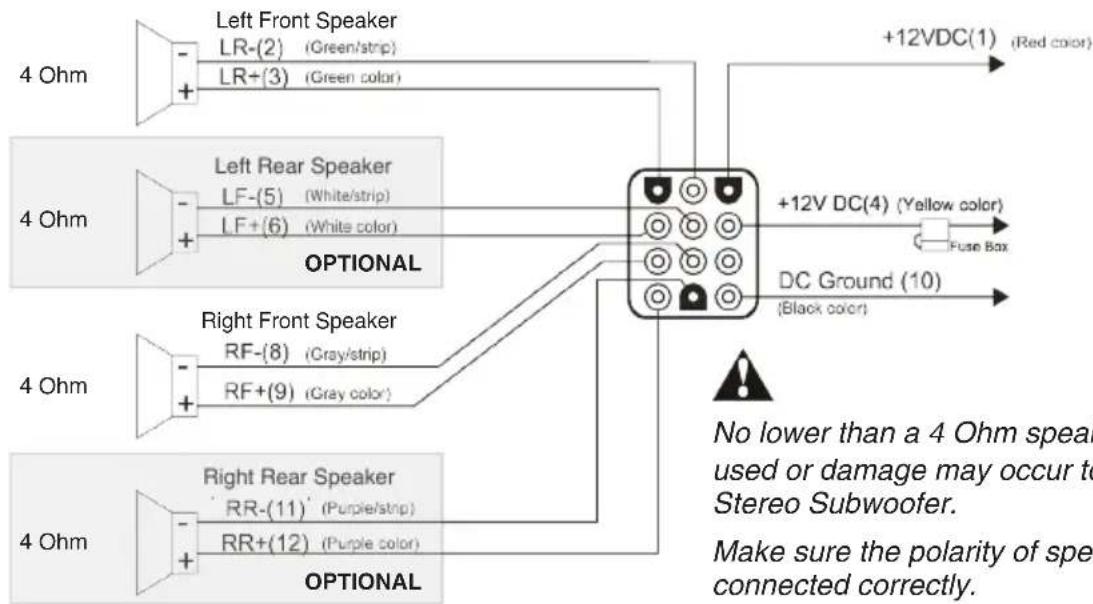
flowchart
graph TD
    A["Left Front Speaker"] --> B["LR-(2) (Green/strip)"]
    A --> C["LR+(3) (Green color)"]
    D["Left Rear Speaker"] --> E["LF-(5) (White/strip)"]
    D --> F["LF+(6) (White color)"]
    G["Right Front Speaker"] --> H["RF-(8) (Gray/strip)"]
    G --> I["RF+(9) (Gray color)"]
    J["Right Rear Speaker"] --> K["RR-(11) (Purple/strip)"]
    J --> L["RR+(12) (Purple color)"]
    M["Optional"] --> N["DC Ground (10) (Black color)"]
    O["+12VDC(1) (Red color)"] --> P["Fuse Box"]
    Q["No lower than a 4 Ohm spea used or damage may occur to Stereo Subwoofer."] --> R["Make sure the polarity of spea connected correctly."]

No lower than a 4 Ohm speaker should be d used or damage may occur to the Combined Stereo Subwoofer.
Make sure the polarity of speakers are connected correctly.
3.3 Bluetooth Halo Aerial Technology Antenna
The Bluetooth Halo Aerial Technology antenna AQ-BTANT-1 (included) improves the standard Bluetooth wireless signal and range, for a stronger signal and increased range.
Please read the precautions and installation instructions below before installing the AQ-BTANT-1 Bluetooth Antenna.
3.3.1 Bluetooth Halo Aerial Technology Precautions
Connect the Bluetooth Halo Aerial Technology Antenna (AQ-BTANT-1) to the male SMA connector. Do not apply excessive torque on the SMA connector (no more than 0.5N-m). Use hands to tighten the connection (do not use a wrench).
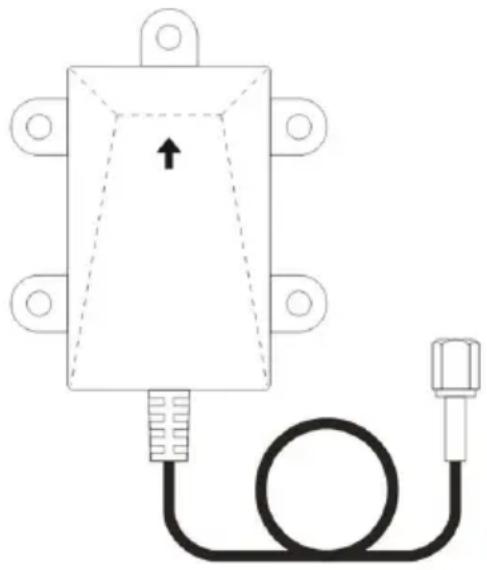
To ensure that the range is maximized, make sure the arrow is pointing directly upwards towards the sky when the antenna is mounted.
If there is excess antenna cable length make sure this is coiled and not bent as bending may cause damage to the cable.
For spa or hot tub installation the antenna should be located above the waterline otherwise. Bluetooth range will be drastically reduced.
3.3.2 Bluetooth Halo Aerial Technology Installation
- Connect the Bluetooth Antenna's cable to the Halo Aerial Technology connector on the control panel, ensuring it is fully secure by turning clockwise until it is finger tight.
- Make sure the arrow is pointing directly upwards towards the sky when the antenna is mounted to ensure the Bluetooth range is maximized.
- Screw on the provided Bluetooth Antenna, avoiding bending the cable at more than a 60° angle.
- Install the Bluetooth Antenna making sure the arrow is pointing directly upwards towards the sky. If there is no suitable surface to screw it in, we recommend using a good quality double sided tape.
natural_image
Pure diagram of a rectangular device with a cable and connector, no text or symbols present4.1 Wireless Handheld Remote Control RF6 Kit (sold separately)
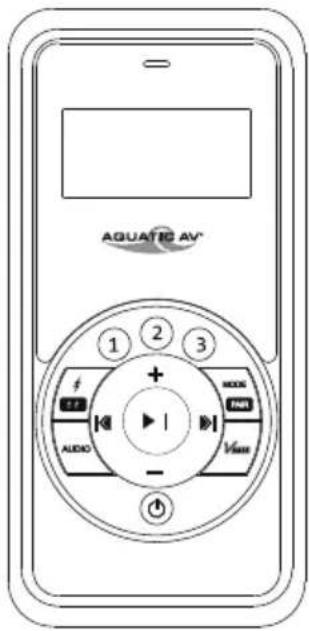
text_image
AQUATIC AV® 1 2 3 + - AUDIO MAX INR Vmax| Buttons | AUX IN Mode | Bluetooth Mode | |
| Power | Press once: Toggle Operational mode to Standby mode or vice versa | ||
| Mode/Pair | MODEPAIR | Press once: no functionPress and hold: Pair | |
| Volume Up | + | Press once: Volume upPress and hold: Fast volume up | |
| Volume Down | - | Press once: Volume downPress and hold: Fast volume down | |
| Fast Forward | Press once: no functionPress and hold: no function | Press once: Next trackPress and hold: Fast Forward | |
| Fast Rewind | Press once: no functionPress and hold: no function | Press once: Previous trackPress and hold: Fast backward | |
| Play/Pause | Press once: no functionPress and hold: no function | Press once: Play/PausePress and hold: no function | |
| 1 | Press once: no functionPress and hold: no function | ||
| 2 | Press once: no functionPress and hold: no function | ||
| 3 | Press once: no functionPress and hold: no function | ||
| EXT Trigger | Press once: no functionPress and hold: no function | ||
| Audio | AUDIO | Press once: no functionPress and hold: no function | |
| VBass | Press once: no functionPress and hold: no function | ||
5.1 Listening via Bluetooth
5.1.1 Pair with Bluetooth Device
- Switch on your Bluetooth device.
- Select 'AQUATIC AV SWA6' from the list of devices and pair with passcode '0000'.
i Only one Bluetooth device can be paired with the Bluetooth Subwoofer at any time.
5.1.2 Play Bluetooth Device
- Bluetooth mode will be activated once a Bluetooth device is paired.
- Play the song from device and the sound will play through the subwoofer.
- Play/Pause, track forward/back and volume up/down can be controlled directly from your Bluetooth device.
5.1.3 Bluetooth Multi-link
A second Bluetooth device can pair to the SWA6 even when it has been paired to another Bluetooth device. The second Bluetooth device will be able to play once the first device has stopped playing.
5.2 Listening via Auxiliary Input
- Connect your MP3 device to the stereo RCA inputs.
- Turn the Variable Voltage Input Selector switch to determine the best sound quality for your input device (400mV, 2V or 4V). Smartphones will typically use the 4V setting.
The RCA input connections are designed for a full-range audio signal and when used in conjunction with a 'sub' output (typically a single green RCA) from your stereo source unit will mean the SWA6 can only be used as a subwoofer (i.e. without the 2x full-range speaker outputs).
If using a single RCA 'sub' output then an RCA Y adaptor must be used to provide input to both red and white RCA inputs on the subwoofer.
i Connecting and playing device via Bluetooth will override Auxiliary mode.
5.3 Automatic Standby Mode
Automatic Standby mode will engage when the SWA6 Combined Stereo Subwoofer does not see any input from either the RCA's or Bluetooth.
Once a signal is detected the unit will switch on again.
5.4 USB Device Charging
Connect your USB device to the USB connector and ensure the stereo is switched on. The device battery will then charge.
The USB connector will provide charging only. Audio content stored on your device will not be recognized or playable.
6.1 Specifications
Inputs......Bluetooth, 2x RCA with variable 400mV, 2V or 4V input
Outputs....2x full range speaker output
Device Charging....via USB
Subwoofer Cone Size....8"
Power (max @ 2ohms)....288W (144W subwoofer + 2x 72W speakers)
Frequency Response....26Hz - 125Hz (subwoofer), 125Hz - 20,000Hz (speaker outputs)
Sensitivity....86dB
Impedance....4 Ohm & 2 Ohm stable
Waterproof / Dustproof.....Yes IPX4
Conformal PCB coating.....Yes
Dimensions.... 368.3 x 279.4 x 144.2 mm
6.2 Dimensions
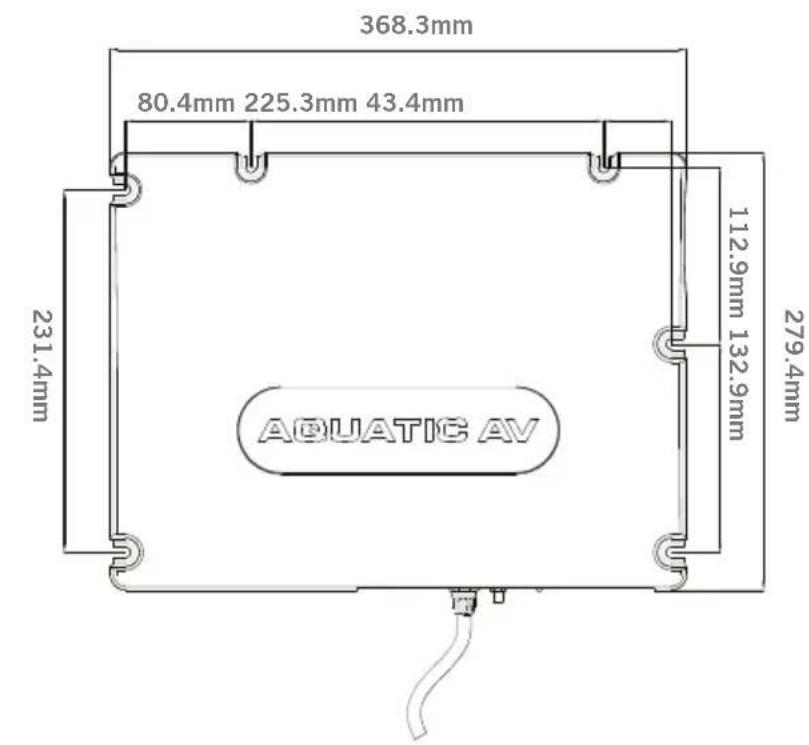
text_image
368.3mm 80.4mm 225.3mm 43.4mm 231.4mm 112.9mm 132.9mm 279.4mm AQUATIC AV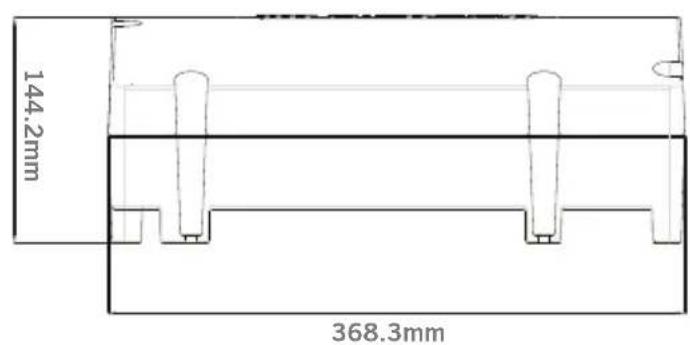
text_image
144.2mm 368.3mmAquatic AV offers a limited warranty of our products on the following terms:
Length of warranty
2 years on audio systems, electronics, speakers, and accessories (receipt required).
Coverage
This warranty covers only the original purchaser of a Aquatic AV product purchased from an authorized Aquatic AV dealer in the United States. In order to receive service, the purchaser must provide Aquatic AV with a copy of the receipt stating the customer name, dealer name, product purchased and date of purchase.
Defective products
Products found to be defective during the warranty period will be repaired or replaced (with a product deemed to be equivalent) at Aquatic AV's discretion.
What is not covered
Damage caused by accident, abuse, improper operations, theft. Any cost or expense related to the removal or reinstallation of product. Service performed by anyone other than an authorized Aquatic AV service center. Any product with the serial number or tamper labels defaced, altered, or removed. Subsequent damage to other components. Any product not purchased from an authorized Aquatic AV dealer.
Limit on implied warranties
Any implied warranties including warranties of fitness for use and merchantability are limited in duration to the period of the express warranty set forth above. Some states do not allow limitations on the length of an implied warranty, so this limitation may not apply. No person is authorized to assume for Aquatic AV any other liability in connection with the sale of the product.
How to obtain service
You must obtain a return material authorization number (RMA) to return any product to Aquatic AV. You are responsible for shipping charges of returned products to Aquatic AV.
Priority Customer Support & Free Extended Warranty
In order to receive the best customer support from Aquatic AV we recommend you register your product for a free extended warranty.
Register your product for extended warranty and priority support at www.aquaticav.com/register
Please record the model and serial number[s] of your equipment in the space provided below as your permanent record and will assist us with your factory warranty coverage.
| Model number[s]: Serial number[s]: | |

California Proposition 65 Warning

WARNING: This product contains chemicals known to the State of California to cause cancer, and birth defects or other reproductive harm.
For more information: www.P65Warnings.ca.gov
Product design and specification subject to change without notice. E&OE.
Doc V1.3
Aquatic AV
282 Kinney Drive
San Jose, CA 95112, USA
E-mail: info@aquaticav.com
US & Canada: 1 877 579 2782
International: +1 408 559 1668
Fax: +1 408 559 0125
www.aquaticav.com