
Digital kitchen scale - Kitchen scale Barazzoni - Free user manual and instructions
Find the device manual for free Digital kitchen scale Barazzoni in PDF.


User questions about Digital kitchen scale Barazzoni
0 question about this device. Answer the ones you know or ask your own.
Ask a new question about this device
Download the instructions for your Kitchen scale in PDF format for free! Find your manual Digital kitchen scale - Barazzoni and take your electronic device back in hand. On this page are published all the documents necessary for the use of your device. Digital kitchen scale by Barazzoni.
USER MANUAL Digital kitchen scale Barazzoni
DIGITAL KITCHEN SCALE
natural_image
Simple geometric diagram showing a circle with a smaller rectangle inside (no text or symbols)Instructions for use
CARATTERISTICHE
Thank you for choosing a Barazzoni product.
The company Barazzoni was founded in 1903, and since then, has produced cooking articles and accessories using top quality materials, the most advanced production techniques, avant-garde machines, and a lot of passion.
FEATURES
- Indicate volume of water and milk
- Two weight unit systems g, lb:oz convertible
- Two volume unit systems ml, fl'oz convertible
- Low battery power / Overload indication
- With high precision strain gauge sensor
- With tare function
- Auto off
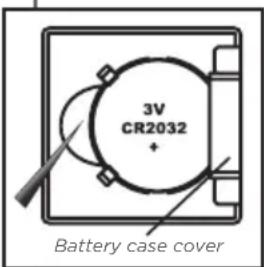
TO INSTALL OR REPLACE BATTERY
1 x 3V CR2032 lithium battery (included). Remove isolation sheet before use.
text_image
3V CR2032 + Battery case coverOpen the battery case cover at the bottom of scale:
A. Remove used batteries, with the aid of a sharp object if needed.
B. Install the new batteries by putting one side of the battery down first and pressing down the other side. Be careful to observe the polarity.
LCD

text_image
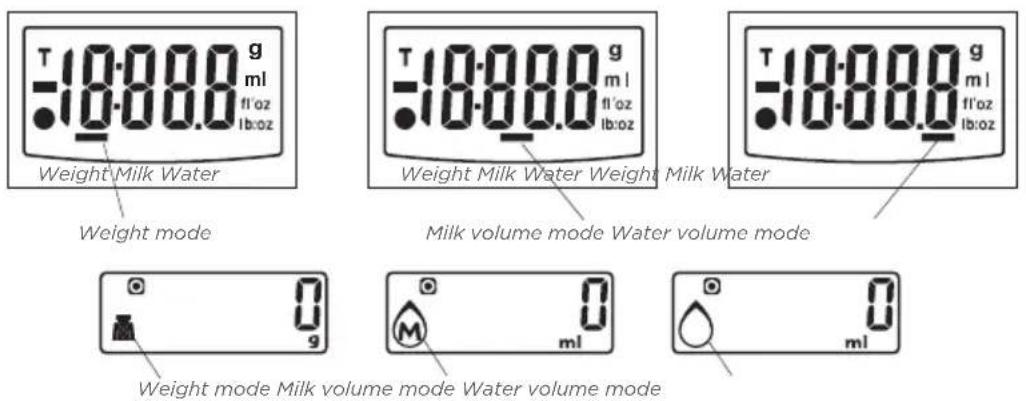
Tare Weight Negative Value Zero Weight Weight mode Milk volume mode Weight Milk Water Weight unit (g) Volume unit (ml) Volume unit (fl'oz) Weight unit (lb:oz) Water volume mode Zero Weight Tare Weight Negative Value Working modes (Weight/water/milk) Weight unit (lb:oz) 18:00.0 g lb:oz fl'oz ml g Weight unit (g) Volume unit (ml) Volume unit (fl'oz)WORKING MODES
text_image
Weight Milk Water Weight mode Weight Milk Water Weight Milk Water Milk volume mode Water volume mode Weight mode Milk volume mode Water volume modeUNIT CONVERSION BUTTON
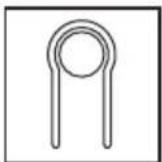
At the bottom of scale, you can find a unit conversion button as shown in picture.
TO CONVERT WEIGHT UNIT
Press UNIT button to choose working mode (weight, milk volume, water volume), then press 📋 to convert between two systems. Take the conversion of weight unit for example:
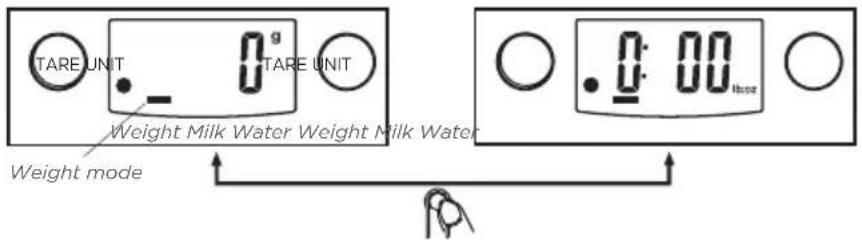
text_image
TARE UNIT 0 g TARE UNIT Weight Milk Water Weight Milk Water Weight mode 0:00 hours- When setting g as weight unit, the default volume unit is ml
- When setting lb:oz as weight unit, the default volume unit is fl'oz
TO START WEIGHING
1. Weighing mode
a. Place the scale on a solid and flat surface
b. Place bowl (if used) on the scale before turning on the scale
c. Gently press on the scale by hand to turn on
d. Wait until LCD shows all information
e. Load weighing object on to start weighing, display will show the weight
f. If the weighing object is water or milk, press UNIT button to choose volume mode and view the volume of weighing object
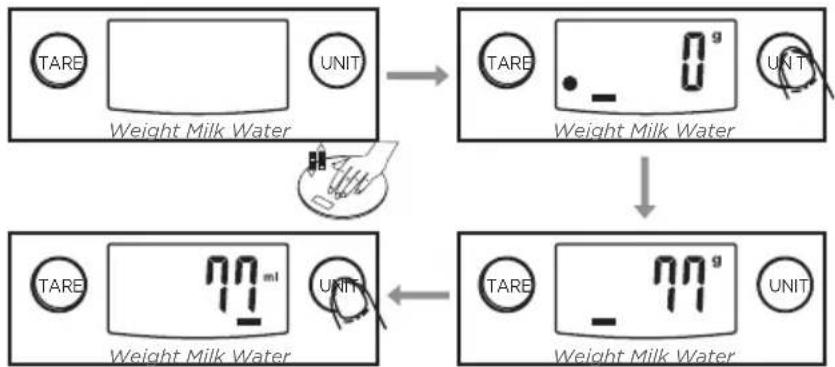
flowchart
graph TD
    A["Weight Milk Water"] --> B["Measurement"]
    B --> C["Weight Milk Water"]
    C --> D["Measurement"]
    D --> E["Weight Milk Water"]
2. Volume indication mode
a. Place the scale on a solid and flat surface.
b. Gently press on the scale by hand to turn on
c. Wait until LCD shows "O", and press UNIT button to choose "Water" or "Milk" mode
d. Put a liquid container onto the scale platform
e. Press TARE button to reset display to "0"
f. Pour liquid (water or milk) into the container, display will show the volume of the liquid
g. Press UNIT button to choose "Weight" mode and view the weight of liquid
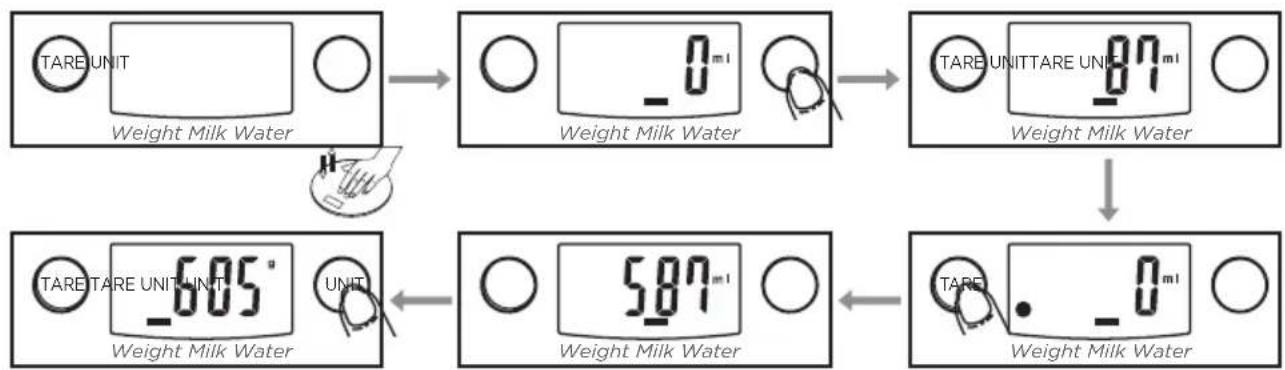
flowchart
graph TD
    A["Weight Milk Water TARE UNIT"] --> B["0 ml Weight Milk Water"]
    B --> C["87 ml TARE UNITTARE UNIT"]
    C --> D["605° TARE TARE UNIT UNIT"]
    D --> E["587 ml Weight Milk Water"]
    E --> F["0 ml Weight Milk Water"]
"ZERO" OR "TARE" FUNCTION
Consents to weigh different loads consecutively without removing loads from the scale. Place first load on the scale, display will show the weight. Press TARE button to reset the display to "0" before adding next load. You can repeat this operation.
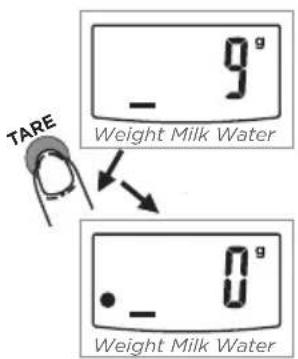
text_image
TARE - 9° Weight Milk Water - 0° Weight Milk WaterCondition 1: "ZERO" function
When the total sum of all loads on the balance is less than or equal to 4% of the maximum weighing capacity (4% = 200 g since maximum capacity of the scale is 5000 g)
The display will show “---” or “O” g each time the TARE button is pressed.
“---” means unstable, please wait a moment.
"0 g" and at the same time an icon with "0" in the lower left corner means that the zero function is active.
The maximum weight capacity remains unchanged.
text_image
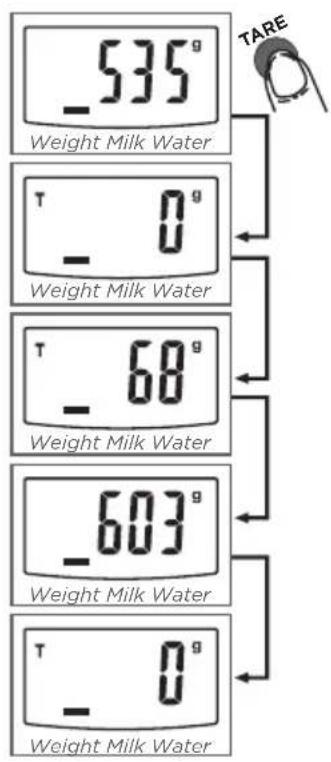
-535g Weight Milk Water T - 0g Weight Milk Water T - 68g Weight Milk Water -603g Weight Milk Water T - 0g Weight Milk WaterCondition 2: "TARE" function
When the total sum of all loads exceeds 4% of the maximum weight capacity (4% = 200 g since maximum capacity of the scale is 5000 g)
The display will show “---” or “0 g” each time the TARE button will be pressed. “---” means unstable, please wait a moment.
"O g" and at the same time an icon with "TARE" in the upper left corner means that the TARE function is active.
The maximum weight capacity remains unchanged.
In this condition:
By pressing TARE you can see the total weight of all loads on the scale. If you want to weigh more than one load, just press TARE to reset the screen and read "0" again.
AUTO OFF
text_image
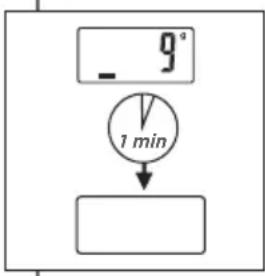
- 9° 1 minAuto shut-off occurs if display shows "0" or shows the same weight for 1 minute
WARNING INDICATORS
1.
2.
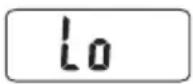
- Replace with new batteries
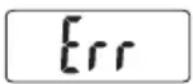
- Scale overload. Remove item to avoid damage. Maximum weight capacity is indicated on the scale
CLEANING AND CARE
- Clean the scale with a slightly damp cloth. Do not immerse the scale in water or use chemical/abrasive cleaning agents
- Clean immediately in case of contact with fats, spices, vinegar and strongly flavored/colored foods. Avoid contact with acid citrus juices
- Always use the scale on a hard, flat surface. Do not use on a carpet
- Do not strike, shake or drop the scale
- The scale is high precision device. Please take care of it
- Please keep it dry
- Please check whether battery is installed or in high level if scale cannot be turned on
- The scale is for family use only, not for commercial purposes
2 YEARS WARRANTY
Warranty offered on our products is in respect of current legislation, and covers manufacturing defects. The company Barazzoni carefully check their products to prevent manufacturing faults, and to guarantee the highest quality. Under no circumstances can the company be held responsible for damage caused by the failure to follow these instructions, and will answer only in the event of any manufacturing faults.
Recourses to warranty must be accompanied by the purchase ticket and addressed to:
Barazzoni S.p.A. - Via Cesare Battisti 46 - 28045 Invorio (NO) - Italy
Kind attention of Quality Department
Barazzoni
Barazzoni S.p.A.
Via Cesare Battisti 46
28045 Invorio (NO) Italy
T.+39 0322 253100
F.+39 0322 253150
info@barazzoni.it
barazzoni.it