
Mi Bunny MITU - Uncategorized Xiaomi - Free user manual and instructions
Find the device manual for free Mi Bunny MITU Xiaomi in PDF.


| Product Type | Bluetooth Speaker / Music Player |
| Dimensions (LxWxH) | 80 x 74 x 136 mm |
| Speaker Diameter | 45 mm |
| Output Power | 2.8 W (4 ohms, THD <1%) |
| Bluetooth Version | 4.0 |
| Frequency Range | 150 Hz - 20 kHz |
| Battery Capacity | 650 mAh (3.7 V) |
| Battery Life | Up to 3 hours (at 60 dB/1m) |
| Charging Input | USB 5V / 500 mA |
| Charging Indicator | Red when fully charged, green flickering during charging |
| Memory Card Support | Micro SD up to 32 GB or more |
| Control Buttons | Play/Pause, Volume Up/Down, Track Control, Source Switch, Folder Switch |
| Pairing Method | Long press button (1) for 2 seconds |
| Compatibility | Smartphones and Bluetooth-enabled devices |
| Operating Temperature | 0°C to 45°C |
| Cleaning and Maintenance | Clean with a soft, dry cloth. Avoid liquids. |
| Safety Warning | Use only specified battery type for replacement; risk of explosion if incorrect. |
| Warranty | Free repair within 12 months; replacement/refund within 7-15 days of purchase. |
Frequently Asked Questions - Mi Bunny MITU Xiaomi
User questions about Mi Bunny MITU Xiaomi
0 question about this device. Answer the ones you know or ask your own.
Ask a new question about this device
Download the instructions for your Uncategorized in PDF format for free! Find your manual Mi Bunny MITU - Xiaomi and take your electronic device back in hand. On this page are published all the documents necessary for the use of your device. Mi Bunny MITU by Xiaomi.
USER MANUAL Mi Bunny MITU Xiaomi

Play/Pause
Long press: on/off device

Switch SD card folder
Long keypress: activate previous folder

Volume down
Long keypress: switch previous track

4 Volume up
Long keypress: switch next track

Switch files source (Bluetooth or SD card);
5 Long press: detection devices via Bluetooth

2+4 Charge level information
Press both buttons simultaneously
* Connect to new devices
Press and hold (1) for 2 seconds, then resume detection of Bluetooth device.
Select connection to pair devices.
* When downloading music on SD card by connecting a USB cable to your computer, press the button (5) to turn the copy.
Connecting
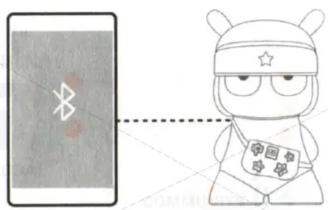
Turning Mi Bunny Speaker on
Press and hold a button (1) for 2 seconds, until you hear corresponding beep. Mi Bunny Speaker automatically turns on Bluetooth mode of devices detection.
Connecting to other devices
Open Bluetooth settings, select «Mi Bunny Speaker» in a list of available devices. After successful combination of appropriate devices you can hear a beep signal. Indicator will light up blue.
With further use turn on Bluetooth on Mi Bunny Speaker and device automatically connects to it.
Frequently used functions
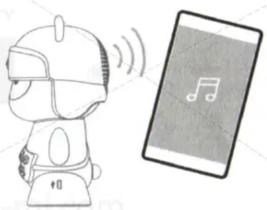
Play music via Bluetooth
Pairing of smartphone and Mi Bunny Speaker: smartphone operating as a control panel and Mi Bunny Speaker is a speaker.
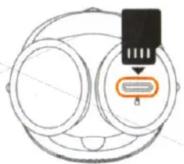
Play music from SD card
After inserting a card, press Play button to play files, stored on Micro SD.
* Support Micro SD 32GB or more.
* Upload tracks to SD card via USB cable.
Notes
Charging
During charging a power indicator flickers green. Permanent Red light indicates a full charge of the device.
* During charging there is a certain limit of playback volume.
Specifications
Maximum output power: 2.8 W x 1 (4 ohms, THD <1%);
Speaker diameter. 45 mm, 1 driver;
Bluetooth Edition: 4.0;
Frequency: 150 Hz - 20 kHz;
Battery capacity / Voltage: 650 mAh 3.7 V;
The duration of battery life: 3 hours (60 dB / 1m);
Power Consumption USB: 5 V, 500 mA;
Size (length x width x height): 80 x 74 x 136 mm;
Operating temperature 0 °C - 45 °C.
Warranty
During a warranty period you have rights to repair, modify or return. For repair, replacement or return of goods, you must present a receipt.
- Within 7 days of purchase, in the event of problems, you can choose a free replacement product or a refund.
- Within 15 days of purchase, in the event of problems, you can choose a free replacement product or repair.
- Within 12 months after the purchase, in the event of problems, you free repair.
Conditions, are not included in warranty
- Damage, resulting by improper use, maintenance or storage device;
- The warranty period has expired;
- Damage, incurred in a force majeure such as lightning, fire or flood;
- Breakdown, resulting repair device in unauthorized service centers.
* In case of incorrect battery replacement there is a danger of explosion.
* To replace the battery you must use the same model and similar models.
XIAOMI-MI.COM
Brand : Xiaomi
Model : Mi Bunny MITU
Category : Uncategorized