
RoidMi B1 - Glasses Xiaomi - Free user manual and instructions
Find the device manual for free RoidMi B1 Xiaomi in PDF.


| Product Type | Smart Speaker |
| Brand | Xiaomi |
| Model | RoidMi B1 |
| Color | Black |
| Dimensions | 100 x 100 x 150 mm |
| Weight | 500 g |
| Power Supply | DC 5V 1A via USB-C |
| Battery Life | 8 hours of playback |
| Connectivity | Wi-Fi 802.11 b/g/n, Bluetooth 5.0 |
| Voice Assistant | Google Assistant / Siri (via Bluetooth) |
| Control | Touch controls, voice commands |
| Display | LED indicator ring |
| Sensors | Microphone array, accelerometer |
| Material | Plastic with mesh fabric |
| Water Resistance | IPX4 |
| Warranty | 1 year |
| Package Contents | Speaker, power cable, user manual |
| Compatible Apps | Xiaomi Home, Google Home |
| Operating Temperature | 0°C to 35°C |
| Frequency Response | 80 Hz – 20 kHz |
Frequently Asked Questions - RoidMi B1 Xiaomi
User questions about RoidMi B1 Xiaomi
0 question about this device. Answer the ones you know or ask your own.
Ask a new question about this device
Download the instructions for your Glasses in PDF format for free! Find your manual RoidMi B1 - Xiaomi and take your electronic device back in hand. On this page are published all the documents necessary for the use of your device. RoidMi B1 by Xiaomi.
USER MANUAL RoidMi B1 Xiaomi
Protective glasses with Blu-ray technology

natural_image
Line drawing of a pair of eyeglasses with no text or symbolsGlasses frame
Changeable nose stops (pads)
natural_image
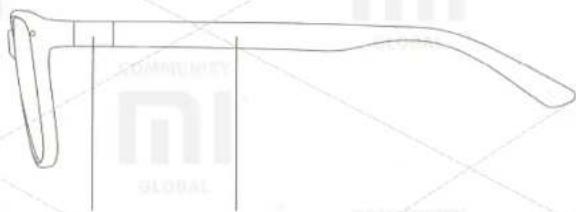
Line drawing of a pair of eyeglasses with no text or symbolsLeg for glasses
Changeable shackle
Main Specifications
Article number: LG01RM;
Spectacle frames Material: TR90;
Material lenses: Resin;
Weight of glasses: 20.5 g;
Relevant Gender: Unisex;
Accessories: Nose stops (pads) × 2 (unit), standard glasses shackle × 1 (unit), mobile glass shackle × 1 (unit) Case × 1 (unit), Cloth for lens × 1 (unit).
Operating the product
1. Replacement of glasses shackle
① Remove from a packing suitable for you shackle, look for the markings on the inside of it. L mark on the lens means a left support, R mark means the right side.

② Insert a glasses shackle to the respective holes.
③ Once inserted a glasses shackle to lock, turn it 90°
4 Installation complete!

natural_image
Line drawing of a pair of eyeglasses with an inset showing the same eyewear detail (no text or symbols present)
natural_image
Line drawing of a pair of eyeglasses with a curved handle and arrow indicating rotation (no text or symbols)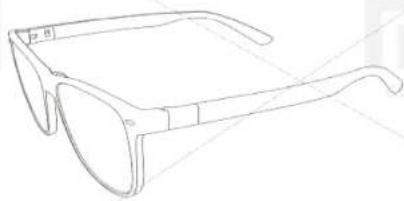
natural_image
Line drawing of a pair of eyeglasses with no text or symbolsOperating the product
- Changing a nose stop (pad)
① Remove the nose stops from the package and select appropriate your nose.

Short nose stops suitable for people with high nose

Long nose stops suitable for people with low nose
② Insert the nose stop in a hole, located on eyeglass frame to complete the installation, press firmly to nose stop become stable.

natural_image
Line drawing of a pair of eyeglasses with no text or symbolsMagnet on a glasses frame
Magnet on a nose stop
Harmful substances in product
| Presence of harmful substances | ||||||
| harmful substances | ||||||
| (Pb) | (Hg) | (Cd) | (Cr(VI)) | (PBB) | (PBDE) | |
| Plastic glasses rim | ○ | ○ | ○ | ○ | ○ | ○ |
| Metallic glasses rim | × | ○ | ○ | ○ | ○ | ○ |
0: toxic and harmful substances in all components of the device are contained in an amount, below the limit value, according to SJ / T11363-2006 «the limits presence of toxic and hazardous substances in products.»
X: means the presence of toxic and hazardous substances at least one of the components of the device in an amount, that exceeds the threshold value, SJ under / T11363-2006 «the limits presence of toxic and hazardous substances in products.»
List of product malfunction
- The tail of a lens have breaks;
- Perhaps degaussing of metal parts of nose stops;
- Loops lose sensitivity and breaking down.
Document, confirming three warranty
After-sales service guarantee of safety glasses with Blu-ray technology:
Strictly based on the «Law on Consumer Protection of the People's Republic of China», «Law of the People's Republic of China of products quality», there are three guarantees of after-sales service, maintenance is as follows: During the warranty period, by law, you can use preventive maintenance, exchange goods also have the right to return your purchased goods. Repair, replacement and return are possible only on presentation of receipts.
- If within seven days without any reason you want to return your purchased item (if you bought it over the internet), all the logistics costs are paid by the user;
- If using protective eyewear technology Blu-ray were detected faults, listed in the table «List of fault» after confirming the detection of faults, you can use the following services for free:
Protective glasses with Blu-ray technology;
Article number: LG01RM;
Producer: Ltd. «Information Technology» (All) Address: All Hueyshan area of economic development, highway 1699, 8 building, 4th floor, District V.
Applicable standards: GB / T14214-2003 QB2506-2001 GB10810.1-2005 GB10810.3-2006 GB10810.4-2012 GB10810.4-2012 Q / 0000002C02-2004
Online Customer Service: www.mi.com/service
Goods return
Within 7 days of receipt of goods, confirm and identify faults, the product should be returned.
Goods change
Within 15 days of receipt of goods, confirm and identify faults, the product should be replaced.
Goods maintenance
Within 1 year from the date of receipt of goods, confirm and failure detection, product should be repaired.
XIAOMI-MI.COM
Brand : Xiaomi
Model : RoidMi B1
Category : Glasses