
Mi Notebook PRO - Laptop Xiaomi - Free user manual and instructions
Find the device manual for free Mi Notebook PRO Xiaomi in PDF.


| Product Type | Laptop |
| Brand | Xiaomi |
| Model | Mi Notebook Pro |
| Operating System | Windows (pre-installed) |
| Processor | Intel Core i7 (typical for Pro models) |
| RAM | 16 GB (typical) |
| Storage | 512 GB SSD (typical) |
| Display Size | 15.6 inches (typical) |
| Display Resolution | 1920 x 1080 (Full HD, typical) |
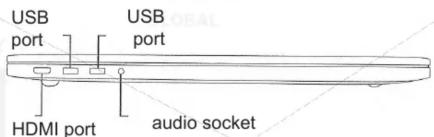
| Ports | 2 x USB 3.0, 1 x USB-C (data, power, video), 1 x HDMI, 3-in-1 card reader, audio jack |
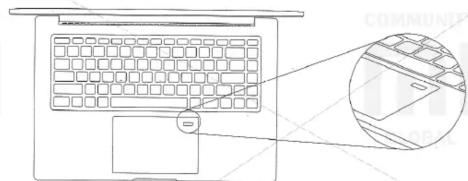
| Fingerprint Sensor | Yes, integrated into touchpad area |
| Webcam | Yes, with LED indicator |
| Microphone | Yes, dual array |
| Touchpad | Yes, multi-touch |
| Keyboard | Full-size backlit keyboard (typical) |
| Battery | Built-in rechargeable, 60 Wh (typical) |
| Power Adapter | USB-C, 65 W (typical) |
| Weight | Approx. 1.95 kg (typical) |
| Dimensions | 360.7 x 243.6 x 15.9 mm (typical) |
| Energy Efficiency Class | Complies with GB28380-2012 |
| Operating Temperature | 5°C to 35°C |
| Storage Temperature | -15°C to 45°C |
| Relative Humidity | 5% to 90% (non-condensing) |
| Accessories Included | Main unit, power adapter, USB-C cable, manual and warranty card |
| Maintenance | Avoid water immersion; do not disassemble battery |
Frequently Asked Questions - Mi Notebook PRO Xiaomi
User questions about Mi Notebook PRO Xiaomi
0 question about this device. Answer the ones you know or ask your own.
Ask a new question about this device
Download the instructions for your Laptop in PDF format for free! Find your manual Mi Notebook PRO - Xiaomi and take your electronic device back in hand. On this page are published all the documents necessary for the use of your device. Mi Notebook PRO by Xiaomi.
USER MANUAL Mi Notebook PRO Xiaomi
Thank you for choosing Mi Notebook Pro! Make sure all accessories are included:
- Mi Notebook Pro(main unit);
- Adapter; USB-C cable
- Manual (waranty card).
Overview
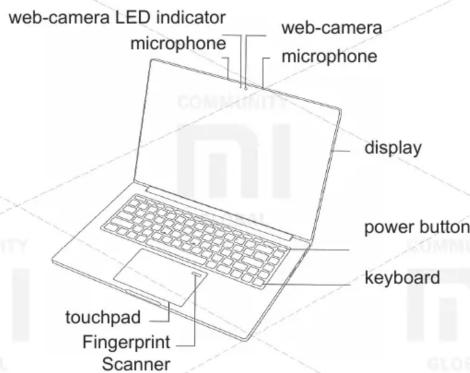
View of a right side
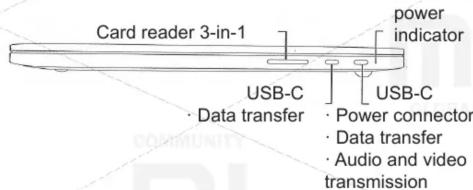
View of a left side
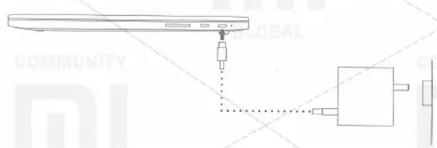
Using the device
natural_image
Pure diagram of a device with no text, numbers, or symbols visibleA first step: Connect a power adapter to supply. Before first use, fully charge the battery.
A second step: Turn on power button.
A third step: Complete an operating system setup, following the instructions of an operating system and preinstalled Mi software. Do not turn off the power before completing OS setting and opening a Home screen.
Touchpad operations
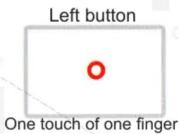


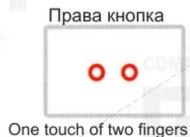
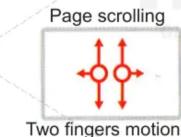
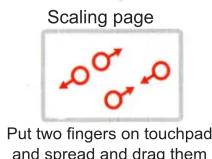
Instructions for using fingerprints
natural_image
Line drawing of a laptop keyboard with an inset close-up view showing the interior panel (no text or symbols)Step 1: Activate the unlock with a fingerprint: During Windows activation, the system will automatically ask the user about the activation of the Windows Hello fingerprint unlock feature, complete the unlock settings for fingerprinting with prompts.
Instruction for using fingerprints
If user at the time of Windows activation chose to skip this function, on the Windows desktop, go to Settings - Account - Login Options, in this section add fingerprints to activate the unlock function with a fingerprint.
Step 2: Using fingerprints: Gently press your finger against the fingerprint sensor to enter the system using a fingerprint or unlock the device.
Energy efficiency class of device
Energy efficiency class of this product meets a requirements of GB28380-2012 standard. Thanks to the improved energy-saving features and optimizing, Mi Notebook complies to high level of energy efficiency. To determine an energy efficiency class of the device, see a labeling on outside of device package.
Information on the use of wireless devices
In some situations, there are restrictions on the use of wireless devices. Use the product in accordance with all laws and regulations.
For example: Using a variety of wireless devices during flight may create some interference to navigational equipment.
About HDMI
This product has been certified for the requirements of the HDMI Association.
The HDMI, HDMI High-Definition Multimedia Interface and the HDMI logo are trademarks or registered trademarks of HDMI LA LCC in the US and other countries.

HIGH-DEFINITION MULTIMEDIA INTERFACE
Information about a Battery
Self-extracting or replacing of a battery may cause of damage or breakage, and this can lead to overheating of the device, injury to user or third parties.
Built-in battery can be replaced only at Mi service centers and other authorized providers. This battery must be disposed of separately from household waste. The use and disposal of the batteries should be carried out in accordance with the instructions and local laws.
Not recommended: immerse a battery in water; Repair or disassemble a battery.
Please do not attempt to repair or reconstruct a battery. Doing so may cause battery explosion or internal leakage of harmful substances.
The warranty does not cover a disassembled and reconstructed battery. Improper battery replacement or maintenance can cause it to burst.
Inside battery contains a small amount of harmful substances.
Electric current safety Information
Threat: Electric current in power supply, passing through communication electric cables, has some risk. To avoid the risk of electric shock:
- Do not use this device during a thunderstorm and lightning. - During a thunderstorm, and lightning, do not connect or disconnect any power cable and do not perform any installation or maintenance of this unit.
- It is recommended to connect a power cable to a grounded outlet.
- Before opening an outer case of the device (unless otherwise specified), please unplug a power cord and other cables.
- If power cord is damaged, it must be replaced by a qualified technician from the manufacturer or authorized service center representative.
Caution
This device is used with a standard peripheral devices with shielded cables between components and other conditions, that meet the EMC standard.
Using standards-compliant peripherals with shielded cables reduces interference from radio, TV and other electronic devices. It is recommended to use shielded HDMI cable with ferrite cores.
Operating temperature range: 5C-35C; Storage Temperature: -15C - 45C; Relative humidity: 5% -90% non-condensing.
Technical support
If in a course of using the notebook, you are experiencing any problems and you need help, contact Xiaomi technical support.
Manufacturer: «Xiaomi Technology Beijing»
Note: Please provide all necessary information. Warranty service is only possible if a serial number on the bottom of the device, the same as serial number in a warranty form and sales receipt. For repair, replacement or return of goods you must present warranty card and receipt.
The presence of toxic and hazardous substances
These tables are provided in accordance with position of SJ / T 11364.
0: toxic and harmful substances in all components of the device are contained in an amount below the limit value according to GB / T 26572 standard.
X: presence of toxic and harmful substances, at least one of components of this product, excess of the limit value, according to GB / T 26572.
In terms of environmentally friendly use of the device indicates that under normal operating conditions, leak of hazardous substances or elements of a laptop computer (not including the battery) and its accessories is impossible. Using of electronic information devices has no harmful effects on environment, human health, and may not cause any serious injuries.