
CBGT 4 A1 - Pedometer CRIVIT - Free user manual and instructions
Find the device manual for free CBGT 4 A1 CRIVIT in PDF.


| Product Type | Wireless speed and cadence sensor for bicycles |
| Brand | Crivit |
| Model | CBGT 4 A1 |
| Dimensions (approx.) | 8.5 x 6.5 x 2.7 cm |
| Weight (approx.) | 21 g |
| Power Supply | 1 x CR2032 button cell battery |
| Battery Life | Approximately 6 months |
| Wireless Technology | Bluetooth Smart 4.0, range up to 10 m |
| Water Resistance | IPX4 (splashproof) |
| Operating Temperature | +5 °C to +35 °C |
| Storage Temperature | +5 °C to +40 °C |
| Relative Humidity (no condensation) | 5% - 75% |
| Compatible App | Crivit Pro Bike Assistant (iOS/Android) |
| Included Accessories | Speed/cadence sensor, pedal frequency magnet, wheel magnet, screwdriver, rubber ring, 6 cable binders, rubber pad, operating instructions |
| Intended Use | Speed and distance measurement during cycling (private use only) |
| Cleaning | Wipe with soft, dry cloth; use mild detergent if necessary; avoid moisture ingress |
| Safety Notes | Keep batteries away from children; do not submerge; ensure sensor does not interfere with bike operation |
| Warranty | 3 years from date of purchase |
| Manufacturer | KOMPERNASS HANDELS GMBH, Germany |
Frequently Asked Questions - CBGT 4 A1 CRIVIT
User questions about CBGT 4 A1 CRIVIT
0 question about this device. Answer the ones you know or ask your own.
Ask a new question about this device
Download the instructions for your Pedometer in PDF format for free! Find your manual CBGT 4 A1 - CRIVIT and take your electronic device back in hand. On this page are published all the documents necessary for the use of your device. CBGT 4 A1 by CRIVIT.
USER MANUAL CBGT 4 A1 CRIVIT
Operating instructions
IAN 270759
DE AT
DE AT CH
Before reading, unfold the page containing the illustrations and familiarise yourself with all functions of the device.
natural_image
Line drawing of a bicycle with front wheel and side seat, shown alongside an inset close-up of the bicycle's seat assembly (no text or symbols)natural_image
Technical line drawing of two mechanical clamping components with numbered annotations (7), no readable text or symbols present.natural_image
Technical line drawing of a mechanical clamp or bracket assembly (no text or symbols)Die Crivit Pro Bike Assistant App
natural_image
Simple line drawing of a trash bin with crossed lines indicating no waste or plastic (no text or symbols)KOMPERNASS HANDELS GMBH
BURGSTRASSE 21
44867 BOCHUM
GERMANY
www.kompernass.com
Contents
Introduction 27
Information concerning these operating instructions ..... 27
Limitation of liability 27
Notes on trademarks 28
Intended use 28
Warnings used 29
Safety 30
Basic safety guidelines 30
Notes on batteries and rechargeable batteries .... 3 2
Description of components 33
Operation 33
Unpacking 33
Check the package contents 34
Disposal of packaging materials 34
Battery insertion/ exchange 35
Installation 36
Installing the speed and pedal frequency sensor, wheel magnet and pedal frequency magnet .... 3 6
The Crivit Pro Bike Assistant App....39
Making a connection to a smartphone ..... 3 9
Troubleshooting 42
Cleaning. 42
Storage when not in use 43
Disposal 43
Disposing of the batteries 44
Appendix 44
Technical data 44
Notes on the Declaration of Conformity 45
Warranty 45
Service 46
Importer 46
Introduction
Information concerning these operating instructions
Congratulations on the purchase of your new appliance.
You have selected a high-quality product.
The operating instructions are part of this product. They contain important information on safety, usage and disposal. Before using the product, familiarise yourself with all operating and safety instructions. Use the product only as described and for the specified areas of application. Keep these operating instructions as a reference and store them near the product. Please also pass on these operating instructions to any future owner.
Limitation of liability
All the technical information, data and instructions regarding installation, connection and operation contained in these operating instructions correspond to the latest information available to us at the time of printing and take into account our previous experience and know-how. No claims can be derived from the details, illustrations and descriptions in these instructions.
The manufacturer assumes no responsibility for damage caused by failure to observe these instructions, improper use, incompetent repairs, unauthorised modifications or for the use of non-approved replacement parts.
Notes on trademarks
- The Bluetooth® word mark and logos are registered trademarks of Bluetooth SIG, Inc..
- Apple® and the Apple logo are registered trademarks of Apple Inc., Cupertino Calif., US.
- App Store is a service mark of Apple Inc..
- Google Play is a registered trademark of Google Inc..
All other names and products may be trademarks or registered trademarks of their respective owners.
Intended use
This information electronics appliance is used for speed and distance measurement during cycling. The appliance is intended for private use only and is not suitable for commercial purposes. The appliance is not intended for any other purpose, nor for use beyond the scope described. The appliance is not intended for use in commercial or industrial environments. The manufacturer accepts no responsibility for damage caused by failure to observe these instructions, improper use or repairs, unauthorised modifications or the use of unapproved replacement parts. The risk shall be borne solely by the user.
Warnings used
The following warning notice types are used in these operating instructions:

DANGER
A warning notice at this hazard level indicates a potentially hazardous situation.
Failure to avoid this hazardous situation could result in severe injuries or even death.
▶ Follow the instructions in this warning notice to avoid the risk of death or serious injury.

CAUTION
A warning notice at this hazard level indicates a potential for property damage.
Failure to avoid this situation could result in property damage.
▶ Follow the instructions in this warning notice to prevent property damage.
NOTE
▶ A note provides additional information that will assist you in using the appliance.
Safety
This section contains important safety instructions for using the product. This product complies with statutory safety regulations. Improper use may result in personal injury and property damage.
Basic safety guidelines
To ensure safe operation of the product, follow the safety guidelines set out below:
This appliance may be used by children aged 8 years and above and by persons with limited physical, sensory or mental capabilities, or lack of experience and knowledge, provided that they are under supervision or have been told how to use the appliance safely and are aware of the potential risks. Children must not use the appliance as a plaything. Cleaning and user maintenance tasks may not be carried out by children unless they are supervised.
DANGER! Do not allow children to play with the packaging material! Keep all packaging materials away from children. Risk of suffocation!
- Check the appliance for visible external damage before use. Do not operate an appliance that has been damaged or dropped.
■ Do not subject the appliance to high temperatures. Otherwise it may overheat and be irreparably damaged.
■ The appliance is splashproof (IPX4). Individual components can be used during rain but must not be submerged in water.
■ Never open the housing of the appliance. There are no user-service-able or replaceable components inside the appliance.
- Do not make any unauthorised modifications or alterations to the appliance.
■ All repairs must be carried out by authorised specialist companies or by the Customer Service department. Improper repairs may put the user at risk. It will also invalidate any warranty claims.
■ Repairs to the appliance during the warranty period may only be carried out by a customer service department authorised by the manufacturer. Otherwise, no warranty claims will be held for any subsequent damages.
■ Defective components must always be replaced with original replacement parts. Compliance with the safety requirements can only be guaranteed by using these replacement parts.
■ Remove the batteries from the appliance immediately if you smell burning or notice smoke. Have the appliance checked by a qualified specialist before using it again.
■ Fitting the speed and pedal frequency sensor must not affect the safe operation of the bicycle at any time. Ensure that the speed and pedal frequency sensor does not hinder pedal movement, the brakes or gear changing.
In order to avoid accidents and injuries, do not look away from the road while cycling. The operation of a smartphone while riding a bicycle is punishable with a fine. Please observe the statutory provisions in the country of use.
Notes on batteries and rechargeable batteries

DANGER
Mishandling the batteries can cause fires, explosions, leakages or other hazards!
▶ Keep batteries out of the hands of children.
▶ Do not leave batteries lying around. There is a risk of them being swallowed by children or pets. If this happens, consult a doctor immediately!
▶ Batteries must never be short-circuited, taken apart, deformed or thrown into a fire. There is a risk of explosion!
▶ Leaking or damaged batteries can cause skin irritations when touched. Therefore, use suitable protective gloves. In the event of contact with the skin, rinse with plenty of water. If the chemicals come into contact with your eyes, rinse thoroughly with plenty of water, do not rub and consult a doctor immediately.
▶ Do attempt to recharge non-rechargeable batteries. There is a risk of fire and/or explosion!
Description of components
(See fold-out page for illustrations)
① Speed and pedal frequency sensor
2 Pedal frequency magnet
3 Wheel magnet
4 Screwdriver
5 Rubber ring
6 Cable binder
7 Rubber pad
8 Operating instructions
Operation
Unpacking
◆ Remove all parts and the operating instructions from the packaging.
◆ Remove all packaging material.
Check the package contents
(See fold-out page for illustrations)
The scope of delivery includes the following components:
● Speed and pedal frequency sensor
- Pedal frequency magnet
- Wheel magnet
- Screwdriver
- Rubber ring
- 6 cable binder
- Rubber pad
• These operating instructions
NOTE
▶ Check the package for completeness and for signs of visible damage.
If the delivery is incomplete or damage has occurred as a result of defective packaging or during transport, contact the Service hotline (see section Service).
Disposal of packaging materials
The packaging protects the appliance from damage during transport. The packaging materials have been selected for their environmental friendliness and ease of disposal, and are therefore recyclable.

Returning the packaging to the material cycle conserves re materials and reduces the amount of waste that is generated. Dispose of packaging materials that are no longer needed in accordance with applicable local regulations.
Battery insertion/ exchange
- Turn the battery compartment cover on the rear of the speed sensor anticlockwise using a coin, and then remove the battery compartment cover.
◆ Remove the battery and insert a new battery of type CR2032 into the battery compartment. The positive terminal should face upwards.

CAUTION
The battery should only be replaced in a dry environment. When replacing the battery, ensure that the sealing ring in the battery compartment is not damaged or lost.
◆ Close the battery compartment again by turning the battery compartment cover clockwise until the two arrowheads on the battery compartment cover and housing are facing each other.

Sealing ring
Installation
Installing the speed and pedal frequency sensor, wheel magnet and pedal frequency magnet

natural_image
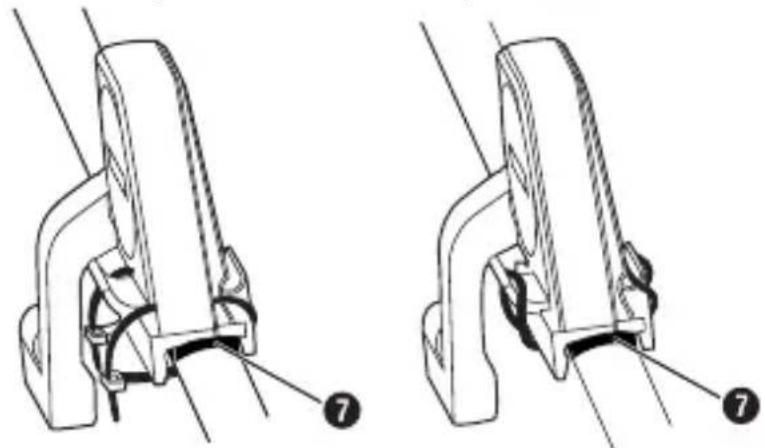
Line drawing of a bicycle with front wheel and side seat, shown alongside an inset close-up of the bicycle's seat assembly (no text or symbols)◆ Fit the speed and pedal frequency sensor to the left-hand side of the rear wheel fork (opposite side to the chain) using the rubber ring or the two cable binders. If the sensor does not fit stably onto the rear wheel fork, place the rubber pad ⑦ under the sensor.
natural_image
Technical line drawing of two mechanical clamping components with numbered annotations (7), no readable text or symbols present.◆ Fix the wheel magnet to one of the rear wheel spokes and position it so that it passes through the speed and pedal frequency sensor zone.
◆ Fit the pedal frequency magnet onto the inside of one of the pedal cranks. To do this, unscrew the pedal from the pedal crank and push the pedal frequency magnet onto the crank arm.

If the pedal frequency magnet does not fit onto your bicycle's pedal crank you can also use a cable binder to fix it.
natural_image
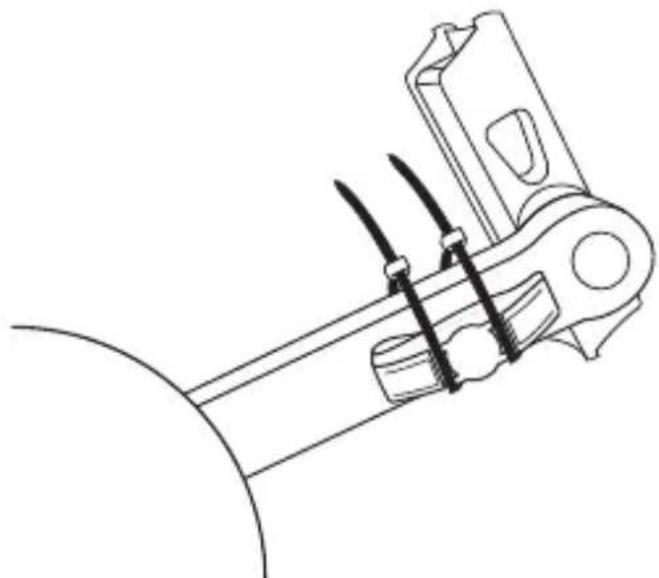
Technical line drawing of a mechanical bracket or clamp assembly (no text or symbols)Fit the magnets and the sensor on the bicycle frames so that the centre of the magnet is facing the sensor zone on the speed and pedal frequency sensor when the rear wheel or pedal crank is rotated. The distance between the magnets and the sensor should be between 2 and 5 mm.
- First adapt the distance to the pedal frequency magnet by tilting the sensor housing to the side towards the pedal frequency magnet.
After this, adapt the distance between the wheel magnet and the sensor zone by undoing the screw on the arm and swivelling it into the right position. Fix the arm back into position by re-tightening the screw.
The Crivit Pro Bike Assistant App
The Crivit Pro Bike Assistant App uses the Bluetooth® Smart facilities on your smartphone and turns it into a bicycle computer and training assistant. You can download the free app from the Apple® App Store or Google® Play Store.


Making a connection to a smartphone
You will have to connect the speed and pedal frequency sensor to a compatible smartphone in order to use it. The connection must be established using the app settings, not the Bluetooth® settings on your smartphone.
◆ Activate the Bluetooth® connection on your smartphone. You can find a detailed description of how to do this in the operating instructions for your smartphone.
◆ Turn the pedals and the wheel to ensure that the speed and pedal frequency sensor is activated.
Open the Crivit Pro Bike Assistant App. The app will automatically try to make a connection to the speed and the frequency sensor. Once the connection has been established, the connection management page will be displayed.

◆ Press the name of the connected sensor to switch to the user information view.
◆ Here you can enter information about your person (gender, size, weight etc.) and set the required unit and tyre size for your bike.
NOTE
The tyre size is normally printed on the side of the tyre wall.
Confirm your entries by pressing the "Save" button.
◆ After this, the training data overview will be displayed again.

◆ Press the button and start your training session.
◆ If you want to pause in your training session, press their button.
If you have finished your training session, press the button. After this, you can save the display values in the history or discard them.
◆ To view records stored in the history, press the button.
Troubleshooting
No data is displayed in the app.
- Check whether the distance between the speed and pedal frequency sensor and the magnet is less than 5 mm.
Adapt the positions of the magnets and the speed sensor.
- Check whether the magnets are passing through the speed and pedal frequency sensor zones correctly.
- Check whether the battery in the speed and pedal frequency sensor is discharged, and replace it if necessary.
- Check the Bluetooth® connection on your smartphone. It is possible that the distance between the smartphone and the speed and the frequency sensor is too large.
Cleaning

CAUTION
Damage to the appliance!
▶ To avoid irreparable damage to the appliance, ensure that no moisture can penetrate the appliance during cleaning.
▶ Do not use caustic, abrasive or solvent-based cleaning materials. These can damage the surfaces of the appliance.
- Clean the surfaces of the appliance with a soft, dry cloth. For stubborn dirt, use a slightly damp cloth with a mild detergent.
Storage when not in use
If you decide not to use the appliance for a long period, remove the battery and store it in a clean, dry place away from direct sunlight.
Disposal

The adjacent symbol of a crossed-out wheelie bin m that this device is subject to Directive 2012/19/EU.
This directive states that this appliance may not be disposed of in normal household waste at the end of its useful life, but must be brought to a specially set-up collection point, recycling depot or disposal company.
This disposal is free of charge for the user. Protect the environment and dispose of this appliance properly.
You can obtain further information from your local disposal company or the city or local authority.
Disposing of the batteries
Do not dispose of the batteries in the household waste. Defective or worn-out batteries must be recycled according to Directive 2006/66/EC.
Consumers are legally obliged to dispose of used batteries at a collection point in their town/district or at a retail store. This obligation is intended to ensure that batteries are disposed of in an environmentally responsible manner. Dispose of batteries only when they are fully discharged.
Appendix
Technical data
| Bluetooth® specifications | Bluetooth® Smart Version 4.0(range up to 10 m) |
| Operating voltage 3 V (1 x CR 2032 button cell) | |
| Battery life about 6 months | |
| Protection class IP X4 | |
| Operating temperature +5 °C to +35 °C | |
| Storage temperature +5 °C to +40 °C | |
| Relative humidity(no condensation) | 5% - 75% |
| Dimensions approx. 8.5 x 6.5 x 2.7 cm | |
| Weight approx. 21 g |
Notes on the Declaration of Conformity
This device complies with R&TTE directive 1999/5/EC,
CE EMC directive 2004/108/EC and RoHS directive 2011/65/EU with regard to correspondence with the basic requirements and other relevant regulations.
The complete original Declaration of Conformity is available from the importer.
Warranty
This appliance is provided with a 3-year warranty valid from the date of purchase. This appliance has been manufactured with care and inspected meticulously prior to delivery. Please retain your receipt as proof of purchase. In the event of a warranty claim, please contact your Customer Service unit by telephone. This is the only way to guarantee free return of your goods.
NOTE
The warranty only covers claims for material and manufacturing defects, not for transport damage, worn parts or damage to fragile components such as buttons or rechargeable batteries.
This product is intended solely for private use and not for commercial purposes. The warranty shall be deemed void in cases of misuse or improper handling, use of force and modifications/repairs which have not been carried out by one of our authorised Service centres. Your statutory rights are not restricted by this warranty. The warranty period is not prolonged by repairs effected under the warranty.
This also applies to replaced and repaired components. Any damage and defects present at the time of purchase must be reported immediately after unpacking, but no later than two days after the date of purchase. Repairs carried out after expiry of the warranty period shall be subject to charge.
Service

Service Great Britain
Tel.: 0871 5000 720 (£ 0.10/Min.)
E-Mail: kompernass@lidl.co.uk
IAN 270759
Importer
KOMPERNASS HANDELS GMBH
BURGSTRASSE 21
44867 BOCHUM
GERMANY
www.kompernass.com
KOMPERNASS HANDELS GMBH
BURGSTRASSE 21
44867 BOCHUM
DEUTSCHLAND / GERMANY
www.kompernass.com



- Die Crivit Pro Bike Assistant App
- Contents
- Introduction 27
- Safety 30
- Description of components 33
- Operation 33
- Installation 36
- The Crivit Pro Bike Assistant App....39
- Making a connection to a smartphone ..... 3 9
- Troubleshooting 42
- Introduction
- Information concerning these operating instructions
- Limitation of liability
- Notes on trademarks
- Intended use
- Warnings used
- DANGER
- A warning notice at this hazard level indicates a potentially hazardous situation.
- CAUTION
- A warning notice at this hazard level indicates a potential for property damage.
- NOTE
- Safety
- Basic safety guidelines
- Notes on batteries and rechargeable batteries
- Mishandling the batteries can cause fires, explosions, leakages or other hazards!
- Description of components
- Operation
- Unpacking
- Check the package contents
- Disposal of packaging materials
- Battery insertion/ exchange
- Installation
- The Crivit Pro Bike Assistant App
- Making a connection to a smartphone
- Troubleshooting
- No data is displayed in the app.
- Cleaning
- Damage to the appliance!
- Storage when not in use
- Disposal
- This disposal is free of charge for the user. Protect the environment and dispose of this appliance properly.
- Disposing of the batteries
- Appendix
- Notes on the Declaration of Conformity
- Warranty
- Service
- Service Great Britain
- Importer
- KOMPERNASS HANDELS GMBH
Brand : CRIVIT
Model : CBGT 4 A1
Category : Pedometer