
CDP 2L1049W-01 - Dishwasher CANDY - Free user manual and instructions
Find the device manual for free CDP 2L1049W-01 CANDY in PDF.


| Product Type | Freestanding Dishwasher |
| Model | CDP 2L1049W-01 |
| Brand | Candy |
| Place Settings | 10 |
| Energy Efficiency Class | A++ |
| Drying Efficiency Class | A |
| Annual Energy Consumption | 211 kWh |
| Annual Water Consumption | 2520 L |
| Noise Level | 49 dB(A) |
| Power Supply | 230 V~ 50 Hz, 1930 W |
| Water Pressure Range | 0.04 - 1.0 MPa (0.4 - 10 bar) |
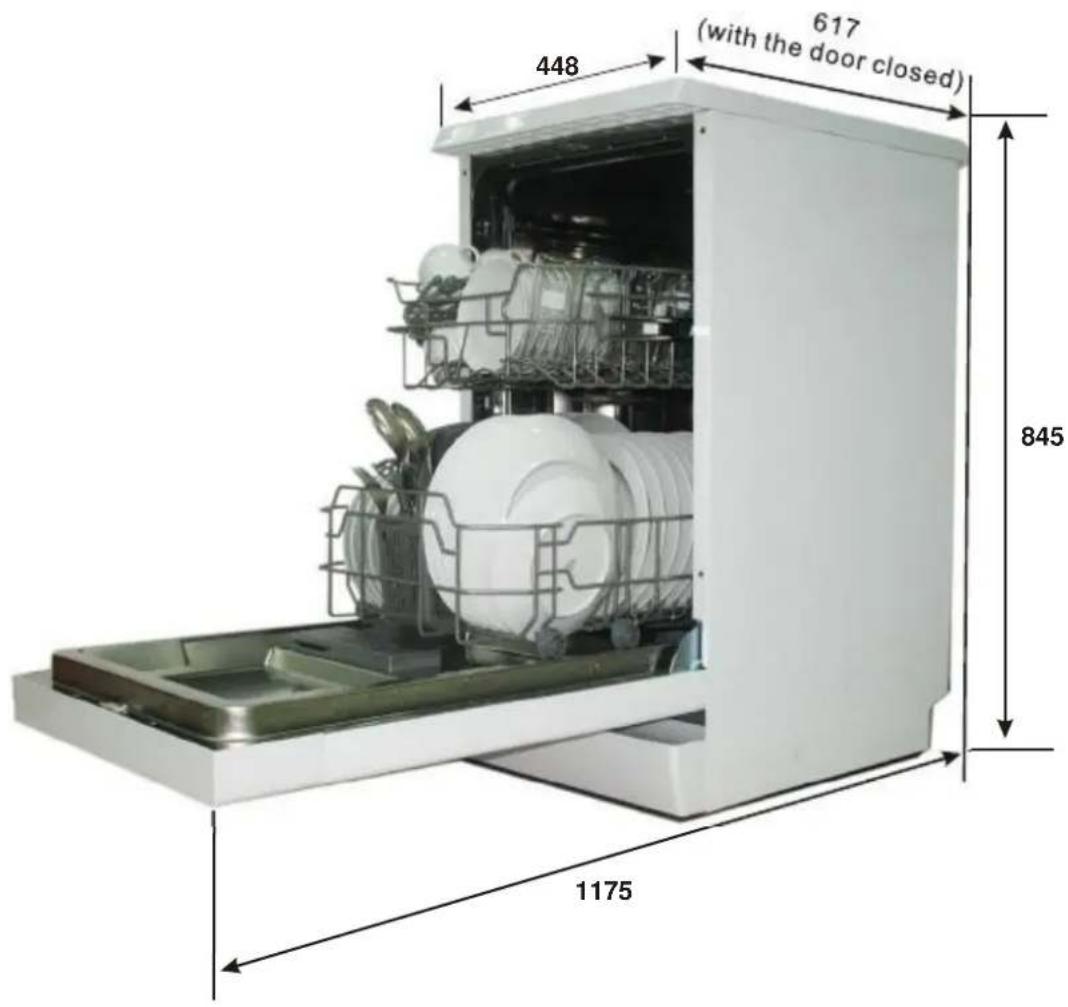
| Dimensions (H x W x D) | 845 x 448 x 617 mm (with door closed) |
| Programs | Intensive, Normal, Eco, Rapid, Soak |
| Standard Program | Eco 45°C, 205 min, 0.74 kWh, 9 L |
| Water Softener | Adjustable (H1-H6) |
| Rinse Aid Dispenser | Yes, adjustable (1-6) |
| Salt Indicator | Yes (control panel light) |
| Rinse Aid Indicator | Yes (control panel light) |
| Delay Start | 3h / 6h / 9h |
| Adjustable Upper Basket | Yes (height adjustable) |
| Foldable Spikes (Lower Basket) | Yes |
| Cutlery Basket | Yes |
| Filter System | 3-stage (coarse, main, fine) |
| Self-Cleaning Filter | No (manual cleaning required) |
| AquaStop | Safety supply hose with double wall |
Frequently Asked Questions - CDP 2L1049W-01 CANDY
- P3 flashing: Overflow (leak).
- P4 and P5 flashing: Not reaching required temperature (heating element issue).
- P2, P3, P5 flashing: Communication abnormal (signal recovery).
User questions about CDP 2L1049W-01 CANDY
0 question about this device. Answer the ones you know or ask your own.
Ask a new question about this device
Download the instructions for your Dishwasher in PDF format for free! Find your manual CDP 2L1049W-01 - CANDY and take your electronic device back in hand. On this page are published all the documents necessary for the use of your device. CDP 2L1049W-01 by CANDY.
USER MANUAL CDP 2L1049W-01 CANDY
□ 9 place settings
10 place settings
□ half-load function
□ Alternative Wash
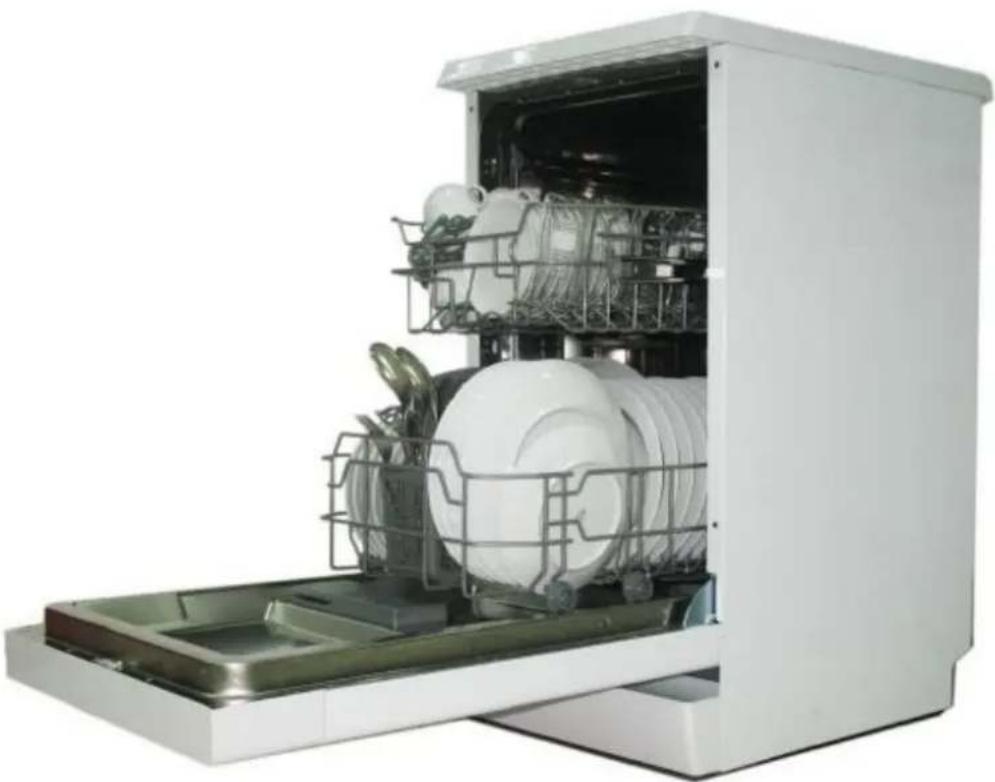
Dishwasher
natural_image
Interior view of a white kitchen appliance with multiple kitchen utensils and a rack-mounted sink (no visible text or labels)
Read this Manual
Dear Customer,
- Please carefully read this manual before using the dishwasher, it will help you to use and maintain the dishwasher properly.
- Keep it to refer to it at a later date.
■ Pass it on to any subsequent owner of the appliance.
This manual contains sections on safety Instructions, Operating Instructions, Installation Instructions and Troubleshooting Tips, etc.

Before Calling for Service
- To review the section on troubleshooting Tips will help you to solve some common problems by yourself.
If you can not solve the problems by yourself, please ask for the help of professional technicians.
NOTE:
The manufacturer, following a policy of constant development and updating of the product, may make modifications without giving prior notice.
This user manual shall also be got from the manufacturer or responsible vendor.
1) Safety Information....1
2) Quick operation guide.... 2
3) Operation Instruction....3
Control Panel....3
Dishwasher Features....3
4) Prior using for the first time....4
A Water Softener....4
B Loading the Salt into the Softener....5
C、Loading the Detergent....6
D、Type of Detergent 7
5) Loading the Dishwasher Basket......9
Recommendation....9
For washing in the dishwasher the following cutlery/dishes....9
Attention before or after loading the Dishwasher Baskets....9
Removing the Dishes....9
The Method Loading Normal Dishware....10
6) Starting a washing programme....11
Wash Cycle Table....11
Turning on the Appliance....11
Change the Programme....12
Forgot to Add a Dish....12
At the end of the Wash Cycle....12
7) Maintenance and cleaning....13
Filtering System....13
Caring for the Dishwasher....14
8) Installation instruction.....15
Positioning the Appliance....15
About Power Connection....15
Water Connection....16
Start of dishwasher....17
9) Troubleshooting Tips......18
Before calling for service....18
Error codes....19
Technical information....20
Loading the baskets according to En50242
1. IMPORTANT SAFETY INFORMATION

WARNING! When using your dishwasher, follow the precautions listed below:
■ This appliance is intended to be used in household and similar applications such as:
-staff kitchen areas in shops, offices and other working environments;
-farm houses;
-by clients in hotels, motels and other residential type environments;
-bed and breakfast type environments.
This appliance can be used by children aged from 8 years and above and persons with reduced physical, sensory or mental capabilities or lack of experience and knowledge if they have been given supervision or instruction concerning use of the appliance in a safe way and understand the hazards involved. Children shall not play with the appliance. Cleaning and user maintenance shall not be made by children without supervision. (For EN60335-1)
This appliance is not intended for use by persons(including children) with reduced physical, sensory or mental capabilities, or lack of experience and knowledge, unless they have been given supervision or instruction concerning use of the appliance by a person responsible for their safety. (For IEC60335-1)
■ This appliance is for indoor use only, for household use only. To protect against the risk of electrical shock, do not immerse the unit, cord or plug in water or other liquid.
■ Please unplug before cleaning and maintenance the appliance .Use a soft cloth moisten with mild soap, and then use a dry cloth to wipe it again .

EARTHING INSTRUCTIONS
■ This appliance must be earthed. In the event of a malfunction or breakdown, earthing will reduce the risk of an electric shock by providing a path of least resistance of electric current. This appliance is equipped with a cord having an equipment-earthing conductor and a earthing plug.
■ The plug must be plugged into an appropriate outlet that is installed and earthed in accordance with all local codes and ordinances.
■ Improper connection of the equipment-earthing conductor can result in the risk of an electric shock. Check with a qualified electrician or service representative if you are in doubt whether the appliance is properly earthed.
- Do not modify the plug provided with the appliance; If it does not fit the outlet. Have a proper outlet installed by a qualified electrician.
■ Do not abuse, sit on, or stand on the door or dish rack of the dishwasher.
■ Do not operate your dishwasher unless all enclosure panels are properly in place.
■ Open the door very carefully if the dishwasher is operating, there is a risk of water squirting out.
■ Do not place any heavy objects on or stand on the door when it is open. The appliance could tip forward.
■ When loading items to be washed:
1) Locate sharp items so that they are not likely to damage the door seal;
2) Warning: Knives and other utensils with sharp points must be loaded in the basket with their points down or placed in a horizontal position.
- Check that the detergent powder is empty after completion of the wash cycle.
■ Do not wash plastic items unless they are marked dishwasher safe or the equivalent. For plastic items not so marked, check the manufacturer's recommendations.
■ Use only detergent and rinse additives designed for an automatic dishwasher.
■ Never use soap, laundry detergent, or hand washing detergent in your dishwasher.
■ Children should be supervised to ensure that they do not play with the appliance.
■ The door should not be left open, since this could increase the risk of tripping.
■ If the supply cord is damaged, it must be replaced by the manufacturer or its service agent or a similarly qualified person in order to avoid a hazard.
■ During installation, the power supply must not be excessively or dangerously bent or flattened.
■ Do not tamper with controls.
■ The appliance is to be connected to the water mains using new hose sets and that old hose-sets should not be reused.
■ The maximum number of place settings to be washed is 10.
■ The maximum permissible inlet water pressure is 1MPa.
■ The minimum permissible inlet water pressure is 0.04MPa.
Disposal
This appliance is marked according to the European directive 2012/19/EU on Waste Electrical and Electronic Equipment (WEEE).
WEEE contains both polluting substances (which can cause negative consequences for the environment) and basic components (which can be re-used).
It is important to have WEEE subjected to specific treatments, in order to remove and dispose properly all pollutants, and recover and recycle all materials.
Individuals can play an important role in ensuring that WEEE does not become an environmental issue; it is essential to follow some basic rules:
■ WEEE should not be treated as household waste;
■ WEEE should be handed over to the relevant collection points managed by the municipality or by registered companies. In many countries, for large WEEE, home collection could be present.
In many countries, when you buy a new appliance, the old one may be returned to the retailer who has to collect it free of charge on a one-to-one basis, as long as the equipment is of equivalent type and has the same functions as the supplied equipment.

WARNING!
■ Packaging material could be dangerous for children!
■ For disposing of package and the appliance please go to a recycling centre. Therefore cut off the power supply cable and make the door closing device unusable.
■ Cardboard packaging is manufactured from recycled paper and should be disposed in the waste paper collection for recycling.
■ By ensuring this product is disposed of correctly, you will help prevent potential negative consequences for the environment and human health, which could otherwise be caused by inappropriate waste handling of this product.
■ For more detailed information about recycling of this product, please contact your local city office and your household waste disposal service.
■ DISPOSAL: Do not dispose this product as unsorted municipal waste. Collection of such waste separately for special treatment is necessary.
2. Quick operation guide
For detailed operating method read the corresponding content on the instruction manual.
| Switch on the appliance | Open the door,press the On/Off button to switch on the appliance. | |
| Fill the detergent dispenser | The detergent container is inside the door.If the lid of the container is closed, press the button (A) to open.At the end of every wash cycle the lid is always open and ready for the next time the dishwasher is used. | 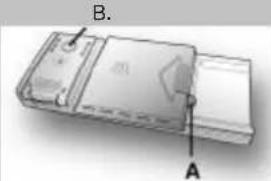 |
| Check the rinse aid level | Mechanical indicator B.It is always advisable to use rinse aid that is specifically designed for dishwasher.Check the rinse aid level through the indicator eye (B) which is located on the dispenser. | |
| Check the regeneration salt level | (On models with water softener system only.)Electric indicator on control panel (if provided).If there is no salt warning light in the control panel (for some models), you can estimate when to fill the salt into the softener by the number of cycles the dishwasher has run. | 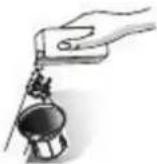 |
| Load the baskets | Scrape off any large amount of leftover food. Soften remnants of burnt food in pans, then load the baskets. Refer to the dishwasher loading instructions. | |
| Select a programme | Close the door, Press the Programme button until the selected programme lights up.( See the section entitled Operation instruction ) | |
| Running the dishwasher | Turn on the water tap , Press the Start/Reset button, The machine will start working at once. | |
| Changing the programme | 1. A running cycle can only be modified if it has been running for a short time. Otherwise the detergent may have already been released and the water already drained. If this is the case, the detergent dispenser must be refilled.2. Press the Start/Reset Button for more than 3s to cancel the running programme.3. Select a new programme.4. Restart the dishwasher. | WARNING!Open the door carefully.Hot steam may escape when the door is opened! |
| Add forgotten dishes in the dishwasher. | 1.Open the door a little to stop the machine.2.After the spray arms stop working, you can open the door completely.3.Add the forgotten dishes.4.Close the door,the dishwasher will start running again after 10 seconds. | |
| If the appliance is switched off during a wash cycle. | If the appliance is switched off during a wash cycle, when switched on again, please re-select the washing cycle and operate the dishwasher according to the original Power-on state ). | |
| Switch off the appliance | When the working cycle has finished, the buzzer of the dishwasher will sound 8 times, then stop.Turn off the appliance using the On/Off Button.Since the appliance is standing by, it will power off automatically after 30 minutes without any operation. | |
| Turn off the water tap, unload the baskets | Warning: wait a few minutes (about 15 minutes) before unloading the dishwasher to avoid handling the dishes and utensils while they are still hot and more susceptible to break.They will also dry better.Unload the appliance, starting from the lower basket. | |
WARNING!
3.Operation Instruction

IMPORTANT
To get the best performance from your dishwasher, read all operating instructions
before using it for the first time.
Control Panel
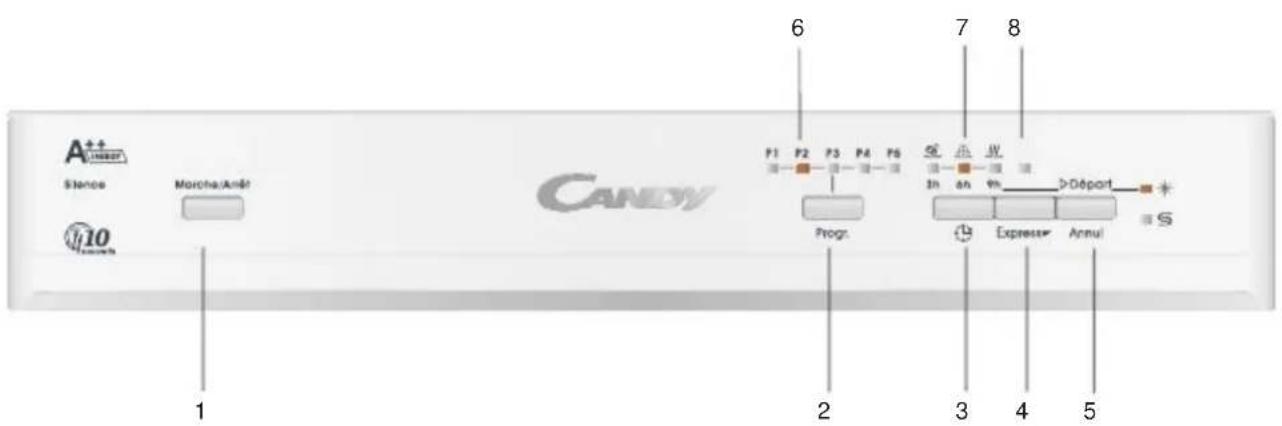
text_image
A++ LIME Stance Marche/Amé CANDY 6 7 8 P1 P2 P3 P4 P5 Progr. In on 9% >Départ Expresser Annul S 1 2 3 4 5- Power Button: switch On/Off the appliance.
- Program Button: press the Button to select a washing program.
- Delay Button: press the button to add the delay time.
- Express Button: program Rapid/Soak no Express function. When the door closed and no program running, press Express button to choose the function.
-
Start/Reset Button: to start or cancel the program.
-
Program Light: show you the selected program P1-P5.
- Delay Light: show you the selected delay time, 3h/6h/9h. It also will show you the wash, Rinse, Dry station.
- Express Light: indicates use the Express function.
Rinse Aid Indicator:
light up when the dispenser needs to be refilled.
Add Salt Indicator:
light up when the dispenser needs to be refilled.
Dishwasher Features
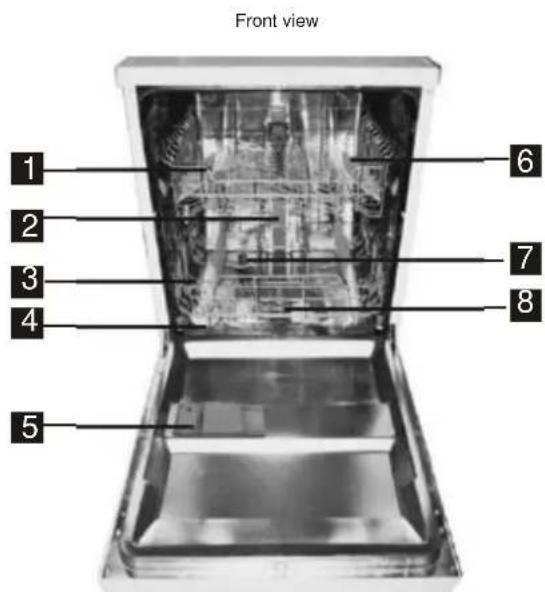
text_image
Front view 1 2 3 4 5 6 7 8Upper Basket
2 Inner pipe
3 Lower Basket
4 Salt Container
5 Dispenser
6 Cup Shelf
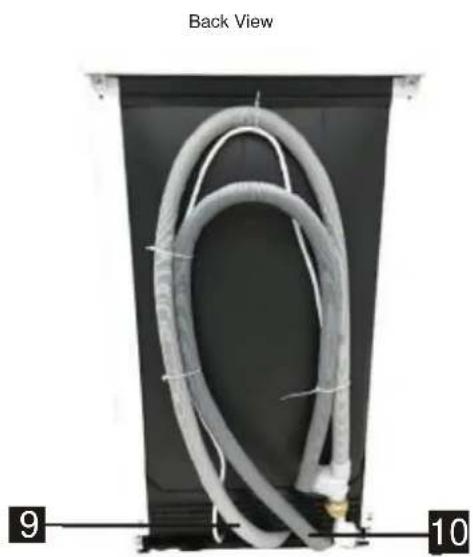
natural_image
Back view of a coiled cable or hose component mounted on a black panel, with labeled parts 9 and 10 (no text or symbols on the main subject)7 Spray arms
8 Filter assembly
9 Security Inlet pipe
10 Drain pipe
4.Prior using for the first time
Before using your dishwasher for the first time:
A. Set the water softener
B. Add 1.5Kg dishwasher salt and then full fill the salt container with water
C. Fill the rinse aid dispenser
D. Fill in detergent
A. Water Softener
The water softener must be set manually, using the water hardness dial.
The water softener is designed to remove minerals and salts from the water, which would have
a detrimental or adverse effect on the operation of the appliance.
The higher the content of these minerals and salts, the harder your water is.
The softener should be adjusted according to the hardness of the water in your area. Your local Water Authority can advise you on the hardness of the water in your area.
Adjusting Salt Consumption
The dishwasher is designed to allow for adjustment in the amount of salt consumed based on the hardness of the water used. This is intended to optimise and customise the level of salt consumption.
Please follow the steps below for adjustment in salt consumption.
- Switch on the appliance;
- Press the Program button for more than 5 seconds to start the water softener set model within 60 seconds after the appliance was switched on;
- Press the Program button to select the proper set according to your local environment, the sets will change in the following sequence: H3->H4->H5->H6->H1->H2;
- Press the On/Off button or no operation for 5 seconds to end the set up model.
| WATER HARDNESS | Selector Position | Salt co nsumption (gram/cycle) | |||
| dH | fH | Clark | mmol/l | ||
| 0~5 | 0~9 | 0~6 | 0~0.94 | H1: P5 Light bright | 0 |
| 6-11 | 10-20 | 7-14 | 1.0-2.0 | H2: P4 Light bright | 9 |
| 12-17 | 21-30 | 15-21 | 2.1-3.0 | H3: P4 P5 Light bright | 12 |
| 18-22 | 31-40 | 22-28 | 3.1-4.0 | H4: P3 Light bright | 20 |
| 23-34 | 41-60 | 29-42 | 4.1-6.0 | H5: P3 P5 Light bright | 30 |
| 35-55 | 61-98 | 43-69 | 6.1-9.8 | H6: P3 P4 Light bright | 60 |
Note:1
1 dH=1.25 Clarke=1.78 fH=0.178mmol/l
^° dH: German degree
^e fH: French degree
•Clark: British degree
Note:2
The manufactory setting: H3:P4 P5 Light bright (EN 50242)
Contact your local water board for information on the hardness of your water supply.

NOTE: If your model does not have any water softener, you may skip this section.
WATER SOFTENER
The hardness of the water varies from place to place. If hard water is used in the dishwasher, deposits will form on the dishes and utensils.
The appliance is equipped with a special softener that uses a salt container specifically designed to eliminate lime and minerals from the water.
B. Loading the Salt Into the Softener
Always use the salt intended for use with dishwasher.
The salt container is located beneath the lower basket and should be filled as explained in the following:
Attention!
■ Only use salt specifically designed for the use in dishwashers! Every other type of salt not specifically designed for the use in a dishwasher, especially table salt, will damage the water softener. In case of damages caused by the use of unsuitable salt the manufacturer does not give any warranty nor is liable for any damages caused.
■ Only fill with salt just before starting one of the complete washing programs. This will prevent any grains of salt or salty water, which may have been spilled, remaining on the bottom of the machine for any period of time, which may cause corrosion.
1
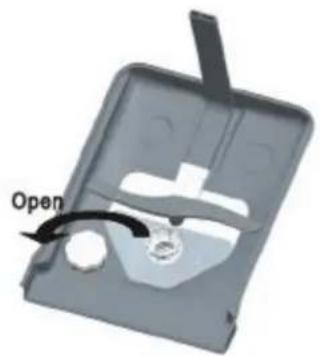
natural_image
3D diagram of a mechanical component with a labeled 'Open' arrow indicating a specific part (no other text or symbols)2
natural_image
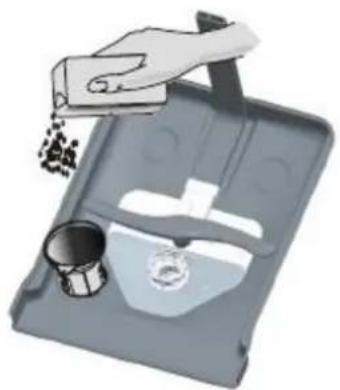
Illustration of a hand pouring granular material into a tray with a metal cup and a small container (no text or symbols)A After the lower basket has been removed, unscrew and remove the cap from the salt container. B Place the end of the funnel (supplied) into the hole and introduce about 1.5kg of dishwasher salt.
C Full fill the salt container with water, It is normal for a small amount of water to come out of the salt container.
D After filling the container, screw the cap tightly back clockwise.
E The salt warning light will stop being after the salt container has been filled with salt.
F Immediately after filling the salt into the salt container, a washing program should be started (We suggest to use a short program). Otherwise the filter system, pump or other important parts of the machine may be damaged by salty water. This is out of warranty.

NOTE:
-
The salt container must only be refilled when the salt warning light in the control panel comes on. Depending on how well the salt dissolves, the salt warning light may still be on even though the salt container is filled. If there is no salt warning light in the control panel (for some Models), you can estimate when to fill the salt into the softener by the cycles that the dishwasher has run.
-
If there are spills of the salt, a soak or a rapid program should be run to remove the excessive salt.
C. LOADING THE DETERGENT
The detergent
IMPORTANT
It is essential to use a detergent that is specifically designed for dishwashers either in powder, liquid or tablet form. "FINISH" gives very good results and can be easily obtained. Unsuitable detergents (like those for washing up by hand) do not contain the proper ingredients for use in a dishwasher and stop the dishwasher from working correctly.

WARNING!
When loading the lower basket, please ensure that the plates or others do not obstruct the detergent dispenser.
Filling the detergent container
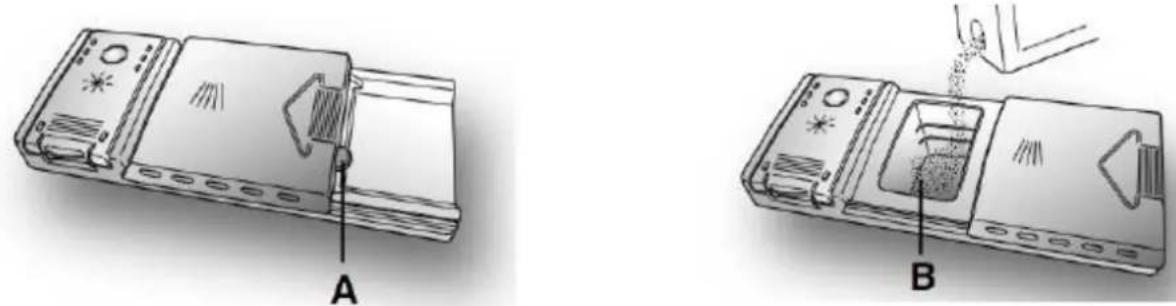
The detergent container is inside the door (fig. A 2). If the lid of the container is closed, press the button (A) to open. At the end of every wash cycle the lid is always open and ready for the next time the dishwasher is used.
The amount of detergent to be used varies according to how dirty the dishes are and on the type of dishes to be washed. We advise using 20/30 g of detergent in the wash section of detergent compartment (B).
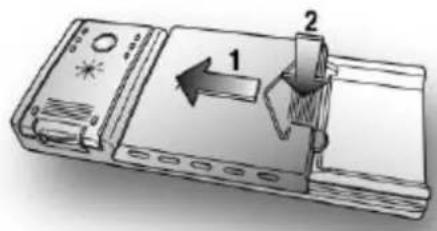
After pouring the detergent into the container, close the lid, firstly pushing (1) and then pressing on it (2) until you hear the click.
text_image
Diagram of a device with labeled parts 1 and 2, showing directional arrows and componentsSince not all detergents are the same the instructions on the boxes of detergent can vary. We should just like to remind users that too little detergent does not clean the dishes properly whilst too much detergent will not produce better results and is also a waste.
IMPORTANT
Do not use an excessive amount of detergent and help limit damage to the environment at the same time.
D. TYPES OF DETERGENT
Detergent tablets
Detergent tablets of different manufacturers dissolve at different speeds, for this reason, during short programmes, some detergent tablets may be not fully effective, because they are not completely dissolved. If these products are used, is recommended to choose longer programmes to guarantee the complete use of the detergent.
IMPORTANT
To get satisfactory washing results, the tablets MUST be placed in the wash section of the detergent container and NOT directly in the tub.
Concentrated detergents
The concentrated detergents, with reduced alkalinity and with natural enzymes, in conjunction with 50° wash programmes, have a smaller impact on the environment and they protect the dishes and the dishwasher. The 50° wash programmes purposely exploit the dirt-dissolving properties of the enzymes, allowing therefore, with the use of the concentrated detergents, to achieve the same results of the 65° programmes but at a lower temperature.
Combined detergents
The detergents that also contain the rinse aid must be placed in the wash section of the detergent container. The rinse aid container must be empty (if it is not empty, set the rinse aid regulator to lowest position before using combined detergents).
"ALL in 1" combined detergents
If you are planning to use "ALL in 1" ("3 in 1" / "4 in 1" / "5 in 1", etc.) combined detergents i.e. those with built in salt and/or rinse agent, we would advise the following:
■ read carefully and follow the manufacturer's instructions given on the packaging;
■ the effectiveness of detergents containing the built in water softener/salt depends on the hardness of your water supply. Check that the hardness of your water supply is within the effective range given on the detergent packaging.
If when using this type of product, you don't get satisfactory washing results, please con-manufacturer. tact the detergent
In certain circumstances use of combined detergents can cause:
■ limescale deposits on dishes or in the dishwasher;
■ a reduction in washing and drying performance.
IMPORTANT
Any problems which arise as a direct result of the use of these products are not covered by our warranty.
Please note that using the "ALL in 1" combined detergents, the rinse aid and salt indicator lights (only used on selected models) are superfluous, so you must ignore the lights.
If washing and/or drying problems occur, we recommend you return to use traditional separate products (salt, detergent and rinse agent). This will ensure that the water softener in the dishwasher operates correctly.
In this case, we recommends that you:
■ refill both the salt and rinse aid container;
■ run one normal washing cycle without a load.
Please note that on return to the use of conventional salt, a number of cycles will be required before the system becomes fully efficient again.
LOADING THE RINSE AID
The rinse aid
The rinse aid, which is automatically released during the last rinsing cycle, helps the dishes to dry quickly and prevents spots and stains forming.
Filling the rinse aid container
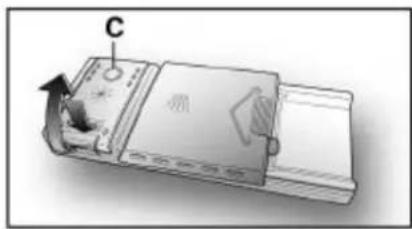
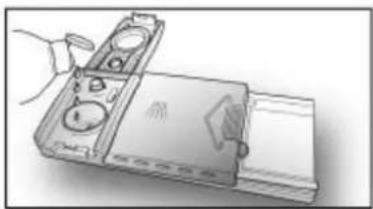
The rinse aid container can be found to the left of the detergent container (fig. A "3"). To open the lid, push the reference mark and, in the same time, pull the tab of opening. It is always advisable to use rinse aid that is specifically designed for dishwasher. Check the rinse aid level through the indicator eye (C) which is located on the dispenser.
natural_image
Diagram of a device with labeled component C, showing internal components and directional arrows (no text or symbols beyond label)FULL

dark
EMPTY

light
natural_image
Illustration of a handheld electronic device with ports and a screen (no text or symbols visible)Regulating the rinse aid from 1 to 6
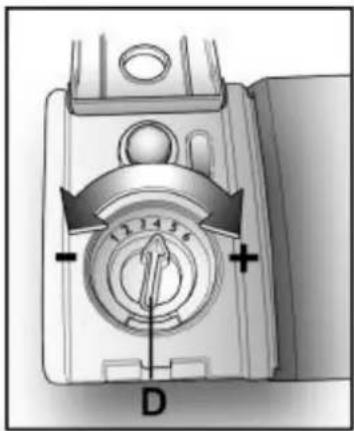
The regulator (D) is placed under the lid and can be turned using a coin. The recommended position is 4. The limestone content of the water considerably affects the formation of limescale and the drying performance. It is therefore important to regulate the quantity of rinse aid to achieve good washing results. If, after the wash, streaks occur on the dishes, decrease the amount by one position. If whitish spots occur, increase the amount by one position.
text_image
12 14 5 D5. Loading the Dishwasher Baskets
Recommendation
■ Consider buying utensils which are identified as dishwasher-proof.
■ Use a mild detergent that is described as 'kind to dishes'. If necessary, seek further information from the detergent manufacturers.
■ For particular items, select a program with as low a temperature as possible.
■ To prevent damage, do not take glass and cutlery out of the dishwasher immediately after the programme has ended.
For washing in the dishwasher the following cutlery/dishes
Are not suitable
■ Cutlery with wooden, horn china or mother-of-pearl handles
■ Plastic items that are not heat resistant
■ Older cutlery with glued parts that are not temperature resistant
■ Bonded cutlery items or dishes
■ Pewter or copper items
■ Crystal glass
■ Steel items subject to rusting
■ Wooden platters
■ Items made from synthetic fibres
Are of limited suitability
■ Some types of glasses can become dull after a large number of washes
■ Silver and aluminum parts have a tendency to discolour during washing
■ Glazed patterns may fade if machine washed frequently
Attention before or after loading the Dishwasher Baskets
(For best performance of the dishwasher, follow these loading guidelines.
Features and appearance of baskets and cutlery baskets may vary from your model.)
Scrape off any large amounts of leftover food. Soften remnants of burnt food in pans.
It is not necessary to rinse the dishes under running water.
Place objects in the dishwasher in following way:
- Items such as cups, glasses, pots/pans, etc. are faced downwards.
- Curved items, or ones with recesses, should be loaded aslant so that water can run off.
- All utensils are stacked securely and can not tip over.
- All utensils are placed in the way that the spray arms can rotate freely during washing.

NOTE: Very small items should not be washed in the dishwasher as they could easily fall out of the basket.
- Load hollow items such as cups, glasses, pans etc. With the opening facing downwards so that water cannot collect in the container or a deep base.
■ Dishes and items of cutlery must not lie inside one another, or cover each other.
■ To avoid damage to glasses, they must not touch. - Load large items which are most difficult to clean into the lower basket.
The upper basket is designed to hold more delicate and lighter dishware such as glasses, coffee and tea cups
■ Long bladed knives stored in an upright position are a potential hazard!
■ Long and/or sharp items of cutlery such as carving knives must be positioned horizontally in the upper basket.
Please do not overload your dishwasher. This is important for good results and for reasonable consumption of energy.
Removing the Dishes
To prevent water dripping from the upper basket into the lower basket, we recommend that you empty the lower basket first and then the upper basket.
The Method Loading Normal Dishware
Loading the Upper Basket
The upper basket is designed to hold more delicate and lighter dishware such as glasses, coffee and tea cups and saucers, as well as plates, small bowls and shallow pans (as long as they are not too dirty). Position the dishes and cookware so that they will not get moved by the spray of water.
Loading the Lower Basket
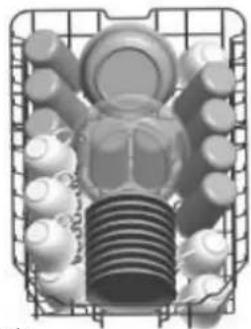
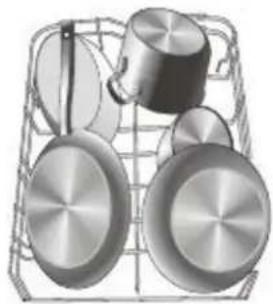
We suggest that you place large items and the most difficult to clean items are to be placed into the lower basket: such as pots, pans, lids, serving dishes and bowls, as shown in the figure below. It is preferable to place serving dishes and lids on the side of the racks in order to avoid blocking the rotation of the top spray arm.
IN

natural_image
Cross-sectional diagram of a mechanical component with gears and shafts (no text or labels)
natural_image
Illustration of kitchen utensils including a pot, pan, and lid arranged in a wireframe grid (no text or symbols)Please be reminded that:
■ Pots, serving bowls, etc, must always be placed top down.
- Deep pots should be slanted to allow water to flow out.
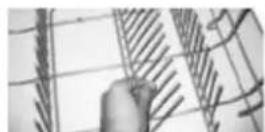
The Bottom Basket features folding spikes so that larger or more pots and pans can be loaded.
Adjusting the Upper Basket
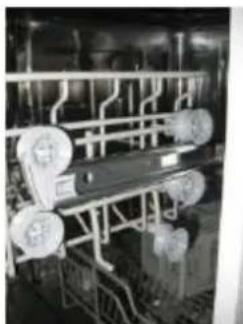
The height of the upper basket can be adjusted in order to create more space for large utensils both for the upper /lower basket. The height of the upper basket can be adjusted by placing the wheels on different height of the rails. Long items, serving cutlery, salad servers and knives should be placed on the shelf so that they do not obstruct the rotation of the spray arms..
Folding back the cup shelves
For better stacking of pots and pans, the spikes can be folded down as show in the picture right.
Lower position Upper position
natural_image
Industrial piping system with circular components and structural beams (no visible text or symbols)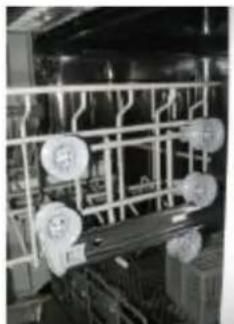
natural_image
Industrial equipment with metal framework and circular components (no visible text or symbols)Wheels
Folding Spikes of Lower Basket
For better stacking of pots and pans, the spikes can be folded down as show in the picture right.
Cutlery Basket
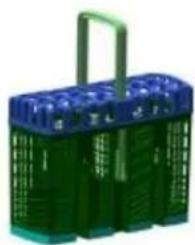
Cutlery should be placed in the cutlery basket with the handles at the bottom. If the rack has side baskets, the spoons should be loaded separately into the appropriate slots, especially long utensils should be placed in the horizontal position at the front of the upper basket as shown in the picture.
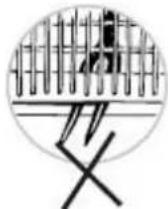
WARNING!
■ Do not let any item extend through the bottom.
■ Always load sharp utensils with the sharp point down!
For personal safety and a top quality cleaning, place the silverware in the basket making sure that:
■ They do not nest together.
■ Silverware is placed with the handles-down.
■ But place knives and other potentially dangerous utensils are placed handles-up.
natural_image
Green plastic basket with blue top handle and green side panels (no text or symbols visible)6.Starting a washing program
Wash Cycle Table

NOTE: ( ★ ) Means: need to fill rinse into the Rinse-Aid Dispenser.
| Program | Cycle Selection Information | Description of Cycle | Detergent pre/main | Running time(min) | Energy (Kwh) | Water (L) | Rinse Aid |
| P1 Intensive | For heaviest soiled crockery, and normally soiled pots pans dishes etc with dried on soiling. | Prewash(50 )Wash (60 )RinseRinseRinse(69 )Drying | 3/221 piece | 165 | 1.4 | 16.5 | |
| P2 Normal | For normally soiled loads, such as pots, plates,glasses and lightly soiled pans. | Prewash(45 )Wash (55 )RinseRinse(66 )Drying | 3/221 piece | 175 | 1.1 | 13 | |
| *EN 50242 | This is standard programme, it is suitable to clean normally soiled tableware and it is the most efficient programme in terms of its combined energy and water consumption for that type of tableware. | PrewashWash (45 )Rinse(62 )Drying | 3/221 piece | 205 | 0.74 | 9 | |
| P4 Rapid | A shorter wash for lightly soiled loads and quick wash. | Wash (55 )Rinse(55 )Rinse(55 ) | 20 | 30 | 0.7 | 10 | |
| P5 Soak | To rinse dishes that you plan to wash later that day. | Prewash | 15 | 0.02 | 3.5 |

NOTE:
*EN 50242 : This program is the test cycle. The information for comparability test in accordance with EN 50242, as follows:
■ Capacity: 10 setting
■ Position Upper basket: upper wheels on rails
■ Rinse aid setting: 6
PI:0.45W; Po:0.30W.
■ Left-on mode duration 30Min.
Turning On the Appliance
Starting a cycle wash
1 Draw out the lower and upper basket, load the dishes and push them back.
It is commended to load the lower basket first, then the upper one (see the section entitled "Loading the Dishwasher").
2 Pour in the detergent (see the section entitled Salt, 'Detergent and Rinse Aid ).
3 Insert the plug into the socket. The power supply is 220-240 VAC /50 Hz, the specification of the socket is 10A 250VAC. Make sure that the water supply is turned on to full pressure.
4 Close the door, press the Power button, to switch on the machine.
5 Press the program button, the wash program will be changed as follows direction:
P3-P4 P5 P1-P2 →
If a program is selected, the response indicator will light. Then press the Start/Reset button, the dishwasher begins to start.
[ P1 - Intensive, P2 - Normal, P3 - Eco, P4 - Rapid, P5 - Soak ]
Change the Programme
Premise:
A cycle that is underway can only be modified if it has only been running for a short time. Otherwise, the detergent may have already been released, and the appliance may have already drained the wash water. If this is the case, the detergent dispenser must be refilled (see the section entitled "Loading the Detergent").
2 Press the Start/Reset button for more than 3s, the machine will be instand by state. then you can change the program to the desired cycle setting (see the section entitled " Starting a wash cycle. . ." ).

NOTE:
If you open the door during a wash cycle, the machine will pause. The program light will stop blinking and the buzzer will oo every minute until you close the door. After you close the door, the machine will keep on working after 10 seconds.
If your model has broken remember function, the machine will go on to finish the selected program after the power cut.
Forgot to Add a Dish?
A forgotten dish can be added any time before the detergent cup opens.
1 Open the door a little.
2 After the spray arms stop working, you can open the door completely.
3
-69Add forgotten dishes.
4 Close the door.
The dishwasher will run after 10 seconds.
At the End of the Wash Cycle
When the working cycle has finished, the buzzer of the dishwasher will sound for 8 seconds, then stop. Turn off the appliance using the ON/OFF button, shut off the water supply and open the door of the dishwasher. Wait for a few minutes before unloading the dishwasher to avoid handling the dishes and utensils while they are still hot and more susceptible to breakage. They will also dry better.
Switch Off the Dishwasher
The program light is on but is not blinking, only in this case the programme has ended.
- Switch off the dishwasher by pressing the On/Off Button.
- Turn off the water tap!
Open the door carefully.
Hot dishes are sensitive to knocks. The dishes should therefore be allowed to cool down around 15 minutes before removing from the appliance.
Open the dishwasher's door, leave it ajar and wait a few minutes before removing the dishes. In this way they will be cooler and the drying will be improved.
Unloading the dishwasher
It is normal that the dishwasher is wet inside.
Empty the lower basket first and then the upper one. This will avoid water dripping from the upper Basket onto the dishes in the lower one.

WARNING!
It is dangerous to open the door when washing, because the hot water may scald you.
7. Maintenance and Cleaning
Filtering System
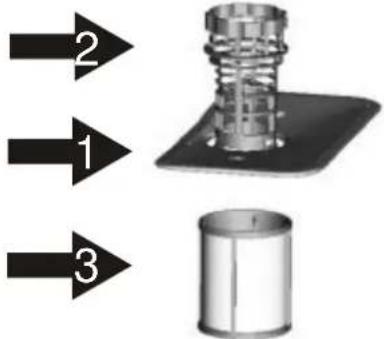
The filter prevents larger remnants of food or other objects from getting inside the pump. The residues may block the filter, in this case they must be removed.
text_image
2 1 3The filter system consists of a coarse filter, a flat (Main filter) And a microfilter(Fine filter).
Main filter

Food and soil particles trapped in this filter are pulverized by a special jet on the lower spray arm and washed down to drain.
Coarse filter

Larger items, such as pieces of bones or glass, that could block the drain are trapped in the coarse filter. To remove the items caught by the filter, gently squeeze the tap on the top of this filter and lift out.
Fine filter

This filter holds soil and food residues in the sump area and prevents it from being deposited on the dishes during wash cycle.
Filter assembly
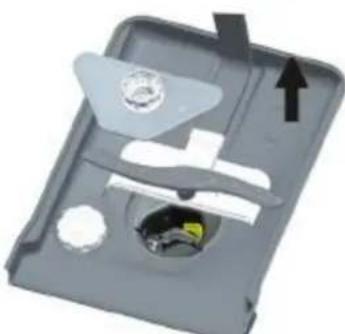
The filter efficiently removes food particles from the wash water, allowing it to be recycled during the cycle. For best performance and results, the filter must be cleaned regularly. For this reason, it is a good idea to remove the larger food particles trapped in the filter after each wash cycle by rinsing the semicircular filter and cup under running water. To remove the filter device, pull the cup handle in the upward direction.
WARNING!
■ The dishwasher must never be used without the filters.
- Improper replacement of the filter may reduce the performance level of the appliance and damage dishes and utensils.

text_image
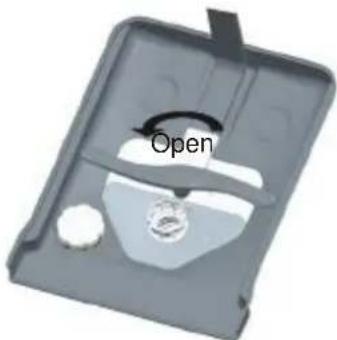
OpenStep 1 : Turn the filter in anti-clockwise direction,

natural_image
3D rendered diagram of a mechanical device with internal components and an upward arrow (no text or symbols)Step 2 lift the filter assy up

NOTE:
When following this procedure from step1 to step 2, the filter system will be removed; when following it from Step 2 to Step 1, the filter system will be installed.
Remarks:
- Inspect the filters for blocking after every time the dishwasher has been used.
- By unscrewing the coarse filter, you can remove the filter system. Remove any food remnants and clean the filters under running water.

NOTE: The entire filter assembly should be cleaned once a week.
Cleaning the Filter
To clean the coarse filter and the fine filter, use a cleaning brush. Reassemble the filter parts as shown in the figures on the last page and reinsert the entire assembly in the dishwasher, positioning it in its seat and pressing downwards.

WARNING!
When cleaning the filters, don't knock on them. Otherwise, the filters could be contorted and the performance of the dishwasher could be decreased.
Caring for the Dishwasher
The control panel can be cleaned by using a lightly dampened cloth.
After cleaning, make sure to dry it thoroughly.
For the exterior, use a good appliance polish wax.
Never use sharp objects, scouring pads or harsh cleaners on any part of the dishwasher.
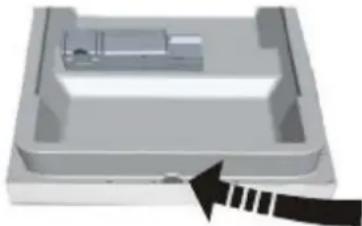
Cleaning the Door
natural_image
3D diagram of a mechanical component with an arrow indicating direction (no text or symbols)To clean the edge around the door, you should use only a soft warm, damp cloth. To avoid penetration of water into the door lock and electrical components, do not use a spray cleaner of any kind.

WARNING!
■ Never use a spray cleaner to clean the door panel as it may damage the door lock and electrical components.
■ Abrasive agents or some paper towels should not be used because of the risk of scratching or leaving spots on the stainless steel surface.
Protect Against Freezing
please take frost protection measures on the dishwasher in winter. Every time after washing cycles, please operate as follows :
- Cut off the electrical power to the dishwasher.
- Turn off the water supply and disconnect the water inlet pipe from the water valve.
- Drain the water from the inlet pipe and water valve. (Use a pan to gather the water)
- Reconnect the water inlet pipe to the water valve.
- Remove the filter at the bottom of the tub and use a sponge to soak up water in the sump.

NOTE: If your dishwasher cannot work because of the ice,
please contact professional service persons.
Cleaning the Spray Arms
It is necessary to clean the spray arms regularly for hard water chemicals will clog the spray arm jets and bearings.
To remove the upper spray arm, hold the nut, rotate the arm clockwise to remove it.
To remove the lower spray arm, pull out the spray arm upward.
Wash the arms in soapy and warm water and use a soft brush to clean the jets. Replace them after rinsing them thoroughly.
____ 14 ____

text_image
Open■ After Every Wash
After every wash, turn off the water supply to the appliance and leave the door slightly open so that moisture and odours are not trapped inside.
■ Remove the Plug
Before cleaning or performing maintenance, always remove the plug from the socket.
■ No Solvents or Abrasive Cleaning
To clean the exterior and rubber parts of the dishwasher, do not use solvents or abrasive cleaning products. Only use a cloth with warm soapy water.
To remove spots or stains from the surface of the interior, use a cloth dampened with water an a little vinegar, or a cleaning product made specifically for dishwashers.
■ When not in Use for a LongTime
It is recommend that you run a wash cycle with the dishwasher empty and then remove the plug from the socket, turn off the water supply and leave the door of the appliance slightly open. This will help the door seals to last longer and prevent odours from forming within the appliance.
■ Moving the Appliance
If the appliance must be moved, try to keep it in the vertical position. If absolutely necessary, it can be positioned on its back.
Seals
One of the factors that cause odours to form in the dishwasher is food that remains trapped in the seals. Periodic cleaning with a damp sponge will prevent this from occurring.
8. Installation instruction
Positioning the Appliance
Position the appliance in the desired location. The back should rest against the wall behind it, and the sides, along the adjacent cabinets or walls. The dishwasher is equipped with water supply and drain hoses that can be positioned either to the right or the left sides to facilitate proper installation.
Levelling the Appliance
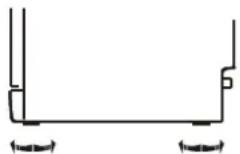
Once the appliance is positioned for levelling, the height of the dishwasher may be altered via adjustment of the screwing level of the feet.
About Power Connection

WARNING!
For personal safety:
- Do not use an extension cord or an adapter plug with this appliance.
■ Do not, under any circumstances, cut or remove the earthing
■ Connection from the power cord.
Electrical Requirements
Please look at the rating label to know the rating voltage and connect the dishwasher to the appropriate power supply. Use the required fuse 10 amp, time delay fuse or circuit breaker recommended and provide separate circuit serving only this appliance.
Electrical Connection
⚠️ Insure proper ground exists before use
Ensure the voltage and frequency of the power being corresponds to those on the rating plate. Only insert the plug into an electrical socket which is earthed properly. If the electrical socket to which the appliance must be connected is not appropriate for the plug, replace the socket, rather than using a adaptors or the like as they could cause overheating and burns.
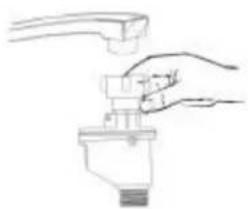
How to connect the safety supply hose
natural_image
Hand holding a faucet with a handle, no text or symbols visibleThe appliance must be connected to the water mains using new hose-sets.
The old hose-sets should not be reused.
Water pressure must be between 0,04 MPa and 1 MPa. If the pressure is below the minimum consult our Service Department for advice.
- Pull The safety supply hoses completely out from storage compartment located at rear of dishwasher.
- Tighter the screws of the safety supply hose to the faucet with thread 3/4inch.
- Turn water fully on before starting the dishwasher.
About the safety supply hose
The safety supply hose consists of the double walls. The hose's system guarantees its intervention by blocking the flow of water in case of the supply hose breaking and when the air space between the supply hose itself and the outer corrugated hose is full of water.
WARNING!
A hose that attaches to a sink spray can burst if it is installed on the same water line as the dishwasher. If your sink has one, it is recommended that the hose be disconnected and the hole plugged.
How to disconnect the safety supply hose
- Turn off the water.
- Release the water pressure by depressing the pressure release button. This relieves water pressure and protects you, and the room, from severe splashing.
- Unscrew The safety supply hose from the faucet..
COLD WATER CONNECTION
Connect the cold water supply hose to a threaded 3/4(inch) connector and make sure that it is fastened tightly in place. If the water pipes are new or have not been used for an extended period of time, let the water run to make sure that the water is clear and free of impurities. If this precaution is not taken, there is a risk that the water inlet can get blocked and damage the appliance.
Drain hose Connection
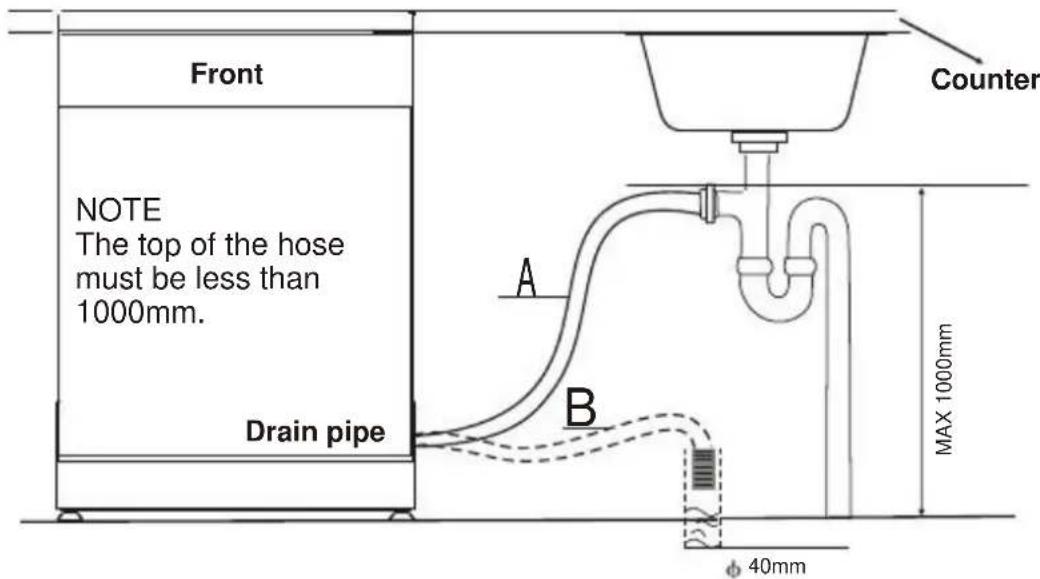
Insert the drain hose into a drain pipe with a minimum diameter of 40mm, or let it run into the sink, making sure to avoid bending or crimping it. The top of the hose must be less than 1000mm.

PLEASE HANG UP THE DRAIN HOSE EITHER WAY OF A, B
text_image
Front NOTE The top of the hose must be less than 1000mm. Drain pipe Counter A B MAX 1000mm φ 40mmHow to Drain Excess Water From Hoses
If the sink is 1000 higher from the floor, the excess water in hoses cannot be drained directly into the sink. It will be necessary to drain excess water from hoses into a bowl or suitable container that is held outside and lower than the sink.
Water Outlet
Connect the water drain hose. The drain hose must be correctly fitted to avoid water leaks. Ensure that the water drain hose is not kinked or squashed.
Extension Hose
If you need a drain hose extension, make sure to use a similar drain hose. It must be no longer than 4 metres; otherwise the cleaning effect of the dishwasher could be reduced.
Syphon Connection
The waste connection must be at a height less than 1000 mm (maximum) from the bottom of the dish. The water drain hose should be fixed.
Start of Dishwasher
The following things should be checked before starting the dishwasher.
1 The dishwasher is level and fixed properly
2 The inlet valve is open
3 Fill hose connections are fully tightened and not leaking
4 The wires are tightly connected
5 The power is switched on
6 The inlet and drain hoses are knotted
7 All packing materials and printings should be taken out from the dishwasher

Attention: After installation, please make sure to keep this manual.
The content of this manual is very helpful to the users.
9.Troubleshooting Tips
Before Calling for Service
Review the charts on the following pages may save you from calling for service.
| ? | Problem Possible CausesWhat to Do | ||
| Dishwasher doesn't fuse blown, or the start | circuit breaker acted | Replace fuse or reset circuit breaker. Remove any other appliances sharing the same circuit with the dishwasher | |
| Power supply is not turned on | Make sure the dishwasher is turned on and the door is closed securely.Make sure the power cord is properly plugged into the wall socket. | ||
| Water pressure is low | Check that the water supply is connected properly and the water is turned on. | ||
| Door of dishwasher not properly closed. | Make sure to close the door properly and latch it. | ||
| water not pumped from dishwasher | Kink in drain hose | Check drain hose. | |
| Filter clogged | Check the coarse filter(see section titled "Cleaning The Filter") | ||
| Kitchen sink clogged | Check the kitchen sink to make sure it is draining well.If the problem is the kitchen sink not draining ,you may need a plumber rather than a serviceman for dishwashers. | ||
| General problems | Suds in the tub | Improper detergent | Use only the special dishwasher detergent to avoid suds.If this occurs, open the dishwasher and let suds evaporate Add 1 gallon of cold water to the tub. Close and latch the dishwasher, then select any cycle. Dishwasher will drain out the water at the first step.Open the door after draining is stop and check if the suds is disappeared.Repeat if necessary. |
| Spilled rinse-aid | Always wipe up rinse-aid spills immediately. | ||
| Stained tub interior | Detergent with colourant was used | Make sure that the detergent is the one without colourant. | |
| White film on inside surface | Hard water minerals | To clean the interior, use a damp sponge with dishwasher detergent and wear rubber gloves.Never use any other cleaner than dishwasher detergent for the risk of foaming or suds. | |
| There are rust stains on cutlery | The affected items are not corrosion resistant.A programme was not run after dishwasher salt was added.Traces of salt have gotten into the wash cycle. | Always run the quick wash programme .without any crockery in the dishwasher and without selecting the Turbo function (if present),after adding dishwasher salt. | |
| The lid of the softer | Check the lid .Ensure the fix is fine. | ||
| Noise | Knocking noise in the wash cabinet | is looseA spray arm is knocking against an item in a basket | Interrupt the programme, and rearrange the items which are obstructing the spray arm. |
| Rattling noise in the wash cabinet | Items of crockery are loose in the wash cabinet | Interrupt the programme,and rearrange the items of crockery. | |
| Knocking noise in the water pipes | This may be caused by on-site installation or the cross-section of the piping. | This has no influence on the dishwasher function. if in doubt, contact a suitably qualified plumber. | |

| Unsatis-factory washing result | Problem | Possible Causes | What to Do |
| The dishes are not clean | The dishes were not loaded correctly. | See notes in "Loading the Dishwasher Baskets". | |
| The programme was not powerful enough. | Select a more intensive programme.See" Wash Cycle Table". | ||
| Not enough detergent was dispensed. | Use more detergent, or change your detergent. | ||
| Items are blocking the path of spray arms. | Rearrange the items so that the spray can rotate freely. | ||
| The filter combination in the base of wash cabinet is not clean or is not correctly fitted.This may cause the spray arm jets to get blocked. | Clean and/or fit the filter combination correctly.Clean the spray arm jets. See "Cleaning the Spray Arms". | ||
| Cloudiness on glassware | Combination of soft water and too much detergent. | Use less detergent if you have soft water and select a shortest cycle to wash the glassware and to get them clean. | |
| Black or gray marks on dishes | Aluminum utensils have rubbed against dishes. | Use a mild abrasive cleaner to eliminate those marks. | |
| Detergent left in dispenser cups | Dishes block detergent cups. | Re-loading the dishes properly. | |
| Unsatis-factory drying result | The dishes are not drying | Improper loading | Load the dishwasher as suggested in the directions. |
| Too little rinse-aid | Increase the amount of rinse-aid/refill the rinse-aid dispenser. | ||
| Dishes are removed too soon | Do not empty your dishwasher immediately after washing. Open the door slightly so that the steam can escape. Begin unloading the dishwasher only once t he dishes are barely warm to the touch. Empty the low basket first. This prevents water form dropping off dishes in the upper basket. | ||
| Wrong program has been selected | In short program the washing temperature is lower.This also lowers cleaning performance. Choose a program with a long washing time. | ||
| Use of cutlery with a low-quality coating | Water drainage is more difficult with these items.Cutlery or dishes of this type are not suitable for washing in the dishwasher. |
Error Codes
When some malfunctions come on, the appliance will display error codes to warn you:
| Codes | Meanings | Possible Causes |
| P5 indicator fleets frequently | Longer inlet time. | Faucets is not opened, or water intake is restricted,or water pressure is too low. |
| P3 indicator fleets frequently | Overflow. | Some element of dishwasher leaks. |
| P4 and P5 indicators fleet frequently | Not reaching the required temperature . | Malfunction of the heating element. |
| P2, P3 and P5 indicator fleets frequently | Communication Abnormal. | Detect abnormal data over 20s, indicator fleets. Without treatment, it returns to normal after the signal recovery. |

WARNING!
■ If overflow occurs, turn off the main water supply before calling a service.
If there is water in the base pan because of an overfill or small leak, the water should be removed before restarting the dishwasher.
text_image
617 (with the door closed) 448 845 1175| Height : | 845mm |
| Width : | 448m m |
| Depth : | 617mm(with the door closed) |
| Water pressure: | 0.04-1.0MPa |
| Power supply: | see rating label |
| Capacity: | 10 place settings |
Technical Data Sheet
Sheet of household dishwasher according to EU Directive 1059/2010:
| Manufacturer | CANDY |
| Type / Description | CDP 2L1049W-47. CDP 2L1049X-47 |
| Standard place settings | 10 |
| Energy efficiency class | A++ |
| Annual energy consumption | 211 kWh |
| Energy consumption of the standard cleaning cycle | 0.74 kWh |
| Power consumption of off-mode | 0.30 W |
| Power consumption of left-on mode | 0.45 W |
| Annual water consumption | 2520 liter |
| Drying efficiency class | A |
| Standard cleaning cycle | ECO 45 |
| Program duration of the standard cleaning cycle | 205 min |
| Noise level | 49 dB(A) re 1 pW |
| Mounting | Free standing |
| Could be built-in | Yes |
| Height | 84.5 cm |
| Width | 44.8 cm |
| Depth (with connectors) | 61.7 cm |
| Power consumption | 1930 W |
| Rated voltage / frequency | 230 V~ 50 Hz |
| Water pressure (flow pressure) | 0.4-10 bar = 0.04-1 MPa |
NOTE :
1 A + + + (highest efficiency) to D (lowest efficiency)
2 Energy consumption “211 kWh per year, based on 280 standard cleaning cycles using cold water fill and the consumption of the low power modes. Actual energy consumption will depend on how the appliance is used.
3 Water consumption “2520” litres per year, based on 280 standard cleaning cycles. Actual water consumption will depend on how the appliance is used.
4 A (highest efficiency) to G (lowest efficiency)
5 This program is suitable for cleaning soiled normally soiled tableware and that it is the most efficient programme in terms of its combined energy and water consumption for that type of tableware.
The above values have been measured in accordance with standards under specified operating conditions. Results may vary greatly according to quantity and pollution of the dishes, water hardness, amount of detergent, etc.
The manual is based on the European Union's standards and rules.
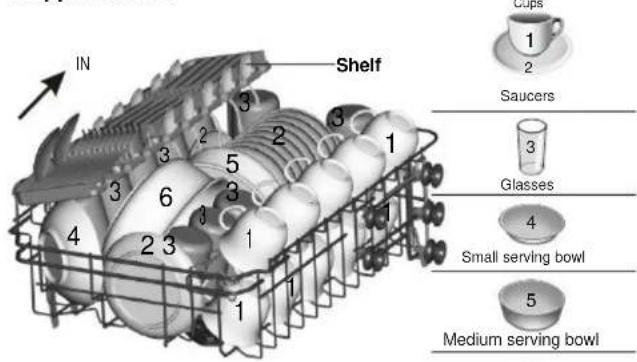
Loading the baskets according to En50242:
1. Upper basket:
text_image
IN Shelf 1 2 3 4 5 6 7 8 9 10 11 12 13 14 15 16 17 18 19 20 21 22 23 24 25 26 27 28 29 30 31 32 33 34 35 36 37 38 39 40 41 42 43 44 45 46 47 48 49 50 51 52 53 54 55 56 57 58 59 60 61 62 63 64 65 66 67 68 69 70 71 72 73 74 75 76 77 78 79 80 81 82 83 84 85 86 87 88 89 90 91 92 93 94 95 96 97 98 99 100- Lower basket:
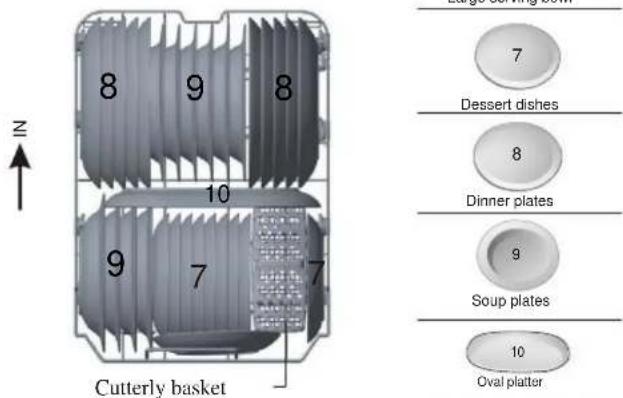
text_image
8 9 8 10 9 7 7 Cutterly basket Dessert dishes 8 Dinner plates 9 Soup plates 10 Oval platter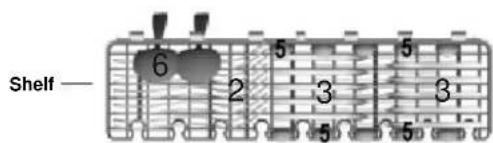
text_image
Shelf 6 5 5 2 3 3 5 5Note: Please place the light flat wares on the shelf. The total weight is less than 1.5kg.
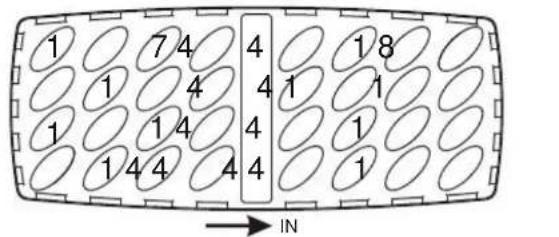
3.Cutterly basket:
text_image
1 7 4 1 4 1 1 4 1 4 4 4 1 8 4 1 1 4 1 4 1 → IN1 Soup spoons
2 Forks
3 Knives
4 Teaspoons
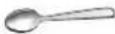
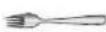
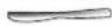

5 Dessert spoons
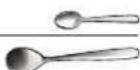
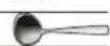
6 Serving spoons
7 Serving forks
8 Gravy ladles
Information for comparability tests in accordance with EN 50242
Capacity: 10 place settings
Position of the upper basket: lower position
Programme: ECO
Rinse aid setting: 6
Softener setting: H3