
PX5 Wireless - Headphones BOWERS & WILKINS - Free user manual and instructions
Find the device manual for free PX5 Wireless BOWERS & WILKINS in PDF.


| Product Type | On-Ear Wireless Headphones |
| Brand | Bowers & Wilkins |
| Model | PX5 Wireless |
| Wearing Style | On-Ear |
| Weight | 241 g |
| Battery Type | Rechargeable Lithium Polymer |
| Battery Life (Bluetooth + ANC) | Up to 25 hours |
| Charging Time (Full) | 3 hours |
| Fast Charging | 15 min charge provides 5 hours playback |
| Bluetooth Version | 5.0 with aptX Adaptive |
| Supported Codecs | aptX Adaptive, aptX HD, aptX Classic, AAC, SBC |
| Noise Cancellation | Adaptive Noise Cancellation (High, Low, Auto, Off) |
| Ambient Pass-Through | Yes (customizable via app) |
| Wear Sensor | Yes (auto pause/resume) |
| Driver Size | 2 x 35.6 mm full range |
| Frequency Response | 10 Hz - 30 kHz |
| Impedance | 20 kOhms |
| Total Harmonic Distortion (THD) | < 0.3% (1 kHz / 10 mW) |
| Microphones | 4 for ANC, 2 for telephony (CVC2) |
| Connectivity | Bluetooth, 3.5 mm stereo jack, USB-C audio |
| USB-C Charging | Yes (charges while connected to computer USB) |
| In Box Accessories | Storage case, USB-C cable, 3.5 mm audio cable, documentation |
| App Support | Bowers & Wilkins Headphones App (iOS/Android) |
| Warranty | 2 years (varies by region) |
Frequently Asked Questions - PX5 Wireless BOWERS & WILKINS
User questions about PX5 Wireless BOWERS & WILKINS
0 question about this device. Answer the ones you know or ask your own.
Ask a new question about this device
Download the instructions for your Headphones in PDF format for free! Find your manual PX5 Wireless - BOWERS & WILKINS and take your electronic device back in hand. On this page are published all the documents necessary for the use of your device. PX5 Wireless by BOWERS & WILKINS.
USER MANUAL PX5 Wireless BOWERS & WILKINS
Welcome to Bowers & Wilkins and PX5
Thank you for choosing Bowers & Wilkins. When John Bowers first established our company, he did so in the belief that imaginative design, innovative engineering and advanced technology were keys that could unlock the enjoyment of audio in the home. His belief is one that we continue to share and inspires every product we design, tailored for new audio experiences outside of the home.
The Bowers & Wilkins PX5 are high performance on-ear headphones designed to deliver the highest quality mobile personal audio experience combined with the convenience of wireless operation and the serenity of noise-cancellation. This manual will tell you everything you need to know to get the most from your PX5 headphones.
Your PX5 can play music streamed wirelessly from your mobile phone, tablet or computer via Bluetooth, or conventionally connected by a jack cable to a suitable analog headphone output. PX5 can also play audio via a USB connection from a computer and can be used for wireless telephony.
PX5 Real World Listening features include our latest innovations in Adaptive Noise Cancellation, Ambient Pass-Through and enhanced Wear Sensing technologies. Our latest generation noise cancellation feature was designed from the ground up with intelligent environment sensing capabilities, automatically selecting the appropriate type of noise cancellation best suited to your surrounding environment, its only goal is to deliver an uncompromised listening experience. Ambient Pass-Through enables external sounds, such as conversation or safety announcements, to be heard clearly without any need to remove the headphones. The Wear Sensing feature enables PX5 to respond naturally, pausing and resuming the music simply by lifting either earpiece on or off your ear. These features can be enabled and further customised via the Bowers & Wilkins Headphone App available for free on iOS and Android devices.
PX5 incorporates a rechargeable battery pack. When fully charged and depending on the degree of Bluetooth, Adaptive Noise Cancellation and Ambient Pass-Through use, the battery pack can provide up to 25 hours of continuous wireless media streaming with noise cancellation enabled at average playback volume levels.
1. PX5 Carton Contents
PX5 headphones
Storage case
USB-C charging cable
3.5mm audio cable
Document pack
2. Getting to know your PX5
2.1 Switching Headphones On and Off
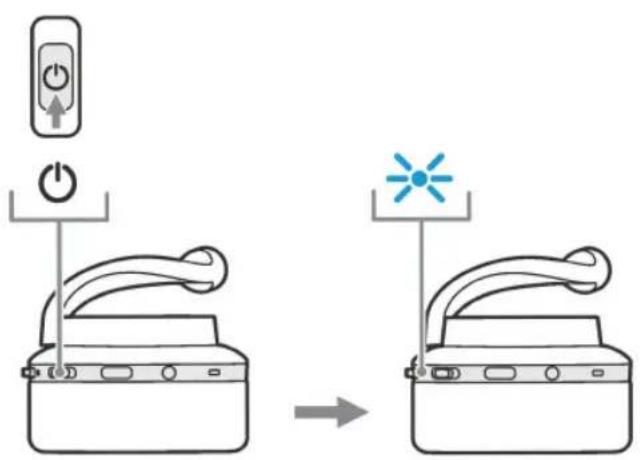
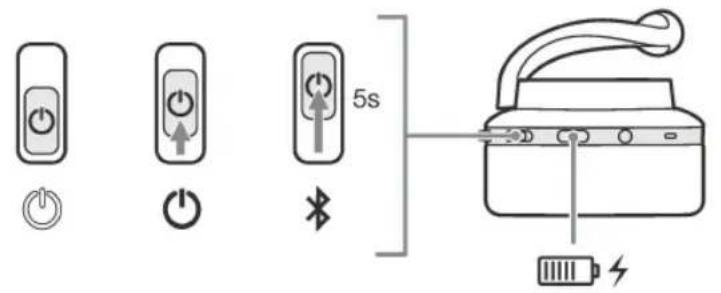
Diagram 1 illustrates power switch functionality.
Switching On
The Power Switch is located on the right earpiece. Slide the Power Switch up to the middle position. An audible cue will be presented and the LED indicator will light up in ether green, amber or red displaying the current charge level.
Switching Off
Slide the Power Switch to the bottom position. An audible cue will be presented and the headphones will power down when the LED indicator is no longer lit.
2.2 Headphone Controls
Diagram 2 illustrates the headphone controls. The following buttons on the right earpiece are used to for media playback:
Function Action
| Play or pause | Press the Multi-function button once. |
| Play to next track | Press the Multi-function button twice in quick succession.Note: functionality dependent on source device. |
| Play previous track | Press the Multi-function button three times in quick succession. Note: functionality dependent on source device. |
| Increase Volume Press the Volume + button. | |
| Lower Volume Press the Volume - button. | |
The following buttons on the right earpiece are used for phone call functionality:
Function Action
| Answer or end call | Press the Multi-function button once. |
| Answer an incoming call | When incoming call occurs, press the Multi-function button once. |
| Decline an incoming call | When incoming call occurs, hold the Multi-function for 2 seconds. |
| Switch between two calls | With two calls active, press the Multi-function button twice. |
| Merge two calls | With two calls active, hold the Multi-function button for 1 second. |
| Toggle mute | While on a call, press the Multi-function button three times. |
2.3 Status Indicator
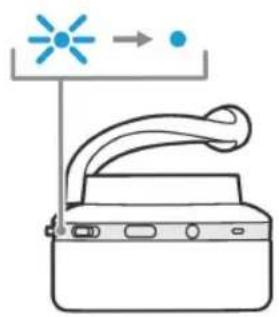
The status LED indicator is located on the right earpiece, Diagram 3 explains the illumination states.
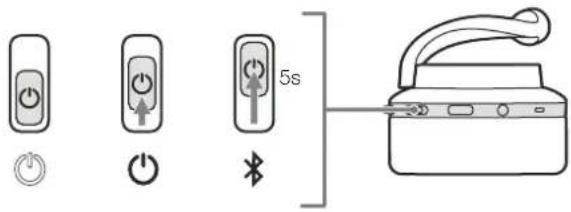
Diagram 1
Power switch functionality
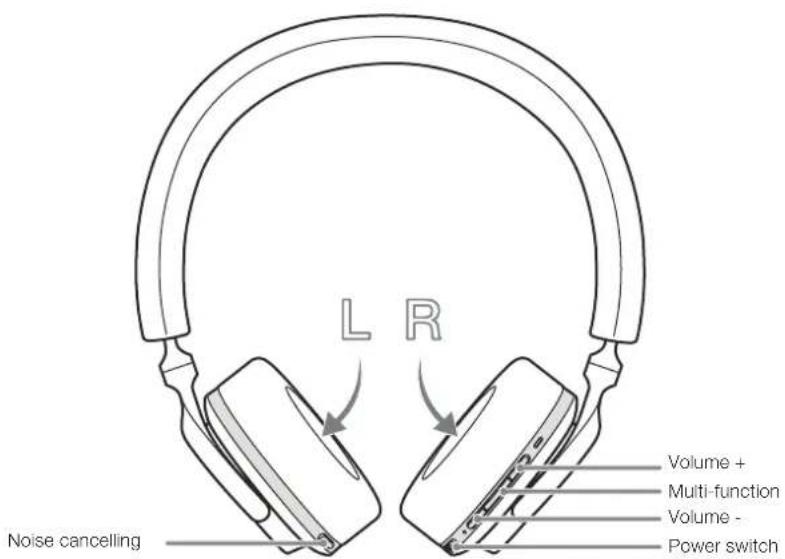
Diagram 2
Headphone controls
Illumination Operational state
| White Battery charge > 30% |
| Amber Battery charge between 30% and 10% |
| Red Battery charge < 10% |
| Red flashing Battery charge insufficient for headphone operation |
| Blue flashing Pairing mode enabled |
| Blue (2 sec solid) Pairing successful |
| Blue flashing (calls) Incoming call |
| Green flashing Rapid charging |
| Green solid Battery charge full, trickle charging |
Diagram 3
Status indicator illuminations
3. Intelligent Features
3.1 Adaptive Noise Cancellation
Noise cancellation is a series of advanced technologies that aids in removing undesired noise from the surrounding environment.
PX5 features our latest innovations in adaptive noise cancellation, this includes intelligent sensing that adapts noise cancellation and tuning best suited to your surrounding environment. As your surroundings change, noise cancellation will auto adapt to complement your new environment.
The Noise Cancellation button on the left earpiece is used to cycle between the following modes, see Diagram 2 for button location:
Mode Application
| High | Suitable for consistently noisy environments such in an airplane cabin. |
| Low | Suitable for environments where you need awareness of your surroundings. |
| Auto | Intelligently adapts noise cancellation best suited to your current environment. |
| Off Turns off the noise cancellation feature. | |
3.2 Ambient Pass-Through
PX5 features ambient pass-through which lets some external noise from the surrounding environment, such as safety announcements or conversations, to be heard without taking the headphones off.
The Noise Cancellation button on the left earpiece also controls this feature, see Diagram 2 for button location.
Function Action
| Enable ambient pass-through | Press and hold the Noise Cancellation button for 2 seconds. |
| Disable ambient pass-through | With ambient pass-through enabled, either hold down or single press the Noise Cancellation button for 2 seconds, the headphones will return to the previous noise cancellation mode |
The level of ambient pass-through can be further customised to suite your needs using the Bowers & Wilkins Headphones App.
3.3 Wear Sensors
PX5 incorporate our latest enhanced wear detection sensors in both earpieces, see Diagram 4, enabling intelligent battery conservation by entering standby when removed from the head. When worn again, PX5 automatically wakes and connects to the last connected Bluetooth device.
During media playback, PX5 will auto pause when either earpiece is lifted from the ear. Playback will auto resume when the earpiece is placed back on the ear. Auto resume has been further optimised so it is ready only when you are. This means the headphone will not attempt to resume playback during following conditions:
- Headphone powers on from the off state.
- Headphone wakes from the standby state.
- Headphone reboots (such as after a factory reset).
Wear sensor and standby can be adjusted using the Bowers & Wilkins Headphones App.
Note: Take care when wearing your headphones; hair or accessories trapped between your ears and the earpieces, or wearing glasses that distort the profile of your ears, may interfere with the performance of the proximity sensors.
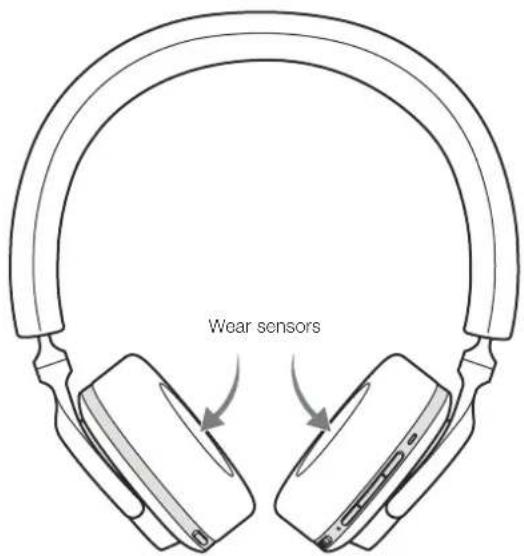
Diagram 4 Wear sensor location
4. Battery Charging and Power Saving
Your PX5 comes with the battery partially charged may be used immediately. For best practice we recommend to fully charge the headphones before first use. Please allow up to 3 hours for full charge. The headphones can be used while charging.
To charge:
- Please use the supplied charging cable and connect the USB-A plug to a wall charger or a powered computer USB-A socket.
- Then connect the USB-C end to the headphones USB-C socket
Note: During charging, the headphone indicator will flash green. When fully charged, the indicator will remain illuminated. See Diagram 3 for status indicator details.
4.1 Standby Power Saving
PX5 wear detection sensors intelligently conserve power. When taken off your head, PX5 will automatically enter standby which will pause media playback, disconnect Bluetooth and switch to a low power state.
When worn again, PX5 will wake and reconnect to the last connected Bluetooth source. Note that both earpieces must detect wear for proper functionality. If wear sensors are disabled using the app, this feature will also be disabled.
With the app, you can customise how long the headphones will wait before switching to auto standby, please see Standby Timer under Settings in the app.
5. Wearing Your Headphones
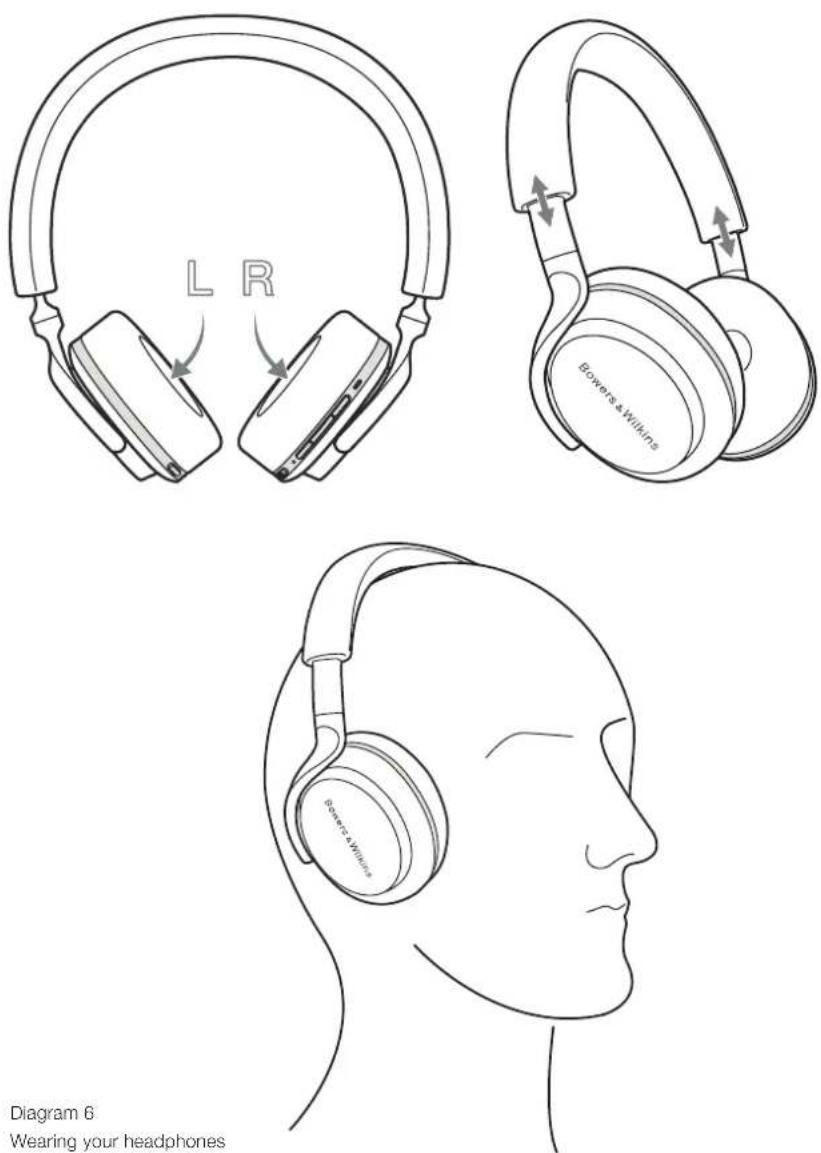
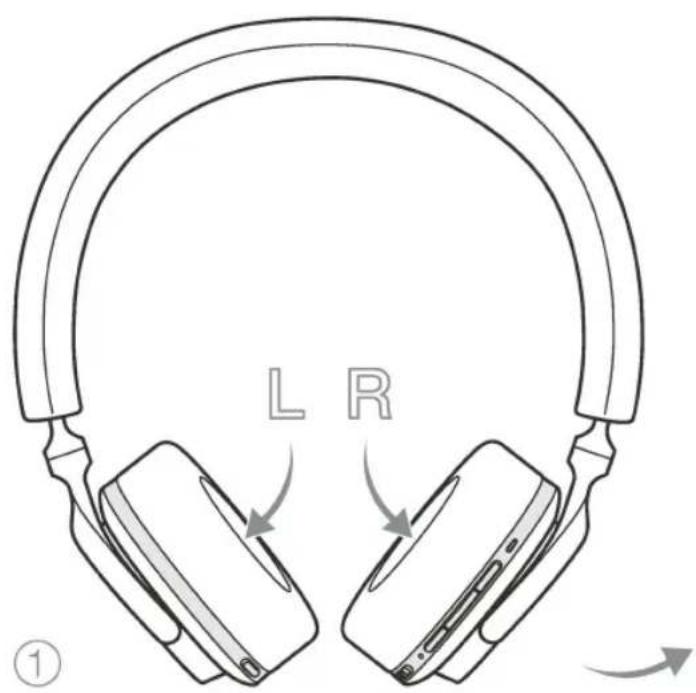
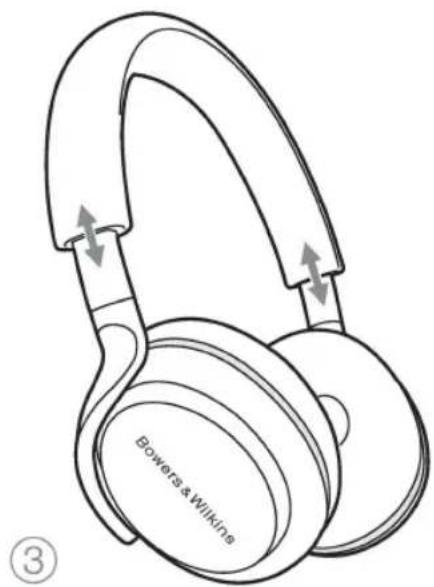
Wearing your headphones correctly will help ensure the best possible experience. See Diagram 6.
- Identify the left and right earpieces by finding the identification legends located on the interior of each earpiece.
- Wear the headphones accordingly with the headband adjusted so that the they rest comfortably on your head.
Note: Wearing glasses that distort the profile of your ears may interfere with headphone performance. Similarly, hair trapped between your ears and the headphone ear-pieces may interfere with the wear sensor performance.
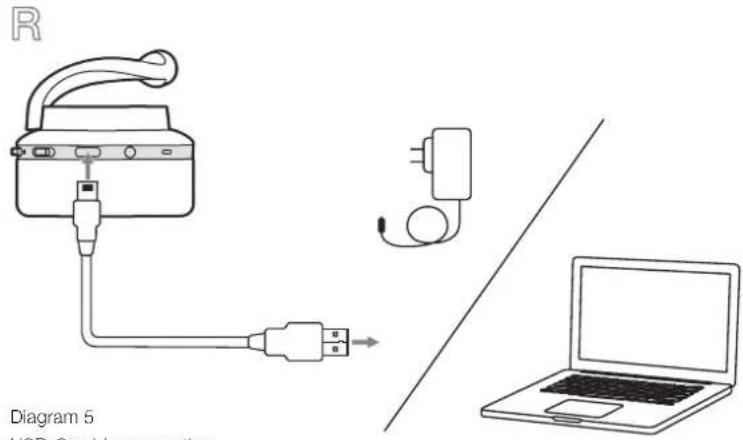
Diagram 5 USB-C cable connection
6. Bluetooth Connection
6.1 Pairing
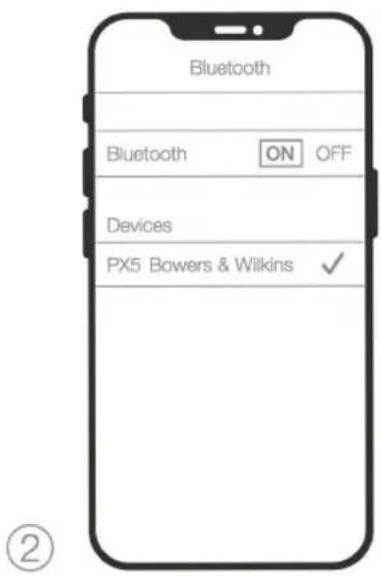
PX5 is designed to stream media wirelessly from Bluetooth audio devices, such as smartphones, tablets or personal computers. To do so, the headphone and device (source) must first be paired.
- The first time you switch on your headphones, Bluetooth pairing mode will be enabled, the indicator will flash blue. If pairing mode is not enabled, please slide and hold the power switch to the upper (Bluetooth Icon) position for 5 seconds, let go when the indicator blinks blue and when an audible cue is presented.
- Ensure the Bluetooth feature is enabled on the audio device, PX5 will appear in the discovery list, select it to pair.
- The indicator will flash blue while pairing is in progress, this will change to solid blue and an audible cue presented when pairing is successful.
Your headphones will remember up to eight paired Bluetooth devices. Repeat the above steps to pair more devices.
Note: Your headphones will automatically exit Bluetooth pairing mode if no device is paired within 5 minutes. If pairing fails, the indicator will rapid flash blue, please try pairing again.
6.2 Multiple Bluetooth Connections
PX5 can connect up to two devices at the same time, but note that you can only play audio or take calls from one device at a time.
To switch between two devices:
- Pause audio on the first device, or use the PX5 multi-function button.
- Play audio from the second device and the headphone will switch over.
When streaming audio, receiving a call on the second device will automatically pause playback and the call will be routed automatically to your headphones. Ending the call will automatically resume playback from the first device.
6.3 Disconnect from a Device
You can quickly disconnect PX5 from a device by sliding the Power Switch to the upper (Bluetooth Icon) position two times in quick succession, an audible tone will be presented indicating successful disconnection.
Alternatively, you can manage connection in further detail using the Bowers & Wilkins Headphones app under Connections.
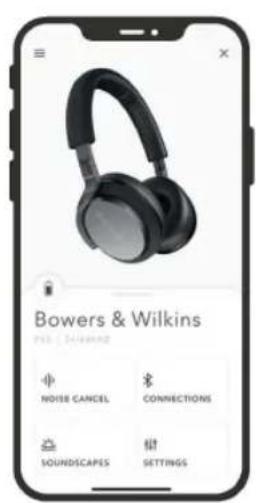
6.4 Setting Up Headphones with the App
The Bowers & Wilkins Headphones app provides extended setup and adjustments to features such as Adaptive Noise Cancellation, Ambient Pass-Through, and Wear Sensors. The app also provides further customisations such as voice prompt, standby time, connection management and headphone software updates. The app is available as a free download on iOS and Android devices.
To add your headphones:
- From your mobile device, download and install the Bowers & Wilkins Headphones app.
- Launch the app, then read and follow the instructions pertaining app notification and permissions.
- After reaching the main screen, simply tap + and following the in-app instructions.
6.5 Headphone Software Updates
Bowers & Wilkins will occasionally make available software updates that refine and optimise the performance of your headphones or add new features.
The Bowers & Wilkins Headphones app will notify you when a software update is available, tap on the notification and the follow in-app instructions.
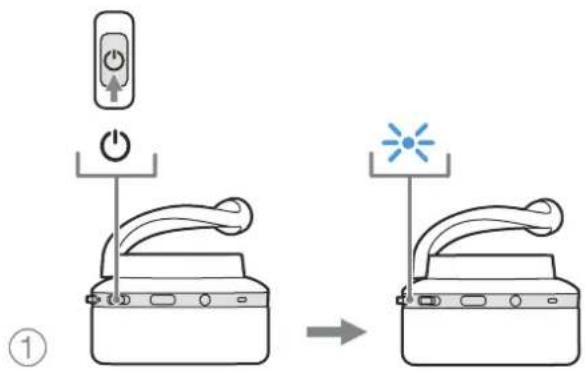
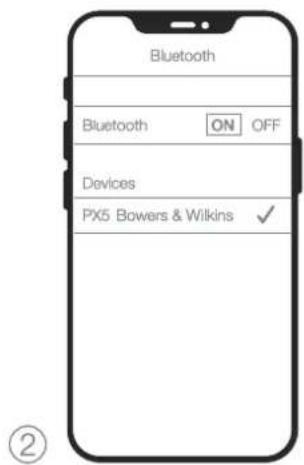
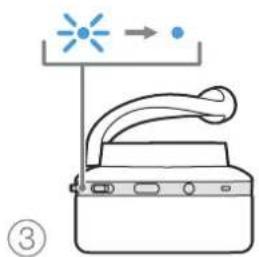
Diagram 7 Bluetooth pairing
7. Auxiliary Connection
In addition to Bluetooth, your PX5 can also connect to audio sources using the supplied 3.5mm audio or USB cables.
7.1 Connecting with the 3.5mm Audio Cable
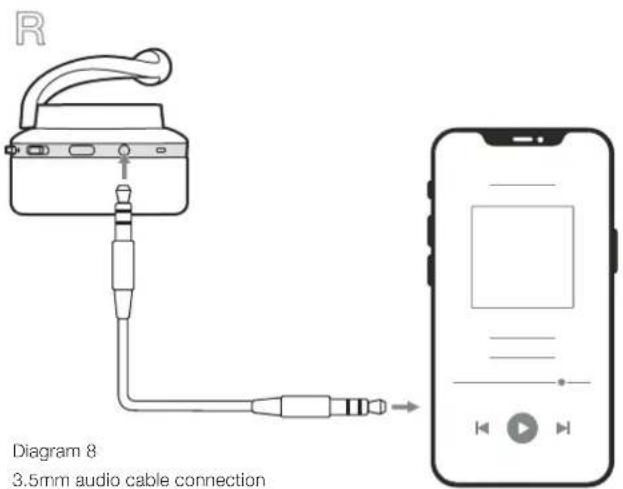
The 3.5mm audio cable enables your PX5 to be used with a device supporting an analogue output such as a conventional headphone socket on smartphones or tablets, or a traditional hi-fi system. See Diagram 8.
- Insert the 3.5mm audio cable into the headphone 3.5mm socket on the right ear piece.
- Take the other end and insert into the appropriate socket on your device.
- Your PX5 will automatically disconnect from any Bluetooth devices.
Note: Your headphones must have sufficient charge and switched on to play audio from an analogue source device. The volume and play/pause buttons will not function when using the 3.5mm interface.
7.2 Connecting with the USB Cable
USB connection enables your PX5 to function as a USB sound output device when connected to a capable computer.
- Insert the USB-C end into the PX5 USB-C socket on the right ear piece.
- Take the USB Type A end and insert into the appropriate socket on your computer.
- PX5 will automatically disconnect from any Bluetooth devices.
- Find and select your headphones from the computer's audio output control panel.
Note: When connected to an capable computer USB port, the headphone battery will also charge.
8. Power Cycle and Reset
8.1 Power Cycle
You can power cycle your PX5, simultaneously hold the Volume + and Volume - buttons for 10 seconds until the indicator LED extinguishes, let go when the indicator lights up again. Rebooting your headphones will not reset their internal settings or clear the paired device history.
8.2 Reset to Default
You can clear the paired device history and restore all settings to their defaults. With PX5 powered on, simultaneously hold the Volume +, Volume - and Noise Cancellation buttons for 10 seconds until the indicator LED extinguishes, let go when the indicator lights up again, the headphones will be ready to pair to a device. Alternatively, you can reset from the Bowers & Wilkins Headphones app, please see Reset under Settings in the app
9. Care & Maintenance
9.1 Storing Your PX5
Taking care of your PX5 will ensure they continue to deliver the best performance and experience.
When not used, stow your headphones using the included storage pouch. It is recommended the headphones are first powered off:
- Retract the headband on each side so they are in the smallest position.
- With the buttons facing you, rotate the earpieces inwards so they lay flat.
- Place the headphones in to the storage case.
9.2 Cleaning Your PX5
Your PX5 can be cleaned by a soft, damp microfiber cloth, gently wipe or dab clean.
The fabric on PX5 have been specially coated with moisture and stain repellent. If dirt, stain or fibre residue accumulate on the fabric surface, please clean as instructed above.
- Do NOT aggressively rub or use an abrasive tool to clean, especially the fabric.
- Do NOT use paper towels, napkins or tissue as they will leave residue.
- Do NOT use cleaning detergents, soapy water, polish or chemical cleaners.
- Ensure that no moisture get inside the earpieces, buttons and interface ports.
10. Support
Should you require further help or advice regarding your PX5 please visit the Headphones support site here www.bowerswilkins.com/support.
Environmental Information
This product complies with international directives, including but not limited to the Restriction of Hazardous Substances (RoHS) in electrical and electronic equipment, the Registration, Evaluation, Authorisation and restriction of Chemicals (REACH) and the disposal of Waste Electrical and Electronic Equipment (WEEE). Consult your local waste disposal authority for guidance on how properly to recycle or dispose of this product.
Specifications
Wearing Style Bluetooth Wireless On-Ear Headphones
Technical Features Adaptive Noise Cancellation
Ambient Pass-Through
Wear-Detection Sensor
Bluetooth® audio - Bluetooth 5.0 with aptX™ Adaptive
USB-C charging & audio interface
3.5mm auxiliary audio interface
Bluetooth Codecs aptX™ Adaptive
aptX™ HD
aptX™ Classic
AAC
SBC
Bluetooth Profiles A2DP v1.3.1
AVRCP v1.6.1
HFP v1.7.1
HSP v1.2
BLE GATT (Generic Attribute Profile)
Drive Units 2 x ø 35.6mm full range
Microphones 4x mics for ANC
2x mics for telephony (CVC2 - Clear Voice Communication v2)
Frequency Range 10Hz to 30kHz
Input Impedance 20 kOhms
Distortion (THD) <0.3% (1kHz/10mW)
Battery Type Rechargeable Lithium Polymer
Battery Life & Charging 25 hrs Bluetooth with ANC, 5hrs with 15min charge
Inputs Bluetooth, 3.5mm stereo jack, USB-C audio
In Box Accessories 1.2m stereo audio cable, 1.2m USB-A to USB-C cable, Storage Case
Weight 241 grams
Bowers & Wilkins
PX5
natural_image
Line drawing of a Bowers & Wilkins headphones with adjustable earthenage (no text or symbols on the device itself)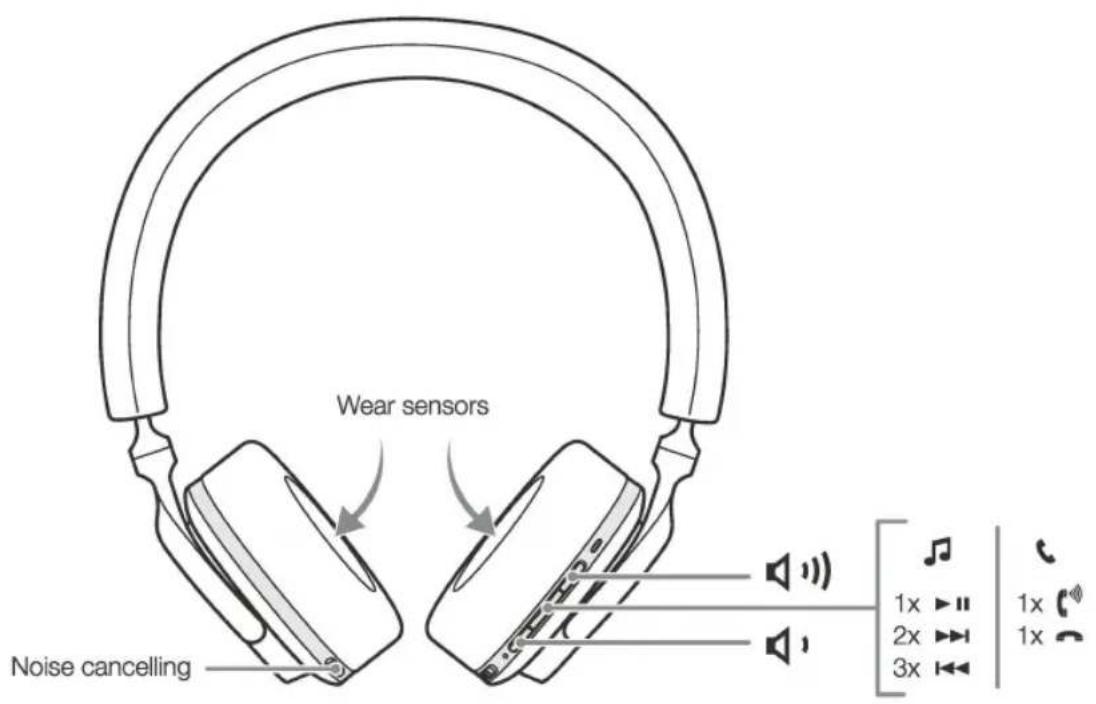


II15423/3
The Bluetooth® work mark and logos are registered trademarks owned by Bluetooth SIG, Inc. and any use of such marks by B&W Group Ltd. is under license. Other trademarks and trade names are those of their respective owners. Apple and the Apple logo are trademarks of Apple Inc ®, registered in the U.S. and other countries. App Store is a service mark of Apple Inc., registered in the U.S. and other countries. Use of the Works with Apple badge means that an accessory has been designed to work specifically with the technology identified in the badge and has been certified by the developer to meet Apple performance standards. Google Play and the Google Play logo are trademarks of Google LLC. Android is a trademark of Google LLC.
PX5
Safety & Warranty
Bowers & Wilkins
English
Important safety instructions
1 Read these instructions.
2 Keep these instructions.
3 Heed all warnings.
4 Follow all instructions.
5 Clean only with a dry cloth.
6 Only use attachments/accessories specified by the manufacturer.
7 Ensure that the headphones are not worn with, or kept in the immediate vicinity (closer that 10cm) of, a pacemaker.
8 Do not insert headphone jack plugs into electric power sockets.
9 Always supervise children using these headphones.
10 The operation of switches on your hi-fi system, or the action of plugging-in the headphones, may cause audible clicks which, at high volume levels, may effect your hearing. Always therefore set the volume control to minimum before operating switches or plugging-in the headphones.
11 Do not use headphones while driving or cycling.
12 Contains small parts which may be a choking hazard. Not suitable for children aged 3 or under.
13 This product contains magnetic material.
14 Do not drop, sit on, or allow headphones to be immersed in water.
15 Prolonged listening at high volume levels may cause hearing damage.
16 This product is only designed to work at an ambient temperature of up to 45°C.
17 This product contains Lithium batteries, if misused or damaged this can become a hazard and is at risk of explosion.
18 Do not handle the product should the battery leak.
19 Do not incinerate the product. The internal battery could explode causing injury or death.
20 Do not attempt to access or replace the product's battery, the battery is internal and not user serviceable.
21 Refer to the product manual for information on battery care.
22 Do not expose the product to rain or moisture
23 Do not use the product near water, bathtubs, sinks, saunas, pools or steam rooms.
24 Turn off the product before boarding aircraft.
25 Do not position or store the product or accessories on or near a vehicle air bag, should the airbag exploded there is a risk of injury.
26 Dispose of this product in accordance with local regulations. This product must not be disposed of with regular household waste.
27 The device can be powered through a micro USB from any CE compliant power source that implement the European interface as requested by EN 301 489-52.
Compliance markings are located underneath the left and right removable ear cushions.
Warranty
Bowers & Wilkins products are designed and manufactured to the highest quality standards. However, if something does go wrong with the product, B&W Group Ltd. and its national distributors warrant free of charge labour (exclusions may apply) and replacement parts in any country served by an official Bowers & Wilkins distributor.
This warranty complements any national or regional legal obligations of dealers or national distributors and does not affect your statutory rights as a customer. Some regional legal obligations outside the control of B&W Group Ltd. may reduce the scope or time of the terms outlined below. In particular:
- Special warranty terms apply in the Russian Federation.
• Specific import regulations apply in Brazil.
• See following pages for specific warranty instructions that apply in Australia.
Please contact the relevant national distributor for details.
Terms and Conditions
This warranty:
1 is valid only for products purchased from an authorised Bowers & Wilkins retailer or dealer.
2 is valid from the date of purchase for a period of five years for passive loudspeakers and two years for powered loudspeakers, electronics and headphones, except that exclusions apply in certain countries in line with national law. Please consult the Bowers & Wilkins distributor in your country for detailed information.
3 is limited to the repair of the equipment. Neither transportation, nor any other costs, nor any risk for removal, transportation and installation of products is covered by this warranty.
4 is only valid for the original owner. It is not transferable.
5 will not be applicable in cases other than defects in materials and/or workmanship at the time of purchase and will not be applicable:
a for deterioration of component parts, the nature of which is to become worn or depleted with use, such as batteries and headphone ear pads.
b for any interoperability issues with third party products; unless we explicitly specify this intent,
c for damages caused by incorrect installation, connection or packing.
d for damages caused by any use other than correct use described in the user manual, negligence, modifications, or use of parts that are not made or authorised by B&W Group Ltd.,
e for damages caused by faulty or unsuitable ancillary equipment.
for damages caused by accidents, lightning, water, fire heat, war, public disturbances or any other cause beyond the reasonable control of B&W Group Ltd. and its appointed distributors,
9 for products whose serial number has been altered, deleted, removed or made illegible.
h if repairs or modifications have been executed by an unauthorised person.
How to claim repairs under warranty
Should you have any concerns regarding the performance of your product, please use the following procedure:
1 You can find all contact details by clicking on 'Contact Bowers & Wilkins' at the bottom of the home page of our web site and selecting the appropriate country.
2 Our representative will discuss your concerns. If it is found necessary to return the product for repair, you may be given a Return Merchandise Authorisation. You should not return the product without this authorisation, if given.
To validate your warranty, you will need to produce the original sales invoice or other proof of ownership and date of purchase.
Environmental Information
This product complies with international directives, including but not limited to:
i. the Registration, Evaluation, Authorisation and restriction of Chemicals (REACH)
ii. the disposal of Waste Electrical and Electronic Equipment (WEEE).
Consult your local waste disposal authority for guidance on how properly to recycle or dispose of this product.
Australia Warranty
Subject to the following terms, Bowers & Wilkins Australia Pty Ltd will repair or replace any part of any eligible Bowers & Wilkins product that is defective within the warranty period indicated in the table below or refund you the cost of the replacement. The benefits to a consumer given by this warranty are in addition to other rights and remedies of the consumer under a law in relation to the goods or services to which the warranty relates.
Eligibility
To claim the benefit of this warranty you must;
1 Be the original purchaser of a genuine Bowers & Wilkins product (this warranty is not transferable)
2 Produce proof of your purchase
3 This warranty is limited to defects that arise;
a in the course of normal domestic installation and use and
b within the warranty period identified for the product in the table below, commencing on the date of original purchase.
4 This warranty excludes:
a defects arising from misuse, accident, neglect or improper care, fluctuation in electrical current, incorrect or failed software upgrade, damage or malfunction from incorrect assembly or installation, defects from alteration or modification, unauthorised service or repair;
b appearance items such as cabinetry marks or damage;
c products on which the serial number has been defaced or removed; and
d claims made later than 21 days after the defect first appears.
5 Note: In making a claim under this warranty, you agree that if, following receipt of your claim under this warranty, Bowers & Wilkins or its authorised service centre determine that your claim in respect of a product is invalid or you have provided false, inaccurate or misleading information with your claim, Bowers & Wilkins or its authorised service centre may charge you for any labour, parts or transport costs incurred.
How to Claim
In order to make a claim under this warranty, take the following steps:
1 Attach you proof of purchase document(s) to the below card and complete the details.
2 Contact Bowers & Wilkins by telephone or email (contact details below)
3 Deliver the product(s) the subject of your claim to the Authorised Service Centre nominated by Bowers & Wilkins. Details of the Authorised Services Centres are available at the below address.
4 You must bear any expense you incur in claiming this warranty.
Notice: Our goods come with guarantees that cannot be excluded under the Australian Consumer Law. You are entitled to a replacement or refund for a major failure and compensation for any other reasonably foreseeable loss or damage. You are also entitled to have the goods repaired or replaced if the goods fail to be of acceptable quality and the failure does not amount to a major failure.
| Brand | Category | Warranty Period |
| Bowers & Wilkins | Headphones | 2 Years |
| Accessories | 1 Year |
Bowers & Wilkins Australia Pty Ltd.,
Suite 303, 754 Pacific Highway, Chatswood.
2067 New South Wales, Australia
Tel: +61 (2) 9196 8990
info-au@bowerswikins.com
Make:
Bowers & Wilkins
Model Name/Number:
Serial Number:
Date of Purchase:
Where Purchased:
Additional Countries
USA
FEDERAL COMMUNICATIONS COMMISSION INTERFERENCE STATEMENT
This equipment has been tested and found to comply with the limits for a Class B digital device, pursuant to part 15 of the FCC Rules. These limits are designed to provide reasonable protection against harmful interference in a residential installation. This equipment generates, uses and can radiate radio frequency energy and, if not installed and used in accordance with the instructions, may cause harmful interference to radio communications. However, there is no guarantee that interference will not occur in a particular installation. If this equipment does cause harmful interference to radio or television reception, which can be determined by turning the equipment off and on, the user is encouraged to try to correct the interference by one or more of the following measures:
- Reorient or relocate the receiving antenna.
- Increase the separation between the equipment and receiver.
- Connect the equipment into an outlet on a circuit different from that to which the receiver is connected.
- Consult the dealer or an experienced radio/TV technician for help.
FCC Caution: Any changes or modifications not expressly approved by the party responsible for compliance could void the user's authority to operate this equipment.
IMPORTANT NOTE: FCC Radiation Exposure Statement: The product comply with the US portable RF exposure limit set forth for an uncontrolled environment and are safe for intended operation as described in this manual.
This transmitter must not be co-located or operating in conjunction with any other antenna or transmitter.
This device complies with Part 15 of the FCC Rules. Operation is subject to the following two conditions: (1) This device may not cause harmful interference, and (2) this device must accept any interference received, including interference that may cause undesired operation.
Radiation Exposure Statement: This equipment complies with FCC/IC RSS-102 radiation exposure limits set forth for an uncontrolled environment. This equipment should be installed and operated with minimum distance 20cm between the radiator & your body.
Canada
Industry Canada Statement:
This device contains licence-exempt transmitter(s)/receiver(s) that comply with Innovation, Science and Economic Development Canada's licence-exempt RSS(s). Operation is subject to the following two conditions:
-
This device may not cause interference.
-
This device must accept any interference, including interference that may cause undesired operation of the device.
Radiation Exposure Statement:
The product comply with the Canada portable RF exposure limit set forth for an uncontrolled environment and are safe for intended operation as described in this manual. The further RF exposure reduction can be achieved if the product can be kept as far as possible from the user body or set the device to lower output power if such function is available.
EU Declaration of Conformity
English
Bowers & Wilkins hereby declares that this product is in compliance with the essential requirements and other relevant provisions of Directive 2014/53/EU and all other applicable EU directive requirements. The complete Declaration of Conformity can be found at www.bowers-wilkins.com/compliance.
Français

- Welcome to Bowers & Wilkins and PX5
- PX5 Carton Contents
- Getting to know your PX5
- Switching Headphones On and Off
- Switching On
- Switching Off
- Headphone Controls
- Status Indicator
- Intelligent Features
- Adaptive Noise Cancellation
- Ambient Pass-Through
- Wear Sensors
- Battery Charging and Power Saving
- Standby Power Saving
- Wearing Your Headphones
- Bluetooth Connection
- Pairing
- Multiple Bluetooth Connections
- Disconnect from a Device
- Setting Up Headphones with the App
- Headphone Software Updates
- Auxiliary Connection
- Connecting with the 3.5mm Audio Cable
- Connecting with the USB Cable
- Power Cycle and Reset
- Power Cycle
- Reset to Default
- Care & Maintenance
- Storing Your PX5
- Cleaning Your PX5
- Support
- Environmental Information
- Specifications
- Bowers & Wilkins
- PX5
- Safety & Warranty
- English
- Important safety instructions
- Warranty
- Terms and Conditions
- This warranty:
- How to claim repairs under warranty
- Australia Warranty
- Eligibility
- How to Claim
- Bowers & Wilkins Australia Pty Ltd.,
- Additional Countries
- USA
- Canada
- Industry Canada Statement:
- Radiation Exposure Statement:
- EU Declaration of Conformity
- Français
Brand : BOWERS & WILKINS
Model : PX5 Wireless
Category : Headphones