
HV390UK - Steam cleaner SHARK - Free user manual and instructions
Find the device manual for free HV390UK SHARK in PDF.


| Product Type | Corded Upright Vacuum Cleaner |
| Model | HV390UK |
| Brand | Shark |
| Power Consumption | 450 W |
| Voltage | 220-240 V |
| Frequency | 50-60 Hz |
| Current | 5 A |
| Technology | DuoClean™ with Flexology™ |
| Suction Settings | 2 (I: Hard floors and area rugs; II: Thick pile carpets) |
| Brushroll Type | Motorized brushroll + Soft Roller |
| Headlights | LED on floor nozzle |
| Dust Cup Capacity | Not specified (empty when debris reaches MAX line) |
| Pre-Motor Filter | Washable foam and felt (clean monthly) |
| Post-Motor Filter | Washable (clean every 9 months) |
| Above-Floor Mode | Yes (convertible handheld with accessories) |
| Flexology™ Wand | Foldable for under-furniture reach and storage |
| Included Accessories | Crevice tool, Dusting brush, Upholstery tool, Anti-allergen dust brush, Deep-cleaning motorized pet tool, Under appliance wand (may vary by model) |
| Overheat Protection | Motor-protective thermostat with auto shut-off |
| Warranty | 5 years (12 months + 4 extended after registration) |
| Certifications | WEEE Directive 2012/19/EU, EMC 2014/30/EU, LVD 2014/35/EU |
Frequently Asked Questions - HV390UK SHARK
User questions about HV390UK SHARK
0 question about this device. Answer the ones you know or ask your own.
Ask a new question about this device
Download the instructions for your Steam cleaner in PDF format for free! Find your manual HV390UK - SHARK and take your electronic device back in hand. On this page are published all the documents necessary for the use of your device. HV390UK by SHARK.
USER MANUAL HV390UK SHARK
Corded Vacuum with Flexology™
HV390UK
Series
INSTRUCTIONS
natural_image
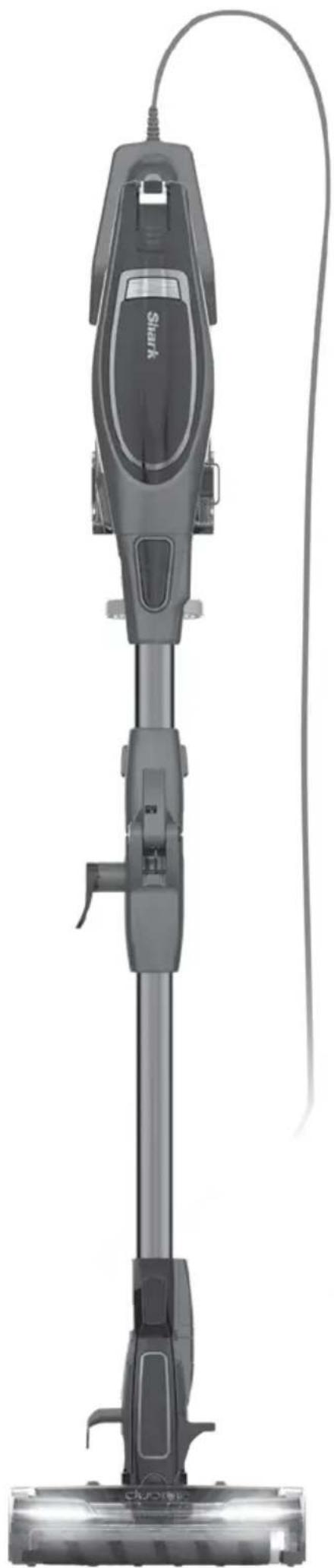
Front view of a black Shark vacuum cleaner with attached cable, shown from top to bottom (no text or symbols visible)THANK YOU
for purchasing the Shark DuoClean™ Corded Vacuum with Flexology™


TIP: You can find the model and serial numbers on the QR code label which is located on the handheld vacuum.


REGISTER YOUR PURCHASE

registryyourshark.com

0800 862 0453

Scan QR code using mobile device
RECORD THIS INFORMATION
Model Number: ____
Serial Number: ____
Date of Purchase (Keep receipt): ____
Store of Purchase: ____
TECHNICAL SPECIFICATIONS
Voltage: 220-240V, 50-60Hz
Watts: 450W
Amps: 5A
PLEASE READ CAREFULLY AND KEEP FOR FUTURE REFERENCE.
This instruction manual is designed to help you get a complete understanding of your new Shark DuoClean™ Corded Vacuum with Flexology™
If you have any questions, please call the Customer Service line on 0800 862 0453
CONTENTS
Important Safety Instructions....3
Getting To Know Your Shark DuoClean™ Corded Vacuum with Flexology™ 5
Assembling Your Vacuum 7
Using the Motorised Floor Nozzle ....8
Using Your Vacuum in Above-Floor Mode 9
Accessories 11
Storage 12
Maintaining Your Vacuum 13
Emptying the Dust Cup 13
Cleaning the Filters 14
Maintaining the Brushroll 15
Maintaining the Soft Roller 16
Checking for Blockages....16
Troubleshooting Guide 17
Warranty 18
This appliance complies with the WEEE-Directive 2012/19/EU on the disposal of electrical and electronic equipment (WEEE).

This marking indicates that this product should not be disposed with other household wastes throughout the EU. To prevent possible harm to the environment or human health from uncontrolled waste disposal, recycle it responsibly to promote the sustainable reuse of material sources. To return your used device, please use the return and collection systems or contact the retailer where this product was purchased. They can take this product for environmental safe recycling.
This appliance complies with the European directives for electromagnetic compatibility (EMC) 2014/30/EU and its revisions, as well as Low Voltage Directive (LVD) 2014/35/EU and its revisions.
IMPORTANT SAFETY INSTRUCTIONS
This appliance is not intended for use by persons (including children) with reduced physical, sensory or mental capabilities, or lack of experience and knowledge, unless they have been given supervision or instruction concerning use of the appliance by a person responsible for their safety. Children should be supervised to ensure they do not play with the appliance.
CAUTION: THE MOTORISED FLOOR NOZZLE, WAND, AND HANDHELD VACUUM CONTAIN ELECTRICAL CONNECTIONS:
• These are NOT serviceable parts.
• DO NOT use to suck up water.
• DO NOT immerse in water when cleaning.
- The handle/wand should be checked regularly and must not be used if damaged.
1 Inspect power cord and plug for any damage before use. If the supply cord is damaged, it must be replaced by SharkNinja Operating LLC, its service agent or similarly qualified persons in order to avoid a hazard. DO NOT use vacuum cleaner with a damaged cord or plug. Turn off all controls before plugging in or unplugging the vacuum cleaner. Store your vacuum cleaner with the supply cord secured around the two cord hooks.
2 DO NOT use outdoors or on wet surfaces. Use only on dry surfaces.
3 The plug must be removed from the socket-outlet before cleaning or maintaining the appliance.
4 If vacuum cleaner is not working as it should, or has been dropped, damaged, left outdoors, or immersed in water, return it to Euro-Pro Europe Ltd for examination, repair, or adjustment.
5 DO NOT pull or carry vacuum cleaner by the cord or use the cord as a handle.
6 DO NOT unplug by pulling on cord. Grasp the plug, NOT the cord.
7 DO NOT handle plug or vacuum cleaner with wet hands.
8 DO NOT run the vacuum cleaner over the power cord, close a door on the cord, or pull the cord around sharp corners.
9 The use of an extension cord is NOT recommended.
10 DO NOT leave vacuum cleaner unattended when plugged in.
11 Keep cord away from heated surfaces.
12 ALWAYS turn off this appliance before connecting or disconnecting motorized nozzle.
GENERAL USE
13 Use only as described in this manual.
14 Keep your work area well lit.
15 Keep the vacuum cleaner moving over the carpet surface at all times to avoid damaging the carpet fibres.
16 DO NOT place vacuum cleaner on unstable surfaces such as chairs or tables.
17 DO NOT put any objects into openings. DO NOT use with any opening blocked; keep free of dust, lint, hair, and anything that may reduce airflow.
18 DO NOT allow the appliance to be used by children. Close attention is necessary when used near children. This is not a toy.
SAVE THESE INSTRUCTIONS
PLEASE READ CAREFULLY BEFORE USE
19 DO NOT use without brushroll, Soft Roller, dust cup, and all filters in place.
20 DO NOT use if airflow is restricted; if the air paths or the motorised floor nozzle become blocked, turn the vacuum cleaner off and unplug from electrical outlet. Remove all obstructions before you turn on the unit again.
21 Keep nozzle away from hair, face, fingers, uncovered feet, or loose clothing.
22 Only use manufacturer's recommended attachments.
DUST CUP/FILTERS/ACCESSORIES
Before turning on the vacuum:
23 Make sure brushroll, Soft Roller, dust cup, and all filters are in place after routine maintenance.
24 Make sure Soft Roller, dust cup, and all filters are in place after routine maintenance.
25 Make sure accessories are free of blockages and keep openings away from face and body.
26 Use only Shark ^® brand filters and accessories. Using other brands will void warranty.
GENERAL CLEANING
27 DO NOT vacuum up hard or sharp objects such as glass, nails, screws, or coins that could damage the vacuum cleaner.
28 DO NOT vacuum up drywall dust, fireplace ash, or embers. DO NOT use as an attachment to power tools for dust collection.
29 DO NOT vacuum up smoking or burning objects such as hot coals, cigarette butts, or matches.
30 DO NOT vacuum up flammable or combustible materials (e.g., lighter fluid, gasoline, or kerosene) or use vacuum in areas where they may be present.
31 DO NOT vacuum up toxic solutions (e.g., chlorine bleach, ammonia, or drain cleaner).
32 DO NOT use in an enclosed space where vapours are present from paint, paint thinner, moth-proofing substances, flammable dust, or other explosive or toxic materials.
33 DO NOT vacuum up any liquids.
34 DO NOT immerse vacuum cleaner in water or other liquids.
35 Use extra care when cleaning on stairs.
GETTING TO KNOW YOUR Shark DuoClean™ Corded Vacuum with Flexology™
WELCOME!
Congratulations on your purchase. Use this instruction manual to learn about your new vacuum's great features. From assembly to use to maintenance, you will find it all in here.
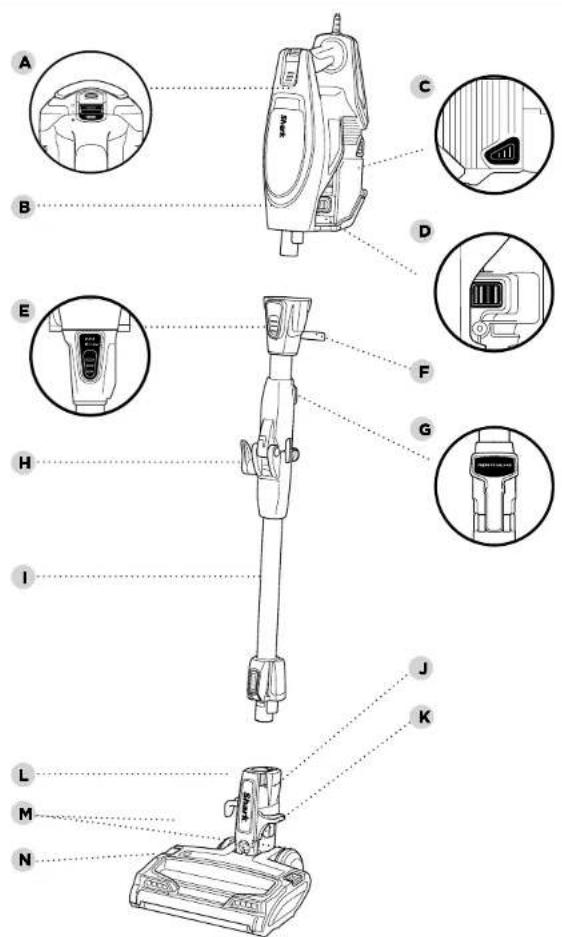
MAIN UNIT
APower/SelectorSwitch
B Handheld Vacuum
c Dust Cup Release
D Dust Cup Empty Button
E Flexology™ Wand Release
F Flexology™ Storage Carry Handle
G Flexology™ Lock Release Button
H Upper Cord Wrap Hook
Flexology™ Wand
J Lower Wand Release Pedal
K Motorised Floor Nozzle
L Lower Cord Wrap Hook
M Brushroll Garage Release Buttons
N Headlights
ASSEMBLING YOUR VACUUM
USING THE MOTORISED FLOOR NOZZLE

WARNING: This
vacuum does not stand up on its own. Using the unit when it lacks stability may result in personal injury. To place in Flexology™ Storage mode, press the Flexology™ Lock Release Button and gently fold the handheld vacuum forward toward the floor nozzle.
NOTE: Before vacuuming
your delicate area rugs or carpet, refer to the manufacturer's recommended cleaning instructions.
WHAT DOES THE
BRUSHROLL INDICATOR LIGHT MEAN?
Solid Green
The brushrolls are on and working as they should.
SolidRed
There is a jam in the brushroll area. Turn your vacuum off and remove the blockage.
No Light
The brushrolls are not spinning.
DID YOU KNOW?
The motorised floor nozzle has LED headlights that illuminate the floor surface being cleaned. The lights turn on automatically in either speed setting.
STEP 1
natural_image
Technical line drawing of a mechanical device with two views: top shows a vertical shaft and handle, bottom shows a flat base with a button labeled 'CLICK' (no text or symbols on the diagram itself)STEP 2
natural_image
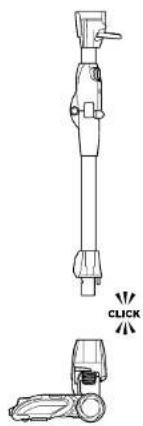
Technical line drawing of a mechanical device with two views: top shows internal components, bottom shows a click button (no text or symbols)1 Insert the wand into the motorised floor nozzle connector, pressing it in until it clicks securely into place.
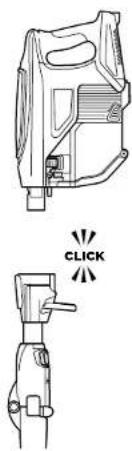
2 Insert the handheld vacuum into the top of the wand, pressing it in until it clicks securely into place.
natural_image
Line drawing of a person using a handheld device to lift a foot (no text or symbols)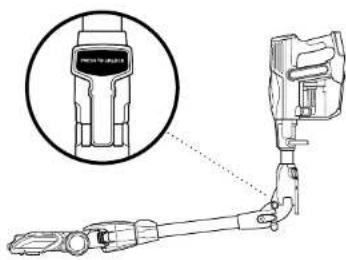
natural_image
Technical line drawing of a mechanical device with a magnified inset showing a component detail (no text or symbols)1 Slide the Power/Selector Switch to one of the 3 settings:
Setting O: Turns off power.
Setting I: For cleaning hard floors and area rugs.
Setting II: For cleaning thick pile carpets.
To start cleaning, recline wand to activate brushrolls.
USING THE MULTIFLEX™ WAND
To easily access hard-to-reach areas under furniture, press the Flexology™ Lock Release Button to position the wand to a lower angle.
USING YOUR VACUUM IN ABOVE-FLOOR MODE
NOTE: Both power settings provide the same suction power.

TIP: You can attach the handheld vacuum directly to the motorised floor nozzle for convenient stair cleaning.
STEP 1 STEP 2
For Long-Reach Cleaning:
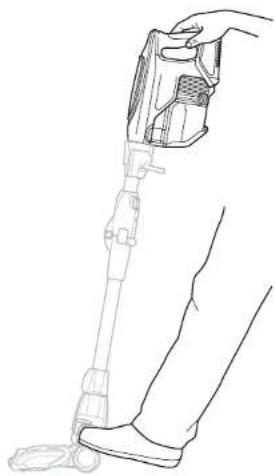
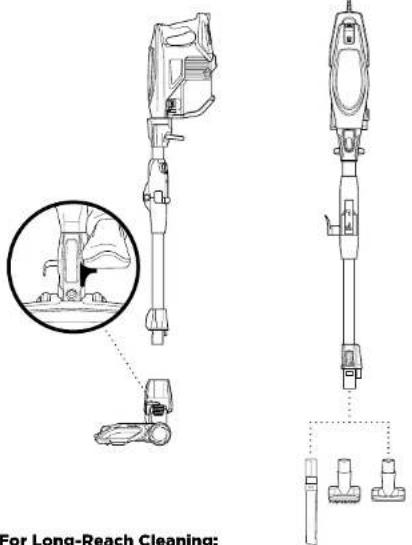
1 Stand the vacuum upright. Step on the foot pedal and pull the wand up to disconnect it from the motorised floor nozzle.
2 Attach desired cleaning accessory to the wand. Press Flexology™ button to vacuum with wand at an angle.
STEP 1 STEP 2
natural_image
Technical line drawing of a hairdryer device with exploded view and mounting bracket (no text or symbols)For Short-Reach Cleaning:
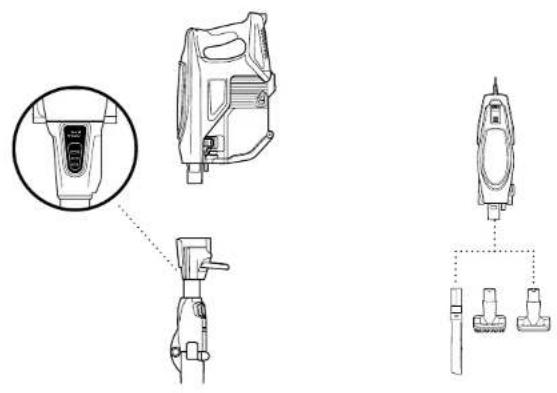
1 Press the Wand Release button on the top of the wand to disconnect it from the handheld vacuum.
2 Attach desired cleaning accessory or motorised floor nozzle to the handheld vacuum.
ACCESSORIES
There are a variety of accessories that are compatible with this vacuum series.
The top flap of your box shows the select accessories that are included with your model.
To purchase additional accessories, visit sharkaccessories.eu
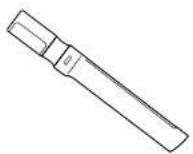
A Crevice Tool
Clean tight spaces or reach skirting boards and ceilings with this slim crevice tool.
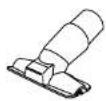
C Upholstery Tool
Perfect for large-particle pickup, dusting, and removing pet hair and lint from furniture and other upholstered surfaces.
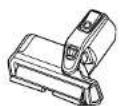
E Deep-Cleaning Motorised Pet Tool
Motorised compact brush powerful enough to remove deeply embedded allergens, dirt, and hair from multiple surfaces.
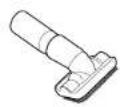
B Dusting Brush
Great for dusting a multitude of surfaces such as shelves, skirting boards, window frames, and more.
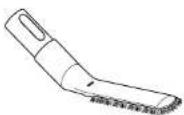
D Anti-Allergen Dust Brush
Nylon fibre bristles specially designed for removing fine dust and allergen particles from the most delicate surfaces.
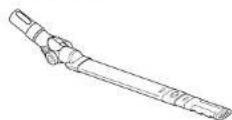
F Under Appliance Wand
Pivoting wand that extends to clean under appliances and on top of furniture.
STORAGE

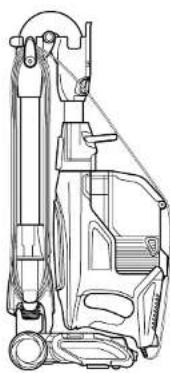
TIP: The carry handle located below the handheld vacuum can also be used to assist in taking the vacuum in and out of Flexology™ Storage mode.
natural_image
Technical line drawing of a mechanical device with no visible text or symbols1 Looking at the vacuum from the side with the cord hooks, wrap the power cord anti-clockwise around the hooks, starting under the bottom hook. Then press the Flexology™ Wand Lock Release button and gently fold the handheld vacuum forward toward the floor nozzle. Use the handle to carry the vacuum to its storage location.
To take the vacuum out of storage mode, press the Flexology™ Wand Lock Release button while lifting up the handheld vacuum. When straightened, the wand will lock in place.
MAINTAINING YOUR VACUUM

WARNING: To reduce the risk of shock and unintended operation, turn off power and unplug unit before servicing.

WARNING: Hand wash filters only with water to prevent damage from cleaning chemicals. Allow ALL filters to air-dry completely before replacing them in the vacuum to prevent liquid from being drawn into electric parts.

IMPORTANT: Clean the dust screen inside the dust cup as required.
NOTE: Empty dust cup when debris reaches the MAX fill line.
RECOMMENDED FILTER CLEANING SCHEDULE:
Pre-Motor Filter Kit
(Foam & Felt) Clean once a month.
Post-Motor Filter Clean every 9 months.
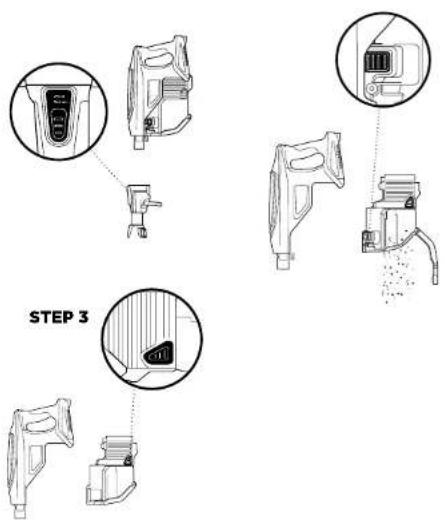
1 Disconnect the handheld vacuum by pressing the Wand Release button on the top of the wand.
2 To remove the dust cup from the handheld vacuum, squeeze the two Dust Cup Release buttons on either side of the base then pull out.
3 Hold dust cup over a bin and press the Empty button on the front of the dust dup. Close the bottom lid and insert dust cup back into handheld vacuum, pressing it until it clicks.
STEP 1STEP 1 STEP 2
FELT FILTER FRAME

FOAM FILTER
STEP 2
FILTER SCREEN
STEP 3
natural_image
Technical line drawing of a mechanical device with an inset close-up showing a component detail (no text or symbols)POST-MOTOR FILTER
CLEANING THE FILTERS
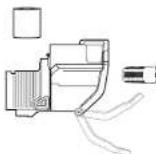
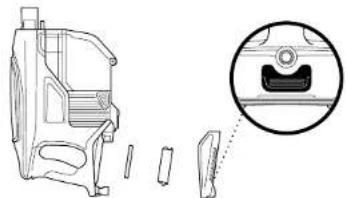
1 Access the pre-motor filter by removing the dust cup from the vacuum. Separate foam filter from felt filter frame and rinse them with water. DO NOT use soap. Tap loose dirt off filters as needed. Allow filters to air-dry completely, then reinsert them and reattach the dust cup to the vacuum.
2 Press the Empty button to open the door then pull the screen to remove from dust cup. Remove any hair or debris that may be wrapped around it and tap off dirt as needed. To replace push firmly back in place.
3 Access the Post-Motor filter under the handle. Remove the filter and rinse it with water. DO NOT use soap.
MAINTAINING YOUR VACUUM - CONT.

WARNING: To reduce the risk of shock and unintended operation, turn off power and unplug unit before servicing.

WARNING: When cleaning brushroll, be sure to not cut anything other than hair, string, fibres, or other debris.

TIP: If nozzle headlights are flashing, then the brushroll garage is not completely closed. Ensure the garage is completely closed by pressing down firmly on both sides.
NOTE: Heavy usage over time may require minimal upkeep to maintain your vacuum's appearance.
STEP 1 STEP 2
natural_image
Diagram of a device with arrows indicating assembly or connection, showing top and bottom views (no text or symbols)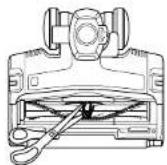
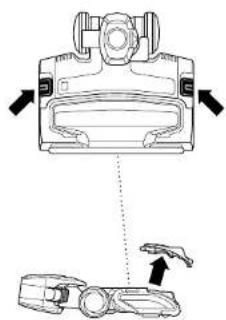
1 Open the brushroll lid by sliding both release buttons away from you, toward the back of the nozzle, then lifting off the lid. Remove any string, hair, or debris that may be wrapped around the brushroll by running scissors along the guide on the brushroll.
2 Press down on both sides of the lid until it clicks into place.
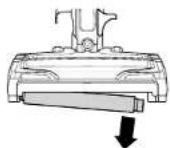
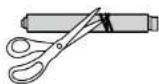
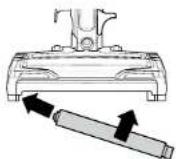
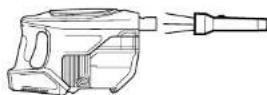

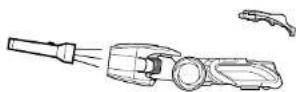
1 Open the brushroll by sliding both release buttons away from you, toward the back of the nozzle, then lifting off the lid. Lift out the Soft Roller by the tab on the right side. Clean off any string, carpet fibres, or hair that may be wrapped around the Soft Roller. Remove debris from the roller housing.
2 Wash the Soft Roller as needed, using only water. Air-dry completely for at least 24 hours before returning it to the brushroll garage.
3 Reinsert the Soft Roller by sliding it into the front of the nozzle until it clicks into place. Close the brushroll garage by inserting the tabs on the lid into the slots, then pressing down on both sides of the lid until it clicks into place.
CHECKING FOR BLOCKAGES: HANDHELD, WAND, AND FLOOR NOZZLE
1 Remove the wand from the handheld vacuum and check all intake openings on the dust cup.
2 Remove the floor nozzle from the wand and check the wand for blockages.
3 Tilt neck of floor nozzle back to straighten the airway, then remove blockages.
TROUBLESHOOTING GUIDE
WARNING: To reduce the risk of shock and unintended operation, turn off power and unplug unit before servicing.
Vacuum is not picking up debris. No suction or light suction. (Refer to Maintenance section for more information.)
- Check filters to see if they need cleaning. Follow instructions for rinsing and completely air-drying the filters before reinserting into the vacuum.
- Dust cup may be full; empty dust cup.
- Check floor nozzle for blockages; clear blockages if required.
- Remove any string, carpet fibres, or hair that may be wrapped around the brushroll and Soft Roller or trapped behind the Soft Roller.
Vacuum lifts area rugs.
- Suction is powerful. Take care when vacuuming area rugs or rugs with delicately sewn edges.
- Turn off the unit to disengage the brushroll and restart with the Power/Selector slider switch.
Brushroll/Soft Roller does not spin.
- If Brushroll Indicator Light on the floor nozzle turns red, the brushroll and/or Soft Roller have stopped spinning. Immediately turn off and unplug vacuum and remove blockage before reconnecting and turning vacuum back on.
- If Brushroll Indicator Light on the floor nozzle is green, the blockage has been successfully cleared. If the light is still red, please contact Customer Service on 0800 862 0453.
- If nozzle LED headlights are flashing, this means the brushroll garage is not completely closed. Tum off and unplug the vacuum. Ensure the brushroll garage is closed by inserting the tabs on the lid into the slots, then pressing down on both sides of the lid until it clicks into place.
Vacuum turns off on its own.
This vacuum is equipped with a motor-protective thermostat so the vacuum will shut off if it overheats. Should this occur, perform the following steps to restart the motor-protective thermostat:
- Turn off vacuum and unplug it.
- Empty dust cup and clean filters (see Maintenance section).
- Check for blockages in hose, accessories, and inlet openings.
- Allow unit to cool for a minimum of 45 minutes.
- Plug in vacuum and turn it on.
Note: If vacuum still does not start, contact Customer Service on 0800 862 0453
Shark|NINJA WARRANTY TERMS AND CONDITIONS
When a consumer buys a product in the UK, they get the benefit of legal rights relating to the quality of the product (your 'statutory rights'). You can enforce these rights against your retailer. However, at Shark we are so confident about the quality of our products that we give you an additional manufacturer's warranty of up to five years upon registration with Snark. Offer valid only in United Kingdom and Republic of Ireland. These terms and conditions relate to our manufacturer's warranty only – your statutory rights are unaffected. The conditions below describe the prerequisites and scope of our warranty. They do not affect your statutory rights or the obligations of your retailer and your contract with them.
Shark ^® Guarantees
A household appliance like a vacuum cleaner constitutes a sizeable investment. Your new machine needs to work properly for as long as possible. The guarantee it comes with is an important consideration - and reflects how much confidence the manufacturer has in its product and manufacturing quality. Every Shark machine comes with a free parts and labour guarantee. Our customer service hotline (0800 982 0453) is open from 9.00am to 6.00pm Monday - Friday. It's free to call, and you'll be put straight through to a Shark representative. You'll also find online support at sharkclean.eu/uk.
How do I register my Shark guarantee?
You can register your guarantee online within 28 days of purchase. To save time, you'll need the following information about your machine:
- Serial number (on the machine rating label)
- Date you purchased the machine (receipt or delivery note)
• To register online, please visit sharkclean.eu/uk/register-guarantee
IMPORTANT
- Both the 12 months and the extended 4 years guarantee will only cover your product from the date of purchase.
- Please keep your receipt at all times. Should you need to use your extended guarantee we will need your receipt to verify the information you have supplied to us is correct. The inability to produce a valid receipt may invalidate your guarantee.
What are the benefits of registering my free Shark guarantee?
When you register your guarantee we'll have your details to hand if we ever need to get in touch. You can also receive tips and advice on how to get the best out of your Shark vacuum and hear the latest news about new Shark® technology and launches. If you register your guarantee online, you'll get instant confirmation that we've received your details.
How long are new Shark machines guaranteed for?
Our confidence in our design and quality control means that your new Shark vacuum cleaner is guaranteed for a total of five years. (12 months plus an extended warranty of 4 years).
What is covered by the free Shark guarantee?
Repair or replacement of your Shark machine (at Shark's discretion), including all parts and labour. A Shark guarantee is in addition to your legal rights as a consumer. What is not covered by the free Shark guarantee?
- Blockages – For details of how to unblock your vacuum cleaner, please refer to the Operating Manual.
- Normal wear and tear such as brush bar fuse, belt, batteries etc.
- Accidental damage, faults caused by negligent use or care, misuse, neglect, careless operation or handling of the vacuum cleaner which is not in accordance with the Shark Operating Manual supplied with your machine.
• Use of the vacuum cleaner for anything other than normal domestic household purposes. - Use of parts not assembled or installed in accordance with the operating instructions.
- Use of parts and accessories which are not Shark Genuine Components.
- Fault installation (except where installed by Shark)
- Facility installation (except where installed by Shark).
• Repairs of alterations carried out by parties other than Shark or its agents.
What happens when my guarantee runs out?
Shark does not design products to last for a limited time. We do appreciate that there may be a desire for our customers to want to repair their vacuum cleaners after the warranty has elapsed. In this case please contact our free phone customer service help line and ask about our out warranty program, on 0800 862 0453.
Where can I buy genuine Shark spares and accessories?
Shark spares and accessories are developed by the same engineers who developed your Shark vacuum. You'll find a full range of Shark spares and replacement parts for all Shark machines at sharkclean.eu/uk/parts. Accessories are at sharkclean.eu/uk/accessories.
Please remember that using non-Shark spares invalidates your guarantee
Euro-Pro Europe Limited
Unit 15 Mariner Court
Calder Business Park
Wakefield, West Yorkshire, UK
Freephone 0800 862 0453
www.sharkclean.eu
Illustrations may differ from actual product. We are constantly striving to improve our products; therefore the specifications contained herein are subject to change without notice.
SHARK is a registered trademark of Euro-Pro Europe Limited.
DuoClean and Flexology™ are trademarks of Euro-Pro Europe Limited.
© 2017 Euro-Pro Europe Limited
HV390UK_Series_IB_171215
PRINTED IN CHINA
f @sharkcleaninguk
@sharkcleanuk
@sharkcleanuk
- Corded Vacuum with Flexology™
- HV390UK
- Series
- INSTRUCTIONS
- THANK YOU
- REGISTER YOUR PURCHASE
- RECORD THIS INFORMATION
- TECHNICAL SPECIFICATIONS
- PLEASE READ CAREFULLY AND KEEP FOR FUTURE REFERENCE.
- CONTENTS
- IMPORTANT SAFETY INSTRUCTIONS
- CAUTION: THE MOTORISED FLOOR NOZZLE, WAND, AND HANDHELD VACUUM CONTAIN ELECTRICAL CONNECTIONS:
- GENERAL USE
- SAVE THESE INSTRUCTIONS
- DUST CUP/FILTERS/ACCESSORIES
- GENERAL CLEANING
- GETTING TO KNOW YOUR Shark DuoClean™ Corded Vacuum with Flexology™
- WELCOME!
- MAIN UNIT
- ASSEMBLING YOUR VACUUM
- USING THE MOTORISED FLOOR NOZZLE
- WARNING: This
- NOTE: Before vacuuming
- WHAT DOES THE
- BRUSHROLL INDICATOR LIGHT MEAN?
- Solid Green
- SolidRed
- No Light
- DID YOU KNOW?
- USING THE MULTIFLEX™ WAND
- USING YOUR VACUUM IN ABOVE-FLOOR MODE
- For Long-Reach Cleaning:
- For Short-Reach Cleaning:
- ACCESSORIES
- STORAGE
- MAINTAINING YOUR VACUUM
- RECOMMENDED FILTER CLEANING SCHEDULE:
- Pre-Motor Filter Kit
- CLEANING THE FILTERS
- MAINTAINING YOUR VACUUM - CONT.
- CHECKING FOR BLOCKAGES: HANDHELD, WAND, AND FLOOR NOZZLE
- TROUBLESHOOTING GUIDE
- WARNING: To reduce the risk of shock and unintended operation, turn off power and unplug unit before servicing.
- Vacuum is not picking up debris. No suction or light suction. (Refer to Maintenance section for more information.)
- Vacuum lifts area rugs.
- Brushroll/Soft Roller does not spin.
- Vacuum turns off on its own.
- Shark|NINJA WARRANTY TERMS AND CONDITIONS
- Shark ® Guarantees
- How do I register my Shark guarantee?
- IMPORTANT
- What are the benefits of registering my free Shark guarantee?
- How long are new Shark machines guaranteed for?
- What is covered by the free Shark guarantee?
- What happens when my guarantee runs out?
- Where can I buy genuine Shark spares and accessories?
Brand : SHARK
Model : HV390UK
Category : Steam cleaner