C110 - Access Point Brocade - Free user manual and instructions
Find the device manual for free C110 Brocade in PDF.


User questions about C110 Brocade
0 question about this device. Answer the ones you know or ask your own.
Ask a new question about this device
Download the instructions for your Access Point in PDF format for free! Find your manual C110 - Brocade and take your electronic device back in hand. On this page are published all the documents necessary for the use of your device. C110 by Brocade.
USER MANUAL C110 Brocade
natural_image
White electronic device with multiple ports and ventilation slots (no visible text or symbols)BENEFITS
NO CAT 5 NEEDED
Deliver great in-room Wi-Fi and concurrent wired IP connectivity using an integral DOCSIS 3.0 cable modem for backhaul over coaxial cable.
GREAT ALL-IN-ONE
Combines the best of Wi-Fi with 802.11ac Wave 2 and a switch with two 100Mbps ports into one wall-mounted unit.
STUNNING WI-FI PERFORMANCE
Extends coverage with patented BeamFlex+™ adaptive antenna technology while mitigating interference by utilizing multi-directional antenna patterns.
AUTOMATE OPTIMAL THROUGHPUT
ChannelFly dynamic channel technology uses machine learning to automatically find the least congested channels. You always get the highest throughput the band can support.
SERVE MORE DEVICES
Connect more devices simultaneously with two MU-MIMO spatial streams and concurrent dual-band 2.4/5GHz radios while enhancing non-Wave 2 device performance.
SUPPORT MORE SERVICES
Multiple SSIDs and switch ports help support services such as VoIP, IPTV, and high-speed Internet access and in-room device connectivity.
MORE THAN WI-FI
Support services beyond Wi-Fi with Ruckus IoT Suite, Cloudpath security and onboarding software, SPoT Wi-Fi locationing engine, and SCI network analytics.
In hotels and housing structures, residents and guests have sky-high expectations for their in-room connectivity options. The technology experience—the quality of available high-speed wired and wireless Internet, voice, and TV services—is becoming a central factor in which hotels people choose for both business and leisure. When weighing options for long-term housing, poor-quality wired and wireless services can cause prospective residents to disqualify a property altogether.
The Ruckus C110 delivers a modern, in-room wall-mount solution that is fast and easy to install, using existing in-building or off-premises Cable Modem Termination Systems (CMTS). The C110 combines the industry's highest-performing 802.11ac Wave 2 wireless access point with a DOCSIS 3.0 cable modem and Ethernet switch.
The C110 is the perfect choice for hotels, student residence halls, and multi-dwelling unit (MDU) properties that depend on coaxial cable to deliver high-speed Internet. Equipped with two Ethernet ports, it can connect IPTV set-top, VoIP telephones, and other wired devices. At the same time, the C110 delivers great 802.11ac wireless performance with advanced features such as guest access and Hotspot 2.0.
The C110 802.11ac Wave 2 Wi-Fi AP and switch incorporates patented technologies found only in the Ruckus Wi-Fi portfolio.
- Extended coverage with patented BeamFlex+ utilizing multi-directional antenna patterns.
- Improve throughput with ChannelFly, which dynamically finds less congested Wi-Fi channels to use.
The C110 also provides next-generation 802.11ac features like MultiUser MIMO (MU-MIMO) connectivity. It can simultaneously transmit to multiple client devices, drastically improving spectral efficiency, overall throughput for all users—even those with non-Wave 2 clients. Additionally, it features a USB port for hosting Internet of Things (IoT) devices such as Bluetooth Low Energy (BLE), and support for smart mesh networking to minimize the need for extra cabling.
Whether you're deploying ten or ten thousand APs, the C110 is easy to manage through Ruckus' appliance, virtual and cloud management options.
NOTE: The C110 is available only through approved DOCSIS Ruckus Partners, as its installation requires specialized knowledge of cable modems and CMTS equipment. For more details, please contact your local Ruckus sales team.
CONVERGED WIRED AND WIRELESS SERVICES
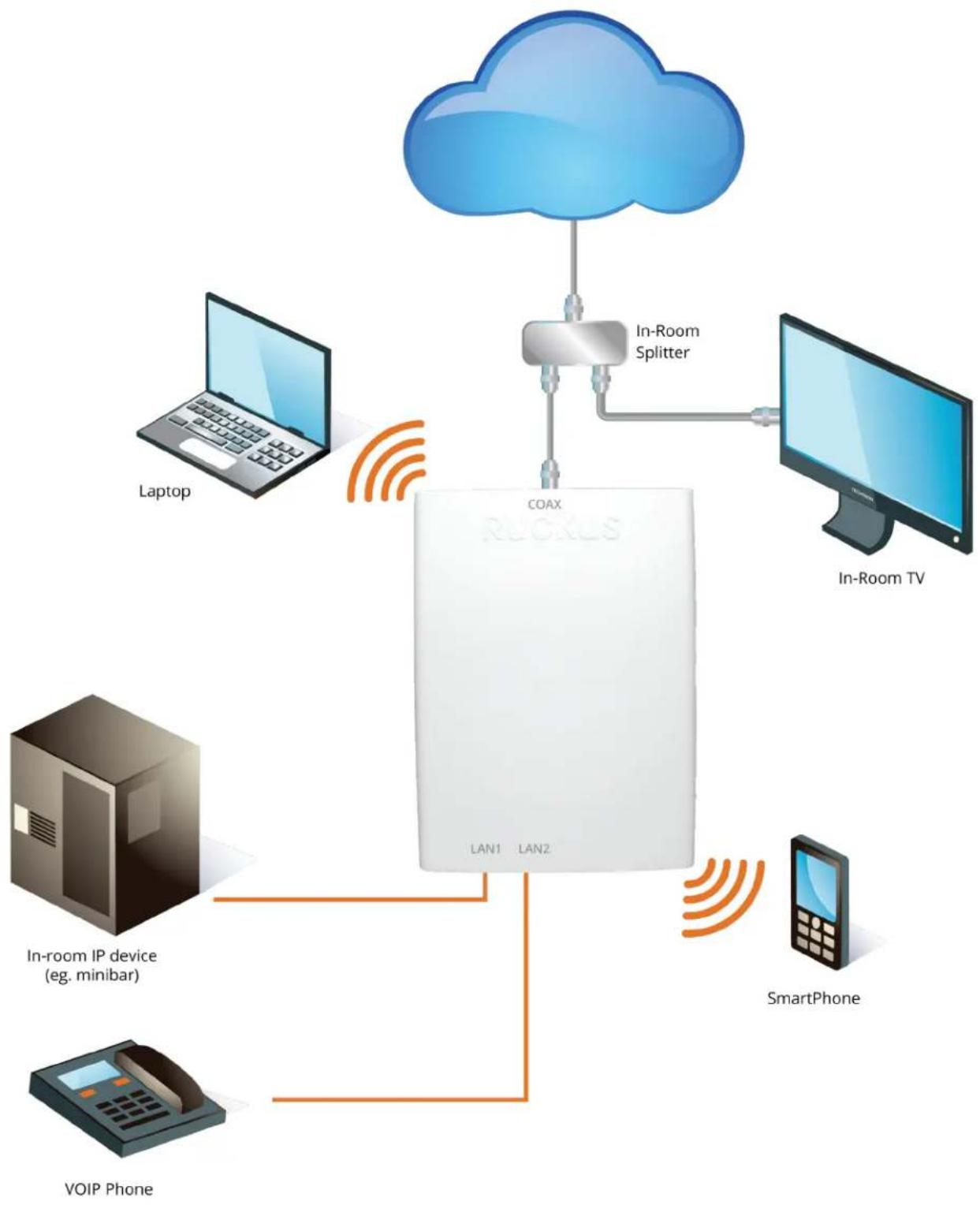
flowchart
graph TD
    A["COAX Device"] -->|In-Room Splitter| B["Laptop"]
    A -->|In-Room Splitter| C["TV"]
    A -->|In-Room Splitter| D["VoIP Phone"]
    A -->|In-Room Splitter| E["SmartPhone"]
    A -->|In-Room Splitter| F["In-Room TV"]
ACCESS POINT ANTENNA PATTERN
Ruckus' BeamFlex+ adaptive antennas allow the C110 AP to dynamically choose among a host of antenna patterns in real-time to establish the best possible connection with every device. This leads to:
• Better Wi-Fi coverage
• Reduced RF interference
Traditional omni-directional antennas, found in generic access points, oversaturate the environment by needlessly radiating RF signals in all directions. In contrast, the Ruckus BeamFlex+ adaptive antenna directs the radio signals per-device on a packet by-packet basis to optimize Wi-Fi coverage and capacity in real-time to support high device density environments. BeamFlex+ operates without the need for device feedback and hence can benefit even devices using legacy standards.
Figure 1. Example of BeamFlex+ pattern
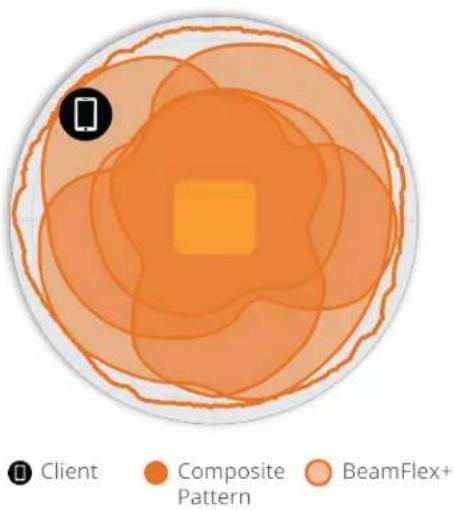
pie
| Category | Value | | -------------- | ----- | | Client | 1 | | Composite Pattern | 2 | | BeamFlex+ | 3 |Figure 2. C110 2.4GHz Azimuth Antenna Patterns
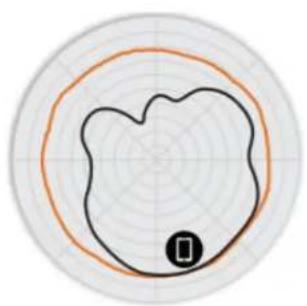
natural_image
Circular diagram with concentric rings and two concentric circles, one black and one orange, with a small black circle labeled '0' at the bottom center (no text or symbols within the diagram itself)Figure 3. C110 5GHz Azimuth Antenna Patterns
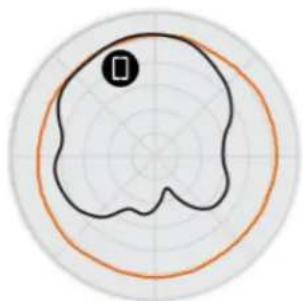
natural_image
Circular diagram with concentric rings and two concentric circles, no text or symbols presentFigure 4. C110 2.4GHz Elevation Antenna Patterns
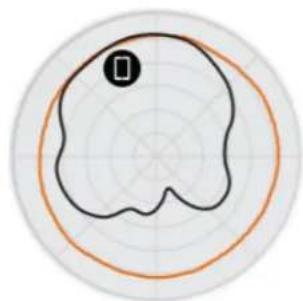
natural_image
Circular diagram with concentric rings and two concentric arcs, no text or symbols presentFigure 5. C110 5GHz Elevation Antenna Patterns
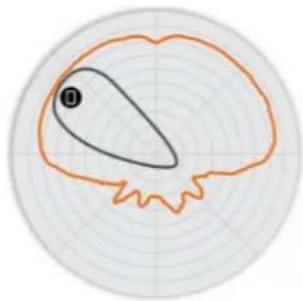
natural_image
Circular diagram with concentric rings and an irregular outline, no text or symbols presentNote: The outer trace represents the composite RF footprint of all possible BeamFlex+ antenna patterns, while the inner trace represents one BeamFlex+ antenna pattern within the composite outer trace.
| WI-FI | |
| Wi-Fi Standards • IEEE 802.11a/b/g/n/ac Wave 2 | |
| Supported Rates | • 802.11ac: 6.5 to 867Mbps (MCS0 to MCS9, NSS = 1 to 2 for VHT20/40/80)• 802.11n: 6.5Mbps to 300Mbps (MCS0 to MCS15)• 802.11a/g: 54, 48, 36, 24, 18, 12, 9, 6Mbps• 802.11b: 11, 5.5, 2 and 1 Mbps |
| Supported Channels | • 2.4GHz: 1-13• 5GHz: 36-64, 100-144, 149-165 |
| MIMO | • 2x2 SU-MIMO• 2x2 MU-MIMO |
| Spatial Streams • 2 Streams SU/MU-MIMO | |
| Channelization • 20, 40, 80MHz | |
| Security | • WPA-PSK, WPA-TKIP, WPA2 AES, 802.11i, Dynamic PSK• WIPS/WIDS |
| Other Wi-Fi Features | • WMM, Power Save, Tx Beamforming, LDPC, STBC, 802.11r/k/v• Hotspot• Hotspot 2.0• Captive Portal• WISPr |
| RF | |
| Antenna Type | BeamFlex+ adaptive antennas with polarization diversityAdaptive antenna that provides multiple unique antenna patterns per band |
| Antenna Gain (max) | 2.4GHz: 3dBi5GHz: 3dBi |
| Peak Transmit Power(aggregate across MIMO chains) | 19 dBm for 2.4GHz22 dBm for 5GHz |
| Minimum Receive Sensitivity ^1 | -96/-95dBm |
| Frequency Bands | ISM (2.4-2.484GHz)U-NII-1 (5.15-5.25GHz)U-NII-2A (5.25-5.35GHz)U-NII-2C (5.47-5.725GHz)U-NII-3 (5.725-5.85GHz) |
| 2.4GHZ RECEIVE SENSITIVITY | |||
| HT20 HT40 | |||
| MCS0 MCS7 | MCS0 MCS7 | ||
| -90 -72 -87 | -59 | ||
| 5GHZ RECEIVE SENSITIVITY | |||||
| VHT20 VHT40 VHT80 | |||||
| MCS0 MCS7 MCS0 MCS7 MCS0 MCS7 | |||||
| -92 -72 -89 -69 -86 -64 | |||||
| 2.4GHZ TX POWER TARGET | |
| Rate Pout (dBm) | |
| MCS0 HT20 16 | |
| MCS7 HT20 15 | |
| 5GHZ TX POWER TARGET | |
| Rate Pout (dBm) | |
| MCS0 VHT20 19 | |
| MCS7 VHT20 14 | |
| MCS0 VHT40, VHT80 19 | |
| MCS7 VHT40, VHT80 14 | |
| MCS9 VHT40, VHT80 12 | |
| PERFORMANCE AND CAPACITY | |
| Peak PHY Rates | 2.4GHz: 300Mbps5GHz: 867Mbps |
| Client Capacity • Up to 100 clients per AP | |
| SSID • Up to 32 per AP | |
| RUCKUS RADIO MANAGEMENT | |
| Antenna Optimization | BeamFlex+Polarization Diversity with Maximal Ratio Combining (PD-MRC) |
| Wi-Fi Channel Management | ChannelFlyBackground Scan Based |
| Client Density Management | Adaptive Band BalancingClient Load BalancingAirtime FairnessAirtime-based WLAN Prioritization |
| SmartCast Quality of Service | QoS-based schedulingDirected MulticastL2/L3/L4 ACLs |
| Mobility | SmartRoam |
| Diagnostic Tools | Spectrum AnalysisSpeedFlex |
| NETWORKING | |
| Controller Platform Support | SmartZoneZoneDirector |
| Mesh | SmartMeshTMwireless meshing technology. Self-healing Mesh. |
| IP | IPv4, IPv6 |
| VLAN | 802.1Q (1 per BSSID or dynamic per use based on RADIUS)VLAN PoolingPort-based |
| 802.1x | Authenticator & Supplicant |
| Tunnel | L2TP, GRE, Soft-GRE |
| Policy Management Tools | Application Recognition and ControlAccess Control ListsDevice FingerprintingRate Limiting |
| CABLE MODEM | |
| DOCSIS Version | 1.0/1.1/2.0/3.0 compliant and certified |
| Channel Bonding | Supports 8 downstream channels and 4 upstream channels |
| Support and Management | Embedded diagnostics web interfaceStatus LED'sSNMP management |
| PHYSICAL INTERFACES | |
| Ethernet • 2 x 10/100 Mbps local ports, RJ-45 | |
| USB • 1 USB 2.0 port, Type A | |
| Cable Modem • Type F, DOCSIS/Euro DOCSIS 3.0 8x4 modem port |
| PHYSICAL CHARACTERISTICS | |
| Physical Size | 180 (L) x 150(W) x 35(H) mm7.09 (L) x 5.9 (W) x 1.38 (H) in |
| Weight • 386 g (13.62 oz) | |
| Mounting | Electrical wallboxSecure bracket (sold separately) |
| Physical Security | Hidden latching mechanismKensington lockT-bar TorxBracket (902-0108-0000) Torx screw & padlock (sold separately) |
| Operating Temperature | 0°C (32°F) - 40°C (104°F) |
| Operating Humidity • Up | to 95%, non-condensing |
| POWER ^2 | |
| Power Supply Maximum Power Consumption | |
| DC input: 12VDC 2.0A • 17 | 2W |
| CERTIFICATIONS AND COMPLIANCE | |
| Wi-Fi Alliance3 | • Wi-Fi CERTIFIEDTM a, b, g, n, ac• Passpoint®, Vantage |
| Standards Compliance4 | • EN 60950-1 Safety• EN 61000-4-2/3/5 Immunity• IEC 61373 Railway Shock & Vibration• EN 62311 Human Safety/RF Exposure• WEEE & RoHS• ISTA 2A Transportation |
| SOFTWARE AND SERVICES | |
| Location Based Services | SPoT |
| Network Analytics • SmartCell Insight (SCI) | |
| Security and Policy • Cloudpath | |
| ORDERING INFORMATION | |
| 901-C110-US00 | • C110, 802.11ac, 2x2:2, Dual Band Concurrent (2.4/5GHz) wall plate AP/CM, DOCSIS, North America power supply |
| 901-C110-EU01 | • C110, 802.11ac, 2x2:2, Dual Band Concurrent (2.4/5GHz) wall plate AP/CM, EuroDOCSIS, EU power supply |
| 901-C110-UN00 | • C110, 802.11ac, 2x2:2, Dual Band Concurrent (2.4/5GHz) wall plate AP/CM, DOCSIS, North America power supply |
| 901-C110-UK01 | • C110, 802.11ac, 2x2:2, Dual Band Concurrent (2.4/5GHz) Wall Plate AP/CM, EuroDOCSIS, UK power supply |
| 901-C110-AR00 | • C110, 802.11ac 2x2:2 Dual Band Concurrent (2.4/5GHz) wall plate AP/CM, DOCSIS, *No power supply* |
| 901-C110-AU00 | • C110, 802.11ac 2x2:2 Dual Band Concurrent (2.4/5GHz) wall plate AP/CM, DOCSIS, Australia/New Zealand power supply |
Warranty: Sold with a limited lifetime warranty. For details see: http://support.ruckuswireless.com/warranty.
| OPTIONAL ACCESSORIES | |
| 902-0124-0000 | • Accessory Offset Mounting Bracket. Includes 90-degree Male-Female F-connector. |
2 Max power varies by country setting, band, and MCS rate.
^3 For complete list of WFA certifications, please see Wi-Fi Alliance website.
^4 For current certification status, please see price list.