Breeze BTE - Hearing aid Unitron - Free user manual and instructions
Find the device manual for free Breeze BTE Unitron in PDF.


User questions about Breeze BTE Unitron
0 question about this device. Answer the ones you know or ask your own.
Ask a new question about this device
Download the instructions for your Hearing aid in PDF format for free! Find your manual Breeze BTE - Unitron and take your electronic device back in hand. On this page are published all the documents necessary for the use of your device. Breeze BTE by Unitron.
USER MANUAL Breeze BTE Unitron
Practical Solutions to Everyday Problems ......2
Getting the Most Out of Your Breeze™ Hearing Instruments....2
Using the Breeze™ Digital BTE Guide......3
Operating Instructions....3
Replacing the Battery ....5
Low Battery Warning....5
Caring for Batteries....6
Earmolds 6
Assistive Listening Devices....7
Cleaning Your Breeze™ Hearing Instruments......9
Caring for Your Breeze™ Hearing Instruments ......9
Warnings ....10
Troubleshooting Guide....12
Warning to Hearing Instrument Dispensers .....14
Your Breeze™ Digital Hearing Instruments
Hearing Healthcare Professional: ____
Telephone:
Model:
Serial Number:
Replacement Batteries: Size 13 □
Warranty:
Practical Solutions to Everyday Problems
Congratulations on choosing Breeze™ Behind-the-ear (BTE) digital hearing instruments.
For 40 years, Unitron Hearing has been committed to making life better for people with hearing loss. This means a commitment to developing high-quality hearing solutions that incorporate special features to solve the everyday problems and concerns you have with hearing loss and hearing instruments.
Getting the Most Out of Your Breeze™ Hearing Instruments
Adjusting to your new hearing instruments will take some time. In the beginning it is important that you do not use the hearing instruments for longer than is comfortable. Depending on your previous experience with hearing instruments, a few hours a day may be enough and then you can increase wearing time gradually. Once you have become accustomed to your hearing instruments, you should wear them all day every day since infrequent use will not permit you to adapt to your hearing instruments and enjoy their full benefits. The quicker you get used to the everyday sounds around you, the less you will notice that you are wearing hearing instruments.
Using the Breeze™ Digital BTE Guide
Refer to the table of contents for a complete listing of the topics covered in this guide.
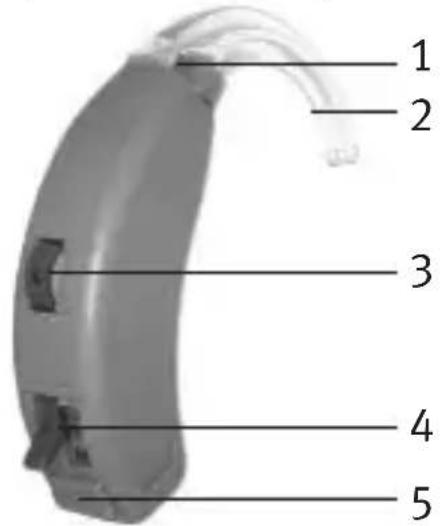
Use the diagram below to identify some of the components on your Breeze hearing devices.
text_image
1 2 3 4 5Legend
1 Microphone
2 Earhook
3 Volume Control
4 Function Switch (select models)
5 Battery Door
Operating Instructions
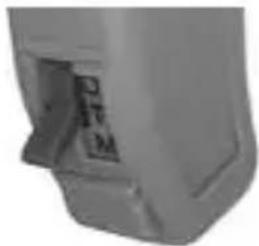
Your Breeze hearing instruments may come equipped with a function switch (M-T-O) allowing you to switch between the Microphone, Telecoil and Off positions.
natural_image
Close-up of a mechanical component with no visible text or symbolsM – Select Microphone for normal listening
T – Select Telecoil for using the telephone
O – Select Off to turn the hearing device off (or you can open the battery door)
Note: Your hearing instrument may have an optional combination MT (Microphone/Telecoil) position (M-MT-O).
Turning Your Breeze™ Hearing Instruments On and Off
To turn your hearing instruments on, move the function switch to the M position or insert the battery and close the battery door.
To turn your hearing instruments off, move the function switch to the O position or open the battery door and remove the battery.
Switching to Telecoil (T position)
The telecoil improves listening on the telephone. When the telecoil is activated, the microphone on your hearing instrument will be turned off. You must have a telecoil-compatible telephone for this feature to work properly. To use the telecoil, move the function switch to the “T” position. Center the telephone receiver on the hearing instrument. Move the receiver along the instrument to locate the clearest, strongest signal. You may have to increase the volume on your hearing instrument. To return to normal listening, move the function switch to the “M” position.
Adjusting the Volume
Your Breeze digital hearing instruments have a volume control. The volume control dial is numbered one to four. One indicates that the volume is at the minimum level and four indicates that the volume is at the
maximum level. Rotate the volume control upward to increase the volume or downward to decrease the volume.
Replacing the Battery
- Gently swing out the battery compartment door with your fingernail.
- Grasp the battery with your thumb and forefinger and remove.
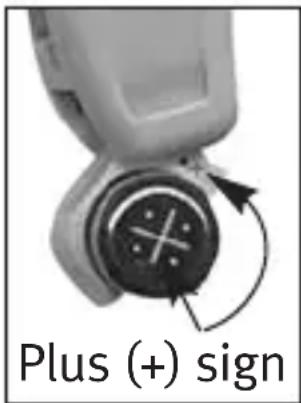
- Insert the new battery into the battery compartment with the plus (+) sign on
the battery facing the same way as the plus (+) sign on the edge of the battery door. This will ensure that the battery door closes properly.
Note: If the battery is inserted incorrectly, the door will not close.
- Close the battery compartment door.
Low Battery Warning
When you hear three short beeps, your digital hearing instruments are warning you that their batteries are low. You will hear the warning approximately every 5 minutes until you change the batteries or the batteries die. After the first warning, you may experience some reduction in sound quality. This is normal and can be remedied by inserting fresh batteries in the hearing instruments.
text_image
Plus (+) signCaring for Batteries
• Always discard batteries carefully.
- To prolong battery life, remember to turn your hearing devices off when not in use.
- Remove the batteries and keep the battery door open while hearing devices are not in use. This will allow internal moisture to evaporate.
Warnings
- Never leave hearing devices or batteries where small children and pets can reach them.
- Never put hearing devices or batteries in your mouth. If a hearing device or battery is swallowed, call a physician immediately.
Earmolds
Earmolds feed amplified sound from the hearing devices into the ears. They must fit into your ears snugly and comfortably. If amplified sound leaks out of your ear, you may hear whistling.
Always ensure earmolds are clean and free of ear wax and moisture. Do not use alcohol to clean your earmolds. If the earmolds become plugged, clear the opening with a wax loop or pipe cleaner. If your physician prescribes ear drops, clean any moisture that may get into the earmolds or tubing to prevent plugging.
If the earmolds require further cleaning, disconnect the plastic tube from the hook of the hearing devices. Wash only the earmolds in warm water with a mild soap. Rinse them with cool water and allow them to dry overnight. Make sure the earmold tubes are dry before reconnecting them to each hook on your hearing devices.
Assistive Listening Devices
Direct Audio Input
Your Breeze BTEs may feature direct audio input (DAI) that allows your hearing instruments to be connected to other audio sources, such as a stereo, television, personal computer or portable radio/CD player. If your Breeze hearing instruments feature DAI, you will need to purchase audio shoes and connector cords from your hearing healthcare professional before you can connect to external audio sources. DAI can also be used to fit your hearing instruments with an assistive listening device, such as a FM system, which you may purchase to improve listening in difficult situations.
FM and Infrared Systems
Some FM systems consist of a teleloop worn around the neck, which is connected to the FM receiver worn on a belt or in a shirt pocket. To listen through the FM system, select the “T” position and turn on the FM
receiver. To keep the signal clear, you may need to adjust the volume control on your hearing instruments as well as on the FM receiver. With some infrared systems you may need to remove your hearing instruments and wear the system's headset receiver. If the volume on the infrared receiver is not loud enough, use your hearing instruments instead.
Loop Systems
To use your hearing instruments in a facility that is “looped”, move the function switch to the “T” position. You may have to increase the volume on your hearing instruments. If your hearing instruments do not operate when the telecoil is on, the loop system may not be operating or you may be in a “dead” spot. Try positioning yourself in a different part of the looped area or move the function switch back to the “M” position.
MicroLink™ MLx Receiver Module
Your Breeze BTEs are compatible with Phonak's MicroLink™ Receiver Module, a wireless FM system that improves listening over distance. The MLx FM receiver module connects to the direct audio input system and is powered by the hearing instrument battery.
Cleaning Your Breeze™ Hearing Instruments
Ear wax is natural and common. Ensuring your hearing devices and earmolds are free of ear wax is an important step in your daily cleaning and maintenance routine.
- Never use alcohol to clean your hearing devices.
- Do not use sharp tools to dislodge ear wax. Sticking household items into your hearing devices or earmolds can seriously damage them.
Caring for Your Breeze™ Hearing Instruments
- Always remove your hearing instruments when using hair care products. The hearing instruments can become clogged and cease to function properly.
- Protect your hearing devices from excessive heat (hair dryer, vehicle glove box or dashboard) and moisture (bath or shower). Do not immerse the hearing devices in water.
- If your hearing instruments do become wet, do not attempt to dry them in an oven or microwave. Do not adjust any controls. Open the battery doors immediately, and allow your hearing instruments to dry naturally for 24 hours.
- Regular use of a dehumidifier, such as a Dri-Aid kit, 9
can help prevent corrosion. See your hearing healthcare professional for more information.
- Do not drop your hearing devices or knock them against hard surfaces.
Warnings
- Hearing devices should only be used as directed by your physician or hearing healthcare professional.
- Hearing devices will not restore normal hearing and will not prevent or improve a hearing impairment resulting from organic conditions.
- Do not use your hearing devices in explosion hazard areas.
- Allergic reactions to hearing devices are unlikely. However, if you experience itching, redness, soreness, inflammation or a burning sensation in or around your ears, inform your hearing healthcare professional and contact your physician.
- In the unlikely case that any parts remain in the ear canal after the removal of the hearing instrument, contact a physician immediately.
- Remove your hearing devices for CAT and MRI scans or for other electromagnetic procedures.
- Special care should be exercised in wearing hearing devices when maximum sound pressure levels exceed 132 decibels. There may be a risk of impairing your
remaining hearing. Speak with your hearing healthcare professional to ensure the maximum output of your hearing devices is suitable for your particular hearing loss.
Precautions
- The use of hearing devices is only part of hearing rehabilitation; auditory training and lip reading instruction may be required as well.
- In most cases, infrequent use of hearing devices does not provide full benefit. Once you have become accustomed to your hearing devices, wear your hearing devices everyday all day.
- Your hearing devices use the most modern components to provide the best possible sound quality in every listening situation. However, communication devices such as digital cell phones can create interference (a buzzing sound) in hearing devices. If you experience interference from a cell phone being used close by, you can minimize this interference by turning your head in a different direction or locating the cell phone and moving away from it.
Labelling
The serial number and year of manufacture are located along the inside spine of the hearing instrument.
Troubleshooting Guide
SYMPTOM CAUSE POSSIBLE REMEDY
| No sound • Not turned onLow/dead batteryPoor battery contactBattery upside downEarmolds blocked with ear wax | Turn onReplace batteryConsult your hearing healthcare professionalInsert battery plus (+) side upRefer to the sections “Earmolds” and “Cleaning Your Breeze Hearing Instruments”.Consult your hearing healthcare professional |
| Not loud • Low volume enoughLow batteryEarmolds not inserted properlyChange in hearingEarmolds blocked with ear wax | Turn up volume; see hearing healthcare professional if problem persistsReplace batteryReinsert carefullyConsult your hearing healthcare professionalRefer to the sections “Earmolds” and “Cleaning Your Breeze Hearing Instruments”.Consult your hearing healthcare professional |
| Intermittent • Low batteryDirty battery contact | Replace batteryConsult your hearing healthcare professional |
| Whistling • Earmolds not inserted properly• Volume too loud• Hand/clothing near ear• Poorly fitting earmolds | • Remove and reinsert• Turn volume down• Remove hand/clothing from ear• Consult your hearing healthcare professional |
| Not clear, • Poorly fitting earmolds distorted• Earmolds blocked with ear wax• Low battery• Change in hearing | • Consult your hearing healthcare professional• Refer to the sections “Earmolds” and “Cleaning Your Breeze Hearing Instruments”.Consult your hearing healthcare professional• Replace battery• Consult your hearing healthcare professional |
| "Motorboating" • Low battery sound • Dirty battery contact | • Replace battery• Consult your hearing healthcare professional |
| Weak on the • Volume control set telephone too low• Telephone not positioned properly• Telephone not telecoil compatible | • Turn up volume• Move telephone around ear for clearer signal• Rent or purchase a telephone that is telecoil compatible |
| Three short • Low battery warning beeps | • Replace batteries |
For any problems not listed in the guide, contact your hearing healthcare professional. If you do not have a hearing healthcare professional, please contact the nearest office listed on the back page of this booklet.
Warning to Hearing Instrument Dispensers
A hearing instrument dispenser should advise a prospective hearing instrument user to consult promptly with a licensed physician (preferably an ear specialist) before dispensing a hearing instrument if the hearing instrument dispenser determines through inquiry, actual observation, or review of any other available information concerning the prospective user, that the prospective user has any of the following conditions: (i) Visible congenital or traumatic deformity of the ear. (ii) History of active drainage from the ear within the previous 90 days. (iii) History of sudden or rapidly progressive hearing loss within the previous 90 days. (iv) Acute or chronic dizziness. (v) Unilateral hearing loss of sudden or recent onset within the previous 90 days. (vi) Audiometric air-bone gap equal to or greater than 15 decibels at 500 hertz (Hz), 1,000 Hz, and 2,000 Hz. (vii) Visible evidence of significant cerumen accumulation or a foreign body in the ear canal. (viii) Pain or discomfort in the ear. Special care should be exercised in selecting and fitting a hearing instrument whose maximum sound pressure level exceeds 132 decibels because there may be risk of impairing the remaining hearing of the hearing instrument user. [This provision is required only for those hearing instruments with a maximum sound pressure capability greater than 132 decibels (dB).]
Important Notice for Prospective Hearing Instrument Users
Good health practice requires that a person with a hearing loss have a medical evaluation by a licensed physician (preferably a physician who specializes in diseases of the ear) before purchasing a hearing instrument.
Licensed physicians who specialize in diseases of the ear are often referred to as otolaryngologists, otologists or otorhinolaryngologists. The purpose of medical evaluation is to assure that all medically treatable conditions that may affect hearing are identified and treated before the hearing instrument is purchased. Following the medical evaluation, the physician will give you a written statement that states that your hearing loss has been medically evaluated and that you may be considered a candidate for a hearing instrument. The physician will refer you to an audiologist or a hearing instrument dispenser, as appropriate, for a hearing instrument evaluation. The audiologist or hearing instrument dispenser will conduct a hearing instrument evaluation to assess your ability to hear with and without a hearing instrument. The hearing instrument evaluation will enable the audiologist or dispenser to select and fit a hearing instrument to your individual needs. If you have reservations about your ability to adapt to amplification, you should inquire about the
availability of a trial-rental or purchase-option program. Many hearing instrument dispensers now offer programs that permit you to wear a hearing instrument for a period of time for a nominal fee after which you may decide if you want to purchase the hearing instrument. Federal law restricts the sale of hearing instruments to those individuals who have obtained a medical evaluation from a licensed physician. Federal law permits a fully informed adult to sign a waiver statement declining the medical evaluation for religious or personal beliefs that preclude consultation with a physician. The exercise of such a waiver is not in your best health interest and its use is strongly discouraged.
Children With Hearing Loss
In addition to seeing a physician for a medical evaluation, a child with a hearing loss should be directed to an audiologist for evaluation and rehabilitation since hearing loss may cause problems in language development and the educational and social growth of a child. An audiologist is qualified by training and experience to assist in the evaluation and rehabilitation of a child with a hearing loss.
Unitron Distributors
CORPORATE OFFICE/INTERNATIONAL
20 Beasley Drive, P.O. Box 9017, Kitchener, ON N2G 4X1 Canada
AUSTRALIA
Level 2, Norwest Quay, 21 Solent Circuit, Baulkham Hills, NSW, NSW 2153
BELGIUM
Baron de Vironlaan, 60 b-1700 Dilbeek
CANADA
20 Beasley Drive, P.O. Box 9017, Kitchener, ON N2G 4X1
CHINA
No. 78, Qi Ming Road, Export Processing Zone District B, Suzhou Industrial Park, P.R. 215021
DENMARK
Nitivej 10, DK-2000 Frederiksberg
EUROPEAN REPRESENTATIVE
Daimlerstrasse 22, 70736 Fellbach-Oeffingen, Germany
FRANCE
5, rue Maryse Bastié - BP 15 69671 Bron Cedex, France
NETHERLANDS
10/215 Rosedale Rd., M277 Private Bag, 300987, Albany, Auckland
NORWAY
Brugata 14 0186 Oslo, Norway
SOUTH AFRICA
First Floor – Selborne House, Fourways Golf Park, Roos Street, Fourways, Johannesburg
SPAIN
Avenida de la Industria n°13/15, Polígono de Canastell, 03690 Sant Vicent del Raspeig. Alicante, España
SWEDEN
St. George House, Cygnet Court, Centre Park, Warrington, Cheshire WA1 1PD
U.S.A.
Suite A, 2300 Berkshire Lane North, Plymouth, MN 55441
Manufacturer
UNITRON HEARING LTD.
20 Beasley Drive, P.O. Box 9017, Kitchener, ON N2G 4X1 Canada

0543

unitron.
DISTRIBUTOR
www.unitron.com
H/09-034 029-5312-02

unitron™