
Contemporary NR1N001W - Watch ORIENT - Free user manual and instructions
Find the device manual for free Contemporary NR1N001W ORIENT in PDF.


| Product Type | Automatic Watch |
| Brand | ORIENT |
| Model | Contemporary NR1N001W |
| Movement Type | Automatic (self-winding) with hand winding |
| Caliber | NR 557 |
| Power Reserve | Approximately 40 hours when fully wound |
| Jewel Count | 21 jewels |
| Vibrations per Hour | 21,600 |
| Daily Accuracy | +40 to -30 seconds per day (at room temperature, fully wound, dial up) |
| Functions | Time (hours, minutes, seconds), date display, quick-set date |
| Date Setting Restriction | Avoid setting date between 8:30 PM and 12:30 AM |
| Winding Direction | Turn crown clockwise to wind; counterclockwise does not wind |
| Crown Type | Push-in crown (non-screw-down for this model) |
| Case Material | Stainless steel (typical for this model) |
| Band Material | Leather or stainless steel (depending on variant) |
| Crystal | Mineral glass (typical) |
| Water Resistance | Not specified in manual; handle with care |
| Shock Resistance | Avoid strong impacts; not designed for strenuous sports |
| Magnetism Resistance | Avoid strong magnetic fields; may affect accuracy temporarily |
| Temperature Range | 5°C to 35°C for normal operation |
| Maintenance | Wipe with dry soft cloth; avoid chemicals and extreme temperatures; service every 3-5 years |
Frequently Asked Questions - Contemporary NR1N001W ORIENT
User questions about Contemporary NR1N001W ORIENT
0 question about this device. Answer the ones you know or ask your own.
Ask a new question about this device
Download the instructions for your Watch in PDF format for free! Find your manual Contemporary NR1N001W - ORIENT and take your electronic device back in hand. On this page are published all the documents necessary for the use of your device. Contemporary NR1N001W by ORIENT.
USER MANUAL Contemporary NR1N001W ORIENT
Thank you for choosing our product. To ensure prolonged use and optimum performance, please read this instruction manual carefully and familiarize your-self with the terms of the guarantee.
Please keep this Instruction Manual handy for future reference.
◆ SAFETY PRECAUTIONS
Make absolutely sure to observe the demarcated contents indicated below to prevent any possible physical danger and property damage to you as well as other people concerned.
... A demarcation with this symbol represents the contents assuming possibility for death or serious injury when the product is used in any manner different from given instructions.
... A demarcation with this symbol represents the contents assuming possibility of causing human injury or material damage only when a product is used in any manner different from given instructions.
◆ IN HANDLING THE WATCH
(1) Water-resistance
| Type\Conditions of use | Underwater operation of crown and operation of crown with drops of water on it | Exposure to small amounts of water (face-washing, rain, etc.) | Water sports (swimming, etc.), frequent contact with water (car-washing, etc.) | Skin diving (air tanks are not used) | Scuba diving (air tanks are used) | Mixed-gas Diving (using helium gas) | ||
| Non water resistant | Without WATER RESISTANT (WATER RESIST) | × × | × × | × × | ||||
| Water resistant watches | Water resistant for daily life | WATER RESISTANT (WATER RESIST) | × | ○ | × × | × × | ||
| Reinforced water resistance for daily life I | WATER RESISTANT (WATER RESIST) 50m (5bar) | × | ○ | ○ | × × | × | ||
| Reinforced water resistance for daily life II | WATER RESISTANT (WATER RESIST) 100m (10bar) 200m (20bar) | × | ○ | ○ | × | × | × | |
| Diver's watches | Diver's watch for Air Diving | AIR DIVER'S 100m / 150m 200m | × | ○ | ○ | ○ | × | |
| Diver's watch for Mixed-gas Diving | He-GAS DIVER'S 200m / 300m /... | × | ○ | ○ | ○ | ○ | ||
* It is recommended that you use the watch correctly following the above-mentioned scope of usage after ascertaining water resistance precautions marked on the dial or caseback.
WARNING
① A watch with water resistance for daily life 30m (3 bar) can be used during face-washing, etc. but cannot be used in an environment in which it will be submerged in water.
② A watch with reinforced water resistance for daily life I 50m (5 bar) can be used while swimming, etc. but cannot be used during any type of diving including skin diving.
③ A watch with reinforced water resistance for daily life II 100m or 200m (10 or 20 bar) can be used while skin diving, but cannot be used while scuba diving using oxygen tanks or saturation diving using helium gas, etc.
CAUTION
④ Keep the crown pushed in at all times (in the normal position) while using the watch. If the crown is the screwed-down type, check that it is securely screwed down.
⑤ Do not operate the crown underwater, or while the watch is wet. Water may enter the interior of the watch and defeat the water resistance.
⑥ If your watch is non-water resistant, beware of splashes of water (during face washing, rain, etc.) and sweat. If the watch becomes wet from water or sweat, wipe the moisture off with a dry, soft cloth.
⑦ Even with a water resistant watch for everyday use, avoid directing strong jets of mains water onto the watch. Water pressure above the limit can apply, which may defeat the water resistance.
⑧ With a water resistant watch for everyday use, rinse sea water off the case after exposure, then wipe it thoroughly to avoid corrosion and other effects.
⑨ The interior of the watch contains some amount of moisture, which may cause fogging on the inside of the glass when the outside air is cooler than the internal temperature of the watch. If the fogging is temporary it causes no harm inside the watch, but if prolonged, or if water enters the watch, consult your place of purchase and do not leave the problem untreated.
(2) Shock
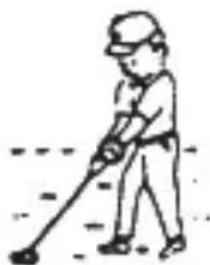
① Be sure not to carry the watch when you engage in strenuous sports, whereas playing such light sports as golf, etc., will not adversely influence the watch.
② Avoid a violent shock such as dropping the watch on the floor.
natural_image
Simple line drawing of a person using a tool to dig or walk (no text or symbols)(3) Magnetism
① If the watch is left at a location with strong magnetism for an extended period of time, the components may be magnetized, resulting in malfunction. Be careful.
② The watch may temporarily speed up or slow down when exposed to magnetism. Precision is restored when placed away from magnetism. In such a case, reset the time.
(4) Vibration
The watch may lose precision if subjected to strong vibrations such as from riding motorcycles, using jackhammers, chain saws, etc.

natural_image
Cartoon illustration of a person riding a three-wheeled motorcycle with motion lines indicating speed (no text or symbols)(5) Temperature
In environments below and above normal temperatures (5°C-35°C), the watch may malfunction and stop.
Do not use the watch at high temperatures, such as in a sauna. The watch may heat and cause burns.
(6) Chemicals, Gases, etc.
Utmost caution must be exercised when coming into contact with gases, mercury, chemicals (paint thinner, gasoline, various solvents, detergents containing such components, adhesives, paint, drugs, perfumes, cosmetics, etc.), and so forth. Such may cause discoloration of the watchcase, watchband, and dial face. Discoloration, deformation, and damage to various resin-based component parts may also occur.
(7) About accessory parts
CAUTION
Do not attempt to disassemble or modify the watch.
WARNING
Store the bracelet/strap pin and other small parts out of the reach of children.
If any small parts are swallowed, immediately contact a doctor.
(8) Allergic reactions

CAUTION
If you develop a skin rash or your skin becomes abnormally irritated due to contact with the watch or strap, stop wearing the watch immediately and consult a doctor.
(9) About "luminous light"
Some models have luminous light on the hands and dial.
The luminous light is a safe paint that stores sunlight and artificial light without using any radioactive material, and emits that light in a dark setting. As the paint discharges the stored light, it will become dimmer over time. The amount of light emitted and the time that light is emitted depends on various factors when the light is stored, such as the shape of the glass, the thickness of the paint, surrounding brightness level, the distance from the watch to the light source, and the light absorption level. Please note that when not enough light energy is stored, the watch may emit weak light or emit light for only a short time.
(10) Water resistant watchband
Some models employ leather and nylon bands on which a special treatment to resist perspiration and water absorption have been applied. Please understand that the water resisting effect of this watchband can be lost depending on the period and conditions of use.
◆ HOW TO IDENTIFY THE CALIBER NUMBER
Check the caliber number by referring to the model number of your watch or the case code on the watch's case back.
1. Searching by 10-digit model number
Check the 10-digit model number on the guarantee supplied with your watch. You can also see the number on the product tag put on the watch. Its second and third digits indicate the caliber number of your watch.
Example: If the model number is "DB05001B", the caliber number is "DB".
2. Searching by the case code
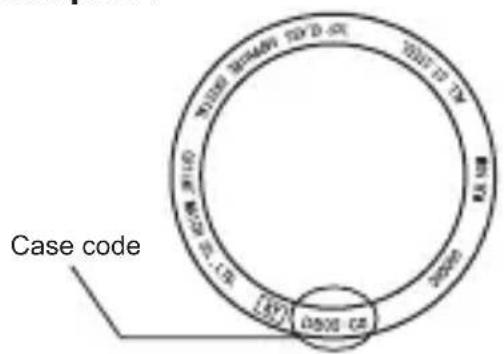
See the case code on the case back of your watch.
A: If the case code is 6 digits, the first two digits indicate the caliber number.
B: If the case code is 8 or 9 digits, the first three digits indicate the movement number. Search the caliber number corresponding to the movement number referring to the correspondence table.
Example A
text_image
Case code 10500-02 10500-03 10500-04 10500-05 10500-06 10500-07 10500-08 10500-09 10500-10 10500-11 10500-12 10500-13 10500-14 10500-15 10500-16 10500-17 10500-18 10500-19 10500-20 10500-21 10500-22 10500-23 10500-24 10500-25 10500-26 10500-27 10500-28 10500-29 10500-30 10500-31 10500-32 10500-33 10500-34 10500-35 10500-36 10500-37 10500-38 10500-39 10500-40 10500-41 10500-42 10500-43 10500-44 10500-45 10500-46 10500-47 10500-48 10500-49 10500-50 10500-51 10500-52 10500-53 10500-54 10500-55 10500-56 10500-57 10500-58 10500-59 10500-60 10500-61 10500-62 10500-63 10500-64 10500-65 10500-66 10500-67 10500-68 10500-69 10500-70 10500-71 10500-72 10500-73 10500-74 10500-75 10500-76 10500-77 10500-78 10500-79 10500-80 128Example B

text_image
ORIENT KY: 059399-87 CA Case codeExample A: When the case code is "DB05-C0", the caliber number is "DB".
Example B : When the case code is "469396-81", the movement number is "469". The caliber number corresponding the number will be found "EM" on the table.
* The place of case code may vary and its letter size may be small and difficult to see depending on the characteristics of watches.
* The pictures and illustrations on this manual may differ from the actual appearance of your watch but the function and operation procedures are the same.
◆ SPECIFICATIONS
| Caliber Click-B Date Day of week Hand winding Daily accuracy Remark1* | ||||||
| DB 46A | - - - - +25~-15s/day - | |||||
| DW 48D | - | ○ | - - +25~-15s/day | 9:00 p.m.-2:00 a.m. | ||
| EM 469 | ○ ○ | ○ | - +25~-15s/day | 9:00 p.m.-4:00 a.m. | ||
| ER 487 | - | ○ | - - +25~-15s/day | 9:00 p.m.-2:00 a.m. | ||
| NB 555 | - - - - +40~-30s/day - | |||||
| NQ 559 | - | ○ ○ | ○ | +40~-30s/day | 8:30 p.m.-4:00 a.m. | |
| NR 557 | - | ○ | - | ○ | +40~-30s/day | 8:30 p.m.-0:30 a.m. |
| PF 597 | - | ○ | - | ○ | +40~-30s/day | 8:30 p.m.-0:30 a.m. |
| PM 599 | - | ○ ○ | ○ | +40~-30s/day | 8:30 p.m.-4:00 a.m. | |
(1) Vibrations: 21,600 vibrations/hour
(2) Number of jewels: 21 jewels
(3) Running time: More than 40 hours
(4) Shock-proof bearings to protect the balance with hairspring from shocks.
The stated daily accuracy is in the following conditions:
• After 24 hours at room temperature with the mainspring wound fully and the dial facing up.
- Due to the characteristics of the automatic winding watch, the time may deviate from the stated “daily accuracy” depending on the following conditions: amount of time the watch is worn each day, position of the watch, movement of your arm, winding condition of the mainspring.
Product specifications may change without notice, for improvement.
CAUTION
* Avoid setting the date during the time periods listed in “Remark1” above since the calendar changes during this time. If the date is set during this time period, the date may not change or the watch may malfunction. Be sure to move the hour and minute hands away from this time period when setting the date.
◆ NAMES AND FUNCTIONS OF INDIVIDUAL COMPONENT PARTS
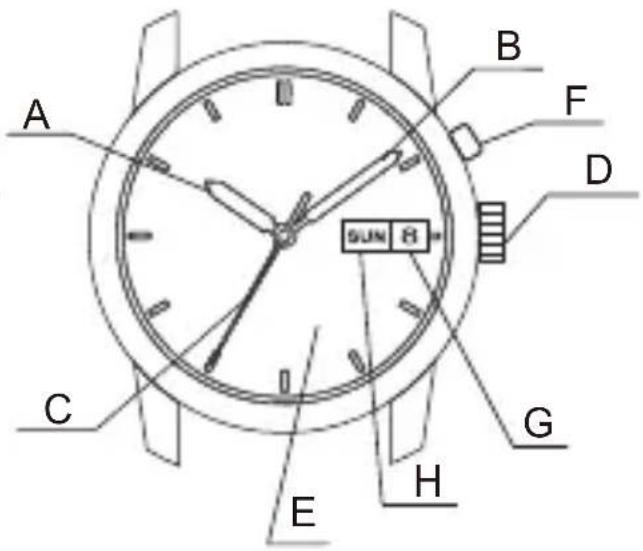
A: Hour hand
B: Minute hand
C:Secondhand
D:Crown
E: Dial
F: Click button
* EM(469) only
G:Date
H: Day of the week
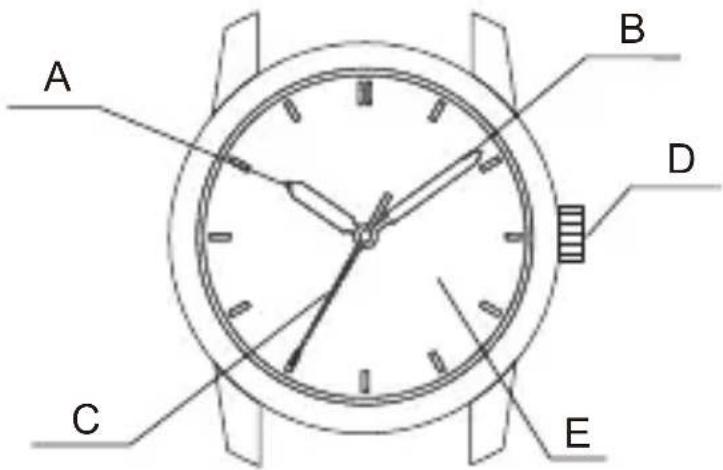
text_image
A B D C E
text_image
A B D C E G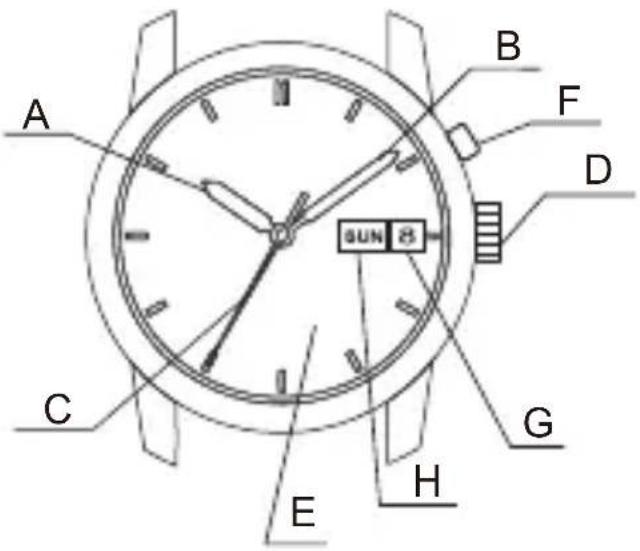
text_image
A B F D SUN 8 C G E H* The position of the crown, date indicator, or day of the week window may be different, depending on the model.
◆ AUTOMATIC WINDING MECHANISM
(1) The mainspring is wound by natural movements of your arm when wearing the watch on your wrist.
(2) If your watch stops, swing the watch back and forth ten or more times to re-start the second hand. After it starts moving, set the date and time.
(3) This watch will run approximately 40 hours after it is fully wound. If it is not wound enough, the watch may lose accuracy. In order to maintain the watch's accuracy, we recommend wearing the watch at least 8 hours a day.
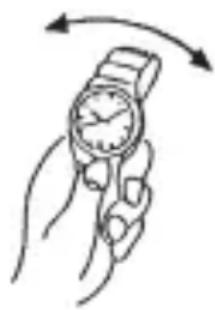
natural_image
Illustration of a hand holding a wristwatch with an arrow indicating rotational motion (no text or symbols)♦ HAND WINDING MECHANISM
(1) The mainspring is wound up manually.
(2) To wind the spring, turn the crown clockwise.
When you turn the crown counterclockwise, the spring will not be wound.
(3) Once the spring is fully wound, the crown will no longer turn. Be careful not to keep trying to turn it, or the spring or other parts may be broken.
(4) This watch will run approximately 40 hours after the spring is fully wound.
◆ MODELS WITH SCREWED-DOWN CROWN
Depending on the model, you may not be able to pull the crown out without unscrewing it (models with screwed-down crown).
Operate this type of watch as follows:
(1) Before setting the date and time, first turn the crown to the left to loosen the screw lock.
(2) After setting the date and time, turn the crown to the right while pressing in, until it stops turning to securely tighten the screw.
◆ MODELS WITH A SCREWED-DOWN BUTTON RING
Some models may have a configuration that allows the button ring (ring on the outer periphery) to be locked (fixed) into place by being screwed down. Use the following operating method for this type of watch.
(1) When wanting to use the buttons, first turn the button ring to the left, and then loosen it until the screw stops.
* The buttons may not be able to be used if the button ring cannot be loosened enough. Do not turn it more forcefully than necessary.
(2) After finishing using the buttons, turn the button ring to the right, and firmly tighten it until the screw stops.
* Do not tighten it more forcefully than necessary.
◆ HOW TO SET THE TIME [DB(46A), NB(555)]
(1) Pull the crown out. (The second hand does not stop.)
(2) Turn the crown clockwise and set the current time.
* When setting the time, first bring the hand back slightly earlier than the current time and then move it forward to the current time.
(3) Press the crown in to the normal position.
![ORIENT Contemporary NR1N001W - ◆ HOW TO SET THE TIME [DB(46A), NB(555)] - 1](/content/2026/05/801517/images/e9dd37b5b4e1d052a0bc0e3fa408977104e75c4865b3ea6bdc7eaea95a1a8b45.jpg)
text_image
Turn clockwise◆ HOW TO SET THE TIME & CALENDAR [EM(469)]
(1) Press the click button and set the previous day of the week.
* The day of the week can be displayed in two languages. Press the click button to select your desired languages.
The languages available differ depending on the model.
(2) Pull the crown out to the first click.
* The crown on this watch can be pulled out to the first and second clicks.
(3) Turn the crown counterclockwise to set the date indicator to the previous date.
![ORIENT Contemporary NR1N001W - ◆ HOW TO SET THE TIME & CALENDAR [EM(469)] - 1](/content/2026/05/801517/images/57398bee3d84d65ec26e6a428b700d3ce4502a83ebb43d71de4f93c1f2ac0c28.jpg)
text_image
0 SAT 2:35![ORIENT Contemporary NR1N001W - ◆ HOW TO SET THE TIME & CALENDAR [EM(469)] - 2](/content/2026/05/801517/images/4044b92914ae36366976a7adaf7d5aae5fb82402c257ee4c74294619363d3458.jpg)
text_image
BAM 37![ORIENT Contemporary NR1N001W - ◆ HOW TO SET THE TIME & CALENDAR [EM(469)] - 3](/content/2026/05/801517/images/446c942f72c71caa05b150ff22f5b5903912961e46c7253ee7e2381214a753b9.jpg)
text_image
BAT 1 TurnTurn counterclockwise
* About date correction at month's end:
Date correction is necessary for months with 30 days or less.
In this case, set the date to the [1st day] on the first day of the next month.
(4) Pull the crown out to the second click.
![ORIENT Contemporary NR1N001W - ◆ HOW TO SET THE TIME & CALENDAR [EM(469)] - 4](/content/2026/05/801517/images/73eb20aa5cd9563ac8f25dc937a6f9cfe633a609d5100c80d332f500f04a3317.jpg)
text_image
BAT 1(5) Turn the crown to set the time.
* Turn the crown clockwise until today's date is displayed. It is the "a.m." when the date changes. Set the hands further forward to adjust to the current time.
* Since the calendar changes at midnight, take care not to confuse a.m. and p.m. when setting the time.
(6) Push the crown back to the normal position.
![ORIENT Contemporary NR1N001W - ◆ HOW TO SET THE TIME & CALENDAR [EM(469)] - 5](/content/2026/05/801517/images/a6d2dd1153efed0fa8bd3d2764d17504df119b7cda2561d9a3ae2a3a5c71373a.jpg)
text_image
Turn clockwise Turn 2![ORIENT Contemporary NR1N001W - ◆ HOW TO SET THE TIME & CALENDAR [EM(469)] - 6](/content/2026/05/801517/images/6900c5f7e50868f835ec93c2d8e34ece35ca0f2fd9979c12e15cd07f831e2147.jpg)
text_image
Diagram of an analog clock showing time and duration with a directional arrow indicating leftward movement.◆ HOW TO SET THE TIME & DATE [DW(48D), ER(487), NR(557), PF(597)]
(1) Pull the crown out to the first click. The crown on this watch can be pulled out to the first and second clicks.
![ORIENT Contemporary NR1N001W - ◆ HOW TO SET THE TIME & DATE [DW(48D), ER(487), NR(557), PF(597)] - 1](/content/2026/05/801517/images/c83fbee25b0bd2024f67f0404f015d683d46387fb11d144e1f251638cb6063c4.jpg)
natural_image
Simple line drawing of a clock face with hour and minute hands, showing an arrow pointing right (no text or symbols)(2) Turn the crown counterclockwise to set the date indicator to the previous date.
![ORIENT Contemporary NR1N001W - ◆ HOW TO SET THE TIME & DATE [DW(48D), ER(487), NR(557), PF(597)] - 2](/content/2026/05/801517/images/e6597ba4041a8d7e4911ef28da87ea1c805376c690eb932e0595ba1535b3c245.jpg)
text_image
Turn counterclockwise* About date correction at month's end: Date correction is necessary for months with 30 days or less. In this case, set the date to the [1st day] on the first day of the next month.
(3) Pull out the crown to the second click. The second hand does not stop.
![ORIENT Contemporary NR1N001W - ◆ HOW TO SET THE TIME & DATE [DW(48D), ER(487), NR(557), PF(597)] - 3](/content/2026/05/801517/images/accbaee8436d01520c78cc78f4122047f2225d91ec08978124814292fd2e43eb.jpg)
natural_image
Simple line drawing of a clock face with hour and minute hands, no text or symbols present(4) Turn the crown clockwise and set the current time.
* Since this watch comes with a calendar, make sure that you set either a.m. or p.m. without fail. The date changes at [twelve o'clock midnight].
* When setting the time, first bring the hand back slightly earlier than the current time and then move it forward to the current time.
(5) Press the crown in to the normal position.
![ORIENT Contemporary NR1N001W - ◆ HOW TO SET THE TIME & DATE [DW(48D), ER(487), NR(557), PF(597)] - 4](/content/2026/05/801517/images/87176901e30a8e9887151136c5bdfd83170f15e388fb5ef97880d46caf5a8b05.jpg)
text_image
Turn clockwise![ORIENT Contemporary NR1N001W - ◆ HOW TO SET THE TIME & DATE [DW(48D), ER(487), NR(557), PF(597)] - 5](/content/2026/05/801517/images/7899849fe0302f06c07e38df155e3a75b8f7a399475eca428f385e4ca6f4304b.jpg)
natural_image
Simple line drawing of an analog clock face with hour and minute hands, showing time near 10:30 (no text or symbols)◆ HOW TO SET THE TIME & CALENDAR [NQ(559), PM(599)]
(1) Pull the crown out to the first click. The second hand does not stop.
(2) At first turn the crown clockwise to the previous day of the week.
![ORIENT Contemporary NR1N001W - ◆ HOW TO SET THE TIME & CALENDAR [NQ(559), PM(599)] - 1](/content/2026/05/801517/images/106045944d4d9e97ba4a04387315fb98626715c94f264e9feb17cf84507d8845.jpg)
text_image
PREF 15* The day of the week can be displayed in two languages. Press the click button to select your desired languages.
The languages available differ depending on the model.
Turn the crown counterclockwise to set the date indicator to the previous date.
![ORIENT Contemporary NR1N001W - ◆ HOW TO SET THE TIME & CALENDAR [NQ(559), PM(599)] - 2](/content/2026/05/801517/images/48e9069ab0a99e52e153a091a42d559fdae64bf94ec386a08f87caf8d154bac4.jpg)
text_image
Turn clockwise (Day setting) Turn counterclockwise (Date setting)* About date correction at month's end:
Date correction is necessary for months with 30 days or less.
In this case, set the date to the [1st day] on the first day of the next month.
(3) Pull the crown out to the second click.
(4) Turn the crown to set the time.
![ORIENT Contemporary NR1N001W - ◆ HOW TO SET THE TIME & CALENDAR [NQ(559), PM(599)] - 3](/content/2026/05/801517/images/602a271c3682d9601b235f01a31e28ae641951e7d17c0aae75e9acc1ef89aa41.jpg)
text_image
Turn clockwise 2* Turn the crown clockwise until today's date is displayed.
It is the “a.m.” when the date changes. Set the hands further forward to adjust to the current time.
* Since the calendar changes at midnight, take care not to confuse a.m. and p.m. when setting the time.
(5) Press the crown in to the normal position.
![ORIENT Contemporary NR1N001W - ◆ HOW TO SET THE TIME & CALENDAR [NQ(559), PM(599)] - 4](/content/2026/05/801517/images/c9da016ac1e29013c4e8e8fab0c4c51719160fe7088a42d1d2e2a7b128b6a2a2.jpg)
text_image
2:00 2◆ HOW TO SET THE MONTHLY CALENDAR
Some models come with a calendar function which uses an inner ring or bezel on the exterior of the case to indicate the date.
The monthly calendar can be used by turning the crown to set the rotating ring inside the watchcase and aligning it with the day of the week that is printed on the dial.
Turn the crown to align the first day of the month to the appropriate day of the week.
* Note that when setting the first day of the month, if the days at the end of the month (31st, etc.) are aligned with the section that does not have the days of the week printed on the dial (3 - 4 o'clock side), days of the week will not be indicated at the end of the month.
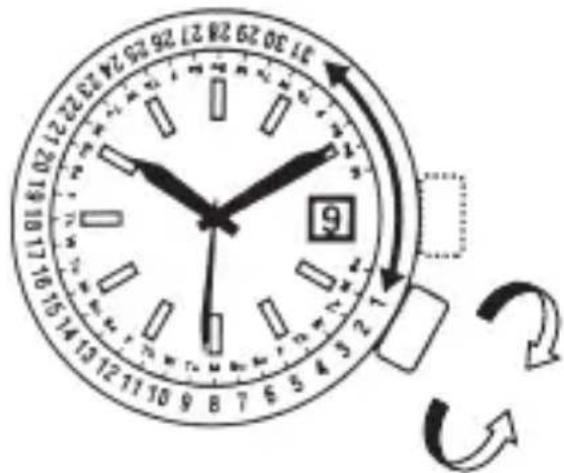
text_image
10:30 29:28 27:26 25:24 23:22 21:20 19:10 17:16 10:30 29:28 27:26 25:24 23:22 21:20 19:10 17:16* The position of the inner ring crown and details of the date indicator may vary depending on the model.
◆ HOW TO USE THE MULTI-YEAR CALENDAR
Some models come equipped with a multi-year calendar. Check the instructions for the model that you purchased to ensure that you set your watch correctly.
The yearly calendar printed on the rotating ring can be set easily using the crown.
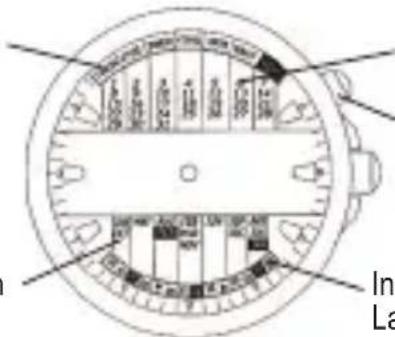
◆ NAMES AND FUNCTIONS OF COMPONENT PARTS
Inner ring : Day of the week
text_image
In LaDates (for 1 month)
Inner ring crown
Month
Inner ring : Last 2 digits of the year
* The position of the inner ring crown, location of the indicators, and style of the month indicator (numbers or alphabet letters) may vary depending on the model.
◆ HOW TO SET THE MULTI-YEAR CALENDAR
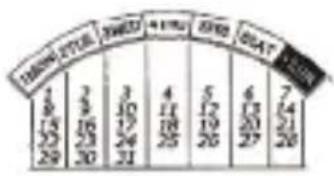
Example 1: To set the month to October 2007 (ordinary year)
(1) Turn the inner ring crown to align "07" of the inner ring to "OCT" (the month) on the bottom of the dial.
(2) The calendar for October 2007 is displayed on the upper half of the dial.
Example 2: To set the month to February 2008 (leap year)
other
| Year | Value | |---|---| | 2018 | 1 | | 2019 | 2 | | 2020 | 3 | | 2021 | 4 | | 2022 | 5 | | 2023 | 6 | | Total | 7 |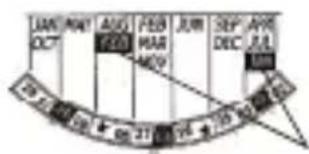
text_image
JAN OCT MAY AUG FEB JUN SEP APR JUL 129 + 50 + 68 37 14 + 75 + 82 67The months of January and February in a leap year
* The last two digits of the year for a leap year are printed in white on black (i.e., with the colors reversed).
(1) Turn the inner ring crown to align "08" to FEB (the month) shown on the dial.
* Only set January and February of leap years to JAN and FEB.
There are no differences between an ordinary year and leap year for the months from March to December.
(2) The calendar for February 2008 is displayed on the upper half of the dial.
♦ WORLD TIME
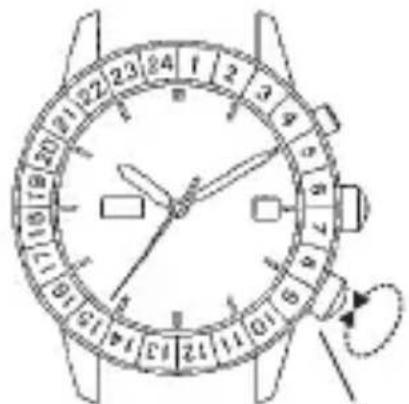
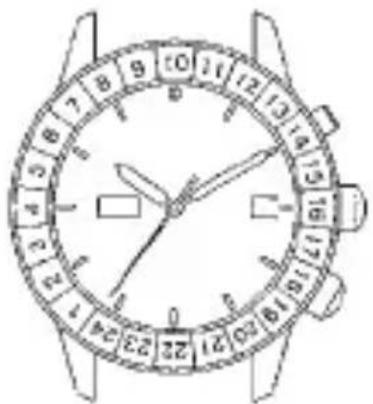
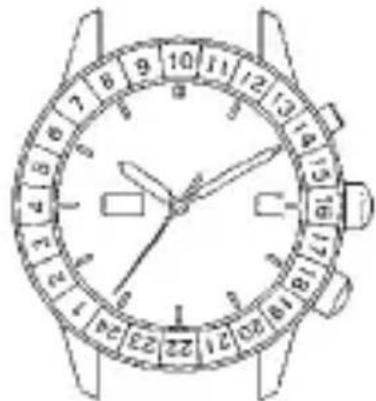
You can see the time in cities around the world by turning the crown (2) to the present time of one of the cities printed on the dial. In the figure on the right, since the time in Tokyo is 10:08 a.m., align “10” on the rotating indicator ring to “TOKYO” on the dial. To tell the time in other cities, simply look at the corresponding numbers on the rotating indicator ring.
text_image
1 2 3 4 5 6 7 8 9 10 11 12 13 14 15 16 17 18 19 20 21 22 23 24 25 26 27 28 29 30 31 32 33 34 35 36 37 38 39 40 41 42 43 44 45 46 47 48 49 50 51 52 53 54 55 56 57 58 59 60 61 62 63 64 65 66 67 68 69 70 71 72 73 74 75 76 77 78 79 80Crown (2)
text_image
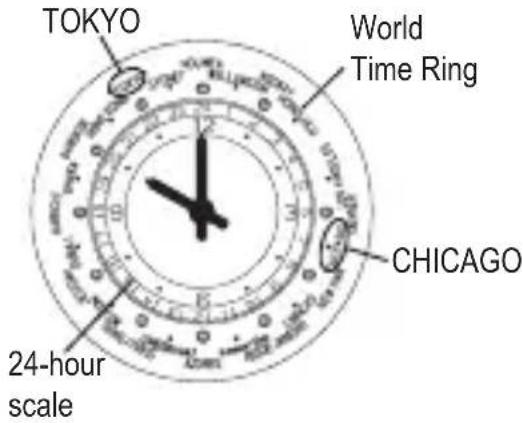
Hand-drawn sketch of a wristwatch face with dual dials and hands pointing to the dial (0–12)Using the World Time Ring, you can see the times all around the world.
Example: It is 10:00 p.m. now.
(1) In the 24-hour system, 10:00 p.m. is 22:00 hours.
(2) Set TOKYO on the World Time Ring to the 22-hour position of the 24-hour scale.
* The World Time Ring comes in various types, such as with a crown for setting world time or with a rotating bezel.
(3) The position that CHICAGO on the World Time Ring indicates is the time in Chicago.
* The position indicated by each scale on the World Time Ring represents
text_image
TOKYO World Time Ring CHICAGO 24-hour scalethe time in that country.
Using this method, you can simultaneously see the time in countries around the world by using the scales on the World Time Ring and reading the dial.
* The city names are major cities in various countries around the world.
* Some countries use daylight savings time.
* Note that in some countries policies regarding daylight savings time may be changed by the government ordinance.
◆ HOW TO USE THE ROTATING INDICATOR BEZEL
Please notice that some models come with a rotating indicator bezel, which should be used properly.
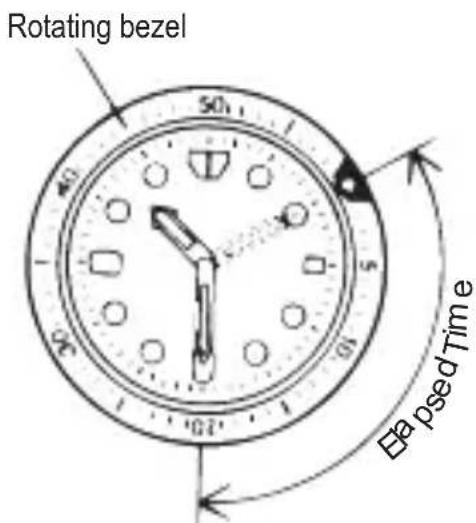
Turn the bezel by pointing the ▽ mark to the minute-hand. While certain time goes by, you can measure the elapsed time from the distance between minute-hand and figures on the rotating indicator bezel. You can also set the ▽ mark as a desired time to remind you how long time is still remain for an appointment.
text_image
Rotating bezel 50 40 5 67 Eapsed TimeThe above shows that 20 minutes have elapsed from 10:10.
You cannot turn the bezel reversely since it comes with a protection mechanism for preventing wrong operation by force or shock. Figures on the bezel could also help you to read the current time easily.
* Depending on design, anti-reversely and 1 minute "click" sound mechanism on rotating indicator bezel does not apply to some models.
ITALIANO
OROLOGIO MECCANICO
natural_image
Cartoon illustration of a person riding a motorcycle with motion lines indicating speed (no text or symbols)(5) Temperatura
text_image
A B D C E G
text_image
A B F D C G E H SUN 8natural_image
Illustration of a hand holding a wristwatch with motion arrows indicating rotation (no text or symbols)natural_image
Simple line drawing of a clock face with an arrow pointing right (no text or symbols)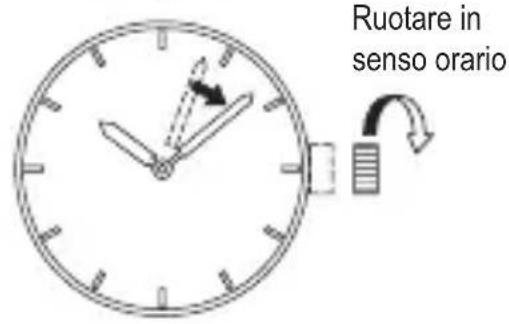
natural_image
Simple line drawing of an analog clock face with hour and minute hands (no numbers or text)text_image
Diagram of an analog clock showing time and duration with a rightward arrow indicating leftward movement.text_image
Diagram of a wristwatch face with numbered dial and hand pointer, showing analog clock face and dial indicatorCorona (2)
text_image
Hand-drawn sketch of a wristwatch face with dual dials and rotary dial, showing time approximately 12:30 to 17:00.natural_image
Simple line drawing of a person using a tool to clean or brush (no text or symbols)
natural_image
Simple line drawing of a person riding a motorcycle with motion lines indicating speed (no text or symbols)(5) Temperaturas
text_image
A B D C E G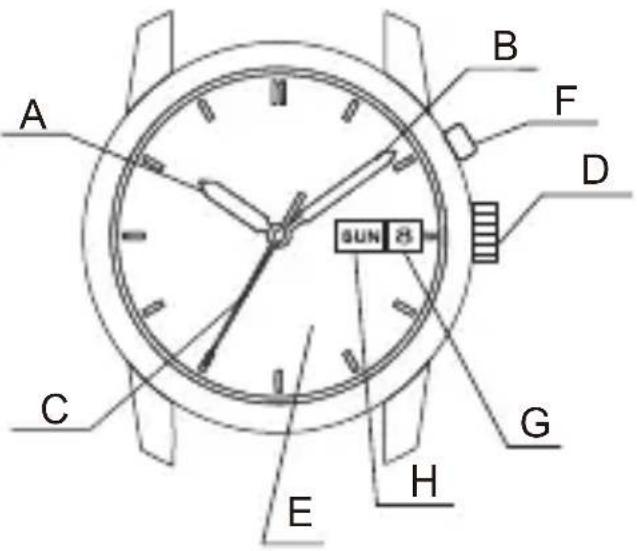
text_image
A B F D SUN 28 C G E Hnatural_image
Illustration of a hand holding a wristwatch with motion arrows indicating rotation (no text or symbols)◆ MECANISMO DE CUERDA MANUAL
natural_image
Simple line drawing of a clock face with an arrow pointing right (no text or symbols)
natural_image
Simple line drawing of an analog clock face with hour and minute hands (no numbers or text)◆ CÓMO AJUSTAR LA HORA Y EL CALENDARIO [EM(469)]
natural_image
Simple clock face diagram with hour and minute hands and a right-pointing arrow (no text or symbols)text_image
Diagram of an analog clock showing time and duration with directional arrow indicating left hand movement◆ PUESTA EN HORA Y AJUSTE DE LA FECHA [NQ(559), PM(599)]
text_image
LUN OCT MAY AUG FEB FEB MAR JUN SEP DEC APR JUL FR FR FR FR FR FR FR FR FR FR FR FR FR FR FR FR FR FR FR FR FR FR FR FR FR FR FR FR FR FR FR FR FR FR FR FR FR FR FR FR FR FR FR FR FR FR FR FR FR FR MR MR MR MR MR MR MR MR MR MR MR MR MR MR MR MR MR MR MR MR MR MR MR MR MR MR MR MR MR MR MR MR MR MR MR MR MR MR MR MR MR MR MR MR MR MR MR MR MR MR MPtext_image
Diagram of a wristwatch face with numbered dial and hand pointer, showing measurement markings and a rotary dial indicator.![ORIENT Contemporary NR1N001W - ◆ PUESTA EN HORA Y AJUSTE DE LA FECHA [NQ(559), PM(599)] - 1](/content/2026/05/801517/images/5effb570c6513557e18ae53d0aa1cdfcb14e9171a6de2d84f0cf458c3bf5edc3.jpg)
text_image
Hand-drawn sketch of a wristwatch face with numbered dials and hands pointing to the dial (no text or symbols beyond numbers)Corona (2)
natural_image
Simple line drawing of a person using a tool to dig or brush (no text or symbols)natural_image
Cartoon illustration of a person riding a three-wheeled motorcycle with motion lines indicating speed (no text or symbols)(5) Температура
text_image
A B D C E G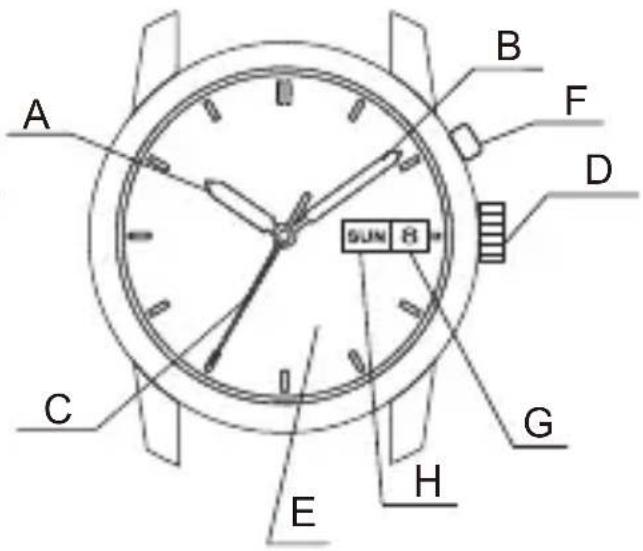
text_image
A B F D SUN 8 C G E Hnatural_image
Illustration of a hand holding a wristwatch with an arrow indicating rotational motion (no text or symbols)natural_image
Simple line drawing of a circular clock face with an arrow pointing right (no text or symbols)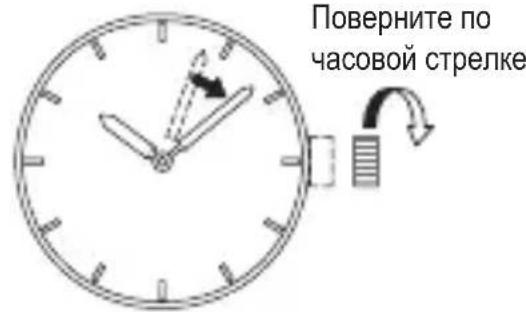
natural_image
Simple analog clock face showing 3 o'clock with hour and minute hands, no text or symbols presentnatural_image
Simple analog clock face with hour and minute hands, showing 2:05 (no text or numbers)natural_image
Simple line drawing of a circular gauge with a small square and a curved arrow indicating rotation (no text or symbols)natural_image
Simple diagram of a clock face with an arrow pointing right, no text or symbols presenttext_image
Diagram of an analog clock showing time and duration with a rightward arrow indicating leftward movement.◆ УСТАНОВКА ВРЕМЕНИ И ДАТЫ [NQ(559), PM(599)]
text_image
Technical diagram of a circular mechanical or electrical component with labeled parts and directional arrows indicating flow or movement.Даты (на 1 месяц)
text_image
Diagram of a wristwatch with dual dials showing time and duration in seconds, including a dial indicator and analog dial.Головка (2)
![ORIENT Contemporary NR1N001W - ◆ УСТАНОВКА ВРЕМЕНИ И ДАТЫ [NQ(559), PM(599)] - 1](/content/2026/05/801517/images/69331dd94929b3b42de968d572b4197351c33eb28906b2b727cbc294a8ab1f9e.jpg)