
F990 - Iron BLACK & DECKER - Free user manual and instructions
Find the device manual for free F990 BLACK & DECKER in PDF.


| Type | Steam iron with Avant Steam technology |
| Brand | Black & Decker |
| Model | F990 (also F995) |
| Power | Approximately 1700 watts (typical for irons) |
| Voltage | 120V AC (North America) |
| Soleplate | Non-stick soleplate |
| Water tank capacity | Approximately 350 ml (based on MAX line) |
| Cord length | 360° pivoting cord, approximately 8 feet |
| Weight | Approximately 2.5 lbs (1.1 kg) |
| Dimensions (LxWxH) | Approximately 12 x 5 x 6 inches |
| Automatic shutoff | 30 seconds on soleplate/side, 8 minutes on heel |
| Steam settings | Smart Steam automatically adjusts based on fabric dial |
| Surge of steam | Yes, for stubborn creases (5-second intervals) |
| Vertical steam | Yes, for hanging garments and drapes |
| Spray function | Yes, dampens wrinkles at any setting |
| Dry ironing | Settings 1-3, or empty tank for higher settings |
| Auto clean | Yes, monthly maintenance with AUTO CLEAN button |
| Care | Wipe with damp cloth, avoid abrasives |
| Safety | Polarized plug, tamper-resistant screw, 3-way auto shutoff |
| Warranty | One-year limited (US/Canada) |
| Replacement parts | Available via 1-800-738-0245 |
| Origin | Made in People's Republic of China |
Frequently Asked Questions - F990 BLACK & DECKER
User questions about F990 BLACK & DECKER
0 question about this device. Answer the ones you know or ask your own.
Ask a new question about this device
Download the instructions for your Iron in PDF format for free! Find your manual F990 - BLACK & DECKER and take your electronic device back in hand. On this page are published all the documents necessary for the use of your device. F990 by BLACK & DECKER.
USER MANUAL F990 BLACK & DECKER
Please Read and Save this Use and Care Book

BLACK&DECKER® Home
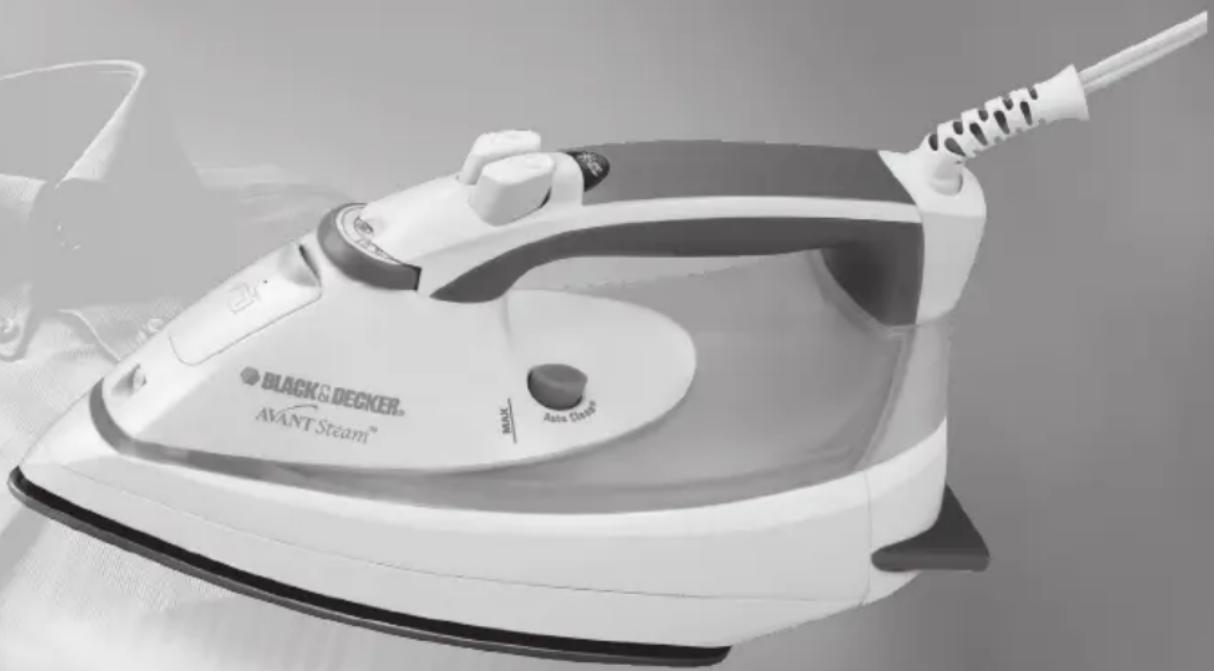
Avant Steam™ Plancha Iron
natural_image
Black and Decker Avant Steam iron with visible brand logo and control knob (no text-heavy elements)
USA/Canada 1-800-231-9786
Mexico 01-800-714-2503
www.applicaconsumerproductsinc.com
Accessories/Parts (USA/Canada)
1-800-738-0245
Modelos Models
F990
F995
Símbolos

Seco

When using your iron, basic safety precautions should always be followed, including the following:
☐ READ ALL INSTRUCTIONS BEFORE USING.
☐ Use iron only for its intended use.
☐ To protect against a risk of electric shock, do not immerse the iron in water or other liquids.
☐ The iron should always be turned to "0" before plugging or unplugging from outlet. Never yank cord to disconnect from outlet; instead grasp plug and pull to disconnect.
☐ Do not allow cord to touch hot surfaces. Let iron cool completely before putting away. Loop cord loosely around the iron when storing.
□ Always disconnect iron from electrical outlet when filling with water or emptying and when not in use.
☐ Do not operate iron with a damaged cord or if the iron has been dropped or damaged. To avoid the risk of electric shock, do not disassemble the iron, take it to a qualified serviceman for examination and repair. Incorrect reassembly can cause a risk of electric shock when the iron is used.
☐ Close supervision is necessary for any appliance being used by or near children. Do not leave iron unattended while connected or on an ironing board.
Burns can occur from touching hot metal parts, hot water or steam. Use caution when you turn a steam iron upside down - there may be hot water in the reservoir.
SPECIAL INSTRUCTIONS
☐ To avoid a circuit overload, do not operate another high-wattage appliance on the same circuit.
☐ If an extension cord is absolutely necessary, a 15-ampere cord should be used. Cords rated for less amperage may overheat. Care should be taken to arrange the cord so that it cannot be pulled or tripped over.
SAVE THESE INSTRUCTIONS.
POLARIZED PLUG
This appliance has a polarized plug (one blade is wider than the other). To reduce the risk of electric shock, this plug is intended to fit into a polarized outlet only one way. If the plug does not fit fully into the outlet, reverse the plug. If it still does not fit, contact a qualified electrician. Do not attempt to modify the plug in any way.
TAMPER-RESISTANT SCREW
Warning: This appliance is equipped with a tamper-resistant screw to prevent removal of the outer cover. To reduce the risk of fire or electric shock, do not attempt to remove the outer cover. There are no user-serviceable parts inside. Repair should be done only by authorized service personnel.
Note: If the power supply cord is damaged, it should be replaced by qualified personnel or in Latin America by an authorized service center.
Product may vary slightly from what is illustrated.
Symbols

Dry

Steam/Surge of Steam

Spray
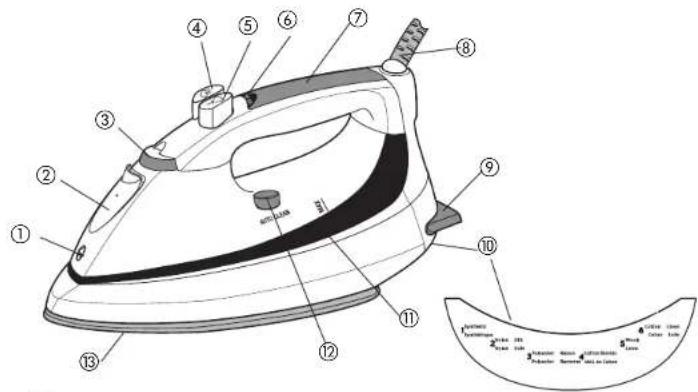
- Spray nozzle
- Water-fill cover
- Fabric-select dial
- Steam button
- Spray button
- On/auto off indicator light
- Comfort Grip ^TM handle
- 360° pivoting cord
- Anti-slip, rubberized heel
- Fabric guide
- Water tank
- AUTO CLEAN® button
- Soleplate
- Cord wrap and cord hook (not shown)
How to Use
This appliance is intended for household use only.
GETTING STARTED
Remove any labels, stickers or tags attached to the body or soleplate of the iron.
Note: Use ordinary tap water for ironing. Do not use water processed through a home softening system
Important: For optimum performance, let the iron stand for 90 seconds before beginning to iron.
FILLING WATER TANK
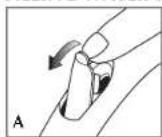
- With iron on flat surface with soleplate down, open water-fill cover (A).
- Tilt the iron and using a clean measuring cup, pour water into opened chamber until water reaches the MAX level mark on the side of the water tank. Do not overfill.
- Close the water-fill cover.
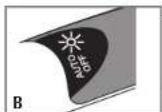
- Plug in the iron. The on indicator light illuminates green (B). Once the iron reaches the selected temperature, the light goes off and stays off during the ironing cycle.
Note: If you need to add water while ironing, unplug the iron and follow above steps.
Tip: If unsure of a garment's fiber, test a small area (on an inside seam or hem) before ironing.
3-WAY AUTOMATIC SHUTOFF
The automatic shutoff feature in your iron works as follows:
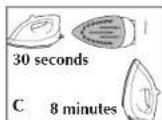
- Once the iron reaches appropriate temperature, it will turn off after 30 seconds of inactivity if left on its soleplate or tipped over on its side. If left vertically on its heel rest, it will shut off after 8 minutes (C).
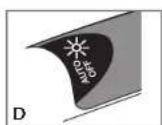
- The AUTO OFF light starts blinking red to let you know that the iron has stopped heating (D).
- As soon as you pick up the iron, it will start heating again. Wait for iron to reheat completely before resuming operation.
SMART STEAM® TECHNOLOGY
The Smart Steam® system automatically produces steam when you turn the fabric-select dial between settings 4 and 6. The higher the setting, the more powerful the steam.
SURGE OF STEAM
Use to remove stubborn creases.
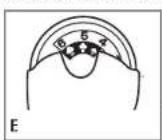
- With the water tank filled to the MAX mark, set fabric-select dial to appropriate setting (between 4 and 6) for your fabric. See fabric guide under the heel rest and read garment's label to help you determine fabric type (E).
- Be sure there is water in the reservoir. Steam is automatically turned off between settings 0 and 3.
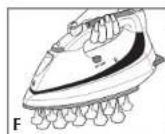
- For best performance, use surge of steam at 5-second intervals (F).
- When finished ironing, turn the fabric-select dial to 0 and unplug the iron.
Important: Always stand the iron on its heel rest when powered on but not in use.
VERTICAL STEAM
Use for removing wrinkles from hanging clothes and drapes.
- Be sure the water tank is filled to the MAX mark.
- Hang the garment to be steamed on a clothes hanger. (Curtains or drapes can be steamed once they are hung.)
-
Set the fabric-select dial to appropriate setting (between 4 and 6) for your fabric.
-
Hold the iron close to, but not touching, the fabric.
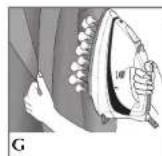
- Pull the fabric tight in your free hand and pump the button as you move the iron over the fabric (G).

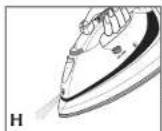
USING SPRAY
Use to dampen tough wrinkles at any setting (H).
- Be sure the iron is filled with water.
- On first use, pump the △button several times.
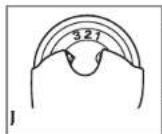
DRY IRONING
- Turn the fabric selection dial to setting 1, 2, or 3 iron without steam (J). The Smart Steam® system will automatically turn off.
- To dry iron at higher settings, empty the water from the reservoir to prevent sleaming.
EMPTYING WATER TANK (OPTIONAL)
Note: It is not necessary to empty the water after each use.
-
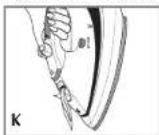
Unplug the iron and let it cool.
-
To release the water, hold the iron over a sink with the tip pointing down and to one side. Water will empty out of the water-fill opening (K).
Care and Cleaning
This product contains no user serviceable parts. Refer service to qualified service personnel.
CLEANING OUTSIDE SURFACES
- Make sure iron is unplugged and has cooled completely. Wipe the soleplate and outer surfaces with a soft cloth dampened with water. Add mild household detergent. Never use abrasives, heavy-duty cleansers, vinegar or scouring pads that may scratch or discolor the iron.
- After cleaning, steam iron over an old cloth to remove any residue from the steam vents.
AUTO CLEANING
To keep the steam vents free of any buildup, about once a month follow these instructions:
- Fill the water tank well below the MAX line. Plug in the iron.
- Turn the fabric-select dial to 6 and stand the iron on its heel rest. Allow it to heat until the on indicator light goes out and comes on again.
- Turn fabric selection dial to 0, unplug the iron and hold over a sink with the soleplate facing down.
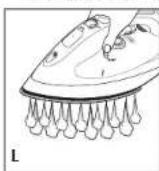
- Press and hold the AUTO CLEAN® button. Be careful, as hot water and steam will come out of the steam vents (L). Continue to hold the AUTO CLEAN® button until all the water has emptied. If necessary, rock iron side-to-side and front-to-back.
- When finished, release the button, stand the iron on its heel rest and plug it in. Heat for about 2 minutes to dry out any remaining water.
STORING YOUR IRON
- Unplug the iron and allow it to cool.
- Check that the selector is set to 0.
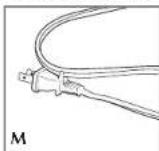
- Wrap the cord around the iron and insert cord into the clip to secure in place (M).
- Store vertically on its heel to prevent water leaking from the soleplate.
NOTAS/NOTES
¿NECESITA AYUDA?
For service, repair or any questions regarding your appliance, call the appropriate "800" number on the cover of this book. Do not return the product to the place of purchase.
Do not mail the product back to the manufacturer nor bring it to a service center.
You may also want to consult the website listed on the cover of this manual.
One-Year Limited Warranty
(Applies only in the United States and Canada)
What does it cover?
- Any defect in material or workmanship; provided; however, Applica's liability will not exceed the purchase price of the product.
For how long?
• One year after the date of original purchase.
What will we do to help you?
- Provide you with a reasonably similar replacement product that is either new or factory refurbished.
How do you get service?
- Save your receipt as proof of the date of sale.
- Check our on-line service site at www.prodprotect.com/applica, or call our toll-free number, 1-800-231-9786, for general warranty service.
- If you need parts or accessories, please call 1-800-738-0245.
What does your warranty not cover?
• Damage from commercial use
• Damage from misuse, abuse or neglect
• Products that have been modified in any way
- Products used or serviced outside the country of purchase
• Glass parts and other accessory items that are packed with the unit
- Shipping and handling costs associated with the replacement of the unit
- Consequential or incidental damages (Please note, however, that some states do not allow the exclusion or limitation of consequential or incidental damages, so this limitation may not apply to you.)
How does state law relate to this warranty?
- This warranty gives you specific legal rights, and you may also have other rights that vary from state to state or province to province.
Póliza de Garantía
San Jose, Costa Rica
Tel.: (506) 257-5716
223-0136
Ecuador
Col. Centro, Cuauhtemoc,
México, D.F.
Tel. 01 800 714 2503
Nicaragua
ServiTotal
City Market Nivel Plaza
Local 153
Diagonal Hotel Melia,
Caracas.
Tel. (582) 324-0969
www.applica-latam.com
servicio@applicamail.com.mx
Col. Chapultepec Morales, Mexico D.F
Deleg. Miguel Hidalgo
CP 11570
MEXICO
Copyright © 2008 Applica Consumer Products, Inc., a subsidiary of Salton Inc.
Col. Chapultepec Morales, Mexico D.F
Deleg. Miguel Hidalgo
CP 11570
MEXICO
Made in People's Republic of China
Printed in People's Republic of China
- BLACK&DECKER® Home
- Avant Steam™ Plancha Iron
- SPECIAL INSTRUCTIONS
- SAVE THESE INSTRUCTIONS.
- POLARIZED PLUG
- TAMPER-RESISTANT SCREW
- How to Use
- GETTING STARTED
- FILLING WATER TANK
- 3-WAY AUTOMATIC SHUTOFF
- SMART STEAM® TECHNOLOGY
- SURGE OF STEAM
- VERTICAL STEAM
- USING SPRAY
- DRY IRONING
- EMPTYING WATER TANK (OPTIONAL)
- Care and Cleaning
- CLEANING OUTSIDE SURFACES
- AUTO CLEANING
- STORING YOUR IRON
- NOTAS/NOTES
- ¿NECESITA AYUDA?
- One-Year Limited Warranty
- (Applies only in the United States and Canada)
- What does it cover?
- For how long?
- What will we do to help you?
- How do you get service?
- What does your warranty not cover?
- How does state law relate to this warranty?
- Póliza de Garantía
- Ecuador
- Nicaragua
Brand : BLACK & DECKER
Model : F990
Category : Iron