HFP-C2 - Mp3 player Renkforce - Free user manual and instructions
Find the device manual for free HFP-C2 Renkforce in PDF.


| Product Type | High-end MP3 player |
| Brand | Renkforce |
| Model | HFP-C2 |
| Dimensions (L x W x H) | 88 x 56 x 16 mm |
| Weight | 183 g |
| Display | 5 cm (2") TFT, 320 x 240 pixels |
| Supported Audio Formats | MP3, WMA, WAV, FLAC, APE, OGG |
| Storage Medium | microSD cards up to 64 GB (FAT32) |
| Interface | USB 2.0 |
| Battery Type | Integrated rechargeable Li-ion, 3.7 V / 1500 mAh |
| Battery Runtime | Up to 25 hours |
| Charging Time | Approx. 5 hours (with 1 A charger) |
| Headphone Jack | 3.5 mm stereo |
| Line Out | 3.5 mm (LINE) |
| DAC Chip | High-quality DAC |
| Amplifier | Professional amplifier chip |
| Volume Control | 100 graduations |
| Housing Material | CNC-cut metal |
| Operating Systems | Windows XP or higher, Mac OS 10, Linux 2.4.2 |
| Operating Temperature | -5 °C to +40 °C |
| Humidity Range | 30% to 75% RH (non-condensing) |
| Scope of Delivery | MP3 player, USB cable, operating instructions |
| Cleaning | Use a dry, lint-free cloth; no aggressive cleaning agents |
| Safety Notes | Keep away from children; protect from moisture and extreme temperatures; do not open or modify |
| Spare Parts / Repairability | No user-serviceable parts; built-in battery non-removable; reset button for troubleshooting |
Frequently Asked Questions - HFP-C2 Renkforce
User questions about HFP-C2 Renkforce
0 question about this device. Answer the ones you know or ask your own.
Ask a new question about this device
Download the instructions for your Mp3 player in PDF format for free! Find your manual HFP-C2 - Renkforce and take your electronic device back in hand. On this page are published all the documents necessary for the use of your device. HFP-C2 by Renkforce.
USER MANUAL HFP-C2 Renkforce
GB Operating Instructions
"HFP-C2"High-end MP3 player
Item No. 1457192 Page 20 - 37
CE
Seite
www.business.conrad.at
WMA 24 bit/48 kHz max.
APE/FLAG 16 bit/48 kHz max.
Speichermedien.....microSD-Karten (max. 64 GB)
Ladedauer ......ca. 5 h
- Introduction......21
- Explanation of Symbols....21
- Intended Use....22
- Scope of Delivery 22
- Features and Functions....23
- Safety Information 24
a) General Information ....24
b) Rechargeable Battery 25 - Operating Elements....26
- Charging the Integrated Rechargeable Battery....27
- Audio Connection....28
- Plugging in a Storage Medium 28
- Operation....29
a) General Operation....29
b) Menu Operation ....30
c) PC Connection....34 - Troubleshooting....35
- Cleaning 36
- Disposal....36
- Technical Data....37
1. Introduction
Dear Customer,
Thank you for purchasing this product.
To maintain this status and to ensure safe operation, you as the user must observe these operating instructions!
This product complies with the statutory national and European requirements.

These operating instructions are part of this product. They contain important notes on commissioning and handling. Also consider this if you pass on the product to any third party. Therefore, retain these operating instructions for reference!
If there are any technical questions, please contact:
International: www.conrad.com/contact
United Kingdom: www.conrad-electronic.co.uk/contact
2. Explanation of Symbols

The exclamation mark in a triangle indicates important notes in these operating instructions that must be observed strictly.

The arrow symbol indicates that special advice and notes on operation are provided.
3. Intended Use
The product is used to play back digital music files of different formats. The possible file formats can be found in chapter "Features and Functions".
It is intended for use indoors and in the protected outdoor area only. Contact with moisture, e.g. in bathrooms, must be avoided under all circumstances.
For reasons of safety and approval, the product must not be converted and/or changed by you. Using the product for any other purposes than those described above may damage the product. Improper use also may cause dangers such as fire, overheating, etc. Read the operating instructions precisely and keep them. Only pass the product on to any third parties together with the operating instructions.
All company names and product names are trademarks of their respective owners. All rights reserved.
4. Scope of Delivery
- MP3-player
- USB cable
- Operating Instructions

Up-to-date operating instructions
Download the latest operating instructions via the link www.conrad.com/downloads or scan the QR code. Follow the instructions on the website.
5. Features and Functions
- Playable audio files: MP3, WMA, WAV, FLAC, APE, OGG
- 5 cm (2") display with 320 x 240 pixels
• High-quality DAC-chip
• Professional amplifier chip - Socket for microSD-carts (max. 64 GB)
- CNC-cut housing
• Volume control in 100 graduations
• 3.5 mm stereo headphones socket - Integrated rechargeable battery with 1500 mAh with up to 25 h battery runtime
6. Safety Information

Read the operating instructions attentively and particularly observe the safety notes. If the safety notes and the information in these operating instructions regarding proper handling are not observed, we assume no liability for any resulting injury/property damage. In such cases, the warranty/guarantee will also lapse.
a) General Information
- The product is not a toy. Keep it away from children and pets.
- Do not leave packaging material lying around carelessly. It may become a dangerous toy for children.
- Protect the product from extreme temperatures direct sunlight, high humidity, moisture, flammable gases, vapours and solvents.
- Do not subject the product to mechanical stress.
- Handle the product with care. Impact, blows or falls from even a low height will damage the product.
- Also observe the safety notes and operating instructions of the other devices to which the product is connected.

- When secure operation is no longer possible, shut off the product and protect it from inadvertent use. Secure operation is no longer warranted if the product:
- has visible damage,
- no longer works properly,
- was stored under detrimental ambience conditions for an extended period or
-
was subjected to considerable transport strain.
-
Consult an expert if you are unsure as to the function, safety or connection of the product.
- Have maintenance, adjustment and repair work only performed by a specialist or specialist workshop.
- In case you have questions which are not answered in these operating instructions, contact our technical service or other specialists.
b) Rechargeable Battery
- The installed rechargeable battery cannot be removed and must only be charged in the device. Never try to remove the rechargeable battery or to charge it at an external charger.
- The rechargeable battery must only be charged via the USB interface at a USB mains unit or a USB port of a computer. Any other charge current supply would lead to damage to the device and may overheat or cause the installed rechargeable battery to catch fire (danger of explosion!).
7. Operating Elements
1 button
2 Display
3 Dial switch
4 button
5 button
6 button
7 MENU button
8 BACK button
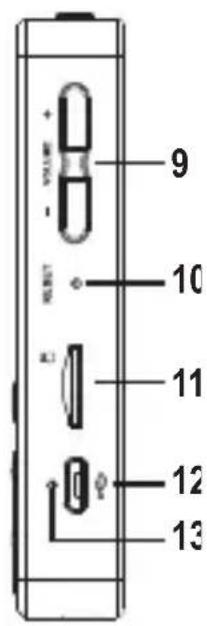
9 VOLUME button
10 RESET button
11 microSD socket
12 USB Interface
13 Charging indication
14 LINE connection
15 Headphones connection

natural_image
Simple line drawing of a rectangular device with a circular button and label '1' (no text or symbols beyond the number)

8. Charging the Integrated Rechargeable Battery

The USB connection on which the device is charged must have a resilience of at least 500 mA. This is usually ensured at every USC connection of computers. However, the device may also be charged with mains units offering a higher resilience. In this case, the service life reduces accordingly.

Before first commissioning, the integrated rechargeable battery must be charged completely first. The charging duration is approx. 5 hours with a 1 A-mains unit. A charge at the USB connection of a computer may take up to 10 hours.
- Connect the enclosed USB cable to the USB interface (12).
- Plug the other end of the USB cable into the USB connection of a computer or a suitable USB mains unit.
- The charge display (13) lights up red while charging and goes out when the integrated rechargeable battery is fully charged.
- Disconnect the USB cable again after charging.
- The operating time with one battery charge is 25 hours depending on volume and use.
- The charge display at the upper right in the display (2) indicates the charging state of the rechargeable battery. Recharge the unit when the charge condition display shows an empty battery symbol.
9. Audio Connection
- Connect your headphones to the headphone connection (15).
- If you want to play back the audio signal via a stereo or another device with an audio input, connect the LINE (14) connection to the input of the corresponding unit.
10. Plugging in a Storage Medium

microSD-cards up to 64 GB are supported. The memory card must be formatted in FAT 32.
Due to the great variety of systems with microSD storage media and their different functions, some of which are very producer-specific, we cannot guarantee that all microSD cards will be recognised and that all the operational functions are available on this device.
If your microSD card is not recognised, please remove it and reconnect it. Insert the microSD card into your microSD socket (11).
11. Operation
a) General Operation
Switching On/Off
Keep the button ⬆(1) pushed for longer to switch the device on or off.
Key lock
Push the button ⏻(1) briefly with the device switched on to activate or deactivate the key lock.
Start/pause playback
Push the button ▶(4) to start or stop music playback.
Track search/scanning
During playback, briefly push the button ▶(5) to jump to the next track.
During playback, briefly push the button (6) to jump to the last track.
During playback, push the button ▶(5) longer to activate fast forward scanning.
During playback, push the button (6) longer to activate reverse scanning.
Volume control
Push the button VOLUME (9) to adjust volume:
VOLUME+ increases the volume
VOLUME- reduces the volume
Playback menu
Pushing the button BACK (8) during playback jumps to the music menu (see "Menu Overview").
Push the button BACK (8) several times to select the menu levels backwards.
Here, you can scan for a title, select by different criteria, add to playback lists (favourites), etc.
b) Menu Operation
General Menu Operation
- The MENU (7) button selects a menu item or a selected function.
Keep this button pushed during playback to enter the main menu.
Push this button briefly to select a menu item or a function.
- Use the button BACK (8) to jump one level back in the menu.
- In order to navigate in the displayed menu, turn the dial switch (3) or push the buttons ▶(5) or (6)
Menu overview
| Music All songs | Selection by different criteria or storage locations | |
| Artists | Direct jump to playback when this is already running in the background | |
| Albums | ||
| Genres | ||
| Local folder | ||
| Cardfolder | ||
| Category See Music menu | ||
| Browse File | Local folder Deletion functions for the installed folder | |
| Cardfolder Deletion functions for the memory card | ||
| Equalizer Rock Different sound pre-settings can be chosen. | ||
| Pop | ||
| Soft | ||
| Jazz | ||
| Classical | ||
| Techno | ||
| Custom Settings of the individual equalizer bands with the dial switch (3) or the buttons ▶(5) and (6) ◀◀◀ The button MENU (7) jumps to the next equalizer band. | ||
| Off Sound control off | ||
| My favourite My favourite [1] Favourites list 1 | ||
| My favourite [2] Favourites list 2 | ||
| My favourite [3] Favourites list 3 | ||
| Play settings | Shuffle Switching random playback on and off | |
| Repeat Different options for the repeat function | ||
| Album cover Switching the cover display on or off | ||
| Default volume Sets the activation volumeMemory = last settingUser-defined = pre-setting | ||
| Memory play Saves the last playback item when switching off the playerOff = no storageLocation = playback is continued at the last playback pointTitle = playback is continued at the start of the last title played back | ||
| The line level Setting for the line level for the connection LINE (14)-6 dB = low0 dB = loud | ||
| Setting Power Off Sets the automatic deactivation(Sleeptimer) | ||
| Displaysettings | Sets the time of thebacklighting | |
| Language/Language | Sets the menu language | |
| System Displays system informationFirmware upgrade optionReset to factory settings | ||
| Exit Setting Jump to the main menu | ||
c) PC Connection

While the device is connected to a computer, the rechargeable battery is charged automatically.
- Connect the enclosed USB cable to the USB interface (12).
- Connect the other end of the USB cable to the USB port of your computer.
- The device switches on automatically.
- Now you have access to the inserted memory card through your computer's Explorer and are able to save audio files there.
12. Troubleshooting
The device cannot be switched on
- The rechargeable battery is discharged.
- The device needs to be reset. Push the button RESET (10) with a pointy object (e.g. a straightened paper clip).
The device cannot be operated anymore
- Switch the device off and on again (keep the button ⬇1) pushed).
- The device needs to be reset. Push the button RESET (10) with a pointy object (e.g. a straightened paper clip).
No sound at playback
- The volume is set too low.
- The headphones are not connected or connected incorrectly.
- The headphones are defective.
- The format of the played-back file is not supported by the device.
No files can be saved to the microSD card
- The connection to the computer is not properly connected.
- The memory card is full.
- The memory card is damaged.
13. Cleaning

Never use any aggressive cleaning agents, cleaning alcohol or other chemical solutions, since these may damage the casing or even impair function.
- Disconnect the product from the USB power supply before cleaning it.
- Use a dry, lint-free cloth to clean the product.
14. Disposal
Electronic devices are recyclable and should not be disposed of in household waste. Dispose of the product according to the applicable statutory provisions at the end of its service life.

The installed rechargeable battery cannot be removed and therefore must be disposed of together with the product.
15. Technical Data
Display....5 cm (2") / 320 x 240 pixels
Files that can be played back.....MP3, WMA, WAV, FLAC, APE, OGG
WMA 24 bit/48 kHz max.
APE/FLAG 16 bit/48 kHz max.
Storage media .... microSD-cards (max. 64 GB)
Interface......USB 2.0
Operating systems......Windows XP or higher
MAC OS 10
Linux 2.4.2
Rechargeable battery 3.7 V/1500 mAh
Operating duration for rechargeable batteries.. 25 h
Charge duration....Approx. 5 h
Operating/storage conditions....-5 °C to +40 °C,
30% to 75% rel. humidity
(non-condensing)
Dimensions (L x W x H)....88 x 56 x 16 mm
Weight 183 g

Copyright 2016 by Conrad Electronic SE.

This is a publication by Conrad Electronic SE, Klaus-Conrad-Str. 1, D-92240 Hirschau (www.conrad.com).
All rights including translation reserved. Reproduction by any method, e.g. photocopy, microfilming, or the capture in electronic data processing systems require the prior approval by the editor. Reprinting, also in part, is prohibited. This publication represents the technical status at the time of printing.
Copyright 2016 by Conrad Electronic SE.
written



- Seite
- Introduction
- Explanation of Symbols
- Intended Use
- Scope of Delivery
- Up-to-date operating instructions
- Features and Functions
- Safety Information
- a) General Information
- b) Rechargeable Battery
- Operating Elements
- Charging the Integrated Rechargeable Battery
- Audio Connection
- Plugging in a Storage Medium
- Operation
- a) General Operation
- Switching On/Off
- Key lock
- Start/pause playback
- Track search/scanning
- Volume control
- Playback menu
- b) Menu Operation
- General Menu Operation
- c) PC Connection
- Troubleshooting
- The device cannot be switched on
- The device cannot be operated anymore
- No sound at playback
- No files can be saved to the microSD card
- Cleaning
- Disposal
- Technical Data
Brand : Renkforce
Model : HFP-C2
Category : Mp3 player