
Classic RA-AG0026E - Watch ORIENT - Free user manual and instructions
Find the device manual for free Classic RA-AG0026E ORIENT in PDF.


User questions about Classic RA-AG0026E ORIENT
0 question about this device. Answer the ones you know or ask your own.
Ask a new question about this device
Download the instructions for your Watch in PDF format for free! Find your manual Classic RA-AG0026E - ORIENT and take your electronic device back in hand. On this page are published all the documents necessary for the use of your device. Classic RA-AG0026E by ORIENT.
USER MANUAL Classic RA-AG0026E ORIENT
Thank you for choosing our product. To ensure prolonged use and optimum performance, please read this instruction manual carefully and familiarize your-self with the terms of the guarantee.
Please keep this Instruction Manual handy for future reference.
◆ SAFETY PRECAUTIONS
Make absolutely sure to observe the demarcated contents indicated below to prevent any possible physical danger and property damage to you as well as other people concerned.
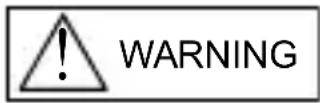
... A demarcation with this symbol represents the contents assuming possibility for death or serious injury when the product is used in any manner different from given instructions.
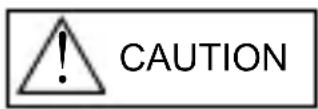
... A demarcation with this symbol represents the contents assuming possibility of causing human injury or material damage only when a product is used in any manner different from given instructions.
◆ IN HANDLING THE WATCH
(1) Water-resistance
| Type\Conditions of use | Underwater operation of crown and operation of crown with drops of water on it | Exposure to small amounts of water (face-washing, rain, etc.) | Water sports (swimming, etc.), frequent contact with water (car-washing, etc.) | Skin diving (air tanks are not used) | Scuba diving (air tanks are used) | Mixed-gas Diving (using helium gas) | ||
| Non water resistant | Without WATER RESISTANT (WATER RESIST) | × × | × × | × × | ||||
| Water resistant watches | Water resistant for daily life | WATER RESISTANT (WATER RESIST) | × | ○ | × × | × × | ||
| Reinforced water resistance for daily life I | WATER RESISTANT (WATER RESIST) 50m (5bar) | × | ○ | ○ | × × | × | ||
| Reinforced water resistance for daily life II | WATER RESISTANT (WATER RESIST) 100m (10bar) 200m (20bar) | × | ○ | ○ | × | × | × | |
| Diver's watches | Diver's watch for Air Diving | AIR DIVER'S 100m / 150m 200m | × | ○ | ○ | ○ | × | |
| Diver's watch for Mixed-gas Diving | He-GAS DIVER'S 200m / 300m /... | × | ○ | ○ | ○ | ○ | ||
* It is recommended that you use the watch correctly following the above-mentioned scope of usage after ascertaining water resistance precautions marked on the dial or caseback.
WARNING
① A watch with water resistance for daily life 30M (3 bar) can be used during face-washing, etc. but cannot be used in an environment in which it will be submerged in water.
② A watch with reinforced water resistance for daily life I 50M (5 bar) can be used while swimming, etc. but cannot be used during any type of diving including skin diving.
③ A watch with reinforced water resistance for daily life II 100M or 200M (10 or 20 bar) can be used while skin diving, but cannot be used while scuba diving using oxygen tanks or saturation diving using helium gas, etc.
CAUTION
④ Keep the crown pushed in at all times (in the normal position) while using the watch. If the crown is the screwed-down type, check that it is securely screwed down.
⑤ Do not operate the crown underwater, or while the watch is wet. Water may enter the interior of the watch and defeat the water resistance.
⑥ If your watch is non-water resistant, beware of splashes of water (during face washing, rain, etc.) and sweat. If the watch becomes wet from water or sweat, wipe the moisture off with a dry, soft cloth.
⑦ Even with a water resistant watch for everyday use, avoid directing strong jets of mains water onto the watch. Water pressure above the limit can apply, which may defeat the water resistance.
⑧ With a water resistant watch for everyday use, rinse sea water off the case after exposure, then wipe it thoroughly to avoid corrosion and other effects.
⑨ The interior of the watch contains some amount of moisture, which may cause fogging on the inside of the glass when the outside air is cooler than the internal temperature of the watch. If the fogging is temporary it causes no harm inside the watch, but if prolonged, or if water enters the watch, consult your place of purchase and do not leave the problem untreated.
(2) Shock
① Be sure not to carry the watch when you engage in strenuous sports, whereas playing such light sports as golf, etc., will not adversely influence the watch.
② Avoid a violent shock such as dropping the watch on the floor.
natural_image
Simple line drawing of a child using a golf club to dig (no text or symbols)(3) Magnetism
① If the watch is left at a location with strong magnetism for an extended period of time, the components may be magnetized, resulting in malfunction. Be careful.
② The watch may temporarily speed up or slow down when exposed to magnetism. Precision is restored when placed away from magnetism. In such a case, reset the time.
(4) Vibration
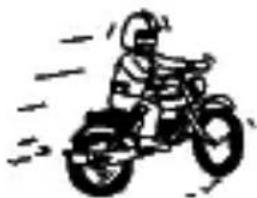
The watch may lose precision if subjected to strong vibrations such as from riding motorcycles, using jackhammers, chain saws, etc.
natural_image
Simple line drawing of a person riding a three-wheeled motorcycle with motion lines (no text or symbols)(5) Temperature
In environments below and above normal temperatures (5°C-35°C), the watch may malfunction and stop.
Do not use the watch at high temperatures, such as in a sauna. The watch may heat and cause burns.
(6) Chemicals, Gases, etc.
Utmost caution must be exercised when coming into contact with gases, mercury, chemicals (paint thinner, gasoline, various solvents, detergents containing such components, adhesives, paint, drugs, perfumes, cosmetics, etc.), and so forth. Such may cause discoloration of the watchcase, watchband, and dial face. Discoloration, deformation, and damage to various resin-based component parts may also occur.
(7) About accessory parts
Do not attempt to disassemble or modify the watch.
Store the bracelet/strap pin and other small parts out of the reach of children.
If any small parts are swallowed, immediately contact a doctor.
(8) Allergic reactions
If you develop a skin rash or your skin becomes abnormally irritated due to contact with the watch or strap, stop wearing the watch immediately and consult a doctor.
(9) About "luminous light"
This watch has luminous light on the hands and dial.
The luminous light is a safe paint that stores sunlight and artificial light without using any radioactive material, and emits that light in a dark setting. As the paint discharges the stored light, it will become dimmer over time. The amount of light emitted and the time that light is emitted depends on various factors when the light is stored, such as the shape of the glass, the thickness of the paint, surrounding brightness level, the distance from the watch to the light source, and the light absorption level. Please note that when not enough light energy is stored, the watch may emit weak light or emit light for only a short time.
(10) Water resistant watchband
Some products employ leather and nylon bands on which a special treatment to resist perspiration and water absorption have been applied. Please understand that the water resisting effect of this watchband can be lost depending on the period and conditions of use.
◆ HOW TO IDENTIFY THE CALIBER NUMBER
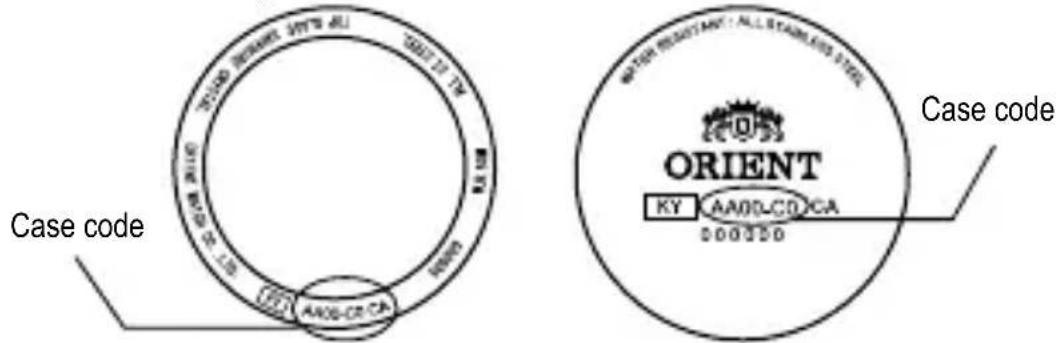
Check the caliber number by referring to the model number of your watch or the case code on the watch's case back.
1. Searching by 10-digit model number
Check the 10-digit model number on the guarantee supplied with your watch. You can also see the number on the product tag put on the watch. Its second and third digits indicate the caliber number of your watch.
Example: If the model number is “☐AA00001B☐”, the caliber number is “AA”.
2. Searching by the case code
See the case code on the case back of your watch.
The first two digits indicate the caliber number.
text_image
Case code ORIENT KY AA00LCD CA 000350 Case codeExample : When the case code is "AA00-C0", the caliber number is "AA".
* The place of case code may vary and its letter size may be small and difficult to see depending on the characteristics of watches.
* The pictures and illustrations on this manual may differ from the actual appearance of your watch but the function and operation procedures are the same.
◆ SPECIFICATIONS
| Caliber | Number of jewels | Date Day of week | Second hand halt mechanism | Remark1* | ||
| AA F69 22 | ○ ○ | ○ | 8:00P.M.-4:00A.M. | |||
| AC F67 22 | ○ | - | ○ | 8:00P.M.-2:00A.M. | ||
| AG F6T 22 | - | - | ○ | 8:00P.M.-4:00A.M. | ||
| AP F62 24 | ○ | - | ○ | 8:00P.M.-1:00A.M. | ||
(1) Vibrations: 21,600 vibrations/1 hour
(2) Daily accuracy: +25 sec. to -15 sec.
(3) Drive system: Mainspring winding (Hand-winding)
(4) Running time: More than 40 hours
(5) Shock-proof bearings to protect the balance with hairspring from shocks.
The stated daily accuracy is in the following conditions:
• After 24 hours at room temperature with the mainspring wound fully and the dial facing up.
- Due to the characteristics of the automatic winding watch, the time may deviate from the stated “daily accuracy” depending on the following conditions: amount of time the watch is worn each day, position of the watch, movement of your arm, winding condition of the mainspring.
- Determine the deviation from not just a day but a period of about a week. Product specifications may change without notice, for improvement.
* Avoid setting the date during the time periods listed in "Remark1" above since the calendar changes during this time. If the date is set during this time period, the date may not change or the watch may malfunction. Be sure to move the hour and minute hands away from this time period when setting the date.
◆ NAMES AND FUNCTIONS OF INDIVIDUAL COMPONENT PARTS
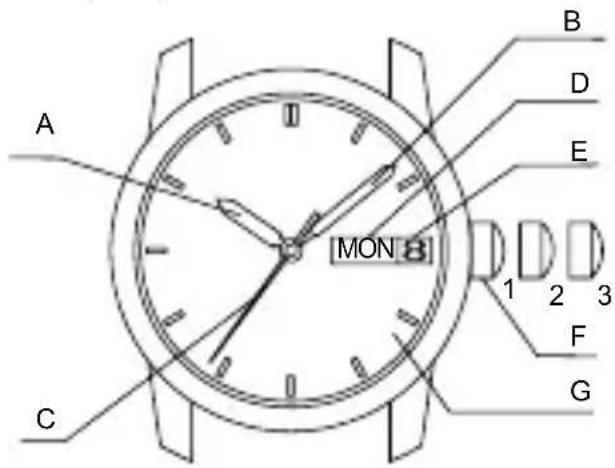
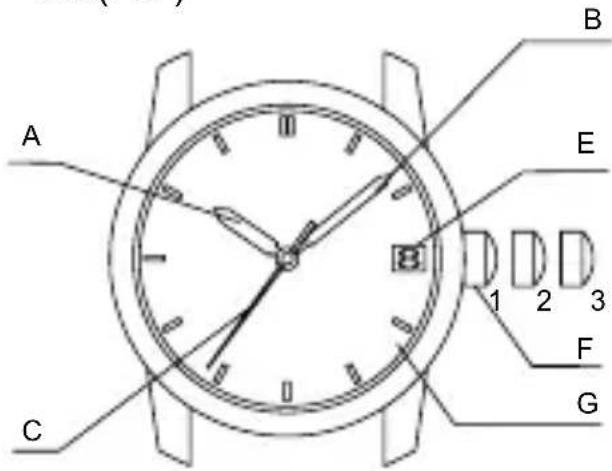
A: Hour hand E: Date 1. Normal position
B: Minute hand F: Crown 2. First click: Calendar setting
C: Second hand G: Dial 3. Second click: Time setting
D: Day of the week
text_image
A B D E MON 1 2 3 F G C
text_image
A B E 1 2 3 F C GAP(F62)
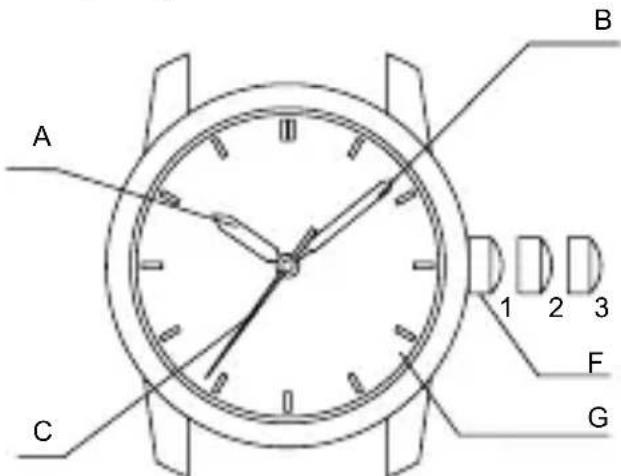
text_image
A B C 1 2 3 F G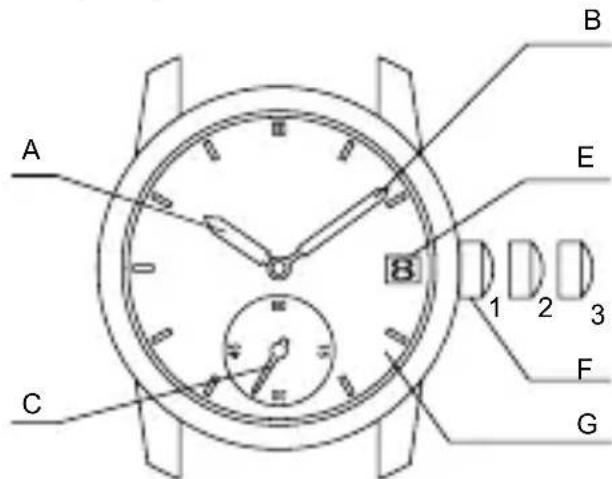
text_image
A B E 1 2 3 C F G* The position of the crown, date indicator, or day of the week window may be different, depending on the model.
◆ AUTOMATIC WINDING MECHANISM
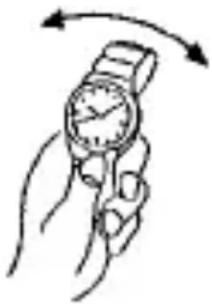
(1) The mainspring is wound by natural movements of your arm when wearing the watch on your wrist.
(2) If your watch stops, swing the watch back and forth ten or more times to re-start the second hand. After it starts moving, set the date and time.
(3) This watch will run approximately 40 hours after it is fully wound. If it is not wound enough, the watch may lose
natural_image
Illustration of a hand holding a wristwatch with an arrow indicating rotational motion (no text or symbols)accuracy. In order to maintain the watch's accuracy, we recommend wearing the watch at least 8 hours a day.
◆ HAND WINDING MECHANISM
(1) The mainspring is wound up manually.
(2) To wind the spring, ensure that the crown is in its normal position and slowly turn it clockwise.
Turning the crown counterclockwise will have no effect.
(3) When the watch is in the stopped state, the spring can be wound sufficiently by rotating the crown approximately 30 times. Since the crown will rotate even when winding is complete, wind the watch using the above number of turns as a guide.
(4) This watch will run approximately 40 hours after the spring is fully wound.
◆ MODELS WITH SCREWED-DOWN CROWN
Depending on the model, you may not be able to pull the crown out without unscrewing it (models with screwed-down crown).
Operate this type of watch as follows:
(1) Before setting the date and time, first turn the crown counterclockwise to loosen the screw lock.
(2) After setting the date and time, turn the crown clockwise while pressing in, until it stops turning to securely tighten the screw.
◆ HOW TO SET THE TIME & CALENDAR [AA(F69)]
(1) Pull out the crown to the second click when the second hand reaches the 12 o'clock position. (The second hand stops.)
![ORIENT Classic RA-AG0026E - ◆ HOW TO SET THE TIME & CALENDAR [AA(F69)] - 1](/content/2026/05/799760/images/76af57742ddbaeee70251642d8a98ca6aa3ead93bf2e7c831acbcc96c1a152fd.jpg)
text_image
Diagram showing a clock face with hour and minute hands, followed by a rightward arrow indicating time or duration.(2) Turn the crown counterclockwise and set the current time.
* When setting the time, first bring the hand back slightly earlier than the actual time and then move it forward to the actual time. * For the watch with a calendar, make sure that you set either a.m. or p.m. without fail. The date changes at [twelve o'clock midnight].
(3) Pull the crown out to the first click. * The crown on this watch can be pulled out to either of two clicks.
![ORIENT Classic RA-AG0026E - ◆ HOW TO SET THE TIME & CALENDAR [AA(F69)] - 2](/content/2026/05/799760/images/8c5c00b435a5cac4eac1060a2002a9e1b6ea475604b6ebbbeca44d6e21ba3548.jpg)
text_image
Turn counterclockwise![ORIENT Classic RA-AG0026E - ◆ HOW TO SET THE TIME & CALENDAR [AA(F69)] - 3](/content/2026/05/799760/images/9d32720d75e434d4d99d84fdcbfc377328e357bd63eecdb65481be915579a194.jpg)
text_image
SAT 6(4) Turn the crown counterclockwise, and set the date to that for the current day.
![ORIENT Classic RA-AG0026E - ◆ HOW TO SET THE TIME & CALENDAR [AA(F69)] - 4](/content/2026/05/799760/images/26220f12365697fbc7f09874ed5b424f83a8431c9b76aed153ad1bfdc87c4923.jpg)
text_image
SAT 8 Turn counterclockwise(5) Turn the crown clockwise to set the day of the week to the current day.
* This watch has a bilingual day of the week function.
Turn the crown to select the desired language.
The display languages differ depending on the model.
![ORIENT Classic RA-AG0026E - ◆ HOW TO SET THE TIME & CALENDAR [AA(F69)] - 5](/content/2026/05/799760/images/4e83f8c06713bc714ad2965c57b8bb183c442d0a064ae94efbf2d0b51027c498.jpg)
text_image
Turn clockwise MON 8** Correcting the date at the end of the month The date will have to be corrected for months that have 30 days, or those that have less than 30 days. After the date switches over to the first day of the succeeding month, set the date to the [First (1)].
(6) Push the crown back to the normal position.
![ORIENT Classic RA-AG0026E - ◆ HOW TO SET THE TIME & CALENDAR [AA(F69)] - 6](/content/2026/05/799760/images/148ac6187c6d3f0adc1fe8d120b7aa5066ca97c72f0330ff9c7b1366cc1d15ee.jpg)
text_image
MON8◆ HOW TO SET THE TIME & CALENDAR [AC(F67)]
(1) Pull out the crown to the second click when the second hand reaches the 12 o'clock position. (The second hand stops.)
![ORIENT Classic RA-AG0026E - ◆ HOW TO SET THE TIME & CALENDAR [AC(F67)] - 1](/content/2026/05/799760/images/a0629cca29f2d922da09f2ef5cdc17e4fd1f656c75cfec6ed2be3660dffe9482.jpg)
text_image
Diagram showing a clock face with hour and minute hands, followed by a directional arrow indicating time or duration.(2) Turn the crown counterclockwise and set the current time.
* When setting the time, first bring the hand back slightly earlier than the actual time and then move it forward to the actual time. * For the watch with a calendar, make sure that you set either a.m. or p.m. without fail. The date changes at [twelve o'clock midnight].
![ORIENT Classic RA-AG0026E - ◆ HOW TO SET THE TIME & CALENDAR [AC(F67)] - 2](/content/2026/05/799760/images/44252f8ae6db34b1e7c919619cd743e9a5b8391180f939801c60c21550bc8799.jpg)
text_image
Turn counterclockwise(3) Pull the crown out to the first click.
* The crown on this watch can be pulled out to either of two clicks.
![ORIENT Classic RA-AG0026E - ◆ HOW TO SET THE TIME & CALENDAR [AC(F67)] - 3](/content/2026/05/799760/images/48a0572f371615c0929a58e0345f765a9caf07ebc9bfe411efbee71a28548f06.jpg)
natural_image
Diagram of a circular object with internal components and an arrow indicating direction (no text or symbols)(4) Turn the crown counterclockwise, and set the date to that for the current day.
** Correcting the date at the end of the month The date will have to be corrected for months that have 30 days, or those that have less than 30 days. After the date switches over to the first day of the succeeding month, set the date to the [First (1)].
(5) Push the crown back to the normal position.
![ORIENT Classic RA-AG0026E - ◆ HOW TO SET THE TIME & CALENDAR [AC(F67)] - 4](/content/2026/05/799760/images/40f03890f7efb81eedd56f02cff9e9ceffa926b5cb28c30ce26df0c3dc02d046.jpg)
text_image
8 Turn counterclockwise![ORIENT Classic RA-AG0026E - ◆ HOW TO SET THE TIME & CALENDAR [AC(F67)] - 5](/content/2026/05/799760/images/fb1f7efa22d245fd97531f8d586f46d368ba6e388a867d7a2c28615711e7149f.jpg)
natural_image
Diagram of a circular dial with internal components and directional arrow (no text or symbols)◆ HOW TO SET THE TIME [AG(F6T)]
(1) Pull out the crown to the second click when the second hand reaches the 12 o'clock position. (The second hand stops.)
(2) Turn the crown counterclockwise and set the current time.
![ORIENT Classic RA-AG0026E - ◆ HOW TO SET THE TIME [AG(F6T)] - 1](/content/2026/05/799760/images/31a154635a1ff81bf283380b1f6c18fae3127c01b30336e04d72d388b1e42a32.jpg)
text_image
Turn counterclockwise(3) Press the crown in to the normal position.
![ORIENT Classic RA-AG0026E - ◆ HOW TO SET THE TIME [AG(F6T)] - 2](/content/2026/05/799760/images/1e2a30a335753e8fc5fb31d8df95c4169f32fb020acc2a2a5e3f354414f25910.jpg)
natural_image
Simple analog clock face with hour and minute hands, showing time near 10:30 (no text or symbols beyond clock face)◆ HOW TO SET THE TIME & CALENDAR [AP(F62)]
(1) Pull out the crown to the second click when the second hand reaches the 12 o'clock position. (The second hand stops.)
![ORIENT Classic RA-AG0026E - ◆ HOW TO SET THE TIME & CALENDAR [AP(F62)] - 1](/content/2026/05/799760/images/5ddee0d00ac665e7c3ff9025ebe7cf72571cb8efe17e0f87bfedd03ae4bc08c3.jpg)
text_image
Diagram showing a clock face with hour and minute hands, followed by an arrow indicating rightward movement.(2) Turn the crown counterclockwise and set the current time.
* When setting the time, first bring the hand back slightly earlier than the actual time and then move it forward to the actual time.
* For the watch with a calendar, make sure that you set either a.m. or p.m. without fail. The date changes at [twelve o'clock midnight].
![ORIENT Classic RA-AG0026E - ◆ HOW TO SET THE TIME & CALENDAR [AP(F62)] - 2](/content/2026/05/799760/images/fa58730a2ca61a6bd4b7c6a9f59e40bec6d1f538be4b31947741311b6ee174e4.jpg)
text_image
Turn counterclockwise(3) Pull the crown out to the first click.
* The crown on this watch can be pulled out to either of two clicks.
![ORIENT Classic RA-AG0026E - ◆ HOW TO SET THE TIME & CALENDAR [AP(F62)] - 3](/content/2026/05/799760/images/7e7838fd3bca2c112b224f069f582fc20ae15089f8088d0be282c50a44368666.jpg)
text_image
60 45 51 06ENGLISH
(4) Turn the crown clockwise, and set the date to that for the current day.
** Correcting the date at the end of the month
The date will have to be corrected for months that have 30 days, or those that have less than 30 days. After the date switches over to the first day of the succeeding month, set the date to the [First (1)].
(5) Push the crown back to the normal position.
![ORIENT Classic RA-AG0026E - ◆ HOW TO SET THE TIME & CALENDAR [AP(F62)] - 4](/content/2026/05/799760/images/e41124ae553a3b56f01b27bb5f141072b21978c4adde0aecb71450d68774c95b.jpg)
text_image
Turn clockwise![ORIENT Classic RA-AG0026E - ◆ HOW TO SET THE TIME & CALENDAR [AP(F62)] - 5](/content/2026/05/799760/images/e6abf10a1d6de9a21db379277077c3dc7ba2fe56c5a278fd97951a8621e1ad7b.jpg)
natural_image
Diagram of a circular dial with internal components and directional arrow (no text or symbols)◆ HOW TO SET THE MONTHLY CALENDAR
Some models come with a monthly calendar.
The monthly calendar can be used by turning the crown at the 4 o'clock position to set the rotating ring inside the watchcase and aligning it with the day of the week that is printed on the dial.
Turn the crown to align the first day of the month to the appropriate day of the week.
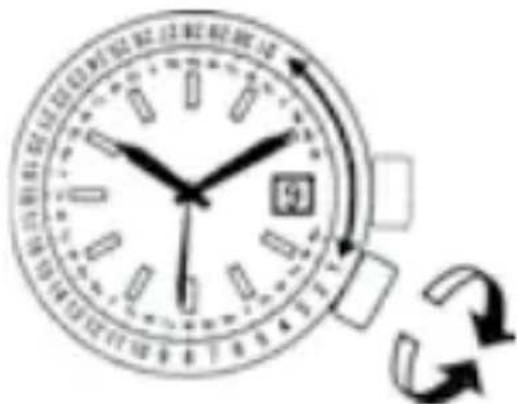
text_image
Hand-drawn clock face with Chinese text and directional arrows, indicating time measurement or refresh.* Note that when setting the first day of the month, if the days at the end of the month (31st, etc.) are aligned with the section that does not have the days of the week printed on the dial (3 - 4 o'clock side), days of the week will not be indicated at the end of the month.
◆ USING THE ROTATING INDICATOR RING
Please notice that some models come with a rotating indicator ring, which should be used properly.
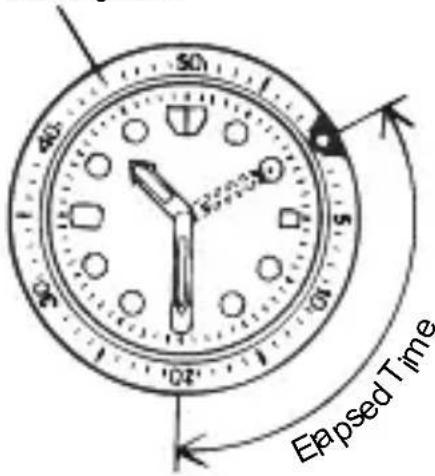
Turn the ring by pointing the ▽ mark to the minute-hand. While certain time goes by, you can measure the elapsed time from the distance between minute-hand and figures on the rotating indicator ring. You can also set the ▽ mark as a desired time to remind you how long time is still remain for an appointment.
You cannot turn the ring reversely since it comes with a protection mechanism for preventing wrong operation by force or shock. Figures on the ring could also help you to read the current time easily.
Rotating bezel
text_image
50 40 30 1 0 Eapsed Time* Depending on design, anti-reversely and 1 minute "click" sound mechanism on rotating indicator ring does not apply to some models.
◆ HOW TO USE THE INTERNAL ROTATING INDICATOR RING
Please notice that some models come with an internal rotating indicator ring, which should be used properly.
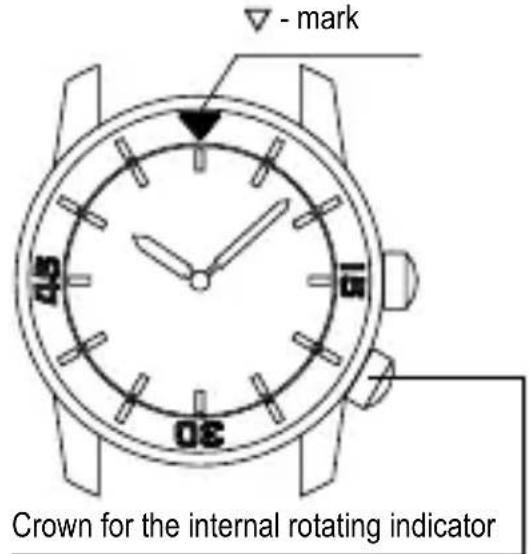
Turn the crown for the internal rotating indicator ring to set the ▽ - mark to the position of the minute hand.
The position of the internal rotating indicator ring to which the minute hand is pointing after some time has elapsed indicates the elapsed time.
Setting the mark to the desired time also allows you to know the remaining time.
text_image
- mark Crown for the internal rotating indicator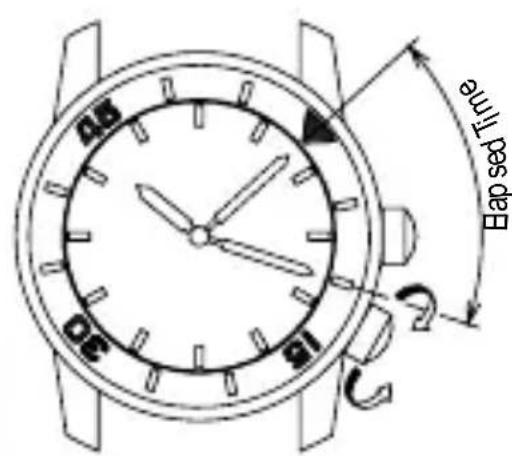
text_image
Bap sealed fluteThe above figure shows that 10 minutes have elapsed since 10:08.
* The positions of the crown and the appearance of the internal rotating indicator ring may differ depending on the model.
DEUTSCH
MECHANISCHE UHR
BEDIENUNGSANLEITUNG
natural_image
Simple line drawing of a person riding a three-wheeled motorcycle with motion lines (no text or symbols)(5) Temperatur
text_image
VDDO ROHARD 2017 A1 2017.21.19 2017.21.19 2017.21.19 2017.21.19 2017.21.19 2017.21.19 2017.21.19 2017.21.19 2017.21.19 2017.21.19 (A400-CC) CA 2017.21.19 WATER RESORTANT: ALL STADIEN 850 STREI ORIENT KY AA00-COCA 300000 Gehäuse-Codenatural_image
Illustration of a hand holding a wristwatch with motion arrows indicating rotational movement (no text or symbols)♦ HANDAUFZUGMECHANISMUS
text_image
Diagram of a clock face with an arrow indicating rightward movement, showing time measurement or navigation.text_image
Diagram of a clock face with an arrow indicating rightward movement, showing time measurement or sequence.natural_image
Diagram of a circular mechanical component with internal components and an arrow indicating direction (no text or symbols)text_image
Diagram showing a circular dial with a labeled component '8' and an arrow indicating rotation or adjustment.natural_image
Circular dial with a pointer and arrow pointing to it, no text or symbols presenttext_image
Diagram of a clock face with an arrow indicating rightward movement, showing time measurement or directional indicator.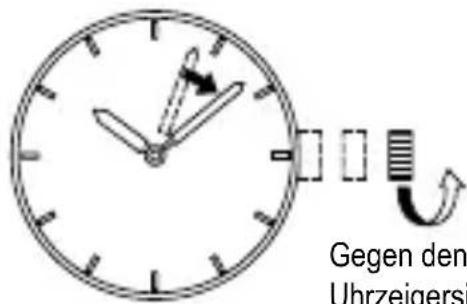
natural_image
Simple line drawing of an analog clock face with hour and minute hands, showing time near 3:00 (no text or symbols)text_image
Diagram showing a clock face with hour and minute hands, followed by an arrow indicating rightward movement.natural_image
Diagram of a circular dial with a pointer and arrow indicating direction (no text or symbols)text_image
Hand-drawn clock face with Chinese text and directional arrows, indicating time and refresh functionnatural_image
Simple line drawing of a child using a golf club to dig (no text or symbols)(5) Temperatura
natural_image
Simple line drawing of a person riding a three-wheeled motorcycle (no text or symbols)natural_image
Illustration of a hand holding a wristwatch with an arrow indicating rotational motion (no text or symbols)text_image
Diagram showing a clock face with hour and minute hands, followed by a rightward arrow indicating time measurement or direction.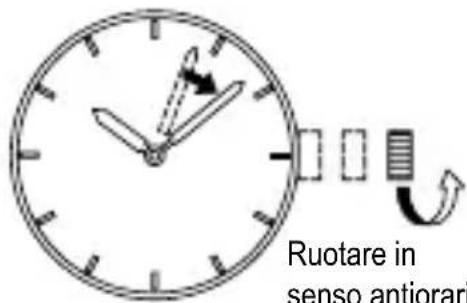
text_image
Ruotare in senso antiorari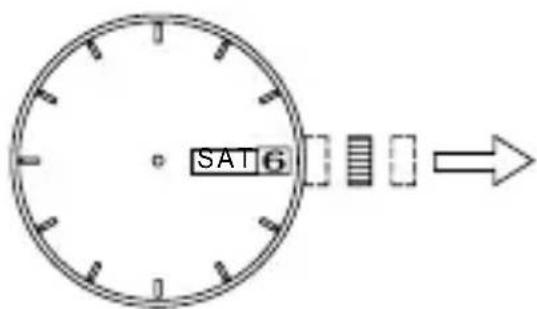
text_image
SAT 6text_image
Diagram showing a clock face with an arrow indicating rightward movement, likely illustrating time or duration.natural_image
Diagram of a circular dial with internal components and an arrow indicating direction (no text or symbols)text_image
Diagram showing a circular dial with a numbered pointer and a curved arrow indicating rotation or direction.natural_image
Diagram of a circular dial with a pointer and arrow indicating direction (no text or symbols)text_image
Diagram showing a clock face with hour and minute hands, followed by a rectangular block and arrow indicating time or duration.natural_image
Simple line drawing of an analog clock face with hour and minute hands, showing time near 10:30 (no text or symbols)text_image
Diagram of a clock face with hour and minute hands, showing time measurement and directional arrowtext_image
Diagram showing a circular dial with an arrow and a numbered component, possibly indicating rotation or adjustment.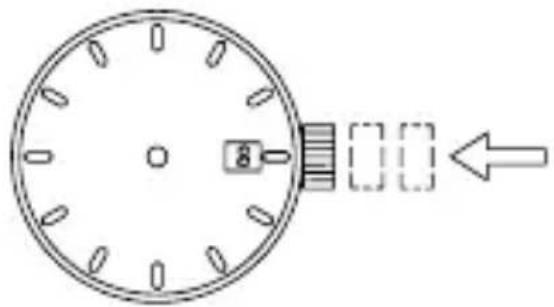
natural_image
Diagram of a circular dial with a pointer and dashed rectangular arrows indicating direction (no text or symbols)natural_image
Simple line drawing of a person using a tool to dig or walk (no text or symbols)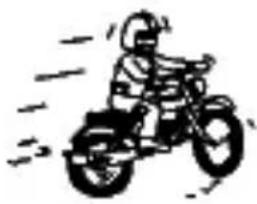
natural_image
Simple line drawing of a person riding a three-wheeled vehicle (no text or symbols)(5) Temperaturas
natural_image
Illustration of a hand holding a wristwatch with an arrow indicating rotational motion (no text or symbols)◆ MECANISMO DE CUERDA MANUAL
text_image
Diagram showing a dial with an arrow indicating direction, likely for digital display or time measurement.
natural_image
Simple analog clock face with hour and minute hands, showing time measurement (no text or numbers)
natural_image
Diagram of a circular dial with a numbered square and directional arrow, no text or symbols presentnatural_image
Diagram of a circular dial with internal components and an arrow pointing to it (no text or symbols)◆ CÓMO AJUSTAR LA HORA [AG(F6T)]
text_image
Diagram showing a clock face with hour and minute hands, followed by a rightward arrow indicating time or duration.![ORIENT Classic RA-AG0026E - ◆ CÓMO AJUSTAR LA HORA [AG(F6T)] - 1](/content/2026/05/799760/images/46a4b908aaf935d6e10999888dcbd7fc26858a34a88cefa854194a7d550ec55a.jpg)
natural_image
Simple analog clock face with hour and minute hands, showing time near 10:30 (no text or symbols beyond clock face)◆ CÓMO AJUSTAR LA HORA Y EL CALENDARIO [AP(F62)]
text_image
Diagram of a clock face with hour and minute hands, showing time measurement and directional arrow![ORIENT Classic RA-AG0026E - ◆ CÓMO AJUSTAR LA HORA Y EL CALENDARIO [AP(F62)] - 1](/content/2026/05/799760/images/ba7acdf33b45e89a6b80da46b6462a7bbde00dc799845f1ec0afd7ad0a2636cc.jpg)
text_image
dercena 8![ORIENT Classic RA-AG0026E - ◆ CÓMO AJUSTAR LA HORA Y EL CALENDARIO [AP(F62)] - 2](/content/2026/05/799760/images/d273b15e13d9567b9d9f9fe3ced1344f5be515060a76034b47c1b54936ca78ba.jpg)
natural_image
Diagram of a circular dial with a pointer and arrow indicating direction (no text or symbols)♦ AJUSTE DEL CALENDARIO MENSUAL
natural_image
Simple line drawing of a person using a tool to dig or sweep (no text or symbols)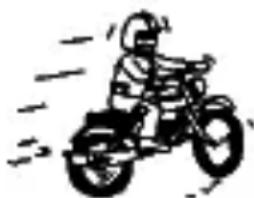
natural_image
Simple line drawing of a person riding a three-wheeled vehicle (no text or symbols)(5) Температура
natural_image
Illustration of a hand holding a wristwatch with an arrow indicating rotational motion (no text or symbols)text_image
Diagram of a clock face with hour and minute hands, showing time measurement and directional arrowtext_image
Diagram of a clock face with hour and minute hands, showing time measurement and directional arrowtext_image
Diagram showing a clock face with an arrow pointing right, indicating time measurement or direction.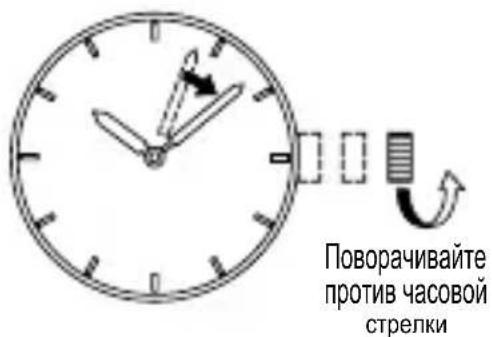
natural_image
Simple analog clock face with hour and minute hands, showing time near 10:30 (no text or symbols beyond clock face)text_image
Diagram showing a clock face with hour and minute hands, followed by an arrow indicating rightward movement.natural_image
Simple line drawing of a person using a golf club to clean or walk (no text or symbols)(3) 磁化
natural_image
Simple line drawing of a person riding a three-wheeled vehicle (no text or symbols)(5) 温度
natural_image
Illustration of a hand holding a wristwatch with an arrow indicating rotational motion (no text or symbols)◆ 手动上弦机构
text_image
Diagram showing a clock face with hour and minute hands, followed by a directional arrow indicating time.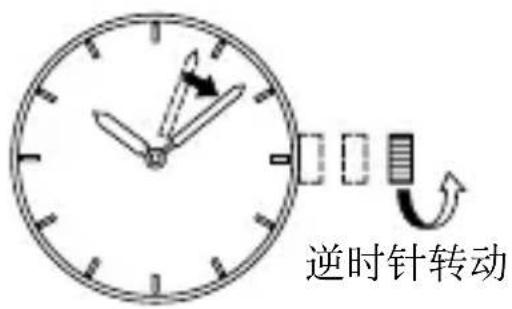
text_image
逆时针转动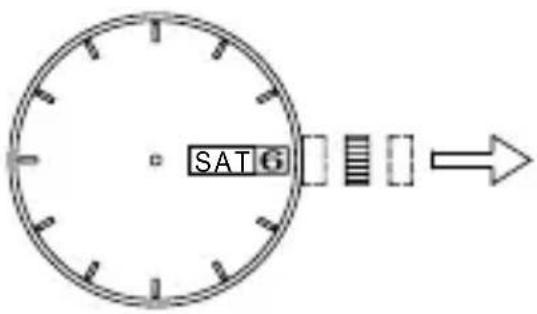
text_image
SAT 6text_image
Diagram showing a clock face with an arrow pointing right, indicating time or duration.(2) 逆时针转动表冠并设置当前时间。
natural_image
Circular diagram with a central square and directional arrow, no text or symbols presentnatural_image
Circular dial with a pointer and arrow indicating direction (no text or symbols)◆ 时间设置方法 [AG(F6T)]
text_image
Diagram of a analog clock face with an arrow indicating rightward movement, showing time scale and measurement indicators.(2) 逆时针转动表冠并设置当前时间。
![ORIENT Classic RA-AG0026E - ◆ 时间设置方法 [AG(F6T)] - 1](/content/2026/05/799760/images/40fa6dcdbb22ec441dcbe22526a3eae813609c174302a46cd4673f14fdebdbf3.jpg)
text_image
逆时针转动(3) 将表冠按到正常位置。
![ORIENT Classic RA-AG0026E - ◆ 时间设置方法 [AG(F6T)] - 2](/content/2026/05/799760/images/eac123201714427024284f19ba4801fda432bc4cd361330c70f4a116e0dc747e.jpg)
natural_image
Simple analog clock face with hour and minute hands, showing time approximately 2:30 (no text or symbols beyond clock face markings)中
text_image
Diagram showing a clock face with hour and minute hands, followed by an arrow indicating rightward movement.(2) 逆时针转动表冠并设置当前时间。
text_image
Diagram showing a circular dial with a numbered indicator and an arrow indicating rotation or direction.![ORIENT Classic RA-AG0026E - ◆ 时间设置方法 [AG(F6T)] - 3](/content/2026/05/799760/images/488f5091b7a9624ae89327bdc9cacbbf8f1989b329b2dc0d23bbb824cafd5a06.jpg)
natural_image
Diagram of a circular mechanical component with internal slots and an arrow indicating direction (no text or symbols)◆ 月历设置方法
一些手表型号设计有月历。
text_image
Diagram of an analog clock face with hands and a directional arrow indicating rotation or movement.text_image
Diagram showing a circular dial with labeled components and an arrow indicating rotation or direction, possibly illustrating a mechanical or electrical concept.natural_image
Circular dial with a pointer and a dashed arrow pointing to it, no text or symbols present.natural_image
Simple line drawing of an analog clock face with hour and minute hands, showing time near 10:30 (no text or symbols)text_image
Diagram of a clock face with hour and minute hands, showing time measurement and directional arrowtext_image
A dir be kcs at jaya eqarab saaagenatural_image
Diagram of a circular dial with internal slots and an arrow pointing to it (no text or symbols)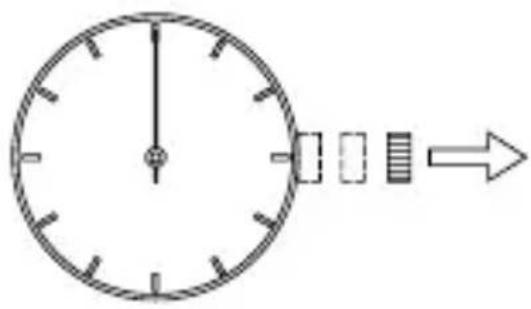
natural_image
Simple analog clock face with hour and minute hands, showing a 12:30 time frame (no text or numbers)text_image
Diagram of a clock face with directional arrow indicating time measurement or sequencenatural_image
Diagram of a circular dial with internal components and an arrow indicating direction (no text or symbols)natural_image
Simple analog clock face with hour and minute hands, showing a 3:5 ratio between two units (no text or numbers)natural_image
Illustration of a hand holding a wristwatch with an arrow indicating rotational motion (no text or symbols)natural_image
Simple line drawing of a person using a golf club to walk (no text or symbols)(٢)prec#