
HTI 247 CE - Washing machine HOOVER - Free user manual and instructions
Find the device manual for free HTI 247 CE HOOVER in PDF.


User questions about HTI 247 CE HOOVER
0 question about this device. Answer the ones you know or ask your own.
Ask a new question about this device
Download the instructions for your Washing machine in PDF format for free! Find your manual HTI 247 CE - HOOVER and take your electronic device back in hand. On this page are published all the documents necessary for the use of your device. HTI 247 CE by HOOVER.
USER MANUAL HTI 247 CE HOOVER
Read this manual carefully as it offers practical advice to help you get the most from your washing machine.
text_image
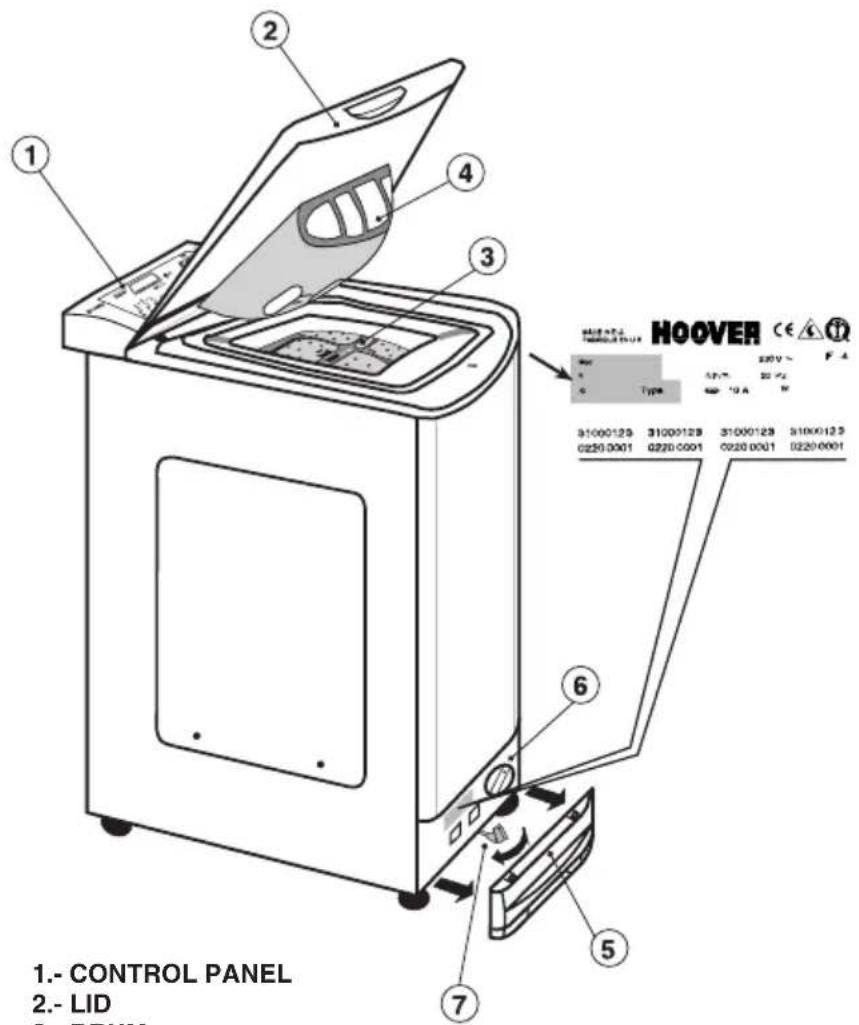
1.- CONTROL PANEL 2.- LID 3.- DRUM 4 1 2 3 6 7 5 HOOVER CE 200V~ Type 31000129 31000128 31000128 31000128 0220.0001 0220.0001 0220.0001 0220.00011.- CONTROL PANEL
2.-LID
3.- DRUM
4.- DETERGENT COMPARTMENT
5.- FILTER DOOR
6.- FILTER
This Instruction Manual contains everything you need to know about the everyday running of your machine. Keep it for future reference.
An Installation and Maintenance Manual is also provided which you should consult during the installation and routine maintenance of your washing machine. The manual also contains information about possible working problems, advice about the wash load, an explanation of label symbols and hints about how to remove stubborn stains.
When contacting a HOOVER or one of its Technical Assistance Centre always refer to the model (see control panel) and the registration and series numbers which are indicated at the bottom of the machine under the lower panel or on the warranty certificate. That is to say, everything that appears in the box.
Providing this information will ensure a faster and more efficient service.
page
GUARANTEE 5
TECHNICAL DATA 6
OPENING THE LID - LOADING 7
DETERGENT DISPENSER 8
ACTIVE SYSTEM 9
AUTOMATIC ECONOMY SYSTEM 9
USING YOUR INTER@CT FOR THE FIRST TIME
- At-a-glance Inter@ct Menu guide ......9
- Programming the machine 10
PROGRAMME SELECTION 13
CONTROL DESCRIPTION 14
TABLE OF PROGRAMMES 19
text_image
Illustration showing two hand-drawn steps (A and B) of a document application with labeled sections and diagrams, likely illustrating a procedure or workflow.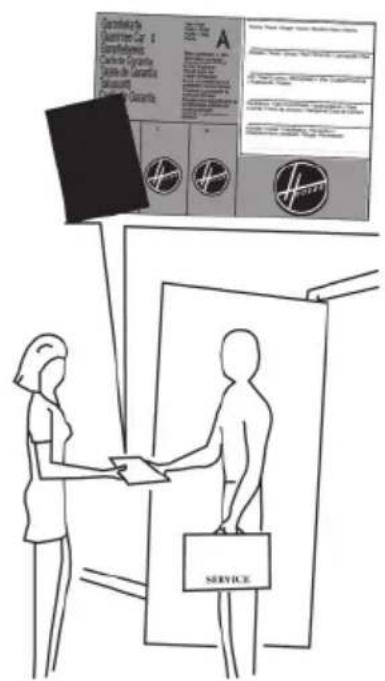
text_image
Criterielle der Quartierer 34 Emissionen Criterie in Cypertes (Anlage der Amerika) (Seizante) Criterie in Cypertes A Service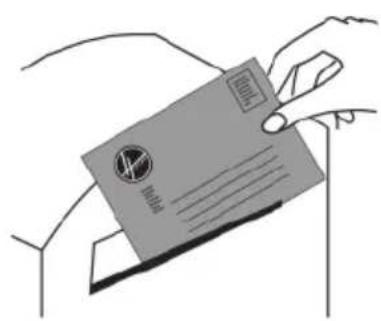
text_image
Illustration of hands holding a credit card with visible logos and text, including '10000' and '100000'.-
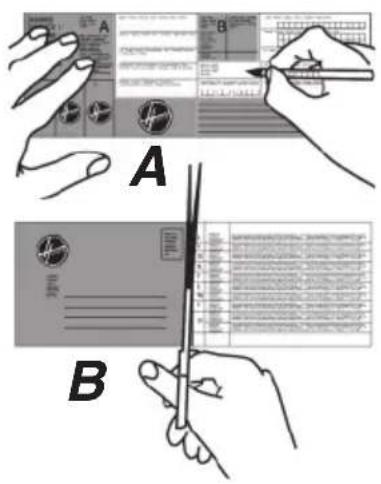
The appliance comes with a guarantee certificate.
-
Complete part A and keep it in a safe place. It should be presented to the Technical Assistance Centre in the event of a repair being necessary along with the legal receipt issued by the dealer on purchase.
-
Do not forget to send part B of the Guarantee Certificate to be validated within 15 days of purchase.
TECHNICAL DATA
Load capacity ....kg.
Voltage ...... V.
Wash motor power rating .... W.
Spin motor power rating ....W.
Electropump power rating .... W.
Heating element power rating ....W.
Max. power input ....W.
Fuse ...... A.
Water pressure ....MPa
Water consumption (60° C programme) .....lit.
Energy consumption (60° C programme) / 4,5 kg ..... kWh
Energy efficiency rating ....
| HTI 206 | HTI 247 |
| 4,5 | 4,5 |
| 230 | 230 |
| 175 | 125 |
| 340 | 400 |
| 30 | 30 |
| 1.950 | 1.950 |
| 2.200 | 2.200 |
| 10 | 10 |
| 0,05 min. | 0,05 min. |
| 0,8 max. | 0,8 max. |
| 1000 | 1200 |
| 48 | 48 |
| 0,85 | 0,85 |
| A | A |
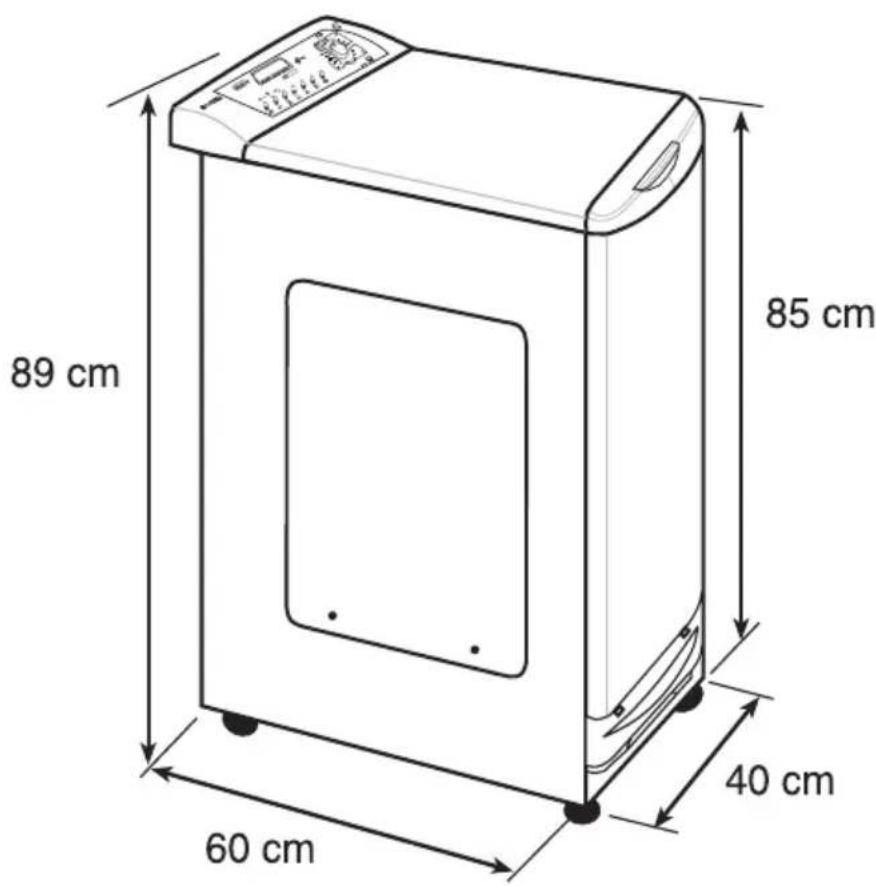
text_image
89 cm 60 cm 40 cm 85 cm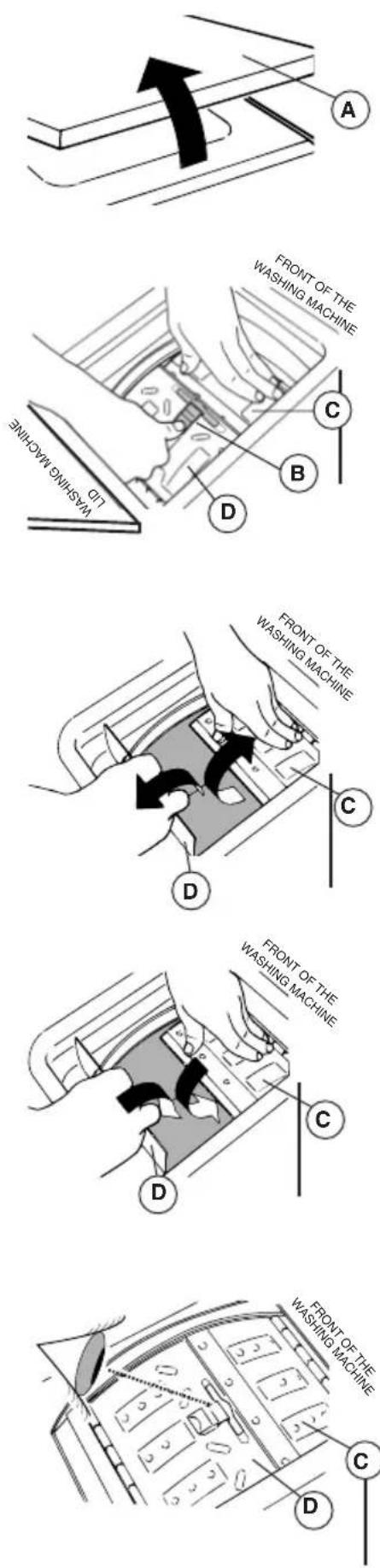
1.
Lift the lid (A) and open completely. Next open the drum door following these instructions:
2.
Press catch (B) and kept it pressed down.
Press the first shutter (C) to unlock the two shutters (C) and (D).
3.
Open the second shutter (D). Open the first shutter (C).
Place the washing in the drum.
4.
Close the first shutter (C).
Close the second shutter (D) so that the catch on the first shutter fits correctly into the slot. Release.
5.
Ensure that both shutters are perfectly aligned and properly closed.
IMPORTANT: IT IS IMPORTANT TO MAKE SURE THAT THE DRUM IS CAREFULLY CLOSED BEFORE OPERATING THE MACHINE, OTHERWISE THE MACHINE OR LAUNDRY COULD GET DAMAGED.
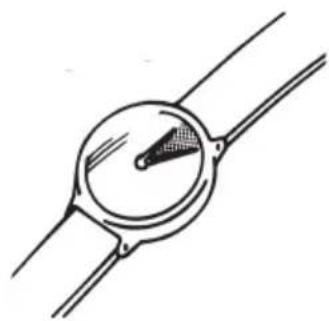
2 min.
natural_image
Simple line drawing of a wristwatch with a circular dial and handle (no text or symbols)IMPORTANT: A SPECIAL SAFETY DEVICE PREVENTS THE LID FROM BEING OPENED IMMEDIATELY AFTER THE WASH HAS FINISHED. ONCE THE SPIN CYCLE HAS FINISHED, WAIT FOR 2 MINUTES BEFORE TRYING TO OPEN THE LID.
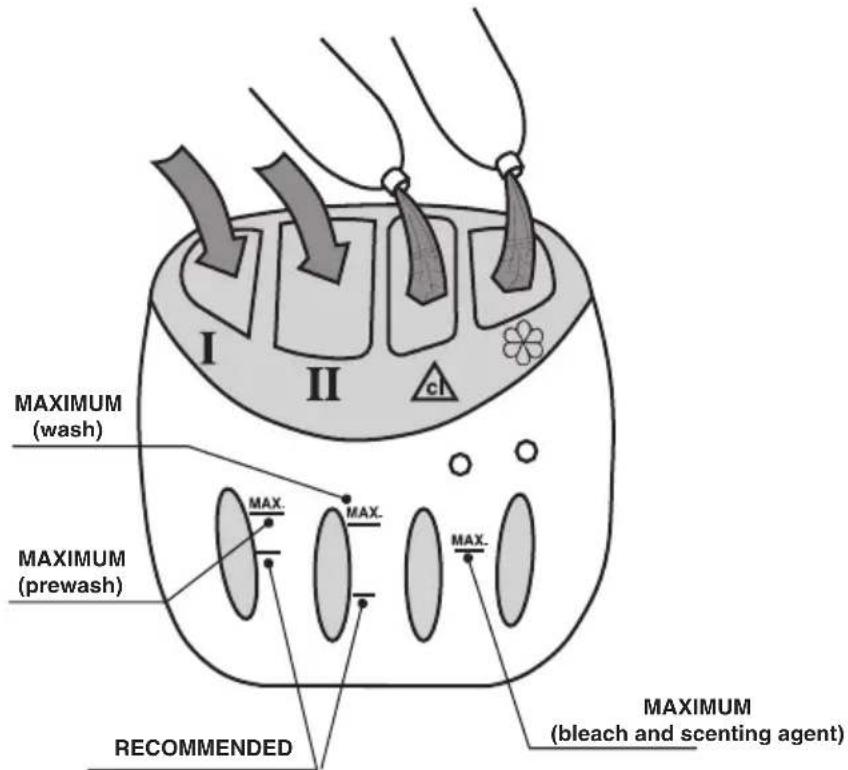
The detergent dispenser is divided into 4 compartments:
- Compartment I, is for prewash powder detergent. The recommended quantity is 60 gm of detergent (for 4,5 kg of laundry).
- Compartment II, is for wash powder detergent. The recommended quantity is 120 gm of detergent (for 4,5 kg of laundry).
- The compartment is for bleach. The recommended quantity is 7 cl.
- The ✅ compartment is for fabric conditioners, scenting agents and special additives. The recommended quantity is 5 cl.
The detergent compartment has two guidance lines:
- RECOMMENDED (lower line). This indicates the recommended level for the prewash and wash compartments.
- MAX. This indicates the maximum level which should never be exceeded.
text_image
I II CL MAXIMUM (wash) MAXIMUM (prewash) RECOMMENDED MAXIMUM (bleach and scenting agent)The Active system owes its efficiency to its capacity to take advantage of all the force of the water. During the washing phases the water in the drum is pumped towards an injector located in the drum which injects a powerful water jet onto the wash. This action with an increase of rotation speed up to 100 revolutions guarantees an optimum quality of wash and more thorough rinsing.
AUTOMATIC ECONOMY SYSTEM
With this system the machine adjusts the amount of water used to wash and rinse according to the load. This means that water (and therefore power) can be saved without affecting wash and rinse quality, because the machine will always use the right amount for the load it contains. Excellent results are therefore ensured at lower cost, making the machine more environmentally friendly.
USING YOUR INTER@CT FOR THE FIRST TIME
- AT-A-GLANCE INTER@CT MENU GUIDE:
Select the desired programme. After a brief time the screen will display:
HOOVER INTER@CT WELCOME 11:05
The time can be set correctly later.
1 WHITE COTTON 90° HEAVY (*) RPM
Only if programme 1 is selected.
(* depending on model) Mod. HTI 206 : 1000 GIRI/MIN. - Mod. HTI 247 : 1200 GIRI/MIN.
When you go into the Inter@ct menu, you have 30 seconds to make each selection. If no selection is made in that time, the screen returns to the initial display and you must access the Inter@ct menu again to continue programming.
Hold down EXPRESS WASH and EXTRA RINSE together for 5 seconds until you hear the OK signal.
CHANGE LANGUAGE ENGLISH
Press EXPRESS WASH to confirm.
ENTER NEW TIME hh:
Press EXTRA RINSE to set the hours.
Press EXPRESS WASH to confirm.
ENTER NEW TIME mm:
Press EXTRA RINSE to set the minutes.
Press EXPRESS WASH to confirm.
CHANGE TIME TO: ABSOLUTE
If RELATIVE is displayed, press EXTRA RINSE to change to ABSOLUTE.
Press EXPRESS WASH to confirm.
ACTIVATE END OF WASH BEEP YES
If NO is displayed, press EXTRA RINSE to change to YES.
Press EXPRESS WASH to confirm.
MEMORY ON YES
If NO is displayed, press EXTRA RINSE to change to YES.
Press EXPRESS WASH to confirm.
ENGAGE DEMO? NO
Maintain NO.
Press EXPRESS WASH to confirm.
EXIT MENU? YES
If NO is displayed, press EXTRA RINSE to change to YES.
Press EXPRESS WASH to confirm.
1 WHITE COTTON 90° HEAVY (*) RPM
This returns you to the programme selected previously.
(* depending on model) Mod. HTI 206 : 1000 GIRI/MIN. - Mod. HTI 247 : 1200 GIRI/MIN.
Press EXPRESS WASH to confirm.
You can then select any wash programme, plus a delayed start if you wish.
Read on for more information.
The machine also works without the Inter@ct settings programmed, though in that case the DELAYED START and SET END TIME settings will not run correctly. The machine is designed to be easy to handle, and programming is simple.
• PROGRAMMING THE MACHINE
To set the time, language and your personal preferences, you must programme Inter@ct.
Unless the programme selector is set to STOP a welcome message will be displayed when the machine is on.
HOOVER INTER@CT WELCOME 11:05
This message is displayed for a few seconds while the machine acknowledges the programme selected. When the machine is off, the display shows programme data. The machine can be programmed in this status.
E.g.
1 WHITE COOTN 90° HEAVY (*) RPM
(* depending on model) Mod. HTI 206 : 1000 GIRI/MIN. - Mod. HTI 247 : 1200 GIRI/MIN.
Accesing the Menu
When you go into the Inter@ct menu, you have 30 seconds to make each selection. If no selection is made in that time, the screen returns to the initial display and you must access the Inter@ct menu again to continue programming. To programme the menu hold down EXPRESS WASH and EXTRA RINSE together for 5 seconds until you hear the OK signal. Press EXTRA RINSE to change menu settings, and EXPRESS WASH to confirm your choice.
Language Selection (Default selection - POLSKI "PL")
The machine programmes appear by default in Polski "PL". To change language (for the messages display when the machine is operating) proceed as follows. To confirm menu selection, hold down EXPRESS WASH and EXTRA RINSE together for 5 seconds until you hear the OK signal. The screen will display a message inviting you to choose a language. Release EXTRA RINSE and EXPRESS WASH and press EXTRA RINSE again to scroll through the languages available and make your selection. To confirm release EXTRA RINSE and press EXPRESS WASH. Once the language is confirmed, the screen will display a message inviting you to set the time.
Enter New Time
If this function is not programmed the correct time will not be displayed and the delayed start/end function will not work properly.
When the hour digits flash on the display, set the time by pressing EXTRA RINSE until the correct hour appears, then EXPRESS WASH to confirm.
When the minutes flash, press EXTRA RINSE again until the correct time is shown, the EXPRESS WASH to confirm.
Once the time is set, the screen will display the message "Memory on".
Setting the Time (Default setting - ABSOLUTE)
There are two ways of setting the time.
The first is known as “absolute time mode”. It consists of setting the clock time at which the machine must end its programme (which in turn determines the time at which it must start). An example follows of how to set the time in absolute mode from the menu using the Set End Time/Delayed Start function.
PROGRAMME END
08.00 14:00
In this example the machine is configured to complete its programme at 08:00.
The second type of programming is known as “relative time mode”. It consists of programming the length of time as from the present moment after which the machine must have completed its programme (which in turn determines the time at which it must start). An example follows of how to set the time in relative mode from the menu using the Set End Time/Delayed Start function.
PROGRAMME END
IN 1h 30 m. 14:00
In this example the machine is set to complete its programme at 15:30.
Both these settings are very useful, but “absolute time mode” is perhaps easier to use, as there is no need to work out the number of hours until the desired start/stop time.
When you access the time setting you can use the EXTRA RINSE key to switch between
relative and absolute modes. Press EXPRESS WASH to confirm your choice.Once the time is set the screen displays the message "Activate End of Wash Beep".
End of Wash Beep (Default setting - YES)
This activates a beep to advise that the washing cycle has been completed. Use EXTRA RINSE to switch between YES and NO, the press EXTRA WASH to confirm your choice. After confirmation the screen moves on to the “Enter New Time” setting.
Once they are set, menu settings remain in the memory of the machine even if it is disconnected from the mains or there is a power cut.
Memory On (Default setting - NO)
This function is useful if you frequently wash with the same programme. With Memory On selected, the machine memorises the last programme used. This function works with cotton, synthetics, delicates and wool programmes, but not with special programmes.
Use EXTRA RINSE to select YES or NO and EXPRESS WASH to confirm. The screen will then display a message asking if you wish to set Demo Mode. This should be set to NO: this mode is for use only by technical service personnel. If Demo Mode is set to YES when you exit the Inter@ct menu, the wash programme will not operate. Press EXPRESS WASH to confirm NO. A message then appears asking if you wish to exit the menu.
Exit Menu
Press EXTRA RINSE to select YES then confirm with EXPRESS WASH once all settings are confirmed to exit. If you wish to change a setting, select NO to return to the beginning of the programming menu. Press EXPRESS WASH to confirm settings as you scroll through them until you reach the one you wish to change. Once all settings are as desired, exit the menu and start a trial run of the machine.
To change settings at al later date (e.g. to enter a new time when summer / winter time begins), go to the menu from the beginning and select the settings you wish to change.
WASH PROGRAMME SELECTION
Chek the Programme Guide to determine the most suitable programme.
Toselect a programme, turn the selector clockwise until the desired programme number is aligned with the indicator. Chek that the stopcock is open and the outlet tube is correctly positioned. Press the keys to select any additional settings desired.
Press START: the DOOR LOCK lamp will light up and the programme will start.
• ONCE THE PROGRAMME HAS ENDED
- The DOOR LOCK lamp remains on and the display reads "DOOR LOCK engaged: please wait".
- When the lamp goes out and the door can be opened, the display reads “End of programme: remove washing”.
- T urn off the machine by turning the control to STOP.
- Open the door and remove the washing.
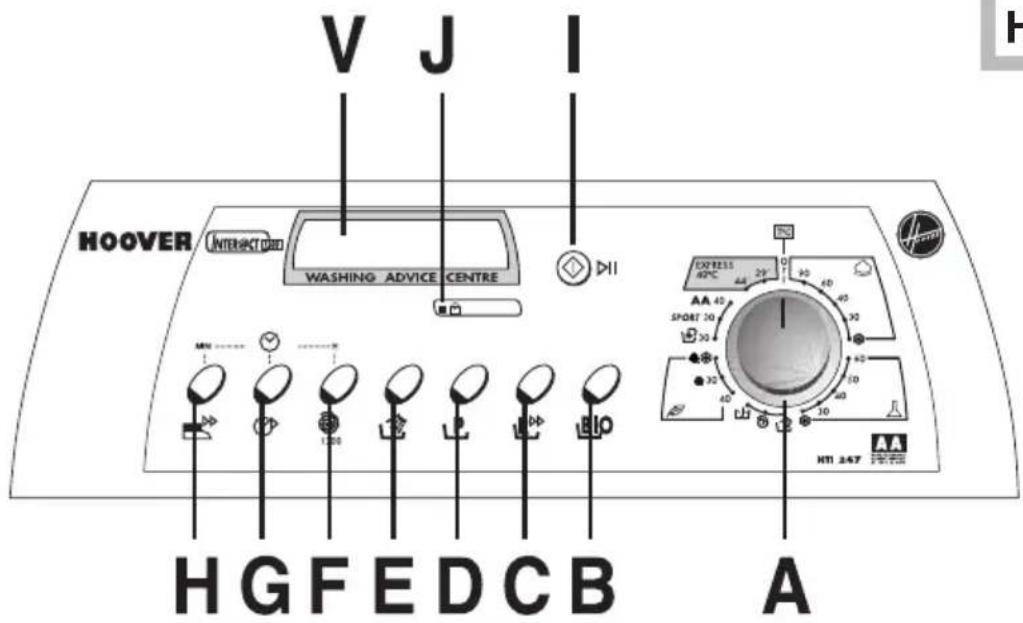
text_image
V J I HOOVER INTERESTED WASHING ADVICE CENTRE MN 1:05 30 40 30 30 30 30 30 30 30 H G F E D C B A CXPRESS 42°C 29 AA 42 SPORT 30 HTI 247PROGRAMME SELECTOR ...... A
BIO KEY B
EXPRESS WASH KEY C
PRE-WASH KEY D
EXTRA RINSE KEY E
SPIN SPEED KEY ...... F
DELAYED START KEY ...... G
EASY IRON KEY ...... H
START/STOP KEY I
DOOR LOCK LAMP ...... J
DISPLAY UNIT V
This section describes all the keys and selectors on the washing machine control panel. Once the desired programme and settings keys are set, your choice will be displayed on the Inter@ct display.
If the programmes and option keys selected are compatible, a beep will sound and the pilot for the function selected will come on. If incompatible options are selected (e.g. a cotton wash programme plus the EASY IRON key) the pilot on the key will not light up.
Press keys once to select the relevant option and again to deselect it.
Please read the descriptions below carefully.
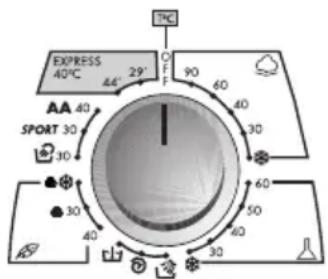
A. Programme Selector
text_image
EXPRESSION 40°C 29° F 90 60 AA 40 SPORT 30 30 30 40 30 50 60 30 30 30 30 1°CNOTE: Always select your programme before you press START/STOP. If you unintentionally press this button first, the programme accidentally selected can be deselected by holding down START/STOP for 5 seconds (see “Cancel” below).
When you turn the programme selector and the welcome text disappears, the screen displays the following data (from left to right):
- Programme n°
- Programme name
- Wash water temperature
- Treatment type (dependent on how dirty the washing is)
- Spin speed
E.g.:
1 WHITE COTTON
90° LONG (*) RPM
(* depending on model) Mod. HTI 206 : 1000 GIRI/MIN. - Mod. HTI 247 : 1200 GIRI/MIN.
I. START/STOP
START
Press once to start up a new programme. The lamp comes on to indicate that the door is closed. The machine checks the load and asks you to wait.
E.g.:
WASH STARTED
PLEASE WAIT
The Inter@ct display shows the time required to complete the programme, then the wash cycle starts. The Inter@ct calculates time on the basis of a standard 4,5 kg. load, but corrects its calculation during the cycle according to the volume and make-up of the load.
E.g.:
1H 50 M REMAINING COLD PRE-WASH 19.30
During the wash the display shows the current phase of the cycle above the current time. The display changes as the cycle progresses.
STOP
You can put the wash programme on hold at any time by holding down START/STOP for approx. 2 seconds until you hear the OK signal. The display will indicate that the programme is on hold. To resume the programme, press START/STOP again. The display will indicate that the programme has resumed.
E.g.:
COLOURED COTTON PROGRAMME ON HOLD
CANCEL
Tocancel the programme, hold down START/STOP for five seconds, until you hear the OK signal. The display indicates that the programme has been cancelled and therefore deleted.
E.g.:
PROGRAMME CANCELLED
J. ■ DOOR LOCK LAMP
There is a safety device to prevent the door from opening immediately after a wash cycle. The DOOR LOCK lamp remains on while this device is operating. Around 2 minutes after the end of the wash cycle, the light goes out and the door can then be opened.
B. BIO KEY BIO
When this key is pressed, the machine stops in programmes for fast fabrics (cotton) with water in the drum at a maximum of 40^ C. This enables the enzymes in the washing powder to act more effectively.
This optimum wash system works in accordance with the requirements of each user.
C. EXPRESS WASH key
This works in cotton and synthetics programmes. Wash time can be cut by as much as 50 minutes, depending on which programme is selected.
D. PRE-WASh Key
This is useful especially for heavily soiled washing. It can be used before the main wash programme is selected. Pour the washing powder for the pre-wash into the compartment marked “I” (for more information see “Detergent Dispenser” below). We recommend using only 20% of the amount recommended in the washing powder instructions, with no fabric softener.
E.

EXTRA RINSE Key
This causes more water to be used in rinsing. It helps prevent skin irritation in people particularly sensitive to washing powders. We also recommend using EXTRA RINSE with heavily soiled washing which requires large amounts of washing powder, and when washing padded fabrics which may retain washing powder.
F.

SPN SPEED Key

Once you have selected a programme, the screen will display the spin speed permitted for that programme. The speed setting drops by 100 rpm each time the spin speed key is pressed. The minimum permitted spin speed is 400 rpm. Spinning can be cut out by pressing the spin speed key repeatedly. When the desired speed is selected, the display shows the programme selected, the temperature and the new spin speed.
NB.- This model has an electronic sensor which checks that the load is properly balanced. If it is slightly off balance, the machine balances it automatically and then runs a normal spin cycle. If the load remains off balance after several attempts, the machine will use a lower spin speed lower than that set. If the load is highly off balance, the spin cycle is cancelled. This limits vibrations, reduces noise and makes for a more reliable, longer machine lifetime.
G

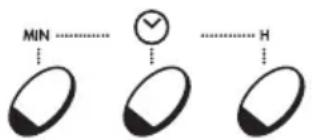
SET END TIME / DELAYED START
The SET END TIME / DELAYED START function can be used to set the machine to wash later (within 24 hours).
text_image
MIN ↓ ↓ ↓ H1. Configuring DELAYED START
Press the SET END TIME / DELAYED START key and set the desired time using the time key (hours on the left, minutes on the right). If the key is not pressed within 5 seconds the display reverts to the programme settings. To cancel DELAYED START mode, hold the key down for 5 seconds.
2. SET END TIME
Press SET END TIME / DELAYED START twice and set the desired time using the time key (hours on the left, minutes on the right). When SET END TIME is selected the display shows the minimum time which may be entered for the programme to be completed. This time can be extended if required.
NB.- When the DELAYED START / SET END TIME function is used, washing powder should be placed only in the dispenser: if it is placed inside the drum and left in contact with washing for a long time damage may result.
This works only with programmes for synthetics, delicates, wool and some special programmes. When this setting is used for delicates, wool or hand wash programmes, the machine stops and leaves the washing in water inside the drum. This makes for fewer wrinkles and easier ironing. To resume the wash cycle, press EASY IRON. If this setting is used in the synthetics cycle, the programme ends with a short spin at very low speed. The washing then remains in the drum but without excessive wrinkling. If a spin cycle is required, select an appropriate speed (see Programme Guide) and remove the washing when the programme ends.
| PROGRAMME | T°C | PROGRAMME FOR | MAX. LOAD kg. | WASHING POWDER | |||
| I | II | △ | ※ | ||||
| COTTONS | 90^ | WHITES | 4,5 | ● | ● | ● | ● |
| 60^ | FAST COLOURS | 4,5 | ● | ● | ● | ● | |
| 40^ | FAST COLOURS | 4,5 | ● | ● | ● | ||
| 30^ | DELICATE COLOURS | 4,5 | ● | ● | ● | ||
| [IMAGE] | DELICATE COLOURS(cold wash 15^ ) | 4,5 | ● | ● | ● |
| MIXED/SYNTHÉTICS | 60° | FAST COLOURS | 2 | ● | ● | ● | |
| 50° | FAST COLOURS | 2 | ● | ● | ● | ||
| 40° | DELICATE COLOURS | 2 | ● | ● | ● | ||
| 30° | DELICATE COLOURS | 2 | ● | ● | ● | ||
| DELICATE COLOURS (cold wash 15 °C) | 2 | ● | ● | ● |
| SPECIFIC | — | RINSE | — | ● | ||||
| — | SPIN | — | ||||||
| — | EMPTY | — |
| 40° | DELICATES | 1,5 | ● | ● | ||||
| DELICATES | 30° | WOOLLENS | 1 | ● | ● | |||
| WOOLLENS(cold wash 15 °C) | 1 | ● | ● | |||||
| SPECIAL | 30° | HAND WASH | 2 | ● | ● | |||
| SPORT | 30° | SPORT | 2 | ● | ● | |||
| AA | 40° | ECONOMY/ CLASS AA | 2 | ● | ● |
| EXPRESS | 44' | 40° | 44 MINUTE CYCLE | 2 | ● | ● | ||
| 29' | 40° | 29 MINUTE CYCLE | 2 | ● | ● |
text_image
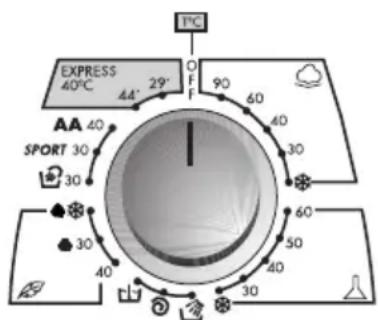
EXPRESSION 40°C AA' 29° F 90 60 40 30 AA SPORT 30 30 30 30 50 40 30 60 40 30 30 40 SPOR AA AAProgramme\*, as per standard EN 60456.
There are six programme groups (COTTONS, MIXED & SYNTHETICS, SPECIFIC, DELICATES & WOOLLENS, SPECIAL AND EXPRESS). The first programmes in each group are the longest, and therefore give the best results. Use the others only when washing is not heavily soiled, or for particularly delicate garments.
SPECIFIC PROGRAMMES

SPECIAL RINSE PROGRAMME
Programme 📋 runs 3 rinses with spins at 800 rpm (this speed may be reduced or spin cancelled using the appropriate button). It works for all fabrics and can be used, e.g. after garments are hand washed.

SPECIAL HIGH-SPEED SPIN PROGRAMME
Programme 📋 runs a spin at 1000 rpm. (Mod. HTI 206) / 1200 rpm. (Mod. HTI 247) (this speed can be reduced via the appropriate button).

EMPTY ONLY
Programme ☐ empties the water from the machine.
SPECIAL PROGRAMMES

HAND WASH
The programme runs a complete wash cycle for garments intended to be hand washed. It washes at no more than 30^ and finishes with two rinses and a delicate spin.
SPORT
SPORTSWEAR
Hoover has designed a special programme for sportswear: it is intended for mixed sportswear which should not be washed with high-temperature programmes.
It begins with a cold pre-wash to soften and eliminate the worst of the dirt, then runs a 30 °C wash, a rinse and a delicate spin to ensure maximum care for delicate, heavily soiled garments.

CLASSE AA
Optimum wash performance can be obtained at 40 °C with Class A power consumption.
EXPRESS PROGRAMMES

44' MINUTE EXPRESS PROGRAMME
29' MINUTE EXPRESS PROGRAMME
These programmes run a complete wash cycle at 40^ C for up to 2 kg of washing in 44 or 29 minutes. The washing powder should go in compartment II, and only the amount indicated for this programme on the measuring cup provided should be used.
REMARKS
- For heavily soiled washing we recommend loads of no more than 3 kg.
- Bleach can be added via dispenser (△) for the WHITE 90° and FAST COLOURS 60° COTTONS programmes.
- The machine is designed to apply fabric softener automatically in the last rinse of all wash cycles.
Get the best results from your new Hoover machine
To ensure you get the best results from your new Hoover machine it is important to use the right detergent in your everyday wash. There are many detergents available in the market and making a choice from the wide range available can often be confusing.
At Hoover we regularly test many different types of detergent to assess which give the best wash results in our machines. We found only one brand always lives up to our exacting standards and provides outstanding cleaning across a broad range of dirt and stains, as well as providing high levels of fabric care. That's why Hoover gave Ariel their official seal of approval.