
CR02 Allergy - Washing machine DYSON - Free user manual and instructions
Find the device manual for free CR02 Allergy DYSON in PDF.


| Product type | Washing machine |
| Brand | Dyson |
| Model | CR02 Allergy |
| Dimensions (HxDxW) | 848 x 575 x 595 mm |
| Weight | 103 kg |
| Voltage / Frequency | 220-240 V, 50 Hz |
| Power consumption | 2750 W (230 V) |
| Water pressure | 0.4 - 5 bar |
| Maximum load (dry laundry) | 7 kg |
| Drum technology | Contrarotator™ (two drums rotate in opposite directions) |
| Wash programmes | Cotton, Synthetics, Wool, Delicates, Handwash items, Duvet |
| Temperature range | 20 °C – 85 °C (depending on programme) |
| Maximum spin speed | 1400 rpm (Cotton programme) |
| Optional settings | Soil level (Dirt, Dirt & Stains, Heavy stains), Pre-wash, Extra rinse, Minimum iron, Start delay (selected models), Memory (selected models), Child lock, Door lock |
| Water supply | Hot and cold fill (dual inlet hoses) |
| Drainage | Standpipe or under-sink connection, hose length adjustable |
| Mobility aid | Rollerjack™ handle for repositioning |
| Self-clean cycle | Yes (on selected models) – runs at 85 °C |
| Coin trap | Yes, accessible from front |
| Water inlet filters | Yes, cleanable |
| Emergency door release | Yes, via screw behind soap tray |
| Child safety | Child lock option |
| Guarantee | 2 years standard, extendable up to 5 years |
Frequently Asked Questions - CR02 Allergy DYSON
User questions about CR02 Allergy DYSON
0 question about this device. Answer the ones you know or ask your own.
Ask a new question about this device
Download the instructions for your Washing machine in PDF format for free! Find your manual CR02 Allergy - DYSON and take your electronic device back in hand. On this page are published all the documents necessary for the use of your device. CR02 Allergy by DYSON.
USER MANUAL CR02 Allergy DYSON
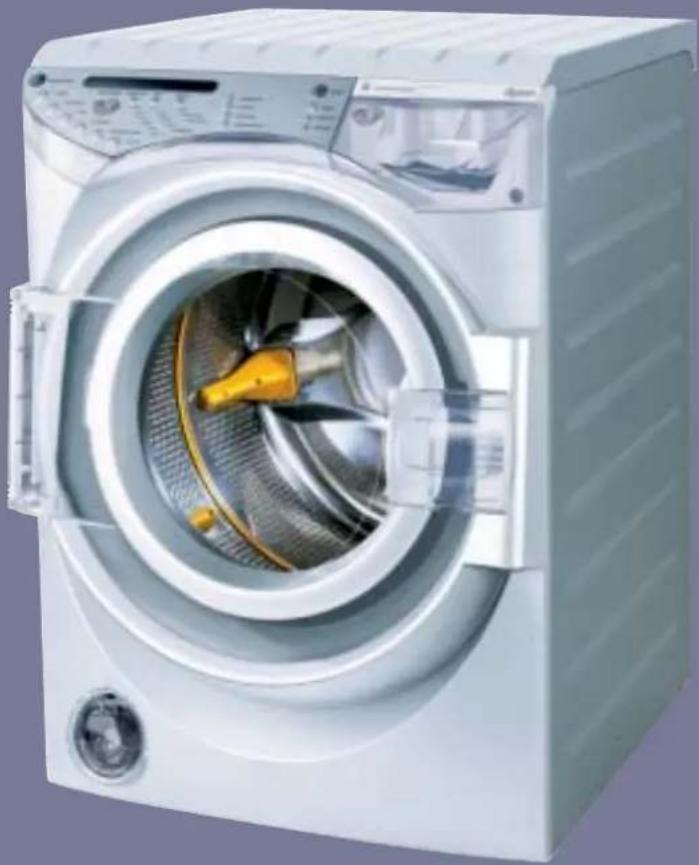
Please read this user guide carefully before use.
natural_image
Exterior view of a white water heater with open door and internal fan blade (no visible text or symbols)This user guide also contains tips on effective washing and important safety notes.
contrarotator
www.dyson.com
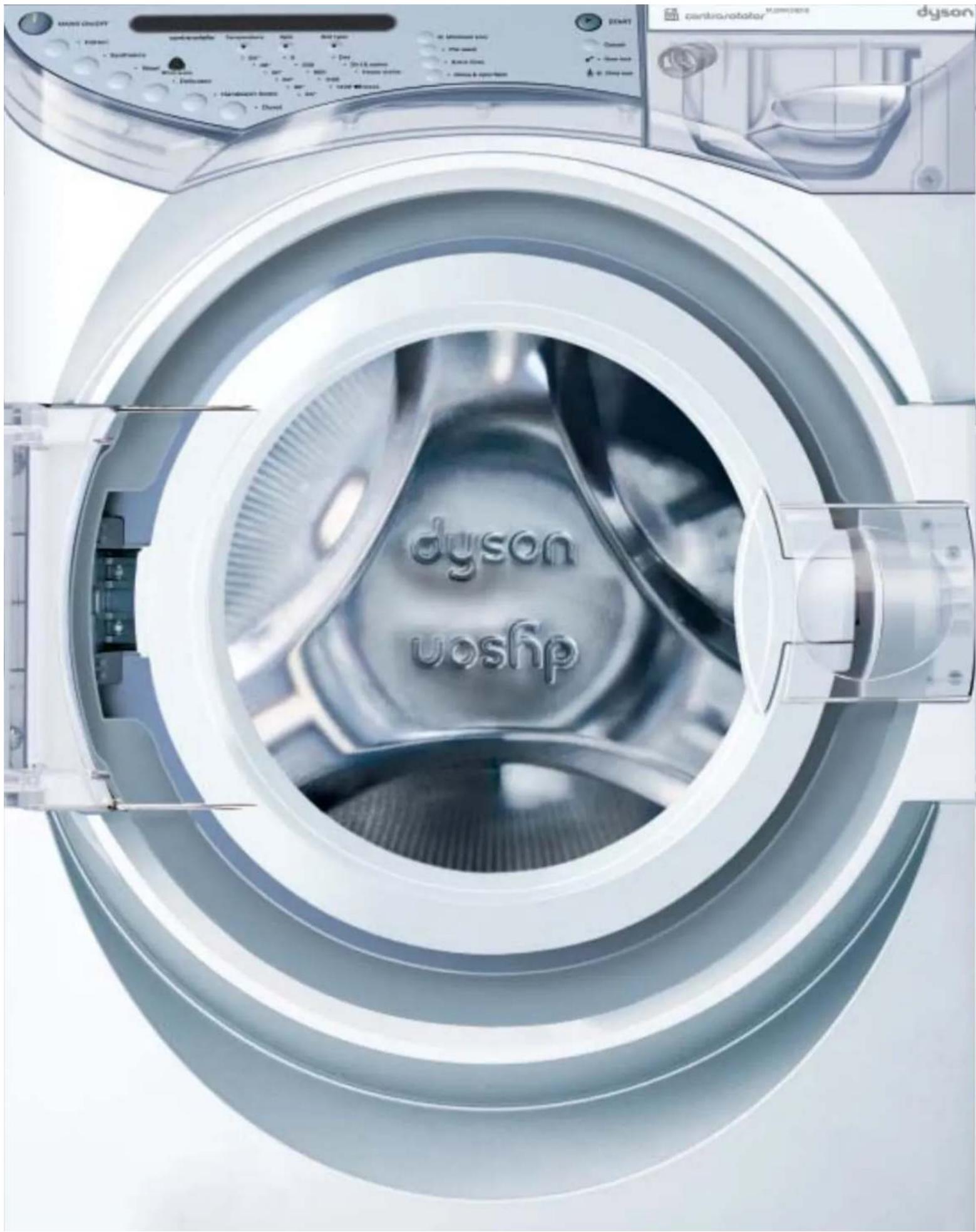
Contents
| Overview | 1 01 | Overview of your Dyson washing machine |
| ContrarotatorTM | 2 01 | The only 2-drum wash action |
| User Instructions | 3 01 | Free registrationImportant safety notes |
| Before installation | 4 01 | Inner transit packaging removalMoving the washing machine |
| Installation | 5 01 | SpecificationLocationDrainage, water supply and electricity |
| 02 | DrainageWater supply | |
| 03 | Electrical installationAfter installation | |
| Operation | 6 01 | Loading the washing machineDetergent use |
| Starting your wash | 7 01 | To start your wash, using default settings |
| Optional settings | 8 01 | To personalise the default wash programmes |
| Fabric care and Programme table | 9 01 | Fabric careProgramme table |
| Maintenance | 10 01 | Self clean cycle and cleaning |
| 02 | Coin trap | |
| 03 | Water filterEmergency door release | |
| Troubleshooting | 11 01 | Troubleshooting |
Illustrations and some product details may differ from your machine. In doubt, contact the Dyson helpline on 08705 275104 (UK) or 01 475 7109 (ROI)
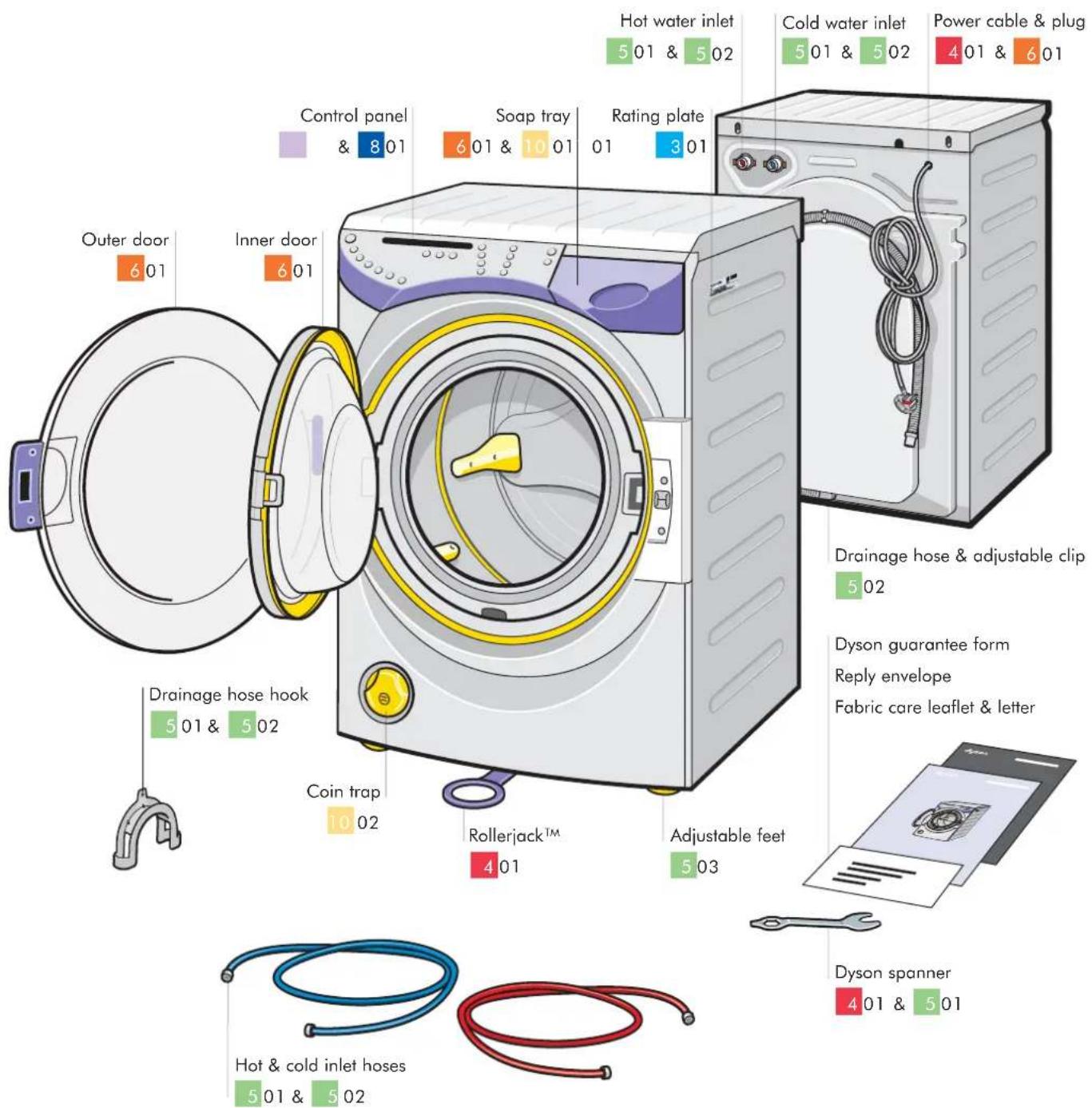
101 Overview
Overview of your Dyson washing machine
Contrarotator™
natural_image
Illustration of a washing machine with internal components and airflow direction arrows (no text or symbols)
201
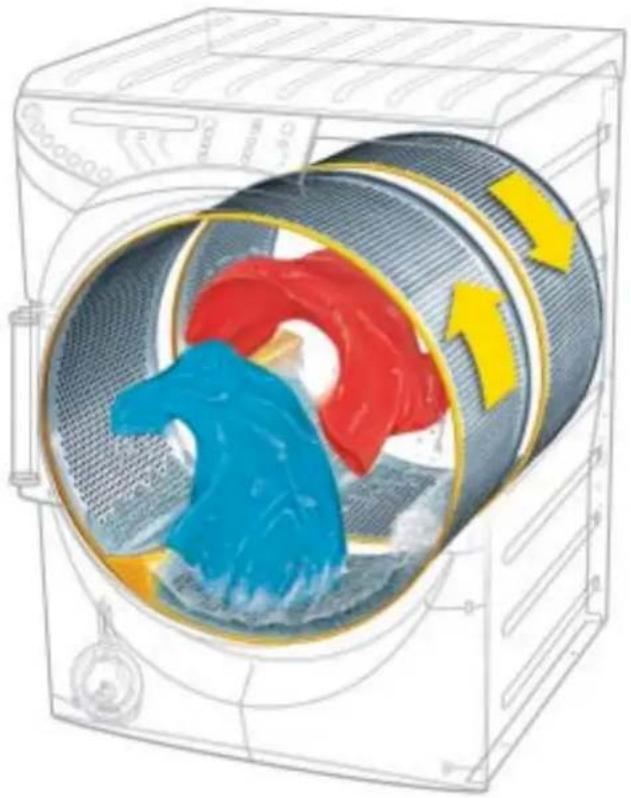
The only 2-drum wash action.
Conventional washing machines may seem convenient, but their poor performance lets you down. So James Dyson asked his engineers to experiment with every imaginable way of washing to design a better washing machine.
Along the way, Dyson engineers made a surprising discovery: washing by hand gave better wash results than single drum machines. Because the laundry is constantly on the move, it is manipulated and flexed. This opens the fabric to the detergent, releasing dirt quickly and effectively.
To replicate the movement of washing by hand, Dyson engineers designed two aligned drums and engineered them to rotate in opposite directions at the same time: laundry is constantly on the move, manipulated and flexed.
This product is protected by the following:
Patents and Patent Applications:
| AU 751945 | US 6,584,812 | US 10/220,227 | EP 1305467 | US 09/956,248 |
| US 6,381,790 | US 10/366,662 | EP 1266059 | GB 2365027 | GB 2 337 274 |
| US 6,497,123 | JP 2001-584634 | JP 2001-569454 | JP 2002-516407 | US 6,311,527 |
| AU 751196 | US 10/276,800 | US 10/221,671 | EP 1327018 | EP 1078119 |
| EP 1177340 | EP 1269622 | EP 1266060 | GB 2368071 | JP 2000-548539 |
| GB 2362690 | JP 2001-571549 | JP 2001-569456 | JP 2002-536126 | CA 2,332,024 |
| CA 2,408,550 | US-2003-0052672 | US 10/221,754 | US 10/380,118 | US 10/312,675 |
| EP 1262738 | EP 1266061 | EP 1319100 | GB 2379452 | US 2003-0172689 |
| JP 2000-617256 | JP 2001-569455 | JP 2002-527368 | WO 03/023119 | EP 1335061 |
Registered Designs:
GB 2090907 CN 191339 DE 40006214.4 FR 004914 AU 143433
CH12765 ITM 2000 O 000588 JP 1114510 US 450164
Trade Marks:
DYSON ^TM CONTRAROTATOR ^TM DYSON CONTRAROTATOR ^TM CRO1 ^TM ROLLERJACK ^TM
Equivalent rights exist in other territories.
For patent information please see www.dyson.com
User Instructions
301
Free registration
Registering your Dyson washing machine
Every Dyson washing machine comes with a complimentary 2 year guarantee, with an option to extend the guarantee for a further 1 to 3 years. For more details on these options, please refer to the enclosed guarantee form.
How to register
Please ensure that you register your guarantee as soon as possible. This can be done by:
- registering your machine at www.dyson.com
- completing the enclosed guarantee card and returning it in the envelope provided.
• or calling the Dyson registration line on 0870 600 2707
Please keep your proof of purchase in a safe place as it will be required in order for a service engineer to carry out a repair under guarantee.
Dyson service
If a problem arises with your Dyson washing machine, or if it is displaying a fault code, please refer to the troubleshooting guide section 11 to 11 03.
If the problem is still not resolved, please:
- visit our website at www.dyson.com for on-line help
• or contact the helpline:
UK 0870 600 2701, 7 days a week, 8am-8pm
email service@dyson.com
ROI (01) 475 7109
email irelandservice@dyson.com
Serial number
For future reference, fill in your machine's details in the space provided. The serial number is on the rating plate
see section 011 for location.

Serial number
Date of purchase
Place of purchase

Do not:
- use the washing machine for commercial or industrial purposes, as this will invalidate your guarantee. The machine is designed for domestic use only.
Important safety notes

Always:
- ensure that the feet are screwed into cabinet before using the Rollerjack ^TM to move the machine. Care should be taken when moving it, as it is very heavy.
- turn off the machine with the 'Mains on/off' button and switch off at the socket when not in use.
- turn off the water supply to the machine and close both the inner and outer doors when not in use.
- close the soap tray before starting the machine.
- remove all items from pockets.

Do not:
- stack tumble dryers or other appliances on top of the washing machine.
- alter the machine or modify it in any way, as this will invalidate your guarantee and could be dangerous.
- carry out any maintenance work on the machine other than that outlined in this guide.
- use the washing machine if any part appears to be faulty, missing or damaged.
• overload the washing machine; the maximum loads are indicated in the programme table in section 09. - use adapters or extension cables.
Child safety
The Dyson washing machine has a child lock option. See section 08 for usage instructions.

Always:
- check the drums are empty before loading the machine.
- use the 'child lock' when running the machine, if children are present.
- keep all packaging out of the reach of children.

Do not:
- allow children to play with or use the machine.
Before installation
Inner transit packaging removal
Before installation, check the machine for damage.
A qualified person should always carry out installation.
All packaging must be removed before the machine is connected to power or water supplies.
Please retain the transit packaging for future use, as it should be used whenever the machine is relocated.
1 Open the outer door and carefully lift out the foam inserts from the front of the inner door.
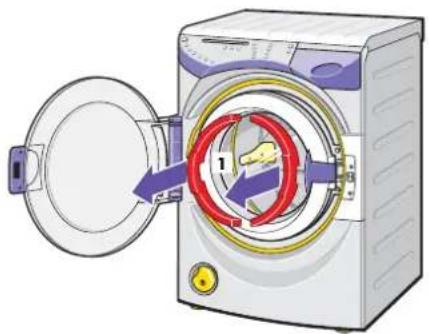
natural_image
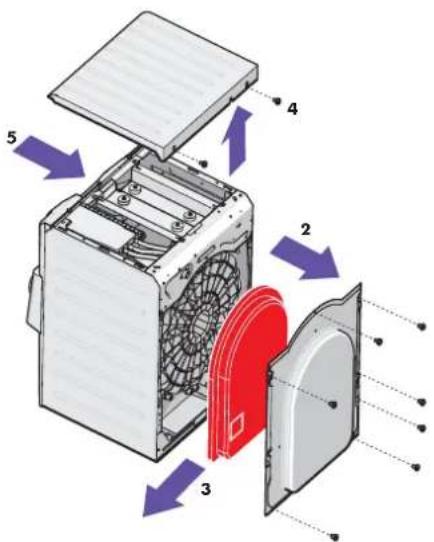
Diagram of a washing machine with a door open, showing internal components and a numbered arrow (no text or symbols present)2 Take off the rear panel by removing the seven screws, using a cross-head screwdriver.
3 Carefully withdraw the foam block and then refit the rear panel and screws.
4 Remove the two screws from the rear of the lid.
5 Remove the lid by sliding it backwards and upwards.
6 Remove the plug and cable from the transit bracket from inside the machine.
401
7 Using the Dyson spanner remove the four bolts securing the top transit bracket.
8 Remove the four screws securing the bracket to the machine casing and lift out the transit bracket.
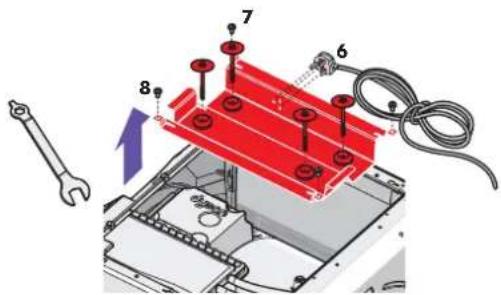
• Refit the lid and two screws.
To replace the packaging eg: for moving house, reverse the procedure described above.
natural_image
Illustration of a hand holding a knob with directional arrows indicating motion or movement (no text or symbols)Moving the washing machine
- Ensure the feet are screwed into the cabinet before moving the machine. See section 5 03 for instruction on adjusting feet.
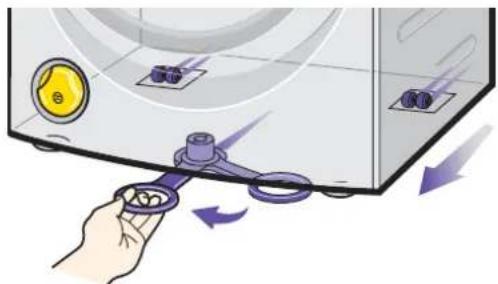
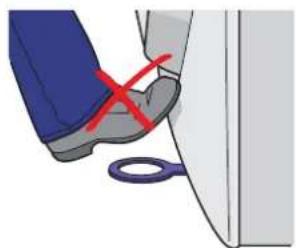
- T o move the machine, pull out the Rollerjačkhandle from underneath the machine, which will enable you to manoeuvre the machine easily into your desired position.
- Replace the Rollerjack ^™ slowly because the handle may return with force.
NB: The Rollerjack ^™ is designed for final positioning only and not suitable over long distances. Do not push with your foot.
natural_image
Close-up of a person's foot and shoe being probed with scissors, no text or symbols visibleInstallation
Specification
Dimensions Height 848mm Depth 575mm Width 595mm Weight: 103kg.
Voltage: 220-240V, 50Hz. Please refer to rating plate (see section 0i for location).
Power: 2750W 230V. Please refer to rating plate (see section 0i for location).
Water pressure: 0.4-5 bar.
Capacity: 7kg dry laundry maximum.
Location
Every Dyson washing machine is tested before it leaves the factory. As a result, there may be some dampness or water in the machine.
- The machine should not be installed in a location where the temperature may drop below freezing.
• T he machine should not be installed in a bathroom. - The machine must be installed on a secure and flat surface. Soft floors, such as carpet or carpet tiles, are not suitable.
The layout of the drainage taps and power socket and their distance from the machine are illustrated below. The water inlet hoses, drainage hose and electrical mains lead must be positioned carefully to avoid damage or kinks when the machine is in use. The machine can be connected to a standpipe, under-sink pipe connection or other drainage system, but the critical dimensions must be adhered to.

Important
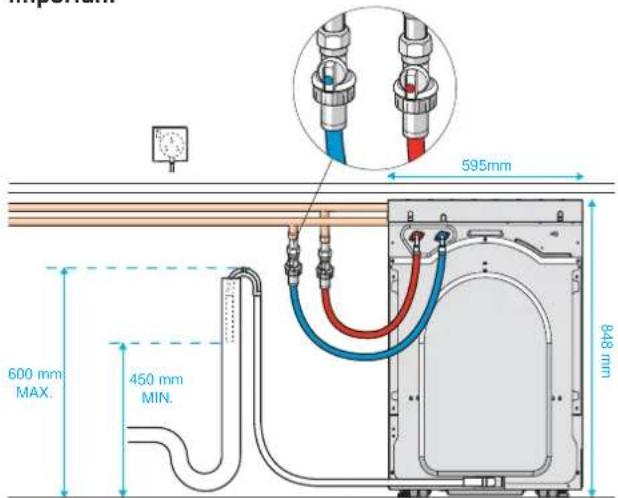
Drainage using a stand pipe*
501
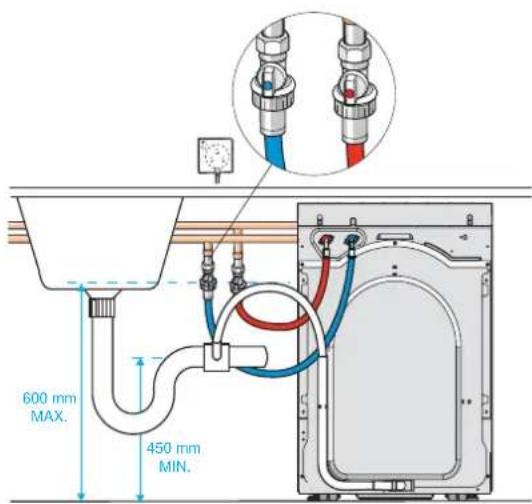
Drainage using an under-sink pipe*
Drainage, water supply and electricity
The washing machine comes with:
2 inlet hoses
1 drainage hose hook
1 Dyson spanner
1 drainage hose at the back of the machine
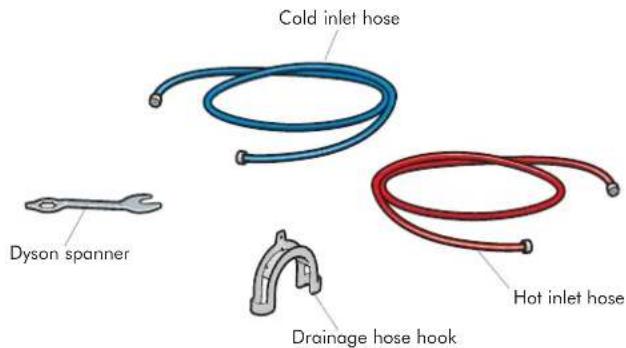
Note: Hoses can be supplied in 2.5m lengths if required. Please contact the helpline to order.
The above items are found in the drum unless stated otherwise.
Installation
Drainage
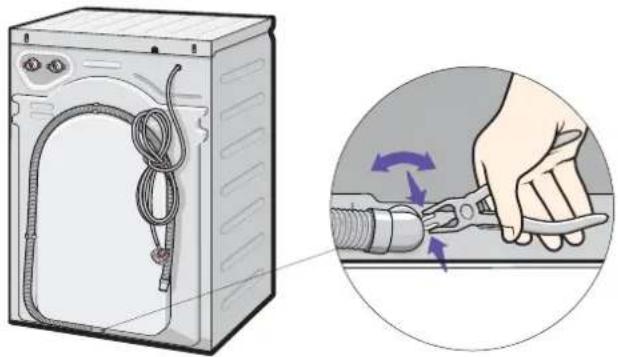
You can alter the direction of the drainage hose to the left or right.
- To change the direction of the machine's drainage hose, squeeze open the retaining clip using a pair of pliers and hold it open while you rotate the hose.
- Ensure the hose is inserted properly before releasing the clip.
natural_image
Illustration of a washing machine with coiled tubing and a close-up of hands using a tool (no text or symbols)- Thread the drainage hose through the hose hook and adjust the protruding end to a distance of 30mm. The hose hook has a small retention hole that can be used to secure the hose in position.

Do not use the hose hook for under-sink connections.
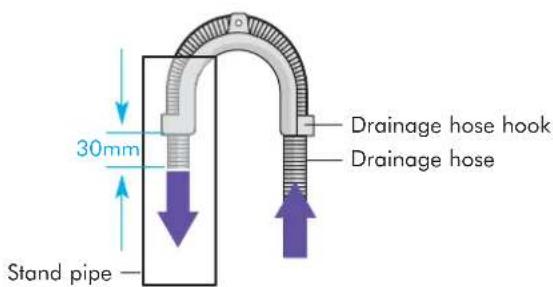
When installed with a standpipe or under-sink connection, ensure that the water outlet end of the drainage hose is no lower than 450mm above ground level. Position the hose so that none of it lies higher than 600mm above ground level (refer to section 0 for position).

NB: Failure to comply with these dimensions could cause the machine to malfunction.
502
Water supply
- Connect your machine to the water supply by hand, using the hoses supplied. Only tighten by hand, do not use a spanner. Do not use old hoses.
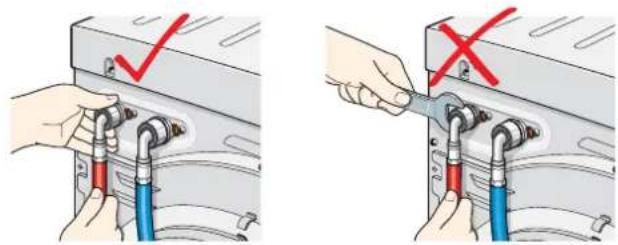
- Ensure the water pressure is between 0.4 and 5 bar.

Do not:
- connect the machine to a mixer tap.
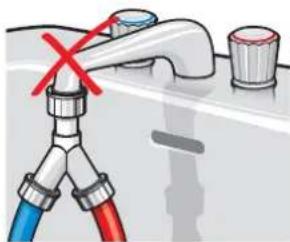
natural_image
Illustration of a faucet with blue and red tubing, showing a valve with a red X mark (no text or symbols)Hot and cold water supply
- Attach the blue inlet hose to the cold inlet tap and the red hose to the hot inlet tap, and turn on water supply.
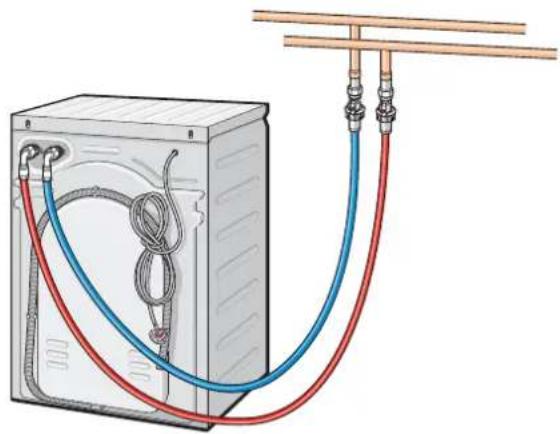
natural_image
Diagram of a washing machine with red and blue tubing connecting hoses to a box (no text or symbols)Installation
Cold water only supply
- If there is no hot water supply, attach the cold and hot hoses to the machine as normal. Then, attach both hoses to a Y-piece (which can be bought from most DIY stores) and finally connect the Y-piece to the cold inlet tap.
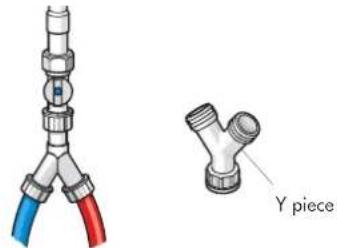
- Once all connections have been made, turn on the tap(s) to check that there are no leaks, tighten by hand if necessary.
Electrical installation

Warning: This machine must be earthed
- Any electrical work required to install the washing machine should be carried out by a qualified electrician.
- Before using your machine, check that the plug and sockets match, and check that the voltage in your home corresponds to the machine's voltage.
This information is on the rating plate (see section 01).
- The machine should be plugged into an earthed socket which can be switched on & off, and that is easily accessible after installation.
• D o not use an extension cable or plug adapter. - If the supply cord or plug are damaged disconnect the machine from the socket outlet immediately. The supply cord must only be replaced by Dyson or its appointed agents, as special purpose tools and service techniques are required.
- If the plug supplied needs to be removed it should be cut off and disposed of safely. Under no circumstances should the severed plug be inserted into a socket outlet as this will present an electric shock hazard.
European conformity information
This Dyson washing machine has been tested and conforms to the following European Directives:
73/23/EEC Low Voltage Directive.
93/68/EEC CE Marking Directive.
89/336/EEC EMC Directive.
503
When all the instructions on the previous pages have been completed, the machine can be installed into its operating position using the Rollerjack™ handle (see section 04).
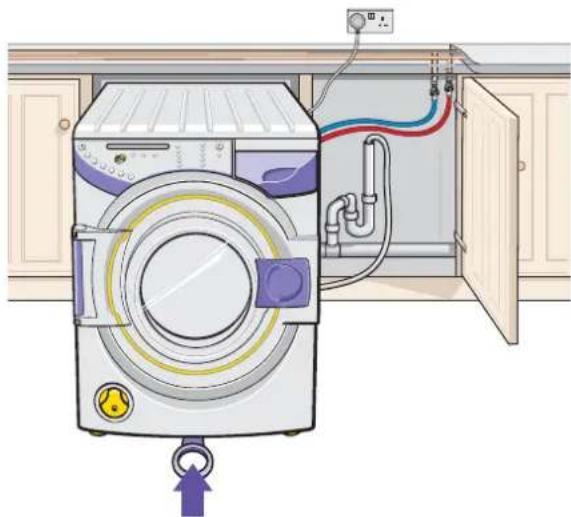
natural_image
Illustration of a washing machine with attached piping and control panel (no text or symbols)- Using the Dyson spanner, adjust the two front feet so that the machine is perfectly stable and is touching the ground on all four corners and cannot rock.
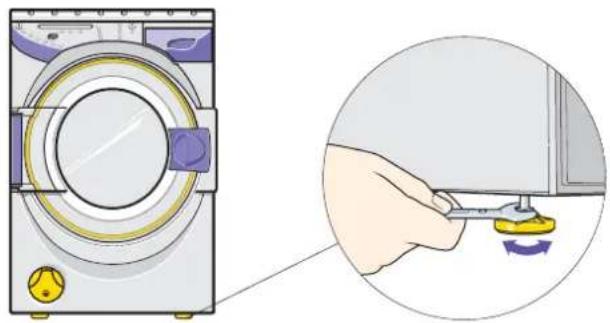
natural_image
Illustration of a washing machine with a close-up view showing a hand holding a small tool near the door (no text or symbols present)- Do not use wood, carpet or other material to stabilise the washing machine.
After installation
- Run an empty 60 °C cotton cycle with a half measure of detergent. For the correct dosage, please follow the manufacturer's instructions on the detergent packaging. (See sections 07 and 01 8 how to start the machine).
• This will clean any test water out of the machine, and allow you to check that the machine is installed and levelled correctly. - Observe it regularly during the first wash and check connections afterwards and during the first week, to ensure that they have been fitted correctly.
Operation
Loading the washing machine
- Ensure the machine is plugged into the mains and switched on at the socket. Check that the water supply is on at the mains.
- Open the outer and inner doors.
- Check the drums are empty before placing the sorted laundry into the washing machine.
- Close both doors, making sure that both have 'clicked' shut.
It is important not to overload the machine. Maximum loads for each programme are shown in the table section 9. Tests have shown that overloading can reduce the wash performance and may cause damage to your machine.
Detergent use
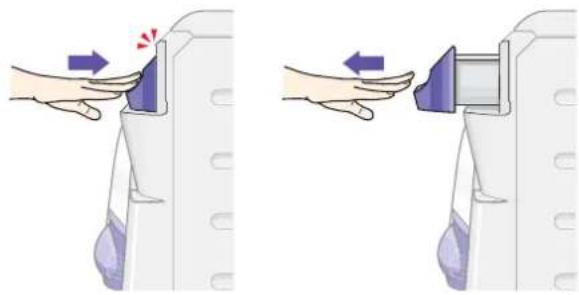
• T o open the soap tray, press the hand on the soap tray. Do not try to pull out the soap tray without first pressing it.
natural_image
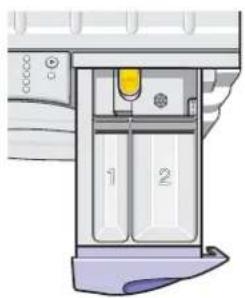
Illustration of two hand positions on a vehicle door, showing a close-up of the interior and side view (no text or symbols)- Add detergent to the compartment marked 2 for all the main wash programmes.
- F or a pre-wash option, add detergent to the compartment marked 1.
- Fabric conditioner can be added to the compartment marked to the level indicated, do not overfill.
natural_image
Diagram of a mechanical device with labeled parts (1 and 2), no readable text or symbols present.- Push the soap tray to close, ensuring it 'clicks'.

601
Detergent use
- Use only powder suitable for automatic washing machines.
Type of laundry Type of detergent
| Brightly coloured/multi coloured | Colour care |
| Whites Conventional biological or non-biological | |
Wool, silk Non biological wool/silk
Detergent format
Place wash balls and nets directly into the drums of the washing machine.

Do not:
- place wash balls or tablets in drums when using the start delay option (selected models only). This could fade coloured laundry if the detergent touches the fabric before the water soaks the laundry.
- place detergent into the drums when using a pre-wash as it will be used before the main wash. Instead, use the soap tray.
• cover wash balls or tablets with laundry, as this can inhibit the dispersal of detergent. - stop the wash for long periods of time once it has started. The detergent may not have had time to disperse and concentrations may damage the laundry.
Detergent quantity
- C RO2's drum capacity is larger than conventional washing machines.
- This larger load will require a slight increase in detergent. We recommend the following doses:
CRO2 with a half load
CRO2 with a full load
 | Powder1 scoop |  | Powder 1^1/2 scoops |
 | Liquid1 dose |  | Liquid 1^1/2 doses |
 | Tablets2 tablets |  | Tablets3 tablets |
*For maximum dosage based on very heavy soil and hard water please refer to manufacturer's instructions on detergent pack.
Starting your wash
701
To start your wash cycle using the default settings
1
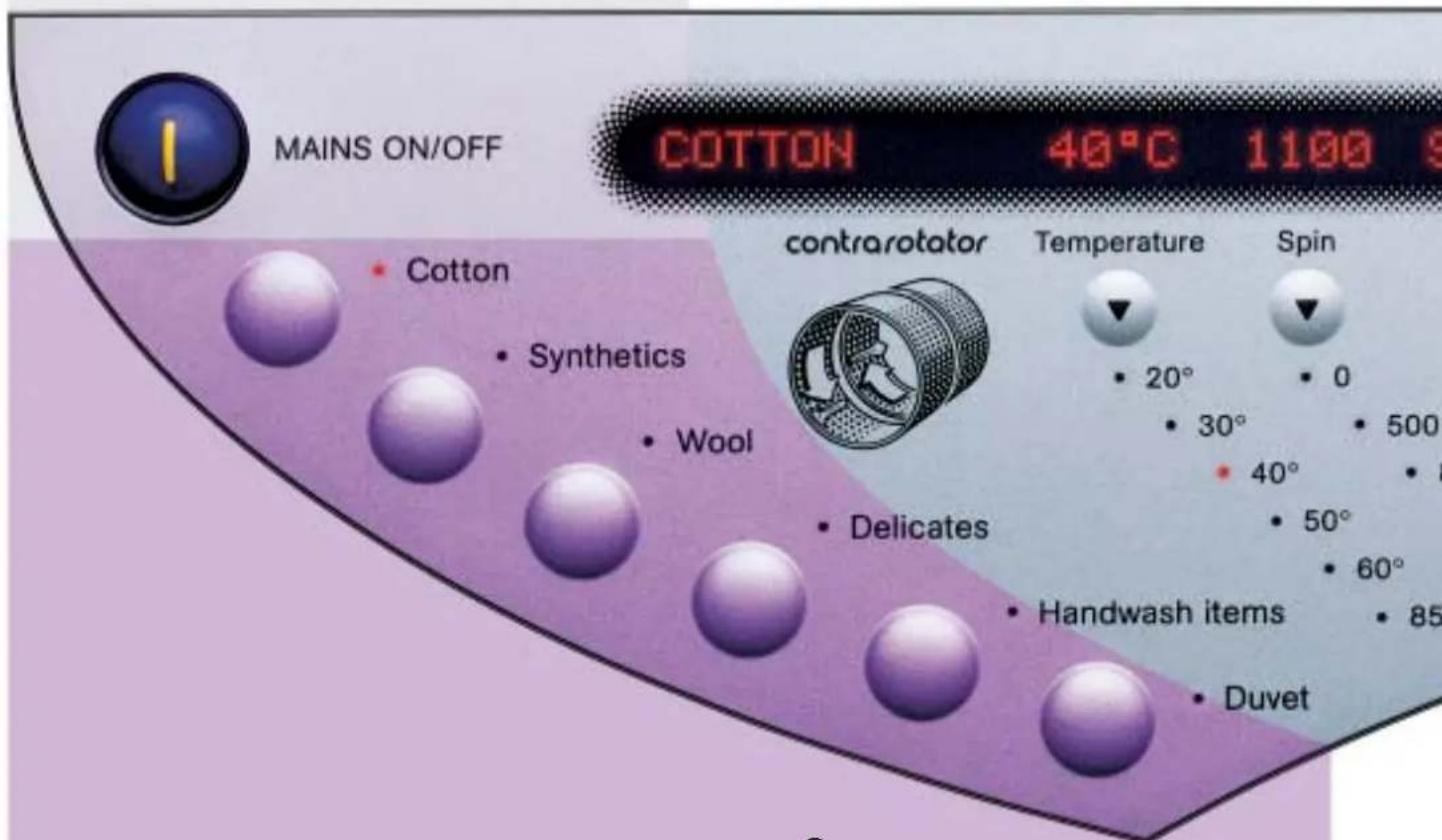
Switch on the machine
2
Select the programme
Select Cotton/Synthetics/Wool/Delicate/Handwash items or Duvet cycle. Temperature, spin and soil type settings will automatically adjust to the default settings to give the best options for the selected wash. Please see section 08 for details of how to change the default settings.
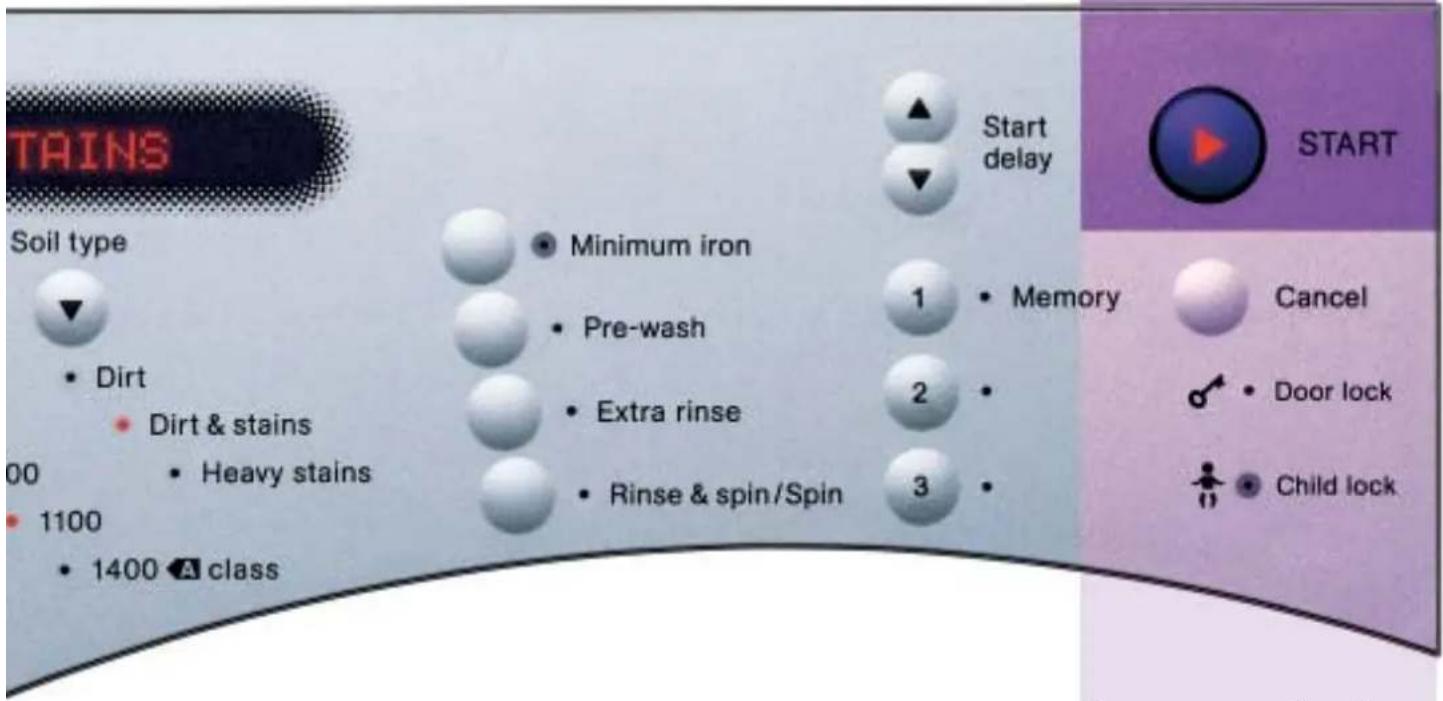
3
Start your wash cycle
Press to start your chosen programme.
Pause your wash cycle
To pause the wash, for example to add a forgotten item to the wash, press the 'Start' button.
Press 'Start' once more to resume the wash. When a programme is paused, the door may remain locked for safety reasons (see section 08 for the door lock).
Cancel your wash cycle
To cancel the wash, press and hold down the 'Cancel' button. The outer door will unlock once the water has drained away, and if the inner door is cool enough (see section
801 for the door lock).
End of wash cycle
The display will show 'Programme finished' once the cycle is complete. Remove the washing and turn off the machine by pressing the 'Mains on/off' button.
Optional settings
801
To personalise the default wash programmes
Adjust your programme
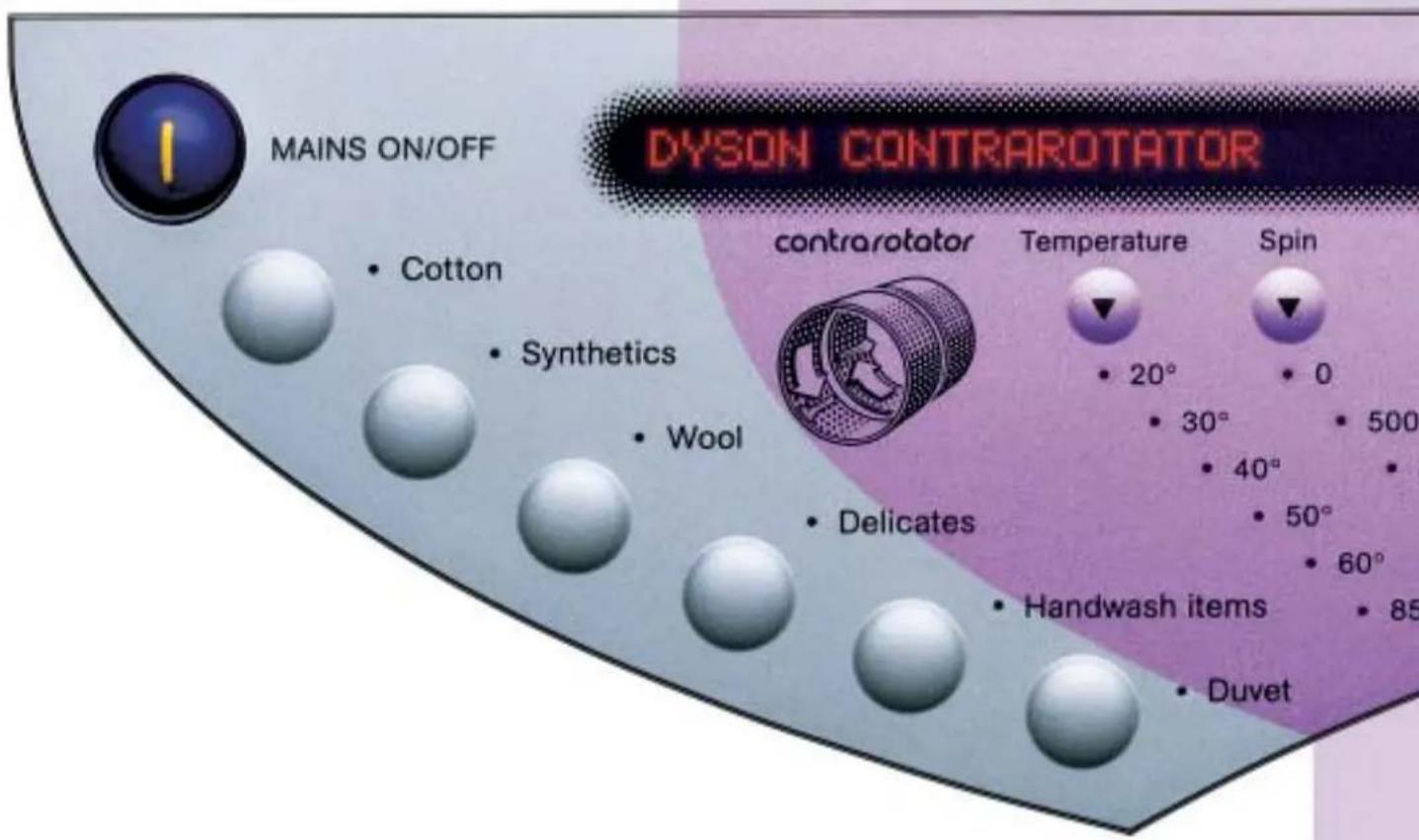
After selecting the fabric type, press the temperature, spin and soil type buttons to scroll through the options and select your preferred settings. Note: on certain programmes some options are not available (see section 902).
Additional options
To activate any of the additional options below after you have selected your programme, press your desired option button once; press it again to cancel the option.
Minimum iron
This holds your laundry in water after the final rinse to minimise creasing. To spin the laundry and finish the programme, press the 'Start' button. Minimum iron is not suitable on all programmes but is particularly good for synthetics and delicates. (Please refer to section 09).
Start delay
Selected models only
This allows you to programme the wash to finish when you want it to. Use the ▲ and arrows to adjust the settings eg: if you want the wash to start in 10 hours time, press the ▲row 10 times and press 'Start' to activate it. The display will countdown the delay time to start. Press and hold the 'Cancel' button at any time to cancel the start delay, press and hold 'Cancel' again to cancel cycle.
Door lock
The door lock light indicates that the outer door is locked.
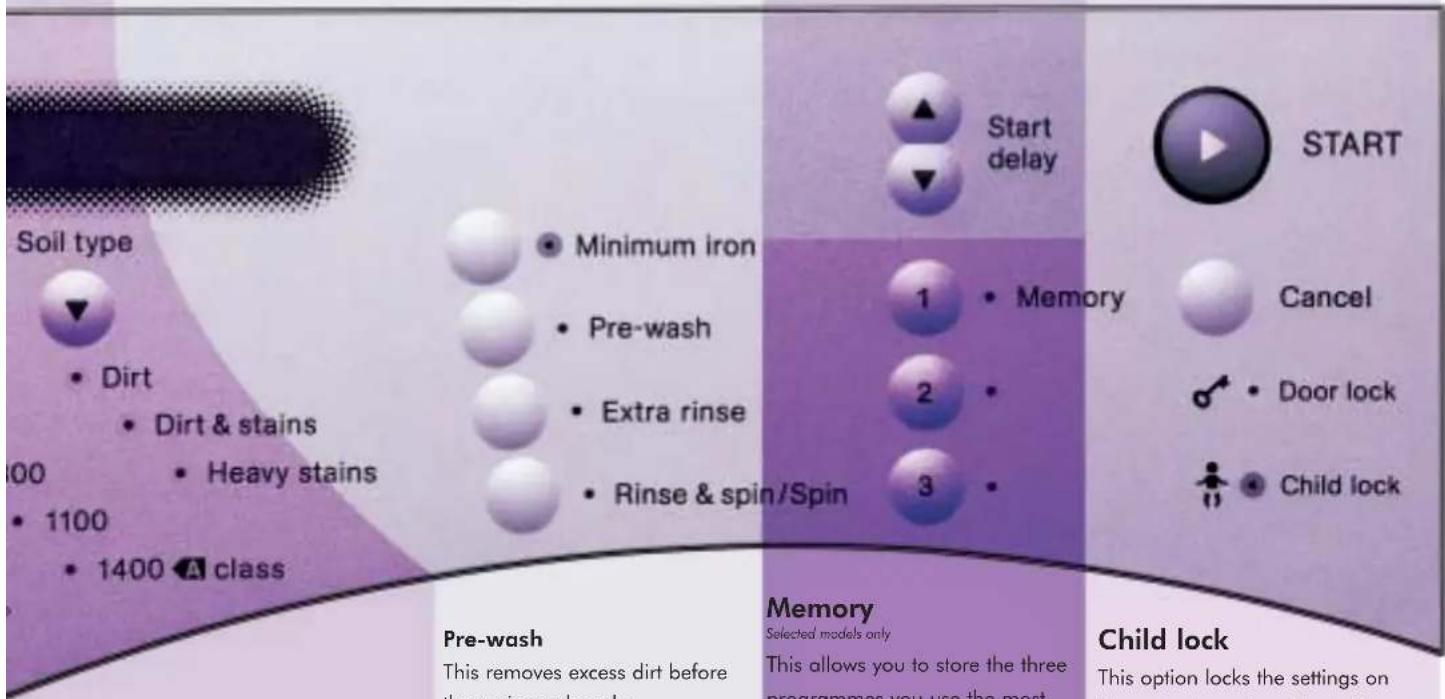
Soil type selection
Soil type can be adjusted on the Cotton and Synthetic programmes only, cleaning from everyday washing to heavily stained football kits.
Dirt
For lightly soiled laundry.
Dirt & stains
For typical everyday soiling.
Heavy stains
For heavily stained items. (see section 09.
Pre-wash
This removes excess dirt before the main wash cycle.
Extra rinse
This adds one extra rinse. On some models, up to 3 extra rinses can be selected by pressing the button up to 3 times. To deactivate press repeatedly until light is extinguished. For people with sensitive skin.
Rinse & spin/Spin only
Press once for 'Rinse & spin' option, press twice for 'Spin' only option and press a third time to cancel.
Memory
Selected models only
This allows you to store the three programmes you use the most. Select the programme with any additional options, then press and hold one of the memory buttons for one second. A beep will confirm the programme has been stored. To select a stored programme, press the relevant 'Memory' button and then press 'Start'. To re-programme a stored cycle, follow the steps for programming a memory cycle.
Child lock
This option locks the settings on the control panel and locks the outer door. Once a programme is running, use this option to prevent it from being altered, paused or cancelled. You can also use the Child lock when the machine is not in use to keep the outer door locked. Press and hold the 'Minimum iron' button to activate or cancel the Child lock, before starting the cycle.
Fabric care and advice
901
Wash tips
Care symbol
Care symbol

Do not:
- wash frayed or torn fabrics.
- w ash items unsuitable for washing machines e.g. trainers, shoes or rucksacks. Always:
Care label
- check the wash care label on laundry to select the most appropriate programme. If you are unsure of the care label, use a gentle programme such as Wool.
Mixed fabric load
- wash a mixed load according to the most delicate item in it.
- sort laundry according to care label.
Sort laundry according to colours
- wash dark colours separately.
- wash new items separately for their first few washes as excess dye may run.
Underwired bras
• We recommend washing underwired bras on the delicate programme, to safeguard your garments and your machine.
• Take care not to overload the machine when you have underwired bras in the wash.
Prepare your laundry
- empty all pockets before loading the laundry into the machine, fasten zips, draw strings, tie belts and press studs before washing. Turn sleeping bags, duvet covers, jeans, knitted fabrics and coloured items inside out before washing, checking the wash care label.
Duvets & Pillow
- check your duvet is machine washable.
- wash duvets on the Duvet cycle.
• refer to care label for wash temperature and drying recommendations.
- Dyson washing machine will wash most machine washable king size duvets up to 13.5 tog.
Note: Different manufacturers' duvet sizes can vary under the same tog rating.
- If the duvet is over 10.5 tog, we do not recommend spinning it. If it is 10.5 tog or below, we recommend a maximum spin speed of 500 rpm.
- T o load the duvet into the machine, feed the corner into the rear of the drum and continue to feed the duvet along its outer seam.

Cotton
A wash tub with no bar underneath indicates the item is suitable for a high agitation wash. The maximum temperature is normally specified in the wash tub.

Hot iron
Iron 200^

Synthetics
A wash tub with one bar underneath indicates the item is suitable for a medium agitation wash. The maximum temperature is normally specified in the wash tub.

Medium iron
Iron 150°C

Cool iron
Iron 110^

Wool/Delicate
A wash tub with two bars underneath indicates the item is suitable for a gentle agitation wash. The maximum temperature is normally specified in the wash tub. Note: Machine washable wool and wool mixes should only be washed on the Wool cycle.

Do not iron
Steaming and steam treatments should not be used.

WOOLMARK

May be tumble dried
Normal heat setting.

May be tumble dried
Delicate heat setting.

Handwash
Wash gently by hand or in a washing machine with a gentle handwash programme.
Note: Not all handwash items are suitable for a machine handwash programme. Check core label or contact garment manufacturer.

Do not tumble dry
Tumble drying unsuitable laundry can result in shrinking and melting.

May be dry cleaned
Letters in the circle indicate the type of solvent suitable.

Do not wash
Laundry with this symbol should not be put in a washing machine.

Do not dry clean

Chlorine-based bleach may be used.

Dry flat

Do not use bleach
Use a colour care detergent for best results.
Note: If in doubt of correct washing guidelines, please contact the garment manufacturer or retailer.
Programme table
902
Care label Suggested programme Temperature Spin speed Soil type Options
Maximum load
Cycle time
 | Cotton100% cottonsLinen | 20 - 60°C | 0 - 1400 rpm | DirtFor lightly soiled laundry | Pre-washExtra rinseMinimum iron | 3.5 kg | 40 mins* |
| 20 - 85°C | 0 - 1400 rpm | Dirt & stainsFor typical everyday soiling | 7 kg | 67 mins* | |||
| Heavy stainsFor heavily stained items | 85 mins* | ||||||
 | SyntheticsCotton mixesMixed fibrePolycottonsFabrics with special finisheseg: 'non-iron' treated cottonMixed fabric wash loadsPrinted cottonsPolyester | 30 - 50°C | 0 - 1100 rpm | DirtFor lightly soiled laundry | Pre-washExtra rinseMinimum iron | 4 kg | 40 mins* |
| Dirt & stainsFor typical everyday soiling | 77 mins* | ||||||
| Heavy stainsFor heavily stained items | 85 mins* | ||||||
 WOOLMARK WOOLMARK | WoolMachine washableWool and wool mixes | 30 - 40°C | 0 - 800 rpm | No option | Extra rinseMinimum iron | 2 kg | 45 mins* |
 | DelicatesMicro fibresSynthetic laundry thatrequire careful handlingPrinted fabricsNot for wool | 30 - 40°C | 0 - 500 rpm | No option | Pre-washExtra rinseMinimum iron | 3 kg | 77 mins* |
 | Handwash itemsMachine washableHandwash items only,requiring a very gentle actionWashable silks | 20 - 30°C | 0 - 500 rpm | No option | Minimum iron | 1.5 kg | 45 mins* |
| DuvetPlease also read the duvetsection in the 'Wash tips'Allergy duvet washAnti dust-mite wash,for allergy sufferers | 30 - 40°C60°C(on selected models). | 0 - 800 rpm | No option | Pre-washExtra rinseMinimum iron | Up to 13.5 tog | 100 mins* |
*Based on 40°C programmes and will vary according to temperature, hot/cold fill and options selected.
'AAA' Energy Label declaration is based on a Cotton, 60°C Dirl and Stains cycle. On some machines, cycle selections may differ from those shown.
Maintenance
10 01
Self clean cycle (on selected models only)
- Approximately every 200 cycles, the machine will display 'Self clean cycle due'. This message will be displayed at the end of a finished wash cycle. The self clean cycle is a hygienic cycle which will kill most bacteria in the machine. You can decide to activate or cancel the Self clean cycle:
- Unload the machine as self clean cycle washes at 85 °C
- To activate, put half a measure of detergent into the soap tray, then press 'Start'.
• T o cancel, press and hold 'Cancel'.
Cleaning

Always:
- disconnect the machine from the mains before cleaning or carrying out any maintenance work.

Do not:
- clean the machine with detergents. Always use a clean, soft, damp cloth.
Cleaning the soap tray
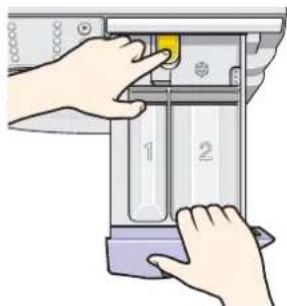
- Remove the soap tray by pressing the yellow release button at the back of the tray, and pulling it out.
natural_image
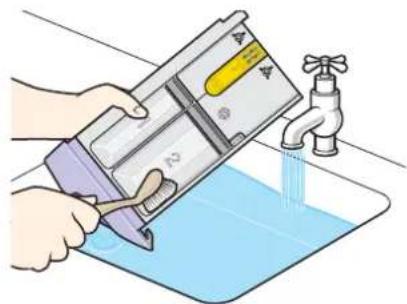
Illustration of hands operating a mechanical device with numbered parts (no text or symbols visible)- Wash it in warm water with a small, soft brush, taking care not to scratch the soap tray front.
natural_image
Illustration of a hand pouring liquid from a container into a basin with a faucet (no text or symbols)- The soap tray cavity in the machine should be cleaned out with a small, soft brush, taking care not to dislodge the rubber seal.
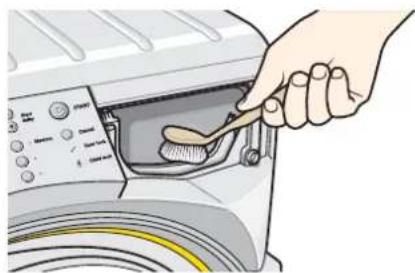
natural_image
Illustration of a hand using a spoon to clean or wash the air in a washing machine (no text or symbols visible)- Replace the soap tray ensuring it 'clicks' into place.

Do not:
- wash the soap tray in a dishwasher.
Maintenance wash
To prevent odours and build-up of deposits within the washing machine, it is recommended that you run an empty 85°C cotton cycle with a half measure of detergent 2 or 3 times a year. This cycle can be used in addition to the Self clean cycle (selected models only).
If the outer door is dislodged from its safety hinge:
1 Locate the top ring of the outer door into the top of the safety hinge.
2 Lift the door and push it forward until the lower ring of the door 'clicks' into place.
The outer door is designed to 'pop' out of its hinge if leant on, however it is not designed to support a load.
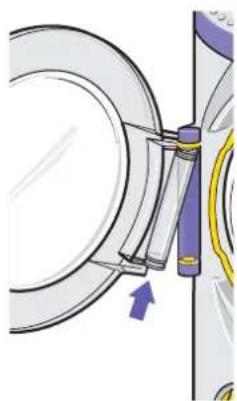
natural_image
Mechanical assembly diagram showing a circular component with attached parts and an arrow indicating direction (no text or symbols)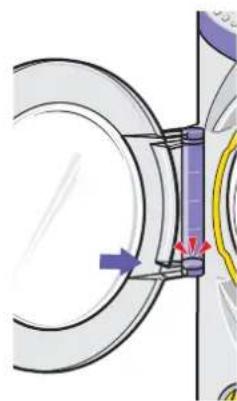
natural_image
Mechanical assembly diagram showing a rotating component with directional arrows (no text or symbols)Maintenance
10 02
Coin trap

Never remove any objects from the coin trap while the washing machine is switched on, still running or paused during a wash. Always cancel cycle, switch off machine and allow the water to cool before opening the coin trap.
• Empty the coin trap when a blockage has occurred.
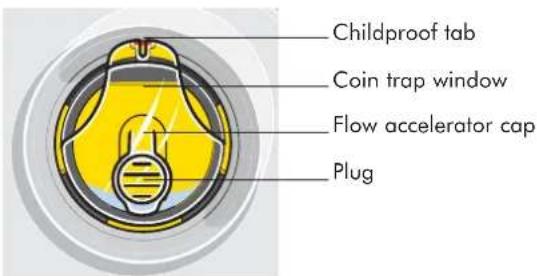
1 Place a tray or shallow dish underneath the coin trap.
2 Using the Dyson spanner, lever the plug in the middle of the coin trap. The water will drain from the plug.
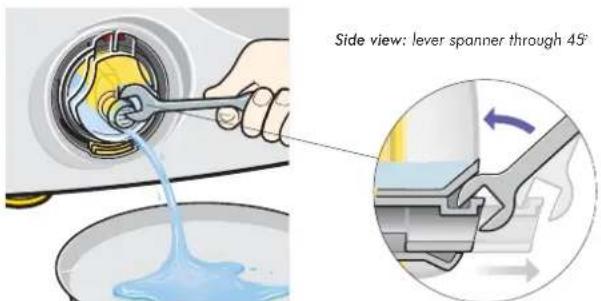
3 If the tray or dish is full, push the plug into its original position by hand, empty the tray or dish and repeat the process.
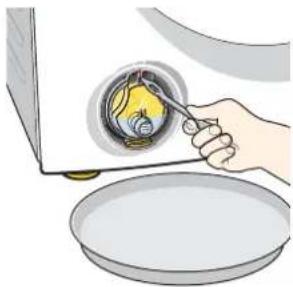
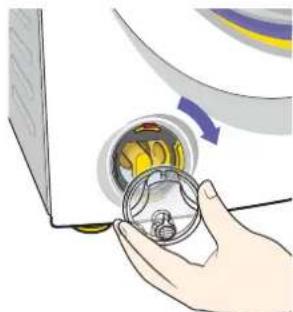
4 Once the water has been removed (a small quantity of water will remain below the level of the plug), lift and hold the childproof tab using a small screwdriver or the reverse end of the Dyson spanner. Turn the window anticlockwise until it is released.
natural_image
Illustration of a hand pouring liquid into a bowl with a spoon (no text or symbols)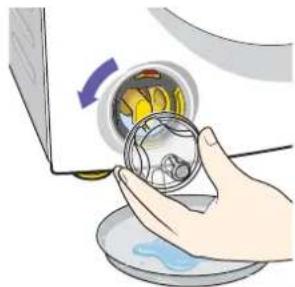
natural_image
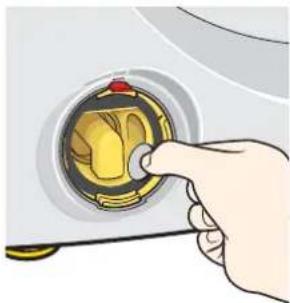
Illustration of a hand holding a transparent container with a yellow bowl, partially open by a curved arrow (no text or symbols)5 Remove any objects from the coin trap.
natural_image
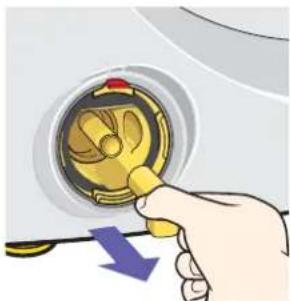
Hand inserting a coin into a washing machine (no text or symbols visible)6 If any more items seem to be blocking the coin trap, pull out the flow accelerator cap.
natural_image
Hand holding a yellow mechanical component with a blue arrow indicating downward motion (no text or symbols)- Remove any items and firmly push the flow accelerator cap back into place.
To replace the coin trap window:
- Ensuring the seal is in place, lubricate with a drop of washing up liquid.
• Make sure the plug is pushed back into the closed position. - Line up the ears at 12 o'clock position and rotate 360^ clockwise until it clicks into child proof tab at top.
natural_image
Illustration of a hand holding a mechanical component with a circular dial and yellow components, no text or symbols present.
Always wash hands after handling the coin trap.
Maintenance
Water filter

To access the back of the machine ensure the feet are screwed into the cabinet before using the Rollerjack™ handle to pull the machine out, see section 014 for details.
Cleaning the water inlet filters
The water inlet filters should be checked regularly for debris or limescale build-up particularly in a hard water area. Contact your local water authority to find out your water composition.
• T urn off the water supply to the machine.
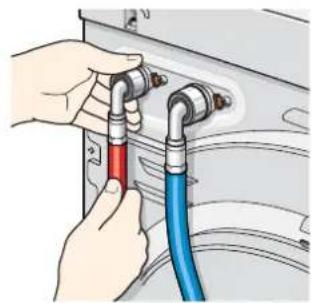
- Unscrew both water inlet hoses by hand.
• Using pliers, grip the coloured filters, pull them out and rinse them under cold water.
NB: Some water may remain in the hoses.
natural_image
Illustration of hands connecting blue and red hoses to a wall-mounted device (no text or symbols)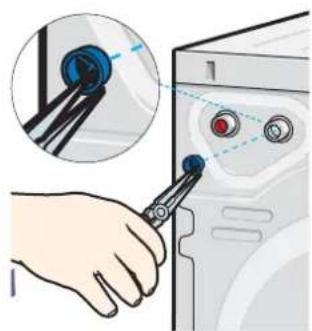
natural_image
Illustration of a hand using a tool to adjust or install a computer control panel (no text or symbols visible)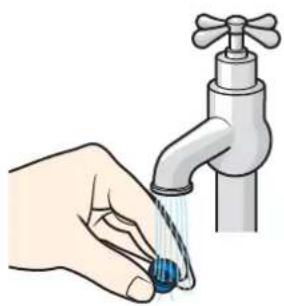
natural_image
Illustration of a hand holding a blue water droplet next to a faucet (no text or symbols)- Replace the filters, red to the hot fill and blue to the cold fill, and reconnect the water inlet hoses.
10 03
Emergency door release

This should be used in the event of a power cut to remove laundry.
- Switch off and remove the plug from the socket.
- Ensure the drums have stopped moving.
- If the machine has been running on a hot wash, leave it to cool down.
- Completely drain the washing machine see section 02 under 'coin trap'.
- Remove the soap tray as described in section 010
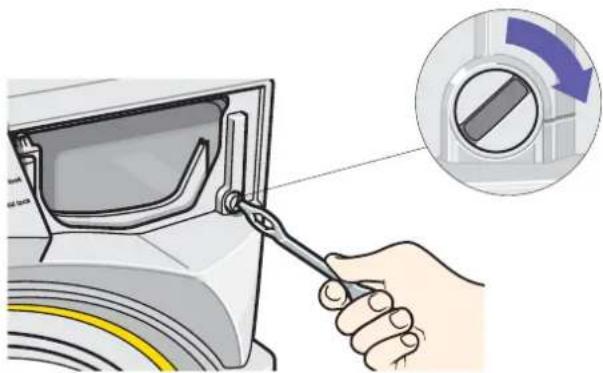
- Using the Dyson spanner or a coin, turn the door release screw 14 of a turn clockwise to unlock the door.
- Replace the soap tray.
natural_image
Illustration of a hand using a tool to adjust or install a washing machine component, with a magnified inset showing the switch mechanism (no text or symbols present)11 01 Troubleshootin

Before calling the helpline, please carefully read the following pages.
11 02 Troubleshooting

Some solutions may require you to disconnect the electricity and water supply.
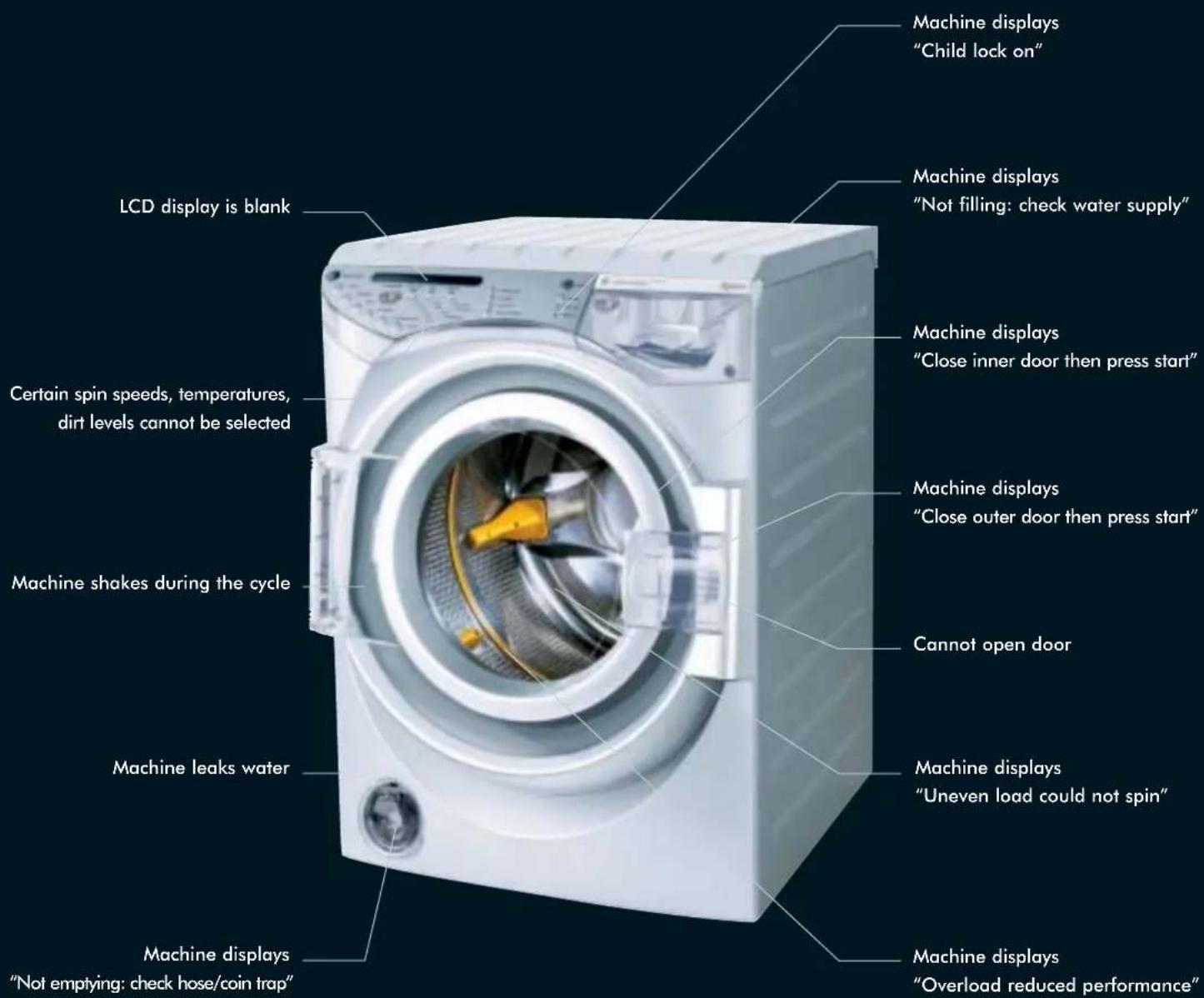
| Symptom | Possible causes | Solutions |
| LCD display is blank | There is no power to the machine. | Ensure the machine is plugged in and switched on. Check the fuse and also that the circuit breaker has not tripped. |
| Certain spin speeds, temperatures or soil types cannot be selected | There are limits set on these options for each programme to prevent unsuitable options being selected. | (See section 9) for the programme options wash table. |
| Cannot open outer door | Machine has not finished the cycle. | Wait for the machine to finish the cycle before opening the door. To cancel the wash hold down the 'Cancel' button. |
| Machine has paused and the water level is too high or the water is too hot. | Press 'Start' to resume the wash. | |
| Child lock is active. | Hold down the 'Minimum iron' button until 'Child lock off' is shown on LCD display. | |
| Power cut or any other cause not listed above. | Follow the 'Emergency door release' instructions in (section 03). | |
| Machine leaks water | Coin trap cover is not in place, or the plug is not closed. | Turn off the water supply to the machine and ensure that the coin trap cover is correctly fitted and that the plug is closed, (see section 02). |
| Machine is not level. | Adjust the feet until the machine is level, (see section 05). | |
| Drainage hose is not connected correctly. | Check the drainage hose is draining into a suitable place (drain, sink or standpipe), (see section 02). | |
| Inlet hoses are not positioned or correctly fitted. | Ensure the hoses are fitted correctly, (see section 02). | |
| Soap tray is open. | Close the soap tray. | |
| Soap tray is blocked with detergent | Remove soap tray and clean (see section 01). | |
| Machine shakes during the cycle | 2 adjustable front feet are not level. | Adjust feet until the machine is level, (see section 02). |
| RollerjackTM handle has not been replaced under the machine. | Return the RollerjackTM handle carefully to its position under the machine, (see section 04). | |
| Burning smell | Transit packaging not removed. | Remove top, rear and front packaging, (see section 04). |
| Transit packaging is removed | Call Dyson helpline. | |
| Clothes warm at end of cycle | Hot and cold pipes reversed. | Check orientation of hot and cold pipes. |
11 03 Troubleshooting
| LCD display message | Possible causes | Solutions |
| Child lock on | The child lock has not been deactivated. | Hold down the 'Minimum iron' button until 'Child lock off' is shown on the LCD. |
| Overload reduced performance | The recommended wash load has been exceeded or unusual items have been washed. The wash load is uneven. | In future, refer to the programme table section 09 or cease to wash the particular unusual item(s). |
| Uneven load could not spin | The machine sensed that spinning would be unsafe. Unusual items eg: trainers may have been washed. | Remove some items or reload the machine and select 'Spin only' option (see section 8). |
| Close outer door then press start | Outer door not closed properly, manual release still open. | Close the outer door, ensuring nothing is trapped. Turn manual release clockwise (see section 03). |
| Close inner door then press start | Inner door not closed properly. | Close the inner door, ensuring nothing is trapped. |
| Not emptying: check hose and coin trap | Coin trap blocked.Machine full of suds.Drainage hose not draining. | Remove blockages (see section 02).Leave suds to settle. In future, refer to the manufacturer's dosage instructions.Check that the drainage hose is installed according to the installation instructions (see section 05 & 5 02). |
| Not filling: check water supply | Water supply is not connected.Filter is blocked.Inlet hoses are blocked or kinked.Drainage hose is installed incorrectly. | Check that the water supply is connected and turned on at the tap.Clean the filters (see section 03).Unblock or straighten the inlet hoses.Unblock or straighten the drainage hose. |
| Fault | There is a technical fault with your washing machine.NOTE: The two drums make an unusual noise when they are counter rotating - this is nothing to worry about. | Contact the Dyson Helpline or visit the website www.dyson.com with the following information:Your machine's serial number see side of machine.Where and when you purchased your washing machine.Your address.The fault code that appears on the LCD display, if applicable.A Dyson service engineer will visit you to test your machine and repair if necessary. |
| Dyson HelplineUK 0870 600 2701email service@dyson.comROI (01) 475 7109email irelandservice@dyson.comwww.dyson.com | NOTE: If an engineer is booked and it is found that the fault could have been rectified using the troubleshooting guide, you may be charged. |
GENUINE COMPONENTS
dyson
For Dyson, call Dyson
Made & Tested by Dyson
JN.8887 30.10.03 PN.50351-04-01
Dyson Call Centre
Helpline 8 till 8, every day
UK 08705 275104
ROI (01) 475 7109
service@dyson.co.uk
www.dyson.com
Dyson Ltd Tetbury Hill Malmesbury Willshire SN16 ORP
- Overview
- Contrarotator™
- 201
- The only 2-drum wash action.
- This product is protected by the following:
- Registered Designs:
- Trade Marks:
- User Instructions
- 301
- Free registration
- Registering your Dyson washing machine
- How to register
- Dyson service
- Serial number
- Important safety notes
- Always:
- Do not:
- Child safety
- Before installation
- Inner transit packaging removal
- 401
- Moving the washing machine
- Installation
- Specification
- Location
- 501
- Drainage, water supply and electricity
- Drainage
- 502
- Water supply
- Cold water only supply
- Electrical installation
- Warning: This machine must be earthed
- European conformity information
- 503
- After installation
- Operation
- Loading the washing machine
- Detergent use
- 601
- Detergent format
- Detergent quantity
- Starting your wash
- Select the programme
- 3
- Start your wash cycle
- Pause your wash cycle
- Cancel your wash cycle
- End of wash cycle
- Optional settings
- Adjust your programme
- Additional options
- Minimum iron
- Start delay
- Door lock
- Soil type selection
- Dirt
- Dirt & stains
- Heavy stains
- Pre-wash
- Extra rinse
- Rinse & spin/Spin only
- Memory
- Child lock
- Fabric care and advice
- 901
- Wash tips
- Care symbol
- Care label
- Mixed fabric load
- Sort laundry according to colours
- Underwired bras
- Prepare your laundry
- Duvets & Pillow
- Cotton
- Hot iron
- Synthetics
- Medium iron
- Cool iron
- Wool/Delicate
- Do not iron
- May be tumble dried
- Handwash
- Do not tumble dry
- May be dry cleaned
- Do not wash
- Do not dry clean
- Chlorine-based bleach may be used.
- Dry flat
- Do not use bleach
- Programme table
- 902
- Maintenance
- Self clean cycle (on selected models only)
- Cleaning
- Cleaning the soap tray
- Maintenance wash
- If the outer door is dislodged from its safety hinge:
- Coin trap
- To replace the coin trap window:
- Water filter
- Cleaning the water inlet filters
- Emergency door release
- 01 Troubleshootin
- 02 Troubleshooting
- 03 Troubleshooting
- GENUINE COMPONENTS
- dyson
Brand : DYSON
Model : CR02 Allergy
Category : Washing machine