
Bluspeaker TWS XL - Car Mount TECHNISAT - Free user manual and instructions
Find the device manual for free Bluspeaker TWS XL TECHNISAT in PDF.


| Product Type | Stereo Speaker with True Wireless Stereo |
| Brand | TechniSat |
| Model | Bluspeaker TWS XL |
| Dimensions (W x H x D) | 261 x 147.2 x 85.6 mm |
| Weight | 2 kg |
| Battery Capacity | 2200 mAh |
| Battery Type | Lithium |
| Bluetooth Version | 4.2 |
| Bluetooth Frequency | 2402 - 2480 MHz |
| Max. Transmission Power | 15 dBm |
| NFC Frequency | 13.56 MHz |
| AUX Input | 3.5 mm jack |
| USB Output | DC 5 V, 1 A |
| Amplifier Power | 2 x 15 W |
| Frequency Response | 60 Hz - 20 kHz |
| Signal-to-Noise Ratio | > 75 dB(A) |
| TWS Function | Yes, pair two speakers for stereo sound |
| Mains Adapter Input | 100 - 240 V, 50/60 Hz |
| Safety Precautions | Do not open device, avoid water, use only supplied adapter |
| Cleaning Instructions | Clean with a dry cloth |
| Disposal | Dispose according to WEEE directive 2012/19/EU |
Frequently Asked Questions - Bluspeaker TWS XL TECHNISAT
User questions about Bluspeaker TWS XL TECHNISAT
0 question about this device. Answer the ones you know or ask your own.
Ask a new question about this device
Download the instructions for your Car Mount in PDF format for free! Find your manual Bluspeaker TWS XL - TECHNISAT and take your electronic device back in hand. On this page are published all the documents necessary for the use of your device. Bluspeaker TWS XL by TECHNISAT.
USER MANUAL Bluspeaker TWS XL TECHNISAT
natural_image
Exterior view of a modern silver rectangular electronic device with a coiled cable handle (no visible text or symbols)BLUSPEAKER TWS XL
CONTENTS
DEUTSCH 3-36
ENGLISH 37-70
natural_image
Exterior view of a modern rectangular electronic device with a handle and metallic grille (no text or symbols visible)TechniSat
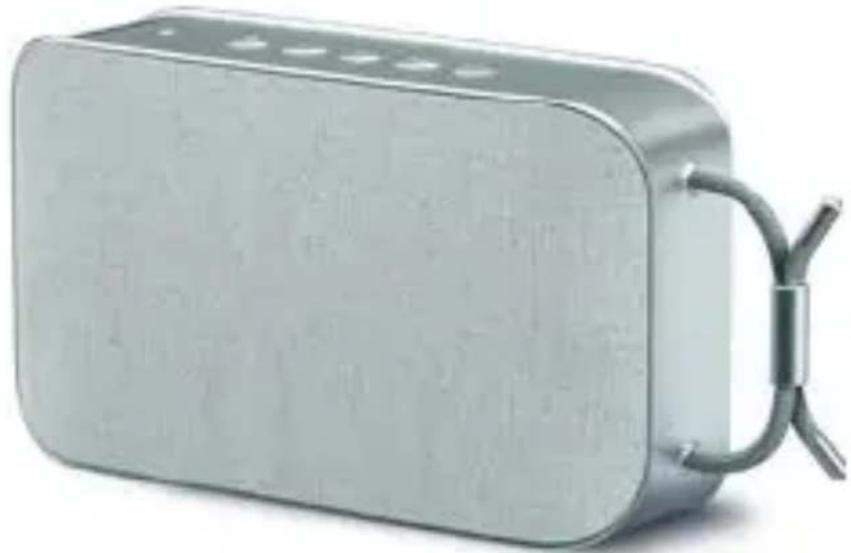
Stereo speaker with True Wireless Stereo function
natural_image
Exterior view of a modern rectangular electronic device with a metallic handle and ventilation slots (no text or symbols visible)TechniSat
3736 37
1 Contents
1 Contents ......38
2 Foreword......40
2.1 Target audience...... 40
2.2 Design style of this instruction manual......40
2.3 Guidelines 41
3 Illustrations......42
4 Safety and setting up the device ....43
5 Disposal Instructions......49
5.1 Disposing of the device.....49
6 Information on setting up ....52
6.1 Scope of delivery....52
6.2 Bluetooth: Wireless communication technology..53
6.3 Connecting external sources 53
6.4 Charging the battery....54
7 Use 55
7.1 Switching the device on and off....55
7.2 Adjusting the volume .....56
7.3 Pairing Bluetooth devices .. 57
7.4 Bluetooth control .....58
7.5 Using the LINE-IN connection....61
7.6 TWS mode....63
7.6.1 Enabling TWS mode ...... 64
7.6.2 Disabling TWS mode ......65
8 Troubleshooting guide .....66
9 Technical specifications ...68
2 Foreword
This instruction manual will help you use your BLUSPEAKER TWS XL
• properly and
- safely.
2.1 Target audience
The instruction manual is intended for anyone involved in the
- operating
- cleaning or
• disposing of the device.
2.2 Design style of this
instruction manual
Different elements in this user manual are indicated by defined formatting. You can then easily distinguish between: normal text,
- lists
actions to be taken, or

Instructions.
Buttons to be pressed appear in bold.
2.3 Regulations
TechniSat hereby declares that the BLUSPEAKER TWS XL radio equipment complies with Directive 2014/53/EU. The full text of the EU conformity declaration is available at the following Internet address:
4 Safety and setting up the
Device
Please read all the safety instructions carefully and store them for future reference. Always follow all the warnings and instructions in this instruction manual and on the back of the device.

Safety instructions

Do not open the device under any circumstances. Touching live parts poses a danger to life!

Any necessary repairs should only be carried out by qualified personnel.

The device must only be operated in a temperate climate.

In the event of extended transport in the cold and subsequent moving into warm rooms, do not switch on immediately; wait for the temperature to equalise.

Do not expose the device to dripping or splashing water. If water has penetrated the device, switch it off and inform the service department.

Do not expose the device to heat sources which could heat it up more than normal use will.

In the event of a thunderstorm, disconnect the device from the mains power supply. Overvoltage can damage the device.

If you detect a device defect, odour or smoke, a major malfunction, or damage to the housing, switch off the device and inform the Service Department.

The device must only be used with the supplied mains adapter and must only be connected to the mains supply specified on the mains adapter.

Never try to operate the device at a different
voltage and only use the mains adapters approved for the device.

The mains adapter must not be connected until the installation has been completed according to regulations.

Do not operate the device if the mains adapter is defective or if the device is damaged in any other way.

When removing the mains adapter from the power outlet, pull on the plug, not the cable.

Do not put the device into operation in the vicinity of baths, swimming pools or splashing water.

Never attempt to repair a defective device yourself. Always contact one of our customer service locations.

Foreign bodies, e.g. needles, coins, etc. must not be allowed to fall inside the device. Do not touch the connection contacts with metal objects or your fingers. This may cause a short circuit.

Do not place objects or naked flame sources such as lighted candles on the device.

Never allow children to use the device unsupervised.

The device is still connected to the mains when in standby mode. If you do not intend to use the device for an extended period, remove the mains plug from the power outlet. Only pull on the plug, not on the cable.

Do not listen to music or the radio at high volume. Doing so can cause permanent hearing impairment.

This device is not intended for use by persons (including children) with reduced physical, sensory or mental capabilities or lack of experience and/or knowledge unless they are supervised by a person responsible for their safety or have received instructions from that person on how to use the device.

Children must be supervised to ensure that they do not play with the device.

It is forbidden to make changes to the device.

Damaged devices or accessories must not be used any more.
Handling batteries

Make sure that batteries do not get into the hands of children. Children may put batteries in their mouth and choke on them, which can be seriously harmful to health. Seek medical advice immediately should this occur! Therefore keep batteries out of reach of infants.

Only operate the device with the battery approved for this device.

Do not charge normal batteries. Batteries must not be reactivated by other means, nor taken apart, heated or thrown onto an open fire (danger of explosion!).

Clean the battery contacts and device contacts prior to inserting.

If the rechargeable battery is inserted incorrectly, there is a danger of explosion!

Replace only with rechargeable batteries of the correct type and model number

Caution! Do not expose batteries to extreme conditions.

Do not place on radiators, do not expose to direct sunlight!

Leaking or damaged batteries can irritate the skin. Use suitable protective gloves. Clean the battery compartment with a dry cloth.

Remove the battery if the device is not to be used for an extended period.
5 Disposal instructions
Disposing of packaging
Your new device was protected by packaging as it made its way to you. All materials used are environmentally friendly and recyclable. Please do your bit and dispose of the packaging in an environmentally-friendly way. Please contact your dealer or local waste disposal centre for current disposal instructions.
Risk of suffocation!
Keep packaging and parts thereof away from children.
Risk of suffocation from films and other packaging materials.
5.1 Device disposal
The packaging material used for your device consists entirely of recyclable
materials. Please sort these and take them to a "Dual System" recycling facility.

Old devices are not worthless. Valuable raw materials can be extracted from them by disposing of them in an environmentally-friendly way. Contact your local recycling centre for information about the correct way of disposing of your device.
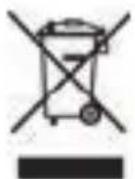
This device is identified in accordance with the Waste Electrical and Electronic Equipment (WEEE) Directive 2012/19/EU. At the end of its useful life span, this receiver must not be disposed of together with your regular household waste. It must be taken to a recycling collection point for electrical and electronic equipment. The symbol on the product, the operating manual or the packaging indicates this.
The materials are recyclable according to their labelling. An important contribution is made to protecting our environment by recycling, the recovery of materials and other forms of the recycling of old devices. Batteries/rechargeable batteries can contain toxic substances that are hazardous to health and the environment. Batteries/rechargeable batteries are subject to the European Directive 2013/56/EU.
They must not be disposed of together with normal household waste.
6 Information on setting up
6.1 Scope of delivery
Please ensure that all the following accessories are in the box:
• BLUSPEAKER TWS XL
- Mains adapter
- Jack connection cable
- Instruction manual
6.2 Bluetooth: wireless
Communication technology
Bluetooth wireless technology allows you to connect compatible devices without the use of cables.
This is short-range radio technology. This means that, although the devices to be connected do not need a direct line of sight, they must not exceed a certain maximum distance from each other.
In the case of this device, the range is up to 10 metres.
6.3 Connecting external sources
In addition to the Bluetooth connection, the BLUSPEAKER TWS XL also has a LINE-IN audio input in the form of a 3.5 mm jack connection.
This allows you to use audio sources that do not use Bluetooth technology.
6.4 Charging the battery
The speaker has a 2200 mAh lithium battery. To charge the battery, connect the supplied mains adapter to the DC-IN socket. Then connect the mains adapter to a 100-240 V, 50/60 Hz power outlet. The power LED flashes red to indicate that the battery is charging. The battery is 100 % charged when the red LED goes out.

Only connect the mains adapter to the intended voltage.
If the battery power is exhausted, the red LED flashes rapidly. In this case, recharge the battery.

External devices can be charged/operated via the USB Out socket. To activate the USB power supply, briefly press the BLUETOOTH button during operation.
7 Use
7.1 Switching the device on and off
PressthePower ON/OFF button to switch the device on. A confirmation tone is heard.
The power LED flashes blue to indicate that it is searching for Bluetooth devices in your vicinity (connection mode).

The blue LED lights up continuously when a Bluetooth connection is established.

The blue LED goes out if no Bluetooth connection is established within 15 minutes, and the BLUSPEAKER TWS XL switches itself off.
To switch off, press and hold the Power ON/OFF for about 2 seconds. A confirmation tone is heard. The power LED then goes out.
7.2 Adjusting the volume
To adjust the volume, press the volume buttons on the device until the desired volume is achieved.
+ increases the volume.
- reduces it.
You can also continue to use the volume control on the playback device you are using.
7.3 Pairing a Bluetooth device
Before you can use the BLUSPEAKER TWS XL with another Bluetooth device for the first time, you will need to connect (pair) the two devices with each other.
Since the procedure may differ from one device to another, the basic procedure is described here.

After a connection has been successfully established once, both devices “remember” each other, so it is not necessary to perform the connection procedure again each time.
To connect to a Bluetooth device, proceed as follows:

Place the devices you want to use within 1 metre of each other to minimise the risk of connection errors.
Switch on the BLUSPEAKER TWS XL. The power LED now flashes blue.
If necessary, activate the Bluetooth function on your Bluetooth device and start searching for available devices.Then select “BLUSPEAKER TWS XL” from the list of available devices.
If you are asked to enter a PIN, use the PIN: 0000.
The blue power LED now lights up constantly and a confirmation tone is heard. A connection has been successfully established.
If you want to use another device with the BLUSPEAKER TWS XL, switch off the Bluetooth function on the device you no longer want, or press and hold the Bluetooth button until you hear a confirmation tone and the LED flashes blue.
Then carry out the steps described above with the new device.

If the pairing process is not successful, switch the BLUSPEAKER TWS XL off briefly and then on again.

Another way to start the pairing process is via the NFC interface. Hold an NFC-compatible smartphone or tablet at the point marked “NFC” on the top of the BLUSPEAKER TWS XL. The pairing process then starts automatically.
7.4 Bluetooth control
To pause or resume playback, briefly press the Play/Pause button or use the playback buttons on your smartphone/tablet.
To skip to the next track, either briefly press the Volume + button twice on the BLUSPEAKER or use the buttons on your smartphone/tablet.
To skip to the previous track, briefly press the Volume - button twice or use the buttons on your smartphone/tablet.

Not all devices can be controlled via the BLUSPEAKER TWS XL. In this case, use your music app's controls.
7.5 Using the LINE-IN connection
The audio input on the back allows you to use audio sources that do not have Bluetooth functionality.
Use the supplied jack cable (3.5 mm jack) to connect such audio devices.
The BLUSPEAKER TWS XL automatically switches to the LINE-IN input when the jack cable is connected and the power LED lights up constantly.

For optimum volume adjustment, use both the volume control on the BLUSPEAKER TWS XL and the one on your audio device. Do not set the volume on the audio playback device too low as this may cause interference.

To return to Bluetooth mode, remove the jack cable from the BLUSPEAKER TWS XL.
7.6 TWS mode
You can use 2 BLUSPEAKER TWS XLs together as a stereo speaker system. This function is called TWS (True Wireless Stereo). In TWS mode, one BLUSPEAKER TWS XL acts as the left speaker and the other as the right speaker. The left speaker is always the “master”, which receives the audio signal from a paired smartphone/tablet and transmits it to the right speaker (slave). The power LED lights up green when TWS mode is active.
7.6.1 Activating TWS mode
Switch the BLUSPEAKER TWS XL ON.
Activate TWS mode on both BLUSPEAKER TWS XLs one after the other by briefly pressing the Volume + and Volume - buttons simultaneously. The power LED flashes blue.
Now switch on the second BLUSPEAKER TWS XL. This is in pairing mode and now finds the first BLUSPEAKER TWS XL. After successful pairing, a signal tone sounds from the master (left) and TWS mode is active (LED lights up green).
Then connect a smartphone/tablet to the left BLUSPEAKER (master) via Bluetooth.

While TWS mode is active, only the left speaker (master) can be paired with an external device.

The volume can be adjusted either via the external device or via one of the BLUSPEAKER TWS XL devices.
7.6.2 Deactivating TWS mode
With TWS mode active, briefly press the Volume + and Volume - buttons simultaneously on one of the BLUSPEAKERS.
8 Troubleshooting
| Symptom | Possible cause/remedy |
| Device cannot be paired | Check if the device is still in connection mode, or turn it off and on again. Switch Bluetooth off and on again on the device you want to connect to.If too many Bluetooth devices are being used in the vicinity, interference may occur.Switch off Bluetooth connections that are not needed. |
| The sound is too quiet or is distorted. | Check the volume setting on the Bluetooth device and adjust it to a louder setting if necessary. Charge the battery. |
| The music playback stops intermittently | Check whether the reception range has been exceeded or there is an obstacle between the speaker and the Bluetooth device. |
| LED remains off or flashes red | Battery too low, recharge battery Switching on the device |
| Device has stopped responding or is responding in an unexpected way | Restart the device. To do so, insert a pointed object, e.g. a paper clip, into the hole marked RESET on the back. |
9 Technical data
Amplifier: 2 x 15 W
Frequency response: 60 Hz - 20 kHz
S/N ratio: > 75 dB(A)
Battery capacity: 2200 mAh
Battery type: Lithium
Bluetooth version: 4.2
Bluetooth frequency: 2402-2480 MHz
Maximum transmission
capacity: 15 dBm
NFC frequency: 13.56 MHz
AUX-IN: 3.5 mm jack
USB output: DC 5 V, 1 A
Dimensions (mm): 261 x 147.2 x 85.6
Weight (kg): 2
Subject to technical changes and errors! The dimensions are approximate values.
Your device bears the CE symbol and complies with all requisite EU standards.
Subject to change for amendments and printing errors Version 5/18
Duplication and reproduction only with the publisher's approval.
TechniSat and BLUSPEAKER TWS XL are registered trademarks of
D-54550 Daun/Eifel, Germany
www.technisat.de
This product is quality-tested and furnished with the legally-specified warranty period of 24 months from the date of purchase.
Please keep your receipt as proof of purchase.
In the event of warranty claims, please contact the product dealer.
Note!
For questions and information, or if there is a problem with this device, please contact our technical hotline,
Mon - Fri 8am - 8pm, on:
(0) 3925 9220 1800.
Warning!
If the device needs to be sent to us for any reason, please only use the following address:
39418 Stassfurt, Germany.
- CONTENTS
- Contents
- Foreword
- Target audience
- Design style of this
- instruction manual
- Regulations
- Safety and setting up the
- Device
- Safety instructions
- Handling batteries
- Disposal instructions
- Disposing of packaging
- Risk of suffocation!
- Device disposal
- Information on setting up
- Scope of delivery
- Bluetooth: wireless
- Communication technology
- Connecting external sources
- Charging the battery
- Use
- Switching the device on and off
- Adjusting the volume
- Pairing a Bluetooth device
- Bluetooth control
- Using the LINE-IN connection
- TWS mode
- Activating TWS mode
- Deactivating TWS mode
- Troubleshooting
- Technical data
- Note!
- Warning!
Brand : TECHNISAT
Model : Bluspeaker TWS XL
Category : Car Mount