
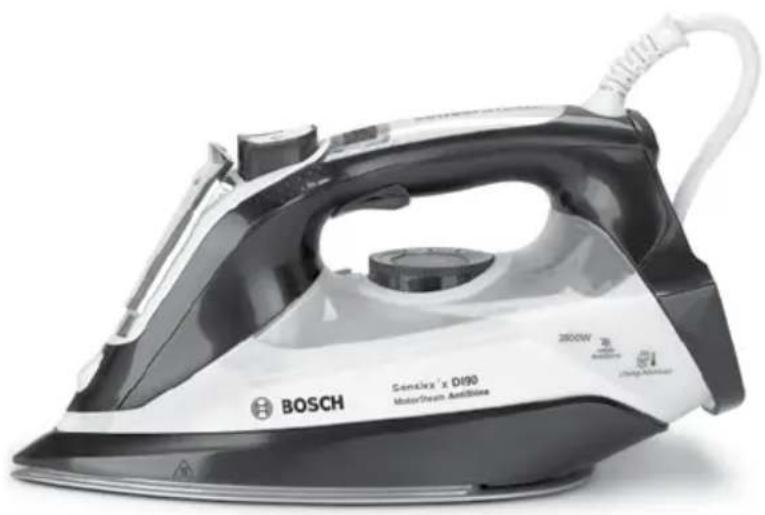
Sensixx'x DI90 MotorSteam AntiShine TDI9020GB - Iron BOSCH - Free user manual and instructions
Find the device manual for free Sensixx'x DI90 MotorSteam AntiShine TDI9020GB BOSCH in PDF.


| Type | Steam Iron |
| Brand | Bosch |
| Model | Sensixx'x DI90 MotorSteam AntiShine TDI9020GB |
| Power Supply | 220-240 V AC |
| Power Consumption | 2400 W (typical) |
| Dimensions (approx.) | 30 x 15 x 20 cm |
| Weight (approx.) | 1.5 kg |
| Steam System | MotorSteam with built-in pump |
| Steam Modes | eco (green), max (red), dry ironing |
| SensorSteam | Auto shut-off when handle released |
| i-Temp Programme | Automatic temperature and steam for all ironable fabrics |
| AntiShine Programme | Reduces shiny marks on dark and delicate fabrics |
| Hygienic Programme | Sanitizing effect for thick and delicate garments |
| Vertical Steam | For hanging clothes and curtains |
| Spray Function | For stubborn wrinkles (not for silk) |
| Shot of Steam | Requires 5-second intervals between presses |
| Temperature Control | Adjustable with TempOK indicator |
| Water Type | Tap water (no additives) |
| Descaling System | Self-clean filter, anti-calc cartridge, Calc'n Clean function |
| Accessories (optional) | Descaling liquid (TDZ1101), StoreProtect (TDZ1750), TextileProtect (TDZ1550) |
| Safety Features | SensorSteam auto shut-off, hot surface warning |
| Cord Length | Approx. 2 m |
| Warranty | As per country-specific conditions |
Frequently Asked Questions - Sensixx'x DI90 MotorSteam AntiShine TDI9020GB BOSCH
User questions about Sensixx'x DI90 MotorSteam AntiShine TDI9020GB BOSCH
0 question about this device. Answer the ones you know or ask your own.
Ask a new question about this device
Download the instructions for your Iron in PDF format for free! Find your manual Sensixx'x DI90 MotorSteam AntiShine TDI9020GB - BOSCH and take your electronic device back in hand. On this page are published all the documents necessary for the use of your device. Sensixx'x DI90 MotorSteam AntiShine TDI9020GB by BOSCH.
USER MANUAL Sensixx'x DI90 MotorSteam AntiShine TDI9020GB BOSCH
natural_image
Close-up of a white collared shirt with a bow tie, resting on a plain surface (no text or symbols visible)Register your new Bosch now: http://www.bosch-home.co.uk
natural_image
BOSCH electric iron with model number D190 printed on its side (no visible text or symbols beyond branding)
natural_image
Stack of plain gray fabric or sheet with button-like cutouts, no visible text or symbolsSensixx'x TDi90
i-Temp / AntiShine / Hygienic

BOSCH
en Operating instructions
General safety instructions
☐ The iron must not be left unattended while it is connected to the supply mains.
☐ Remove the plug from the socket before filling the appliance with water or before pouring out the remaining water after use.
☐ The appliance must be used and placed on a stable surface.
☐ When placed on its stand, make sure that the surface on which the stand is placed is stable.
☐ The iron should not be used if it has been dropped, if there are visible signs of damage or if it is leaking water. It must be checked by an authorized Technical Service Centre before it can be used again.
☐ With the aim of avoiding dangerous situations, any work or repair that the appliance may need, e.g. replacing a faulty mains cable, must only be carried out by qualified personnel from an Authorised Technical Service Centre.
☐ This appliance can be used by children aged from 8 years and above and persons with reduced physical, sensory or mental capabilities or lack of experience and knowledge if they have been given supervision or instruction concerning use of the appliance in a safe way and understand the hazards involved. Children shall not play with the appliance. Cleaning and user maintenance shall not be made by children without supervision.
- Keep the iron and its cord out of reach of children less than 8 years of age when it is energized or cooling down.
☐ This appliance is designed only for household use up to 2000m above sea level.
☐ CAUTION. Hot surface. Surface is liable to get hot during use.
Important notices
- This appliance has been designed exclusively for normal household use in a home environment..
- This appliance must be used only for the purposes for which it was designed, i.e. as an iron. Any other use will be considered improper and consequently dangerous. The manufacturer will not be held responsible for any damage arising from misuse or improper use.
- This appliance is to be connected and used in accordance with the information stated on its characteristics plate.
- This appliance must be connected to an earthed socket. If it is absolutely necessary to use an extension cable, make sure that it is suitable for 16A and has a socket with an earth connection.
- In order to avoid that, under unfavorable mains conditions, phenomena like transient voltage drops or lighting fluctuations can happen, it is recommended that the iron is connected to a power supply system with a maximum impedance of 0.21Ω. If necessary, the user can ask the public power supply company for the system impedance at the interface point.
- In special environmental conditions slight instability may occur.
- Never direct the steam jet at garments that are being worn.
-
Never aim the steam at people or animals.
-
The appliance must never be placed directly under the tap to fill the water tank.
- Unplug the appliance from the mains supply after each use, or if a fault is suspected.
- Never immerse the iron in water or any other fluid.
- Do not leave the appliance exposed to weather conditions (rain, sun, frost, etc.).
Advice on disposal
Our goods come in optimised packaging. This basically consists in using non-contaminating materials which should be handed over to the local waste disposal service as secondary raw materials. Your local town council can give you information about how to dispose of obsolete appliances.
This appliance is labelled in accordance with European Directive 2012/19/EU concerning used electrical and electronic appliances (waste
electrical and electronic equipment – WEEE).
The guideline determines the framework for the return and recycling of used appliances as applicable throughout the EU.
Description
- Motor activation trigger *
- "SensorSteam" indicator lamp
- "SET" button
- Steam setting indicator lamps
- Spray button
- Shot of steam button
- Water inlet lid
- Spray nozzle
-
Level mark for maximum filling
-
Soleplate
- "clean" button
- Temperature index
- Temperature control with "TempOK" indicator
- "MotorSteam" indicator lamps
- Heel
- Power cable
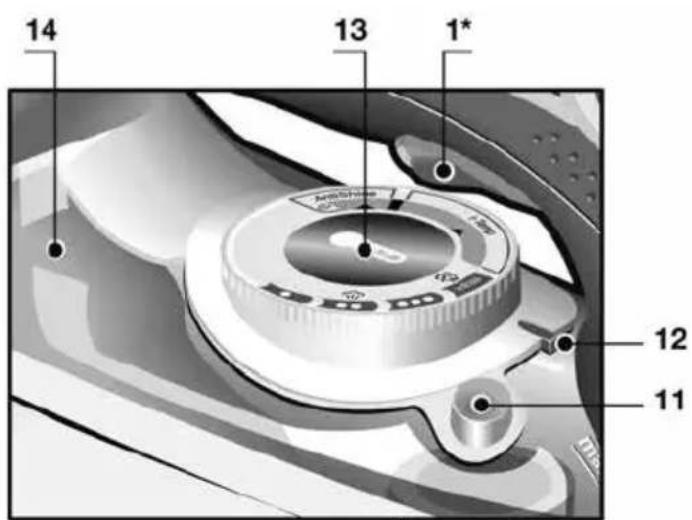
text_image
14 13 1* 12 11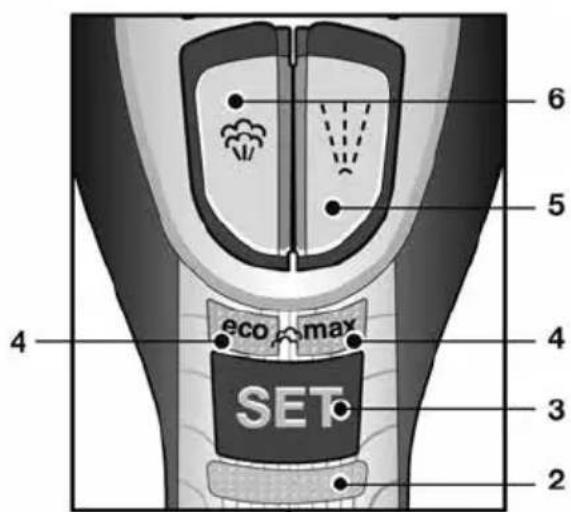
text_image
6 5 4 eco max 4 3 2 SET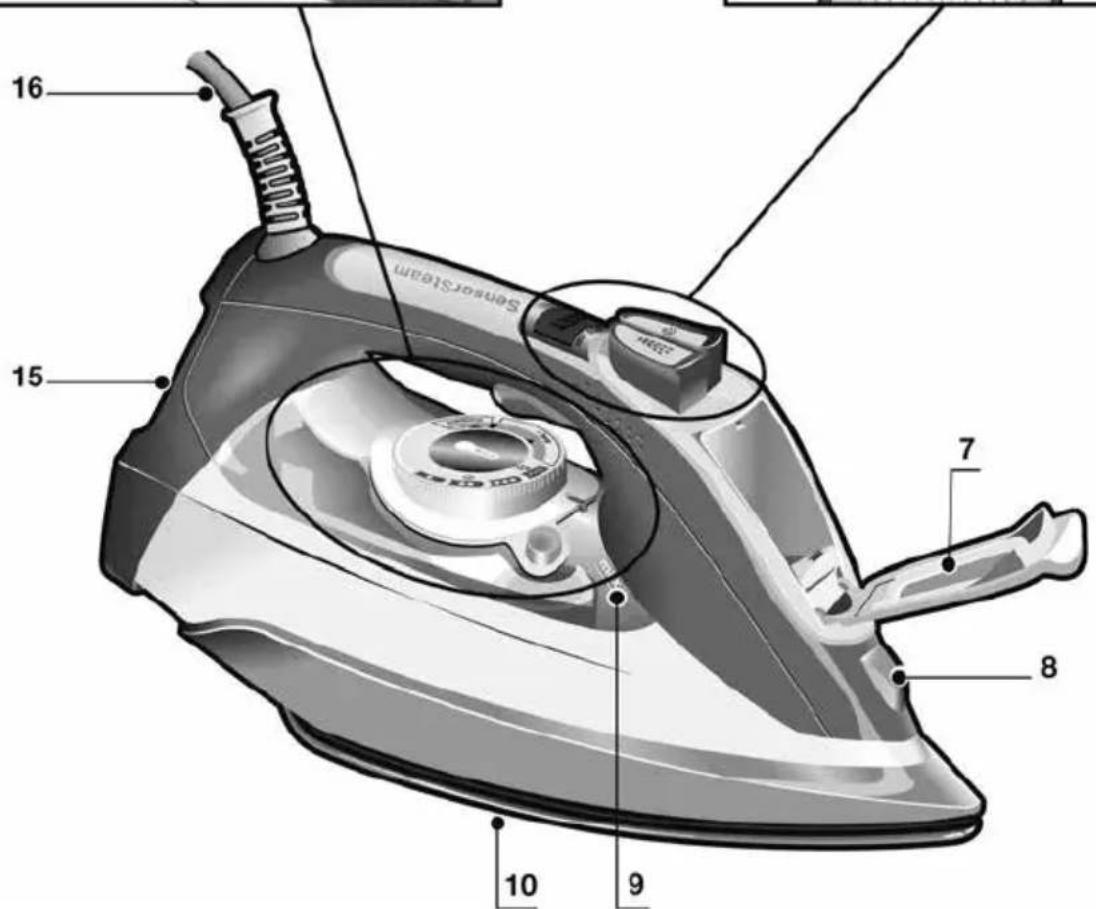
text_image
SensorSteam 16 15 7 8 9 10Using your appliance
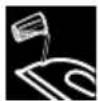
1. Filling the water tank
This appliance has been designed to use normal tap water.
Important: Do not use additives! The addition of other liquids, such as perfume, vinegar, starch, condensation water from tumble dryers or from air conditioning systems or chemicals will damage the appliance. Any damage caused by the use of the aforementioned products will make the guarantee void!
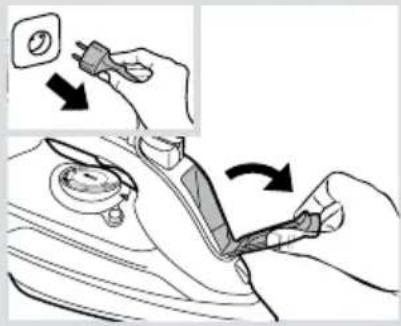
1 Unplug the iron from the mains.
2 Open the water inlet lid (7).
3 Fill the water tank. Never fill beyond the level mark for maximum filling (9)!
4 Close the water inlet lid.
Tip: To prolong the optimum steam function, you may mix tap water with distilled or demineralised water 1:1. If the tap water in your area is very hard, mix tap water with distilled or demineralised water 1:2.

2. Heating
Remove any labels or protective covering from the soleplate (10).
1 Plug in the iron.
2 "SensorSteam" function will be activated and the indicator lamp (2) will flash.
3 The "eco" steam mode is automatically selected.
4 The "TempOK" indicator lamp (13) will flash, indicating that the iron is heating up. When the iron is ready to use, the indicator lamp will remain lit continuously.
natural_image
Illustration of a hand using a power plug to adjust a component, showing step-by-step assembly (no text or symbols)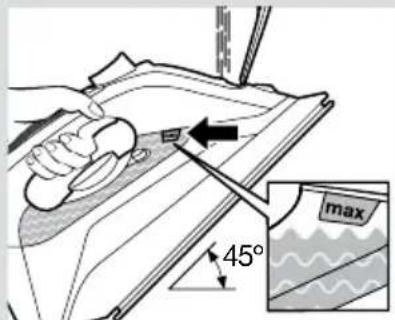
text_image
45° max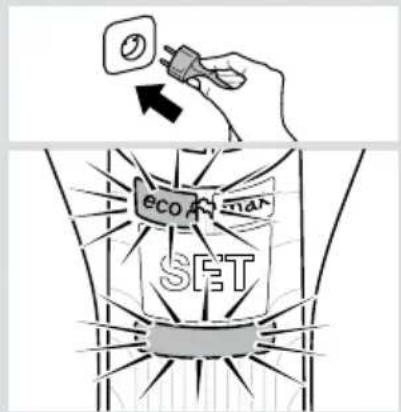
text_image
eco man SET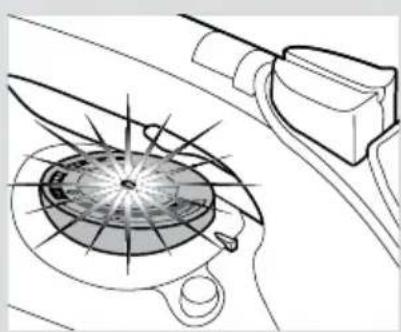
natural_image
Diagram of a car's steering wheel and dashboard with no text or symbols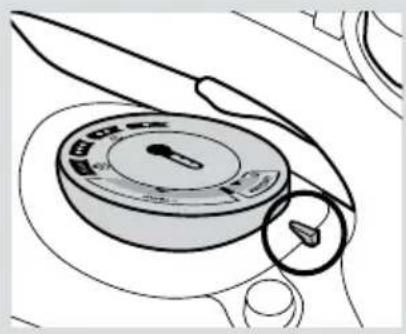
natural_image
Line drawing of a mechanical device with a knob and handle (no text or symbols)
3. Setting the temperature
Set the temperature control (13) to the corresponding position by lining it up with the temperature index (12) on the iron.
| Temperature | Suitable for |
| ● | synthetics |
| ●● | silk – wool |
| ●●● | cotton |
| max | linen |
Tip: Start by ironing the fabrics that require the lowest ironing temperature. Check the recommended ironing temperature on the label on the garment.
natural_image
Line drawing of a pair of trousers with a zipper, showing front and side views (no text or symbols)
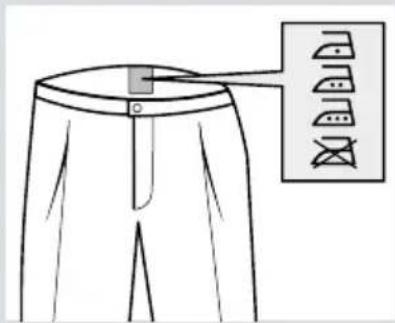
“i-Temp” programme
This programme sets an appropriate combination of temperature and steam, which is suitable for all fabrics that can be ironed (symbols 📄 🐃 🐃
The "i-Temp" programme does not apply to fabrics that cannot be ironed (symbol ☒).
Please check the garment care label for details or try ironing on a part of the fabric not visible normally.
text_image
AntiShine Temperature Y-axis
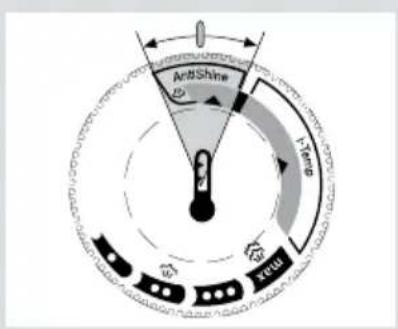
"AntiShine" programme \*
Suitable for dark and delicate fabrics. Reduces the risk of shiny marks when ironing.
Tip: Try to iron the fabrics while they are still damp after washing. Steam will be generated from the fabrics rather than the iron.
text_image
Hygienic Temp Max
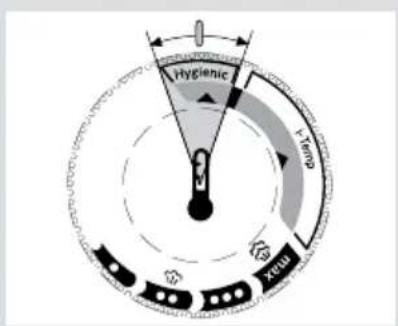
"Hygienic" programme \*
Suitable for all kinds of fabrics and extremely efficient in both thick and delicate garments.
The unique combination of temperature and interval steam provides a sanitizing effect requiring no chemical additives.
Tip: To ensure the maximum efficiency of the "Hygienic" programme, it is recommended to set the steam mode to "max" (see section 5).

4. "SensorSteam" function
After the initial heating, "SensorSteam" function switches off the iron when it is left unattended, thus increasing security and saving energy.
1 While the handle is gripped, the iron heats up. The "SensorSteam" indicator lamp (2) will remain lit continuously.
2 When the handle is released, the "SensorSteam" function is activated. The "SensorSteam" indicator lamp (2) will flash.

5. Steam settings
This iron generates steam by means of a built-in motor. While the motor is working, the "MotorSteam" indicator lamps (14) of the water tank come on.
The iron is equipped with a sensor and an electronic system to adapt the amount of steam to the mode of use, optimising both the ironing and the service life of the appliance.
The steam mode can be selected by pressing the "SET" button (3) successively. The iron runs through the following cycle:
Steam mode Indicator lamp (4)
| Medium(continuous steam) | “eco”(green) |
| Maximum(continuous steam) | “max”(red) |
| Dry ironing(ironing without steam) | off |
Steam production can be controlled manually for steam ironing only when necessary. Select dry ironing mode and press the motor activation trigger (1*).

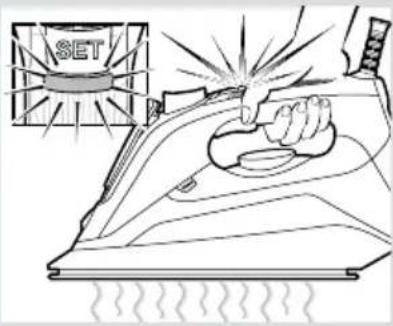
6. Shot of steam function
Shot of steam can be used to remove stubborn wrinkles or to press in a sharp crease or pleat.
1 Set the temperature control (13) to at least “●●”.
2 Press the shot of steam button (6) repeatedly with intervals of at least 5 seconds.
text_image
SET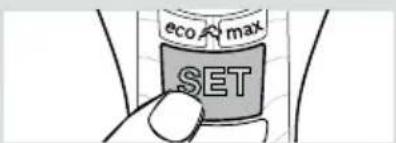
text_image
eco max SET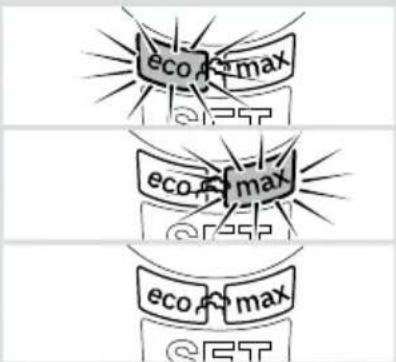
text_image
eco max @25T eco max @25P eco max @5T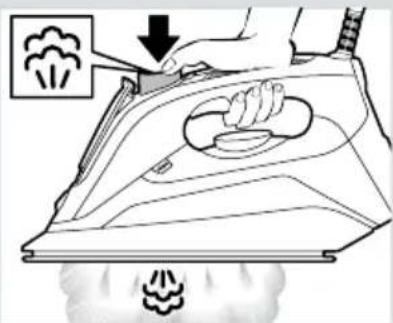
text_image
Diagram illustrating the process of ironing with a hand operating, showing smoke and steam emission from a machine.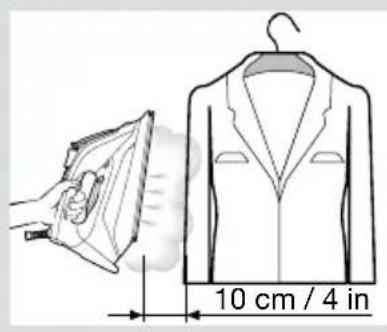
text_image
10 cm / 4 in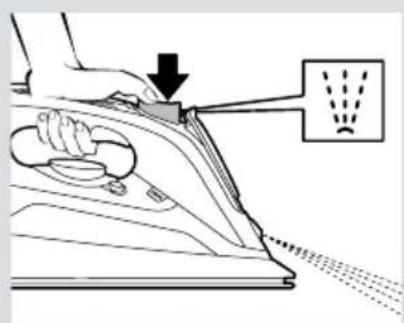
text_image
Diagram showing a hand using an iron to clean air, with a downward arrow and spray pattern labeled in the background.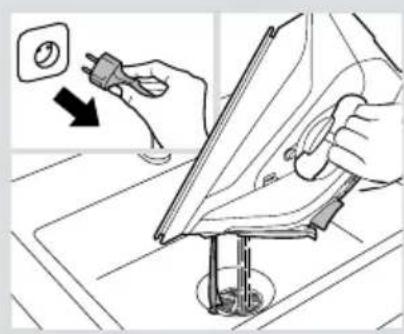
natural_image
Illustration of hands using a power tool to clean or install a component, with no visible text or symbols.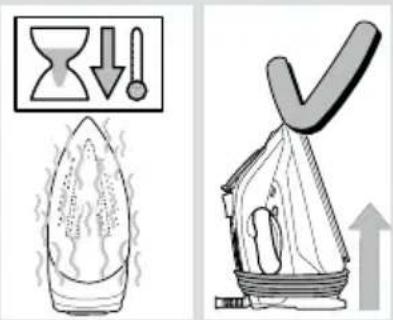
text_image
Diagram illustrating environmental change with a downward arrow and a checkmark, alongside a smokestack emitting smoke.
7. Vertical steam
Vertical steam can be used to remove creases from hanging clothes, curtains etc.
1 Set the temperature control (13) to "max".
2 Hang article of clothing on a clothes hanger.
3 Operate the iron in a vertical position at a distance of 10 cm / 4 in, and press the shot of steam button (6) repeatedly with pauses of at least 5 seconds.

8. Spray
Spray can be used to remove stubborn wrinkles.
1 When ironing, press the spray button (5) and water will spray out of the spray nozzle (8) onto the garment.
Tip: Do not use the spray function with silk.
9. After ironing
1 Unplug the iron from the mains socket.
2 Empty the water tank.
3 Set the iron aside in a vertical position on its heel (15) to cool down.
4 Coil the power cable (16) loosely around the heel of the iron. Store the iron in an upright position.
Tip: For immediate storage of the iron, you may use the "StoreProtect" accessory (see "Accessories" section).

Cleaning & Maintenance

Attention! Risk of burns!
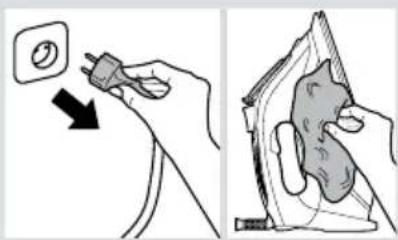
Always unplug the appliance from the mains supply before carrying out any cleaning or maintenance operation on it.
1 If the iron is only slightly soiled, pull out the plug and allow the soleplate (10) to cool down. Wipe the housing and the soleplate with a damp cotton cloth only.
2 To keep the soleplate smooth, you should avoid hard contact with metal objects. Never use a scouring pad or chemicals to clean the soleplate.
natural_image
Illustration showing a hand using a power plug to clean a circular component, and another hand holding an iron iron (no text or symbols present)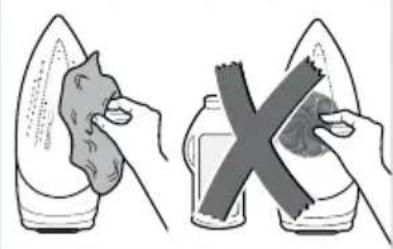
natural_image
Illustration showing two hands holding food items: one with a knife and the other with a bottle and a cross (no text or symbols)
Descaling systems
A "self-clean"
The "self-clean" filter prevents motor from blocking.
B "anti-calc"
The “anti-calc” cartridge has been designed to reduce the build-up of scale produced during steam ironing.
C "Calc'n Clean" function
The "Calc'n Clean" function helps to remove scale particles out of the steam chamber. If the water in your area is very hard, you may use this function approximately every two weeks.
1 Unplug the iron from the mains socket.
Tip: For deep descaling, it is recommended to use the descaling liquid (see "Accessories" section). This procedure should be carried out every 3 months.
Pour a measure (25 ml) of the descaling fluid into the water tank.
2 Fill the water tank up to the level mark for maximum filling.
text_image
eco max SET clean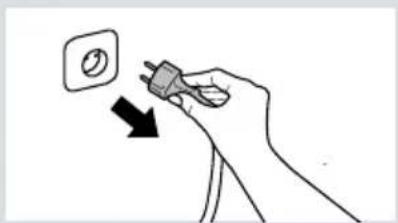
natural_image
Hand holding a small plug with a circular button, pointing downward (no text or symbols)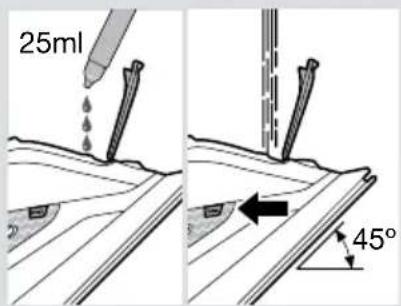
text_image
25ml 45°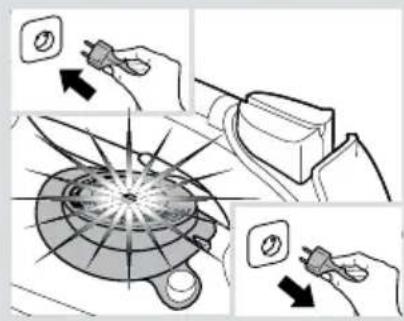
text_image
Diagram illustrating a mechanical or electrical process with labeled components and directional arrows indicating action or movement.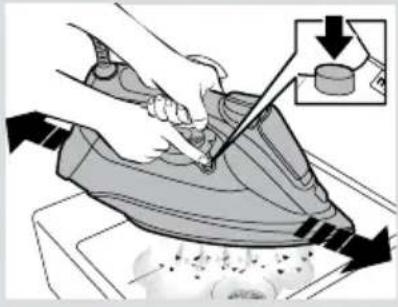
natural_image
Illustration of a hand using a power iron to clean air, with an inset showing a close-up of the iron (no text or symbols present)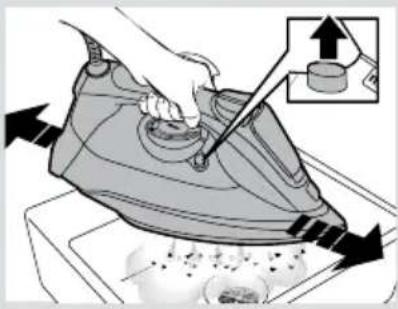
natural_image
Illustration of a hand using a power iron to press down a cylindrical component on a stove (no text or symbols present)
text_image
Illustration showing a hand cleaning an airfoil with a power plug, accompanied by a water level indicator and warning symbols.3 Plug in the iron and set the temperature to "max".
4 When the lamp "TempOK" (13) remains lit continuously, unplug the iron (very important!).
5 Hold the iron over a sink.
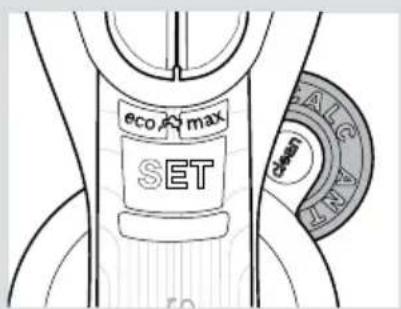
6 Press the "clean" button (11) and shake the iron back and forth keeping it in a horizontal position until approximately one third of the water capacity of the tank is evaporated. Boiling water and steam will come out, carrying scale or deposits that might be there.
7 Release the "clean" button, and gently shake the iron for some seconds.
8 Repeat steps 6 and 7.
9 Check carefully that the water tank is empty (very important!).
10 Plug the iron in and heat it up again until the remaining water has evaporated.
11 Unplug the iron and let the soleplate cool down. Wipe the soleplate with a damp cotton cloth only.
Accessories
The accessories may be purchased from the customer service or specialist shops.
| Descaling liquid | “StoreProtect” “TextileProtect” | |
| For deep descaling of the steam iron.Contents:4 bottles x 25 ml | Enables an immediate and safe storage of the iron, even with a hot soleplate. | Used for steam-ironing delicate garments at maximum temperature and maximum steam without damaging them. |
| Name: TDZ1101 Name: | TDZ1750 Name: TDZ1550 | |
| Accessory code:00311715 | Accessory code:00575960 | Accessory code:00575494 |
| Problem Probable cause Solution | ||
| The iron does not heat up. | The “SensorSteam” function has been activated. The iron is set to stand-by. | Grip the handle of the iron to re-start it. |
| Water drips out of the soleplate when using the “shot of steam” function. | You have pressed the shot of steam button (6) repeatedly without waiting for 5 seconds between each press. | Wait 5 seconds between each press of the shot of steam button. |
| Steam does not come out in horizontal position. | Dry ironing steam mode has been selected. | Set the steam control to “eco” or “max” position. |
| Excessive dripping or steaming. | No proper closing of “clean” button (11). | Point the iron away from the ironing area. Actuate a few times the “clean” button. |
| The motor does not work. | The iron is not in a horizontal position. | Use the iron in a horizontal position. |
| Smoke comes out when connecting the iron for the first time. | This may be caused by the lubrication of some of the internal parts. | This is normal and will stop after a few minutes. |
| Deposits come out through the holes in the soleplate (10). | Traces of lime scale are coming out of the steam chamber. | Carry out a cleaning cycle (see “Calc'n Clean function” section). |
| The appliance makes a pumping sound. | Water is being pumped into the steam chamber. | This is normal. |
If none of the above solves the problem, get in touch with an Authorised Technical Service.
Guarantee conditions
The terms of the guarantee for this appliance are in accordance with that stated by our representative for the country in which it is sold.
The details of these conditions can be obtained from the retailer from whom the appliance was purchased. The purchase receipt must be presented when making any claims against the terms of this guarantee.
Customer Service
Great Britain
Bosch Customer Service
Grand Union House
Old Wolverton Road Milton Keynes
MK12 5PT
UK +44 (0)344 892 8979
IRL +353 (0)1450 2655
www.bosch-home.co.uk