Soe XW Pure - Smartwatch Xlyne - Free user manual and instructions
Find the device manual for free Soe XW Pure Xlyne in PDF.


User questions about Soe XW Pure Xlyne
0 question about this device. Answer the ones you know or ask your own.
Ask a new question about this device
Download the instructions for your Smartwatch in PDF format for free! Find your manual Soe XW Pure - Xlyne and take your electronic device back in hand. On this page are published all the documents necessary for the use of your device. Soe XW Pure by Xlyne.
USER MANUAL Soe XW Pure Xlyne
natural_image
Diagram of a USB connector connected to a circular battery (no text or symbols)text_image
Smart DailyWecker/Zeit Alarm/Time

Social Media WhatsApp

natural_image
Symbol of a trash bin crossed with diagonal lines, representing waste sorting or disposal (no text or labels)
Troubleshooting....4
Appendix 4
Support & help....5
Introduction
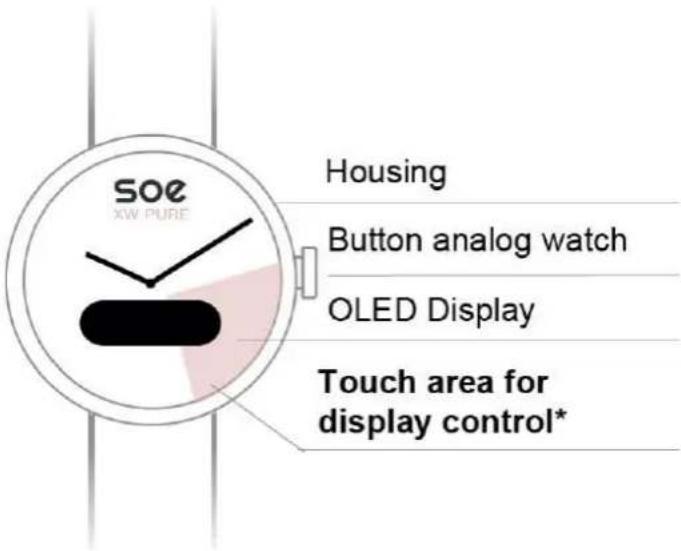
text_image
SOE XW PURE Housing Button analog watch OLED Display Touch area for display control** Only this area controls the display. Do not touch on the display since it has no function.
Please fully charge the smart watch for 3 hours before using it for the first time. The stand by-time of a fully charged SOE XW PURE is up to 15 days, the working time is up to 7 days. You find all information regarding the charging process in the chapter "Installation". After the battery is fully loaded, you can adjust the analog watch hand with the "Setting Time"-button. The digital time and date will automatically synchronize with the smart phone after binding the gadget via Bluetooth.
Charging
Watch stand (charger)
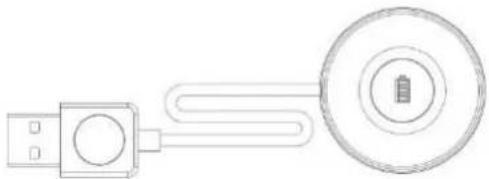
natural_image
Diagram of a USB connector connected to a circular device with a battery (no text or symbols)Place the watch on top until the display shows a battery symbol.
To charge the SOE XW PURE put the watch on the enclosed watch stand and connect it with a charging adapter or computer. The watch needs to be positioned so that the battery symbol (☐) will appear on the watch screen. This indicates that the connection is successful.
Installation
Download and installation of the app

text_image
APPShort-URL:
http://q-r.to/bao91l
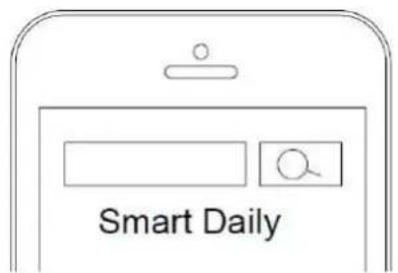
text_image
Smart DailyWhen installing the APP on an Android system, please pay attention, that: (1) The APP is allowed to read notifications (2) The APP won't be closed at any time while using the smart watch to ensure stable operations of the watch.
Binding the Smartwatch
Activate the Bluetooth function on your smart phone and open the "Smart Daily" APP. Enter the settings and tap "add watch" to start searching. As the Bluetooth connection is established, the digital time of the smart watch will be synchronized with the smart phone settings. Bluetooth Auto-Reconnect: If the smart watch gets out of the range of the smart phone (> 7m diameter range) the connection gets lost. It reconnects automatically when both devices will get back within the range. From time to time the smart watch "SOE XW PURE" should synchronize with the APP. Especially after a longer period of inactivity.
Unbinding the smart watch
Android: Open the APP and enter the settings. Tap on "Unbind devices" to disconnect the devices.
iOS: Open the APP and enter the settings. Tap on "Unbind devices" to disconnect the devices. Afterwards tap on "Ignore the device" in the Bluetooth settings of the smart phone.
Functions

Wecker/Zeit Alarm/Time

Social Media WhatsApp

Pedometer: The steps are counted permanently. The data base is cleared every night at 0:00 to restart the daily counting.
Sleep monitor: The sleep monitor function is not displayed directly on the watch. You can examine the collected data in the APP as long as you established a stable Bluetooth connection. Note: If you want to collect historical data within the APP, you have to synchronize the smartwatch with the APP at least once every day.
Calories: The calorie consumption is calculated based on the counted steps and your personal data (gender, height, weight).
6.56 Km
Walking distance: The walked distance is calculated based on the counted steps and your personal data (gender, height, weight). Note: If you want to collect historical data within the APP, you have to synchronize the smartwatch with the APP at least once every day.
Daily notifications: SMS messages, WhatsApp, Facebook, E-Mail, WeChat, QQ, Line. You can change your personal settings in "Remind/Notifications" (depending on your APP version)
Wake-Up gesture: If you turn on the Palming bright function, the display of the watch will turn on automatically when you raise your arm to look at the watch.
Note for historic data: If you want to collect daily data of the pedometer / sleep monitor / travel distance and retrieve them, you should ensure to synchronize the watch at least daily with the APP.
12:05
Clock: The clock screen shows the actual time. It synchronizes automatically with your connected device. You can also check the battery status.
26-10
Date: This screen shows the actual date.
[Non-Text]
Alarm clock: Tap the alarm clock setting to add an alarm time in the APP. When the preset time is reached the watch will vibrate to remind you with an alarm icon. Note: To set an alarm clock correctly, you need to determine the day, at which the alarm clock should notify you (even when you want to set a one-time alarm).
Troubleshooting
Bluetooth connection:
- Make sure that the Bluetooth function is activated on your smart phone and that the watch is powered on.
- When searching for Bluetooth devices, make sure that the watch is not bound to other devices.
- When search for Bluetooth devices, keep a close connection distance between the smart watch and the smart phone. If the watch is not receiving any push notifications, please make sure that the APP is running in the background and that the notification functions are turned on.
Please note: Not all functions of the APP “Smart Daily” are compatible with the SOE XW PURE. Only the functions mentioned in the chapter “Functions” are supported. The SOE XW PURE features Bluetooth 4.0: It is compatible for Android 4.3 or higher and iOS 7.0 or higher. Please connect the charger to activate the watch before the first use and fully charge the watch. If the data of sports and sleep monitoring are not synchronized to the APP, try to disconnect and re-connect the Bluetooth connection. If you plan to bind the smart watch with another device, please unbind the current device first in the settings of the APP.
Appendix
Safety instructions & regulations
EC Declaration of Conformity: We, the XLYNE GmbH, Kettling 38, 58791 Werdohl, declare that this product complies with the essential requirements and other relevant provisions of the directives RED 2014/53 / EU, EMV 2014/30 / EU and ROHS 2011/65 / EU matches. A copy of the complete declaration of conformity can be found on our website: www.xlyne.com.
Brands
The word mark Bluetooth and corresponding logos are registered trademarks and property of Bluetooth SIG, Inc. The use of such trademarks by XLYNE GmbH is under license. All other trademarks are property of their respective owners.
Health warning
When selecting our materials, we carefully make sure that they comply with applicable regulations. However, it may happen that some persons are allergic to materials that are in contact with the skin. Too tight or loose wearing of the watch on the wrist can lead to skin irritation. We recommend the consultation of a doctor in case the skin itches, redness or other skin irritations occur under the watch.
The magnetic charging cable of this Smartwatch contains magnets. The heart rate sensor and the app of this product are not medical devices and are only intended for personal fitness.
Safety advice for children and disabled persons
This device is unmeant for children under the age of 8 or persons with a limited physical, sensorial or emotional capability or limited knowledge, unless they are supervised by a responsible individual for their safety or instructed in terms of using the device and understands the relevant risks. Pay attention to children to ensure they do not play with the device.
Maintenance and cleaning should not be executed by children without supervision.
Precautions
Read this manual before using your Smartwatch. Use only the cable that came with the product to charge the battery. Opening and, in particular, replacing the installed battery will void the warranty and constitute a safety risk.
Disposal
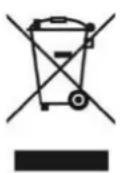
Do not throw the smartwatch in the household waste. This product and the battery used with it must be separated from the household waste, e.g. at an official collection point. This ensures that used equipment is recycled appropriately and negative effects on the environment are avoided, which is why electrical appliances are marked with the symbol of a crossed-out refuse bin.
Support & help
XLYNE GmbH
Kettling 38
58791 Werdohl
www.xlyne.com
support@xlyne.de
Technical specifications of data transfer
· data transfer via Bluetooth 4.0
· max range: 10m
· data transfer frequency: 2.4GHz (ISM Band)
· Max. transmission power: 4dBm (2,5mW)
CE
X-WATCH
XLYNE | PRO

Bluetooth®