
KX-FC225G - Fax PANASONIC - Free user manual and instructions
Find the device manual for free KX-FC225G PANASONIC in PDF.


User questions about KX-FC225G PANASONIC
0 question about this device. Answer the ones you know or ask your own.
Ask a new question about this device
Download the instructions for your Fax in PDF format for free! Find your manual KX-FC225G - PANASONIC and take your electronic device back in hand. On this page are published all the documents necessary for the use of your device. KX-FC225G by PANASONIC.
USER MANUAL KX-FC225G PANASONIC
natural_image
Line drawing of a traditional print press machine with a rotary keypad and control panel (no text or symbols)Panasonic
Bedienungsanleitung
natural_image
Black-and-white photo of a window with plants and a basket, no visible text or symbolsYou can select English for the voice guidance, display and report of the base unit (feature #48 and #50, page 45) and the display of the handset (page 50).
Panasonic Testing Centre
text_image
Diagram of a device front panel with numbered labels pointing to various function keys and buttons.① 【MIK】(Mikrofon)
text_image
Diagram of a mobile phone with numbered labels pointing to different parts of the device.① 【目/OK】 (Menü/OK)
text_image
Labeled diagram of a lathe machine with numbered parts for identificationnatural_image
Illustration of a hand inserting a card into a digital timer (no text or symbols visible)1.6.2 Mobilteil
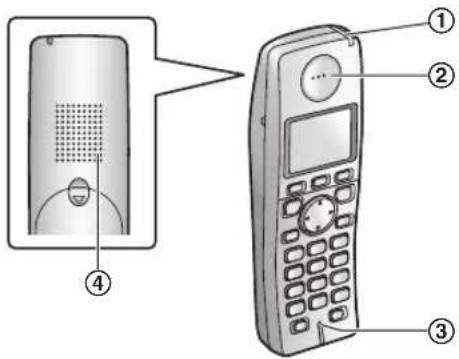
text_image
Diagram showing a mobile phone with labeled parts: front panel, remote control, and keypad.natural_image
Illustration of a hand inserting a digital file into a printer (no text or symbols visible)natural_image
Illustration of a lathe printer with a paper feeder and control panel, showing internal components and a close-up view of the printer's handle (no text or symbols present)natural_image
Illustration of a printer with internal circuitry and a scroll wheel (no text or symbols visible)text_image
Technical diagram of a printer with labeled parts and an inset showing internal structure, likely illustrating a printing or printing process.natural_image
Illustration of a printer presser with a hand inserting a component, showing internal structure and part outline (no text or symbols)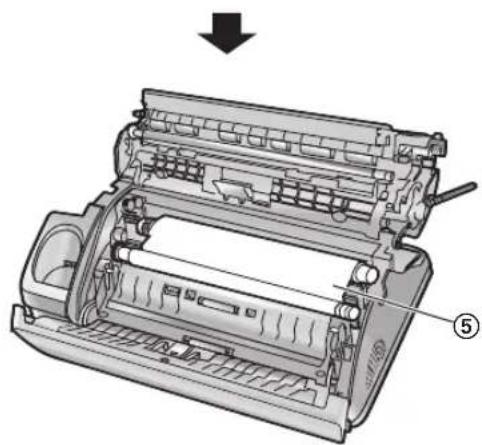
natural_image
Technical illustration of a mechanical device with labeled parts, showing internal components and a downward arrow (no text or symbols present)natural_image
Simple line drawing of a scroll and a speech bubble with two circles (no text or symbols)natural_image
Illustration of a printer with a paper roll and control panel, showing internal structure without any text or symbols.natural_image
Illustration of a digital fax machine with control panel and keypad (no text or symbols visible)1.8 Papierhalter
text_image
Diagram of a printer's internal components with numbered labels indicating parts of the device.natural_image
Illustration of a digital fax machine with a magnified inset showing the printer's tip (no text or symbols visible)1.9 Papierstütze
text_image
Diagram of a lathe printer with labeled parts and an inset showing the internal structure.natural_image
Line drawing of a hand holding a stack of papers or documents (no text or symbols present)natural_image
Illustration of a printer with a screen and control panel, showing no text or symbols on the device itself.natural_image
Illustration of hands holding a tool with a brush and arrow indicating motion (no text or symbols)natural_image
Diagram of a remote control device with a battery and two labeled buttons (no text or symbols present)2.1 Anschlüsse
Wichtig:
natural_image
Diagram of a car air conditioning unit with pipe connections and valve (no text or labels)text_image
Diagram showing three steps of a printer printing process: receipt, print, and output with labeled parts.Hinweis:
text_image
Diagram of a digital printer with labeled ports and control buttons, showing front and back views with Chinese annotations.1 【】
text_image
[→] [4] [×①] [INT]1 [☐OK] → “Anruferliste” → [▶]
3. Telefon
text_image
ABWESEND [FAX START]Hinweis:
text_image
[✓] [▶] [4] [[OK]] [✗①]text_image
ABWESEND [STOP]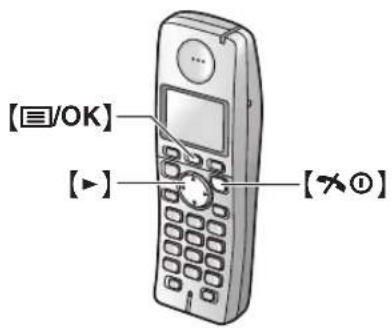
text_image
[☐/OK] [▶] [×①]Hinweis:
2. "Beantworting Ein" → [▶] → [✗①]
Hinweis:
text_image
Two identical staircase diagrams with numbered blocks arranged in ascending and descending steps.text_image
[✓] [◀][▶] [▲] [■/OK] [×①]text_image
[MENÜ] [ → ]If you want to change the language setting to English, proceed as follows.
- 【目/OK】
- Press [▲] 3 times. → [▶]
- Press [▼] 2 times. → [▶] → [▼] → [▶]
- Select the desired language. → [▶] → [✗①]
7.2.4 Ruf-Optionen
natural_image
Illustration of a printer with a paper roll and control panel (no text or symbols)text_image
Diagram of a printer with labeled parts showing internal structure and operation, including hand and tool insertion.text_image
Technical diagram of a printer with labeled parts and an arrow indicating assembly or operationnatural_image
Illustration of a printer presser with a hand inserting a component, showing internal components and paper feed (no text or symbols)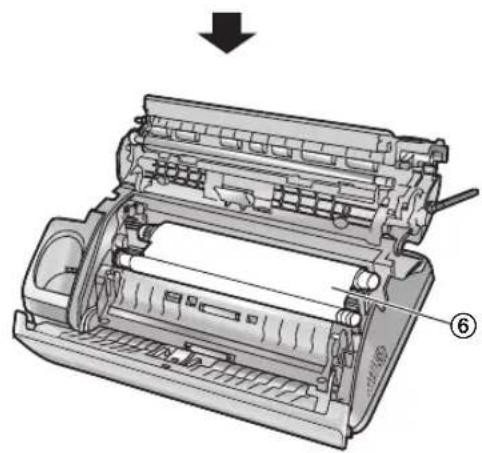
natural_image
Technical illustration of a printer internal structure with no visible text or symbolsRichtig
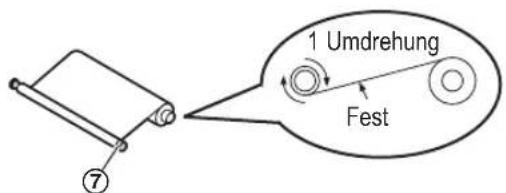
text_image
1 Umdrehung FestFalsch
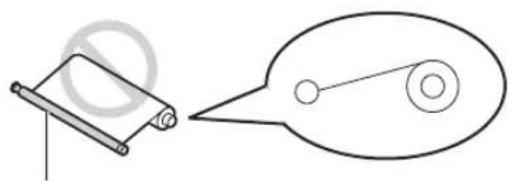
natural_image
Simple line drawing of a scroll and a pulley with circles, no text or symbols presenttext_image
Diagram of a printer with labeled parts, showing internal structure and directional arrows indicating assembly or movement.natural_image
Illustration of a hand operating a lathe machine with a paper sheet being inserted (no text or symbols visible)natural_image
Illustration of a printer with paper feed and control panel (no text or symbols)text_image
Diagram of a printer with labeled parts showing internal components and a hand holding the device.text_image
Technical diagram of a mechanical device with numbered components labeled 4, 5, and 6natural_image
Illustration of a printer with internal components and a magnified inset showing internal structure (no text or symbols)text_image
Diagram of a printer with numbered parts indicating internal structure and assembly stepsnatural_image
Illustration of a printer with paper roll and control panel (no text or symbols)text_image
Diagram of a printer with labeled parts showing internal components and a hand holding the device.natural_image
Diagram of a printer with internal components and an arrow indicating a process (no text or symbols present)natural_image
Cross-sectional diagram of a mechanical device showing internal components and a labeled part (⑤), no readable text or symbols present.Modified Huffman (MH), Modified READ (MR), Modified Modified READ (MMR)
text_image
THE SLEREXE COMPANY LIMITED SARINA LABOR - WOOD, BORRY, 1921 OR HOLDING WORK (4.1.1) 1921 - THIS ORDER For Ref: 30/09/2016 19th, 1972. Mr. P.A. Gondall. Having French Ltd., Refined Road, Healing, Roads. This Note: Permit us to introduce you to the facility of faudaline transmission. In facilities a photocell is created to perform a centre case over the net/total power. The variations of print density for the measurement cause the photocell to ensure an analogise electrical video signal. This signal is used to facilitate a circuit, which in transmitted in a centre destination over a node or node demethasement based. In the remote rental, demodulation reusurants the video signal, which is used to facilitate the density of prime produced by a striking device. This device is attempting to a circuit with an electrician with that at the transmitting rental. As a vessel, a mobile copy of the subject document is performed. Probably you have used for this facility in your segment. Power strongly. P.A. GOND Group Leader = Terminal ResearchHinweis:
DECT (Digital Enhanced Cordless Telecommunications:
AB/FAX-Ansagetext: 45
Panasonic Communications (Malaysia) Sdn. Bhd.
PLO No.1, Kawasan Perindustrian Senai, KB No. 104, 81400 Senai, Negeri Johor Darul Ta'zim, Malaysia
Globale Website:
http://panasonic.net