Hollywood - Power bank SunChargers - Free user manual and instructions
Find the device manual for free Hollywood SunChargers in PDF.


User questions about Hollywood SunChargers
0 question about this device. Answer the ones you know or ask your own.
Ask a new question about this device
Download the instructions for your Power bank in PDF format for free! Find your manual Hollywood - SunChargers and take your electronic device back in hand. On this page are published all the documents necessary for the use of your device. Hollywood by SunChargers.
USER MANUAL Hollywood SunChargers
natural_image
Black and orange portable solar panel with visible circuitry and control buttons (no text or symbols)Festival 4000 mAh
natural_image
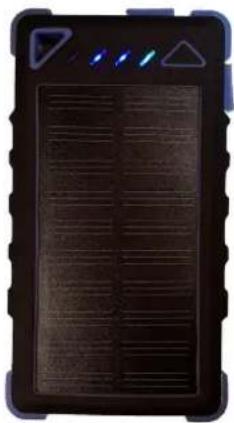
Black rectangular electronic device with grid pattern and four indicator lights (no visible text or symbols)Smart 8000mAh
natural_image
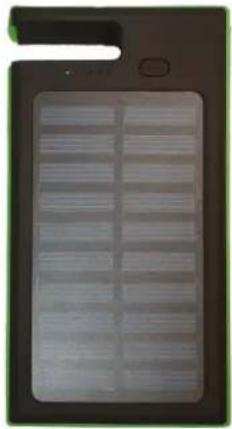
Close-up of a black electronic device with a grid of rectangular slots and a small handle (no visible text or symbols)Hollywood 8000mAh
| Nederlands | Deutsch | English |
| 2 Introductie____3 USB poorten____3 Opladen Powerbank____3 > Via USB____4 > Via de zon____4 Opladen telefoon / USB____4 > Capaciteit & oplaadtijd____5 > Rekenen met mA(h)____6 Functionaliteiten____6 Tips & tricks____Veelgestelde vragen | 2 Einführung____7 USB-Anschlüsse____7 Aufladen Ladegerät____7 > Über den USB____8 > Über die Sonne____8 Aufladen Ihres Telefon____8 > Vermögen&Aufladezeit____9 > Rechnen mit mA(h)____10 Funktionsfähigkeiten____10 Tipps & tricks____Häufig Gestellte Fragen | 2 Introduction____11 USB ports____11 Charging Powerbank____11 > Via USB____12 > Via the Sun____12 Charging phone / USB____12 > Capacity & Charging____13 > mA(h) calculations____14 Functionalities____14 Tips & tricks____Frequently Asked Questions |
Congratulations with your new SunCharger and of course on behalf of the team: thank you :). The device works very intuitively, so you can start using it immediately. The device also contains nice functionalities that we want to share with you. This quick start guide introduces some valuable tips, so you can use your Solar Powerbank in the best possible way. Enjoy your mobile device!
- The powerbank is not a toy. Don't let your kids play with it and use carefully
- The powerbank contains one or two batteries. If the powerbank feels hot or swells up, make a photo, put the powerbank in a safe place and contact us immediately
- If the powerbank has been in contact with water or has endured a shock/bump/fall, check if it isn't swelling up or gets hot. In both cases; dispose of the Powerbank safely ASAP
- Batteries can be recycled. Bring these to the correct recycle facility in your area
Nederlands
USB-Poorten
natural_image
Close-up of a yellow electronic device with black ports and a white internal slot (no visible text or symbols)natural_image
Close-up of a control panel with triangular indicator and three illuminated buttons (no text or symbols visible)natural_image
Close-up of a yellow electronic device with black ports and a rectangular slot (no visible text or symbols)natural_image
Close-up of a control panel with triangular indicator and three illuminated buttons (no text or symbols visible)The SunCharger has three USB ports, a LED light and a button. The ports are covered by a rubber strip, so no dust or water can enter the electronics. Two ports are “regular” USB ports, and one is the Micro-USB port, which is used to charge the Powerbank.

natural_image
Close-up of a yellow electronic device with black ports and a white stripe (no visible text or symbols)< Micro-USB port to charge the Solar Powerbank
< USB-port to connect/charge other devices
Image 1 - USB ports
Charging the Solar Powerbank
The Solar Powerbank can be charged in two ways:
3) Via Micro-USB poort | 500 - 2000 mA | USB adapter, PC, laptop or other USB device
4) Via the Sun | 150 - 300 mA | Also using lamps or when cloudy
When a USB charger or adapter is available, it is always advised to use this over the solar panel. Because most USB chargers can generate between 500 mA and 2000 mA, the Powerbank will charge anywhere between 4 and 8 hours.*
The solar cell provides between 150 mA and 300 mA of power. This means that the charging time varies between 10 and 20 hours when in continuous sun.*
* "Festival" has 4000 mAh and charges twice as fast.
Via USB port (power outlet, PC)
Connect the provided or alternative Micro USB cable to the Micro USB port (Image 1). The LED indicators or the Powerbank (Image 2) will light up and show the charging level of the Powerbank. If the Powerbank is not fully charged, the charging process will start immediately and the right LED indicator will start blinking. If only one indicator is blinking, then the Powerbank is nearly empty. If three indicators are already lit and the fourth one is blinking, the powerbank is almost full.

natural_image
Close-up of a control panel with triangular indicator and three illuminated indicators (no text or symbols visible)This “SunCharger Smart” is almost fully charged. Three LED indicators are on. When charging, the fourth LED will start to blink.
Image 2 - LED lamps
Via the Sun
As soon as the Powerbank is directed towards the light with the solar panels, these start generating power. You can check this by looking at the color of the first LED indicator. If this is green, there is enough light to charge the powerbank. The brighter the light, the brighter the LED.
If the Powerbank is not yet fully charged, it will start charging immediately. If LED 1 is bliking, then the powerbank is nearly empty. If already 3 LED indicators are on, the Powerbank is almost full.

This powerbank has enough light and is already fully charged
Image 3 - LED indicators batteries, solar panel and charge state
* The powerbank will stop charging automatically and will show four LED lights when finished
* If you want to know how far your Powerbank is charged, press the button once
* The "Smart" has four indicators (Image 2). The first indicator contains two LED lights. When this is shining brightly, there is enough sun/light. If indicators are evenly bright, there is not enough light.
Charging your phone (or other USB device)
To charge your USB device, first unfold the protective rubber strip from the USB port on the side and plug the USB cable in both the powerbank and your device. The phone/device will start charging immediately (you can check this on your phone/USB device).
If the device does not start charging (for instance if the device does not provide a feedback signal), press the button on the powerbank once. This will turn on the "force current" feature and provide the USB ports with power, while actively searching for the feedback signal.
Capacity and charging time
Voltage: (Almost) all USB devices work on 5 volts, that is also the volgate of the powerbank and official USB specifications
Current: This is measured in Ampère and show how quickly the Powerbank can charge itself and other devices. The SunChargers.eu Powerbanks all contain USB ports of 1A(mpère). The Powerbank can charge itself with a current up to 2A. Depending on the charger, this can take 4 to 8 hours.
Capacity: This is the power that the batteries of the powerbank contain, and give an idea of long the device can deliver the same current. The more capacity in a device, the longer it can charge and the more often you can charge a phone. The capacity is always measured at a temperature of 20 degrees Celsius. A battery with 8000 milli-ampère-hour (mAh) can provide a power of 2000 mAh during 4 hours and charge 3 phones with 2000 mAh each.
Calculations with current and capacity
You can calculate the number of times you can charge a phone by dividing the capacity of your powerbank by the capacity of your phone. An iPhone 5 (1440mAh) can be charged (without the sun) around 8000/1440 = 5,5 times*
* "Festival": 4000 / 1440 = \~3 charges
The charging time can be calculated if you know the capacity of your phone and the maximum current intake. Newer models can take up to 2A, but most are limited to 1A(mpère). This means that a phone with 2000 mAh capacity (standard battery) needs two hours to charge using the Solar Powerbank at a temperature of 20 degrees Celsius
The calculations are:
$$ \begin{array}{l} \text { CHARGING TIME(HOURS) } = \text { CAPACITY PHONE BATTERY } / 1 0 0 0 (\text { when calculating in mAh }) \ \text { NUMBER OF CHARGES } = \text { CAPACITY POWERBANK(8000) } / \text { CAPACITY PHONE BATTERY } \ \end{array} $$
We have calculated this for some of the most popular phones:
| Device | mAh | Charging time | Number of charges* |
| iPhone 5 | 1440 mAh | 1,4 hours | 5,56 x |
| Samsung S6 | 2550 mAh | 2,5 hours | 3,14 x |
| iPhone 6 | 1810 mAh | 1,8 hours | 4,42 x |
| Samsung S7 | 3000 mAh | 3 hours | 2,67 x |
| iPad | 11560 mAh | 12 hours(1A) / 6 hours(2A) | 0,69 x |
| Samsung Tablet | 7000 mAh | 7 hours (1A) / 3,5 hours (2A) | 1,14 x |
* With 8000 mAh Powerbank
Functionalities
To activate the bright LED on the back, press the button on the powerbank twice. The LED light will start shining immediately. Press the button once after that to switch between different modes:
• 1 - Continuously on
- 2 - Flashing slowly
• 3 - Flashing quickly
- 5 - Off
If you want to check how far the powerbank is charged, just press the on-button on the device and check the number of shining LED indicators. 4 = fully charged, 0 = fully discharged
The powerbank will auto-shutdown after 1 minute of inactivity.
If the device is located in the sun and a phone is connecte, the powerbank will start charging both. The solar panel will generate around 150 - 300 mA of power.
If your phone is fully discharged AND the powerbank is empty as well, you can charge your phone up to 5% in around 5-10 minutes in the sun. This is often enough for a phone call or a quick message. When charging, leave the phone off as long as possible to speed up the process.
Tips & Tricks
- CAUTION: Never put your phone and powerbank in the burning/hot sun for longer than two 2 hours at a time (in the summer or in warm countries). Devices can handle the sun, but with excessive heat, the batteries may overheat. Feel the device once in a while. If the device starts to "burn" the skin, put the device in a cool place as soon as possible!
- We advise to charge your phone when it is off. When the phone is on, it uses a lot of energy and has to divide it between battery, screen and processor.
- All devices charge slower at the beginning and at the end (current intake battery)
- Never charge the powerbank in a closed space (eg. a box). This can lead to overheating.
- The full power of the powerbank will be unleashed after around 10 cycles of full discharge and full charge at 20 degrees Celsius.
- CAUTION: The powerbanks are dust and water resistant, but not waterproof. Avoid getting the powerbank wet from either swimming water or rain. If the powerbank has been wet, take it off with a towel and put it between dry rice for at least 6 hours as soon as possible. The rice will absorb most of the moisture from the powerbank. Watch the powerbank closely after that, if something is wrong, it can lead to dangerous situations, melting and explosion.
- The powerbank can take up to 500 charging cycles, after that the power will diminish quickly.
Check our Frequently Asked Questions (FAQ): https://sunchargers.eu/frequently-asked-questions/