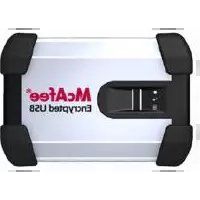
USB-HDDK-120GBFI - External hard drive MCAFEE - Free user manual and instructions
Find the device manual for free USB-HDDK-120GBFI MCAFEE in PDF.


Pick your language and provide your email: we'll send you a specifically translated version.
| Product Type | External hard drive |
| Capacity | 120 GB |
| Interface | USB 2.0 (backward compatible with USB 1.1) |
| Dimensions | 129 x 79 x 13 mm (5.1 x 3.1 x 0.5 inches) |
| Weight | 150 g (5.3 oz) |
| Power Supply | USB bus-powered, no external adapter required |
| Form Factor | Portable 2.5-inch drive |
| Compatibility | Windows 7/8/10/11, macOS 10.x or later, Linux |
| Data Transfer Rate | Up to 480 Mbit/s (USB 2.0) |
| Main Functions | Data storage, backups, file transfer, portable access |
| LED Indicator | Power/activity LED |
| Enclosure Material | Aluminum and plastic body |
| Cleaning | Wipe with a soft, dry cloth; do not use liquid cleaners |
| Safety Precautions | Avoid drops, shock, and exposure to moisture |
| Safe Removal | Always use the 'Eject' or 'Safely Remove Hardware' feature |
| Spare Parts | No user-replaceable parts; contact support for repairs |
| Repairability | Not user-repairable, professional service recommended |
| Warranty | Typical 1-year limited warranty (verify with seller) |
| Operating Temperature | 5°C to 35°C (41°F to 95°F) |
| Storage Temperature | -20°C to 60°C (-4°F to 140°F) |
| Package Contents | External hard drive, USB cable, quick start guide |
Frequently Asked Questions - USB-HDDK-120GBFI MCAFEE
How do I connect the McAfee USB-HDDK-120GBFI to my computer?
Connect the included USB cable to the drive and then to a free USB port on your computer. The drive is plug-and-play, so it should appear as a new disk drive automatically.
Why is my external hard drive not showing up on my PC?
Try connecting to a different USB port, use a different cable, and check if the drive appears in Disk Management. If it is new, it may need to be initialized and formatted before use.
Can I use this drive with both Windows and Mac?
Yes, the drive can be used with both, but if you need to share files between them, format it as exFAT or FAT32 for cross-platform compatibility.
How do I format the 120GB hard drive?
On Windows, open Disk Management, right-click the drive, and choose Format. On Mac, use Disk Utility. Select a file system like NTFS, exFAT, or APFS depending on your needs.
What is the maximum data transfer speed?
The USB 2.0 interface supports a theoretical speed of 480 Mbit/s (about 60 MB/s), but real-world performance is typically slower due to overhead and the drive's speed.
Does the drive require an external power supply?
No, the drive is bus-powered, meaning it draws power through the USB connection. If you experience issues, try using a powered USB hub or a direct PC port.
How can I back up my files safely to this drive?
You can drag and drop files manually or use backup software. For automatic backups, set up your operating system's built-in backup tool to target the drive as the backup destination.
What should I do if I get an error saying 'Device Not Recognized'?
Unplug the drive, restart your computer, and reconnect it. Also check Device Manager for driver issues. You may need to update the USB controllers or try another USB port.
Can I install software or run applications directly from the drive?
Yes, you can install portable apps, but performance may be slower than an internal drive. For heavy applications, a USB 3.0 or faster connection is recommended.
How do I safely remove the drive from my computer?
Click the 'Safely Remove Hardware' icon in the system tray (Windows) or drag the drive to the trash (Mac). This ensures all writes are completed and prevents data corruption.
User questions about USB-HDDK-120GBFI MCAFEE
0 question about this device. Answer the ones you know or ask your own.
Ask a new question about this device
No questions yet. Be the first to ask one.
Download the instructions for your External hard drive in PDF format for free! Find your manual USB-HDDK-120GBFI - MCAFEE and take your electronic device back in hand. On this page are published all the documents necessary for the use of your device. USB-HDDK-120GBFI by MCAFEE.
USER MANUAL USB-HDDK-120GBFI MCAFEE

Manual assistant
Powered by Anthropic
Waiting for your message
Product information
Brand : MCAFEE
Model : USB-HDDK-120GBFI
Category : External hard drive