40 Mix Euro - Distributeur de monnaie Pro - Free user manual and instructions
Find the device manual for free 40 Mix Euro Pro in PDF.


User questions about 40 Mix Euro Pro
0 question about this device. Answer the ones you know or ask your own.
Ask a new question about this device
Download the instructions for your Distributeur de monnaie in PDF format for free! Find your manual 40 Mix Euro - Pro and take your electronic device back in hand. On this page are published all the documents necessary for the use of your device. 40 Mix Euro by Pro.
USER MANUAL 40 Mix Euro Pro
1 Functions ....4
2 Appearance ....4
3 Specifications....5
4 Safety precautions and maintenance rules ....5
5 Control panel operation....6
6 Preparation ....7
7 Selection of counting modes ....7
8 «COUNT» mode – counts banknotes of different currencies in a normal mode .....8
9 «SORT» mode – counts and controls banknotes denomination....10
10 «VALUE» mode – counts and summates the banknotes' denominations .....11
11 Adjustment of sensors ....11
12 Error codes .... 12
13 Warranty ....14
Inhalt
PRO INTELLECT TECHNOLOGY Co. Ltd. offers the PRO 40 MIX EURO series of banknote counters, with the ability to recognize denomination, which are specially designed to verify EURO banknotes via MT, MG, UV, DEN detection.
In the «VALUE» mode, the total value of a stack of mixed denomination EURO banknotes can be calculated in just a few seconds.
In the «SORT» mode, the device will count, verify, and sort based on the denomination of the first banknote. In the "Count" mode PRO 40 MIX EURO can be used for counting different currencies.
This is a complex technical device. This manual will help you easily and quickly get acquainted with the device, its functions, and capabilities. Please read this manual to ensure proper operation of the device.
1 Functions
- Recognition of EURO banknotes' denomination
- «VALUE» mode – recognition and summation mode for a stack of EURO banknotes with mixed denominations via MT, MG, UV, DEN detection.
- «SORT» mode – recognition and summation by one denomination (automatically determines the first banknote's denomination) and rejects banknotes with other denominations (for EURO banknotes).
- «COUNT» - normal mode for banknotes' counting and summation with UV detection for different currencies.
- For all counting modes: «VALUE», «SORT», «COUNT», you can put the banknotes into the hopper with any orientation.
- The counting speed in «VALUE» and «SORT» modes is 800 banknotes per minute.
- Automatic and manual start modes.
- Connection to an external display.
2 Appearance
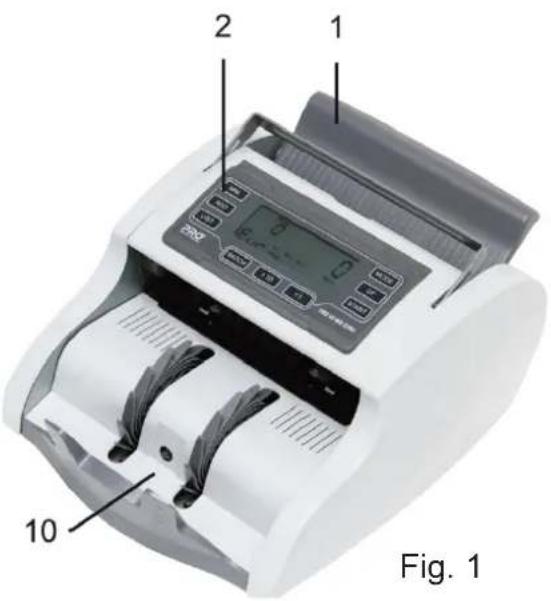
text_image
2 1 200 10 Fig. 1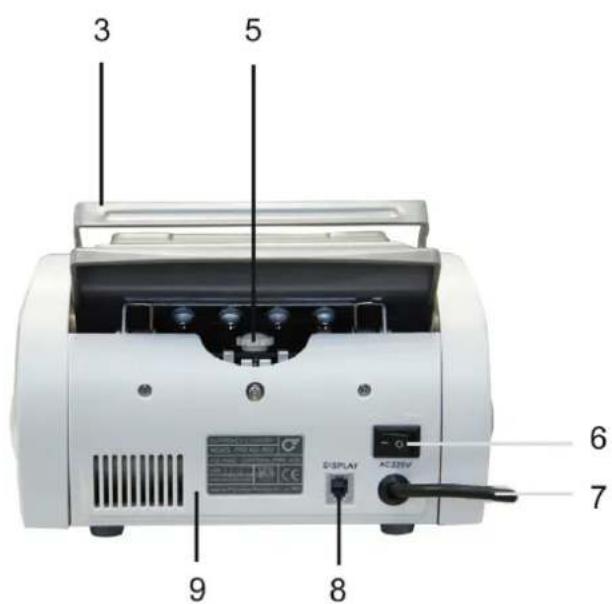
text_image
3 5 6 7 8 9 DISPLAY AC225V- Hopper
- Control panel
- Carrying handle
- Paper thickness adjustment screw
- Power switch
- Power cord
- Port for external display
- Rear cover
- Stacker
3 Specifications
Counting speed, banknotes/min 800
Hopper capacity, banknotes: 100
Stacker capacity, banknotes 100
Power supply, V/Hz 220/50
Power consumption, W....40
Net weight, Kg / 4.3
Dimensions, mm 225x290x140
4 Safety precautions and maintenance rules
Warning: this device is intended to operate from the power source 220V/50Hz. The user shall use electric power cord with a ground contact.
Do not use power cable or power cord without ground contact.
- Read this manual before operation
- The manual should be available to operator
- Do not use this device under the following conditions:
- The device is not resting on a level surface
- The device is in an excessively dusty or polluted room
- The device will be exposed to vibration while in use
- The device is exposed to direct sunlight or strong directional interior lighting
- Do not operate the device with wet hands
- During operation, do not touch the moving parts of the counter
- Do not expose to water (or other liquid).
- Avoid foreign objects, paper clips, and staples
- Avoid dropping the device
- When finished be sure there are no banknotes in the hopper or transport system
- Clean the device regularly and service the device as needed at a licensed service center to ensure the device will function within its specified parameters
- Do not disassemble, repair or attempt to update the counter on your own. This can result in damage to the device or injury to the operator.
- Technical maintenance and cleaning shall be carried out only in certified service centers. - If the device was exposed to cold for an extensive period of time, it is necessary to keep it at the room temperature for no less than 6 hours, when the device has not been stored in a box. If the device has been stored in a box while exposed to cold temperature, allow the device to rest at room temperature for 12 hours prior to use. Remember the manufacturer is in no way responsible for damage to the device or injury to the operator in the event of incorrect operation /care of the device.
5 Control panel operation
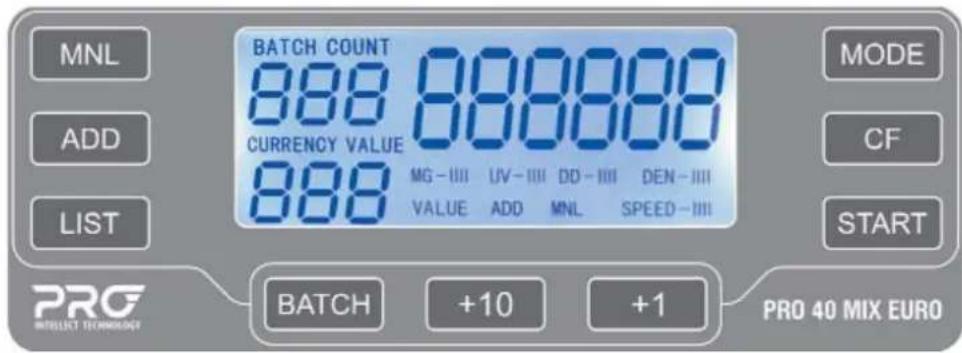
text_image
MNL ADD LIST BATCH COUNT 888 CURRENCY VALUE 888 MG - III VALUE ADD UV - III MML DD - III MNL DEN - III SPEED - III MODE CF START PRO 40 MIX EURO BATCH +10 +1«MODE» button – Selects counting modes: VALUE / SORT / COUNT.
«START» button – Starts and continues counting, nulls, resets error messages, returns to the main menu.
«BATCH» button – enters number value BATCH 100, 50, 25, 20, 10, 0. To enter the value, press the button several times. To adjust the BATCH value use buttons «+10», «+1».
«MNL» button – turns on / off manual start mode. In automatic mode, the indicator MNL is switched off in the display, the device starts counting automatically after you put banknotes into the hopper. In the manual mode, the MNL indicator is lit on the display, the device starts counting another stack of banknotes after you press button «START».
«ADD» button – turns on/off the banknote summation mode by sum and number. In ADD mode, the indicator «ADD» is lit on the display.
«CF» button – enters/exits UV, DEN detection menu. When pressing "CF" button the changing UV value starts to blink. When pressing "CF" button for the second time the changing DEN value starts to blink.
«LIST» button – monitors banknotes' distribution by denomination in "VALUE" mode. In order to view the number of counted EURO banknotes of all denominations, press "LIST" button several times:
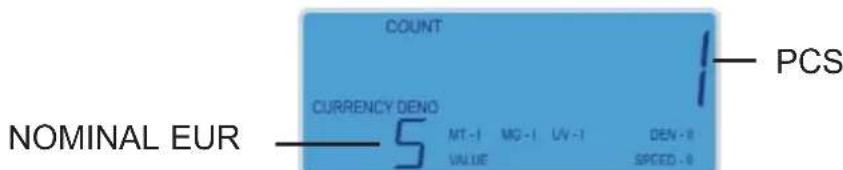
text_image
NOMINAL EUR COUNT CURRENCY DENO 5 MT-1 MG-1 LV-1 DEN-8 VALUE SPEED -0 PCSFig.3
6 Preparation
Connect the power cord to the device and connect to a 220V/50Hz power supply. The user shall use electric power cord with a ground contact.
- Turn the power switch ON;
- The counter runs a diagnostic and is then ready for operation.
7 Selection of counting modes
«COUNT» MODE
text_image
Eur UV - 1 DEN - 8 SPEED - 8Fig.4
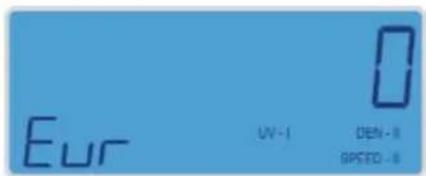
«COUNT» mode – banknotes' normal counting mode. Is used for counting various currencies. Is recommended for medium and large counting volumes. The recommended maximum load of banknotes on the hopper is 100 banknotes.
In this mode you can quickly count banknotes with UV detection.
When counting in this mode, the device is not sensitive to the placement of the banknotes, irrelevant marks, dirt, a banknote's loss of color, crumpled banknotes, banknotes with curved edges or corners, and taped or glued banknotes.
«SORT» MODE
text_image
COUNT 0 Eur MT-1 MG-1 UV-1 DEN-1 SORT SPEED-8Fig.5
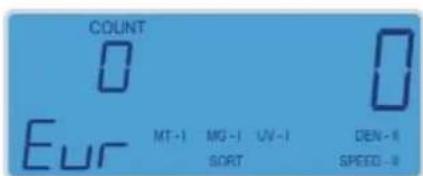
«SORT» mode – A mode for banknotes counting and summation by one denomination (automatically determined by the first banknote's denomination). Uses MT, MG, UV, DEN detection, and rejects banknotes with other denominations. This mode is designed only to count EURO banknotes from the 2002 series. We recommend using this mode to count and verify banknotes of one denomination by MT Detection for small and medium volumes. The recommended maximum load of banknotes on the hopper is 100 banknotes. In this mode, the counter is sensitive to the placement of the banknotes, irrelevant marks, dirt, a banknote's loss of color, crumpled banknotes, banknotes with curved edges or corners, and taped or glued banknotes. When there is a suspicious banknote or a banknote of another denomination, the counter will give an error.
«VALUE» MODE
text_image
COUNT 0 Eur MT-1 MG-1 UV-1 CBN-1 VALUE SPEED-1Fig.6
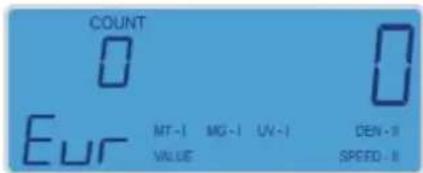
«VALUE» mode – recognition and summation mode for a stack of EURO banknotes with mixed denominations. This mode is designed only to count EURO banknotes from the 2002 series. This mode is recommended for counting and verification of a stack of banknotes with mixed denominations by MT, MG, UV, DEN detection with a small volume. The recommended maximum load of banknotes on the hopper is 100 banknotes. In this mode, the counter is sensitive to the placement of the banknotes, irrelevant marks, dirt, a banknote's loss of color, crumpled banknotes, banknotes with curved edges or corners, and taped or glued banknotes.
Select «VALUE» or «SORT» mode by pressing the «MODE» button. The second pressing of this button allows to enter the «COUNT» mode.
8 «COUNT» mode – counts banknotes of different currencies in a normal mode
text_image
Eur UV - 1 DEN - 1 SPEED - 8Fig.7
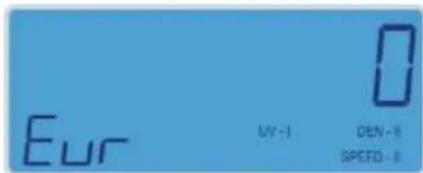
If you choose the «COUNT» mode, the counter only does normal counting:
- Counts banknotes' quantity «COUNT»
- Summation «ADD»
- Batch mode «BATCH»
- Optical density detection «DEN»
- Ultraviolet detection «UV»
NOT AVAILABLE: Recognition and summation by denomination, MT and MG detection.
8.1 Counting Operation
WARNING! In order to avoid errors during counting, examine banknotes and put aside the following:
- Any banknote that has been repaired with white paper, has been exposed to water or "washed", and any banknote that is dirty or torn
Banknotes should be placed in the hopper in a neat stack with the first bill facing up.
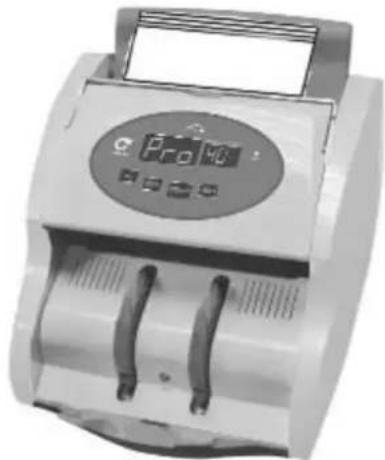
Banknotes should be placed into the hopper perpendicular to the tray (see Figure A). The notes should then be leaned back flat against the tray. Banknotes will be loaded into the device automatically (see Figure B)
Wrong banknote position can cause errors, banknotes being ejected from the device, crumpling or jamming.
- Banknotes are to be placed in the hopper
- The counter will start counting banknotes automatically after one second
- Display will show the quantity of counted banknotes
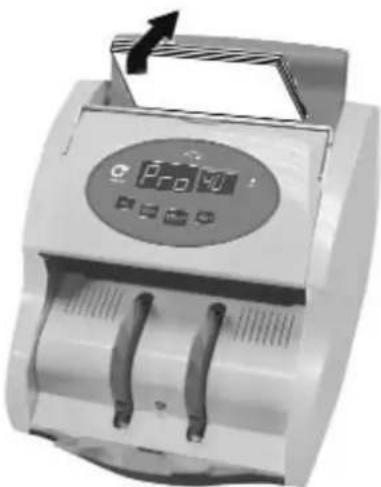
natural_image
Close-up of a digital currency counter with two serial slots and a central display (no visible text or symbols)Fig.A
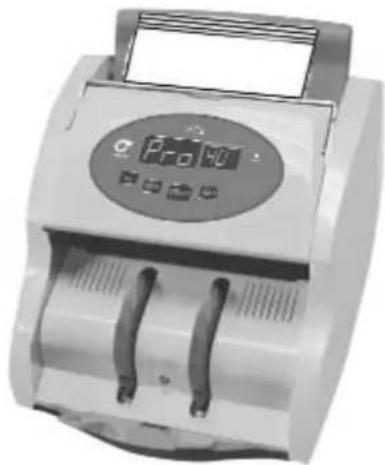
natural_image
Close-up of a handheld electronic currency counter with two blades and a digital display (no visible text or symbols)Fig.B
- Repeat again up to Table 8.1, when necessary
- Press and the «START» button to reset display when finished.
If an error occurs during counting, see Table "Error codes"
8.2. Batch mode
text_image
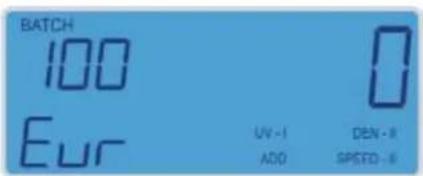
BATCH 100 Eur UV - I ADD DEN - II SPEED - IIIFig.8
- Enter a number corresponding to the amount of banknotes for the desired batch size on the display. To enter the value, press the button «BATCH» several times. To adjust the BATCH value use buttons «+10», «+1». The set batch value is indicated in the upper left corner (Figure 8).
- Repeat the operation once again under cl. 8.1
- Remove banknotes from the stacker
-Add banknotes if necessary
In order to exit the batch mode, press the «BATCH» button several times till the display is reset.
-If an error occurs during counting, repeat all these operations once again under cl. 8.2.
This mode works for all counting modes.
8.3. Summation mode
Press the "ADD" button to enter the summation mode. If the summation mode is on, the "ADD" indicator is be lit (Figure 8).
- Repeat the operation once again under cl. 8.1
- Remove banknotes from the stacker
-Add banknotes if necessary - Press the "ADD" button to exit the summation button, the indicator "ADD" is not lit.
- If an error occurs during counting, repeat summation once again.
This mode works for all counting modes.
9 «SORT» mode – counts and controls banknotes denomination
text_image
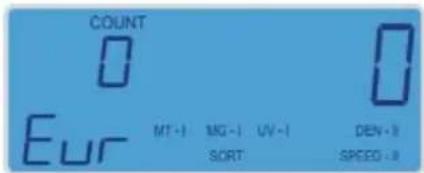
COUNT 0 Eur MT-1 MG-1 UV-1 DEN-1 SORT SPEED-1Fig.9
This counting mode counts and recognizes EURO banknotes' denominations (determined by the first banknote's denomination in a stack) and rejects banknotes with other denominations. The display shows detections included into MT, MG, UV, DEN.
In this mode, the counter is sensitive to proper placement of the banknotes, irrelevant marks, dirt, a banknote's loss of color, crumpled banknotes, banknotes with curved edges or corners, and taped or glued banknotes.
9.1 Counting Operation
WARNING! The recommended maximum load of banknotes on the hopper is 100 banknotes. ATTENTION!
In this mode, the counter is very sensitive to the position of banknotes. Banknotes shall be placed in a neat stack prior to being placed into the hopper! (Fig. A,B)
- Place the banknotes into the hopper;
- The counter will start counting banknotes automatically after one second;
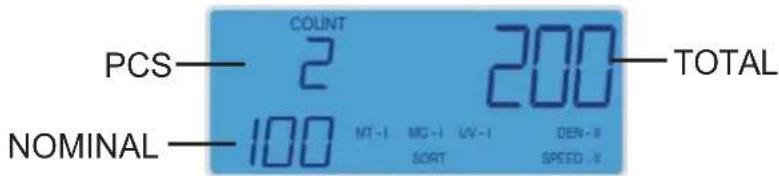
- The display will show the quantity (PCS), the controlled denomination (NOMINAL) and the TOTAL value of the banknotes. Figure 11 represents an example: 2 banknotes of 100 EURO
text_image
PCS COUNT 2 200 TOTAL NOMINAL 100 MT-1 MG-1 LV-1 DEN-3 SORT SPEEDFig.11
each have been counted:
9.2 Errors during banknote counting:
In terms of authentic banknotes, the counter may give error codes due to the following reasons:
1 A banknote in a stack is of a different denomination.
2 Banknotes being incorrectly placed or unevenly laid in the hopper (see Table 9.1)
3 Banknotes are crumpled, torn, damaged, or bear irrelevant marks.
When an error occurs, the result will not be recorded in the counter's memory, so you can remove the suspicious banknote (lying on the top) from the stacker, and place it back in the hopper again.
If an error occurs again on the same banknote, put it upside down in the hopper again. If the above steps do not help, the banknote cannot be recognized as an authentic one and other methods of verification should be used, such as UV or IR. If an error occurs during counting, you can also reference the Error Code Table.
10 «VALUE» mode – counts and summates the banknotes' denominations
text_image
COUNT 0 Eur MT-1 MG-1 UV-1 DEN-8 VALUE SPEED-8Fig. 12
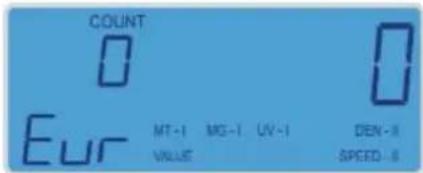
This counting mode recognizes the denominations of EURO banknotes and completes counting and summation operations for a stack of banknotes of mixed denominations. The display shows detections included into MT, MG, UV, DEN.
- To start, repeat counting operations under cl. 8.1, 9.1; (9.2).
- To avoid additional errors during counting, it is recommended to pre-sort banknotes by their size (for example, a 5 EURO banknote is significantly different in size from other denominations), starting with larger denominations and progressing to smaller ones.
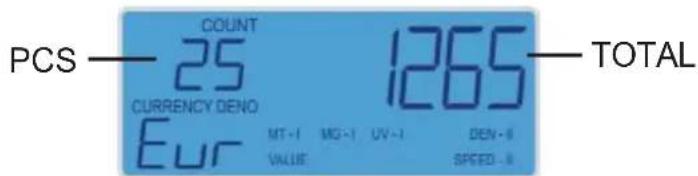
- The display will show the quantity (PCS) and the total value of (TOTAL) counted banknotes:
text_image
PCS — COUNT 1265 — TOTAL 25 CURRENCY DENO EUR MT -1 MG -1 UV -1 DEN -8 VALUE SPEED -8Fig. 13
11 Adjustment of sensors
«CF» button – enters UV and DEN detection menu. When pressing "CF" button the changing UV value starts to blink. In different modifications standard detection levels MT-I MG-I UV-I DEN-II are set by default for «VALUE», «SORT» and «COUNT» modes.
UV detection level is set within 0 – III range (depending on the counter modification). The higher the level, the higher sensitivity and the more precise a banknote's checking. Press «+1» button to make changes. Press the "START" button to exit.
When pressing the button for the second time the changing DEN value starts to blink. DEN detection level is set within 0 – III range. The higher the level, the higher sensitivity and the more precise a banknote's checking. Press «+1» button to make changes. Press the "START" button to exit.
In case of high UV and DEN detection levels, CF1, Ed errors are possible, that is why it is recommended to use standard detection levels MT-I, MG-I, UV-I, DEN-II by default.
Maintenance
In order to provide the best functioning of the device, it is necessary to comply with the following simple requirements:
- Switch off the device, when not in use
- Clean the hopper and stacker with a clean dry cloth. Sensors can cause errors when dirty.
It is recommended to carry out preventive measures, including partial disassembling of the counter each 30 days by an engineer in the service center.
12 Error codes
System errors (appears on the display immediately after you turn on the counter)
| Code Message Reason | ||
| E5 | The hopper sensor is blocked by banknotes or dirt | Remove banknotes from the hopper and clean it |
| E6 | The stacker sensor is blocked by banknotes or dirt | Remove banknotes from the stacker and clean it |
| E2 | The left counting sensor is blocked by dirt or out of operation | Clean the sensor or replace ut |
| E1 | The right counting sensor is blocked by dirt or out of operation | Clean the sensor or replace ut |
If other errors are indicated when switching on the counter, apply to a service center.
Error codes during counting process:
| Code Message Reason | ||
| EC | Banknotes have passed through without being properly separated | 1. Remove banknotes from the stacker and repeat the counting procedure |
| Ed | 1. The device has detected a banknote with a different density than expected,2. DEN level is very high. | 1. Remove banknotes from the stacker and repeat the counting procedure2. Set a lower DEN sensitivity level, see Table 11 |
| CF1 | 1. The banknote has exhibited suspicious UV properties2 UV level is very high | 1. Remove the suspicious banknote (lying on the top). Remove banknotes from the stacker and repeat the counting procedure.2. Use additional verification methods for the suspicious banknote, for example, viewing UV or IR detectors.3. Set a lower DEN sensitivity level under cl. 11. |
| EH | 1 A half banknote has been detected2 A banknote passes through incorrectly | 1. Remove the banknote (lying on the top). Press the «START» button and repeat the counting procedure.2. Count banknotes once again. Banknotes shall be placed in a neat stack on the hopper. You must align banknotes in a neat stack without distortion (Figure A,B) |
| CF-2 | 1. The currency being counted is other than EURO2. . Error of magnetic thread detection MT, MG | 1. «VALUE» and «SORT» modes are only for EURO banknotes counting2. Remove the banknote (lying on the top) and verify it with IR detector |
| CF-3 | 3. Counted banknotes of mixed denominations in «SORT» mode4. The magnetic thread detection level does not correspond to the banknote | 3. «SORT» mode is used only for counting banknotes of the same denomination4. Remove the banknote (lying on the top) and verify it with IR detector |
| 5. Incorrect placement banknotes in the counter | 5. Put banknotes into the hopper. Banknotes shall be placed in a neat stack on the hopper. You must align banknotes in a neat stack without distortion (see cl. 9.1) | |

13 Warranty
Manufacturer guarantees proper functioning of the device within the warranty period since the date of sale provided the user meets operation, maintenance and storage conditions set on his manual. After unpacking the device please keep the package and technical description. Warranties are canceled in the event the device is transported in no- original packaging or operation/maintenance conditions are not met. Manufacturer is not responsible for device malfunction due to improper maintenance, storage and transportation including mechanical damage. In case of the device failure within the warranty period, the customer is not entitled to its repair in our service center free of charge.
The service center accepts equipment for cleaning due to dust and mud, however cleaning equipment from dust and mud is not included in the warranty and is charged separately. Warranty service does not include any training for equipment maintenance or other use of the device (connection, testing, customizing, preventive works etc.) which the customer can complete on their own by referencing the attached manual. The device frequently showing error codes on authentic banknotes is not necessarily a malfunction. If this occurs, adjust the slot size, detection or sensitivity of detection. Manufacturer is entitled to introduce updated software, not described in the current manual.
Warranty service is not available in the following cases:
- Absence of a warranty card, an incorrectly filed warranty card, or other invalid card;
- If operation or maintenance rules requirements set in the manual are not met;
- If there is mechanical damage to the equipment;
- If there are foreign objects or liquid inside of the device;
If the seal portions of the device have been opened or tampered with; - If the device has been connected to a power supply without a ground contact or to an unstable power source.
The present warranty does not apply to batteries, cable adaptors, power units, safety fuses, belts, lamps, brushes, external displays, power cords, and external structural elements, parts of the body of the product or any other parts which have a naturally limited period of service including failures caused by power supply failures.
Replaced defective parts are to be considered the property of the manufacturer.
The owner delivers faulty equipment to the service center at their own expense.
natural_image
Close-up of a white electronic device with a control panel and buttons, no visible text or symbols.Abb.A
natural_image
Close-up of a digital counting machine with two buttons and a display screen (no visible text or symbols)Abb.B
text_image
PCS NOMINAL COUNT 2 100 MT -1 SORT MC -1 UV -1 DEN -1 SPEED -1 200 TOTALAbb.11
natural_image
Abstract logo design with white stylized letter 'G' on red background (no text or symbols)© PRO INTELLECT TECHNOLOGY / www.pro-intell.com