24210 - Steam cleaner Lakeland - Free user manual and instructions
Find the device manual for free 24210 Lakeland in PDF.


| Product Type | Steam Mop |
| Brand | Lakeland |
| Model | 24210 |
| Power Consumption | 1550 Watts |
| Voltage | 220-240 V |
| Water Tank Capacity | 350 ml |
| Cord Length | 7 m |
| Heating Time | Approximately 30 seconds |
| Steam Activation | Push-button control |
| Base Material | Plastic |
| Handle Type | Back saver handle with release button |
| Accessories Included | Microfibre pads (x1), Carpet glider, Filling jug |
| Pad Washing | Machine washable up to 40°C, use liquid detergent, no bleach or fabric softener |
| Safety Features | Earthed plug, 13 amp fuse, auto shut-off not specified |
| Compatible Floors | Sealed hard floors (not unsealed wood or unglazed ceramic) |
| Carpet Use | Yes, with carpet glider accessory for light sanitation |
| Replacement Parts | 3 replacement microfibre pads ref: 23308 |
Frequently Asked Questions - 24210 Lakeland
User questions about 24210 Lakeland
0 question about this device. Answer the ones you know or ask your own.
Ask a new question about this device
Download the instructions for your Steam cleaner in PDF format for free! Find your manual 24210 - Lakeland and take your electronic device back in hand. On this page are published all the documents necessary for the use of your device. 24210 by Lakeland.
USER MANUAL 24210 Lakeland
natural_image
Black and white photo of a vacuum cleaner with handle and base (no text or symbols visible)LAKELAND ELECTRONIC STEAM MOP
Thank you for choosing the Lakeland Electronic Steam Mop.
The steam mop generates steam at a push of a button and uses the triple layered, steam activated microfibre pads to loosen and lift dirt.
Its quick heat up time allows the mop to produce super-heated steam within 30 seconds. The steam sanitises floors, killing harmful germs without the need for harmful chemicals. The 7m flex allows easy use around the home with the back saver function on the handle allowing easy reach under furniture.
To get the best from your new steam mop, please take a few moments to read these instructions, and keep them in a safe place for future reference.
An award winning family-owned business, here at Lakeland we still have the same values of excellent quality, value for money and exceptional customer care as we did when we first set up the company in the 1960s.
Our products are carefully selected and rigorously tested to meet our high standards, so you can be assured that any product you purchase will be easy-to-use and highly durable.
CONTENTS
Parts....4
Important safety instructions....5
Getting started....6
Using your Steam Mop....7
Troubleshooting 8
Electrical connections....9
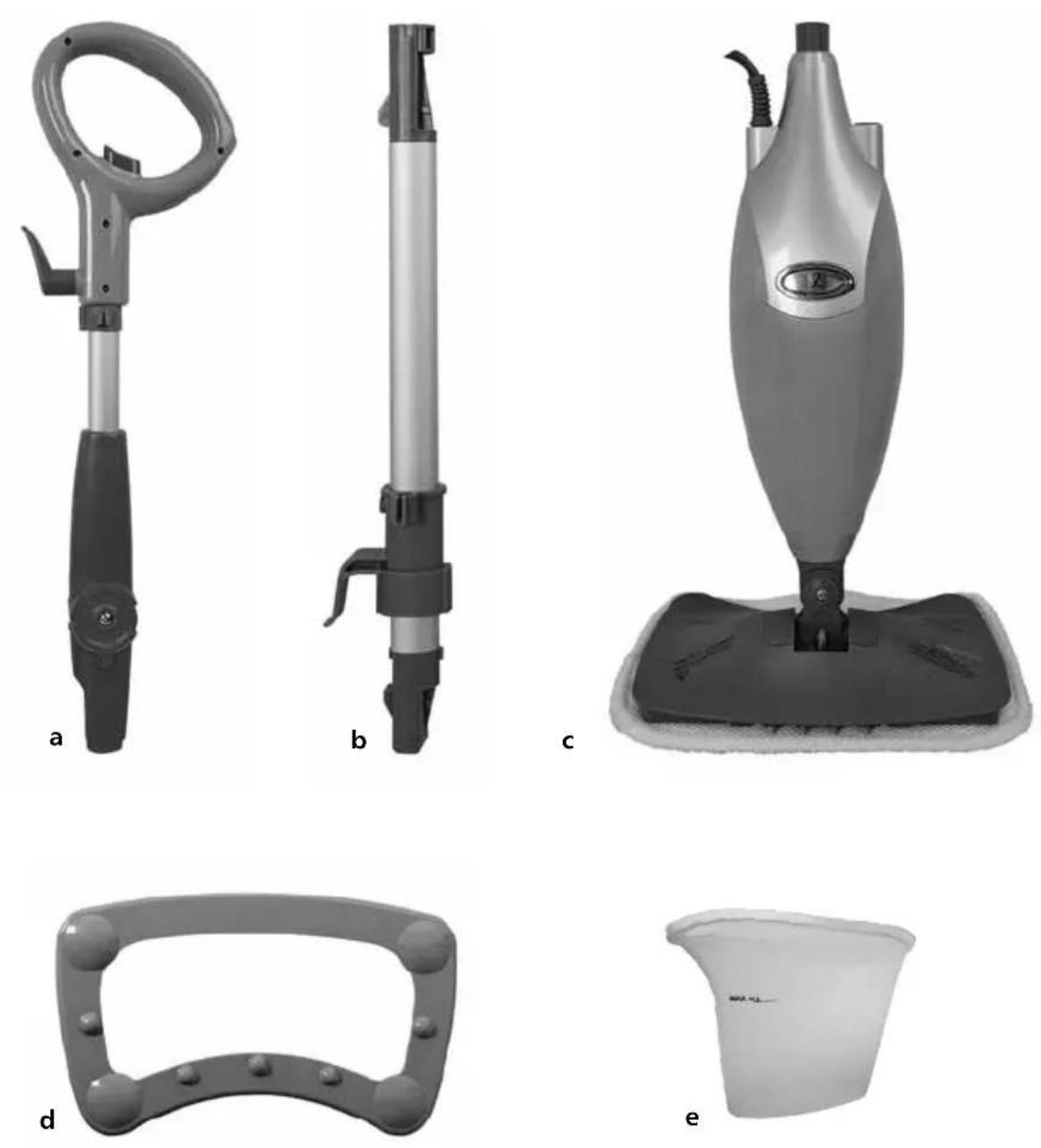
Parts
a Back saver handle
b Lower pole
c Steam mop base
d Carpet glider accessory
e Jug
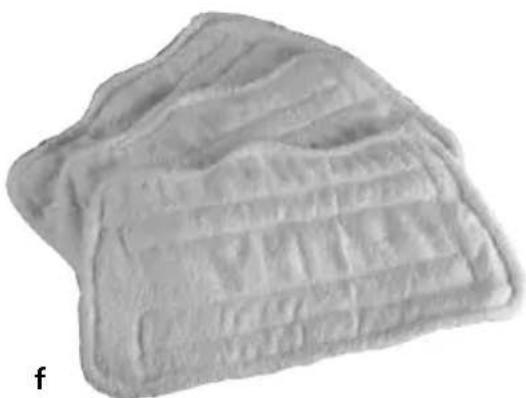
f Microfibre pads
Technical specifications
Voltage: 220 - 240V
Power: 1550 Watts
Water Capacity: 350ml
Helpline: 015394 88100
natural_image
Close-up of a textured, layered material with no visible text or symbolsImportant safety instructions
When using the Lakeland Electronic Steam Mop, please follow these basic safety precautions.
Please use caution when using the steam mop. The steam emitted from the openings is very hot.
- Use the system only for its intended use.
- Do not use outdoors.
- Do not leave the appliance unattended when plugged in. Always unplug the power cord from the electrical outlet when not in use and before servicing.
- The appliance is not intended for use by persons (including children) with reduced physical, sensory or mental capabilities, or lack of experience and knowledge, unless they have been given supervision or instruction concerning the use of the appliance by a person responsible for their safety. Do not allow the appliance to be used as a toy.
- Use only manufacturer's recommended accessories.
- Do not operate the appliance with a damaged plug or cord, or if the unit has been dropped or damaged. Never attempt to repair or replace the cord yourself as this may lead to severe injury or electric shock. Call the helpline on 015394 88100 to arrange a replacement.
- Do not immerse the steam mop into water or any other liquids.
- Do not handle the plug or steam mop with wet hands or operate appliance without any shoes.
- Do not pull or carry by power cord, use power cord as a handle, close a door on the power cord, or pull the power cord around sharp edges or corners. Keep the power cord away from heated surfaces.
- Do not unplug by pulling on the power cord. To unplug, grasp the plug not the power cord.
Do not use extension cords or outlets with inadequate current carrying capacity. - Do not put any objects into openings. Do not use with any opening blocked.
- Do not put hands or feet under the steam mop, the unit gets very hot.
- Use only on flat, horizontal surfaces. Do not use on walls, counters or windows.
- Do not use on unsealed wood or unglazed ceramic floors. On surfaces that have been treated with wax or some no wax floors, the sheen may be removed by the heat and steam action. It is always recommended to test an isolated area of the surface to be cleaned before proceeding.
We also recommend that you check the use and care instructions from the floor manufacturer. - Do not use on leather, waxed polished furniture, synthetic fabrics, velvet or other delicate, steam sensitive materials.
- Do not add cleaning solutions, scented perfumes, oils or any other chemicals to the water used in this appliance as this may damage the unit or make it unsafe for use. If you live in a hard water area, we recommend using distilled water in your steam mop.
- When in use, never turn the appliance over or on its side. Never direct steam towards people, animals or plants.
- Never leave the steam mop in one spot on any surface for any period of time when microfibre pad is attached.
- Once you have finished using the steam mop turn the unit off, unplug and carefully remove the microfibre pad immediately. Do not store the unit with damp, wet microfibre cleaning pad attached.
- When cleaning the steam mop, unplug the power cord from the electrical outlet and clean with a dry or damp cloth. Do not pour water or use alcohol, benzene or paint thinner on the unit.
- Extreme caution should be exercised when using this appliance to clean stairs.
- Do not use steam mop without microfibre pad attached.
- Store the steam mop indoors in a cool, dry place.
- To avoid a circuit overload, do not operate another appliance on the same socket (circuit) as the steam cleaner.
- If an extension cord is absolutely necessary, an extension cord rated a minimum of 15 ampere, 14 gauge cord should be used. Cords rated for less amperage may overheat. Extension cords over 5 metres in length should not be used. Care should be taken to arrange cord so that it cannot be pulled or tripped over.
Getting Started
Assembly
- Carefully unpack all the parts and remove any packaging. Do not plug in the mop until it is fully assembled and you have read all of the following instructions.
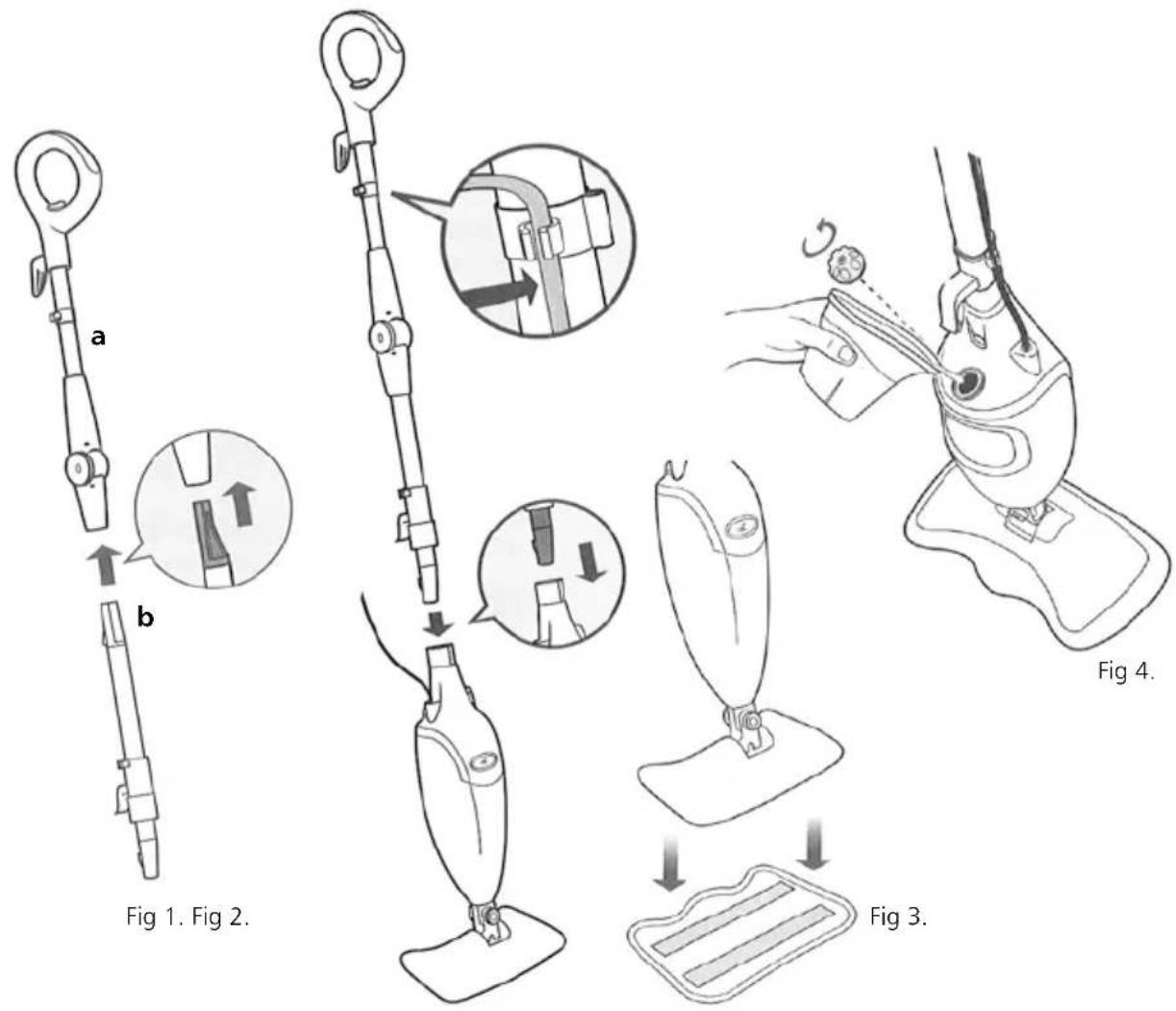
- Fig 1: Slide the back saver handle (a) into the lower pole. Push the two tubes together until you hear them click into place.
- Fig 2: Insert the assembled pieces into the steam mop base. Push together until you hear it click into place. Insert the cord into the cord clip on the shaft of the steam mop.
- Fig 3: Place one microfibre pad underneath the mop head, with the quick fastener strips facing up. Simply press the steam mop to the pad.
Filling the water tank
Please be aware that the first time you use the Lakeland Electronic Steam Mop you may find water droplets in the water tank. This is due to testing of the unit at the factory.
- Make sure your steam mop is unplugged from the wall before you fill the water tank.
- Fig 4: Remove the water tank cap by turning anti-clockwise to the unlocked position.
- Use the jug to aid you in filling the water tank. The water tank must not be filled above the max fill line.
- Replace the water tank cap by turning clockwise back to the locked position.
Using your steam mop
- Sweep or vacuum your floors before using your steam mop.
- Pull and twist the quick release cord holder to unwrap the power cord completely. Plug in and the "On" button will flash blue. If your light doesn't turn on, turn to the Troubleshooting section, page 8.
- It takes about 30 seconds for the steam to be ready for use. Press the "On" button to activate the steam. The indicator light will then go from a flashing blue to a solid blue light.
- Once you have finished using the steam mop, press the "On" button again to stop steam being released.
Back Saver Function
- Use the back saver function to access tight areas. Press the release button on the handle to bend and lock the steam mop in the back saver position.
- To place the handle back into the upright position, press the release button and pull upwards to straighten the handle.
Carpet Glider Accessory
The carpet glider can be used for light sanitation on your carpets.
- Sweep or vacuum your floors before using your steam mop on your carpet.
- To use the carpet glider, place the mop with pad attached in to the glider. Use the steam mop in the usual way.
- Once you have finished using the carpet glider, lift the mop out of the glider and continue to use on hard floors if required, otherwise switch the unit off and unplug.
Microfibre pads
Washing instructions:-
• Machine washable up to 40°C
• Use liquid detergent only
• Do not bleach or use fabric softener
• Wash separately from other fabrics
• Air dry or tumble dry on a low setting
If there are loose threads on the pad carefully cut the thread with scissors. Do not pull on them or cut at the base.
To order replacement pads, call the helpline on 015394 88100
3 replacement microfibre pads ref: 23308
Troubleshooting
Problem The steam mop will not turn on
Solution 1 Your steam mop should be securely plugged in to a 230-240V AC electrical outlet only.
Solution 2 Check the plug fuse or your fuse box trip switches.
Problem Steam mop will not make steam
Solution Is there any water in the water tank? If not, add water to your steam mop following instructions.
Problem Steam Mop left white spot on the floor
Solution 1 Don't leave your steam mop on the floor with a damp or wet cleaning pad.
Solution 2 Do you have hard water? If you do you might want to switch to distilled water.
Problem Floors are cloudy, streaky or spotty after steaming
Solution 1 The pad might be dirty, change the pad.
Solution 2 If you have washed the pad with powder detergent then it might have residual detergent left on it. Wash it again using liquid detergent.
Solution 3 If you are cleaning in a kitchen area where there might be a build up of grease then use a degreasing agent such as an all purpose cleaner or dish soap and paper towels to clean the area first.
Solution 4 You might have left the mop in the same spot too long.
Solution 5 Do you have hard water? If you do you may want to switch to distilled water.
Solution 6 This might be left over from past cleaners used on the floor surface. Use the steam mop a few more times and see if the leftover cloudiness is removed.
Problem Steam Mop is hard to push
Solution Make sure the cleaning pad is on properly.
Electrical Connections
THIS APPLIANCE MUST BE EARTHED
This appliance is fitted with a fused three pin plug to BS1363 which is suitable for use in all homes fitted with sockets to current specifications. If the fitted plug is not suitable for your socket outlets, it should be cut off and carefully disposed of. To avoid an electric shock, do not insert the discarded plug into a socket.
FITTING A NEW PLUG
If for any reason you need to fit a new plug, the flexible mains lead must be connected as shown here. The wires in the mains lead fitted to this appliance are coloured in accordance with the following code:
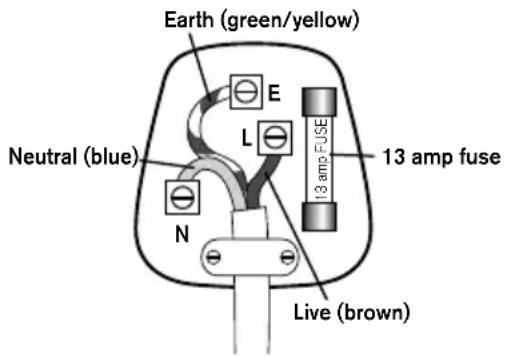
Connect BLUE to Neutral (N)
Connect GREEN & YELLOW to Earth (E)
Connect BROWN to Live (L)
13 amp fuse to be used
If the colours of the wires in the mains lead of this appliance do not correspond with the coloured markings identifying the terminals in your plug, proceed as follows. The wire which is coloured green and yellow MUST be connected to the terminal which is marked with the letter E (Earth) or coloured green. The wire which is coloured blue MUST be connected to the terminal which is marked with the letter N (Neutral) or coloured black. The wire which is coloured brown MUST be connected to the terminal which is marked with the letter L (Live) or coloured red.
Before refitting the plug cover, check that there are no cut or stray strands of wire inside the plug. Use a 13 amp BS1362 fuse. Only BSI or ASTA approved fuses should be used. If you are at all unsure which plug or fuse to use, always refer to a qualified electrician.
Note: after replacing or changing a fuse on a moulded plug which has a fuse cover, the cover must be refitted to the plug; the appliance must not be used without a fuse cover. If lost, replacement fuse covers can be obtained from an electrical shop. This appliance complies with the following EEC Directives: 73/23 EEC (Low Voltage Directive) and 89/336 EEC (EMC Directive).
RECYCLING YOUR ELECTRICALS
Along with many other High Street retailers, Lakeland has joined a scheme whereby customers can take their unwanted electricals to recycling points set up around the country.
Visit www.recycle-more.co.uk to find your nearest recycling point.

BEDIENUNGSANLEITUNG

natural_image
Black and white photo of a handheld vacuum cleaner with handle and base (no text or symbols visible)LAKELAND ELEKTRISCHER DAMPFBESEN
natural_image
Mechanical device with handle and lever mechanism (no visible text or symbols)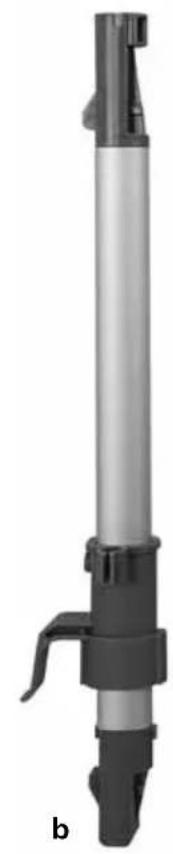
natural_image
Mechanical device with cylindrical body and lever mechanism (no visible text or symbols)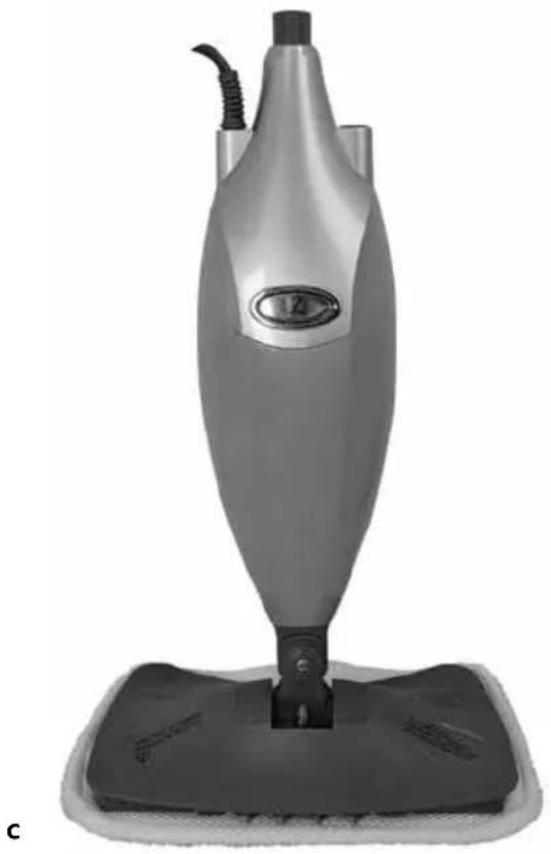
natural_image
Exterior view of a modern vacuum cleaner with a black base and handle (no visible text or symbols)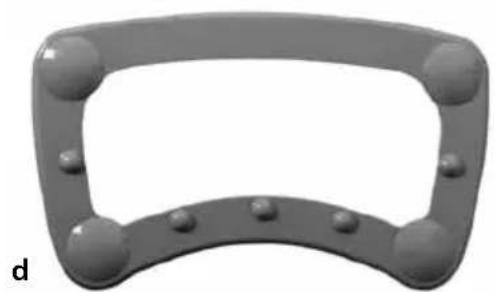
natural_image
3D rendered image of a gray mechanical component with rounded corners and bolt holes (no text or symbols)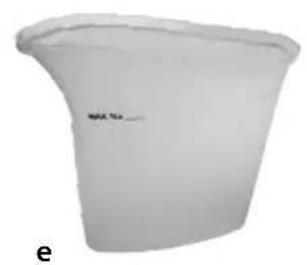
natural_image
White plastic container with a curved top and side edges, labeled 'e' at the bottom (no other text or symbols visible)Teile
natural_image
Close-up of a textured, layered material with no visible text or symbols- LAKELAND ELECTRONIC STEAM MOP
- CONTENTS
- Parts
- Technical specifications
- Important safety instructions
- Getting Started
- Assembly
- Filling the water tank
- Using your steam mop
- Back Saver Function
- Carpet Glider Accessory
- Microfibre pads
- Troubleshooting
- Problem The steam mop will not turn on
- Problem Steam mop will not make steam
- Problem Steam Mop left white spot on the floor
- Problem Floors are cloudy, streaky or spotty after steaming
- Problem Steam Mop is hard to push
- Electrical Connections
- THIS APPLIANCE MUST BE EARTHED
- FITTING A NEW PLUG
- RECYCLING YOUR ELECTRICALS
- BEDIENUNGSANLEITUNG
- LAKELAND ELEKTRISCHER DAMPFBESEN
- Teile
Brand : Lakeland
Model : 24210
Category : Steam cleaner