Frederica - Watch Brera - Free user manual and instructions
Find the device manual for free Frederica Brera in PDF.


User questions about Frederica Brera
0 question about this device. Answer the ones you know or ask your own.
Ask a new question about this device
Download the instructions for your Watch in PDF format for free! Find your manual Frederica - Brera and take your electronic device back in hand. On this page are published all the documents necessary for the use of your device. Frederica by Brera.
USER MANUAL Frederica Brera
MANUALE ISTRUZIONI - INSTRUCTIONAL MANUAL - MANUAL DE INSTRUCCIONES
CONTENUTI - CONTENTS - CONTENIDO
Thank you for purchasing this BRERA watch. This timepiece was manufactured and assembled using the most refined technology, materials and attention to detail, resulting in the highest level of precision and accuracy.
The following instructions are provided to help you familiarize yourself with the proper operation and care of your timepiece. To ensure correct use, please read and follow these instructions carefully.
M.A.Cai
21
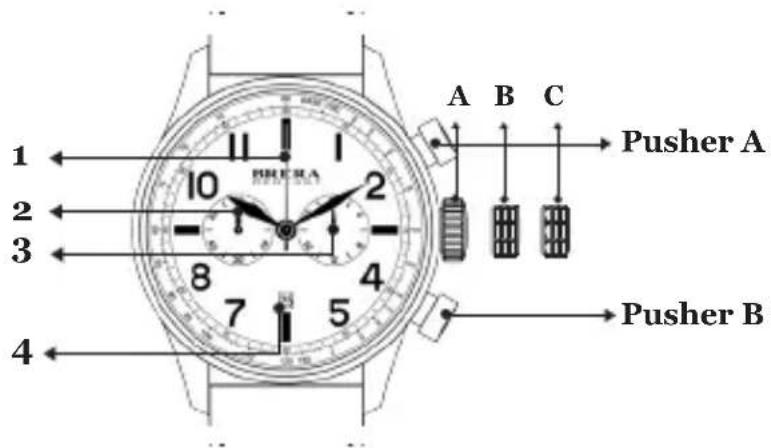
CLASSICO
CHRONO
- Chrono Second Hand
- Chrono Minute Hand
- 24-Hour Hand
- Date Window
A. Crown
B. Date
C. Time
text_image
1 2 3 4 A B C B R E R A Pusher A Pusher BSETTING THE TIME:
• Gently pull the crown out to the 2nd click — position (C).
- Turn the crown until the desired time appears.
• Gently push crown in.
SETTING THE DATE\*:
• Gently pull the crown out to the 1st click — position (B).
- Turn the crown in a counter-clockwise direction until the desired date appears.
• After the date has been set, push the crown back to the normal — position (A).
*If the time is set between the hours of 9 p.m. and 1 a.m., the date may not change on the following day.
USING THE CHRONOGRAPH:
- The chronograph is able to measure and display time in 1/1 second up to maximum of 59 min. 59 sec.
MEASURING TIME WITH THE CHRONOGRAPH:
- The chronograph can be started and stopped each time pusher (A) is pressed. Pressing pusher (B) resets the chronograph and all the hands return to their zero positions.
RESETTING THE CHRONO TO '12' POSITION:
- If watch has screw down crown, unscrew. Pull crown out to position (C). Press top pusher (A) and realign chrono hand manually to '12' position. Push and rescrew crown. To test, press top pusher (A) for 5 seconds and push again to stop. Press bottom pusher (B). Chrono should reset to '12'.
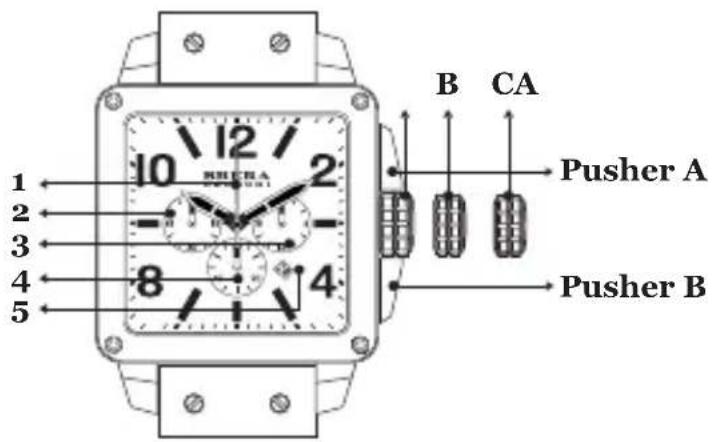
QUATTRO
CHRONO
- Chrono Second Hand
- Chrono Minute Hand
- 24-Hour Hand
- Second Hand
- Date Window
A. Crown*
B. Date
C. Time
*CROWN: Your watch may or may not have a screw down crown. If it does, the crown must be unscrewed counter clockwise first before utilizing the different settings. If your watch does not have a screw down crown, it will spin loosely when turned. This is NOT a defect.
text_image
RICHA 1 2 3 4 5 B CA Pusher A Pusher BSETTING THE TIME:
• Gently pull the crown out to the 2nd click — position (C).
- Turn the crown until the desired time appears.
• Gently push crown in.
SETTING THE DATE\*\*:
• Gently pull the crown out to the 1st click — position (B).
- Turn the crown in a counter-clockwise direction until the desired date appears.
• After the date has been set, push the crown back to the normal — position (A).
**If the time is set between the hours of 9 p.m. and 1 a.m., the date may not change on the following day.
USING THE CHRONOGRAPH:
- The chronograph is able to measure and display time in 1/1 second up to maximum of 59 min. 59 sec.
MEASURING TIME WITH THE CHRONOGRAPH:
- The chronograph can be started and stopped each time pusher (A) is pressed. Pressing pusher (B) resets the chronograph and all the hands return to their zero positions.
RESETTING THE CHRONO TO '12' POSITION:
- If watch has screw down crown, unscrew. Pull crown out to position (C). Press top pusher (A) and realign chrono hand manually to '12' position. Push and rescrew crown. To test, press top pusher (A) for 5 seconds and push again to stop. Press bottom pusher (B). Chrono should reset to '12'.
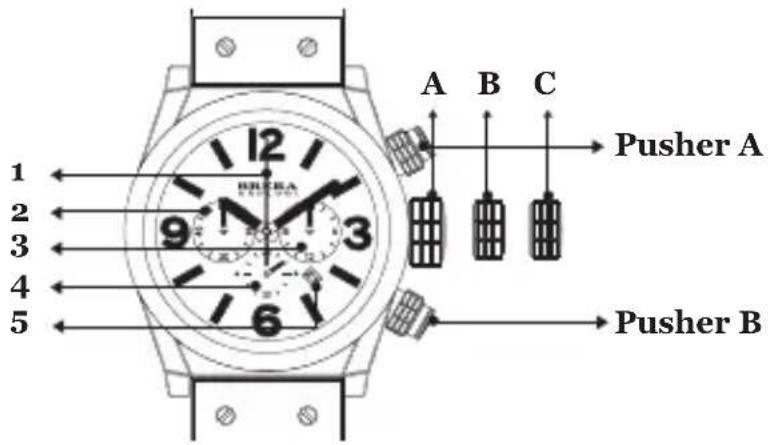
ETERNO/ETERNO PICCOLO
CHRONO
- Chrono Second Hand
- Chrono Minute Hand
- 24-Hour Hand
- Second Hand
- Date Window
A. Crown*
B. Date***
C. Time
*CROWN: Your watch may or may not have a screw down crown. If it does, the crown must be unscrewed counter clockwise first before utilizing the different settings. If your watch does not have a screw down crown, it will spin loosely when turned. This is NOT a defect.
text_image
1 2 3 4 5 A B C Pusher A 9 3 6 Pusher BSETTING THE TIME:
• Gently pull the crown out to the 2nd click — position (C).
- Turn the crown until the desired time appears.
• Gently push crown in.
SETTING THE DATE\*\*:
• Gently pull the crown out to the 1st click — position (B).
- Turn the crown in a counter-clockwise direction until the desired date appears.
• After the date has been set, push the crown back to the normal — position (A).
**If the time is set between the hours of 9 p.m. and 1 a.m., the date may not change on the following day.
***When setting the date on the Eterno Piccolo, turn the crown in a clockwise direction until the desired date appears.
USING THE CHRONOGRAPH:
- The chronograph is able to measure and display time in 1/1 second up to maximum of 59 min. 59 sec.
MEASURING TIME WITH THE CHRONOGRAPH:
- The chronograph can be started and stopped each time pusher (A) is pressed. Pressing pusher (B) resets the chronograph and all the hands return to their zero positions.
RESETTING THE CHRONO TO '12' POSITION:
- If watch has screw down crown, unscrew. Pull crown out to position (C). Press top pusher (A) and realign chrono hand manually to '12' position. Push and rescrew crown. To test, press top pusher (A) for 5 seconds and push again to stop. Press bottom pusher (B). Chrono should reset to '12'.
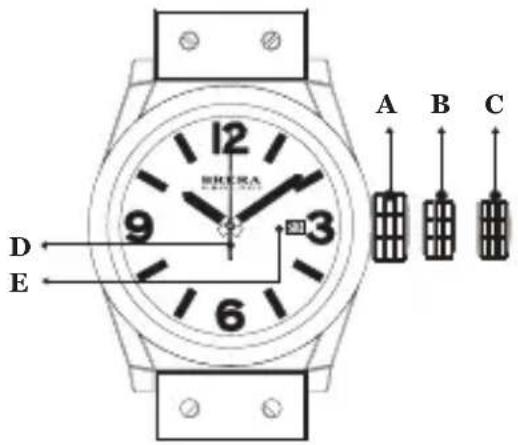
ETERNO SOLOTEMPO
A. Crown*
B. Date
C. Time
D. Second Hand
E. Date Window
*CROWN: Your watch may or may not have a screw down crown. If it does, the crown must be unscrewed counter clockwise first before utilizing the different settings. If your watch does not have a screw down crown, it will spin loosely when turned. This is NOT a defect.
text_image
A B C D E 12 9 3 6SETTING THE TIME:
• Gently pull the crown out to the 2nd click — position (C).
- Turn the crown until the desired time appears.
• Gently push crown back into original position (A).
SETTING THE DATE\*\*:
• Gently pull the crown out to the 1st click — position (B).
- Turn the crown in a counter-clockwise direction until the desired date appears.
• After the date has been set, push the crown back to the normal — position (A).
**If the time is set between the hours of 9 pm and 1 am, the date may not change on the following day.
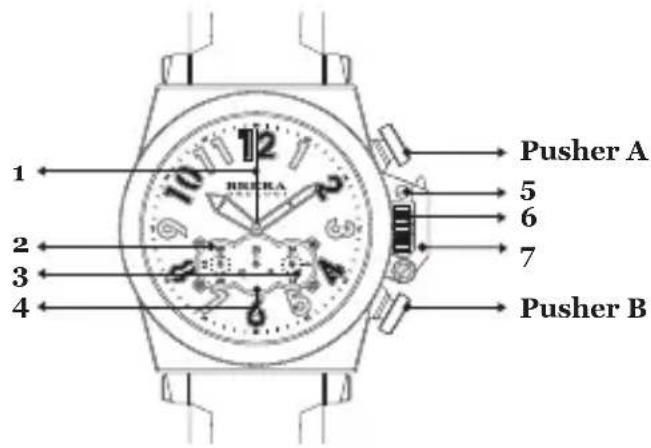
MILITARE
CHRONO
- Second Hand
- Chrono Second Hand
- 24-Hour Hand
- Chrono Minute Hand
- Release Button
- Crown
- Crown Guard
text_image
1 2 3 4 10 12 5 6 7 Pusher A Pusher BSETTING THE TIME\*:
- Push crown release button (5) to unlock crown guard.
• Gently pull the crown out. - Turn crown until the desired time appears.
• Gently push crown in. - Push crown guard back into original — position (7).
*If the time is set between the hours of 9 p.m. and 1 a.m., the date may not change on the following day.
USING THE CHRONOGRAPH:
- The chronograph is able to measure and display time in 1/1 second up to maximum of 59 min. 59 sec.
MEASURING TIME WITH THE CHRONOGRAPH:
- The chronograph can be started and stopped each time pusher (A) is pressed. Pressing pusher (B) resets the chronograph and all the hands return to their zero positions.
RESETTING THE CHRONO TO '12' POSITION:
- If watch has screw down crown, unscrew. Pull crown out to position (C). Press top pusher (A) and realign chrono hand manually to '12' position. Push and rescrew crown. To test, press top pusher (A) for 5 seconds and push again to stop. Press bottom pusher (B). Chrono should reset to '12'.
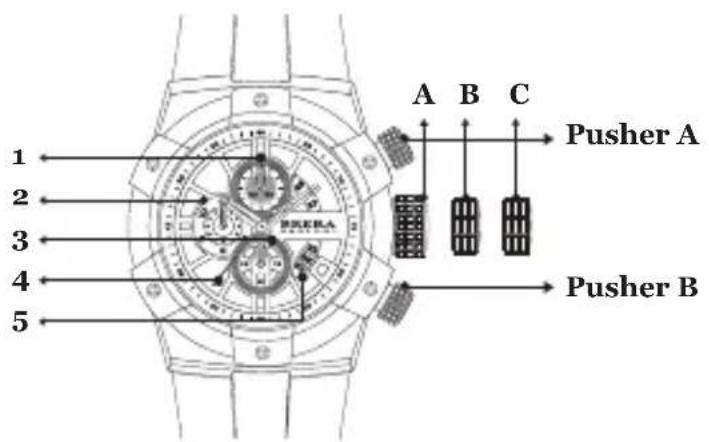
SUPERSPORTIVO CHRONO
- Chrono Minute Hand
- Chrono Hour Hand
- Second Hand
- Chrono Second Hand
- Date Window
A. Crown*
B. Date
C. Time
*CROWN: Your watch may or may not have a screw down crown. If it does, the crown must be unscrewed counter clockwise first before utilizing the different settings. If your watch does not have a screw down crown, it will spin loosely when turned. This is NOT a defect.
text_image
Pusher A Pusher B 1 2 3 4 5 A B CSETTING THE TIME:
• Gently pull the crown out to the 2nd click — position (C).
- Turn the crown until the desired time appears.
• Gently push crown in.
SETTING THE DATE\*\*:
• Gently pull the crown out to the 1st click — position (B).
- Turn the crown in a counter-clockwise direction until the desired date appears.
• After the date has been set, push the crown back to the normal — position (A).
**If the time is set between the hours of 9 p.m. and 1 a.m., the date may not change on the following day.
USING THE CHRONOGRAPH:
- The chronograph is able to measure and display time in 1/1 second up to maximum of 59 min. 59 sec.
MEASURING TIME WITH THE CHRONOGRAPH:
- The chronograph can be started and stopped each time pusher (A) is pressed. Pressing pusher (B) presets the chronograph and all the hands return to their zero positions.
RESETTING THE CHRONO TO '12' POSITION:
- If watch has screw down crown, unscrew. Pull crown out to position (C). Press top pusher (A) and realign chrono hand manually to '12' position. Push and rescrew crown. 'To test, press top pusher (A) for 5 seconds and push again to stop. Press bottom pusher (B). Chrono should reset to '12'.
• Gently pull the crown out to the 2nd click — position (C).
- Turn the crown until the desired time appears.
• Gently push crown in.
SETTING THE DATE\*:
• Gently pull the crown out to the 1st click — position (B).
- Turn the crown to the left until the desired date appears.
• After the date has been set, push the crown back to the normal — position (A).
*If the time is set between the hours of 9 p.m. and 1 a.m., the date may not change on the following day.
USING THE CHRONOGRAPH:
• The chronograph is able to measure and display time in 1/20 second up to maximum of 12 hours.
MEASURING TIME WITH THE CHRONOGRAPH:
- The chronograph can be started and stopped each time pusher (A) is pressed. Pressing pusher (B) resets the chronograph and all the hands return to their zero positions.
RESETTING THE CHRONO TO '12' POSITION:
- If watch has screw down crown, unscrew. Pull crown out to position (C). Press top pusher (A) and realign chrono hand manually to '12' position. Push and rescrew crown. 'I'o test, press top pusher (A) for 5 seconds and push again to stop. Press bottom pusher (B). Chrono should reset to '12'.
• Pull the crown out to the 1st position (B).
- Turn the crown to the right to set the alarm time indicator to the desired set time. The date can be changed by turning the crown to the left.
- Return the crown to normal — position (A).
- Pull out pusher (D) to turn the alarm on.
• The alarm will sound when the hour hand aligns with the alarm time indicator.
SWITCHING THE ALARM ON & OFF:
• Gently pull pusher (D) out to the 1st position.
- Pusher (D) pulled out activates the alarm.
- Pusher (D) returned to the normal position turns the alarm OFF when alarm is sounding. The alarm sounds for 15 seconds, then stops sounding for 2 minutes and 45 seconds. This cycle is repeated several times.
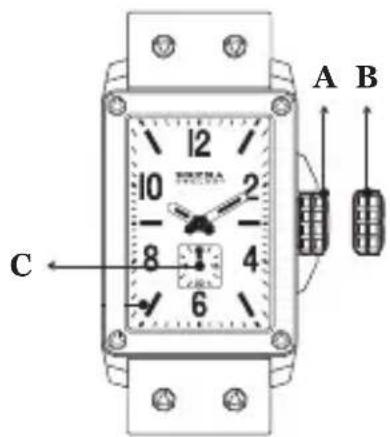
FRANCESCA
A. Crown*
B. Time
C. Second Hand
*CROWN: Your watch may or may not have a screw down crown. If it does, the crown must be unscrewed counter clockwise first before utilizing the different settings. If your watch does not have a screw down crown, it will spin loosely when turned. This is NOT a defect.
text_image
A B CSETTING THE TIME:
• Gently pull the crown out to the 2nd click — position (B).
- Turn the crown until the desired time appears.
• Gently push crown back into original position (A).
ISABELLA CHRONO
- Chrono Minute Hand
- Chrono Second Hand
- Date Window
- Second Hand
A. Crown*
B. Date
C. Time
*CROWN: Your watch may or may not have a screw down crown. If it does, the crown must be unscrewed counter clockwise first before utilizing the different settings. If your watch does not have a screw down crown, it will spin loosely when turned. This is NOT a defect.
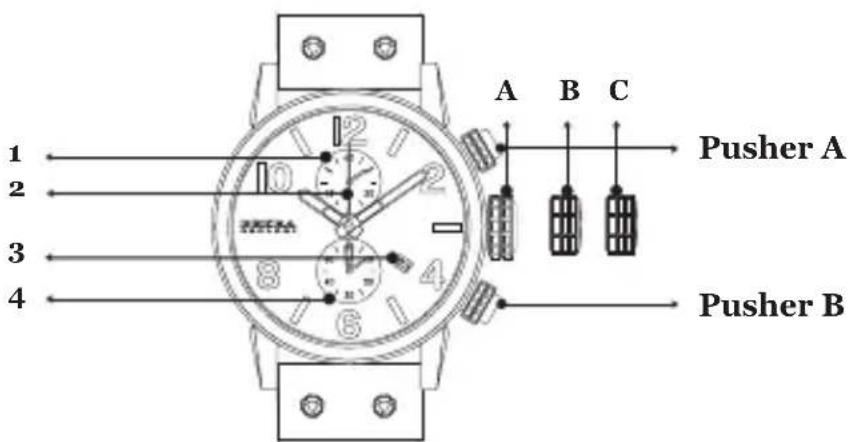
text_image
Pusher A Pusher BSETTING THE TIME:
• Gently pull the crown out to the 2nd click — position (C).
- Turn the crown until the desired time appears.
• Gently push crown in.
SETTING THE DATE\*\*:
• Gently pull the crown out to the 1st click — position (B).
- Turn the crown in a counter-clockwise direction until the desired date appears.
• After the date has been set, push the crown back to the normal — position (A).
**If the time is set between the hours of 9 p.m. and 1 a.m., the date may not change on the following day.
USING THE CHRONOGRAPH:
• The chronograph is able to measure and display time in 1/1 second up to maximum of 59 min. 59 sec.
MEASURING TIME WITH THE CHRONOGRAPH:
- The chronograph can be started and stopped each time pusher (A) is pressed. Pressing pusher (B) resets the chronograph and all the hands return to their zero positions.
RESETTING THE CHRONO TO '12' POSITION:
- If watch has screw down crown, unscrew. Pull crown out to position (C). Press top pusher (A) and realign chrono hand manually to '12' position. Push and rescrew crown. 'To test, press top pusher (A) for 5 seconds and push again to stop. Press bottom pusher (B). Chrono should reset to '12'.
STELLA
A. Crown*
B. Date
C. Time
D. Date
E. Second Hand
*CROWN: Your watch may or may not have a screw down crown. If it does, the crown must be unscrewed counter clockwise first before utilizing the different settings. If your watch does not have a screw down crown, it will spin loosely when turned. This is NOT a defect.
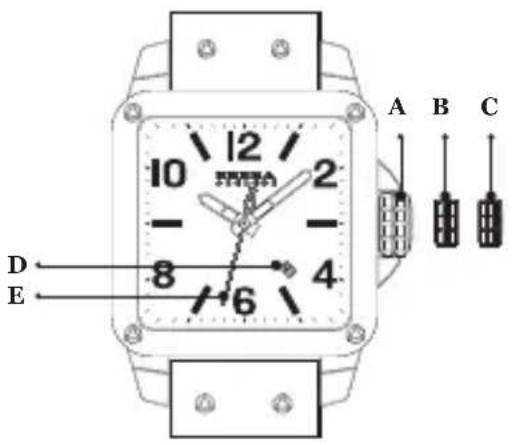
text_image
A B C 10 12 2 - 8 4 6 D ESETTING THE TIME:
• Gently pull the crown out to the 2nd click — position (C).
- Turn the crown until the desired time appears.
• Gently push crown back into original — position (A).
SETTING THE DATE\*\*:
• Gently pull the crown out to the 1st click — position (B).
- Turn the crown in a counter-clockwise direction until the desired date appears.
• After the date has been set, push the crown back to the normal — position (A).
**If the time is set between the hours of 9 p.m. and 1 a.m., the date may not change on the following day.
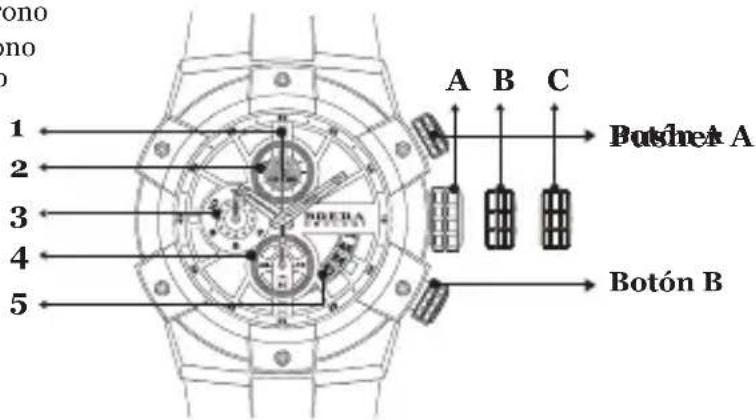
FEDERICA CHRONO
- Chrono Second Hand
- Chrono Minute Hand
- Chrono Hour Hand
- Second Hand
- Date Window
A. Crown*
B. Date
C. Time
CROWN: Your watch may or may not have a screw down crown. If it does, the crown must be unscrewed counter clockwise first before utilizing the different settings. If your watch does not have a screw down crown, it will spin loosely when turned. This is NOT a defect.
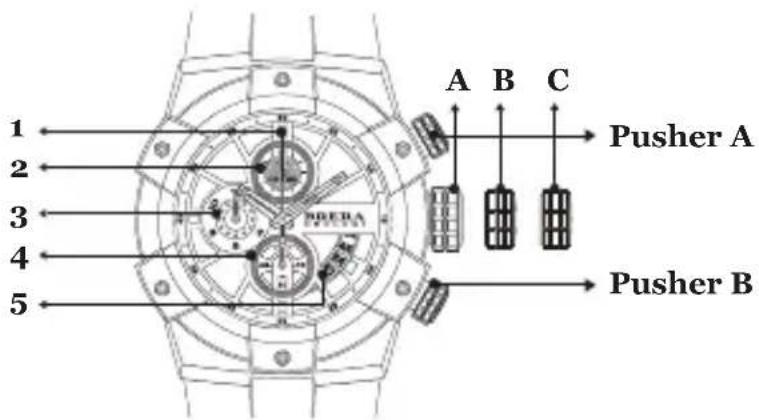
text_image
1 2 3 4 5 A B C Pusher A PDEPA Pusher BSETTING THE TIME:
• Gently pull the crown out to the 2nd click — position (C).
- Turn the crown until the desired time appears.
• Gently push crown in.
SETTING THE DATE\*\*:
• Gently pull the crown out to the 1st click — position (B).
- Turn the crown in a counter-clockwise direction until the desired date appears.
• After the date has been set, push the crown back to the normal — position (A).
**If the time is set between the hours of 9 p.m. and 1 a.m., the date may not change on the following day.
USING THE CHRONOGRAPH:
- The chronograph is able to measure and display time in 1/1 second up to maximum of 59 min. 59 sec.
MEASURING TIME WITH THE CHRONOGRAPH:
- The chronograph can be started and stopped each time pusher (A) is pressed. Pressing pusher (B) presets the chronograph and all the hands return to their zero positions.
RESETTING THE CHRONO TO '12' POSITION:
- If watch has screw down crown, unscrew. Pull crown out to position (C). Press top pusher (A) and realign chrono hand manually to '12' position. Push and rescrew crown. To test, press top pusher (A) for 5 seconds and push again to stop. Press bottom pusher (B). Chrono should reset to '12'.
BRERA OROLOGI™
BRERA INTERNATIONAL WARRANTY
Your BRERA watch is warranted against defects in materials and workmanship by BRERA under the terms and conditions of this warranty for a period of two (2) years from the original date of purchase.
This warranty covers the following components: the watch movement, hands and dial. Should a covered component be defective in materials or workmanship during the warranty period under normal use, it will be repaired or the watch will be replaced (at the sole discretion of the service center) free of repair charges. A copy of the receipt or completed, dated, stamped and signed BRERA International Warranty card is required for proof of purchase.
THIS WARRANTY DOES NOT COVER:
- Battery, case, crystal or strap
- Damage resulting from improper handling, lack of care, accidents, negligence or normal wear or tear
• Water damage unless marked “water-resistance”
This warranty is void if the watch has been damaged by accident, negligence, unauthorized service, or other factors not due to defects in materials or workmanship. In case of replacement, BRERA cannot guarantee that you will receive the same model watch. If your watch is not available, a watch of equal value or similar appearance will be provided.
* IMPORTANT NOTE: Using the chronograph function for more than 30 minutes per day will SIGNIFICANTLY reduce the life of the battery of your quartz movement.
ESPAÑOL
35
text_image
12 RERA ROLOGI 5 18 6 12 3 6 1*CROWN: Your watch may or may not have a screw down crown. If it does, the crown must be unscrewed counter clockwise first before utilizing the different settings. If your watch does not have a screw down crown, it will spin loosely when turned. This is NOT a defect.