DVB 310 S - Uncategorized Fte maximal - Free user manual and instructions
Find the device manual for free DVB 310 S Fte maximal in PDF.


| Product Type | Digital Satellite Receiver with VSB Modulator |
| Model | DVB 310 S / DVB 310 S CI |
| Dimensions | 75 x 265 x 150 mm |
| Weight | 1.4 kg |
| Input Frequency Range | 950 - 2150 MHz |
| Input Level | -25 to -65 dBm |
| Input Impedance | 75 Ω |
| LNB Supply | 13V/18V, 0/22 kHz |
| FEC | 1/2, 2/3, 3/4, 5/6, 7/8 (DVB-S) |
| Modulation | QPSK |
| Symbol Rate | 2 - 45 MS/s |
| Transport Stream | MPEG-2 ISO/IEC 13818 |
| Video Resolution | 720 x 576 |
| Output Connector | Female F-type |
| Output Level | 82 +1/-3 dBµV |
| Regulation Margin | 15 dB |
| Output Channels | C2 to C69 (47-862 MHz) |
| Modulator Type | VSB (Vestigial Side Band), stereo |
| Video S/N Ratio | >54 dB |
| MIX Loss | <1 dB |
| Modulation Standards | PAL B/G, I, D/K; SECAM |
| Spurious | -60 dBc |
| Common Interface (CI) | 1 slot (only DVB 310 S CI model) |
| Programming Interface | PRO 201 programmer via Ethernet |
| Connectors | LNC IN, LOOP OUT, OUT, MIX, RS 232, PRO 201, A/V (RCA), DC input/output |
| Software Update | Via PRO 201 programmer (Download/Upload) |
| Power Supply | External SPS 310 (not included with module) |
Frequently Asked Questions - DVB 310 S Fte maximal
User questions about DVB 310 S Fte maximal
0 question about this device. Answer the ones you know or ask your own.
Ask a new question about this device
Download the instructions for your Uncategorized in PDF format for free! Find your manual DVB 310 S - Fte maximal and take your electronic device back in hand. On this page are published all the documents necessary for the use of your device. DVB 310 S by Fte maximal.
USER MANUAL DVB 310 S Fte maximal
NOTE: This user's guide is adapted to software version 3.0.33 dated 02/09/2010.
For future software updates, you can download the user's guide from the following website: http://www.ftemaximal.com/
Chapter 1. Installation.
1.1. Safety Measures
1.- Never place the device next to hot sources.
2.- Never undergo the device to temperatures that exceed its level of operation.
3.- Never expose the device to leakings nor spatterings.
4.- Never place objects that contain liquids over the device.
5.- Respect the ventilation slots of the device, do not cover them with any kind of object.
6.- The space around the device must be free of objects, in a minimum radius of 40cm.
7.- Avoid locations with possibilities of spilling liquids on the inside of the device, and with important changes of temperature.
8.- Never open the device by yourself due to electric risk. In case of problems, go always to qualified technicians
9.- Never, under no circumstances, open the device when connected to the electrical net..
10.- During the handling it is better to disconnect the device from the electrical net.
11.- Obey the electricity security rules during the assembling. Use materials that obey the current law.
12.- The connecting plug must be accessible in a fast and simple way to have a fast disconnection.
13.- Never touch the plug with wet hands. Also, disconnect always the device before handling the connections.
14.- Never put any heavy object over the device, since it could get damaged.
15.- If the device is going to remain some time without use, it is recommendable to disconnect it from the electrical net.
16.- The repairmen and the maintenance of the device must be done by TV and radio specialised technicians
1.2. Box content
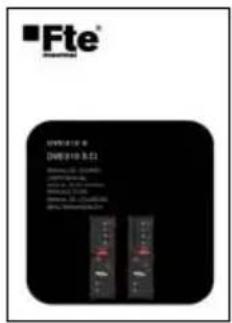
text_image
Fte® JUNYIN 2018 [2008]10.9.21 Model: C-3 (GMP) Performance: 5 Performance: 4 Performance: 3 Performance: 2 Performance: 1 Power/Power Ratio Power: 1.0V Power: 0.5V Power: 0.2V Power: 0.1V Power: 0.05V Power: 0.01V Power: 0.005V Power: 0.001VUser's Guide Link - Input Tunner F male - F male


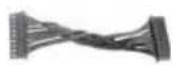
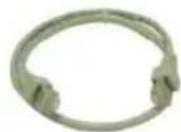
Link - Output modulator F male - F male
DC Cable Cable 12 cm PIN to
PIN RJ45 - RJ45
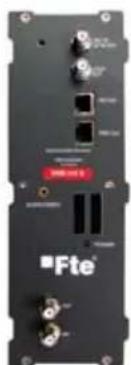
Depending of model selected, the box will has one of these equipments:
natural_image
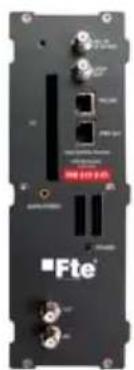
Front view of a black electronic device with ports and connectors (no readable text or symbols)DVB 310 S DVB 310 S CI
natural_image
Front view of a black Fte electronic device with ports and connectors (no readable text or symbols)1.3. Description and connections
DVB 310 S module is used for the reception of free channels and DVB 310 S CI module is used for free channels as well as for codified channels. In both cases, the received channels must follow the DVB-S rule.
Each module allows the reception in QPSK, and the following modulation in PAL/SECAM of a TV or Radio channel.
Main feature of this equipment is its modulator in Vestigial Side Band (or VSB). This modulation can be used to distribute adjacent channels in one distribution without any intermodulation problem.
Each module has one Loop connector to cascade several modules at input and a Mix connector to do same in output channels. The output channel is selectable between C2 and C69.
All the parameters are programmed through PRO 201 programmer, and they are monitored in the display of the programmer or in the A/V output in the device.
DVB 310 S CI has a Common Interface slot.
DVB 310 S / DVB 310 S CI
text_image
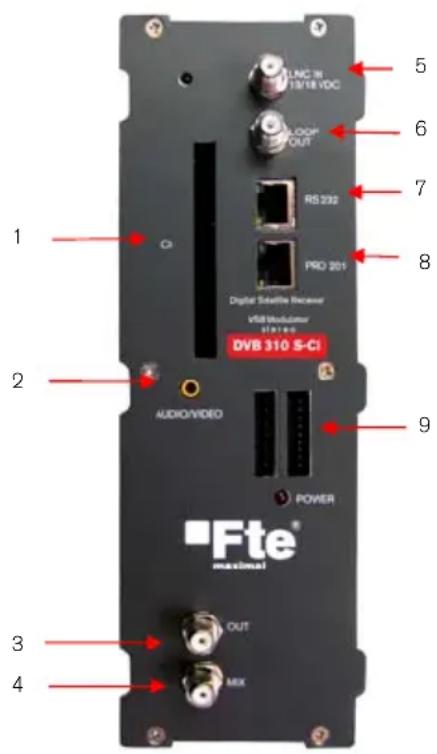
1 2 3 4 5 6 7 8 C LNC 31 13/18 VDC LOOP OUT RS 232 PRO 201 Digital Satellite Receiver VSB Modulator DVB 310 S-CI AUDIO/VIDEO POWER 9 Fte® maximal OUT MIX1 CI: Common Interface.*
2 Conector A/V: Through this connector and the A/V cable provided with SPS 310, it is possible to visualize the A/V signal provided by the module.
3 OUT: This connector supplies the modulated channel according to the selected standard in the module and mixes it with all the signals that it receives through the MIX connector
4 MIX: Input of mixing of the module.
5 LNC IN: To connect to the LNC or to the LOOP OUT output of the previous module
6 LOOP OUT: To connect to the LNC IN input of the next module.
7 RS 232: Ethernet connector to cascade modules with the RCM 310 telecontrol unit with the RJ45/RJ45 cable provided.
8 PRO 201: Ethernet connector to make the programming with the programmer.
9 DC connectors: It has two connectors for input/output.
*Note: Only for DVB 310 S CI model
Programming
DVB 310 S has two ethernet connectors. In order to program a module we have to connect the programmer to the "PRO 201" connector.
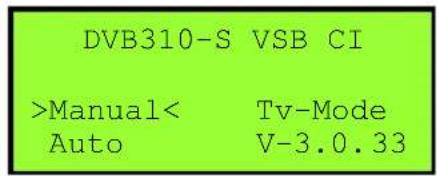
Next, we will proceed to recognize the module and to show the main menu. The firmware of the module as well as the different submenus is shown in this menu.
We have to use the "Up" and "Down" buttons of the keyboard in order to move to the different options, and to get into the submenus we have to press "OK" button.
text_image
DVB310-S VSB CI >ManualMANUAL
Inside the "manual" menu there are the configuring options of the transponder we want to tune in: text_image
DVB 310 S >TV SYSTEM: PAL B/G < Video Level: 1 Picture: AUTOtext_image
General parameters of module programmation. Programming of the transponder parameter. Allows access to special firmware functions as Updates with newer versions or Reset function. General parameters of module programmation. Programming of the transponder parameter. Allows access to special firmware functions as Updates with newer versions or Reset function. General parameters of module programmation. Programming of the transponder parameter. Allows access to special firmware functions as Updates with newer versions or Reset function. General parameters of module programmation. Programming of the transponder parameter. Allows access to special firmware functions as Updates with newer versions or Reset function. General parameters of module programmation. Programming of the transponder parameters. Allows access to special firmware functions as Updates with newer versions or Reset functions. General parameters of module programmation. Programming of the transponder parameter. Allows access to special firmware functions as Updates with newer versions or Reset functions. General parameters of module programmation. Programming of the transponder parameter. Allows access to special firmware functions as Updates with newer versions or Reset functions. General parameters of module programmation. Programming of the transponder parameter. Allows access to special firmware functions as Updates with newer versions or Reset functions. General parameters of module programmation. Programming of the transponder parameter. Allows access to special firmware functions as Updates with newer versions/RSF List of tuned channels and PID's information, allow select channel to view, from TV or Radio lists.Options:
\- TV System: Format of TV signal. Options: PAL B/G, PAL I, PAL D/K, SECAM \- Video level: Level of the video carrier in A/V output. Options: -8 a 8. \- Picture: Screen format. Options: AUTO, 4:3 Letter Box, 4:3 Pan & Scan, 16:9 Letter Box. \- CI CAS: (\*Only available in DVB 310 S CI model). It configures the conditional access system. By pressing "Left" or "Right" a new menu will be opened. After that, we can select through "OK" button or return to the previous menu with the "Cancel" key in order to configure the different options of the Conditional Access. -RF Channel: Output channel. The configuration can be done through the channel or indicating the frequency directly. In order to insert the frequency, press the "OK" key and the cursor will be placed over the frequency. With the keys of the cursor, we can move through all the digits and change the values. Press "OK" in order to save the value. Options: C2-C69 o 47-862 MHz. \- RF Video level: Level of the video carrier in RF output. Options 8 to -8. \- RF Level: Output signal regulation. Options: 0-15. \- Antenna: Feeding/tone towards the LNC. Options: 0V, 13V, 13V+22kHz, 18V, 18V+22KHz. \- Diseqc: DiseqC Switch. Options: LNB A, LNB B, LNB C, LNB D and None. \- Freq: Input channel frequency. In order to introduce the frequency, press the "OK" button and the cursor will be placed over the frequency. With the keys of the cursor, we can move through all the digits and change the values. Press "OK" in order to save the value. \- Symbol rate: Transponder symbol speed. In order to introduce the symbol speed, press the "OK" button and the cursor will be placed over the frequency. With the keys of the cursor, we can move through all the digits and change the values. Press "OK" in order to save the value. \- LO Freq.: Local oscillator frequency. In order to introduce the frequency, press the "OK" button and the cursor will be placed over the frequency. With the keys of the cursor, we can move through all the digits and change the values. Press "OK" in order to save the value. \- Only FTA: Free channels tuning only. Options: Yes and No. \- Channel: Selection of the channel inside the transponder. Press the "OK" button in order to get in the channel list. Select the channel with the "Up" and "Down" buttons and after press "OK". Once it is selected, press "Cancel" on order to get out of the list. \- Tv/Radio: It commutes between TV and radio channels by pressing "OK" button. \- Delete: It removes the selected channel in the channel list. Press "OK" in order to remove it. A confirmation or cancellation of the operation will be requested, press "OK" in order to confirm it or "Cancel" in order to cancel it \- Search: It searches for channels in the transponder inserted. By pressing "OK" the module will start the channel searching and it will save them automatically. text_image
Installation N° TV Channel N° Radio Channel 6 Ping 1 video rate 5 CANALL 5 4 Bits 3 Data 2 Canals 1 Bottle Wording, Please wait... 7 channels bound S: 91% Q: 7.5% Status 100%text_image
Software upgrade Serial port (Download) Serial port (Upload - APP) Move Line OK Confirm CancelAUTO
We will be able to store and recover complete configurations of the device in the option "Auto" of the main menu. text_image
DVB 310 S Manual TV Mode >Autotext_image
DVB 310 S ---- >Head Program< Head Config.text_image
DVB 310 S Head programming Please waittext_image
DVB310-S VSB *Read from module* Up/Down for change OK for entertext_image
DVB310-S VSB DVB >> PRO 201 PG: 01 Freq:11836 Sr:27500 Das Erste F:543250Ktext_image
DVB310-S VSB Data read success Pls Check New Module Press OKtext_image
DVB310-S VSB *Write to module* Up/Down for change OK for entertext_image
DVB310-S VSB PRO201 >> DVB PG: 01 Freq:11836 Sr:27500 Das Erste F:543250Ktext_image
DVB310-S VSB Data Write Success Pls Check New Module Press OKTV MODE
The different output parameters of the module can be configured in the "Tv Mode" option: text_image
DVB 310 S Manual >TV Mode< Autotext_image
DVB310-S VSB Volume: 21 (1-32) CH: service Audiotext_image
DVB310-S VSB *Select Audio* Stereo Up/Down to change1.4. Accessories and example of installation
Example of installation flowchart
graph TD
    A["AMP 310"] --> B["DVB 310 S"]
    A --> C["DVB 310 S CI"]
    B --> D["AT 225"]
    C --> E["AT 226"]
    D --> F["AO 870"]
    E --> G["AO 870"]
    H["PR 80"] --> I["LNC 544"]
    J["AT 215"] --> K["AO 870"]
    L["AT 212"] --> M["AO 870"]
    N["AT 212"] --> O["AO 870"]
text_image
IN *Elu *Elu *Elu *Elu *Elu *Elu *Elu OUTtext_image
Fid PRO 201 GCS Loading Programmer| Ref. | DVB 310 S DVB 310 S CI | |
| Code | 2003500 | 2003522 |
| Input frequency margin | 950-2150 MHz 950-2150 MHz | |
| Input level | -25 a -65 dBm -25 a -65 dBm | |
| Input impedance | 75Ω | 75Ω |
| LNB (feeding/conmutation) | 13V-18V / 0-22kHz 13V-18V / 0-22kHz | |
| Input connector | Female F connector Female F connector | |
| Input LOOP losses | <1 dB <1 dB | |
| FEC | 1/2, 2/3, 3/4, 5/6, 7/8 DVB 1/2, 2/3, 3/4, 5/6, 7/8 DVB | |
| Modulation | QPSK | QPSK |
| Symbol speed | 2-45 MS/s 2-45 MS/s | |
| Transport Stream | MPEG-2 ISO/ IEC 13818 MPEG-2 ISO/ IEC 13818 | |
| Video resolution | 720X576 | 720X576 |
| Output connector | Female F connector Female F connector | |
| Output level | 82 +1/-3 dBuV 82 +1/-3 dBuV | |
| Regulation margin | 15 dB 15 dB | |
| Channels | C2-C69 | C2-C69 |
| Type of modulator | BLV / Stereo BLV / Stereo | |
| S/N Video Ratio | >54 | >54 |
| MIX losses | <1 dB <1 dB | |
| Modulation standards | B-G, D-K, L, I B-G, D-K, L, I | |
| Band Spurious | -60 dBc | -60 dBc |
| Common Interface | - | Yes, 1 Slot |
| Dimensions | 75x265x150 mm | 75x265x150 mm |
| Weight | 1,4Kg | 1,4Kg |