
YES40 - Uncategorized Ergotron - Free user manual and instructions
Find the device manual for free YES40 Ergotron in PDF.


| Product Type | Charging Cart for Mini-Laptops |
| Model Number | YESBASGMPW4 |
| Dimensions (H × L × W) | 106 cm × 73 cm × 64 cm (41.7 in × 28.7 in × 25 in) |
| Weight (empty) | 80 kg (176 lb) |
| Weight Capacity - Top Surface | 11.3 kg (25 lb) |
| Weight Capacity - Each Shelf | 27.2 kg (60 lb) |
| Weight Capacity - Adapter Shelves | 5.4 kg (12 lb) each |
| Power Input | 120V~60 Hz, Max Amps: 10A |
| Number of Devices | Up to 36 devices (tablets, smartphones, mini-laptops) |
| Shelves | Adjustable in 1-inch increments |
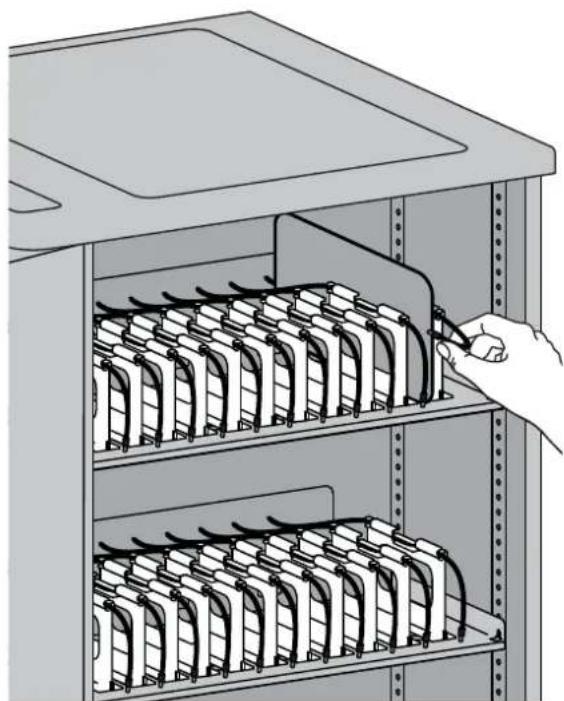
| Dividers | Removable, adjustable left-right, with cable channels |
| Casters | 4-inch total-lock casters, two directional lock for straight-line movement |
| Operating Temperature | 0° to 30°C (32° to 86°F) |
| Storage Temperature | -29° to 60°C (-20° to 140°F) |
| Operating Humidity | 10%–90% (non-condensing) |
| Storage Humidity | 5%–95% (non-condensing) |
| Maximum Altitude | 2000 m (6,562 ft) |
| Compatibility | Most 13-inch display devices and some 14-inch devices |
| Cleaning | Use diluted non-abrasive cleaners; avoid steel wool; dry thoroughly |
| Safety Features | Front locking door latch with padlock bracket, circuit breaker, corner bumpers |
| Regulatory Compliance | FCC Class A, CAN ICES-3(A)/NMB-3(A) |
| Warranty | See www.ergotron.com/warranty |
Frequently Asked Questions - YES40 Ergotron
User questions about YES40 Ergotron
0 question about this device. Answer the ones you know or ask your own.
Ask a new question about this device
Download the instructions for your Uncategorized in PDF format for free! Find your manual YES40 - Ergotron and take your electronic device back in hand. On this page are published all the documents necessary for the use of your device. YES40 by Ergotron.
USER MANUAL YES40 Ergotron
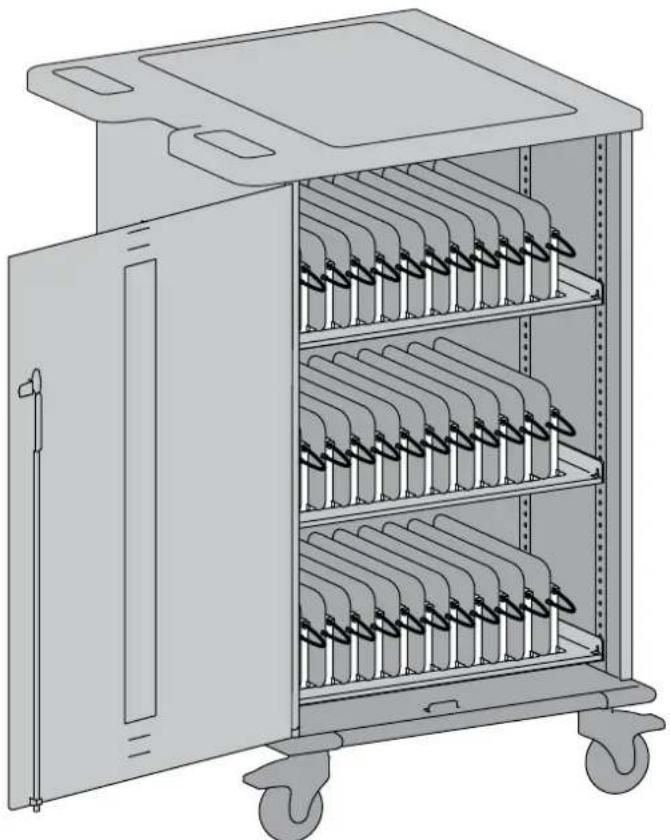
YES BASIC Charging Cart
natural_image
Illustration of a multi-level industrial machine with multiple battery compartments and wheels (no text or symbols)Model Part #YESBASGMPW4
Ergotron's Yes Cart for Mini-laptops is designed to automatically charge and store 1-36 tablet, smart phone, and mini-laptop devices safely and efficiently. Adjustable shelves customize shelf height in 1" increments to fit a range of device heights; adjustable bays slide left to right to fit even the largest cases.
Please review this manual before installing your equipment to learn how to use the cart safely.
AC input: 120V\~60 Hz. Max Amps: 10A.
Hazard Symbols Review
These symbols alert users of a safety condition that demands attention. All users should be able to recognize and understand the significance of the following Safety Hazards if encountered on the product or within the documentation. Children who are not able to recognize and respond appropriately to Safety Alerts should not use this product without adult supervision!
Symbol Signal Word Level of Hazard
 | NOTE | A NOTE indicates important information that helps you make better use of this product. |
 | CAUTION | A CAUTION indicates either potential damage to hardware or loss of data and tells you how to avoid the problem. |
 | WARNING | A WARNING indicates either potential for property damage, personal injury, or death. |
 | ELECTRICAL | An Electrical indicates an impending electrical hazard which, if not avoided, may result in personal injury, fire and/or death. |
Safety
Important Safeguards - We want you to be safe!
These carts are electrical devices. Use care with them and follow these important safeguards:
• Intended for institutional use.
- Electrical devices are not toys. Children are often unaware of the hazards associated with electrical devices, so this unit must always be used by adults or with adult supervision.
- Liquids should not be stored in, set on or placed inside this unit.
- Never unplug this product from the outlet when your hands are wet.
- Be careful with the power cord. Do not jam the power cord against sharp edges. Do not use the unit if the cord appears to be damaged or if the ground prong is missing. When the unit is not plugged in, wrap the power cord around cord wraps.
Inadequate repair can create significant hazards to users and is not covered by the warranty. Repairs should always be performed by an Ergotron service representative or a qualified electrician.
- Mechanical Loading - Mounting of the equipment in the cart should be such that a hazardous condition is not achieved due to uneven mechanical loading.
There are specific risks associated with the use of Cart when moving or stationary (for charging or storage). You must be aware of, and avoid these risks when the Cart is located in close proximity to children.

WARNING: Failure to observe the following Cart Use Safety notices may result in serious personal injury or equipment damage.
Only Adults should move this cart.
- Do not allow anyone to sit, stand, or climb on the Cart.
- Do not lift the Cart from the bottom.
- Do not block the vent openings. To prevent overheating, leave at least 127 mm (5-inch) clearance around vents.
The Cart is designed to be used indoors only.
- Do not use the Cart to transport or store equipment other than what has been noted in this guide.
- Do not use the Cart to store liquids or cleaning supplies.
- Do not place heavy objects on the Cart surface or shelf.
– The maximum weight capacity of the top surface is 11.4 kg (25 lb).
- The maximum weight capacity of each device shelf is 27.2 kg (60 lb).
Moving the Cart
• Before moving the Cart:
- Disconnect the power cable from the wall.
- Make sure the cable is wrapped and secure.
- Close and lock the doors.
- Remove items from the top work surface.
- Unlock the front rotational locking casters.
- Push (do not pull) the Cart for optimum maneuverability and to prevent muscle strain.
- Do not move the Cart across rough, uneven or irregular surfaces such as gravel.
Parking the Cart
Observe these safety alerts for times when the cart is stationary:
- Do not park the Cart in areas of heavy traffic.
- Do not run cables through doorways, holes in ceilings, walls, or floors.
- Do not run cables across hallways, classrooms, or other areas where they will be walked on.
- Do not leave Cart unattended in areas where children have access.
- Keep Cart doors closed and locked whenever it is unattended or parked for charging or storage.
- Keep Cart front rotational locking casters locked whenever it is unattended.
Equipment Electrical Safety
There are specific risks associated with the use of equipment having power cables. You must be aware of, and avoid these risks when the Cart is located in close proximity to children.

WARNING: Failure to observe the following Electrical Safety notices can result in fire or death by electric shock.

Electrical: Electrical cables can be hazardous. Misuse can result in fire or death by electrical shock.
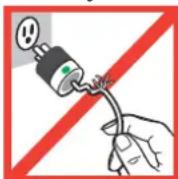
- Inspect power cables thoroughly before each use.
- Do not use cables that are damaged.
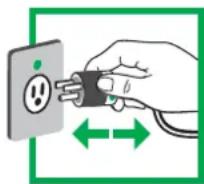
- Insert the plug completely into the outlet.
- Grasp the plug to remove from the outlet.
- Do not unplug by pulling on the cable.
- Do not use excessive force to make connections.
- Do not plug the cable into an extension cable.
- Do not remove, bend or modify any metal prongs or pins of cable.
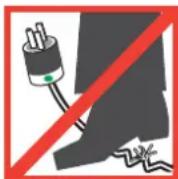
- Do not drive, drag or place objects over the cable.
- Do not walk on the cable.
- Avoid overheating. Uncoil the cable and do not cover it with any material.
- Do not run cable through doorways, holes in ceilings, walls or floors.

Electrical: Keep the Cart away from water.
- Do not use it when wet.
- Do not place the Cart in close proximity to flammable liquids or gases.

CAUTION: No TV/Monitor to be used on top of cart.

CAUTION: Observe all the safety precautions related to the operation and maintenance included in this reference guide! Failure to follow the safety precautions may result or damage to equipment.

CAUTION: There is no on/off switch on this equipment; the only power disconnect is the AC power cable.
Therefore, the socket outlet should be easily accessible and should be installed near the equipment.

WARNING – Death or serious injury may occur when children climb on audio and/or video equipment furniture. A remote control or toys placed on the furnishing may rage a child to climb on the furnishing and as a result the furnishing may tip over on to the child.

WARNING – Relocating audio and/or video equipment to furniture not specifically designed to support audio and/or video equipment may result in death or serious injury to the furnishing collapsing or over turning onto a child.

DANGER!
Risk of Electric Shock
DANGER! Electrical cables can be hazardous.
Misuse can result in fire or death by electrical shock.
Features & Specifications
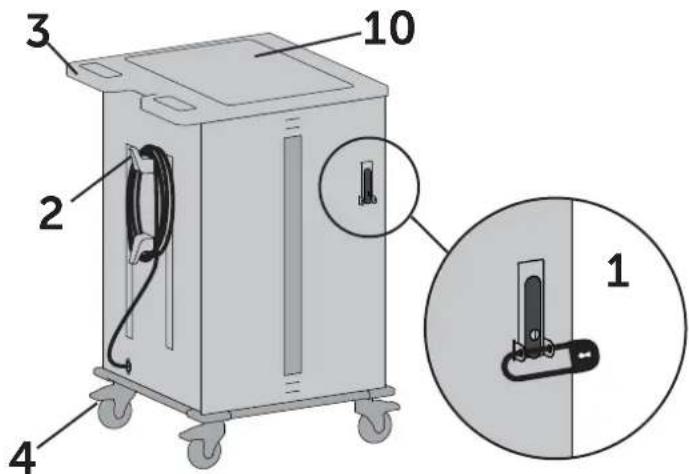
1 Front Locking Door Latch with Padlock Bracket
2 Cord Wrap with Detachable Power Cord
3 Ergonomic Handle
4 4" Total-Lock Casters
5 Control Box and Circuit Breakers
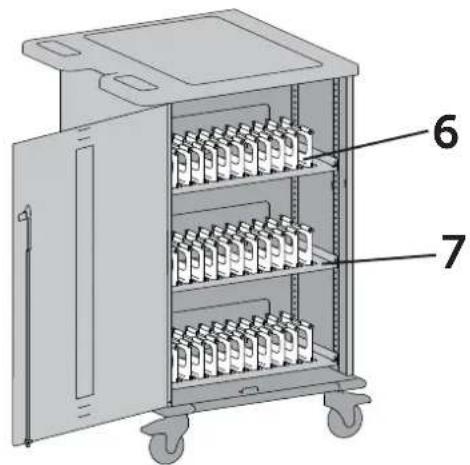
6 Removable Device Dividers with Cable Channels and Width Adjustment
7 Shelves with Height Adjustment
8 Center Panel with Power Outlets and Cord pass through openings
9 Power Adapter Storage Trays
10 Top Shelf with 1/4" High Lip
11 Corner Bumpers
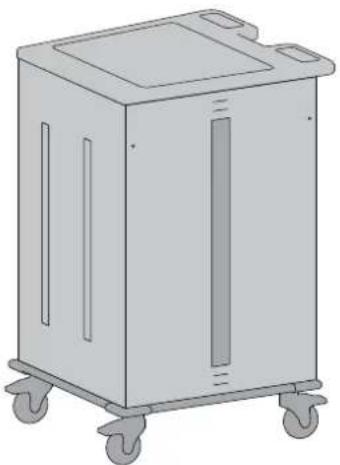
natural_image
Illustration of a four-wheeled industrial machine with wheels and side panels (no text or symbols)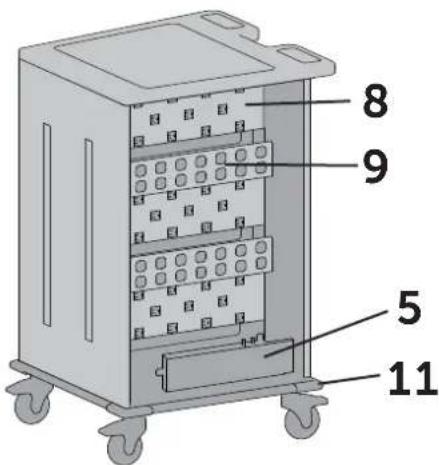
Components

1x
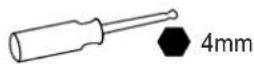
1x
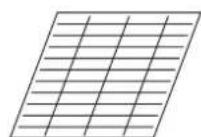
Shelf labels (1-40)
4x
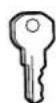
36x
1x
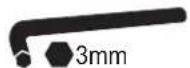
1 Unlock and open front door.
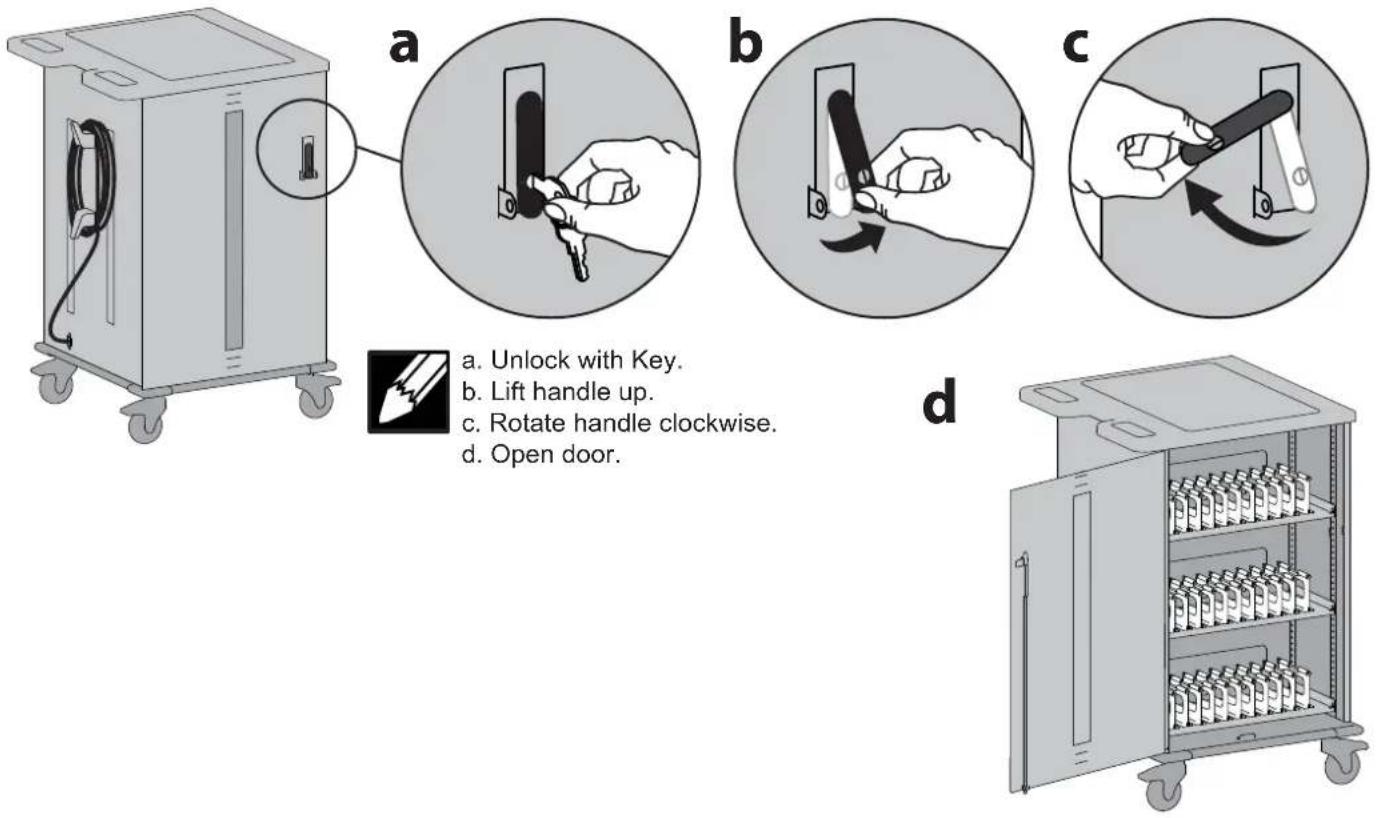
a. Unlock with Key.
b. Lift handle up.
c. Rotate handle clockwise.
d. Open door.
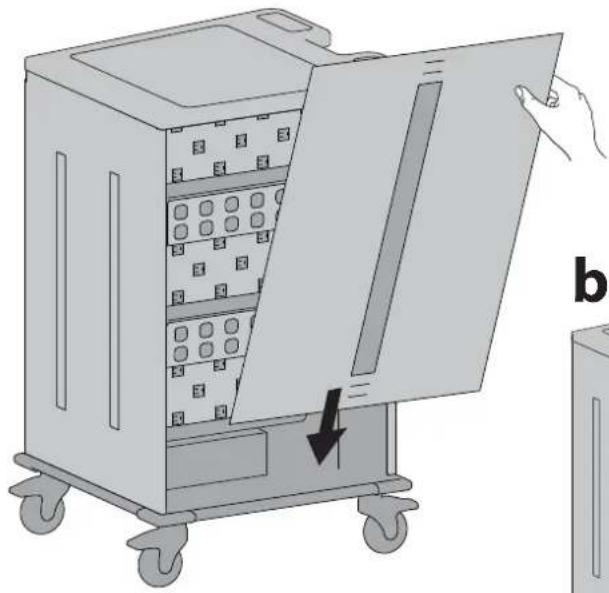
2 Remove back panel.
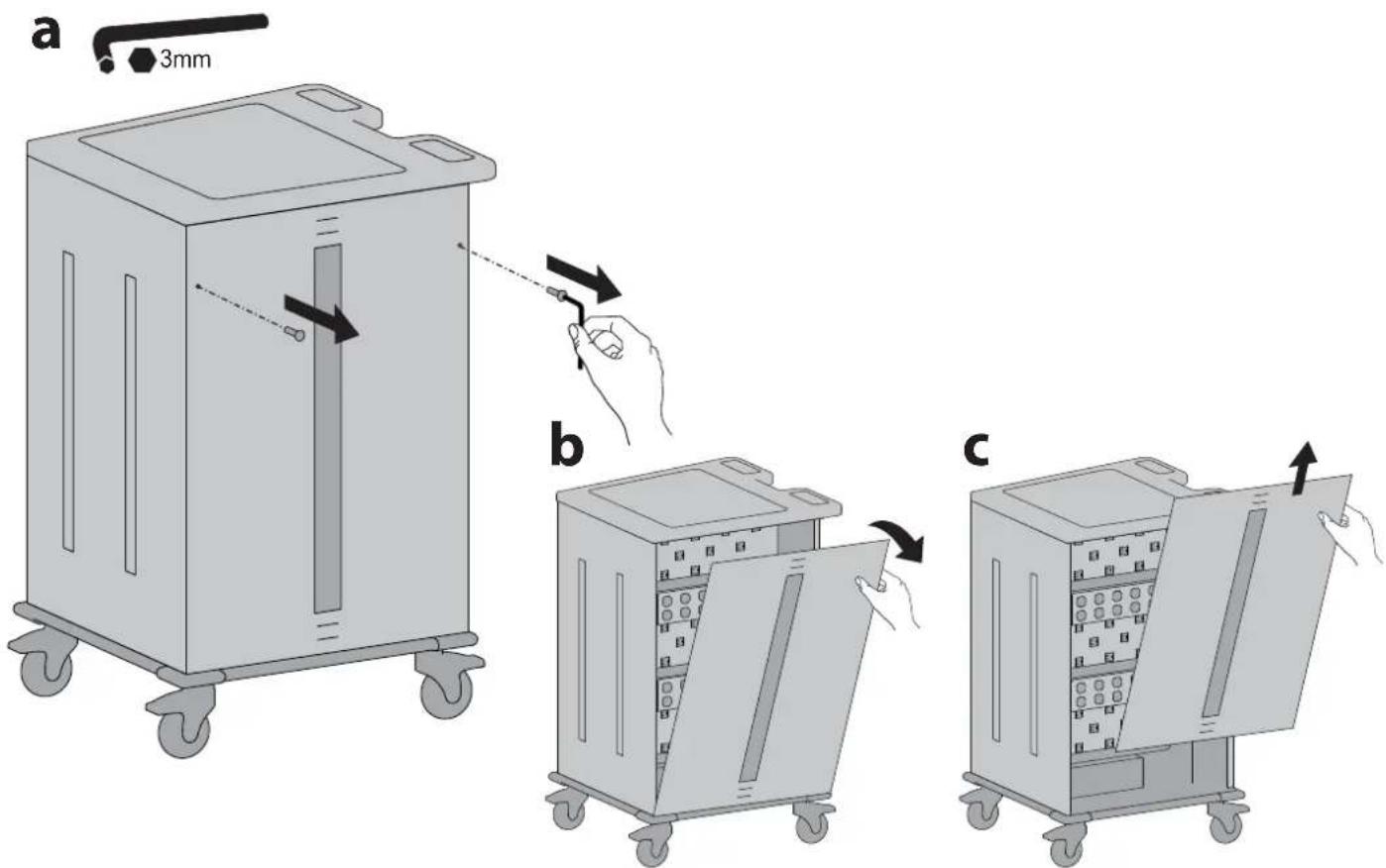
3
a. Route device cables into dividers.
b. Route adapters through cart to back of cart and plug into outlets.
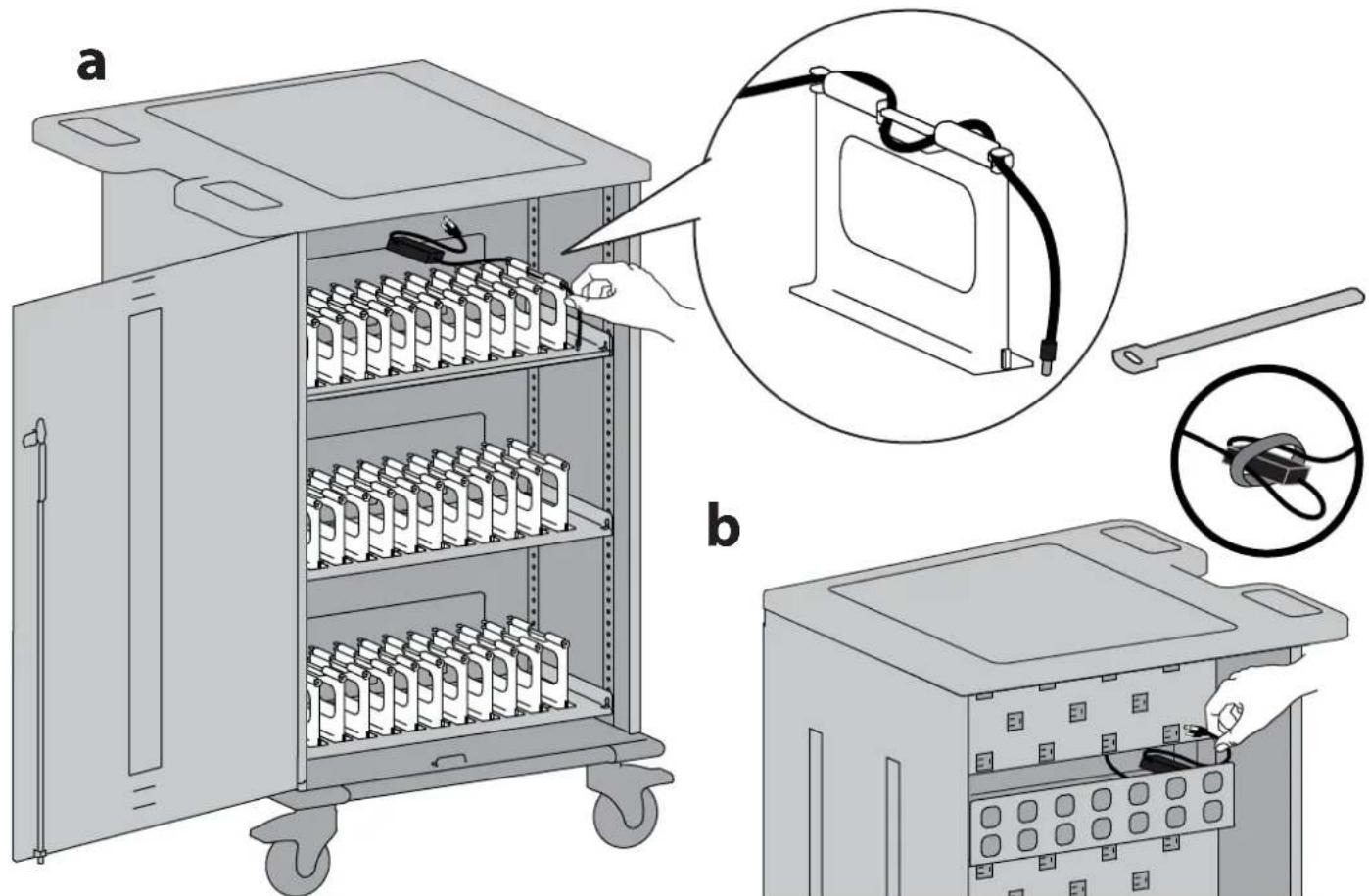

Store adapters and bundled cables on adapter shelves.
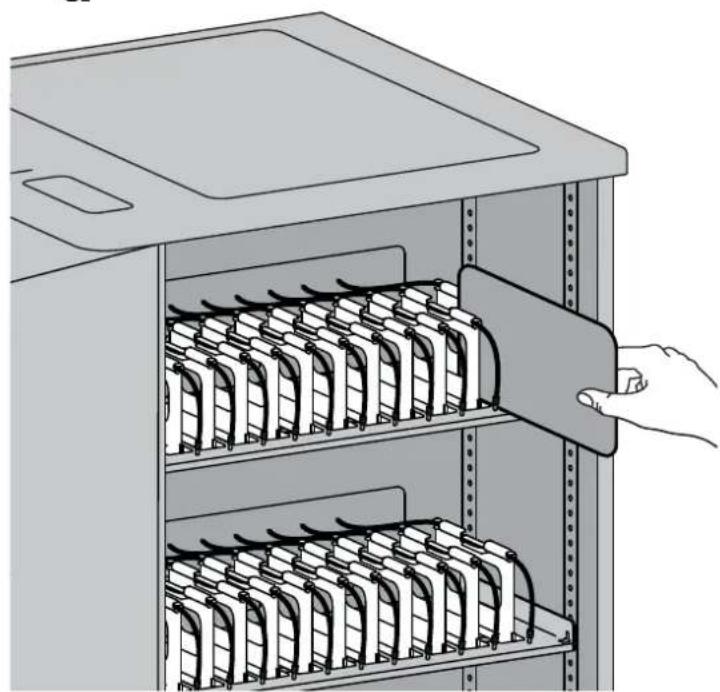
4
a. Insert device into divider.
b. Plug power cable into device.
a
natural_image
Illustration of a hand inserting a folder into a rack-mounted server rack (no text or symbols visible)b
natural_image
Illustration of a hand inserting cables into a rack-mounted server unit (no text or symbols visible)5 Replace the back panel.
a
natural_image
Illustration of a portable industrial machine with a door open, showing internal compartments and a hand holding the lid (no text or symbols)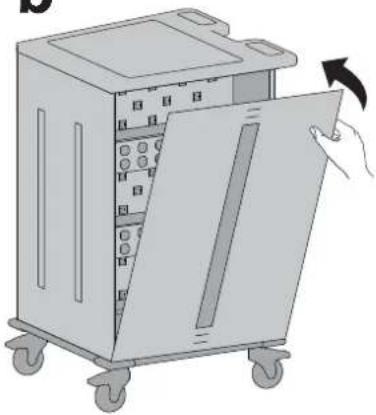
natural_image
Illustration of a hand opening a rack-mounted device into a motor (no text or symbols visible)C
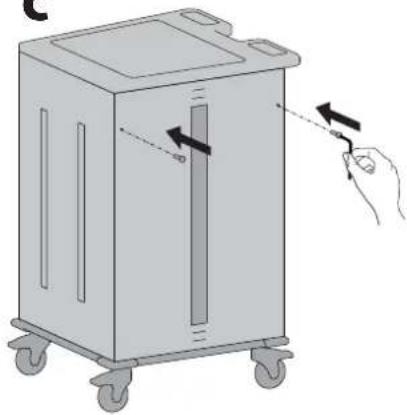
natural_image
Illustration of a hand operating a cart with directional arrows indicating motion (no text or symbols)6 Plug power cord into base of cart and into wall outlet.
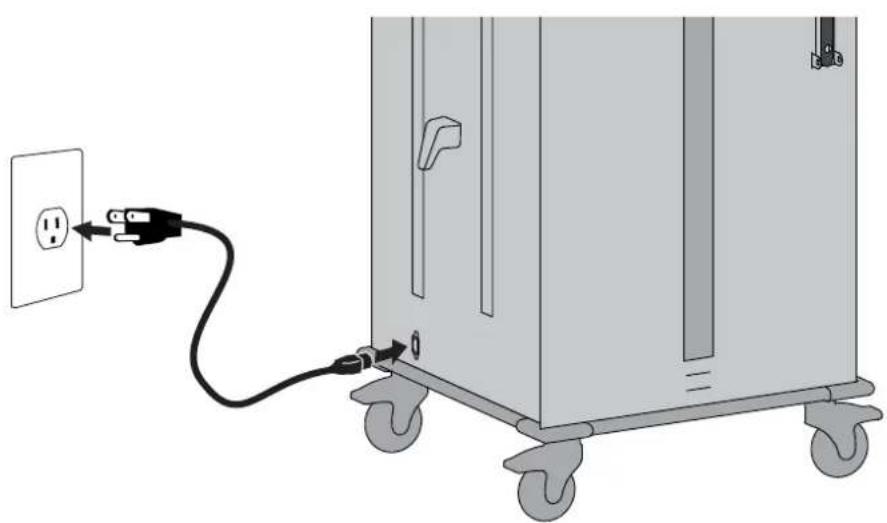
natural_image
Diagram of a portable electrical cabinet with a power outlet connected to wheels, showing wiring and mounting bracket (no text or symbols)How to Remove Dividers
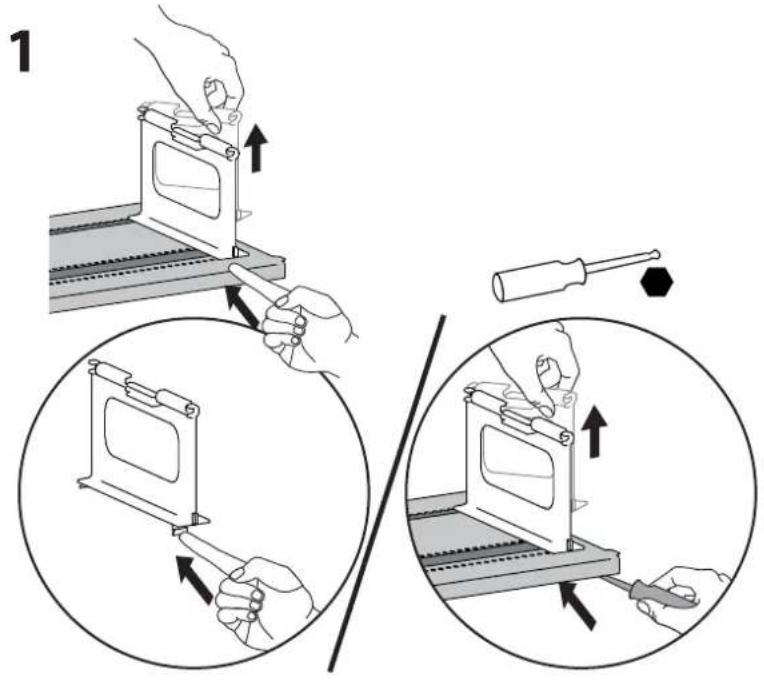
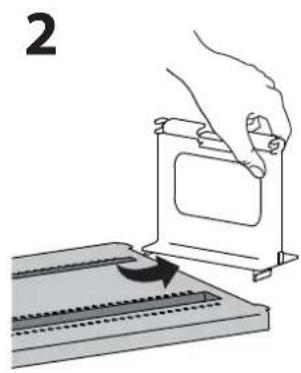
natural_image
Illustration of a hand using a tool to press or install a component on a flat surface, with no visible text or symbols.How to Replace Dividers
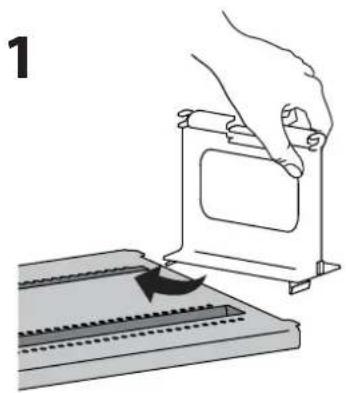
natural_image
Illustration of a hand pressing down on a mechanical component with a curved arrow indicating motion (no text or symbols)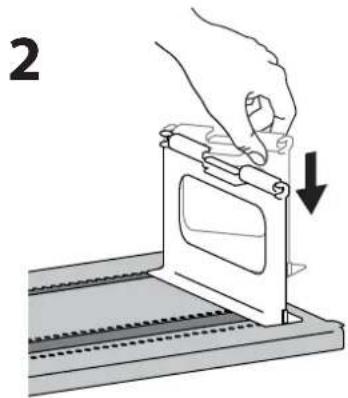
natural_image
Illustration of a hand using a tool to adjust or install a mechanical component, with no visible text or symbols.How to Adjust Shelf Height
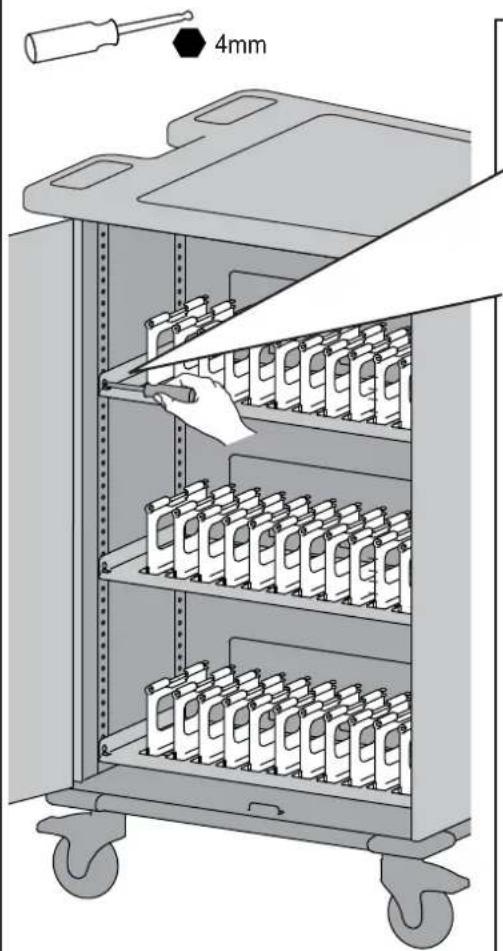
natural_image
Illustration of a mechanical device with a 4mm scale indicator and a hand inserting a component into a multi-tiered rack (no text or symbols on the diagram itself)1
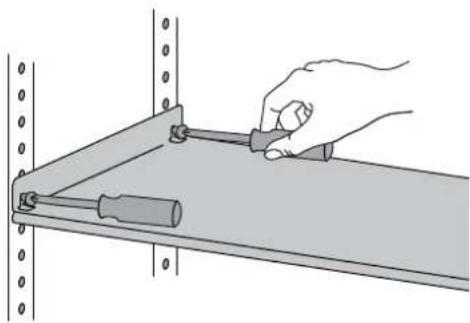
natural_image
Illustration of a hand using a tool to adjust or install a mechanical component on a shelf (no text or symbols visible)2
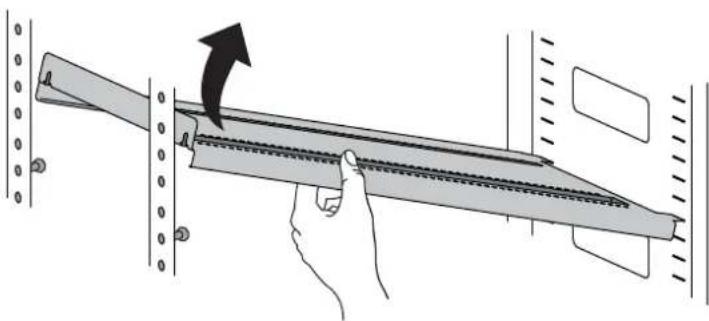
natural_image
Illustration of a hand holding a mechanical component with an arrow indicating motion (no text or symbols present)3
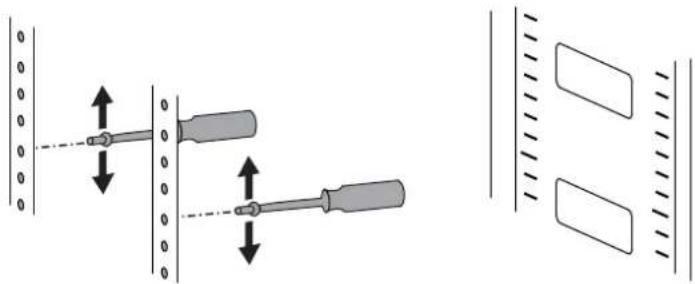
natural_image
Diagram showing two screwdrivers with alignment arrows, alongside a grid of rectangular blocks (no text or symbols)4
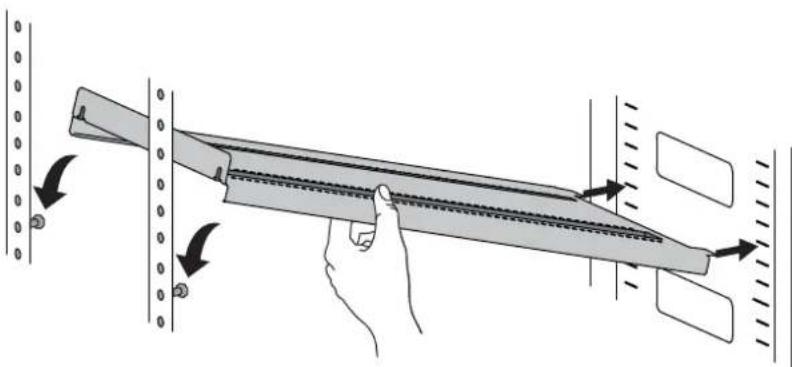
natural_image
Diagram of a hand holding a tool interacting with a panel, showing directional arrows indicating movement (no text or symbols present)5
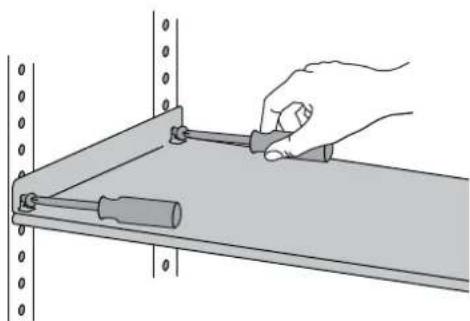
natural_image
Illustration of a hand using a screwdriver to adjust a mechanical component on a metal shelf (no text or symbols)Specifications
Power System
120V\~60Hz. Max Amps: 10A
Physical Dimensions
Height: 106 cm (41.7-inches)
Length: 73 cm (28.7-inches)
Width: 64 cm (25-inches)
Weight (without Mobile Devices) 80 kg (176 lb)
Weight Capacity:
Top Surface 11.3 kg (25 lb)
Shelves (Top, Middle, Bottom) ea. 27.2 kg (60 lb)
Adapter Shelves (ea.) 5.4 kg (12 lb)
Generally compatible with most 13" display devices and
some 14" devices.
Environmental
Temperature range:
Operating 0° to 30°C (32° to 86°F)
Storage -29° to 60°C (-20° to 140°F)
Relative humidity (maximum):
Operating 10%–90% (non condensing)
Storage 5%–95% (non condensing)
Altitude (maximum): 2000 m (6,562 ft)
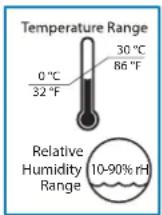

Operational Storage
Elevated Operating Ambient - Consideration should be given to installing the cart in an environment compatible with the maximum ambient temperature Tma of 30 degree C.
Troubleshooting Guide
There is no switch or indicator light.
The best option is to use a electrical test meter or something like a lamp.
There are 3 outlet banks(channels) with only one channel on at any time. The power control module sequences through each of the 3 channels at \~6 minute intervals starting at the top, then middle and bottom last, then going back to the top bank.
The devices are all plugged in, but they won't charge. What do I do?
First disconnect the main power cord from the wall and inspect the cord and plug to make sure that they're undamaged. Plug the cord into a working power outlet. Next, check the devices: Verify that each device is connected to its power adapter and that each adapter is plugged into the internal outlet. Look at the circuit breaker and push the button in if it is extended out. Still need some help? Call Ergotron at 800-888-8458.
Someone tried to break into the unit and damaged a door. Can it be replaced?
Yes, you can order a replacement. Contact Customer Care. We'll ask you for the cart's model number and whether it's for the front or back of the unit.
My power cord/plug is damaged. Are they under warranty?
For warranty information visit: www.ergotron.com/warranty
When I plug in the unit it trips the circuit breaker in my building. Help!
The carts are designed to run on a 15 amp circuit. If you have other items plugged into the same circuit you may be overloading it. Have a qualified electrician check that adequate power is available.
My unit was damaged during shipment. What should I do?
Please contact Customer Care and we'll work with you.
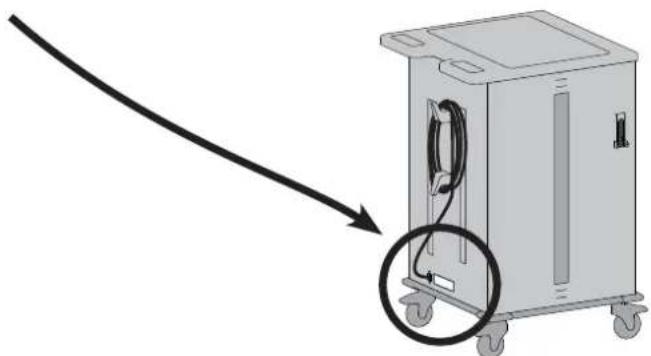
How do I find the unit's serial number?
The serial number label is on the outside of the cart, next to the power cord inlet.
Can I remove a bay divider?
Yes! See the instructions - including helpful pictures - on page 8!
How can I make the cart easier to steer?
This cart has two directional lock casters to make the cart easier to steer. How? Directional lock casters don't swivel - they lock the direction of the casters so they move in a straight line. Press the tabs of these casters (located under the handle) when you need to move the cart more than a few feet. When you need to maneuver into tight spaces, release the tabs so the casters swivel.
Cleaning and Maintenance

WARNING: Failure to observe the following safety notices may result in serious personal injury or equipment damage.
Inspect for damage, dirt and debris on a regular basis. All paint and plastic components used in the Cart will withstand cleaning by most commonly used, diluted, non-abrasive solutions such as quaternary ammonia compounds, ammonia enzyme cleaners, bleach, or alcohol solutions. It is recommended that any cleaning solution be tested on a small, inconspicuous area to ensure it does not harm the surface of the Cart.
- Marks from permanent marker, dry-erase marker, and pens can be removed with 91% isopropyl alcohol and a soft cloth.
- lodine stains can be removed with commonly used cleaners and a soft cloth.
- Do not use steel wool or other abrasive materials that may damage the surface finish.

Electrical: To avoid risk of electric shock, do not expose electrical components to water, cleaning solutions or other potentially corrosive or substances.

Electrical: Do not immerse Cart or Cart components in liquid or allow liquids to flow into the Cart. Wipe all cleaners off surface diately using a damp cloth. Dry the surface thoroughly after cleaning.

Electrical: Do not use fl ammable cleaners on Cart surfaces.

CAUTION: Adjustment, Service, Replacement - DO NOT attempt to adjust, service or replace any part of the Cart unless directed to do so through Ergotron-approved documentation (i.e. installation instructions). Only Ergotron, Inc. or an Ergotron-certified entity may adjust, service or place Cart components. If any component on the Cart is missing or damaged, the Cart must not be used. Contact Ergotron immediately request a replacement part.

CAUTION: Casters - Check casters periodically to make sure they are clean and free of debris that would prevent smooth travel. Avoiding Cart across uneven, dirty, or damaged surfaces.

CAUTION: Customer Equipment- Make sure equipment is balanced and installed securely to Cart. Contact Ergotron for information about the Cart components.

CAUTION: Changes or Modifications not expressly approved by Ergotron could void the user's authority to operate the equipment.
Regulatory Information
FCC Compliance Statement
This has been tested and found to comply with the limits for a Class A digital device, pursuant to Part 15 of the FCC rules. These limits are designed to provide reasonable protection against harmful interference when the equipment is operated in a commercial environment. This equipment generates, uses, and can radiate radio frequency energy and, if not installed and used according to the instructions, may cause harmful interference to radio communications. Operation of this equipment in a residential area is likely to cause harmful interference in which case the user will be required to correct the interference at their own expense.
Operation of this equipment is subject to the following two conditions: (1) this device may not cause harmful interference, and (2) this device must accept any interference received, including interference that may cause undesired operation.
FCC Caution: Changes or Modifications not expressly approved by Ergotron could void the user's authority to operate the equipment.
This Class A digital apparatus complies with Canadian CAN ICES-3(A)/NMB-3(A). / Cet appareil numérique de la classe A est conforme à la norme CAN ICES-3(A)/NMB-3(A) du Canada.
For the latest User Installation Guide please visit: www.ergotron.com
For Warranty visit: www.ergotron.com/warranty
For Service visit: www.ergotron.com
For local customer care phone numbers visit: http://contact.ergotron.com
NOTE: When contacting customer service, reference the serial number.
natural_image
Diagram of a mechanical device with a cable and circular component, no text or symbols presentergotron®
www.ergotron.com | USA: 1-800-888-8458
© 2017 Ergotron, Inc. All rights reserved.
While Ergotron, Inc. makes every effort to provide accurate and complete information on the installation and use of its products, it will not be held liable for any editorial errors or omissions (including those made in the process of translation from English to another language), or for incidental, special or consequential damages of any nature resulting from furnishing this instruction and performance of equipment in connection with this instruction. Ergotron, Inc. reserves the right to make changes in the product design and/or product documentation without notification to its users. For the most current product information, or to know if this document is available in languages other than those herein, please contact Ergotron. No part of this publication may be reproduced, stored in a retrieval system, or transmitted in any form or by any means, electronic, mechanical, photocopying, recording or otherwise without the prior written consent of Ergotron, Inc., 1181 Trapp Road, Eagan, Minnesota, 55121, USA Patents Pending and Patented U.S. & Foreign. Ergotron is a registered trademark of Ergotron, Inc.

- YES BASIC Charging Cart
- Hazard Symbols Review
- Safety
- Equipment Electrical Safety
- DANGER!
- Risk of Electric Shock
- Features & Specifications
- Components
- Unlock and open front door.
- Remove back panel.
- 3
- 4
- Replace the back panel.
- Plug power cord into base of cart and into wall outlet.
- How to Remove Dividers
- How to Replace Dividers
- How to Adjust Shelf Height
- Specifications
- Power System
- Physical Dimensions
- Environmental
- Troubleshooting Guide
- There is no switch or indicator light.
- The devices are all plugged in, but they won't charge. What do I do?
- Someone tried to break into the unit and damaged a door. Can it be replaced?
- My power cord/plug is damaged. Are they under warranty?
- When I plug in the unit it trips the circuit breaker in my building. Help!
- My unit was damaged during shipment. What should I do?
- How do I find the unit's serial number?
- Can I remove a bay divider?
- How can I make the cart easier to steer?
- Cleaning and Maintenance
- Regulatory Information
- ergotron®
Brand : Ergotron
Model : YES40
Category : Uncategorized