DM10-1007-1 - Uncategorized Ergotron - Free user manual and instructions
Find the device manual for free DM10-1007-1 Ergotron in PDF.


User questions about DM10-1007-1 Ergotron
0 question about this device. Answer the ones you know or ask your own.
Ask a new question about this device
Download the instructions for your Uncategorized in PDF format for free! Find your manual DM10-1007-1 - Ergotron and take your electronic device back in hand. On this page are published all the documents necessary for the use of your device. DM10-1007-1 by Ergotron.
USER MANUAL DM10-1007-1 Ergotron
natural_image
Technical line drawing of a rectangular electronic device with coiled connectors and a central panel (no text or symbols)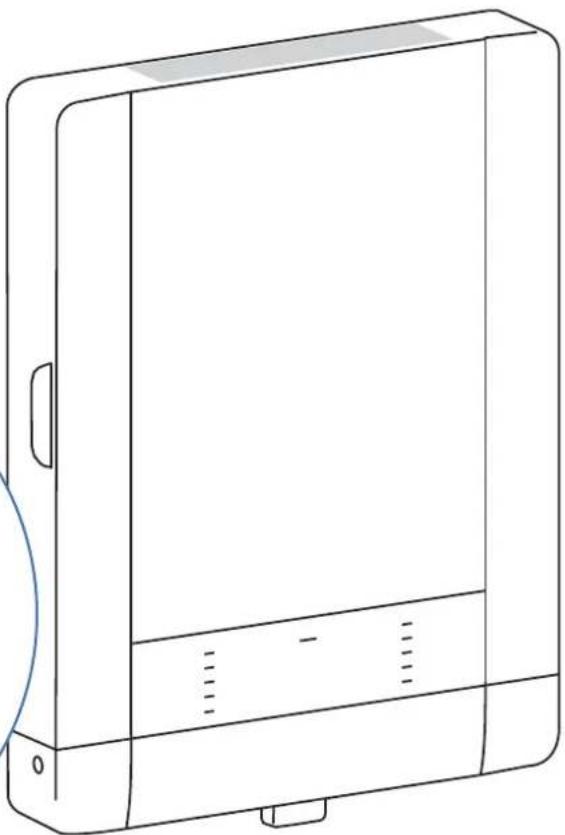
natural_image
Line drawing of a rectangular electronic device with a flat top and side panel, no text or symbols presentTable of Contents
Hazard Symbols Review & Safety 2
Components & Tools 2
Mounting Considerations ....3
Set-up 3 - 8
Wood Stud Attachment ....4
Concrete Attachment 6

≤ 24lbs. (11 kg)
CAUTION: DO NOT EXCEED MAXIMUM LISTED WEIGHT CAPACITY. SERIOUS INJURY OR PROPERTY DAMAGE MAY OCCUR!
Charging and Syncing 10 - 11
Cleaning and Maintenance....12
Specifications 13
Service and Warranty Information ....13
For service and warranty visit www.ergotron.com
Apple, iPad, iPad Air, iPad mini, Retina, iTunes, Lightning and Macintosh are trademarks of Apple Inc., registered in the U.S. and other countries.
"Made for iPad" means that an electronic accessory has been designed to connect specifically to iPad, and has been certified by the developer to meet Apple performance standards. Apple is not responsible for the operation of this device or its compliance with safety and regulatory standards. Please note that the use of this accessory with iPad may affect wireless.

Reduce.Reuse.Recycle
Hazard Symbols Review
These symbols alert users of a safety condition that demands attention. All users should be able to recognize and understand the significance of the following Safety Hazards if encountered on the product or within the documentation. Children who are not able to recognize and respond appropriately to Safety Alerts should not use this product without adult supervision!
Symbol Signal Word Level of Hazard
 | NOTE | A NOTE indicates important information that helps you make better use of this product. |
 | CAUTION | A CAUTION indicates either potential damage to hardware or loss of data and tells you how to avoid the problem. |
 | WARNING | A WARNING indicates either potential for property damage, personal injury, or death. |
 | ELECTRICAL | An Electrical indicates an impending electrical hazard which, if not avoided, may result in personal injury, fi re and/or death. |
Safety

WARNING: Because surfaces vary widely and the ultimate mounting method is out of Ergotron's control, it is imperative that you consult with appropriate engineering, architectural or construction professional to ensure that your Ergotron mounting solution is mounted properly to handle applied loads.

CAUTION: Make sure the wall mount bracket is level, flush and snug to the wall surface. DO NOT OVERTIGHTEN THE BOLTS.
Components
| A | B | C | D | ||
| 1 | 1x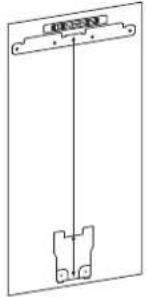 | 1x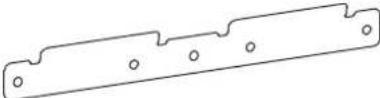 | 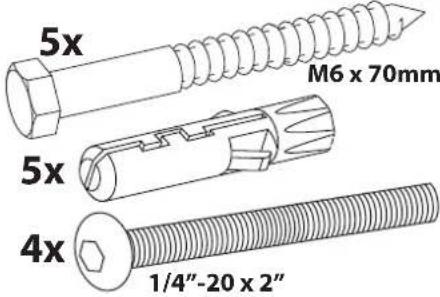 | ||
| 2 | 1x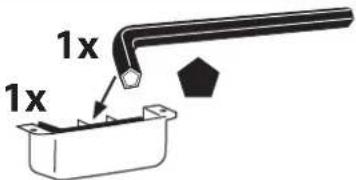 | ||||
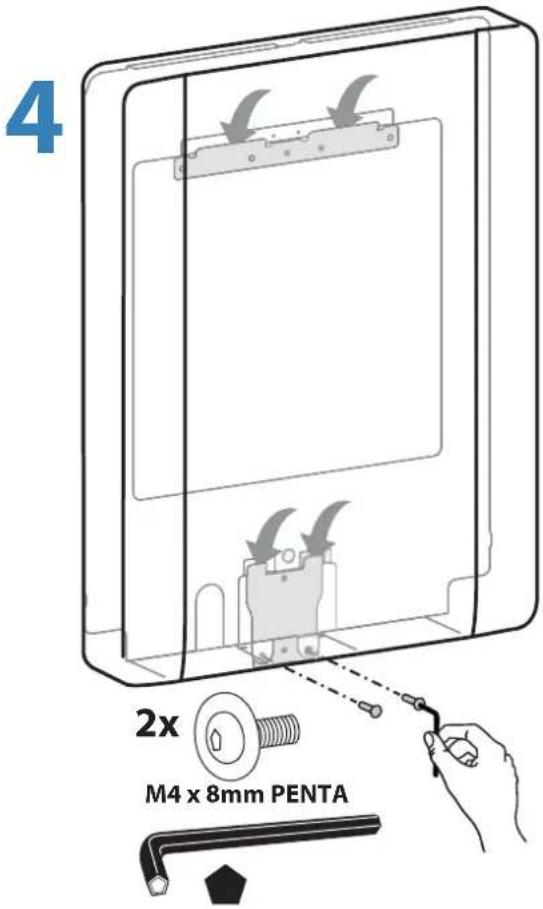
| 3 | 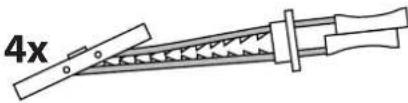 | 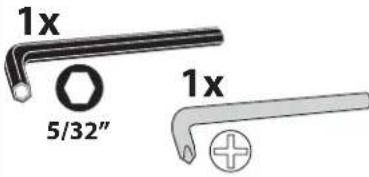 | 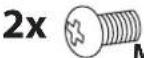 M4 x 8mm2x2x M4 x 8mm2x2x 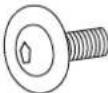 M4 x 8mm PENTA M4 x 8mm PENTA 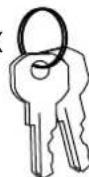 | ||
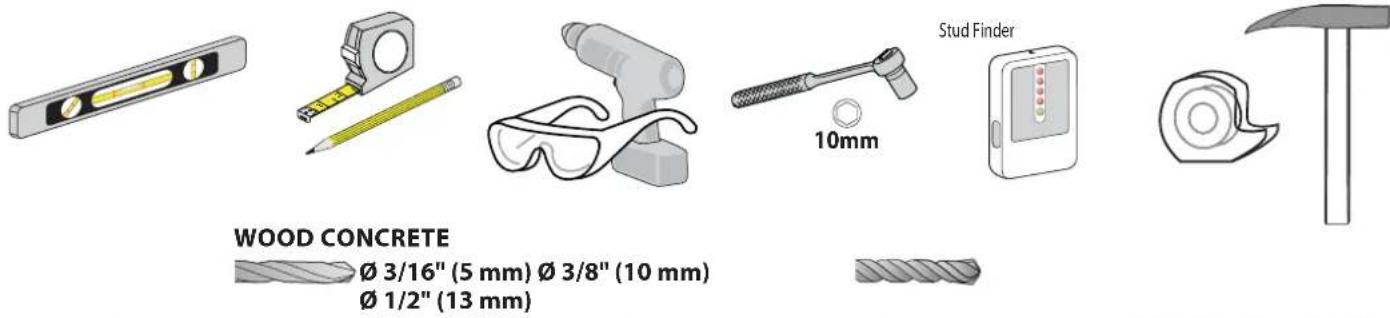
Tools Needed
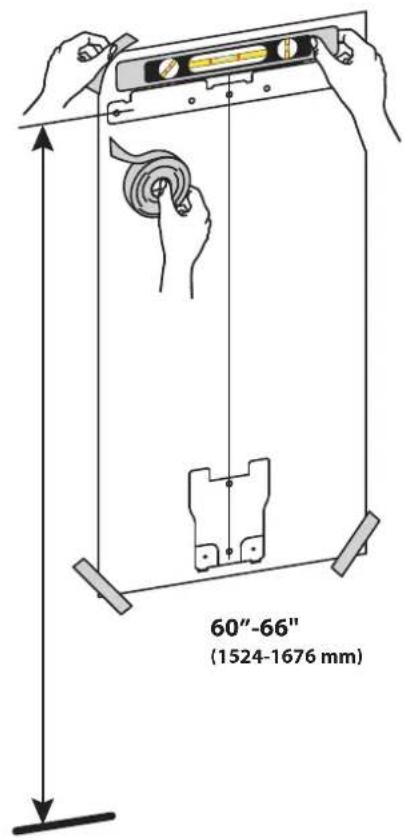
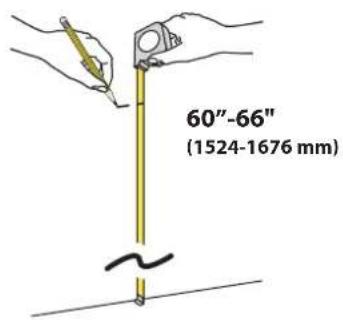
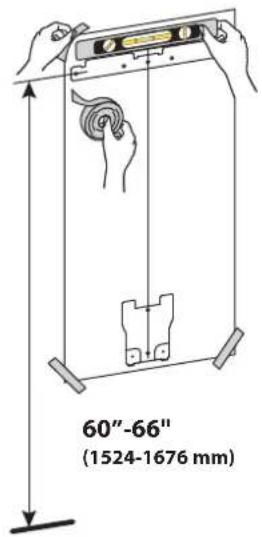
1 Mounting Considerations
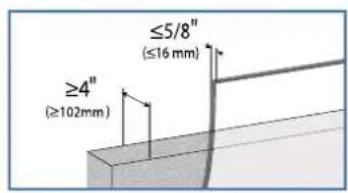
Space Requirements:
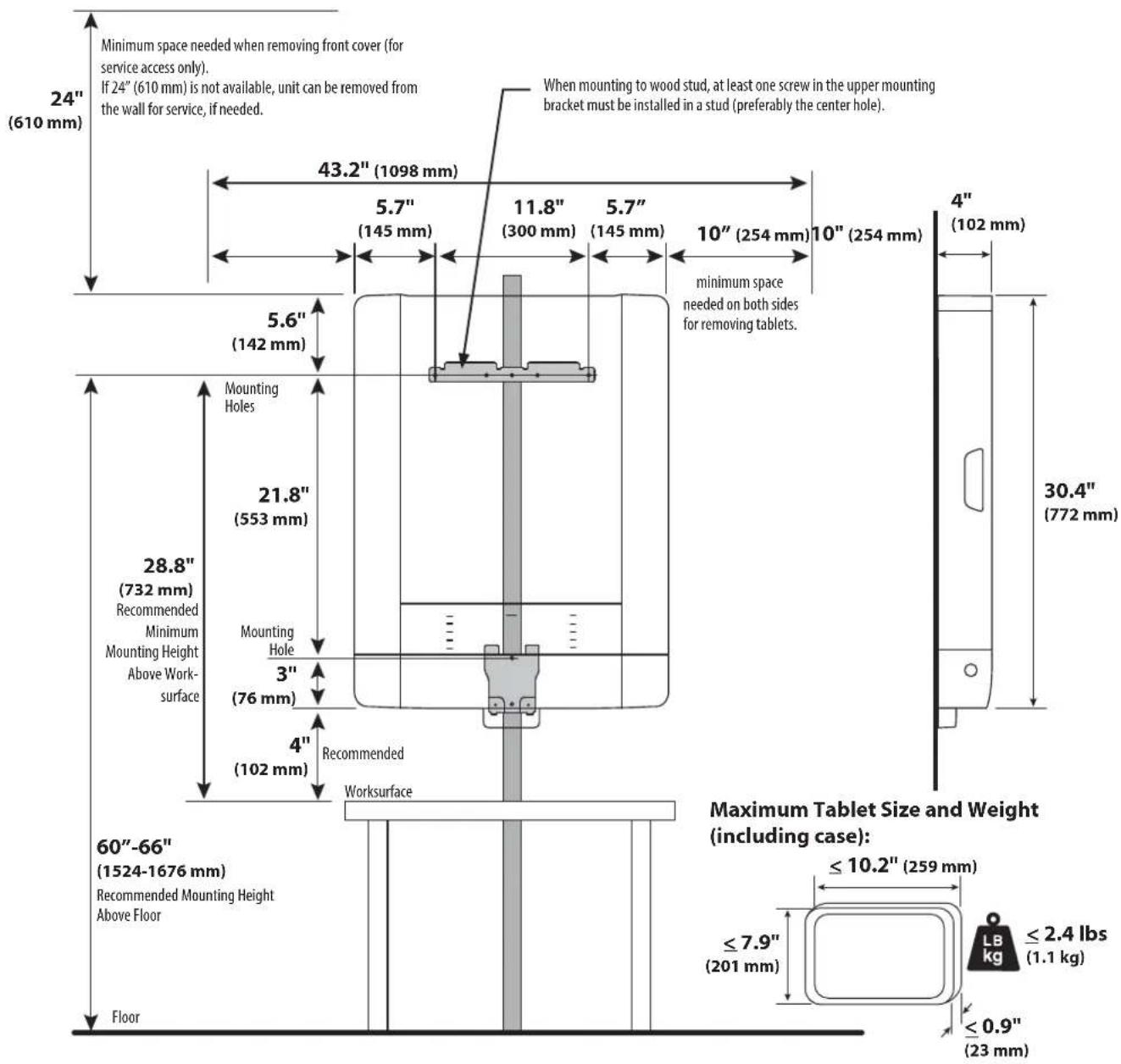
2
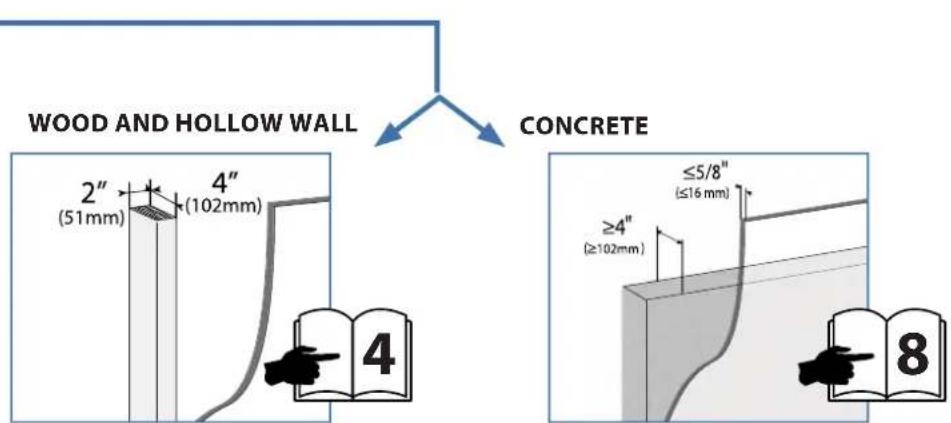
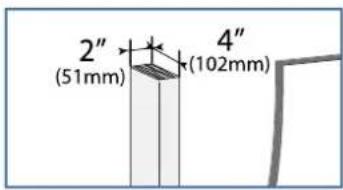
2 WOOD AND HOLLOW WALL
C

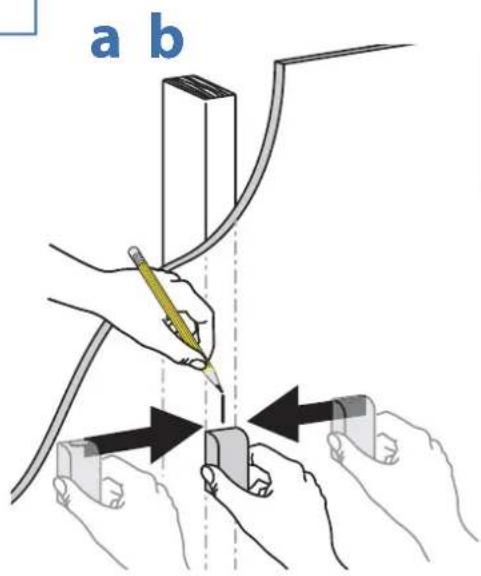
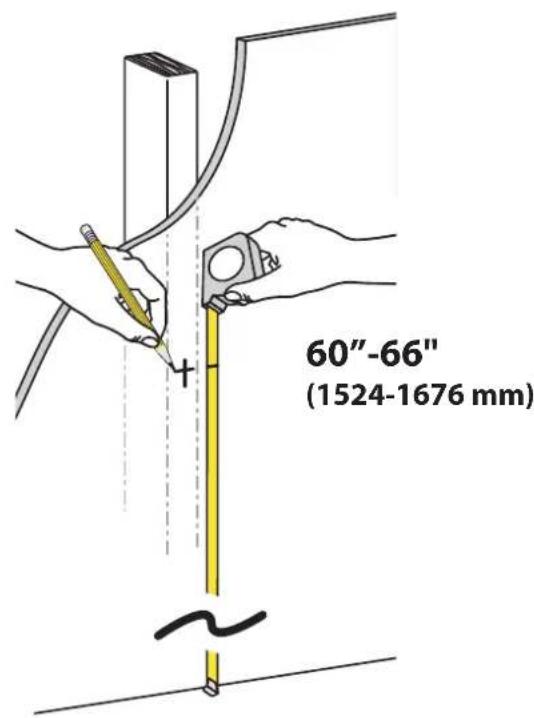
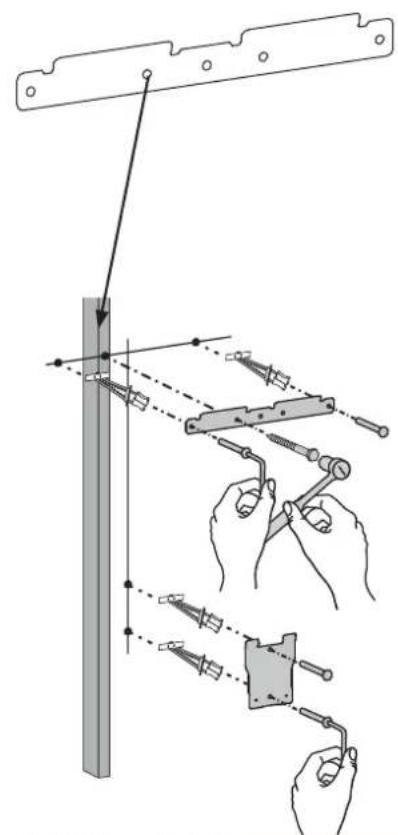
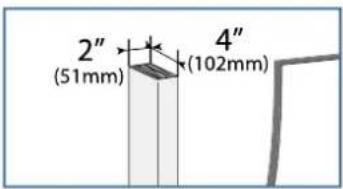
NOTE: The stud can be located at one of five mounting holes on the top bracket. While the first option (center hole of bracket) is recommended for most cases, you should consult with a construction professional to confirm which method is best suited for your particular situation. Options 2-5 are illustrated on the following page in no order of preference.
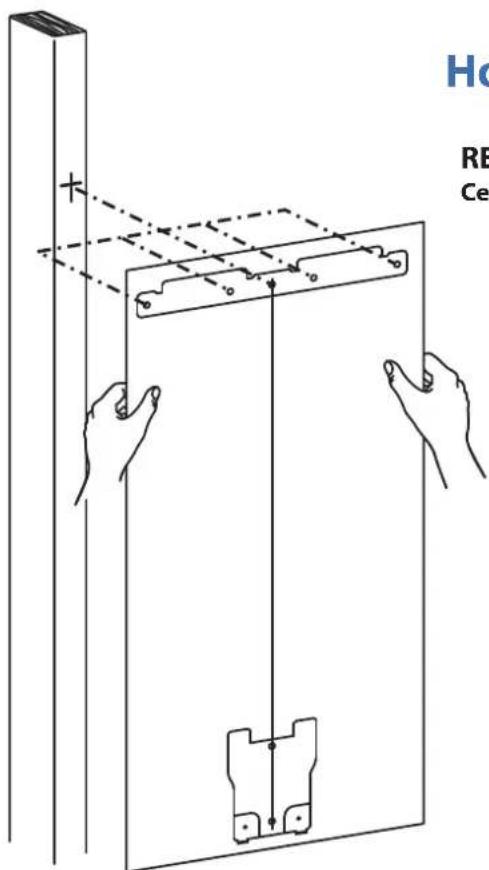
Hole Option 1
RECOMMENDED Center Hole in Stud
STUD LOCATION OPTIONS 2-5
Hole Option 2
Extreme Left Hole in Stud
Hole Option 3 Hole Option 4
Extreme Right Hole in Stud
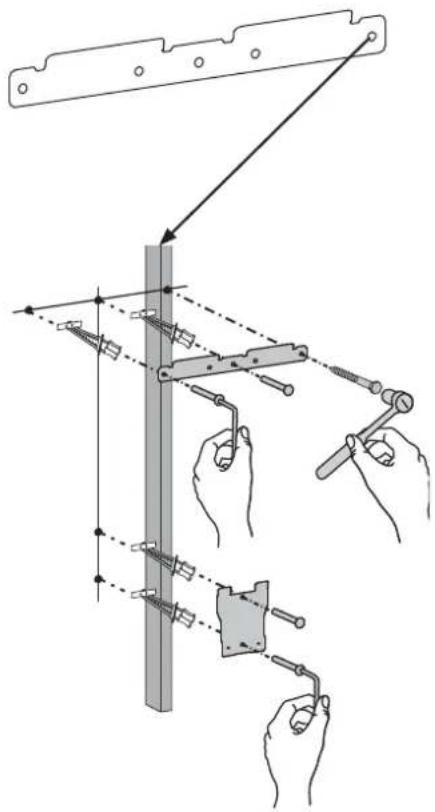
Middle Right Hole in Stud
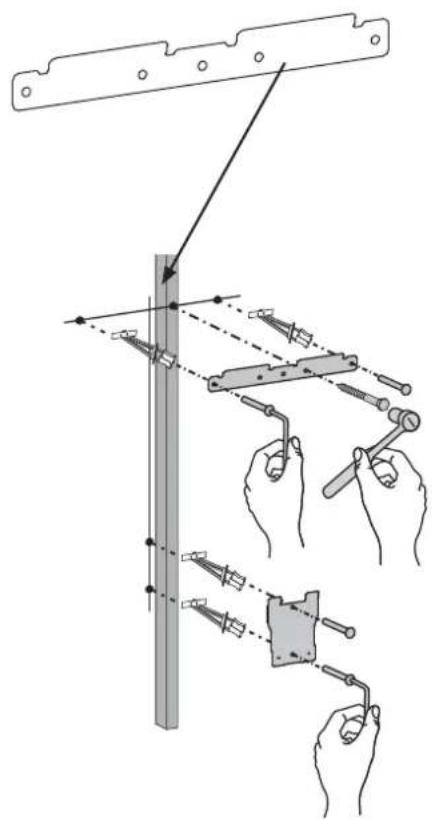
Hole Option 5
Middle Left Hole in Stud
d
WOOD AND HOLLOW WALL
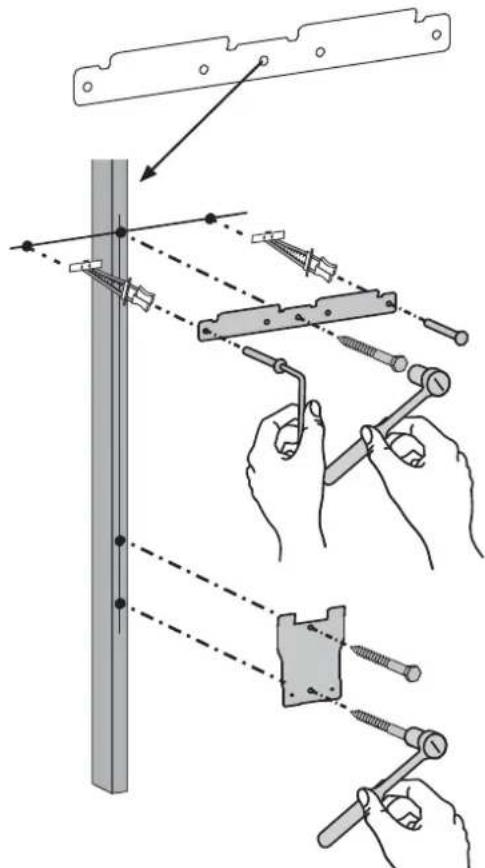
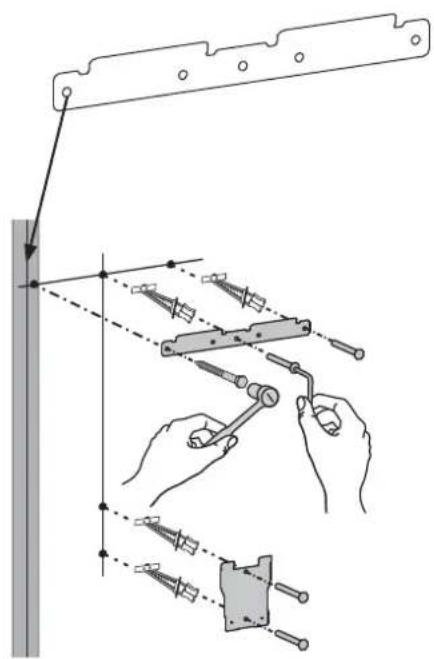
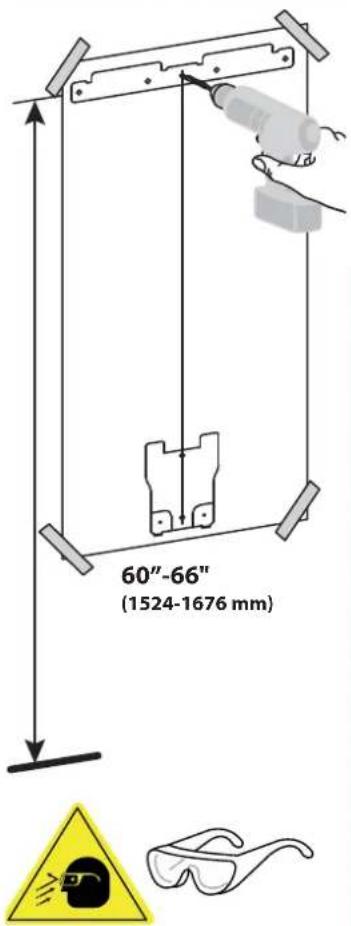
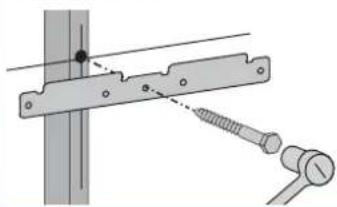
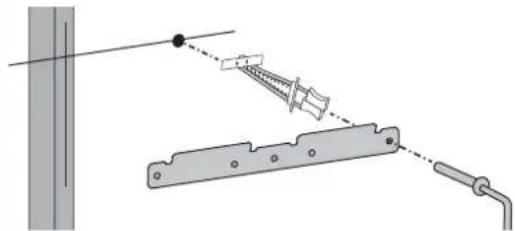
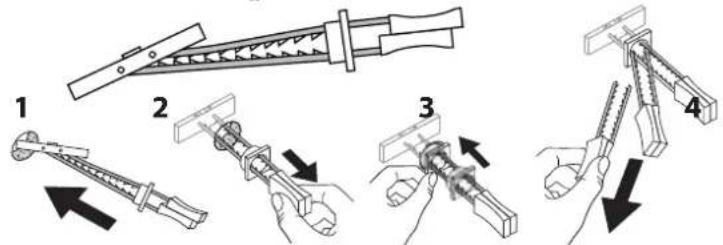
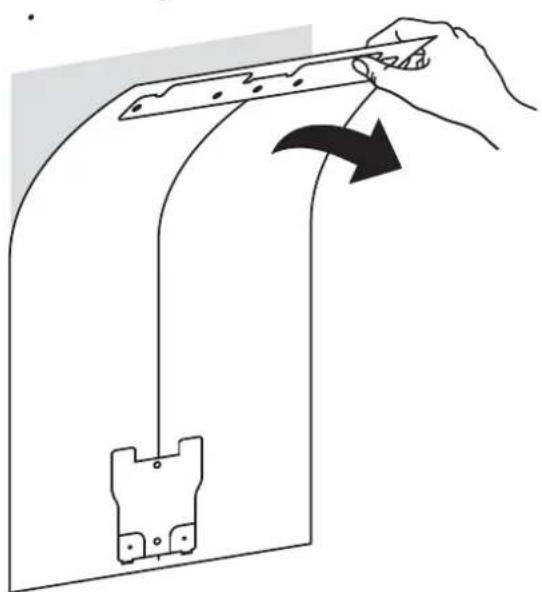
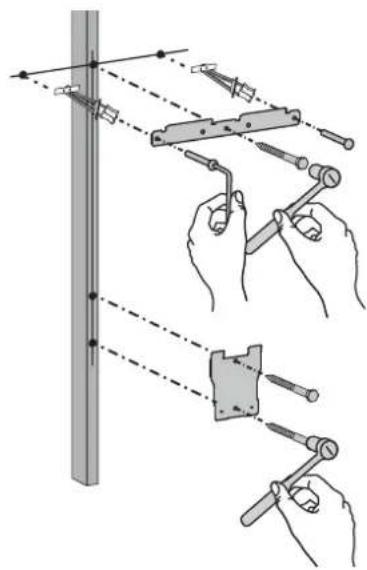
e Drill the three holes in the top bracket that correspond with the hole option determined on previous page. Then drill the two holes in the bottom bracket.

NOTE: Use the ∅ 3/16" (5 mm) drill bit when drilling directly into the wood stud. Use the ∅ 1/2" (13 mm) drill bit when drilling into the hollow wall for the anchors. Use hollow wall anchors where ever a screw does not get inserted directly into the wood stud.

NOTE: Bottom Bracket mounting holes will always line up vertically with the center mounting hole in the Top Bracket.
WOOD STUD
natural_image
Mechanical assembly diagram showing a bracket with a screw and pin, no text or symbols present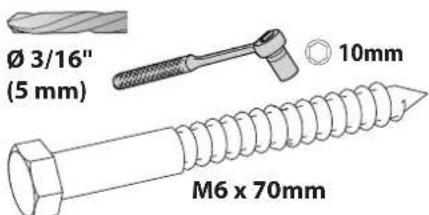
HOLLOW WALL
natural_image
Diagram showing a screw fastening setup with a spring and rod, no text or symbols present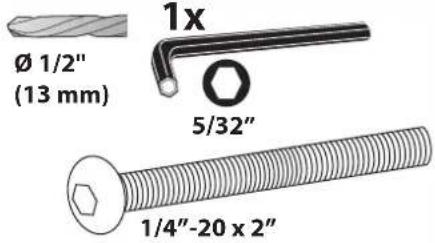
f
natural_image
Diagram showing a hand holding a tool interacting with a curved mechanical component, with an arrow indicating rotation (no text or symbols present)g
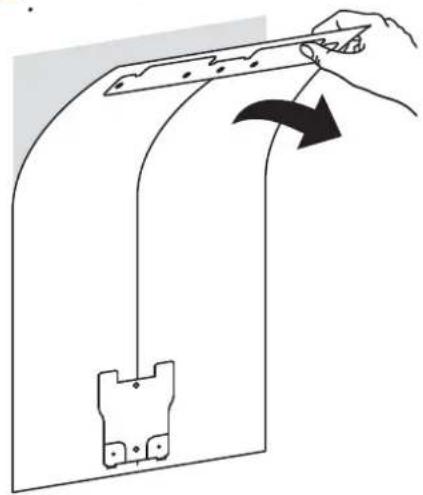
Attach brackets to wall according to the hole option determined on previous page.
natural_image
Illustration of hands using a tool to adjust or install a component on a vertical pole, with no visible text or symbols.
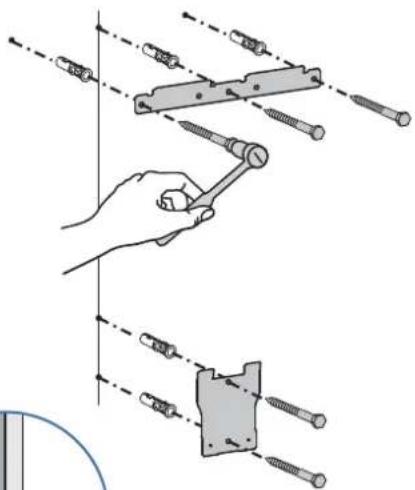
CONCRETE
a
b
C
d
natural_image
Diagram showing a hand holding a tool interacting with a curved mechanical component, with an arrow indicating rotation (no text or symbols present)e
5x
natural_image
Technical line drawing of a hexagonal bolt with threaded end (no text or symbols on the object itself)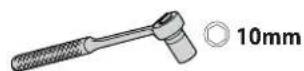
natural_image
Illustration of a hand using a tool to adjust or install a screw assembly, with no visible text or symbols.
WARNING:
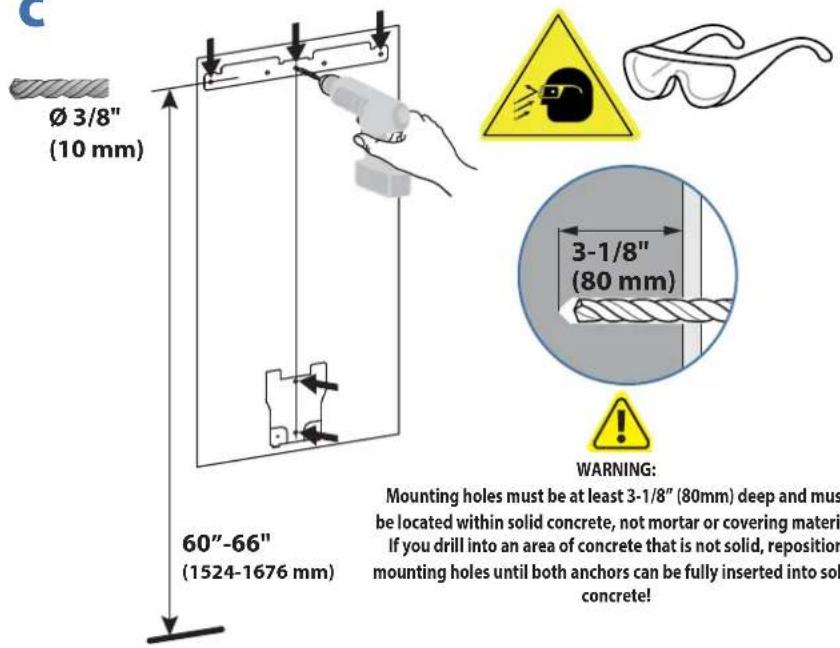
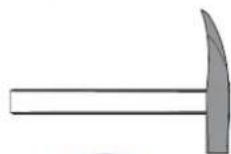
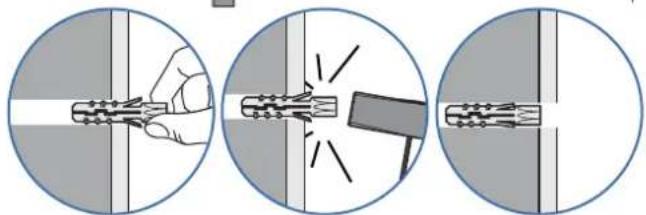
Anchors that are not fully set in solid concrete will not support the applied load resulting in an unstable, unsafe condition which could lead to personal injury and/or property damage. Consult a construction professional if you have any doubt about what this means in regard to your particular situation.
natural_image
Three-step diagram showing a hand holding a tool, breaking through a pipe with a tool, and applying force to a wire (no text or symbols present)
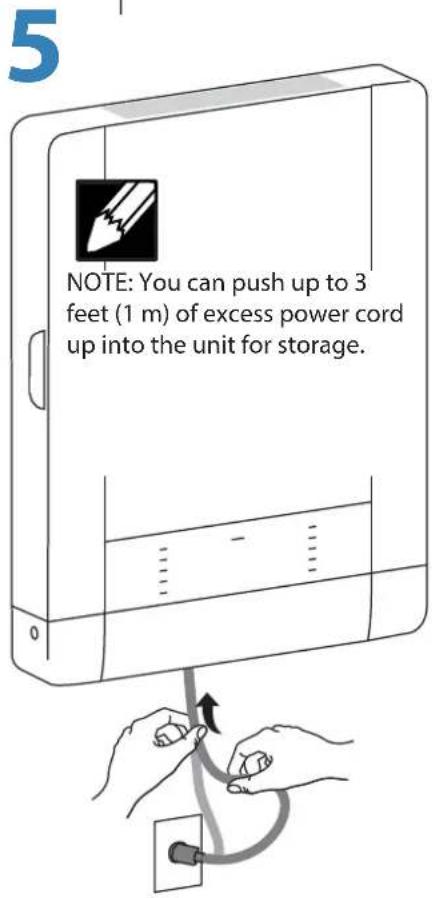
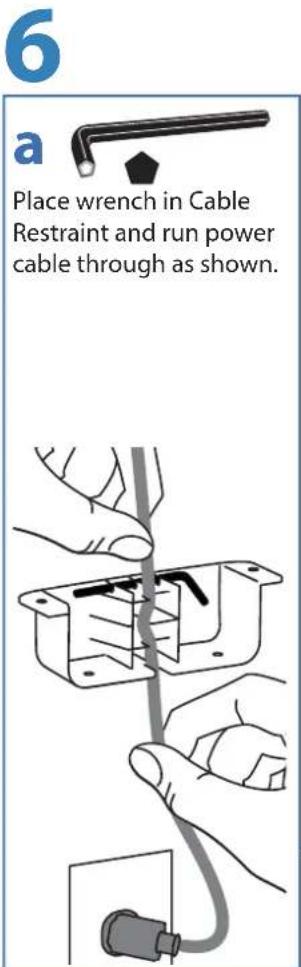
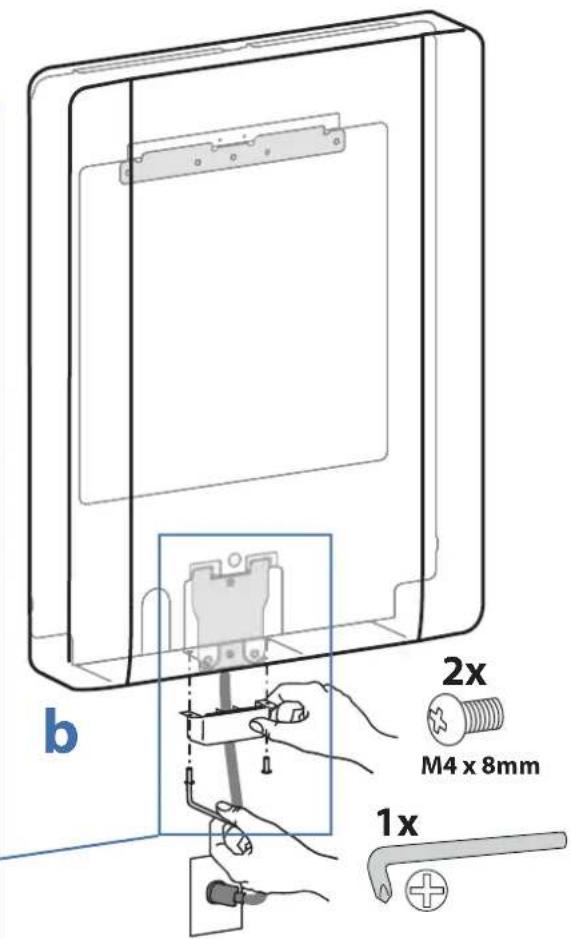
7
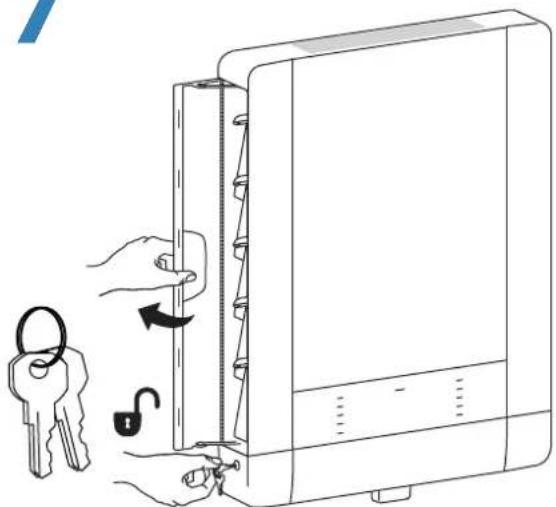
natural_image
Illustration of a computer lock switch being inserted into a case, with keys and keys moving from the lock (no text or symbols present)
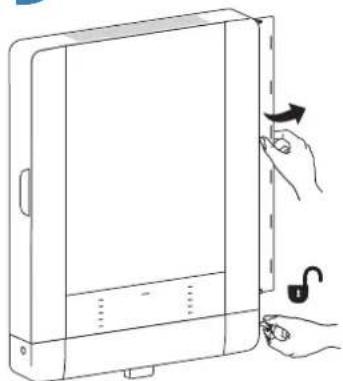
NOTE: To keep door unlocked, pull key out while unlocked.
natural_image
Line drawing of a hand inserting a card into a computer case (no text or symbols)
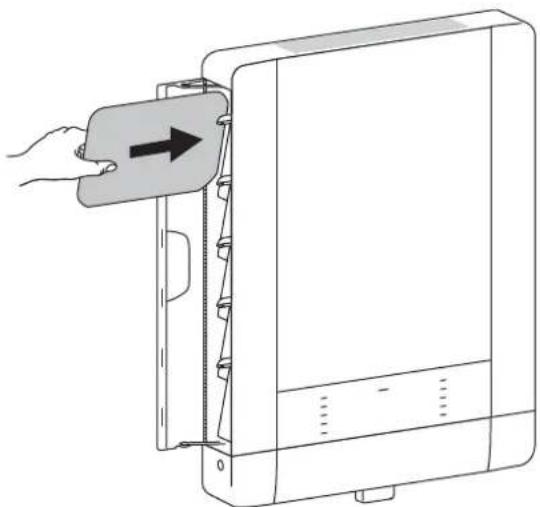
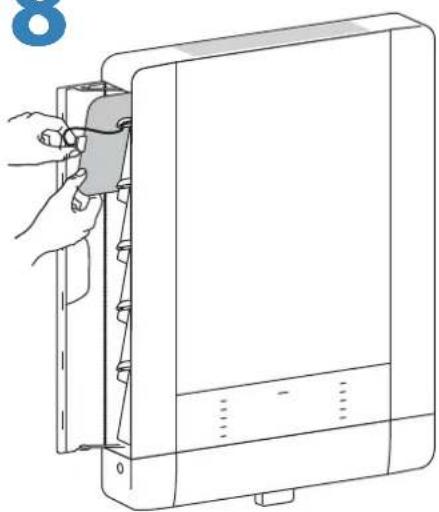
NOTE: Tablet screen should face the wall when inserting.
8
natural_image
Line drawing of a hand inserting a cable into a device panel (no text or symbols)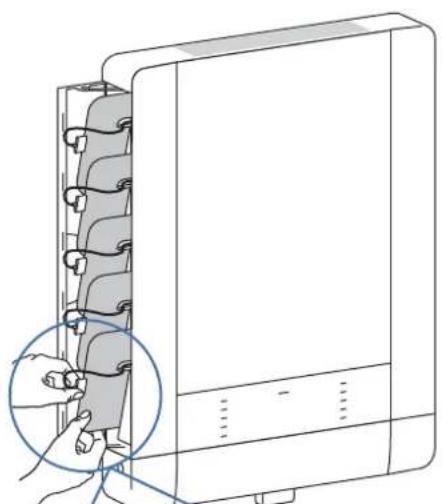
natural_image
Line drawing of a computer tower with a hand inserting a cable into the case (no text or symbols)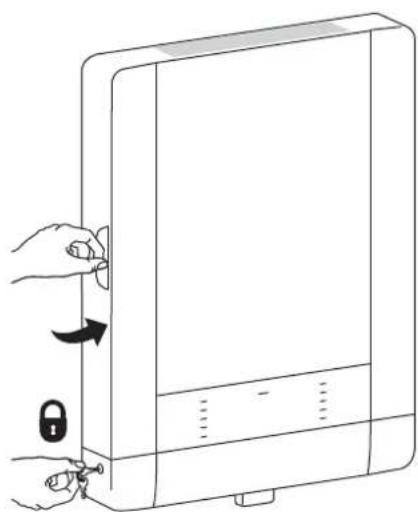
natural_image
Line drawing of a computer tower with hands holding keys and a lock, no text or symbols present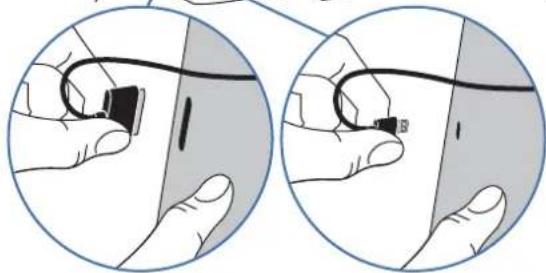
natural_image
Illustration showing two hands holding a small electronic device connected to a cable, with no visible text or symbols.Lightning™ Cable30 Pin Cable
9
natural_image
Line drawing of a device with a hand holding an open lid and a lock, no text or symbols present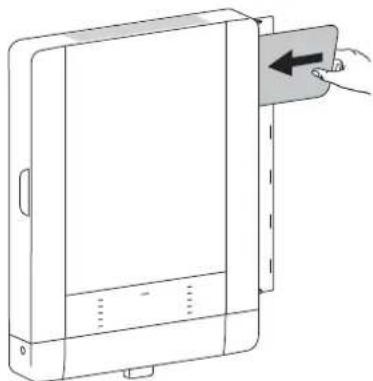
natural_image
Line drawing of a device with a hand inserting a card into a panel (no text or symbols)
natural_image
Line drawing of a closed notebook with a hand inserting a spring into it (no text or symbols)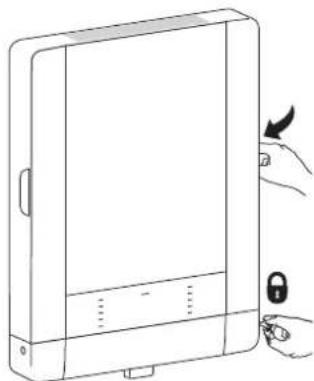
natural_image
Line drawing of a device with a hand holding a lock and a scroll wheel (no text or symbols)10 Tablet Charging
natural_image
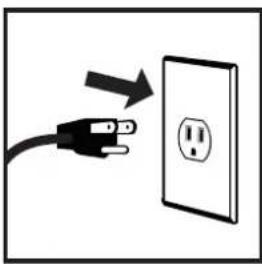
Illustration of a black electrical plug connected to an open electrical outlet with a square symbol (no text or labels)To begin charging the tablets, plug in the power cord.
The power cord is used to turn the power on and off. Charging occurs whenever the power cord is connected UNLESS a Macintosh ^® or PC notebook USB cable is connected for syncing.

NOTE: The power cord acts as the connect/disconnect device switching power off and on. The socket outlet shall be installed near the equipment and shall be easily accessible.
LED - Indicators
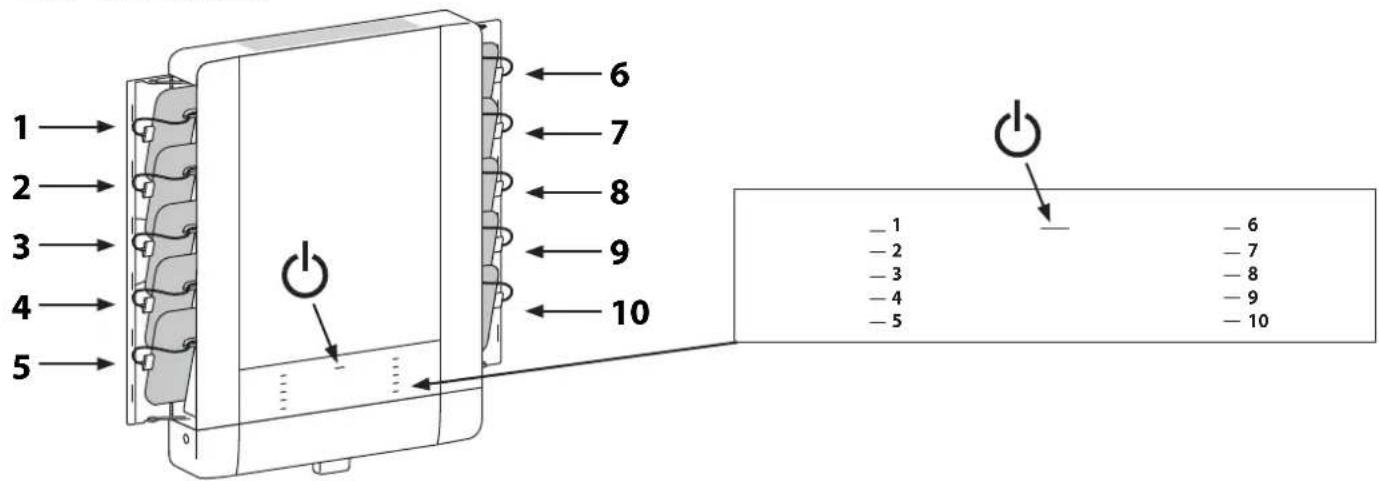

Power Indicator – Communicates sync and charge status with the following signals:
| Light Description | |
| Off No power to the module. | |
| On - solid iPad devices are charging. | |
| On - slow blink Computer is plugged into USB port and iPad devices are ready to sync or are syncing. | |
| On - fast blink | Fault Status. Please make sure all cables are seated correctly and product is operating within specified operating temperature. Can also indicate a failed 30 pin or lightning cable. Contact Ergotron Customer Support if problem continues. |
1-10 Individual Status Indicators (ISI) – Sequentially numbered LEDs (1 - 10) corresponding to each tablet slot in the unit:
| Light Description | |
| Green Fully charged. | |
| Amber ■ | Charging in progress. |
| Off No device connected. | |

NOTE: If module is syncing all ISIs will be green.
Tablet Syncing

NOTE: Complete the Tablet Charging instructions before syncing. iPad devices should be charged at least 50% before starting the syncing process.
Syncing can be done using iTunes ^® or the Apple Confi gurator program available for the Macintosh ^® computer. Please reference www.Apple.com for more information.
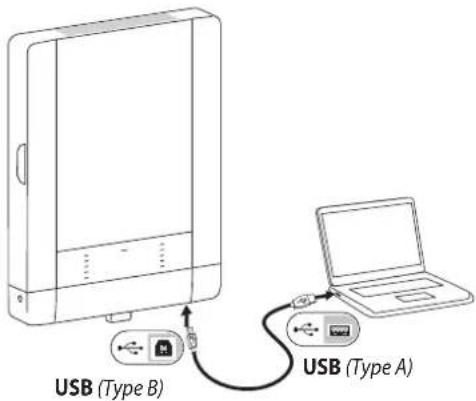
NOTE: The devices will not charge while syncing is in process. To return to charge mode, unplug the USB cable from the TM Wall Mount 10 USB port when syncing is complete.
The iPad devices will mount as USB devices when the A to B USB cable (not included) is connected to a host notebook via the USB port on the bottom of the TM Wall Mount 10.
If using iTunes, please see separate iTunes setup instructions available on the Ergotron website Tablet Management Wall Mount 10 product page.
Cleaning and Maintenance
| Equipment Electric SafetyThere are specific risks associated with the use of equipment having power cables. You must be aware of, and avoid these risks when this product is located in close proximity to children. | |
| WARNING: Failure to observe the following Electrical Safety notices can result in fi re or death by electric shock. | |
| Electrical cables can be hazardous. Misuse can result in fi re or death by electrical shock.Double Pole / Neutral FusingInspect power cables thoroughly before each use.Do not use cables that are damaged.Insert the plug completely into the outlet.Grasp the plug to remove from the outlet.Do not unplug by pulling on the cable.Do not use excessive force to make connections.Do not plug the cable into an extension cable.Do not remove, bend or modify any metal prongs or pins of cable.Do not drive, drag or place objects over the cable.Do not walk on the cable.Avoid overheating. Uncoil the cable and do not cover it with any material.Do not run cable through doorways, holes in ceilings, walls or floors. | |
| Keep this product away from water.Do not use it when wet.Do not place this product in close proximity to fl ammable liquids or gases. | |
| This product is intended for use only with loading as indicated. Use with loads greater than indicated may result in instability causing possible injury. | |
| The power cord acts as the connect/disconnect device switching power off and on. The socket outlet shall be installed near the equipment and shall be easily accessible. | |
| CAUTION: Changes or Modifications not expressly approved by Ergotron could void the user's authority to operate the equipment. | |
| Use SafetyThere are specific risks associated with the use of this product (for charging or storage). You must be aware of, and avoid these risks when this product is located in close proximity to children. | |
| WARNING: Failure to observe the following Use Safety notices may result in serious personal injury or equipment damage. | |
| Only Adults should use this product.Do not allow anyone to climb or hang on this product.Do not block the fans and vent openings. To prevent overheating, leave at least 127 mm (4-inch) clearance around fans and vents.This product is designed to be used indoors only.Do not use this product to store equipment other than what has been noted in this guide.Do not use this product to store liquids or cleaning supplies.Do not place heavy objects on this product.- The maximum weight capacity is 24 lbs (11 kg). |
23.2"W x 31.8"H x 4.0"D (59 x 80.9 x 10.2 cm)
Weight (w/o equipment)
34.5 lbs (15.7 kg)
Rated weight capacity
24 lb (11 kg)
Maximum tablet size
Individual tablet dimensions (including cover): up to 10.2" H x 7.9" W x 0.9" D (25.9 x 20.1 x 2.3 cm) Individual tablet weight: up to 2.4 lb (1.1 kg)
LED status indicators (ISI)
Lights indicate power status and syncing activity 10 LED lights
Cooling/ventilation
One 12-volt DC continuous operation fan in each module
Shipping dimensions
36.5" x 26.4" x 7.0" (92.6 x 67.0 x 17.7 cm)
Shipping weight
43 lb (19.5 kg)
Power system
Input: 100-240V\~, 2.0A, 50/60 Hz
Environmental
Temperature range:
Operating 0° to 30°C (32° to 86°F)
Storage -40° to 60°C (-40° to 140°F)
Relative humidity (maximum):
Operating 10%–90% (non condensing)
Storage 5%–95% (non condensing)
Altitude (maximum): 2000 m (6,562 ft)
Compatibility:
Model DM10-1006-X Made for
iPad (3rd generation)
iPad 2
iPad
Model DM10-1007-X Made for
iPad Air™
iPad (4th generation)
iPad mini™ with Retina® display
iPad mini™
Service and Warranty
For Service on the Ergotron Tablet Management Wall Mount Charging Station
for iPad
Visit www.ergotron.com

NOTE: When contacting customer service, reference the serial number.
www.ergotron.com
MADE IN CN
12-345-678

1234567-1234
natural_image
Technical line drawing of a mechanical or electrical component with coiled spring and housing (no text or symbols)
While Ergotron, Inc. makes every effort to provide accurate and complete information on the installation and use of its products, it will not be held liable for any editorial errors or omissions (including those made in the process of translation from English to another language), or for incidental, special or consequential damages of any nature resulting from furnishing this instruction and performance of equipment in connection with this instruction. Ergotron, Inc. reserves the right to make changes in the product design and/or product documentation without notification to its users. For the most current product information, or to know if this document is available in languages other than those herein, please contact Ergotron. No part of this publication may be reproduced, stored in a retrieval system, or transmitted in any form or by any means, electronic, mechanical, photocopying, recording or otherwise without the prior written consent of Ergotron, Inc., 1181 Trapp Road, Eagan, Minnesota, SS121, USA Patents Pending and Patented U.S. & Foreign. Ergotron is a registered trademark of Ergotron, Inc.
Americas Sales and
Corporate Headquarters
St. Paul, MN USA
(800) 888-8458
+1-651-681-7600
www.ergotron.com
sales@ergotron.com
EMEA Sales
Amersfoort, The Netherlands
+31 33 45 45 600
www.ergotron.com
info.eu@ergotron.com
APAC Sales
Tokyo, Japan
www.ergotron.com
apaccustomerservice@ergotron.com
Worldwide OEM Sales
www.ergotron.com
info.oem@ergotron.com