
Business 5361 - Telephone AASTRA - Free user manual and instructions
Find the device manual for free Business 5361 AASTRA in PDF.


| Product Type | Business Telephone |
| Brand | Aastra |
| Model | Business 5361 |
| Dimensions (approx.) | 200 x 180 x 100 mm |
| Weight (approx.) | 0.8 kg |
| Power Supply | Power over Ethernet (PoE) or AC adapter (12V DC) |
| Display | Backlit LCD with multiple lines |
| Keypad | Alphanumeric keypad with dedicated function keys |
| Speakerphone | Full-duplex speakerphone |
| Headset Support | RJ9 headset jack |
| Voicemail | Integrated voicemail with message waiting indicator |
| Call Features | Caller ID, call hold, transfer, conference, call forwarding |
| Programmable Keys | Multiple programmable keys for speed dial and features |
| Network Interface | 10/100 Mbps Ethernet |
| Warranty | 1-year limited warranty |
| Cleaning Instructions | Wipe with a soft, dry cloth. Do not use liquids or cleaners. |
| Safety | Use only supplied or approved power adapter. Follow safety guidelines in manual. |
| Repair and Spare Parts | Contact authorized Aastra service center. Unauthorized repair voids warranty. |
| Manual | 126-page user manual available in PDF format |
Frequently Asked Questions - Business 5361 AASTRA
User questions about Business 5361 AASTRA
0 question about this device. Answer the ones you know or ask your own.
Ask a new question about this device
Download the instructions for your Telephone in PDF format for free! Find your manual Business 5361 - AASTRA and take your electronic device back in hand. On this page are published all the documents necessary for the use of your device. Business 5361 by AASTRA.
USER MANUAL Business 5361 AASTRA
natural_image
Woman in business attire talking on a landline at a desk in an office environment, with a digital phone and documents visible (no text or symbols)natural_image
Black office telephone with keypad and cord, no visible text or symbols on device bodyWillkommen...
Limited Warranty (Australia only) 11
Limited Warranty (Australia only).... 11
Dokumentinformationen.... 14
Sicherheitshinweise
Limited Warranty (Australia only)
The benefits under the Astra Limited Warranty below are in addition to other rights and remedies to which you may be entitled under a law in relation to the products.
In addition to all rights and remedies to which you may be entitled under the Competition and Consumer Act 2010 (Commonwealth) and any other relevant legislation, Aastra warrants this product against defects and malfunctions in accordance with Aastra's authorized, written functional specification relating to such products during a one (1) year period from the date of original purchase ("Warranty Period"). If there is a defect or malfunction, Aastra shall, at its option, and as the exclusive remedy under this limited warranty, either repair or replace the product at no charge, if returned within the warranty period.
Repair Notice
To the extent that the product contains user-generated data, you should be aware that repair of the goods may result in loss of the data. Goods presented for repair may be replaced by refurbished goods of the same type rather than being repaired. Refurbished parts may be used to repair the goods. If it is necessary to replace the product under this limited warranty, it may be replaced with a refurbished product of the same design and colour.
If it should become necessary to repair or replace a defective or malfunctioning product under this warranty, the provisions of this warranty shall apply to the repaired or replaced product until the expiration of ninety (90) days from the date of pick up, or the date of shipment to you, of the repaired or replacement product, or until the end of the original warranty period, whichever is later. Proof of the original purchase date is to be provided with all products returned for warranty repairs.
Exclusions
Aastra does not warrant its products to be compatible with the equipment of any particular telephone company. This warranty does not extend to damage to products resulting from improper installation or operation, alteration, accident, neglect, abuse, misuse, fire or natural causes such as storms or floods, after the product is in your possession. Aastra will not accept liability for any damages and/or long distance charges, which result from unauthorized and/or unlawful use.
To the extent permitted by law, Astra shall not be liable for any incidental damages, including, but not limited to, loss, damage or expense directly or indirectly arising from your use of or inability to use this product, either separately or in combination with other equipment. This paragraph, however, is not intended to have the effect of excluding, restricting or modifying the application of all or any of the provisions of Part 5-4 of Schedule 2 to the Competition and Consumer Act 2010 (the ACL), the exercise of a right conferred by such a provision or any liability of Astra in relation to a failure to comply with a guarantee that applies under Division 1 of Part 3-2 of the ACL to a supply of goods or services.
This express warranty sets forth the entire liability and obligations of Aastra with respect to breach of this express warranty and is in lieu of all other express or implied warranties other than those conferred by a law whose application cannot be excluded, restricted or modified. Our goods come with guarantees that cannot be excluded under the Australian Consumer Law. You are entitled to a replacement or refund for a major failure and for compensation for any other reasonably foreseeable loss or damage. You are also entitled to have the goods repaired or replaced if the goods fail to be of acceptable quality and the failure does not amount to a major failure.
Warranty Repair Services
Procedure: Should the product fail during the warranty period and you wish to make a claim under this express warranty, please contact the Astra authorized reseller who sold you this product (details as per the invoice) and present proof of purchase. You will be responsible for shipping charges, if any.
Limitation of liability for products not of a kind ordinarily acquired for personal, domestic or household use or consumption (e.g. goods/services ordinarily supplied for business-use).
Limitation of liability
1.1 To the extent permitted by law and subject to clause 1.2 below, the liability of Aastra to you for any non-compliance with a statutory guarantee or loss or damage arising out of or in connection with the supply of goods or services (whether for tort (including negligence), statute, custom, law or on any other basis) is limited to:
a) in the case of services:
i) the resupply of the services; or
ii) the payment of the cost of resupply; and
b) in the case of goods:
i) the replacement of the goods or the supply of equivalent goods; or
Limitation of liability
ii) the repair of the goods; or
iii) the payment of the cost of replacing the goods or of acquiring equivalent goods; or
iv) the payment of the cost of having the goods repaired.
1.2 Clause 1.1 is not intended to have the effect of excluding, restricting or modifying:
a) the application of all or any of the provisions of Part 5-4 of Schedule 2 to the Competition and Consumer Act 2010 (the ACL); or
b) the exercise of a right conferred by such a provision; or
c) any liability of Astra in relation to a failure to comply with a guarantee that applies under Division 1 of Part 3-2 of the ACL to a supply of goods or services.
After Warranty Service
Aastra offers ongoing repair and support for this product. If you are not otherwise entitled to a remedy for a failure to comply with a guarantee that cannot be excluded under the Australian Consumer Law, this service provides repair or replacement of your Aastra product, at Aastra's option, for a fixed charge. You are responsible for all shipping charges. For further information and shipping instructions contact:
Manufacturer: Note:
Aastra Telecom Australia Pty Ltd ("Aastra")
Level 12, 45 William Street
Melbourne, Victoria 3000, Australia, ABN: 16 140 787 195
Phone: +61 3 8628 9500
Repairs to this product may be made only by the manufacturer and its authorized agents, or by others who are legally authorized. Unauthorized repair will void this express warranty.
natural_image
Simple diagram with three symbols: upward arrows, a circle with dots, and a telephone handset (no text or labels)natural_image
Line drawing of a classic office telephone with keypad and keypad (no text or symbols)

natural_image
Pure technical line drawing of a mechanical bracket or frame structure without any text, numbers, or symbols
Optionen
Steckernetzteil

natural_image
Simple line drawing of an electrical outlet with a coiled cable (no text or symbols)natural_image
Diagram of an electrical connector with wires and components, labeled B (no text or symbols present)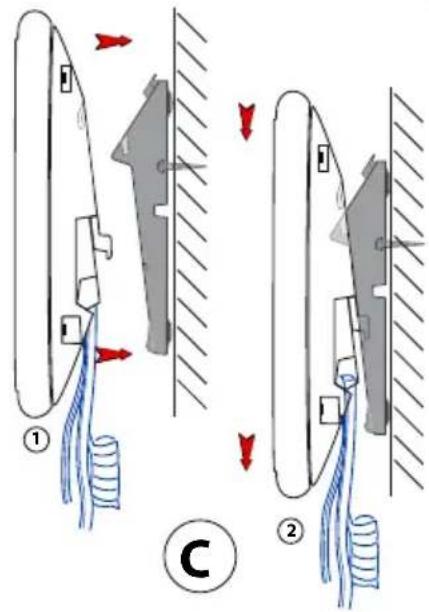
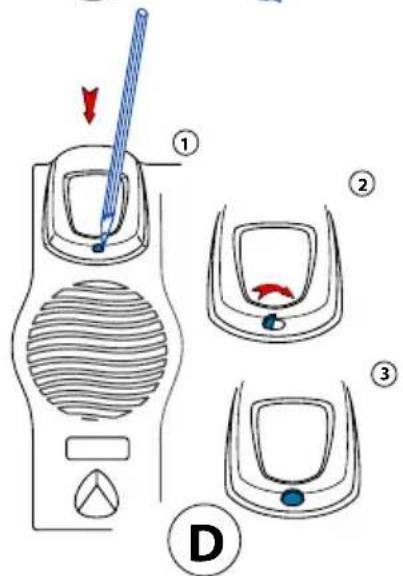
Demontage
Tischtelefon:
| R2.0 R3.0 | ||||||||
| [a] X | ||||||||
| [b] X X | ||||||||
| [c] | ||||||||
| [d] | ||||||||
Index
A
Aastra Alarm Server 79
Abweisen 41
Limited Warranty (Australia only) 11
natural_image
Woman in business attire talking on a landline at a modern office desk, with a large window and office chair in the background (no visible text or symbols)Konformität
Copyright © 2013 Astra Technologies Limited
CE
AASTRA

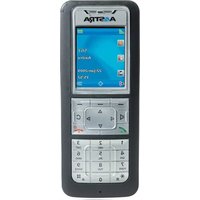
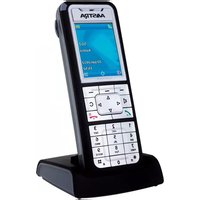
Brand : AASTRA
Model : Business 5361
Category : Telephone