Klassiktelefon 1896 - Phone AUDIOLINE - Free user manual and instructions
Find the device manual for free Klassiktelefon 1896 AUDIOLINE in PDF.


User questions about Klassiktelefon 1896 AUDIOLINE
0 question about this device. Answer the ones you know or ask your own.
Ask a new question about this device
Download the instructions for your Phone in PDF format for free! Find your manual Klassiktelefon 1896 - AUDIOLINE and take your electronic device back in hand. On this page are published all the documents necessary for the use of your device. Klassiktelefon 1896 by AUDIOLINE.
USER MANUAL Klassiktelefon 1896 AUDIOLINE
natural_image
Vintage black-and-white photograph of a classic rotary telephone with ornate arm and keypad (no visible text or symbols)1896
natural_image
Vintage rotary dial telephone on a wooden base, no visible text or symbols1927
Please note the particular information on setting up in Chapter 2.
Operating Instructions
1. General information....7
2. Setting Up....8
2.1 Check contents of pack....8
2.2 Connecting the receiver....8
2.3 Connecting the telephone 8
3. Operation....8
3.1 Making a call 8
3.2 Receiving calls 8
3.3 Redial facility 8
3.4 Adjusting the receiver volume 9
3.5 Adjustable ringer volume....9
4. Important information 9
4.1 Fault finding....9
4.2 Replacing the telephone cable....9
4.3 Guarantee....9
4.4 Declaration of Conformity/CE mark....10
- Operating Instructions -
1. General information
Please read these operating instructions carefully. If you should have any questions, please contact our Service Department on the Hotline number 0180 5 00 13 88 (costs Telekom by printing: 12ct/min). Under no circumstances open the unit yourself and do not try to carry out your own repairs. For any claims under the warranty, please refer to your dealer.
Intended use - This telephone has been designed for use on an analogue telephone line (PSTN) within Germany. However, no guarantee can be accepted for trouble-free operation on all telecommunications terminal equipment connections due to the differences between the different telecommunications network operators. The telephone requires a TAE socket with F/N coding in common with other plug-in units such as fax machines, answering machines or modems. Connect the telephone cable to the phone socket intended for the purpose only. Do not change the plug on the connecting cable.
Private exchanges - The telephone can also be connected to a private exchange. You can find out from the dealer from whom the equipment was purchased whether your telephone will work on your private exchange without any problems. Due to the large number of different private exchanges, it is not possible to guarantee this function.
Temperature and Ambient Conditions - The telephone is designed for use in protected rooms with a temperature range of 10 °C to 30 °C. The base station must not be installed in damp rooms such as a bathroom or laundry room. Avoid proximity to sources of heat such as radiators and do not expose the unit to direct sunlight.
Position - Do not set up the telephone in the immediate vicinity of other electrical equipment such as microwaves or hi-fi systems, as this may result in mutual interference. The location has a decisive influence on the trouble-free operation of the telephone.
Place the telephone on a flat and non-slip surface. The feet of the telephone do not normally leave any marks on the surface. However, due to the large number of varnishes and surfaces in use, it may not be possible to prevent marks occurring on the surface due to the feet of the unit.
Do not use the telephone in areas where there is a risk of explosion.
Excessive exposure to smoke, dust, vibrations, chemicals, moisture, heat or the direct rays of the sun must be avoided.
Cleaning and care - The surface of the case can be cleaned with a soft, dry, lint-free cloth. Never use cleaning agents, particularly aggressive solvents. No attention is necessary apart from cleaning the case occasionally. The rubber feet of the base station are not resistant to all cleaning agents. The manufacturer can therefore not accept any liability for possible damage to furniture or the like.
- Operating Instructions -
2. Setting Up
2.1 Check contents of pack
The following items are supplied:
| one telephone base one telephone receiver with cable |
| one telephone connecting cable one instruction manual |
2.2 Connecting the receiver

HANDSET
After unpacking your telephone, you must first connect the telephone receiver to the telephone base. Take the end of the spiral cable and plug it into the socket HANDSET of the telephone base HANDSET.
2.3 Connecting the telephone

TEL LINE
Connect the telephone cable supplied to the telephone socket and the telephone jack TEL LINE of the telephone base. The telephone works using the MF system (Tone Dialling).
Important note!
Before using the telephone for the first time, please observe the following instructions:
- Connect the telephone as described in the operating instructions.
- Before the first call can be received, you must first lift the receiver and wait for the dialling tone.
- Replace the receiver and your telephone is ready for use.
This procedure should also be repeated if the telephone has not been used for some time.
3. Operation
3.1 Making a call
Your telephone can be used like any conventional telephone.
| Please follow the instructions: |
| Lift the receiver and wait until you hear the dialling tone. |
| Now dial the required telephone number. |
| To end the call, replace the receiver on the rest. |
3.2 Receiving calls
When a call comes through, you will hear the ringing tone. The call can now be accepted using the receiver.
3.3 Redial facility
If a connection that you have dialled is engaged or you were unable to get through to anybody, simply replace the receiver. The last number dialled remains stored in the telephone automatically. The redial key is in the center of the dial area. To use the redial facility, lift the receiver and press the redial button. The stored redial number will now be dialled.
- Operating Instructions -
3.4 Adjusting the receiver volume

If the receiver volume is too quiet or too loud for you, you can change this to suit your requirements. You can adjust the volume from soft to loud using the HANDSET VOLUME switch.
3.5 Adjustable ringer volume
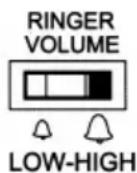
By means of the slide switch RINGER VOLUME you can choose the settings HIGH (loud) or LOW (soft) to match the volume of the ringing tone to your requirements.
4. Important information
4.1 Fault finding
Remove all extra telephone equipment and connect only the telephone directly to the telephone socket. If the fault is still present, connect another telephone (if available) to the telephone socket. The results will show you whether the fault lies with the unit or with the telephone line. In the case of technical problems you can also contact our Service Department on the Hotline number 0180 5 00 13 88 (costs Telekom by printing: 12ct/min).
4.2 Replacing the telephone cable
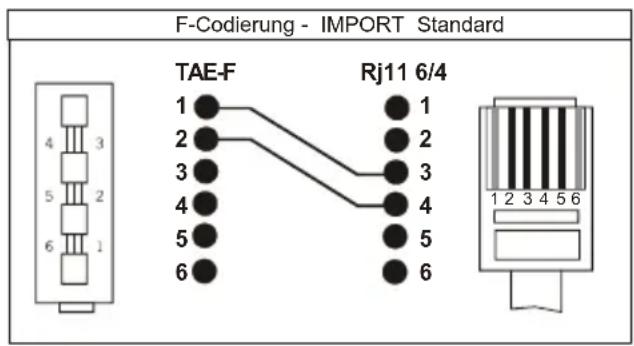
If you have to replace your telephone cable, you can locate the appropriate cable at your dealer's with the help of the following diagram.
text_image
F-Codierung - IMPORT Standard TAE-F Rj11 6/4 1 2 3 4 5 6 1 2 3 4 5 64.3 Guarantee
AUDIOLINE equipment is manufactured and tested in accordance with the most up to date production methods. Selected materials and highly developed technology ensure trouble-free operation and long life. If your unit should develop a fault within the guarantee period, however, please contact the shop where you bought your AUDIOLINE equipment exclusively and have your purchase receipt available for inspection. The warranty period is 24 months from the day of purchase. This warranty is not applicable to the batteries or battery packs used in the various products.
- Operating Instructions -
Warranty conditions: Within the guarantee period, all defects due to material or manufacturing faults will be repaired free of charge. The guarantee is invalidated if the equipment has been tampered with by the purchaser or third parties. Any damage caused by improper handling or operation, by incorrect positioning or storage, by improper connection or installation or by excessive force or other external influences is not covered by the guarantee. In the case of complaint, we reserve the right to repair or replace defective parts or to exchange the equipment. Exchanged parts or exchanged equipment become our property. Claims for compensation are excluded insofar as they do not relate to criminal intent or gross negligence on the part of the manufacturer. All guarantee claims according to these conditions must be raised exclusively with your dealer. Rights under the guarantee can no longer be enforced after the expiry of 24 months from purchase and delivery of our products. In the case of unnecessary or unjustified demands on the customer service department, we will levy our usual service charges for materials, time, postage and packing. Any complaints must be reported as soon as a problem is found. The guarantee is valid within the German Federal Republic.
4.4 Declaration of Conformity/CE mark
The telephone complies with the basic requirements of the R&TTE Directive "1999/5/EEC". This is confirmed by the CE mark.
For the complete Declaration of Conformity, please use the free download from our web site www.audioline.de.