
Aquaris micon - Hearing aid SIEMENS - Free user manual and instructions
Find the device manual for free Aquaris micon SIEMENS in PDF.


| Product Type | Behind-the-ear (BTE) hearing aid with LifeTube or earhook |
| Model | Aquaris micon (Siemens) |
| Water Protection | IP68 (waterproof up to 1 meter for 1 hour, with earhook and swim-mold) |
| Battery Type | Non-rechargeable size 13 |
| Wireless Technology | e2e wireless 2.0 (for remote control and simultaneous control of both instruments) |
| Hearing Programs | Multiple programs (configurable by hearing care professional) |
| Power-On Delay | Yes (whistle-free insertion, configurable) |
| Accessories | Remote control, audio streamer, Aquapac (waterproof bag), Sport Clip |
| Ear Pieces | LifeTip (open, closed, double, semi-open) or swim-mold (custom) |
| Tube Options | LifeTube or earhook |
| Operating Frequency | 3.28 MHz (e2e wireless) |
| Maintenance | Daily cleaning with microfiber cloth; LifeTube cleaning with special wire; drying overnight with open battery compartment |
| Part Replacement | Ear pieces and tubes every 3–6 months; battery compartment annually |
| Safety Compliance | CE (93/42/EEC, 99/5/EC), FCC Part 15, IC RSS-210, IP68 |
| Intended Use | Amplify sound for hearing-impaired individuals; prescribed by hearing health specialist |
| Storage Conditions | Temperature 10–40°C, relative humidity 10–80% |
| Transport Conditions | Temperature -20–60°C, relative humidity 5–90% |
| Disposal | Recycle according to national regulations; do not dispose of batteries with household waste |
Frequently Asked Questions - Aquaris micon SIEMENS
User questions about Aquaris micon SIEMENS
0 question about this device. Answer the ones you know or ask your own.
Ask a new question about this device
Download the instructions for your Hearing aid in PDF format for free! Find your manual Aquaris micon - SIEMENS and take your electronic device back in hand. On this page are published all the documents necessary for the use of your device. Aquaris micon by SIEMENS.
USER MANUAL Aquaris micon SIEMENS
natural_image
Two Siemens earbuds with white and blue body, connected by a white cable (no text or symbols visible)Aquaris micon
User Guide
www.siemens.com/hearing

Life sounds brilliant.
Content
Welcome
4
Your hearing instruments 5
Getting to know your hearing instruments 5
Components and names 6
Settings 7
Battery size and ear pieces 8
Service information 9
Batteries
10
Replacing non-rechargeable batteries 10
Daily use 12
Turning on and off 12
Inserting 14
Adjusting the volume 17
Changing the hearing program 17
Sport Clip 18
On the phone 20
Telephone program 20
Audio induction loops 21
Maintenance and care 22
Cleaning 22
Drying 25
Storage 25
Exchanging ear pieces and tubes 25
Exchanging the battery compartment 25
Troubleshooting 26
Important information 27
Intended use 27
Explanation of symbols 27
Transport and storage conditions 27
Disposal information 28
Technical information 28
Conformance information 30
Important safety information 31
Personal safety 31
Product safety 33
Country-specific information 37
Welcome
You have chosen a Siemens hearing instrument, a reliable partner to accompany you through everyday life. Like everything new, it will take you a little while to become familiar with it.
This document, along with support from your Hearing Care Professional, will help you. You will quickly come to appreciate the advantages and greater quality of life your hearing instrument offers.

CAUTION
Read this user guide thoroughly and completely and follow the safety information in this document to avoid damage or injury.
To benefit most from your hearing instrument, wear it daily and all day long. Especially after longer periods of living with hearing loss, a dedicated hearing training is recommended - with a Hearing Care Professional or at home.
Your hearing instruments
Getting to know your hearing instruments
Your hearing instruments have no controls.
If you want to adjust the volume or switch hearing programs manually, you can ask your Hearing Care Professional about a remote control option.
Waterprotection
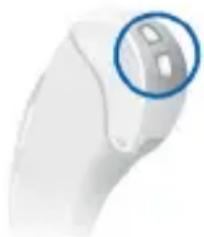
The unique design makes your hearing instruments waterproof. For example, the battery compartment has a special seal and the membranes on the battery compartment provide air required for the battery function while keeping water out.
natural_image
Close-up of a white electronic device with a blue circular highlight on the top (no text or symbols visible)It is, however, important that you observe a few basic rules:
- Your hearing instruments are only protected against water immersion, when worn with an earhook and swim-mold. The swim-mold is a custom-made ear piece that is based on the anatomy of your ear.
- Moisture inside the hearing instruments may nevertheless be produced, e. g. by condensation. Follow the instructions for drying in section "Maintenance and care".
Components and names
Your hearing instruments are either equipped with a LifeTube or with an earhook:


1 Ear piece (LifeTip)
2 Concha lock (optional)
③ Tube (LifeTube)
4 Earhook (alternative)
5 Microphone membranes
6 Battery compartment
Settings

Ask your Hearing Care Professional to mark your individual settings on the following pages.
Hearing programs
| 1 |
| 2 |
| 3 |
| 4 |
| 5 |
| 6 |
Read more in section "Changing the hearing program".
Features

Power-on delay enables whistle-free insertion of hearing instruments.
Read more in section "Turning on and off".

e2e wireless enables the use of remote controls and simultaneous control of both hearing instruments.
Accessories
 | Remote control Audio streamer  | |
 | Aquapac (waterproof sealing bag) |  Sport ClipRead more in section "Sport Clip" Sport ClipRead more in section "Sport Clip" |
Battery size and ear pieces
| Batteries | ||
| Non-rechargeable (size 13) | ||
| Exchangeable ear pieces(only with LifeTubes) | Size | |
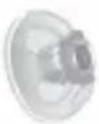 LifeTip open or closed LifeTip open or closed | ||
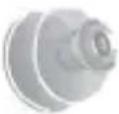 LifeTip double LifeTip double | ||
 LifeTip semi-open LifeTip semi-open | ||
Service information
Serial numbers
Left:
Right:
Service dates
1:
2:
3:
4:
5:
6:
Your Hearing Care Professional
Date of purchase:
Batteries
When the battery is low the sound becomes weaker or you will hear an alert signal. It depends on the battery type how long you have until you have to replace the battery.
Replacing non-rechargeable batteries
Remove empty batteries immediately and dispose of according to local regulations.

Remember to have your replacement batteries with you at all times.
Removing:
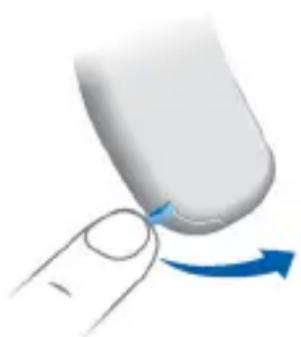
Open the battery compartment.
The battery falls out when the compartment is completely open.
natural_image
Close-up of a finger pressing a button with a blue arrow indicating rotation (no text or symbols)If the battery does not fall out, lightly tap the instrument or use the magnet stick. The magnet stick is available as an accessory.

natural_image
Close-up of a robotic arm joint with a blue circular button and directional arrow (no text or symbols)Inserting:
Remove the protective film from the new battery.
Insert the battery with the "+" symbol facing up (refer to the picture).
Carefully close the battery compartment. If you feel resistance, the battery is not inserted correctly.
Do not attempt to close the battery compartment by force. It can be damaged.

NOTICE
Take care when closing the battery compartment, that no hair is caught in.

NOTICE
Sharp objects and dirt can damage your hearing instruments.
Remove the battery only with your fingers or a magnet stick.


natural_image
3D illustration of a blue and white mechanical component with a blue arrow indicating direction (no text or symbols)Daily use
Turning on and off
You have several options to turn your hearing instruments on or off.

NOTICE
Water penetration damages your hearing instruments.
Always use the remote control in an AquaPac to turn your hearing instrument on and off during water activities.
Via battery compartment:
Turning on: Close the battery compartment. The default volume and hearing program are set.
▶ Turning off: Open the battery compartment.
Via remote control:
▶ Follow the instructions in the remote control's user guide.
After turning on, the previously used volume and hearing program are set.

- When wearing the hearing instruments, an optional signal can indicate when an instrument is turned on or off.
■ Remove the batteries if the hearing instruments are not used for several days.
When the power-on delay is activated, the hearing instruments turn on after a delay of several seconds.
During this time you can insert the hearing instruments without experiencing unpleasant whistling.
The "power-on delay" can be activated by your Hearing Care Professional.
Inserting
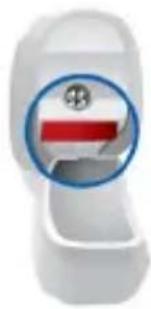
Your hearing instruments have been fine-tuned for your right and left ear. Colored markers in the battery compartment indicate the side:
■ red marker = right ear
■ blue marker = left ear
natural_image
Close-up of a white toilet with a red and blue button symbol (no text or numbers visible)To insert the hearing instrument:
Hold the tube at the bend.
Carefully push the ear piece in the ear canal.
Twist it slightly until it sits well
Open and close your mouth to avoid accumulation of air in the ear canal.
Lift the hearing instrument and slide it over the top of your ear.


CAUTION
Risk of injury!
Insert the ear piece carefully and not too deeply into the ear.
i
- Insert the right hearing instrument with the right hand and the left hearing instrument with the left hand.
If you have problems inserting the ear piece, use the other hand to gently pull your earlobe downwards. This opens the ear canal and eases insertion of the ear piece.
The optional concha lock helps to securely retain the ear piece in your ear. To position the concha lock:
Bend the concha lock and position it carefully into the bowl of your ear (refer to the picture).

natural_image
Illustration of a human ear with an ear canal and earpiece, showing no text or symbolsRemoving
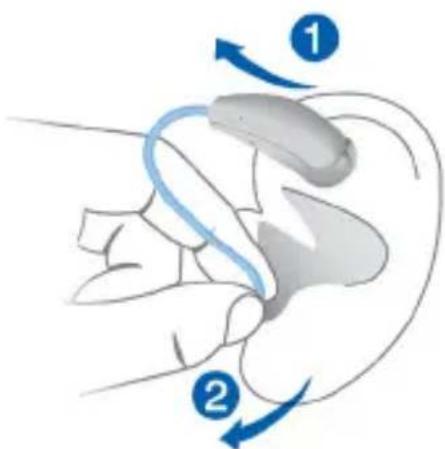
Lift the hearing instrument and slide it over the top of your ear.
Hold the tube and pull the ear piece carefully out.

CAUTION
Risk of injury!
In very rare cases the ear piece could remain in your ear when removing the hearing instrument. If this happens, have the ear piece removed by a medical professional.
Clean and dry your hearing instruments after usage. Read more in section "Maintenance and care".
Adjusting the volume
Your hearing instruments automatically adjust the volume to the listening situation.
If you prefer manual volume adjustment, use a remote control. Follow the instructions in the remote control's user guide.
An optional signal can indicate the volume change.
Changing the hearing program
Hearing programs change the characteristics of the sound coming through the hearing instrument. They help you to select the optimal setup for every listening situation. An optional signal can indicate the change of the hearing program.
To change the hearing program, use a remote control. Follow the instructions in the remote control's user guide.
Refer to section "Settings" for a list of your hearing programs.
SportClip
The Sport Clip supports the retention of your hearing instruments during sport activities.
Attaching the Sport Clip
Press the Sport Clip evenly on top of your hearing instrument until it clicks into place.

Place your hearing instrument behind your ear.
Bend the safety string around your earlobe to secure the Sport Clip.

natural_image
Illustration of a human ear with a blue arrow indicating motion or force (no text or symbols)With the Sport Clip attached, it is still possible to turn your hearing instruments on and off via the battery compartment.
Removing the Sport Clip
Release the safety string from your earlobe.
Remove your hearing instrument.
Pull the safety string upward to remove the Sport Clip.

natural_image
Medical device with attached tubing and a blue arrow indicating direction (no text or symbols visible)Ask your Hearing Care Professional for further information.
On the phone
When you are on the phone, hold the telephone receiver slightly above your ear. The hearing instrument and telephone receiver have to be aligned. Turn the receiver slightly so that the ear is not completely covered.

natural_image
Illustration of a hand holding an ear with a medical device (no text or symbols visible)Telephoneprogram
You may prefer a certain volume when using the phone. Ask your Hearing Care Professional to configure a telephone program.
Switch to the telephone program whenever you are on the phone.
Whether a telephone program is configured for your hearing instrument is listed in section "Settings".
Audio induction loops
Many telephones as well as public places like theatres offer the audio signal (music and speech) via an audio induction loop. With this system, your hearing instruments can directly receive the desired signal – without distracting noise in the environment.
You can usually recognize audio induction loop systems by certain signs.

natural_image
Blue square icon with a white hearing curve and a small 'T' symbol (no text or numbers)
This function is only available in combination with an audio streamer.
Your hearing instruments can receive this signal via an audio streamer. Audio streamers are available as accessory. Ask your Hearing Care Professional for an appropriate audio streamer and to configure a telecoil program.
Switch to the telecoil program whenever you are in a place with an audio induction loop.
Whether the telecoil program is configured for your hearing instrument is listed in section "Settings".
▶ Follow the instructions in the audio streamer's user guide.
Maintenance and care
Siemens hearing instruments are so robust that they will function reliably for years. It is, however, important that you take care of your instruments and observe a few basic rules, which will soon become habit.
Cleaning
For hygiene reasons and to maintain functionality, clean your hearing instruments daily.

NOTICE
Avoid immersing your hearing instruments in chemicals.
Do not put LifeTubes or LifeTips in water.
The hearing instrument is only protected against water immersion, when worn with an earhook and swim-mold. Water can enter the hearing instrument via the receiver when submerged after removing it from the ear.
Clean your hearing instruments with a microfiber cloth.
If your hearing instruments are equipped with LifeTubes, regularly clean the tubes with special cleaning wires.
Refer to section "Cleaning the tubes" for details.
Ask your Hearing Care Professional for recommended cleaning products, special care sets and further infor-
mation on how to keep your hearing instruments in good condition.
For a more thorough professional cleaning, take your instruments to your Hearing Care Professional.

NOTICE
Sharp objects and dirt can damage your hearing instruments.
Clean the membrane of the battery compartment regularly with a microfiber cloth.
Cleaning the LifeTubes
If your hearing instruments are equipped with LifeTubes, you can remove cerumen from the tubes using a special cleaning wire. Ask your Hearing Care Professional for suitable cleaning wires.
Screw off the tube.

natural_image
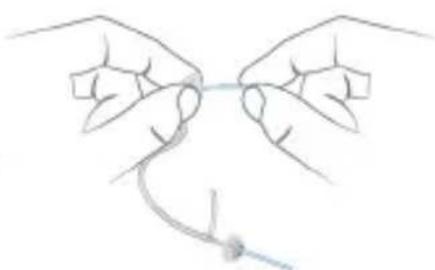
Illustration of two hands holding a medical device with a blue arrow indicating the tip (no text or symbols present)Carefully insert the cleaning wire into the tube. Start from the side opposite to the ear piece adapter.
natural_image
Line drawing of two hands tying a knot around a string (no text or symbols)▶ Push the cleaning wire all the way through the tube.
Wipe away any cerumen or debris that is dislodged from the tube.
▶ Completely remove the cleaning wire from the tube.
Screw the tube onto the hearing instrument.

CAUTION
Risk of damage to ear canal and ear drum.
Always remove the Life Cleaning Wire from the LifeTube before reattaching it to your hearing instrument.
Drying
Dry your hearing instruments overnight with open battery compartment.
▶ Ask your Hearing Care Professional for recommended drying products.
Storage
During longer periods of non-use, store your hearing instruments with open battery compartment (and batteries removed) in a drying system in order to prevent the penetration of moisture.
Exchanging ear pieces and tubes
For hearing instruments with a LifeTube:
▶ Ask your Hearing Care Professional to exchange the ear pieces and tubes approximately every 3 to 6 months or as needed.
Exchanging the battery compartment
Your hearing instruments have to be serviced regularly to ensure they remain waterproof.
Ask your Hearing Care Professional to exchange the battery compartment of your hearing instruments once a year and to register each exchange of the battery compartment in section "Service information" of this user guide.
Troubleshooting
| Problem Possible solution | |
| Sound is weak. Increase the volume. | Replace the empty battery.Clean or exchange the tube and the ear piece. |
| Hearing instrument emits whistling sounds. | Reinsert the ear piece until it fits securely.Decrease the volume.Clean or exchange the ear piece. |
| Sound is distorted. Decrease the volume. | Replace the empty battery.Clean or exchange the tube and the ear piece. |
| Hearing instrument emits signal tones. | Replace the empty battery. |
| Hearing instrument does not work. | Turn the hearing instrument on.Gently close battery compartment completely.Replace the empty battery.Make sure the battery is inserted correctly.Power-on delay is active. Wait several seconds and check again. |
Consult your Hearing Care Professional if you encounter further problems.
Importantinformation
Intendeduse
Hearing instruments are intended to improve the hearing of hearing impaired persons. Diagnosis and prescription of a hearing instrument must be performed by hearing health specialists, e.g. acousticians, audiologists or ENT doctors.

Use the hearing instruments and accessories only as described in this user guide.
Explanation of symbols

Points out a situation that could lead to serious, moderate, or minor injuries.

Indicates possible property damage.

Advice and tips on how to handle your device better
Transport and storage conditions
During extended periods of transport and storage, please observe the following conditions:
| Storage Transport | ||
| Temperature 10 to 40 °C -20 to 60 °C | ||
| Relative humidity 10 to 80 % 5 to 90 % | ||
| Air pressure 700 to 1050 hPa 200 to 1200 hPa | ||
| For other parts, such as batteries, other conditions may apply. | ||
Disposalinformation
Within the European Union, the marked equipment is covered by "Directive 2002/96/EC of the European Parliament and of the Council of 27 January 2003 on waste electrical and electronic equipment."

Amended by "Directive 2003/108/EC" (WEEE).


NOTICE
Recycle hearing instruments, accessories and packaging according to national regulations.

NOTICE
To avoid environmental pollution, do not throw batteries into household trash.
▶ Recycle or dispose of batteries according to national regulations or return them to your Hearing Care Professional.
Technicalinformation
Siemens Aquaris Xmi, where "X" stands for any digit (e.g. Siemens Aquaris 7mi, Siemens Aquaris 5mi, ...)
FCC ID: SGI-WL002BTE
IC: 267AB-WL002
Operating frequencies: F_c=3.28 MHz

N14203 (EMC and radio communications compliance
label Australia)
This Class B digital apparatus complies with Canadian ICES-003.
Changes or modifications made to this equipment not expressly approved by SAT GmbH for compliance may void the FCC authorization to operate this equipment.
FCC compliance
This device complies with Part 15 of the FCC Rules and with RSS-210 of Industry Canada.
Operation is subject to the following conditions:
■ this device may not cause harmful interference, and
■ this device must accept any interference received, including interference that may cause undesired operation.
This equipment has been tested and found to comply with the limits for a Class B digital device, pursuant to Part 15 of the FCC Rules. These limits are designed to provide reasonable protection against harmful interference in a residential installation. This equipment generates, uses and can radiate radio frequency energy and, if not installed and used in accordance with the instructions, may cause harmful interference to radio communications. However, there is no guarantee that interference will not
occur in a particular installation. If this equipment does cause harmful interference to radio or television reception, which can be determined by turning the equipment off and on, the user is encouraged to try to correct the interference by one or more of the following measures:
■ Reorient or relocate the receiving antenna.
■ Increase the separation between the equipment and receiver.
■ Connect the equipment to an outlet on a circuit different from that to which the receiver is connected.
- Consult the dealer or an experienced radio/TV technician for help.
Conformanceinformation
With the CE marking Siemens confirms compliance with the European Directive 93/42/EEC concerning medical devices. CE 0123
For the products with e2e wireless 2.0 Siemens additionally confirms compliance with the European Directive 99/5/EC (R&TTE) concerning radio and telecommunications terminal equipment.
Important safety information
Personal safety

CAUTION
Risk of injury!
Always wear the tube with an ear piece.
Make sure that the ear piece is completely attached.

WARNING
Risk of affecting electronic equipment!
In areas where the use of electronics or wireless devices are restricted, verify if your device has to be turned off.

WARNING
Risk of impairing the residual hearing of the user.
Use only hearing instruments that have been fitted especially for your needs.

WARNING
Risk of injury!
Do not use obviously damaged devices and return them to point of sale.

WARNING
Risk of explosion!
Do not use your hearing instruments in explosive atmospheres (e. g. in mining areas).

WARNING
Choking hazard!
Your hearing instruments contain small parts which can be swallowed.
Keep hearing instruments, batteries and accessories out of reach of children and mentally disabled persons.
If parts have been swallowed consult a physician or hospital immediately.

Siemens offers special hearing instruments for the fitting of infants and small children.
Ask your Hearing Care Professional for further information.
Product safety

NOTICE
Leaking batteries damage the hearing instruments.
▶ Turn the hearing instruments off when not in use to preserve the battery.
Remove batteries when the instruments are not in use for a prolonged period of time.

NOTICE
Protect your hearing instruments from extreme heat. Do not expose them to direct sunlight.

NOTICE
Do not dry your hearing instruments in the microwave oven.

NOTICE
Different types of strong radiation, e. g. during X-ray or MRI head examinations, may damage hearing instruments.
Do not wear the hearing instruments during these or similar procedures.
Weaker radiation, e. g. from radio equipment or airport security, does not damage the hearing instruments.

NOTICE
Do not wear your hearing instruments when you apply make-up, perfume, aftershave, hair-spray or suntan lotion.

NOTICE
The hearing instrument is only protected against water immersion, when worn with an earhook and swim-mold. Water can enter the hearing instrument via the receiver when submerged after removing it from the ear.

NOTICE
Sharp objects and dirt can damage your hearing instruments.
Do not push any objects through the membrane of the battery compartment.

NOTICE
Your hearing instruments comply to the IP 68 standard, which means they are protected against dust and permanent water immersion (up to one meter/three feet and for up to one hour).
Avoid immersing your hearing instruments in chemicals.
You can use your hearing instruments for water based activities but should avoid situations with high water pressure (e.g. diving into the water or surfing) as this could damage your instruments.
Use appropriate earmolds instead of LifeTube and LifeTip during water activities.
Use a Sport Clip to ensure the retention of your hearing instruments during sport activities.
Do not open the battery compartment during water activities.
Take care when closing the battery compartment, that no hair is caught in it.
If your hearing instrument stops working or gives feedback from exposure to dust or liquids, blow gently through the microphone cover and open the battery compartment for drying.
Only for two instruments or the use of a remote control:

In some countries restrictions for the usage of wireless equipment exist.
▶ Refer to local authorities for further information.

NOTICE
Your hearing instruments are designed to comply with international standards on electromagnetic compatibility but interference with nearby electronic devices could occur. In this case, move away from the source of interference.
Country-specific information
Printed in Germany | © Siemens AG, 10.2012
- Aquaris micon
- Content
- Your hearing instruments 5
- Daily use 12
- On the phone 20
- Audio induction loops 21
- Maintenance and care 22
- Troubleshooting 26
- Important information 27
- Important safety information 31
- Country-specific information 37
- Welcome
- CAUTION
- Your hearing instruments
- Getting to know your hearing instruments
- Waterprotection
- Components and names
- Settings
- Features
- Service information
- Batteries
- Replacing non-rechargeable batteries
- Removing:
- Inserting:
- NOTICE
- Daily use
- Turning on and off
- Inserting
- i
- Removing
- Adjusting the volume
- Changing the hearing program
- SportClip
- Attaching the Sport Clip
- Removing the Sport Clip
- On the phone
- Telephoneprogram
- Audio induction loops
- Maintenance and care
- Cleaning
- Cleaning the LifeTubes
- Drying
- Storage
- Exchanging ear pieces and tubes
- Exchanging the battery compartment
- Troubleshooting
- Importantinformation
- Intendeduse
- Explanation of symbols
- Transport and storage conditions
- Disposalinformation
- Technicalinformation
- N14203 (EMC and radio communications compliance
- label Australia)
- FCC compliance
- Conformanceinformation
- Important safety information
- Personal safety
- WARNING
- Product safety
- Country-specific information
Brand : SIEMENS
Model : Aquaris micon
Category : Hearing aid