
Eclipse - Hearing aid SIEMENS - Free user manual and instructions
Find the device manual for free Eclipse SIEMENS in PDF.


| Product Type | Hearing Aid |
| Model | Eclipse |
| Brand | Siemens |
| Battery Type | Size 10 |
| Ear Placement | Right ear (red dome) or Left ear (blue dome) |
| Intended Use | Compensate for hearing loss; must be fitted by a hearing care professional |
| Main Functions | Amplification, power-on delay (6/12/18 sec), low battery indicator |
| Power-On Delay | Activatable by professional; delays start by 6, 12, or 18 seconds to avoid feedback |
| Low Battery Indicator | Acoustic signal when battery is low |
| Maintenance | Clean with soft dry tissue; do not use alcohol or solvents; use dry aid kit overnight |
| Dome Replacement | Soft Dome to be replaced every month (recommended every 2 weeks) |
| Wax Protection | Wax protection filter in dome and wax guard on sound outlet |
| Safety Precautions | Avoid extreme heat, humidity, strong magnetic fields (>0.1T), X-rays; do not use in explosive atmospheres |
| Choking Hazard | Small parts; keep away from children and mentally disabled persons |
| Battery Disposal | Recycle according to national regulations |
| Device Disposal | Follow WEEE directive; recycle per national regulations |
| Accessories | Soft Dome removal tool, dry aid kit, spare domes |
| Warranty | Not specified; refer to point of sale |
| Compliance | CE marking per Medical Device Directive 93/42/EEC |
| Manual Language | English (original); translations available via email |
Frequently Asked Questions - Eclipse SIEMENS
User questions about Eclipse SIEMENS
0 question about this device. Answer the ones you know or ask your own.
Ask a new question about this device
Download the instructions for your Hearing aid in PDF format for free! Find your manual Eclipse - SIEMENS and take your electronic device back in hand. On this page are published all the documents necessary for the use of your device. Eclipse by SIEMENS.
USER MANUAL Eclipse SIEMENS
Your Eclipse hearing instrument 4
Intended use 5
General notes on safety 6
Handling batteries 9
Inserting and removing the hearing instrument 11
Turning your hearing instrument on and off 13
Maintenance and care 14
Troubleshooting
Disposal information 18
Your Eclipse hearing instrument
Eclipse
(battery type: 10)
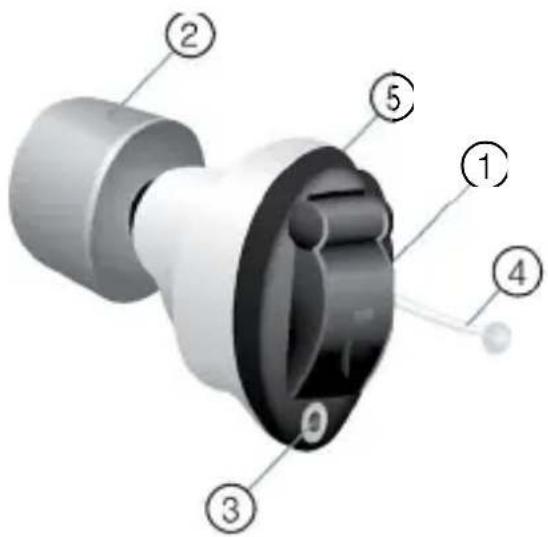
① Battery compartment
② Soft Dome
③ Microphone
④ Removal cord
⑤ Vent
Each hearing instrument can be identified by the serial number located on the outside of the instrument.

If the Soft Dome is red, the hearing instrument is intended for the right ear. If the Soft Dome is blue, the hearing instrument is for the left ear.
Intendeduse
Hearing instruments are intended to improve the hearing of hearing impaired persons. Diagnosis and prescription of a hearing instrument must be performed by hearing health specialists, e.g. ENT doctors, audiologists or acousticians.
Read and follow the instructions of this user guide to avoid injuries and to protect the hearing instruments from damage.
| Symbols: | |
| Be aware of information marked with the warning symbol WARNING, CAUTION or NOTICE! | |
 | WARNING points out a situation that could lead to serious injuries,CAUTIONindicates a situation that could lead to minor and moderate injuries. |
 | NOTICEindicates possible property damage. |
| [A438] | Advice and tips on how to handle your device better. |
| [an=0] | Instruction. Indicates that something has to be done. |
 | Indicates an option that not every hearing instrument has. Ask your Hearing Care Professional to check off the relevant information. |
General notes on safety

NOTICE
Your hearing instruments are sensitive to extreme heat, high humidity, strong magnetic fields (>0.1T), X-rays and mechanical stress.
Do not expose your hearing instruments to extreme temperature or high humidity.
Do not leave them in direct sunlight.
Do not wear them in the shower or when you apply make-up, perfume, aftershave, hairspray or suntan lotion.
Do not wear your hearing instruments when you are exposed to short-waves, a strong magnetic field, a high frequency field or X-rays.
Do not place your hearing instruments in a microwave oven.

WARNING
Risk of impairing the residual hearing of the user.
Use only hearing instruments that have been fitted especially for your needs.

WARNING
Risk of injury!
Do not use obviously damaged devices and return them to point of sale.

WARNING
Choking hazard!
Your hearing instruments contain small parts which can be swallowed.
Keep hearing instruments, batteries and accessories out of reach of children and mentally disabled persons.
If parts have been swallowed consult a physician or hospital immediately.

Siemens offers special hearing instruments for the fitting of infants and small children.
Ask your Hearing Care Professional for further information.

NOTICE
Leaking batteries damage the hearing instruments.
▶ Turn the hearing instruments off when not in use to preserve the battery.
Remove batteries when the instruments are not in use for a prolonged period of time.

NOTICE
To avoid environmental pollution, do not throw batteries into household trash.
Recycle or dispose of batteries according to national regulations or return them to your Hearing Care Professional.

WARNING
Risk of explosion!
Do not use your hearing instruments in explosive atmospheres (e. g. in mining areas).
Handlingbatteries

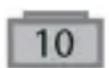
original size

Always use the right size batteries.
Remove the tab on your batteries only when you are ready to use them.
The positive (+) side of the batteries is always the smooth side.
Always keep spare batteries with you.

In some types of instruments the sounds may become fainter or you may hear additional sounds. This means that the battery power is low.
If this happens, change the battery.
Low battery indicator
Your Hearing Care Professional can activate an acoustic signal to inform you when the battery is nearly empty. If you hear an acoustic signal or experience low amplification power, replace the battery.
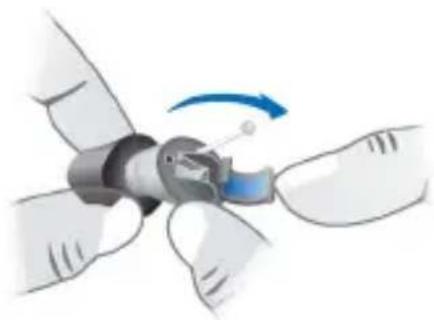
Open the battery compartment.
natural_image
Illustration of a robotic arm joint with a blue arrow indicating rotation (no text or symbols)Insert the battery.
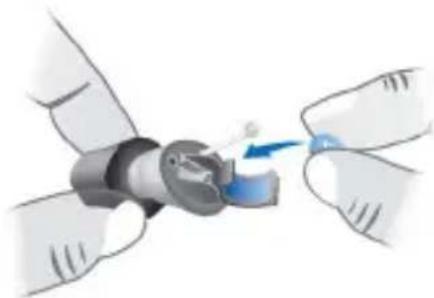
Make sure the "+" symbols on the battery and compartment are aligned.
natural_image
Illustration of hands assembling a mechanical component with a blue arrow indicating rotation (no text or symbols)▶ Close the battery compartment.
Inserting and removing the hearing instrument

Never pull on the battery compartment door to remove the hearing instrument, as this could cause damage to your hearing instrument.
Inserting
Compress the Soft Dome before inserting the hearing instrument.
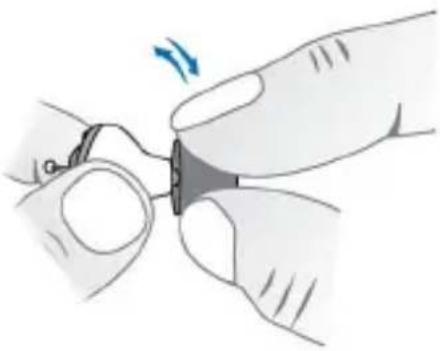
natural_image
Illustration of a hand holding a small mechanical component with a blue arrow indicating rotation (no text or symbols present)Insert the hearing instrument into the ear canal.
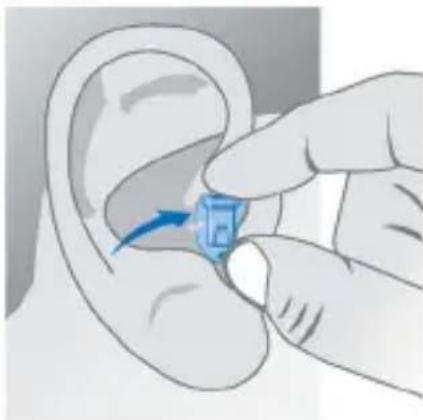
natural_image
Illustration of a hand inserting a blue object into an ear (no text or symbols)Slightly twist and push the hearing instrument into its proper position.
Removing

CAUTION
Risk of injury!
In very rare cases, the Soft Dome could remain in your ear when removing the hearing instrument. If this happens, have the Soft Dome removed by a medical professional.
▶ Push lightly on the back of your ear to loosen the hearing instrument.
Remove the hearing instrument by pulling the small removal cord toward the back of your head.

natural_image
Illustration of a hand performing a finger manipulation on the ear area, with blue arrows indicating direction (no text or symbols)Turning your hearing instrument on and off
On
▶ Fully close the battery compartment to turn your hearing instrument on.
Off
▶ Fully open the battery compartment to turn your hearing instrument off.
Power-ondelay
Your hearing instrument is equipped with a "power-on delay" feature which can be activated by your Hearing Care Professional. This allows you to turn the hearing instrument on with an automatic delay of 6/12/18 seconds, so that you may insert the hearing instrument into your ear without experiencing unpleasant feedback (whistling).
Maintenance and care
Your hearing instruments are highly sensitive systems. Proper care and handling will ensure the best possible performance.
Clean instruments regularly to prevent damage to the hearing instruments and to avoid health problems.

NOTICE
Do not put your hearing instruments and domes in water.

natural_image
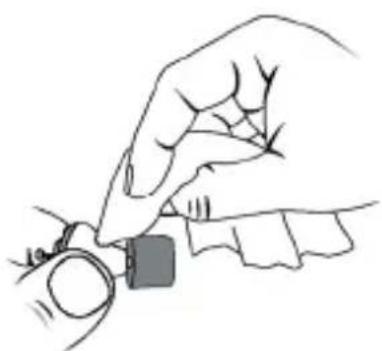
Black faucet symbol with red diagonal line indicating no water or pollution (no text or numbers present)Clean your hearing instruments and the Soft Dome with a soft, dry tissue, as necessary.
Do not use alcohol or other solvents as it will damage the instruments.
natural_image
Line drawing of a hand holding a small object, possibly a watch or watch (no text or symbols present)Be careful not to damage the wax protection or the Soft Dome when cleaning the hearing instruments.
Do not remove the Soft Dome for cleaning.
Place your hearing instruments in a "dry aid kit" with a special moisture-attracting capsule overnight.
Ask your Hearing Care Professional for special care sets and further information on how to keep your hearing instruments in good condition.
Soft Domes and wax protection

CAUTION
Risk of injury!
Always wear the hearing instrument with a Soft Dome.
Make sure that the Soft Dome is correctly attached.
Cerumen (ear wax) on the Soft Dome can affect sound quality. A wax protection filter in the Soft Dome and a wax guard on the sound outlet prevent earwax from entering the hearing instruments.
The Soft Dome has to be exchanged regularly, by the latest every month. It is recommended to exchange the Soft Domes every two weeks.

natural_image
3D rendered mechanical component with a blue lever and shaft (no text or symbols visible)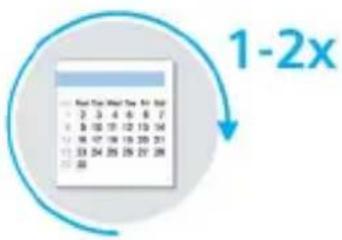
If the instruments sound distorted or weak exchange the Soft Dome.
▶ Ask your Hearing Care Professional for assistance.
Exchanging Soft Domes
Use the Soft Dome removal tool (available as accessory).
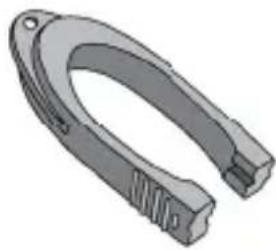
natural_image
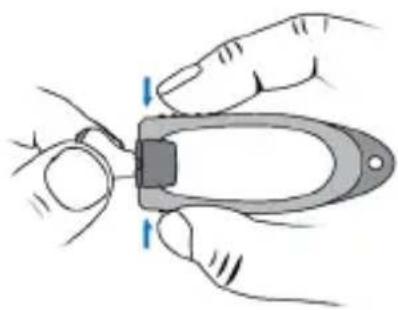
3D rendered mechanical component with curved and stepped features (no text or symbols)Hold the Soft Dome with the removal tool by pressing the tool.
natural_image
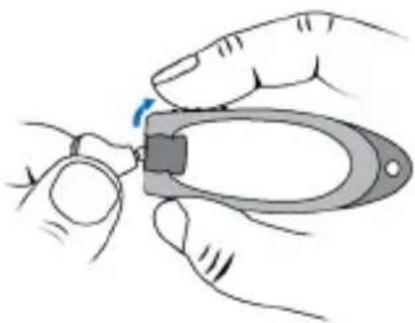
Illustration of hands using a pliers to cut a tool (no text or symbols present)Pull the removal tool to remove the Soft Dome.
natural_image
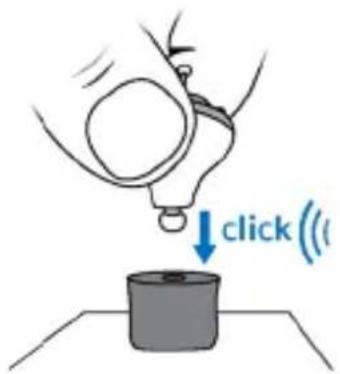
Illustration of hands using a pliers to apply a small object (no text or symbols visible)▶ Click the hearing instrument into the new Soft Dome.
Troubleshooting
Use these tips to resolve simple issues.
| Problem Possible solution | |
| Sound is weak. Replace empty battery. Clean instrument. Gently close battery compartment completely. | |
| Hearing instrument emits whistling sounds. | Reinsert the instrument until it fits securely. Clean instrument. |
| Sound is distorted. Replace empty battery. Clean instrument. | |
| Hearing instrument emits signal tones. | Gently close battery compartment completely. Replace empty battery. |
| Hearing instrument does not work. | Check if the hearing instrument is turned on. Gently close battery compartment completely. Replace empty battery. Make sure battery is inserted correctly. Power-on delay is active – wait 18 seconds and check again. |
Consult your Hearing Care Professional if you encounter further problems.
Disposalinformation
Within the European Union, the marked equipment is covered by "Directive 2002/96/EC of the European Parliament and of the Council of 27 January 2003 on waste electrical and electronical equipment."
Amended by "Directive 2003/108/EC" (WEEE).
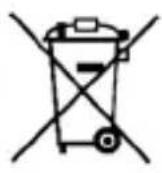

i ▶ Recycle hearing instruments, batteries and accessories according to national regulations.
With the CE marking Siemens confirms compliance with the European Directive 93/42/EEC concerning medical devices.

0123
© Siemens AG, 09.2012 · ANR
Document No. A91SAT-01692-99T2-7600
Order/Item No. 106 726 84
Printed in Germany
www.siemens.com/hearing
- Your Eclipse hearing instrument
- Eclipse
- Intendeduse
- General notes on safety
- NOTICE
- WARNING
- Handlingbatteries
- original size
- Low battery indicator
- Inserting and removing the hearing instrument
- Inserting
- Removing
- CAUTION
- Turning your hearing instrument on and off
- On
- Off
- Power-ondelay
- Maintenance and care
- Soft Domes and wax protection
- Exchanging Soft Domes
- Troubleshooting
- Disposalinformation
Brand : SIEMENS
Model : Eclipse
Category : Hearing aid