
Skyjet - Vacuum Cleaner FAKIR - Free user manual and instructions
Find the device manual for free Skyjet FAKIR in PDF.


| Product Type | Canister Vacuum Cleaner |
| Brand | FAKIR |
| Model | Skyjet |
| Dimensions (H x W x D) | 420 x 320 x 280 mm |
| Weight | 5.2 kg |
| Power Consumption | 2000 W |
| Suction Power | Adjustable, up to 400 air watts |
| Dust Capacity | 2.5 L (bagged or bagless? Assuming bagged) |
| Filter Type | HEPA 13 washable |
| Noise Level | 78 dB(A) |
| Cord Length | 6 m |
| Operating Radius | 9 m |
| Accessories Included | Crevisse tool, dusting brush, upholstery nozzle, combination floor nozzle |
| Energy Class | A |
| Housing Material | ABS plastic |
| Power Cord Type | Automatic cord rewind |
| Overheat Protection | Yes, automatic shut-off |
| Maintenance | Empty dust container or replace bag; clean filter every 3 months |
| Repairability | Replaceable filters and brush heads; motor accessible for repair |
Frequently Asked Questions - Skyjet FAKIR
User questions about Skyjet FAKIR
0 question about this device. Answer the ones you know or ask your own.
Ask a new question about this device
Download the instructions for your Vacuum Cleaner in PDF format for free! Find your manual Skyjet - FAKIR and take your electronic device back in hand. On this page are published all the documents necessary for the use of your device. Skyjet by FAKIR.
USER MANUAL Skyjet FAKIR
Haftung 4
natural_image
Simple line drawing of a helmet with front and side panels (no text or symbols)Bügeln ohne Dampf
natural_image
Line drawing of a hand pouring liquid into an iron (£) using a tool, labeled 'Bild 2' (no other text or symbols)
Wasser
natural_image
Line drawing of a hand using an iron on a machine, with no text or symbols present.HINWEIS!
natural_image
Line drawing of a hand using a power tool to interact with a mechanical component (no text or symbols present)Bild 6
natural_image
Simple line drawing of a field with trees and a triangular structure (no text or symbols)Wasser Sprühen
natural_image
Line drawing of a hand using a power iron to press or brush (no text or symbols)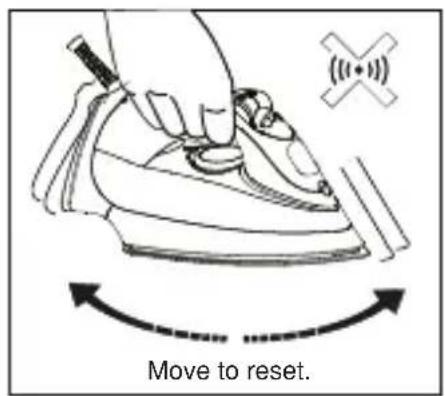
Bild 9
Nach dem Bügeln
natural_image
Line drawing of a mechanical component with no visible text or symbols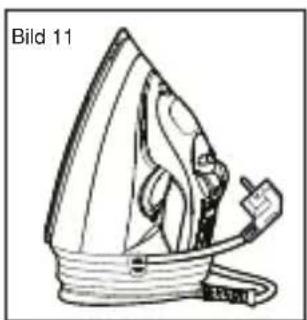
natural_image
Line drawing of a steam iron with label 'Bild 11' (no other text or symbols)Wartung
CE Declaration of Conformity....19
Important Safety Notes....20
Technical Specifications....21
Product Description....21
Before first use 22
Setting the temperature....23
Ironing without steam 24
Filling the water tank 25
Anti-Calc Filter 25
Drip Stop System....25
Steam - Ironing 26
Surge of Steam....26
Vertical Ironing....27
Drectional Precondition Steam....27
Spraying 28
3-way Safety Auto-Off Indicating Light 28
After Ironing....28
Maintenance....29
Cleaning the removable steam valve ....30
Care and Cleaning....31
Waste Disposal....32
Dispatch....32
Thank you for purchasing Fakir SkyJET Steam Iron which has been designed and manufactured to give you many years of trouble-free service. You may already be familiar with using a similar product, but do please take time to read these instructions – they have been written to ensure you get the very best from your purchase.
Liability
Fakir Elektrikli Ev Aletleri Dış. Tic. A.Ş. will accept no liability for damages resulting from failure to comply with the operating instructions. Fakir Elektrikli Ev Aletleri Dış. Tic. A.Ş. cannot assume any liability in case the appliance is used for other purposes than its intended use or handled, repaired or serviced improperly.
Unauthorized use
The examples of unauthorized use listed here can result in malfunctions, damage to the appliance or personal injury:
This appliance is not designed to be used by persons (including children) with limited physical, sensory or mental capacities or by persons lacking in experience and/or knowledge, unless they are supervised by someone who is responsible for their safety or have received instructions on how to use the appliance. Children should be supervised to ensure that they do not play with the appliance. Children should be supervised to ensure that they do not play with the appliance. Electric appliances are not toys for children! Therefore, use and store the appliance away from the reach of children. Children do not recognize the danger involved with handling an electric appliance. Do not let the power cord dangle from the appliance.
Keep packaging films away from children - danger of suffocation!
Usage Area
This appliance is suitable for places; home. Do not use appliance for other than intended use and never use this appliance outdoors.
CE Declaration of Conformity
This appliance fulfills the requirements of the Appliance and Product Safety Law (GPSG) and the EU Directives 2004/108/EC “Electromagnetic Compatibility” and 2006/95/EC “Low-Voltage Directive.” The appliance bears the CE mark on the rating plate.
Important Safety Notes
When using electrical appliances, basic safety precautions should always be followed:
- Read carefully and save all the instructions provided with an appliance.
- Danger - To protect against a risk of electric shock, do not immerse the iron in water or other liquids.
- Use iron only for its intended use.
- Close supervision is necessary for this appliance being used near children. The user must not leave the iron unattended while it is connected to the supply.
- This appliance can be used by children aged from 8 years and above and persons with reduced physical, sensory or mental capabilities or lack of experience and knowledge if they have been given supervision or instruction concerning use of the appliance in a safe way and understand the hazards involved. Children shall not play with the appliance. Cleaning and user maintenance shall not be made by children without supervision.
- Keep the iron and its cord out of reach of children less than 8 years of age when it is energized or cooling down.
- The iron should always be turned to minimum before plugging or unplugging from outlet. Never pull cord to disconnect from electrical outlet; instead, grasp plug and to disconnect.
• Always disconnect iron from electrical outlet when not in use. - Do not allow cord to touch hot surfaces. Allow the iron to cool completely then store in the upright position its heel.
- Do not touch hot surfaces. High temperatures are generated during use which could cause burns. Always use the handle and warn others (especially children) of the possible dangers of burns from steam, hot water or the soleplate, especially when ironing vertically.
- The iron must be used and rested on a stable surface.
- When placing the iron on its stand, ensure that the surface on which the stand is placed is stable.
- The iron is not to be used if it has been dropped, if here are visible signs of damage or if it is leaking.
- Never use the appliance if it is damaged in any way.
- If the supply cord is damaged, it must be replaced by the manufacturer or its service agent or a similarly qualified person in order to avoid a hazard.
-
Check the cord periodically for possible damaged.
-
Do not allow the power cord to hang down over edges where it can be reached by children.
-
Unplug the appliance from the mains supply:
-
before filling with water or emptying it,
- before cleaning and maintenance,
-
immediately after use.
-
Never iron or dampen cloths while wearing them.
- Do not use outdoors or in bathrooms.
Save these instructions.
Technical Specifications
2400 W max.
220-240 V
50/60 Hz
Usage life: 7 years
Product Description
- Variable Steam
The steam selector allows you to select the desired steam output for each garment. Alternatively, select the dry setting to iron without steam.
- Self-Clean
Press and hold the knob at 'SELF CLEAN' position for cleaning and preventing of scale build up that can affect the steam iron performance.
- Spray Button
is conveniently positioned for a fine mist spray.
- Vertical Surge of steam
Pressing the Surge of Steam button with the iron in an upright position produces a vertical surge of steam, which is ideal for steaming curtains and suits, and removing creases from delicate fabrics.
- Extra Long 3m Cord With Flexible Grommet
For greater versatility and ease of movement when ironing. The flexible grommet protects the cord from fraying.
- Swivel Cord Outlet
The cord outlet allows free movement of the cord in any direction for greater manoeuvrability when ironing.
- 3-Way Safety Auto-Off indicating Light
The safety auto-off automatically switches the iron off after approx. 10 minutes of the iron standing motionless in an upright position. It will also switch off for 30 seconds flat on the soleplate, or if it is knocked on to its side. The indicating light will blink and the iron will beep until the iron is moved to reset the power.
- Soft Touch Hand Grip
9. Water Filling cap
to prevent lint from entering water tank and stops water spilling from the iron. The wide water inlet allows for easy filling, without bubbling.
10. Spray Nozzle
- Profiled soleplate with directional precondition steam and full length button groove a) Ceramic coated soleplate b) Hard Anodized Soleplate
12.Maximum Water Level Indicator Do not exceed the maximum water level when the iron is in the upright position.
-
Temperature Dial Temperature selection from minimum (synthetics) through to maximum (linen).
-
Heating Indicator Light and Dial Indicator. Light turns off when selected temperature is reached.
-
Built-in Anti-Calc Filter.
-
Extra Large, Easy- fill Water Tank with On/ Off Illumination Large water tank for continual high steam performance, without having to refill the tank regularly. When the iron is connected to a power supply the water tank will illuminate showing that the iron is On. The On indicator light turns on as long as the iron is plugged in. When the plug is disconnected from the power supply the On indicator light turns off.
-
Dry Tank Alert Light The light illuminates when the water tank is nearly empty and needs topping up with water. It is important to keep the water tank adequately filled with water to ensure optimum steam production.
Before first use
- Check if the voltage rating on the appliance corresponds to the local mains voltage before you connect the appliance.
- Remove any sticker or protective cover from the soleplate before using the iron.
- Use for the first time on a piece of damp cloth to remove any residue on the soleplate.
- When first used some vapour may be emitted. This will cease after a short while.
Setting the temperature
First sort items to be ironed, according to the International Textile Care Labelling Code. Iron fabrics requiring the lowest temperature first. Work gradually to the higher temperatures.
| NOTE:on label means: “This article cannot be ironed!” | |||
| Label Kind of textile | Temperature dial | Steam selector (advised position) | |
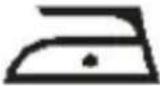 | synthetic | MIN | DRY |
| silk | |||
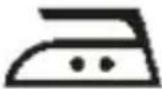 | wool | ||
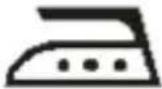 | cotton | LINEN | (MAX STEAM) |
| linen | |||
Check the garment label for the required ironing temperature, If you do not know what kind(s)of fabric(s)an article is made of,determine the right ironing temperature by ironing a part that will not be visible when you wear or use the article. Silk,woollen and synthetic materials:iron the reverse side of the fabric to prevent shiny patches.
Avoid using the spray function to prevent stains.
- Put the iron on its heel and turn the temperature dial to minimum. Plug the cord into the electrical outlet.
- Select the temperature setting required by rotating the temperature dial so that the desired setting is aligned with the heating indicator light / dial indicator.
- The heating indicator light will glow showing that the iron is heating up. When the heating indicator light has first gone out, wait for a while before start ironing. The light will glow and go out as the thermostat maintains the selected temperature.

IMPORTANT!
The steam iron incorporates a thermal safety fuse to protect the steam iron from over-heating. However, the iron should not be left unattended while it is connected to an electrical outlet. Special care should always be taken when there are children in the home.
Fig. 1
natural_image
Simple line drawing of a helmet with decorative elements (no text or symbols)Ironing without steam
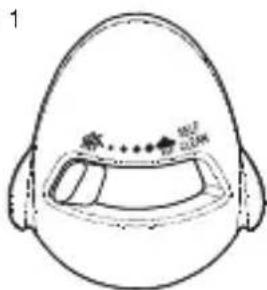
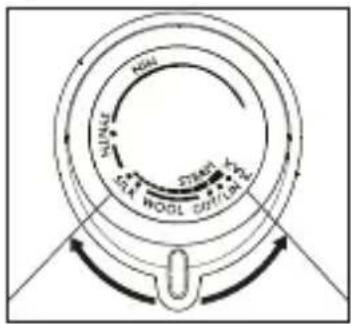
Turn the steam selector knob to position ' 燃' (Figure 1). Select the setting on the temperature dial most suitable for the fabric to be ironed. Once the temperature has been reached, ironing may commence.
Filling the water tank
- Remove the mains plug from the electrical outlet before filling with water.
- Set the Steam Selector knob to position ' 等'
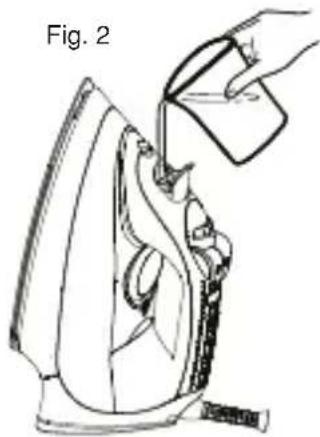
- Open the water filling inlet cover, place the iron on its heel on a flat dry level surface as shown in figure 2, use the water filling beaker supplied to pour water slowly into the filling hole until the maximum water level is reached.
Never fill the tank beyond the MAX indication when the iron is standing vertically on its heel.
natural_image
Line drawing of a hand pouring liquid into an iron (£) using a power tool (no text or symbols)
A SPECIAL NOTE ON WATER!
Water containing sediments and alkalis will cause the steam holes and internal workings of the iron to fur. The specially designed steam chamber and the anti-scaling valve, which is removable for cleaning, gives your steam iron protection against furring. You can use tap water in your iron, unless it is particularly hard and your iron is not fitted with an anti-calc filter, in which case the use of distilled or demineralised water is advised.
To guarantee the maximum life-time of your steam iron:
- Never use vinegar, starch or chemically descaled water.
- The harder the water the more the iron should be self-cleaned (see section "Maintenance").
Anti-Calc Filter
The built-in anti-calc filter reduces the build-up of limescale which occurs during steam ironing, this will prolong the working life of your iron. However, please note that the anti-calc filter will not completely stop the natural process of limescale build-up.
Drip Stop System
With conventional steam irons, water may drip from the soleplate if a too low temperature has been selected.
This will then cause stains. This iron is fitted with a Drip Stop system which is designed to stop steaming automatically when the iron is at too low temperatures. During use the drip stop system may emit a 'click' particularly during heat-up or whilst cooling down.
This is perfectly normal and indicates that the system is functioning correctly.
Steam - Ironing
When steam ironing, ensure that the water tank is at least 1/4 full of water.

IMPORTANT!
Your iron has a dry tank alert light, this will illuminate if the tank is nearly empty and needs refilling. Always check that the water tank has an adequate amount of water in it to ensure optimum steam production. As per the indications on the temperature dial and the table A (see section “Setting the temperature”) that steam-ironing is only possible at higher ironing temperatures, indicated with •• or •••.
The drip stop system will automatically stop the iron from steaming if the selected temperature is too low.
- Plug into the mains supply and switch on.
- Set the temperature dial at the required position within the steam area ( ·s or ·s ) and wait until the heating indicator light has gone out (Figure 3).
- Set the steam selector to the required setting. You can then begin steam ironing.
Fig. 3
Surge of Steam
The Surge of Steam provides an extra burst of steam which is ideal for removal of stubborn creases and wrinkles during STEAM or DRY ironing.
- The Surge of Steam function can only be used at temperature settings between ·s or LINEN.
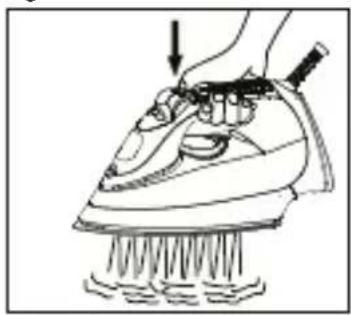
- Lift the iron slightly above the surface of the fabric, press the Surge of Steam button down firmly and then release it during ironing (Figure 4). An intense 'burst' of steam penetrates deep into the fabric.
For optimum steam quality, leave an interval of at least four seconds between pressing the Surge of Steam button.
Fig. 4
natural_image
Line drawing of a hand using a power iron to press down a surface, with no text or symbols present.NOTE!
The Surge of Steam can be used when the Steam Selector knob is in maximum setting ' 🔊'. For a stronger surge of steam set the Steam Selector knob on the ' 🔊' (= DRY) position.
Vertical Ironing
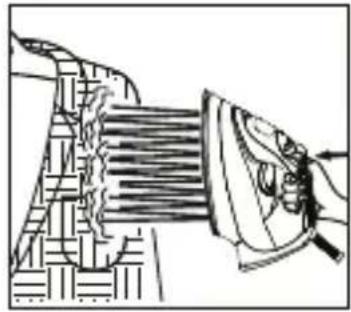
The Vertical Steam system allows you to use the iron for vertical ironing. This is especially useful for getting wrinkles out of hanging clothes, curtains, wall hangings, etc. Hold the iron vertically, in front of the item to be steamed and press the Surge of Steam button (Figure 5).

WARNING!
Never iron clothes on the body or direct the steam towards people!
NOTE!
Hold the iron 10-20 centimeters from the garment to avoid burning delicate fabrics.
Drectional Precondition Steam
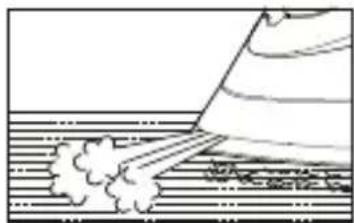
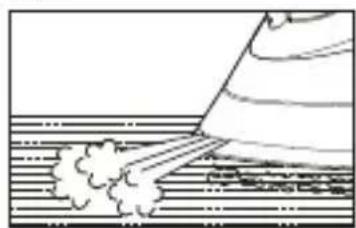
For difficult areas e. g. collars, cuffs, pockets and buttons, press the surge of steam button, the steam channels in the soleplate deliver more steam around the front of the iron (Figure 6), preconditioning the fabric before you iron it, for easier and faster ironing results.
CAUTION!
keep children away from the directional precondition steam and do not hold your fingers in front of the soleplate tip when activating this function.
Fig. 5
natural_image
Illustration of a hand using a power tool to interact with a mechanical component (no text or symbols visible)Fig. 6
natural_image
Simple line drawing of a person standing on a striped surface with smoke or vapor rising (no text or symbols)Spraying
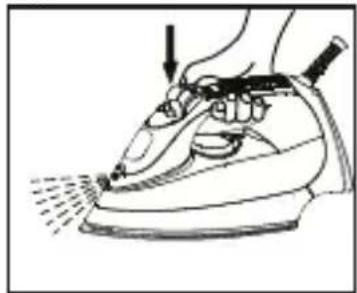
Spray may be used to dampen difficult fabrics, dry areas, wool items and accidental creases. Press the spray button a couple of times to moisten the laundry (Figure 7). Spray may also be used with delicate(synthetic) fabrics which are ironed at a low temperature and thus cannot be steam-ironed.
Make sure that there is enough water in the water tank.
Fig. 7
natural_image
Line drawing of a person using an iron on a steam iron (no text or symbols)3-way Safety Auto-Off Indicating Light
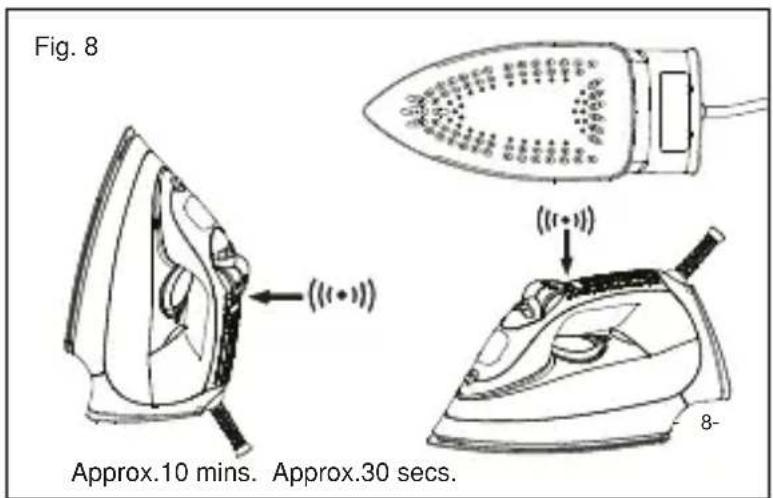
The steam iron has an Electronic Safety Auto-Off function which will turn the iron off should the iron remain motionless either in the upright position for approximately 10 minutes. It will also switch off flat on the soleplate for approximately 30 seconds or if it is knocked on to its side (Figure 8). In such
instances the power to the iron will automatically be switched off and the red Auto-Off indicator light will blink whilst a warning beep will sound.
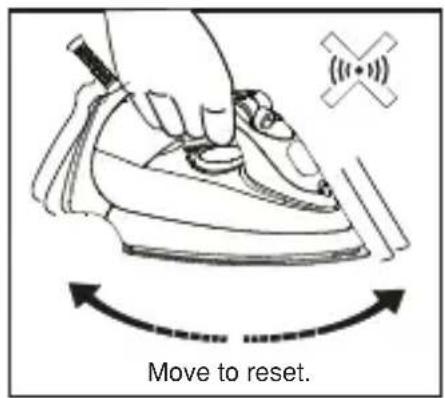
Slight movement of the iron will reset the power (Figure 9).
Resim 9
After Ironing
- Set the steam selector knob to '第' (= DRY).
- Disconnect from the mains supply.
- Open the water filling inlet cover.
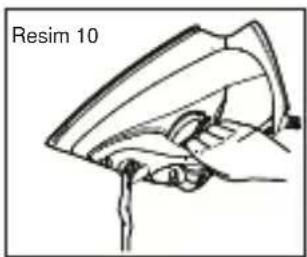
- Invert iron and shake the iron to empty the water tank (Figure 10), and then stand the iron in a upright position to allow to cool.
- In order to save space, the power cord may be easily wound around the cord wrap facility and fixed with the cord clip, after the iron has cooled (Figure 11). Never wrap the power cord tightly around the built-in cord wrap facility.
• Always store the iron (with water emptied from water tank) standing on its heel in a safe and dry place.
natural_image
Line drawing of a mechanical component labeled 'Resim 10' (no other text or symbols)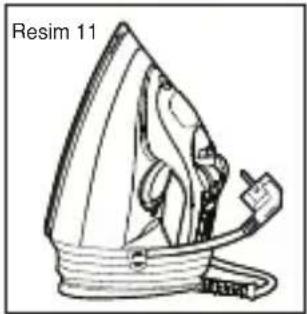
natural_image
Line drawing of a steam iron with label 'Resim 11' (no other text or symbols)Maintenance
Self- cleaning
Your iron will give the best ironing results and last longer if you apply 'self-cleaning' regularly (once or twice a month) to remove any scale or impurities.
- Set the steam selector knob to '' position.
- Fill the water tank up to 'MAX' water level with water filling beaker supplied.
- Place the iron on its heel.
- Set the temperature dial to LINEN.
- Plug into the mains supply and switch on at the socket.
- Allow the iron to heat up until the heating indicator light first goes out.
- Remove the plug from the wall socket.
- Hold the iron horizontally over the sink.
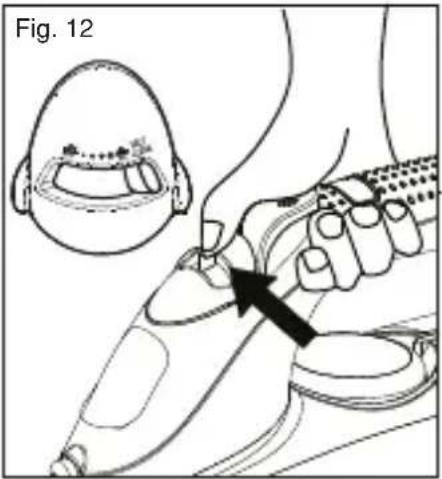
- Push and hold the steam selector knob to position "SELF CLEAN" (Figure 12).

CAUTION!
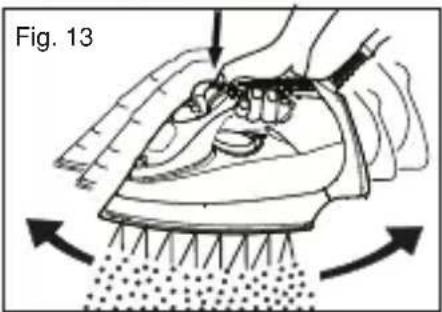
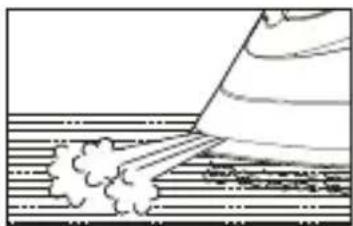
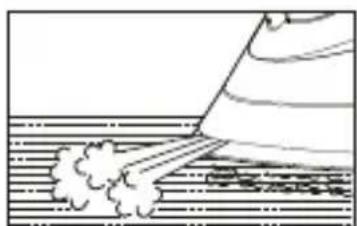
Boiling water and steam will emit from the holes in the soleplate. Impurities and scale(if any) will be flushed out (Figure 13).
- Move the iron forwards and backwards while this happens.

NOTE!
Once you have done this, it is normal for a little water to remain in the water tank because the irons anti-drip system may prevent the tank being completely emptied. This will not affect its ironing performance.
- Repeat the self-cleaning process if the iron still contains a lot of impurities.

IMPORTANT!
Only turn the steam selector knob to "SELF CLEAN" position when you want to activate the self-cleaning system. Do not turn the steam selector knob to "SELF CLEAN" position when ironing.
Cleaning the removable steam valve
- In addition to the self-cleaning operation, we advise cleaning the steam valve once a month (e.g. whenever steam development is insufficient). The steam valve is located at the lower end of the steam selector.
- Before removing and cleaning the steam valve unplug the iron and empty the water tank.
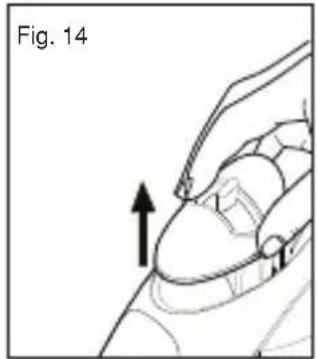
- Carefully pull out the steam selector. Do not touch the steam valve at its lower end (Figure 14).
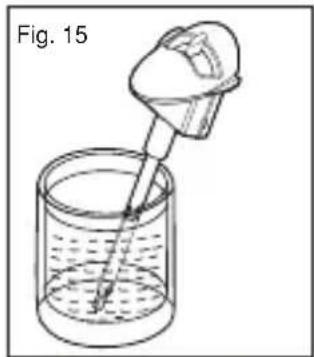
- Immerse the steam valve in vinegar (not vinegar essence) for 4 hours until the lime becomes soft. Using a non-metallic brush to remove remaining residues, then rinse under running water. Do not use sharp objects for cleaning the steam valve(Figure 15).
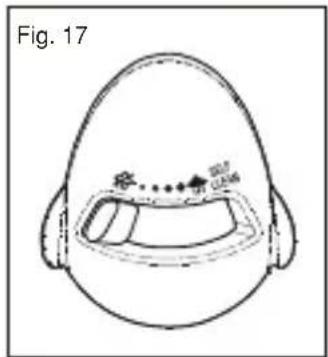
- Replace the steam selector by pressing the steam selector down (Figure16) and turn the knob to position ' (Figure 17).
- Insert the plug into the wall socket.
- Set the temperature dial to position LINEN.
- Let the iron heat up again.
- The remainder of the water inside the steam chamber will now vaporize.
- Unplug from power supply and allow soleplate to cool and wipe it clean with a soft damp cloth.

The iron will not operate without the steam selector fitted.
natural_image
Simple line drawing of a dropper dispensing liquid into a beaker (no text or symbols)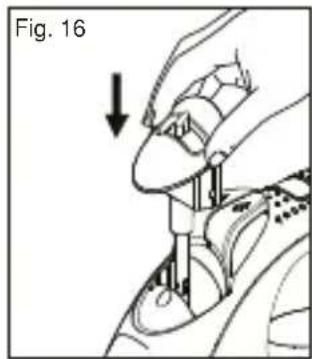
- Disconnect from the mains supply by removing the plug.
- Certain fabric finish residues may build up on the soleplate, these may be removed by cleaning with a rough cloth soaked in a vinegar water solution. Dry with a cloth.
- Do not use abrasives or scouring pads to clean the soleplate.
Keep the soleplate smooth: avoid hard contact with metal objects. Do not scratch or damage the surface of the soleplate.
- Wipe the upper part of the iron with a damp cloth. Do not use abrasives or harsh cleaners as they may damage the surface of the iron.
Never immerse the iron in water or any liquids.
Do not put vinegar or other descaling agents into the water tank.
To clean steam holes-simply use a damp cloth to wipe away any build up of lint or starch from inside steam holes.
Waste Disposal
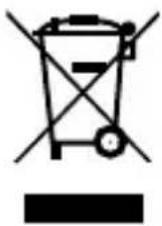

Dispose of the device according to the environmental regulations applicable in your country.
Electrical waste must not be disposed of together with household waste. Bring the worn-out device to a collection center. The packaging of the device consists of recycling-capable materials. Place these, sorted out according to material, in the collectors provided, so that recycling can be carried out on them.
For advice on recycling, refer to your local authority or your dealer. Dispose of used dust bag and filters in domestic waste.
Dispatch:
Carry the appliance in the original package or a similar, wellpadded package to prevent damage to the appliance.
This product is produced on behalf of Fakir Elektrikli Ev Aletleri Dış Ticaret A.Ş. by KEAL DIŞ TİCARET VE PAZARLAMA A.Ş. GEBZE ORGANİZE SANAYİ BÖLGESİ NO.602 41480 GEBZE-TÜRKİYE TEL: 0090 262 751 01 50
Sorumluluk....34
natural_image
Line drawing of a hand using an iron on a machine, with a downward arrow indicating motion (no text or symbols)
natural_image
Technical line drawing of a mechanical component with a hand operating it (no text or symbols)Resim 6
natural_image
Simple line drawing of a person bending over water with smoke rising (no text or symbols)Su Püskürtme
natural_image
Line drawing of a hand using a power iron to press or brush (no text or symbols)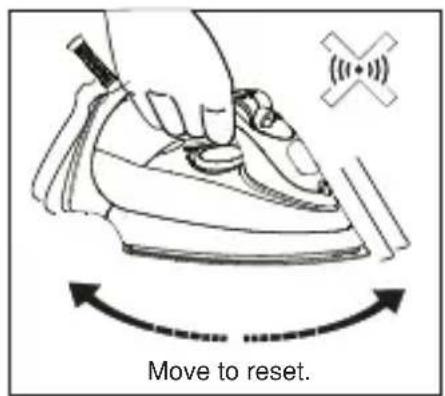
Resim 9
Ütüleme Sonrası
natural_image
Line drawing of a steam iron with label 'Resim 11' (no other text or symbols)Bakım
natural_image
Simple line drawing of a helmet with decorative side panels (no text or symbols)Глажение без пара
natural_image
Line drawing of a hand using a power iron to press down or brush (no text or symbols)
ПРИМЕЧАНИЕ!
natural_image
Technical line drawing of a mechanical component with no visible text or symbolsРисунок 6
natural_image
Simple line drawing of a boat creating a wake over water, with no text or symbols present.Разбрызгивания воды
natural_image
Line drawing of a hand using a steam iron to press or install a piece of material (no text or symbols present)Рисунок 9
После глажения
natural_image
Line drawing of a hand using an iron on a surface, with a downward arrow indicating motion (no text or symbols)
natural_image
Illustration of a hand using a power tool to interact with a mechanical component (no text or symbols visible)المكى المرأسى
natural_image
Simple line drawing of a person bending over a surface with smoke or vapor (no text or symbols)natural_image
Line drawing of a hand using a power iron to press or brush (no text or symbols)بخاخ الماء
- Bügeln ohne Dampf
- Wasser
- HINWEIS!
- Wasser Sprühen
- Nach dem Bügeln
- Wartung
- Liability
- Unauthorized use
- Usage Area
- CE Declaration of Conformity
- Important Safety Notes
- Technical Specifications
- Product Description
- Water Filling cap
- Spray Nozzle
- Before first use
- Setting the temperature
- IMPORTANT!
- Ironing without steam
- Filling the water tank
- A SPECIAL NOTE ON WATER!
- Anti-Calc Filter
- Drip Stop System
- Steam - Ironing
- Surge of Steam
- NOTE!
- Vertical Ironing
- WARNING!
- Drectional Precondition Steam
- CAUTION!
- Spraying
- 3-way Safety Auto-Off Indicating Light
- After Ironing
- Maintenance
- Self- cleaning
- Cleaning the removable steam valve
- Waste Disposal
- Dispatch:
- Su Püskürtme
- Ütüleme Sonrası
- Bakım
- Глажение без пара
- ПРИМЕЧАНИЕ!
- Разбрызгивания воды
- После глажения
- بخاخ الماء
Brand : FAKIR
Model : Skyjet
Category : Vacuum Cleaner