
Behind ear BET 1000 - Thermometers BRAUN - Free user manual and instructions
Find the device manual for free Behind ear BET 1000 BRAUN in PDF.
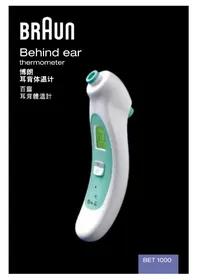


| Product Type | Behind Ear Thermometer |
| Brand | Braun |
| Model | Behind ear BET 1000 |
| Measurement Range | 34.0 °C to 42.2 °C (93.2 °F to 108.0 °F) |
| Measurement Time | Approximately 1 second |
| Display Resolution | 0.1 °C or 0.2 °F |
| Accuracy | ±0.1 °C (0.2 °F) for 37–39 °C; ±0.2 °C (0.3 °F) outside |
| Operating Ambient Temperature | 10 °C to 40 °C (50 °F to 104 °F) |
| Storage Temperature | -20 °C to 50 °C (-4 °F to 122 °F) |
| Humidity (Storage) | < 85% non-condensing |
| Power Source | 1 CR2032 3V lithium battery |
| Battery Life | 2 years or 500 measurements |
| Memory | Last 8 temperature readings |
| Fever Indicator | Green (no fever), Yellow (slightly elevated), Red (fever) |
| Measurement Site | Behind the earlobe over the posterior auricular artery |
| Cleaning | Clean sensor with alcohol; wipe exterior with damp cloth; do not submerge |
| Safety Precautions | Wait 20 min after exposure to extreme temperatures; do not use on scarred tissue |
| Intended Use | Household use only; not a substitute for medical consultation |
| Compliance | ASTM E1112 and E1965-98 |
| Manufacturer | Kaz USA, Inc. under license from Braun GmbH |
| Country of Origin | Designed in Germany; Made and printed in China |
| Service Centers | Hong Kong (852) 2686 3319; Taiwan (886) 0800278789; China (86) 4006165995; Singapore (65) 65522422 |
Frequently Asked Questions - Behind ear BET 1000 BRAUN
User questions about Behind ear BET 1000 BRAUN
0 question about this device. Answer the ones you know or ask your own.
Ask a new question about this device
Download the instructions for your Thermometers in PDF format for free! Find your manual Behind ear BET 1000 - BRAUN and take your electronic device back in hand. On this page are published all the documents necessary for the use of your device. Behind ear BET 1000 by BRAUN.
USER MANUAL Behind ear BET 1000 BRAUN
Manufacturing Quality Healthcare Products for Over 75 Years
Southborough, MA 01772 USA
www.kaz.com/braun
This product is manufactured by Kaz USA, Inc. under license to the
'Braun' trademark.
'Braun' is a registered trademark of Braun GmbH, Kronberg, Germany.
©2013 Kaz USA, Inc.
Designed In Germany. Made and printed In China.
31IM1000294
SEP13
English
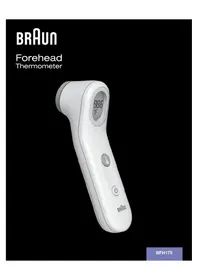
Description
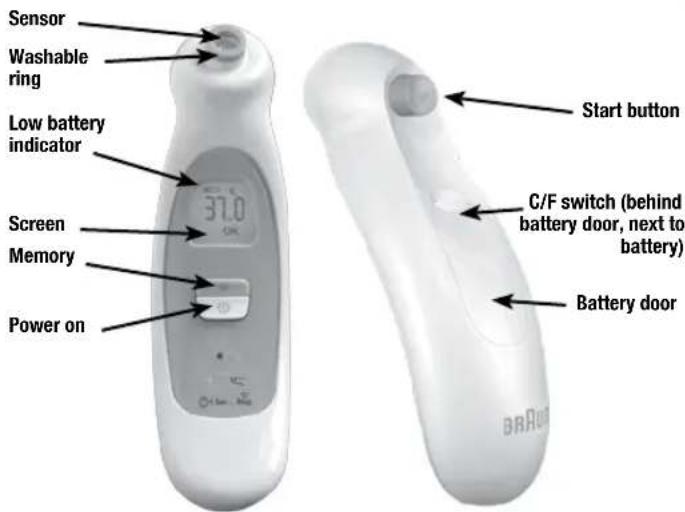
| Power on | Turns thermometer on. |
| Start button | When the washable ring is pressed against the skin, to take temperature, press and hold this button for 1 full second. |
| Sensor | Measures temperature. It will move out when the start button is pressed. |
| Washable ring | This is where the sensor is located. The soft washable ring gently touches the skin behind the ear when measuring temperature. |
| Screen | The screen displays (green) if no fever, (yellow) when the temperature is slightly elevated and a (red) alert for fever. |
| Low battery indicator | Indicates when the battery needs to be replaced. |
| Memory | Pressing this button will recall the last 8 readings. |
| Battery door | Provides access to CR2032 battery. |
| C/F switch | Change display to Celsius or Fahrenheit. |
3
Braun behind ear thermometer instruction manual
The Braun behind ear thermometer has been carefully developed for accurate, safe and fast temperature measurements.
However, as with any thermometer, proper technique is critical in obtaining accurate temperatures. Therefore, read the use instructions carefully and thoroughly.
Warnings and precautions
- Do not use thermometer for 20 minutes on skin if exposed to hot or cold temperatures such as direct sunlight, fireplace heat, cold (compress), direct air conditioning air flow, swimming, bathing, etc.
- Do not place the thermometer on scarred tissue or tissue compromised by skin disorders.
- Do not use on patients in trauma or patients treated with certain drug therapies.
- Do not take temperature from the side on which the patient was laying on - use the opposite side.
- Do not expose the thermometer to temperature extremes below -20°C ( -4°F ) or over 50°C ( 122°F ) nor excessive humidity (>85% non-condensing relative humidity).
- Do not use this thermometer if the operating ambient temperature range is below 10° C ( 50° F) or over 40° C ( 104° F).
- Do not mount the battery with the positive sign facing down. The thermometer will not work.
- This thermometer is intended for household use only.
- Use of this thermometer is not intended as a substitute for consultation with your physician.
- Readings from the right side of the patient's head may differ from the left - therefore it is preferable to take all temperatures on the same side of the head.
How does Braun behind ear thermometer work?
Braun behind ear thermometer is a hand-held, battery powered device designed to measure human body temperature with a special sensor that accurately and gently detects heat flow through the skin directly behind the ear lobe using the heat conduction effect and prediction techniques. The thermometer calculates heat flow through the skin and by use of a mathematical algorithm estimates the internal body temperature. The temperature reading range of the thermometer is from 34° C to 42.2° C ( 93.2° F to 108° F) and the reading time is about 1 second.
Why measure behind the ear?
The skin area behind the earlobe is over the posterior auricular artery which is a branch of the carotid artery. The carotid artery carries blood to the brain and therefore the site is the best external place to measure temperature.
Body temperature
Normal body temperature is not a single number – it's a range. Many people incorrectly believe that 37° C ( 98.6° F) is the only normal temperature. Yet, it's just an average number. Each person has their own normal range which fluctuates throughout the day. It is, therefore, important to determine your normal temperature range. A person's normal (healthy) temperature range tends to decrease with age.
The following table shows that this normal range also varies by the measurement site. Therefore, readings from different sites should not be directly compared.
Normal temperature ranges by site:
Axillary: 34.7 – 37.3 °C 94.5 – 99.1 °F
Oral: 35.5 – 37.5 °C 95.9 – 99.5 °F
Rectal: 36.6 – 38.0 °C 97.9 – 100.4 °F
Ear: 35.8 – 38.0 °C 96.4 – 100.4 °F
Behind ear: 35.0 – 37.6 °C 95.0 – 99.7 °F
Practice taking temperatures on yourself and family members to determine their normal temperature ranges.
First time use
- Remove display plastic decal.
- Pull out the plastic strip that is sticking out of the battery door on the back side of the thermometer. No need to open the battery door. This will activate the battery.
How to take a temperature
- Press the power button.
- Wait for OK.
- Place the green ring of the product on the neck behind the ear lobe.
- While holding thermometer in that spot, press and hold the start button. When the unit beeps, release start button. (Takes about one second.)
- Temperature displays.
- Wait 10 seconds for the count-down to take additional temperatures.
- Thermometer will shut off automatically after 60 seconds.
1

2
3

4

5

6

Temperature taking hints
• External factors may influence accuracy, including when an individual has:
– been recently swimming or bathing.
- been lying on the side where the temperature is taken from. Never take temperature from the side on which the patient was laying on. Use the opposite side.
- been recently exposed to hot or cold air temperatures. Wait at least 20 minutes after the patient was moved to a room with normal operating conditions.
- Readings from the right side of the patient's head may differ from the readings taken on the left side of the head. Therefore, preferably take all temperatures on the same side of the head.
Memory mode
Braun behind ear thermometer stores the last 8 temperatures readings. After turning power on, the last temperature is always briefly displayed.
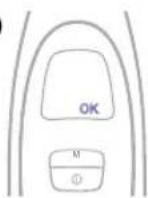
- To retrieve the last 8 readings, press the "M" button when the thermometer has

- The memory mode is exited either automatically if the "M" button is no longer pushed or by pressing the power button.
Care and cleaning
- If the sensor needs to be cleaned or disinfected, push and hold the start button to move the tip out of the washable ring and gently wipe the sensor and the washable ring with the Q-tip or piece of cotton dampened with alcohol. Allow to dry for at least 5 minutes before measuring temperature.

- Use a soft cloth to clean the thermometer display and exterior. The cloth can be slightly dampened with water or alcohol.
- Do not use abrasive cleaners. Never submerge this thermometer in water or any other liquid.
- Store thermometer in a dry location at room temperature free from dust and contamination and away from direct sunlight.
- Do not put it under running tap water or immerse it in the water.
- Always keep the thermometer in the storage case after its use.
Low battery indicator and replacing batteries

- If the low battery indicator appears on the display, it is time to replace your battery. The thermometer takes one 3V lithium battery (CR2032).
- Open the battery door by lifting the battery door using your finger.
- Use a pen tip or similarly sized item and press the tab upward toward the head of the thermometer. The battery will pop up. Remove battery.
- Insert a new CR2032 battery with + sign facing out. Push the battery down until snaps.

To protect the environment, dispose of empty batteries at appropriate collection sites according to national or local regulations.
Changing the temperature scale
Your thermometer is set at the factory to display Celsius (°C) temperature measurements. If you wish to switch to Fahrenheit (°F) and/or back from Fahrenheit to Celsius, follow the following steps:
1) Press the power button to turn on the thermometer.
2) Open the battery door - use your finger to lift the battery door open.
3) Find inside the battery compartment a small pin hole with letters C/F nearby.
4) When the display is in the ready state < 0K> displayed, insert a paper clip wire into the hole and press once switch temperature display.
5) Follow the "How to take a temperature" steps above.

Trouble-shooting
| Problem Possible cause Solution | ||
| Power cannot be turned on Low battery Replace battery | ||
| Product doesn't turn off Internal malfunction Remove and replace battery | ||
“LO” reading | Patient or thermometer was moved from a cold environment.Thermometer probe was recently wet cleaned. | Wait at least 20 minutes before retaking temperature.Wait at least 5 minutes after cleaning before retaking temperature. |
“HI” reading | Patient or thermometer was moved from a warm environment.Patient was laying on the same side where measurement was taken. | Wait at least 20 minutes before retaking temperature.Measure temperature from the opposite side.Repeat measurement by using a correct technique. |
Display shows ERR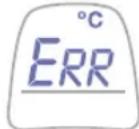 | Internal malfunction Restart thermometer. If this doesn't cure, contact your local Kaz authorized service center. | |
“POS” reading | Thermometer was moved during temperature taking process.Thermometer was not in the correct position during the temperature taking process.Short measurement timeStart button was pressed too slow. | Hold thermometer still and retake measurement.Make sure green ring of thermometer is behind ear lobe and retake measurement.Make sure that the start button is kept pressed until the beep sounds.Retake the temperature and ensure the start button is pressed down steadily. |
Product specifications
Displayed temperature range: 34–42.2 °C (93.2–108 °F)
Measurement time: 1 second
Operating ambient temperature range: 10–40 °C (50–104 °F)
Display resolution: 0.1 °C or 0.2°F
Calibration accuracy: ± 0.1 °C (0.2 °F)-temperature
range 37–39 °C;
± 0.2 °C (0.3 °F)-temperature
range < 37 °C or > 39 °C
Humidity storage: < 85% non-condensing
Battery life: 2 years or 500 measurements
Subject to change without notice.
This appliance conforms to ASTM Standards for clinical thermometers: E1112 and E1965-98, wherever applicable.
Portable and mobile RF communications equipment can affect medical electrical equipment.
Asia Pacific Kaz authorized service center contacts:
Hong Kong service center contact
Number: (852) 2686 3319
Taiwan service center contact
Number: (886) 0800278789
China service center contact
Number: (86) 4006165995
Singapore service center contact
Number: (65) 65522422
简体中文
说明


测量体温须知
250 Turnpike Road, Southborough MA 01772, USA
(P) Amperor Electronic Inc.
8 Sarpotau Building, Ku-Su Village, Shin-Shian Town, Baoan County, Shenzhen,
Guangdong, China
Taiwan license holder:


- ENGLISH
- BRAUN BEHIND EAR THERMOMETER INSTRUCTION MANUAL
- WARNINGS AND PRECAUTIONS
- HOW DOES BRAUN BEHIND EAR THERMOMETER WORK
- WHY MEASURE BEHIND THE EAR
- BODY TEMPERATURE
- NORMAL TEMPERATURE RANGES BY SITE
- FIRST TIME USE
- HOW TO TAKE A TEMPERATURE
- TEMPERATURE TAKING HINTS
- MEMORY MODE
- CARE AND CLEANING
- LOW BATTERY INDICATOR AND REPLACING BATTERIES
- CHANGING THE TEMPERATURE SCALE
- PRODUCT SPECIFICATIONS
- 简体中文
- 测量体温须知
Brand : BRAUN
Model : Behind ear BET 1000
Category : Thermometers