
21200 - Toaster KORONA - Free user manual and instructions
Find the device manual for free 21200 KORONA in PDF.


User questions about 21200 KORONA
0 question about this device. Answer the ones you know or ask your own.
Ask a new question about this device
Download the instructions for your Toaster in PDF format for free! Find your manual 21200 - KORONA and take your electronic device back in hand. On this page are published all the documents necessary for the use of your device. 21200 by KORONA.
USER MANUAL 21200 KORONA
natural_image
Top-down view of a black plastic electronic device casing with internal circuitry (no visible text or symbols)9
10
11
natural_image
Top-down view of a black electronic device casing with internal circuitry and mounting holes (no visible text or symbols)Produktbeschreibung
natural_image
Close-up of a black mechanical component with a textured base and a numbered arrow pointing to it (no visible text or symbols)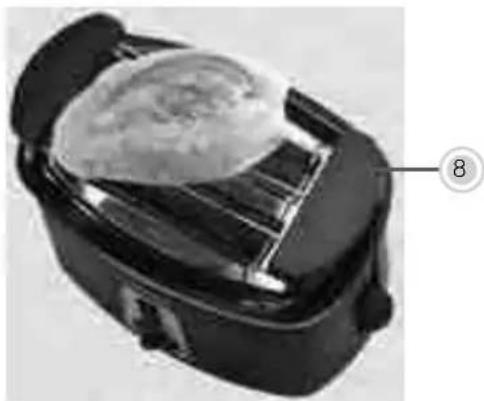
natural_image
Close-up of a black rectangular food item with a lid and lid, showing a textured surface and a numbered label (8) pointing to it.text_image
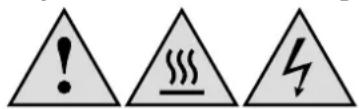
Warning symbols including exclamation mark, steam symbol, and lightning bolttext_image
Labeled diagram of a device interior showing internal components with numbered annotations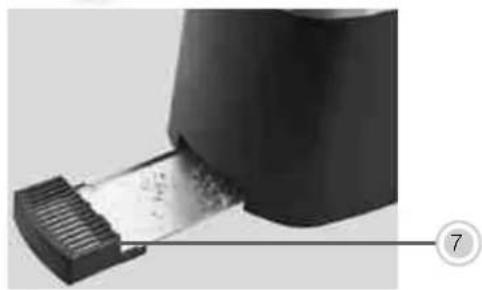
natural_image
Close-up of a black plastic device with a metallic strip inserted, labeled with number 7 (no text or symbols on the device itself)Product Description
1 Bread Slots
2 Toasting lever
3 Stop button + indicator light
4 Defrost button + indicator light
5 Reheat button + indicator light
6 Browning control knob
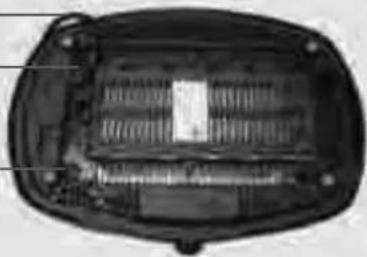
7 Crumb tray
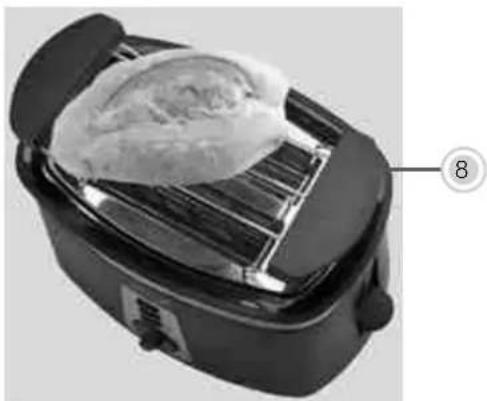
8 Removable bun rack
9 Power Cord and plug
10 Cable guide (rear side)
11 Cord storage (rear side)
natural_image
Black rice cooker with a cloth placed on its side, labeled with number 8 (no text or symbols on the cooker itself)Intended Use
Before use, please read these instructions carefully and keep them in a safe place for future reference. When passing on the appliance to a third party, make sure to include these instructions for use.
the manufacturer and might entail a risk of damage or injury. This appliance is not intended for commercial use!
Safety:

This symbol identifies hazards which may cause injuries!

This symbol warns of hot surfaces. Risk of burns!

This symbol identifies electric shock hazards!

General Safety Instructions
Manufacturer takes no responsibility for any damage caused by incorrect use. Incorrect or improper use can damage the appliance and cause injuries to the user. Before connecting this appliance to the mains, make sure your local voltage matches the technical data of the appliance. Otherwise the appliance may overheat and get damaged.

Caution! Danger of electric shock!
An electric appliance is not a toy!
unless they have been given supervision or instruction concerning use of the appliance by a person responsible for their safety.
damage to the appliance.
in use. Do not allow the cord to hang over sharp edges.
Do not use the appliance,
Never attempt to make any modifications to or repair the appliance yourself.
separate remote-control system.
Special Safety Instructions
text_image
Warning symbols including exclamation mark, steam symbol, and lightning boltWarning! To avoid the possibility of injury/damage to the appliance, electric shock, risk of fire and burns!
bread slot. The appliance may produce some smoke or smell which is due to residues left over from the manufacturing process.
Therefore, do not operate the toaster underneath or near any inflammable material, such as curtains.
Danger of serious burns!
or damage
across the bread slots.
cleaning.
Before First Use
wall socket.
lever (2) until it clicks into place. Do not insert any slices of bread during this first use and let your toaster heat up for 3-4 minutes.
it as described under Cleaning and Care.
Note: During this process, the appliance may briefly produce some smoke or smell which is due to residues on the heating elements left over from the manufacturing process. This is normal and not harmful. Make sure that the room is well ventilated.

Warning: Plastic bags are a danger to toddlers and babies, therefore keep them away to avoid suffocation.
Operation

The temperature of accessible surfaces may be high during operation.
Therefore, do not touch the appliance during and/or immediately after operation.

If your toaster should not switch off automatically, press the stop button to connect the appliance from the mains. The same applies in case of smoking out of the appliance.
Toasting
The toaster comes with a self-centering function which allows an even browning process on both sides of the bread slices.
Place the appliance on an even, non-slippery and heat resistant surface and connect it to a properly installed wall socket.
- Insert the bread into the bread slots (1).
- Select your preferred browning degree (level 1 -7) depending on the freshness and thickness of the bread by turning the browning control knob (6) into the resp. direction.
- Push down the toasting lever (2) until it locks into place, the indicator light (3) of the Stop button will illuminate.
- The toaster will switch off automatically, once the set browning degree has been reached.
- To interrupt the toasting cycle before automatic cut-off, press the Stop button (3). The bread slices will be ejected.
Attention: Toasted bread can be very hot. Let it cool down or use potholders to handle it.
If a slice of bread should get stuck during the toasting process, unplug the appliance and let it cool down completely, before trying to remove it. Do not use any sharp metal objects to do so.
During operation, bread crumbs are falling down onto the crump tray (7), make sure to clean it on a regular basis.
Use of the Bun Rack
Always use the bun rack (8) for toasting/reheating buns/croissants. Never put them directly into the bread slot.
- Unfold the bun rack (8) and place it on top of the appliance.
- Set the browning control (6) to the desired level.
- Press down the toasting lever (2) until it locks in place. Once the required browning degree has been reached, the toaster switches off automatically. Toasted bread can be very hot. Let it cool or use potholders to handle it.
Please note: The browning degree also depends on the size and freshness of the product.
Reheating Function
With this function, you can reheat bread which was toasted earlier, simply insert the bread into the bread slots (1), press down the toasting lever (2) and then press the reheat button (5). Both indicator lights of the Stop button (3) as well as of the reheat button (5) light up. The reheating process starts. The toaster automatically stops after several seconds.
The pre-set browning level has no influence on the reheat cycle.
Defrost Function
With this function you can toast frozen bread. To activate the defrost function insert the bread into the bread slots (1), choose your desired browning level, press down the toasting lever (2) until it locks in place and then press the defrost button (4). Both indicator lights of the Stop button (3) as well as of defrost button (4) light up. The
All functions can be interrupted by pressing the Stop button (3).
Cleaning and Care
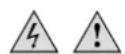
Before cleaning, always switch off the appliance and disconnect it from the mains. Let it completely cool down. Never immerse the appliance in water. Danger! Electric Shock!
Clean the body of the appliance with a moistened soft cloth. Do not use any
pull out the crump tray (7) and clean it on a regular basis.
Storage
After use and after the appliance has completely cooled down wind the power cable (9) around the cord storage (11). Keep it away from children and store it in a clean and dry place.
Keep the appliance away from children and store it in a clean and dry place.
Disposal Instructions
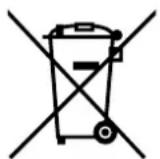
Waste electrical devices marked with this sign must not be disposed of with your household waste, but – according to the EU directive on Waste Electric And Electronic Equipment of 24th March 2005 – are to be collected separately. Therefore, please return this device at the end of its life cycle to special collection points for disposal or your local dealer.
they are reusable or recyclable.
Technical Data:
Rated Power: 720 - 850 W
Protection Class: I
Subject to change without notice.

Guarantee:
This product is guaranteed against defects in materials and workmanship for a period of 2 years.
This guarantee is not valid:
This guarantee does not affect your statutory right, nor any legal right you may have as a costumer under applicable national legislation governing the purchase of goods.
customer must provide evidence of the date of purchase (receipt).
The guarantee is to be asserted against
KORONA electric GmbH, Sundern/Germany.
Service Address:
KORONA Service, Am Steinbach 9, 59872 Meschede, Germany
Telefon Hotline:
Mail:
web:
02933 90284-80
service@korona-electric.de
www.korona-electric.de
within 2 years after the date of purchase. In case of guarantee the customer is given the right to get the appliance repaired at our own or at an authorized shop. Further rights (due to guarantee case) are not given to the customer.

natural_image
Abstract geometric design with curved gray shapes on white background (no text or symbols)KORONA
