
JetStream TL-SG1016 - Switch TP-LINK - Free user manual and instructions
Find the device manual for free JetStream TL-SG1016 TP-LINK in PDF.


User questions about JetStream TL-SG1016 TP-LINK
0 question about this device. Answer the ones you know or ask your own.
Ask a new question about this device
Download the instructions for your Switch in PDF format for free! Find your manual JetStream TL-SG1016 - TP-LINK and take your electronic device back in hand. On this page are published all the documents necessary for the use of your device. JetStream TL-SG1016 by TP-LINK.
USER MANUAL JetStream TL-SG1016 TP-LINK
16/24-port Gigabit Ethernet Switch
COPYRIGHT & TRADEMARKS
Specifications are subject to change without notice. TP-LINK® is a registered trademark of TP-LINK TECHNOLOGIES CO., LTD. Other brands and product names are trademarks or registered trademarks of their respective holders.
No part of the specifications may be reproduced in any form or by any means or used to make any derivative such as translation, transformation, or adaptation without permission from TP-LINK TECHNOLOGIES CO., LTD. Copyright © 2009 TP-LINK TECHNOLOGIES CO., LTD. All rights reserved.
http://www.tp-link.com
FCC STATEMENT

This equipment has been tested and found to comply with the limits for a Class B digital device, pursuant to part 15 of the FCC Rules. These limits are designed to pro-vide reasonable protection against harmful interference in a residential installation. This equipment generates, uses and can radiate radio frequency energy and, if not in-stalled and used in accordance with the instructions, may cause harmful interference to radio communications. However, there is no guarantee that interference will not occur in a particular installation. If this equipment does cause harmful interference to radio or television reception, which can be determined by turning the equipment off and on, the user is encouraged to try to correct the interference by one or more of the following measures:
➢ Reorient or relocate the receiving antenna.
- Increase the separation between the equipment and receiver.
Connect the equipment into an outlet on a circuit different from that to which the receiver is connected.
Consult the dealer or an experienced radio/ TV technician for help.
This device complies with part 15 of the FCC Rules. Operation is subject to the following two conditions:
1) This device may not cause harmful interference.
2) This device must accept any interference received, including interference that may cause undesired operation.
Any changes or modifications not expressly approved by the party responsible for compliance could void the user's authority to operate the equipment.
CE Mark Warning
CE
This is a class B product. In a domestic environment, this product may cause radio interference, in which case the user may be required to take adequate measures.
Package Contents
The following contents should be found in your package:
One TL-SG1016/TL-SG1024 Switch
One power cord
This User Guide
▶ Rubber footpads for Desk-mount
Rack-mount kit for installing the switch in a 19-inch rack
Note:
Make sure that the package contains the above items. If any of the listed items are damaged or missing, please contact with your distributor.
Safety Notices
Do not use this product near water. Avoid using this product during an electrical storm. Do not place heavy objects on the switch.
Chapter 1 Introduction of the Product
This chapter describes the features of the TL-SG1016/TL-SG1024 16/24-port Gigabit Ethernet Switch.
1.1 Overview of the Product
The TL-SG1016/TL-SG1024 16/24-port Gigabit Ethernet Switch provides you with a high-performance, low-cost, easy-to-use, seamless and standard upgrade to boost your old network to 1000Mbps. Increase the speed of your network server and backbone connections make Gigabit a reality. Power users in the home, office, workgroup, or creative production environment can now move large, bandwidth-intensive files faster. Transfer graphics, CGI, CAD, or multimedia files and other applications that have to move large files across the network almost instantly.
The TP-LINK TL-SG1016/TL-SG1024 features a non-blocking switching architecture that forwards and filters packets at full wire-speed for maximum throughput, MAC address auto-learning and auto-aging, IEEE802.3x flow control for full-duplex mode and backpressure for half-duplex mode. It is compatible with all 10,100 and 1000Mbps Ethernet devices because it is standard-based. It protects your existing network investments while providing you with a straightforward migration path to faster Gigabit speeds.
The TP-LINK TL-SG1016/TL-SG1024 is plug-and-play and no configuration is required. Auto MDI/MDI-X cable detection on all ports eliminate the need for crossover cable or Uplink port. Each port can be used as general ports or Uplink ports, and any port can be simply plugged into a server, a hub, a router or a switch, using the straight cable or crossover cable. Diagnostic LEDs which display link status and activity, allowing you to quickly
detect and correct problems on the network.
1.2 Features
Complies with IEEE802.3, IEEE802.3u, IEEE802.3ab standards
16/24 10/100/1000Mbps Auto-Sense RJ45 ports supporting Auto-MDI/MDIX
All ports Support Full/Half Duplex transfer mode for 10/100Mbps and Full Duplex transfer mode for 1000Mbps
Supports IEEE802.3x flow control for full-duplex mode and backpressure for half-duplex transfer mode
Non-blocking switching architecture that forwards and filters packets at full wire-speed for maximum throughput
Supports MAC address auto-learning and auto-aging
➢ LED indicators for monitoring power, link, speed and activity
Rack-mountable steel case
▶ Internal power supply
Chapter 2 Installation
2.1 Mounting the Switch on a Desk
Before place the Switch on a desk, attach four rubber footpads to the flutes on the Switch bottom, then lay the Switch on the desktop, where can be have as much as 5kg placed on top.
Note:
- The electrical outlet shall be installed near the device and shall be easily accessible.
- Make sure there is free space for radiating heat and air.
- Make sure not to place anything too heavy on top of the switch.
2.2 Mounting the Switch in a Rack
The dimension of TL-SG1016/TL-SG1024 is designed according to the standard 19 rack-mountable steel case of Electronic Industries Association.
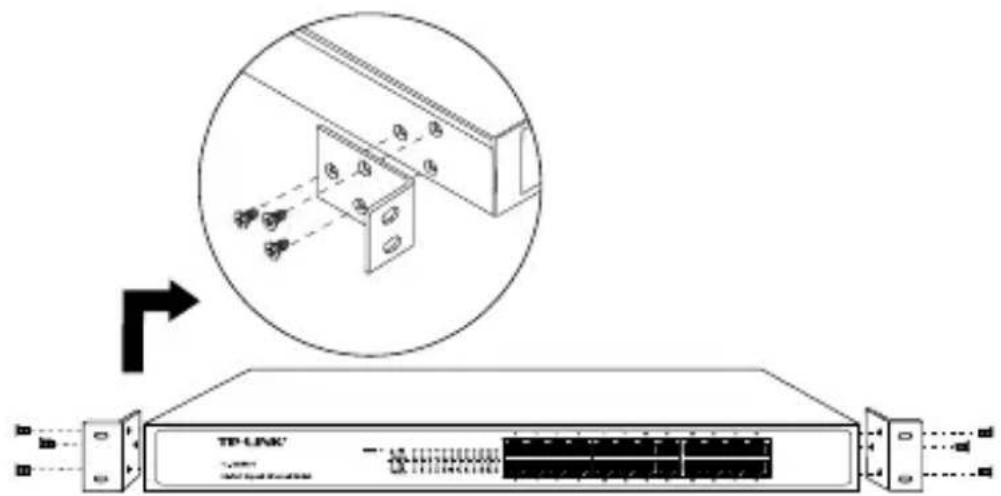
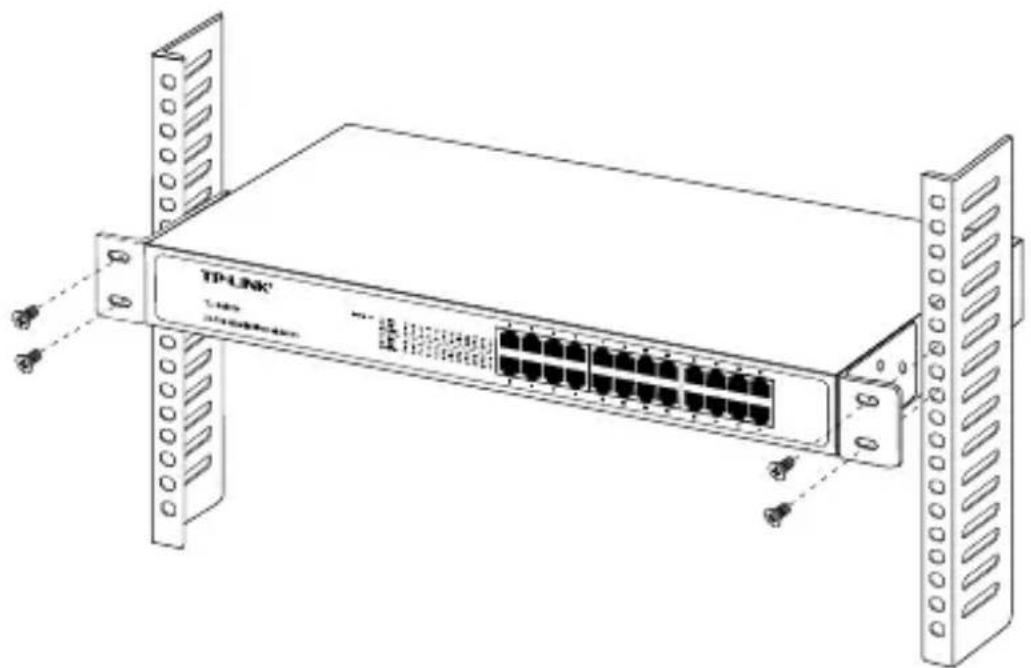
Turn off all the equipment connected to the Switch before mounting it in the rack, then rivet the two "L" brackets onto each side of the Switch, fasten it with screws in the rack.
text_image
Diagram showing a device with an inset view of a server rack and its internal components, including a TP-LINK switch.Figure 2-1 Rivet the "L" brackets onto the Switch
natural_image
Line drawing of a TP-LINK network switch device with multiple Ethernet ports and external racks (no text or symbols on the main body)Figure 2-2 Fasten the Switch in the rack
2.3 Power On
TL-SG1016/TL-SG1024 16/24-port Gigabit Ethernet Switch is powered by AC power supply. Powering on the Switch, it will automatically initialize and its LED indicators should respond as follows:
1) All of the Link/Act and 1000Mbps LED indicators will flash momentarily for one second, which represent a resetting of the system.
2) The Power indicator will light up.
If the LED indicators don't respond as described above, please check the power supply and connection.
Chapter 3 Identifying External Components
This Chapter describes the front panel, rear panel and LED indicators of the Switch. TL-SG1016 and TL-SG1024 just differ in the number of LED indicators and ports and all figures in this guide are of TL-SG1024.
3.1 Front Panel
The front panel of the TL-SG1024 consists of switch LED indicators, 24 10/100/1000Mbps RJ-45 ports.

text_image
TP-LINK® TL-051704 34-Port Gipoli Ethernet 6.12.0Figure 3-1 TL-SG1024 Switch Front Panel sketch
3.2 Rear Panel
The rear panel of the TL-SG1024 only features a power receptacle, which is an AC power receptacle. Connect the female of the power cord head here, and the male head to the
AC power outlet.

text_image
Diagram showing electrical outlet symbols with labels and a central component iconFigure 3-2 TL-SG1024 Switch Rear Panel sketch
3.3 LED Indicators
The LED indicators include Power, Link/Act and 1000Mbps LED indicators, which are used for monitoring and pre-troubleshooting of the Switch. The following section shows the LED indicators for the switch along with an explanation of each indicator.

text_image
POWER 1 2 3 4 5 6 7 8 9 10 11 12 13 1 2 3 4 5 6 7 8 9 10 11 12 13Figure 3-3 TL-SG1024 Switch LEDs sketch
Power LED: This indicator will light solid red when the Switch powers up. If the LED is not lit, please check the power supply and connection.
Link/Act LED: This indicator will light solid green when the corresponding port is connected to another device and will flash green when data is being transmitted or received on the working connection.
➢ 1000Mbps LED: This indicator will light solid green when the corresponding port is connected to a 1000Mbps device.
Appendix A: Specifications
| General | |
| Standards | IEEE802.3 10Base-TIEEE802.3u 100Base-TXIEEE802.3ab 1000Base-T |
| Topology | Star |
| Protocol | CSMA/CD |
| Data Transfer Rate | Ethernet: 10Mbps (Half Duplex), 20Mbps (Full Duplex) |
| Fast Ethernet: 100Mbps (Half Duplex), 200Mbps (Full Duplex) | |
| Gigabit Ethernet: 2000Mbps (Full Duplex) | |
| Network Media (Cable) | 10Base-T: UTP category 3, 4, 5 cable (maximum 100m)EIA/TIA-568 100 STP (maximum 100m) |
| 100Base-TX: UTP category 5, 5e cable (maximum 100m)EIA/TIA-568 100 STP (maximum 100m) | |
| 1000Base-T: UTP category 5, 5e cable (maximum 100m)EIA/TIA-568 100 STP (maximum 100m) | |
| Number of Ports | 16/24 10/100/1000Mbps Auto-Negotiation RJ-45 ports |
| LED indicators Power, Link/Act, 1000Mbps | |
| Transfer Method | Store-and-Forward |
| MAC Address Learning | Automatically learning, automatically aging |
| Frame Filter Rate | 10Base-T: 14881pps/Port |
| 100Base-Tx: 148810pps/Port | |
| 1000Base-T: 1488095pps/Port | |
| Frame Forward Rate | 10Base-T: 14881pps/Port |
| 100Base-Tx: 148810pps/Port | |
| 1000Base-T: 1488095pps/Port | |
| Environmental and Physical | |
| Dimensions | 17.3 × 7.1 × 1.7in. (440 × 180 × 44mm) W×D×H |
| Power Supply Output 100-240V~ 50/60Hz 0.6A | |
| Operating Temperature | 0 ~40°C (32 ~104°F) |
| Storage Temperature | -40 ~70°C (-40 ~158°F) |
| Operating Humidity 10%~90% non-condensing | |
| Storage Humidity 5%~90% non-condensing | |
Appendix B: Troubleshooting
1. The Power LED is not lit
Make sure the AC power cord connected the Switch with power source properly.
Make sure the power source is ON.
2. The Link/Act LED is not lit when a device is connected to the corresponding port
Make sure that the cable connectors are firmly plugged into the Switch and the device.
Make sure the connected device is turned on and working well.
The cable must be less than 100 meters long(328 feet).
Appendix C: Contact Information
For help with the installation or operation of the TP-LINK TL-SG1016/ TL-SG1024 16/24-port Gigabit Ethernet Switch, please contact us.
E-mail: support@tp-link.com
Website: http://www.tp-link.com