VG OT 3 - Oven Venga - Free user manual and instructions
Find the device manual for free VG OT 3 Venga in PDF.


| Product type | Built-in oven |
| Brand | Venga |
| Model | VG OT 3 |
| Dimensions (W x H x D) | 60 x 60 x 55 cm |
| Weight | 30 kg |
| Power supply | 230 V, 50 Hz, 2500 W |
| Capacity | 65 liters |
| Main functions | Traditional cooking, fan-assisted, grill, defrost, interior light |
| Automatic programs | Not specified |
| Control type | Mechanical rotary knobs |
| Display | Indicator lights and markings |
| Timer | Up to 120 minutes with audible signal |
| Temperature range | 50 °C - 250 °C |
| Door material | Tempered glass |
| Cleaning | Damp cloth and mild detergent |
| Safety | Door lock, automatic shut-off, overheating protection |
| Spare parts | Available from Venga after-sales service |
| Repairability | Repairability index not provided |
| Energy class | Not specified |
Frequently Asked Questions - VG OT 3 Venga
User questions about VG OT 3 Venga
0 question about this device. Answer the ones you know or ask your own.
Ask a new question about this device
Download the instructions for your Oven in PDF format for free! Find your manual VG OT 3 - Venga and take your electronic device back in hand. On this page are published all the documents necessary for the use of your device. VG OT 3 by Venga.
USER MANUAL VG OT 3 Venga
Please read these instructions carefully before using the appliance, and always follow the safety and operating instructions.
Important: People (including children) who are not able to use the appliance in a safe way, due to their physical, sensorial or mental capacity or their lack of experience or knowledge, must never use the appliance except if they are supervised by a person responsible for their safety or if they previously received instructions concerning the safe use of the appliance. Close supervision is necessary to prevent children from using the appliance as a toy.
☐ Check that your mains voltage corresponds to that stated on the appliance.
☐ Never leave the appliance unsupervised when in use.
From time to time check the cord for damages. Never use the appliance if cord or appliance shows any signs of damage. Should the cord be damaged, it must be replaced by a competent qualified electrician(*). All repairs should be made by a competent qualified electrician(*).
☐ Only use the appliance for domestic purposes and in the way indicated in these instructions.
☐ Never immerse the appliance in water or any other liquid for any reason whatsoever. Never place it into the dishwasher.
□ Never use the appliance near hot surfaces.
Before cleaning, always unplug the appliance from the power supply.
☐ Never use the appliance outside and always place it in a dry environment.
☐ Never use accessories that are not recommended by the producer. They could constitute a danger to the user and risk to damage the appliance.
☐ Never move the appliance by pulling the cord. Make sure the cord cannot get caught in any way. Do not wind the cord around the appliance and do not bend it.
☐ In order to avoid fire, make sure there is a distance of at least 10 cm between the sides of the oven and a wall or other object and also make sure that there is enough free space above the appliance. During operation, make sure there is enough ventilation in the room around this appliance. Stand the appliance on a stable heat-resistant surface (not a varnished table or a table cloth).
☐ Make sure the appliance has cooled down before cleaning and storing it.
☐ Only cook consumable food. Do not place large pieces of food or metallic utensils in the oven in order to avoid all risk of fire or electrocution. Also never place the following materials in the oven: paper, cardboard or plastic...
☐ In order to heat or toast bread, please do not use your oven for longer than 10 minutes, as otherwise your bread will be burned. This remark is important as the maximum time is 60 minutes but this period of time should be used for other things than (re-)heating your bread.
☐ It is absolutely necessary to keep this appliance clean at all times as it comes into contact with food.
☐ Make sure the cord never comes into contact with the hot parts of the appliance.
☐ The temperature of the accessible surfaces, such as the door of the oven, may be very high when the appliance is in use. Never touch those surfaces during use nor before the
appliance has totally cooled down, and only handle the knobs. Should the symbol be indicated on a certain surface, you need to be careful when handling the product. This symbol means: CAUTION, this surface may get very hot during use.
☐ Make sure the hot parts of the appliance never come into contact with inflammable materials, such as curtains, cloth, etc. when it is in use, as a fire might occur. Also make sure not to cover the appliance and do not put anything on top of it. Make sure nothing comes into contact with the heating element of the appliance.
☐ Be extremely cautious as oil and fat preparations might catch fire if overheated.
☐ If you use the appliance under a cooking hob, make sure to respect the minimum distance advised by the manufacturer.
☐ Unplug the appliance immediately if you notice a crack in the oven door and have it repaired by a competent qualified electrician (*).
☐ Your appliance must never be switched on through an external timer or any kind of separate remote control system.
(*) Competent qualified electrician: after-sales department of the producer or importer or any person who is qualified, approved and competent to perform this kind of repairs in order to avoid all danger. In case of need you should return the appliance to this electrician.
SHORT CORD INSTRUCTIONS
A short power supply cord is provided to reduce the risk resulting from becoming entangled in, or tripping over a longer cord. Extension cords may be used if care is exercised in their use.
- The electrical rating of the extension cord should be at least 16 amp. An extension cord of less than 16 amp could overheat and get damaged.
- The longer cord should be arranged so that it will not drape over the counter top or tabletop where it can be pulled on by children or tripped over.
BEFORE USE
• Unpack the appliance and accessories, then wash and wipe these accessories.
- It is normal if some smoke or smell emanates from the appliance when using it for the first time. Therefore, we advise you to use your appliance empty once before the first use. Set the timer to 15 minutes and the function selector switch on the "heat from above and below" position.
USE
• Before the first use, clean the surface of the tray with a damp cloth and wipe dry.
- Plug the unit into the power supply socket.
• Use the desired accessories (baking tray, grill rack or spit) according to the purpose.
- Put the food in the oven.
- Select the desired cooking mode (upper heating element, lower heating element or both combined) and the temperature.
- To activate the turnspit/convection function, put the function selector switch in position
- Put the timer knob on the desired cooking time. The pilot light will illuminate to show that the appliance is heating. You'll hear a signal when the cooking time has elapsed. The appliance will switch off automatically and the pilot light will go out.
- If you want to stop before the selected time is over, place the timer in the off-position (OFF).
- Carefully open the door, preferably using an oven glove.
- Remove the food using appropriate utensils. To take out the grill rack, the baking tray or the spit, make use of the carrying handles.
• After use, remove the plug from the wall socket.
TURNSPIT
• The turnspit makes it possible to cook and brown meat and poultry evenly.
- Put the meat on the spit. Hold the pieces you want to roast with the forks blocked by the screws. When cooking poultry, make sure the wings and drumsticks do not block the rotation of the spit.
- Put the spit in place. To do so, insert the rounded end of the spit on the right side of the oven and then put the other side of the spit on the left support of the oven.
• To handle the turnspit, make use of the holder supplied.
CONVECTION
The convection function is available with the mode only and allows you to add air circulation in order to improve the heat distribution of the cooking.
PLEASE NOTE: THE OVEN WILL ONLY START HEATING AFTER YOU HAVE SET THE TIMER.
SETTINGS
THERMOSTAT
You can adjust the temperature between 100°C and 250°C.
FUNCTION SELECTOR SWITCH
OFF Off-position

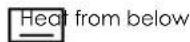

TIMER
You can choose the desired cooking time up to 60 minutes. If you wish to set the timer to less than 5 minutes, turn it to a position higher than 5 minutes first and then set it back to the desired time.
MAINTENANCE AND CLEANING
Before cleaning, unplug the appliance from outlet and allow to cool.
Inside cleaning
- Wipe the tray, rack and turnspit with absorbent paper towels or a soft cloth. To remove baked on food, pour a little cooking oil on the food and allow to stand for five to ten minutes. This should soften the food and allow it to be removed with absorbent paper towels or a soft cloth.
- If the above method fails to remove the food, we suggest wiping the trays with a damp cloth and a little detergent.
- You can clean the crumb tray by removing it from the appliance and by cleaning it with water. Let it dry before putting it back in place.
- Never use abrasive products. Never immerse the appliance in water and make sure no water or damp penetrates into the appliance.
• Make sure no water comes on the oven door when the latter is still hot.
Outside cleaning
- Wipe clean with a soft dry cloth or paper towel.
- Do not use steel wool, scouring pads or abrasive cleaners.
Do not immerse in water or any other liquid.
PROTECTION OF THE ENVIRONMENT - DIRECTIVE 2002/96/EC
In order to preserve our environment and protect human health, the waste electrical and electronic equipment should be disposed of in accordance with specific rules with the
implication of both suppliers and users. For this reason, as indicated by the symbol — on the rating label or on the packaging, your appliance should not be disposed of as unsorted municipal waste. The user has the right to bring it to a municipal collection point performing waste recovery by means of reuse, recycling or use for other applications in accordance with the directive.
FR MODE D'EMPLOI
POUR VOTRE SECURITE
Team International Romania Srl;
Str.Industriilor 56A, sector 3, Bucuresti CUI 16991287; R.C. J40/19685/29.11.2004
VG OT 3
| Deutsch | 4 |
| English | 8 |
| Français | 12 |
| Nederlands | 16 |
| Español | 20 |
| Português | 24 |
| Italiano | 28 |
| Polska | 32 |
| Română | 36 |
Venga
Brand : Venga
Model : VG OT 3
Category : Oven